HomeNavigation arrowBlogNavigation arrow
Current page
Feature Updates

Weekly Recap: Photo Release Features, Merged Participant Clarity & More!

Weekly Recap: Photo Release Features, Merged Participant Clarity & More!
Hello, my fabulous photographer friends!

Candy here, ready to sprinkle some sparkle on your day with our latest Weekly Recap! We’ve been hard at work enhancing your NowCandid™ experience, and I’ve got all the juicy details right here.

Let’s dive in!

1. Photo Releases & The New Image Release Gallery

Collecting Releases

Before using the pictures you take of your subjects in things like portfolios, websites, flyers, samples, and more - the best practice is to get a record of consent from your subjects before using photos of them for such things!

So... we've made some additions to NowCandid that will expedite this process for everyone involved!

  • Enabled via Retail Site Settings: Head to your Account Profile, open the “Retail Site Settings,” and toggle whether to ask participants for a photo release when they complete Selfie Check-In™.
  • Future Expansion: We plan to someday add this consent request to other locations in our Workflows, such as Scanner ID™ Check-Ins or after retail site checkout, so stay tuned!
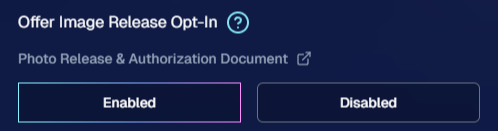
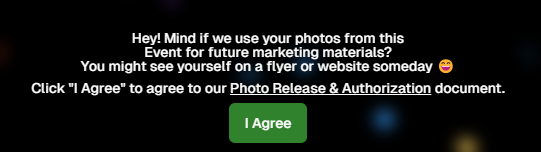
Found under "Retail Site Settings" in your account profile

The post-Selfie Check-In messaging

Image Release Gallery

Once you’ve enabled Photo Releases, we’ve made viewing those fully released images a snap with the new Image Release Gallery!

  • Fully Released Photos Only: This gallery shows images where every primary face in the picture has opted in for marketing use.
  • Opt-Out Procedures: If someone changes their mind, NowCandid™ support can remove their release, and those images will disappear from the gallery.
  • Easier Marketing & Inspiration: Enjoy a reliable stash of images for portfolios, websites, flyers, or sample products, all with peace of mind!

This major addition simplifies the entire release process and keeps your marketing efforts on the right side of consent!

Starting next week, this feature will be enabled by default for all NowCandid accounts! If you wish to disable it, that's up to you!
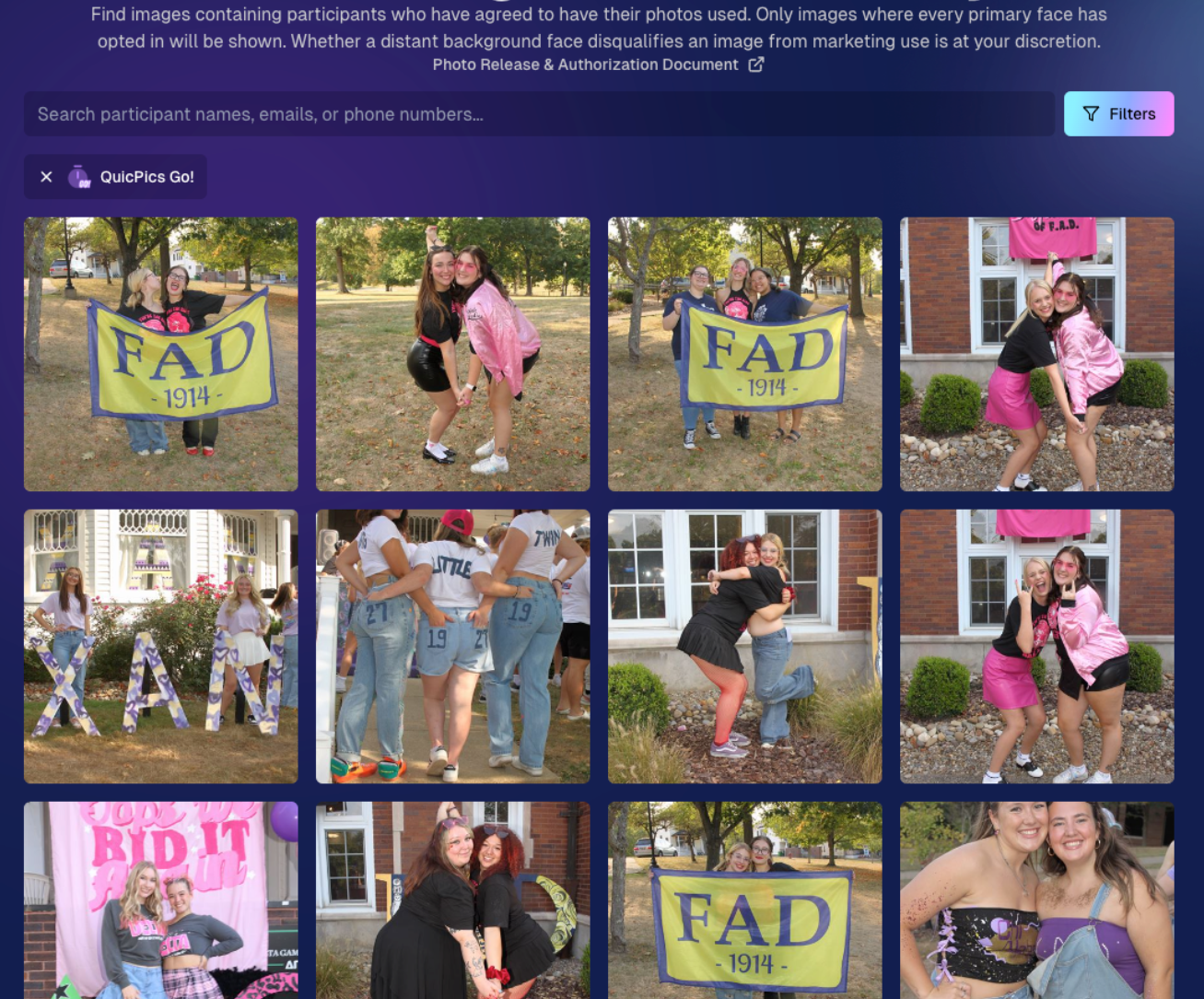
An example of some images with only released faces in the new Image Release Gallery

2. Improved Merged Participants Clarity

We have also improved the photographer's experience and clarity when it comes to Merged Participants!

  • Multiple Names, One Contact: When two or more participants share a phone number, they now visibly merge under one participant in the Participant Manager, with all names separated by commas.
  • Reduced Confusion: Parents with multiple kids at an event won’t be an enigma anymore. You’ll see each kid’s name instead of a single ambiguous participant.
  • Same Smooth Experience for Families: Consumers won’t notice much change, but you’ll breathe easier knowing your records more clearly show who’s who.

No more wondering why two kids keep “replacing” each other in the backend—our improved merging UI has your back!
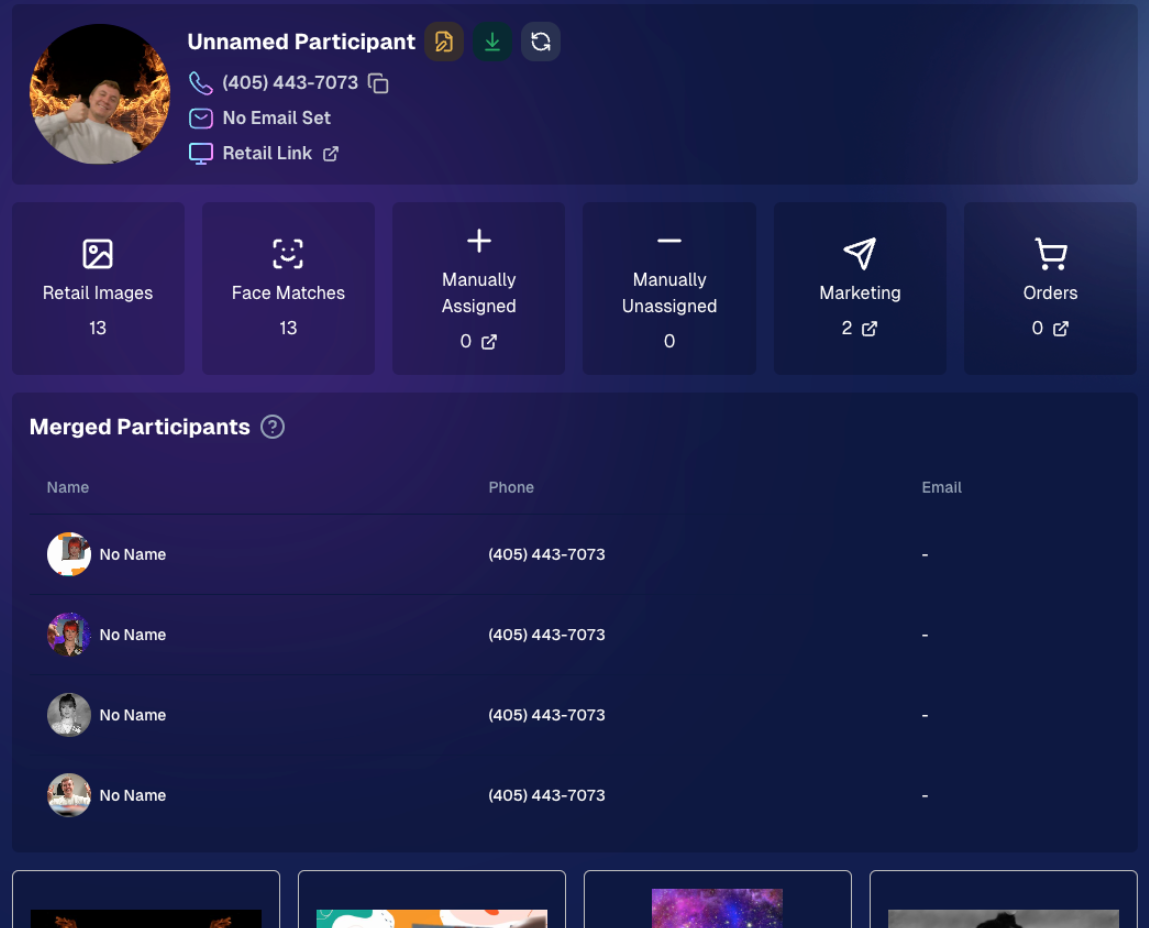
Example of multiple merged participants wrapped into one participant

3. Group Photo Filter in Manage Images

  • Just Group Photos: We’ve added a toggle to the Manage Images page that shows only images flagged as “Group Photos.”
  • Sports & GroupTags™: Perfect for organizing big team shots or verifying no single-person images slipped in by accident.
  • Future Tweaks Coming: We’re cooking up more ways to polish Group Photo and GroupTags™ functionalities, so watch this space!

If you handle big groups (like sports teams or large gatherings), this quick filter simplifies your event workflow.

New toggle button to switch between showing All Images and just Group Photos

4. All Images Gallery Pagination

  • Page-by-Page Browsing: We replaced the endless scroll in the NowCandid™ retail site’s All Images Gallery with a paginated view—complete with arrows to move between pages.
  • Jump to Page: Customers can type or select a page number if they already know where to look.
  • Less Scrolling, More Finding: Makes returning to a specific photo (especially one not in a personal gallery) a breeze.

This update ensures customers spend less time hunting and more time admiring—or purchasing—the images they love.
New retail site page navigation tools

5. New Events List Filter

One last small addition to mention... we added a way to filter down your Events list!

This should make it easier than ever to browse through your upcoming Events as you plan and prepare for them.

New Events list filter options

That’s it for this week’s recap!

We hope these changes help you manage your events more smoothly, give you extra confidence in your marketing, and offer your customers a cleaner, faster photo-browsing experience.

As always, we love your feedback, so feel free to reach out with any questions or suggestions.

Thank you for being an essential part of the NowCandid™ community. Keep capturing those unforgettable moments and creating smiles! 📸✨

Cheers and sparkles,

Candy 🍬
Related articles

Weekly Recap: Candy Image Studio Upgrades, Participant Search & QR Creator 🍬✨
Feature Updates
February 27, 2026

Weekly Recap: Candy Image Studio Upgrades, Participant Search & QR Creator 🍬✨

4
 minutes read
Hey photo friends! 👋

This week is packed with tools you’ll probably use right away: big upgrades to Candy Image Studio, a brand-new Participant Search across all events, and a fun but practical QR Creator.

Let’s dive in.

🎨 Candy Image Studio: More Control, More Power

We’ve made some meaningful upgrades to Candy Image Studio:

👁️ Choose whether to mark the original image invisible

  • Previously, edits always hid the original. Now it’s your call.

🗂️ Multiple edits can coexist

  • Uploading multiple AI edits of the same image no longer overwrites previous ones.

🧠 New safety agent

  • Automatically checks for edits involving race/ethnicity/skin tone changes or nudity to keep things appropriate.

🖼️ Generate 2K or 4K outputs

  • 4K is recommended for images with text.

Image Lightbox Integration

  • Click “Candy Image Studio” directly from an image lightbox to preload it into the Studio.
  • You can optionally mark the original invisible, and it keeps all participant associations intact for the new image (just like cutouts).

If you haven't checked out the AI editor, give it a try!

🔎 New: Participant Search Across All Events

You can now search participants across your entire account:

  • Search by name or contact info
  • Access via Tools & More, Sidebar Search bar, or "/participants" directly in the URL
  • Supports Candy navigation

Huge time-saver when you can’t remember or don't know which event someone was in.

Click here to jump to the Tools & More page

🔳 New Tool: QR Creator

Found under Tools & More, the new QR Creator lets you:

  • Paste in any link (event, check-in, retail, etc.)
  • Customize shape and colors
  • Generate something nicer than a plain black-and-white square
  • Download the new, cuter QR code!

Simple, but useful for signage, flyers, and booths.

https://app.nowcandid.com/tools/qr

📱 Mobile Dashboard Improvements

🔄 Swipe down to refresh any page (no app update needed, just refresh)

↔️ Swipe left/right in image lightboxes to move between images (desktop users already have arrow keys)

🍬 Overall improved Candy experience on mobile

🖥️ Dashboard Improvements

📂 PhotoRoster upload limit increased to 10,000 members

🏷️ PhotoTag assignment via Edit Folder fixed (won’t remove all tags unless you choose “None”)

👤 Create Participant button re-enabled (shows warning if event is older than 60 days; roster import still disabled for older events)

⚡ Faster event list search for accounts with many events

🖼️ Event cover photo now visually anchors the Event Details & Tags pages

🧾 Fixed overlay import not working properly

🔔 Fixed toast notifications appearing behind popups

🌾 Candy Culler Duplicate detection improvement

  • When using “Duplicates Only” in Candy Culler, duplicates now appear side-by-side for easier reviewing.

🛍️ Retail Improvements

📄 Fixed pagination buttons requiring page jump to function

🏈 Improved Jersey Jotter search speed/performance

🌀 LiveLoop Fixes

🛠️ Fixed certain events stopping after running for awhile

📢 Fixed not being able to upload advertisements

💸 Shipping Update

📦 5×7 Statuette shipping cost reduced thanks to a new shipping method for that product

  • From $7.25 → $3.25 (about 55% lower)

That’s the week!

Bigger AI editing control, faster participant lookup, custom QR codes, and a lighter shipping cost on 5×7 Statuettes.

Keep creating magic,

Candy 🍬

Weekly Recap: New Unified Sidebar, Valentine’s Theme & Pano Updates 🍬❤️
Feature Updates
February 13, 2026

Weekly Recap: New Unified Sidebar, Valentine’s Theme & Pano Updates 🍬❤️

4
 minutes read

Hey photo friends! 👋


Big week. We’ve rolled out a brand-new unified Sidebar, added new pano options, improved Dashboard speed, and dropped a Valentine’s-ready retail theme.

Let’s break it down.

🧭 New Unified Sidebar (Desktop + Mobile)

The Dashboard navigation just got a major upgrade.

🖥️📱 One unified sidebar across desktop and mobile

  • No more different layouts depending on device. Navigation is now consistent everywhere.

🔎 “Sidebar Find” (press F to search)

  • The old command palette is now built into the Sidebar.
  • Press F and start typing to jump anywhere.

🍬 Candy Navigation Assistant

  • If no results are found, Candy will try to take you where you meant to go!

👀 Previously hidden items (like Extras) are now much easier to find.

This is one of the biggest usability upgrades we’ve shipped in a while!

🖼️ Panoramic Updates

🖨️ New 24×8 Panoramic Print (non-group version)

  • In addition to the group-only pano lineup, there’s now a non-group 24×8 option.

🏷️ Existing panos renamed to “X Group Print”

  • Makes it clearer which pano products are group-only.

🧱 Extreme aspect ratio images (1:3 or 3:1)

  • These are now limited to Panoramic Print products only.

🧼 Fixed banner artwork incorrectly appearing on pano products in the store sheet.

🛍️ Retail Improvements

Much faster initial image grid rendering

✨ Removed quick “No Images” flash during load

🎨 Fixed “View Images” hero button text being too dark on some themes

✂️ Crop size checker now correctly respects orientation for large-format products

💕 New SweetHearts Theme (Valentine’s Ready)

💖 SweetHearts retail theme released

🎉 Includes custom heart confetti at checkout

Just in time for Valentine’s Day sessions!

🖥️ Dashboard Improvements

🌾 Candy Culler upgrades

  • Can now set an entire filter to visible or invisible (except duplicates)
  • No longer also culls PhotoRoster reference images (whoops!)

🧑‍🤝‍🧑 Group Photo toggle added for Portraits Program

📂 Increased row limits for roster and PhotoRoster uploads

🛠️ Fixed overlay import not working properly

📏 Improved DPI validation on banner artwork (matching full frame improvements)

⚡ Faster requests across many areas including:

  • Profile updates
  • 2FA verification
  • Invoice loading/downloading
  • Retail settings updates
  • Bank info updates
  • Password reset emails

📱 Fixed mobile dashboard scrolling/focus issues in popups

🧾 Fixed create event occasionally not redirecting correctly

📸 Fixed QuicPics creation confirmation spam edge case

📬 Fixed unread inbox items appearing from before account creation

🔐 Security Improvements

🔒 Improved password reset security

🔑 Strengthened 2FA flows and verification handling

🤳 Selfie Check-In

🖼️ Images under 100×100 are now blocked (lab requirement enforcement)

🌀 LiveLoop

🌫️Updated backdrop blur

  • Looks better and is more performant, reducing crashes on WebKit browsers.

That’s the week!

A cleaner, unified Dashboard experience, smarter pano handling, better retail performance, and a Valentine’s-ready theme to boot.

Keep creating magic,

Candy 🍬

Weekly Recap: New 24×8 Panoramic Print, and More! 🖼️🧾
Feature Updates
January 30, 2026

Weekly Recap: New 24×8 Panoramic Print, and More! 🖼️🧾

3
 minutes read
Hey photo friends! 👋


This week is a mix of one new product and a handful of refinements across retail pricing, check-in validation, and Dashboard tools.

Here’s what changed.

🆕 New Product

🖼️ 24×8 Panoramic Print (Group-only)

  • A new panoramic option in the same aspect ratio as the other pano prints, built for team and group shots. (Like the others, it’s group-only.)

🛍️ Retail: Pricing & Editing Improvements

💸 Package “slashed” pricing corrected and standardized

  • Fixes around week 2/3 slash amounts so package comparisons are more accurate and consistent (including cases where tiered pricing is disabled on Quic events).

✍️ Captions editor now allows hyphens and periods

  • Small change, big relief for subjects with multi-hyphenate names.

✅ Check-In Page: Better Email Validation

📧 Improved email validation

  • Now also requires at least one period
  • Now blocks obvious typos like addresses ending in “.con”
  • These are in addition to previously existing "catches" we had in place to help customers avoid typos

👥 Additional Contacts now use the same validation rules

  • Makes additional contact info more typo-proof too!

🖥️ Dashboard: Fewer Snags, More Visibility

🧪 Image Tester now supports PNG files

  • Helpful for validating cutouts and art files.

📏 Improved DPI validation for artwork uploads (and Image Tester)

  • Better handling for images that don’t explicitly include DPI metadata.

📦 Package editor expanded limits

  • You can now include up to 16 4×6 and 5×7 prints in a package
  • (Digital downloads remain capped at 16; most other items remain capped at 8).

📁 Manage Images: Folder Download fixed for large folders

  • Folders over 100 images now reliably download in multiple ZIPs (no more stopping after the first chunk).

🧾 Order Details page got a big clarity upgrade

You can now see key indicators and selections more directly, including:

  • ✨ product finish/overlay indicators
  • 🖼️ backgrounds / AI background indicators (where applicable)
  • 📝 captions and chosen colors
  • ⬇️ background downloads working correctly again

🍬 Candy Culler Improvements

📊 Results update automatically while culling runs

  • As progress changes, search results refresh so culled images can appear without you manually refreshing.

🗂️ New downloadable folder report

  • Quick export alongside the toggle for easier review/sharing.

💬 Misc

📲 Day 0 SMS link placement updated

  • The retail link now appears after the unsubscribe text to encourage better MMS link previews.

That’s the week!

Another new pano option, tighter retail pricing presentation, cleaner check-ins, and a more informative Dashboard where it counts.

Candy 🍬

Let’s get in touch

If you’re a photographer looking to add NowCandid services to your wheelhouse – set up a call by clicking the button below.

How to customize formatting for each rich text

How to customize formatting for each rich text

How to customize formatting for each rich text

How to customize formatting for each rich text

How to customize formatting for each rich text

What’s a Rich Text element?

The rich text element allows you to create and format headings, paragraphs, blockquotes, images, and video all in one place instead of having to add and format them individually. Just double-click and easily create content.

A rich text element can be used with static or dynamic content. For static content, just drop it into any page and begin editing. For dynamic content, add a rich text field to any collection and then connect a rich text element to that field in the settings panel. Voila!

Headings, paragraphs, blockquotes, figures, images, and figure captions can all be styled after a class is added to the rich text element using the "When inside of" nested selector system.

  • List One
  • List Two
  • List Three
  • List Four
  • List Five

This is a link

This is bold text