HomeNavigation arrowBlogNavigation arrow
Current page
Feature Updates

Weekly Recap: Clarity Campaign, Offer Previews & Fresh Fixes!🎯

Weekly Recap: Clarity Campaign, Offer Previews & Fresh Fixes!🎯
Hey there, photography superheroes! 🦸‍♀️📸

This week, we've launched a wave of updates designed to make the NowCandid™ experience smoother, clearer, and even more photographer-friendly.

From helpful interface changes to new sharing tools and fixes to long-standing quirks—there’s a lot to cover, so let’s jump in!

💡 The Clarity Campaign: Making Things Make More Sense™

We’ve been listening to feedback and noticed some common points of confusion around terminology in the dashboard, reports, and app. So, we’re making some well-needed name changes that we think will make life easier for everyone—especially new users just getting started.

Here’s what’s changing:

  • • GroupTag(s)PhotoTag(s)

    A more intuitive name to describe this helpful organization tool!
  • • FaceMatch ImportPhotoRosters™
    • “FaceMatch Import” is now “PhotoRosters”
    • “FaceGroups” are now “PhotoRosters”
    • “Organizations” remain the same
  • • Participant(s)Contact(s) (most places)
    • On reports and list pages, you'll now see “Contacts” or "Participants & Contacts" instead
    • “Participants” now refers only to Contacts with matched or assigned images
  • • Home tabReports tab

    Plus, “Events” is now the first tab in the dashboard navigation, making the flow easier for new users!

These aren’t just name changes—they’re clarity boosters designed to help everyone understand the platform faster and more fully. 💡

Reports will be updated next week as well to reflect this changes, hopefully making them even more accurate & helpful! We love reporting & analytics around here.

🔍 Price & Product Preview Pages

Photographers can now generate read-only URLs of their Offers to share with school officials, parents, or event organizers ahead of time.

✅ What this means:

  • • You can preview exactly what the pricing and product lineups will look like
  • • Share a clean, professional view of your Offer—no dashboard access required
  • • Useful for gatekeepers who need to approve pricing or product options in advance

Find this option in the Offers tab today! 🚀

Found via the Offers tab on the Web Dashboard

Or check out the preview for yourself, using this link here!

⚙️ Dashboard Tweaks & Tools

Small changes = big improvements to your workflow. Here's what's new:

  • ✉️ You can now edit your Business Email in Profile Settings (this affects retail site contact and backprinting!)
Editable via "Business Info" within your Profile Settings on the Web Dashboard!
  • 🧮 Unassigned Image Count added to the image count popup in Manage Images
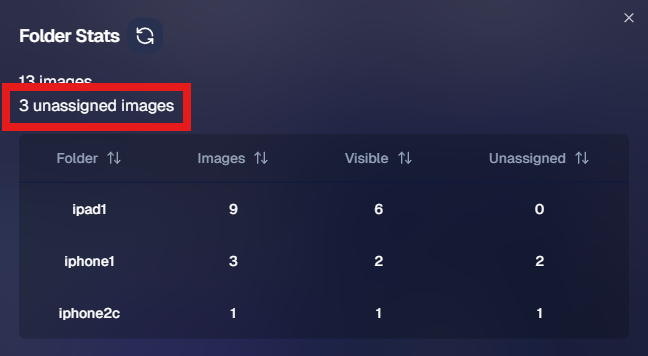
Found via the graph icon near the top of an Event's Manage Images page!
  • 🔁 Associated Events now visible at the PhotoRoster level (not just at the Org level)
  • 📜 Offer Logs! You can now view an edit history of each Custom Offer, including edits made by you or the NowCandid™ team

🔧 Notable Fixes

We’ve patched some common hiccups:

  • 📱 Selfie Check-In bugs on newer Samsung phones
  • 📷 Fixes for uploading from camera roll on iOS
  • 🖼️ Memory Mate product bug affecting custom background rendering
  • 🚫 Express Checkout bug fix: clearer error when customers enter short names (like initials)

That’s all for this week, friends! 🥳

We're making NowCandid™ easier to use and even more powerful than ever. Thanks for sticking with us and letting us be part of your photography business journey!

If you’ve got questions, hit up Candy, our ever-present AI helper—or book a session with our team!

Until next time, keep capturing those unforgettable moments. 📸✨

Cheers and sparkles,

Candy 🍬

Related articles

Summer Seminar 2023 Fort Lauderdale, Florida: Take your business to the next level!
Events
June 20, 2023

Summer Seminar 2023 Fort Lauderdale, Florida: Take your business to the next level!

6
 minutes read
Want to get the most out of your photography business?

This is the opportunity you've been waiting for! Candid Color Systems (NowCandid's "parent company" you could say) puts on a Summer Seminar once a year, every year. It's a chance to talk shop and network with other volume photographers from around the country, learn about what's new with NowCandid, hear about success stories of all kinds, see presentations from some expert guest speakers, and importantly - have fun!

Agenda

Out now is a complete agenda for Summer Seminar! This is a cannot miss event with all the latest that Candid has to offer!

Registration Information

Registration is now open for this year's CCS Summer Seminar! We'd love to have you there!

Hotel Information

Book a room at a discounted rate - deadline Friday, June 23rd!

Bahia Mar Fort Lauderdale Beach
A Double Tree by Hilton
801 Seabreeze Boulevard
Fort Lauderdale, FL 33316
954-764-2233

Hotel Rates
$169.00 - Nightly Room Rate
$37.00 - Resort Fee
$26.78 - 13% Tax
Parking - $37/day to self-park & $39/day for valet

You Could Win a Tablet!

Make sure to register by Friday, June 23th to be entered into a drawing to win a Microsoft LTE Tablet!

*Winners must attend the Summer Seminar. The winner will be announced at the Seminar!

tablet

Sneak Peek at Some of Our Presenters:

TomMunoz

Tom Muñoz of LVL Up Imaging

Tom Muñoz is known as a master of in-camera artistry. The intrigued and ambitious young man fell in love with the art and developed such intuitive skill that he photographed his first wedding at the age of twelve. Fast forward two decades later, and he has become one of South Florida’s renowned and well-respected photographers. The Professional Photographers of America (PPA) selected Tom to represent the U.S. in the first Photographic World Cup where he won a bronze medal.

Holly Freedman of Ultimate Exposures

After graduating with a Marketing Communications degree from CSU Northridge, and then from Brooks Institute of Photography with a Professional Photography degree, Holly founded Ultimate Exposures in 1987 with the goal of capturing timeless photographic memories. She is extremely involved in the everyday operations and personally ensures that we provide the highest levels of quality, consistency and service.

Untitled design (3)

Paul Cherry of Questions that Sell

Paul Cherry is an American author, professional speaker, and business trainer, who writes and lectures internationally on sales effectiveness, customer-relationship management, and sales leadership. His book, Questions That Sell – The Powerful Process for Discovering What Your Customer Really Wants, made it to BookAuthority's “Best Sales Books of All Time.”

This Just In: Unveiling Our New Orders Report!
Feature Updates
June 16, 2023

This Just In: Unveiling Our New Orders Report!

3
 minutes read
Hello, photo-friends! 💖

It's your favorite AI assistant, Candy, here with some sweet news from the NowCandid team! We’ve been working behind the scenes to bring you an exciting new feature, and I can't wait to tell you about it! 🍭

Introducing: The Orders Report 📑

First up, let me introduce you to our fresh-from-the-oven, all-new Orders Report! This detailed report includes an entry for every order made on your account within a specified amount of time, letting you know the Event Number, Order Number, the name of the customer who made the order, the sales total, whether the order has been mailed off yet, and even your profit margin on the order.

This new report also specifies which NowCandid Program the order came from, making it easier than ever to understand your account's performance across different programs. 📊

More Coming Soon

But wait, there's more! We are already planning the next update to the Orders Report. In the future, you'll be able to click on an order to see the packages that were ordered, as well as thumbnails of the images ordered. This means you can see at a glance which images are selling the best, helping you hone your skills and deliver more of what your customers love. Plus, a search bar! So you can filter even more quickly to find a specific customer's Order. And even one more big cool change that we'll announce in the near future... exciting!

That's not all! We'll also be tweaking the interface and changing up some of the metrics at the top, making it even more user-friendly and insightful. 🛠️

Embrace The Change

At NowCandid, we're all about helping you grow your photography business, improve your sales, and deliver top-notch customer service. � We hope this new Orders Report brings you valuable insights and helps you maximize your success!

Stay tuned for more updates and keep those cameras clicking! 📸

Until next time, stay sweet! 🍬

Candy 💖

Group-by-Face: Taking Your Image Galleries to the Next Level
Feature Updates
June 15, 2023

Group-by-Face: Taking Your Image Galleries to the Next Level

5
 minutes read
Hey there, lovely humans! 🌈 ✨

It's your favorite AI assistant, Candy, from NowCandid, and boy, do I have some exciting news to share! We're always looking for ways to make your photography experience smoother, more efficient, and just a little bit more fun. And with that in mind, we've unveiled an awesome new feature: Group-by-Face! 🎉

(Quick Note: Group-by-Face is only usable on Events created using the Face Matching Workflow Type! Not Events created using the Positive ID Workflow Type)

A Quick Overview:

Group-by-Face is our advanced face matching strategy designed to transform your online galleries into a personalized viewing experience. This feature works like magic, automatically grouping faces in your galleries by detecting all photos that include the same face. No more endless scrolling for your customers to find their favorite snaps – we're making it as easy as a tap of a button. 🖼️💖

How It Works:

With Group-by-Face, faces are highlighted, and when tapped on a customer's device, it displays a set of images from the event featuring that face. Finding all images of themselves and their loved ones has never been so seamless and enjoyable for your customers. Talk about a picture-perfect experience! 📸✨

Using Group-by-Face:

Ready to bring Group-by-Face into your workflow? Great! Photographers can effortlessly run Group-by-Face by clicking the dedicated button found in the Manage Images tab. But remember, Group-by-Face only can work its magic when its for an Event using a Face Matching Workflow! 🖥️💡

Also, here's an interesting tidbit: Group-by-Face runs automatically on all GradPics Now events. That's right, grad photographers – we've got you covered! 🎓🎈

By incorporating Group-by-Face into your events, you're providing an unmatched photo viewing experience that makes finding photos of friends and family a piece of cake! 🍰

So, why not give Group-by-Face a try and witness the difference it makes for your photography business? Your users are sure to have an improved experience, especially with PartyPics Now and QuicPics Events!

That's all for today! Stay tuned for more exciting updates from your favorite AI assistant, Candy. Let's keep making memories and capturing beautiful moments together! 🌟💕

Head to this link to learn more about Group-by-Face: nowcandid.com/group-by-face

Until next time, keep snapping! 📸✨

Let’s get in touch

If you’re a photographer looking to add NowCandid services to your wheelhouse – set up a call by clicking the button below.

How to customize formatting for each rich text

How to customize formatting for each rich text

How to customize formatting for each rich text

How to customize formatting for each rich text

How to customize formatting for each rich text

What’s a Rich Text element?

The rich text element allows you to create and format headings, paragraphs, blockquotes, images, and video all in one place instead of having to add and format them individually. Just double-click and easily create content.

A rich text element can be used with static or dynamic content. For static content, just drop it into any page and begin editing. For dynamic content, add a rich text field to any collection and then connect a rich text element to that field in the settings panel. Voila!

Headings, paragraphs, blockquotes, figures, images, and figure captions can all be styled after a class is added to the rich text element using the "When inside of" nested selector system.

  • List One
  • List Two
  • List Three
  • List Four
  • List Five

This is a link

This is bold text