HomeNavigation arrowBlogNavigation arrow
Current page
Feature Updates

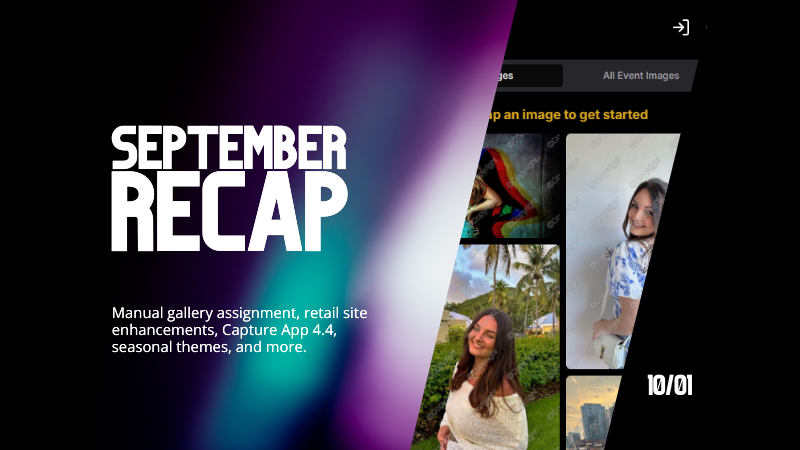
Candy's September Recap: New Features from Last Month!πŸ“ΈπŸŽ‰

Candy's September Recap: New Features from Last Month!πŸ“ΈπŸŽ‰
Hello, wonderful photographers!

‍

Candy here, bringing you the first edition of our Recap series! 🌟

‍

This blog post will cover alllllll of September's new features and changes worth mentioning! But going forward, we will be doing Weekly Recaps to keep you in the loop even faster.

‍

We've been busy bees these past few weeks, and I can't wait to share all the fantastic new features and improvements we've made to help you shine even brighter. ✨

‍

Psst... since this is our inaugural recap, we're covering updates from all of September, so grab a comfy seatβ€”it's a bit longer than usual! Going forward, these recaps will be weekly and shorter, but just as sweet. πŸ˜‰

‍

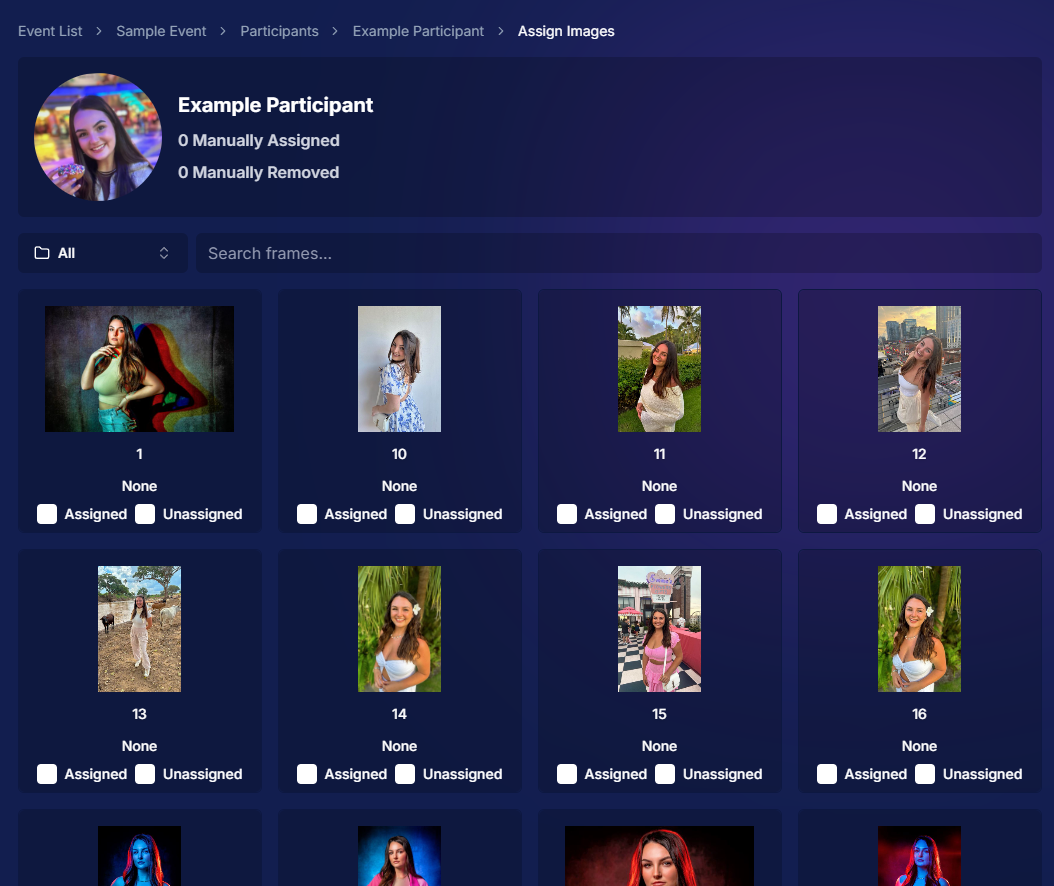
1. Manual Gallery Assignment & Participant Creation πŸ› οΈ

‍

We're thrilled to announce that manual gallery assignment and participant creation are now live! This means you can:

‍

  • β—‹ Assign images to someone's personal gallery manuallyβ€”perfect for those shots where the subject wasn't facing the camera, and face recognition didn't pick them up.
    ‍
  • β—‹ Create participants manually, either one at a time or by uploading a spreadsheet.
    ‍
  • β—‹ Instantly trigger marketing campaigns to individuals when you assign images to them, ensuring they receive their photos promptly.

‍

We believe this will greatly enhance your workflow and support needs. Let us know how it helps you during your next event!
‍

‍

2. Tweaks to the Retail Site for a Smoother Experience πŸ›οΈ

‍

We've made several improvements to our retail site to enhance the shopping experience for your clients:

‍

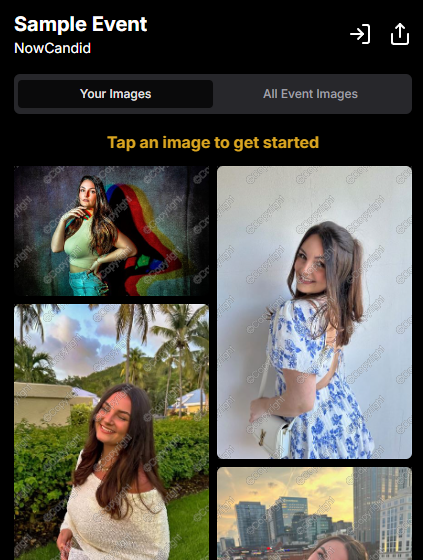
  • β—‹ "Tap image to get started" text now shimmers on the initial gallery screen to guide users who aren't sure what to do next.
    ‍
  • β—‹ Package creation improvements make it more intuitive for customers to customize their packages and select photos.
    ‍
  • β—‹ Product renders in the cart: The view cart screen now displays product images next to every item, including items within multi-item packages, for increased clarity.
    ‍
  • β—‹ Updated header and footer: Clear guidance on when to contact our retail support or reach out to you, the photographer, for assistance.

‍

These tweaks aim to make the purchasing process as seamless and enjoyable as possible for your clients!
‍

Theme:Β Liquorice - Watermarking:Β Default

‍

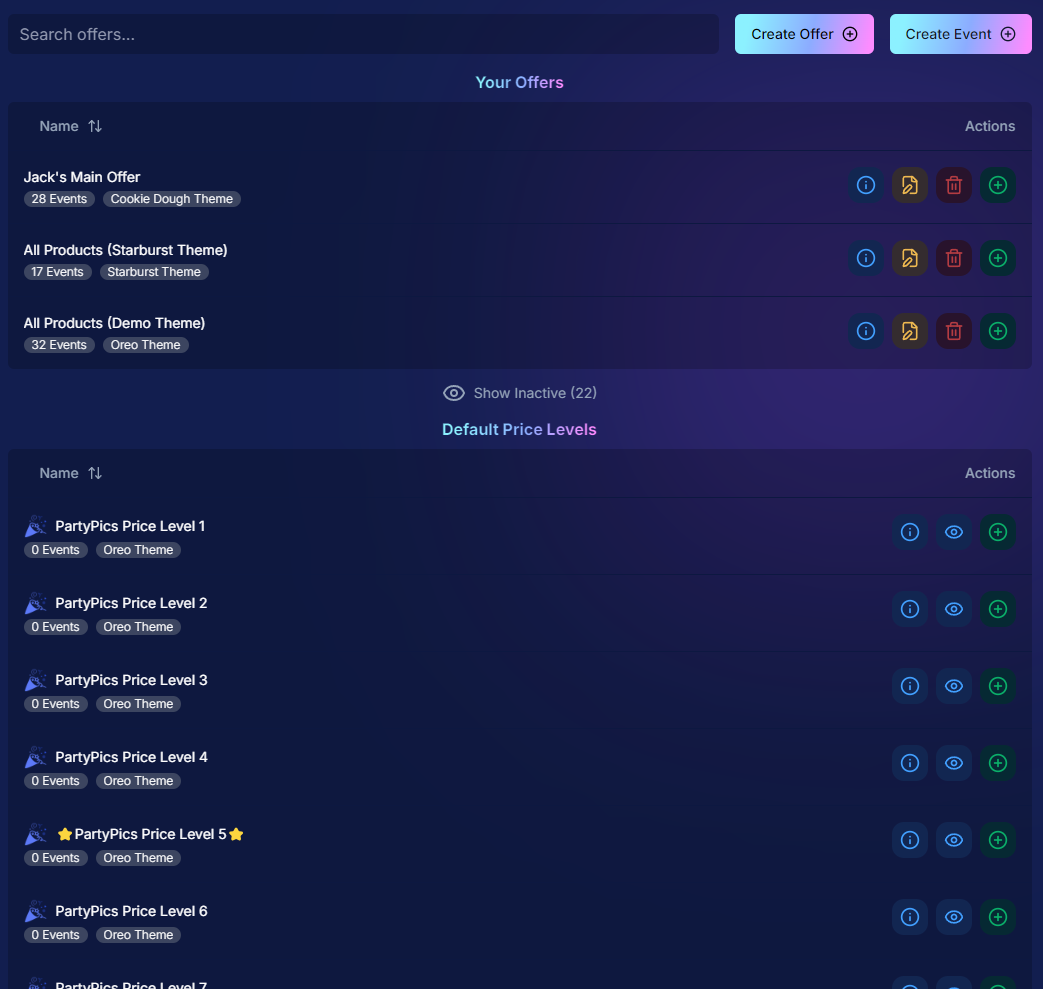
3. Default Price Levels Are Back! πŸ’°

‍

Great news! The Default Price Levels from our previous NowCandid system are back and better than ever.

‍

While you can still create custom offers, these ready-made Price Levels are optimized to help you maximize sales in various situations.

‍

  • β—‹ Optimized for success: Designed to boost your sales potential.
    ‍
  • β—‹ Versatile options: Suitable for a wide range of events and client needs.
    ‍
  • β—‹ Easy to access: Gives you good Offer options in a pinch or when entering a new market.

‍

For a detailed breakdown, click here.

‍

‍

4. New Image Notifications for Previous Purchasers πŸ›ŽοΈ

‍

We've improved our marketing system to better serve your clients and help keep those sales up:

‍

  • β—‹ If someone purchases on Day 1 and is photographed again on Day 2, they will now receive a notification about the new images added to their gallery.
    ‍
  • β—‹ Enhances customer engagement: Keeps clients informed and encourages additional purchases.
    ‍
  • β—‹ Prevents missed opportunities: Even early buyers stay in the loop for new content.

‍

This ensures your clients never miss out on their special moments!

‍

‍

5. Google Pay Added to Express Checkout Options πŸ’³

‍

We're excited to introduce Google Pay as a new express checkout option!

‍

Our available payment methods now include:

‍

  • β—‹ Traditional credit/debit card checkout
    ‍‍
  • β—‹ Apple Pay
    ‍
  • β—‹ Google Pay
    ‍
  • β—‹ PayPal (and PayPal Pay Later)
    ‍
  • β—‹ Venmo

‍

And guess what? We have one more express checkout option coming soon! Stay tuned. πŸ“’

‍

Theme:Β Liquorice - Watermarking:Β Default

‍

6. Capture App Version 4.4 for iOS & Windows πŸ“±πŸ’»

‍

The latest Capture App Version 4.4 is now available for both iOS and Windows, featuring:

‍

  • β—‹ Keyboard support for Windows: Windows laptop users can now input phone numbers using the keyboard when using the Tap-A-Face Workflow.
    ‍
  • β—‹ Performance improvements: Smoother and faster app experience.
    ‍
  • β—‹ sRGB color checking: The app now ensures images are in sRGB format, preventing issues caused by Adobe RGB images.
    ‍
  • β—‹ Event Selfie Check-In QR code display: Access the QR code directly from your device when needed.

‍

Upgrade now to enjoy these enhancements!

‍

‍

7. Enhanced Folders Report πŸ“Š

‍

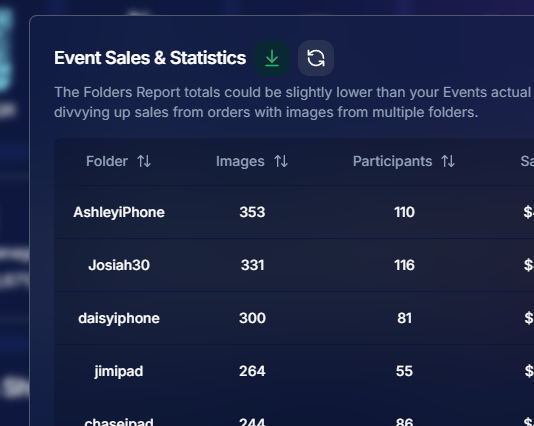
Our Folders Report (which you can find using the Graph button on an Event's Management Page) just got more powerful:

‍

  • β—‹ Sortable columns: Organize by images, participants, sales, and more.
    ‍
  • β—‹ Real-time insights: Works live during events, allowing you to identify your best-performing photographers, mid-event.
    ‍
  • β—‹ Actionable data: Mid-event reporting helps you provide immediate feedback to your team to boost performance.
    ‍
  • β—‹ Download button: This report is now downloadable via the green button in the screenshot below as well!

‍

Optimize your event management like never before!
‍

‍

8. Bulk Visibility Control for Image Folders πŸ“

‍

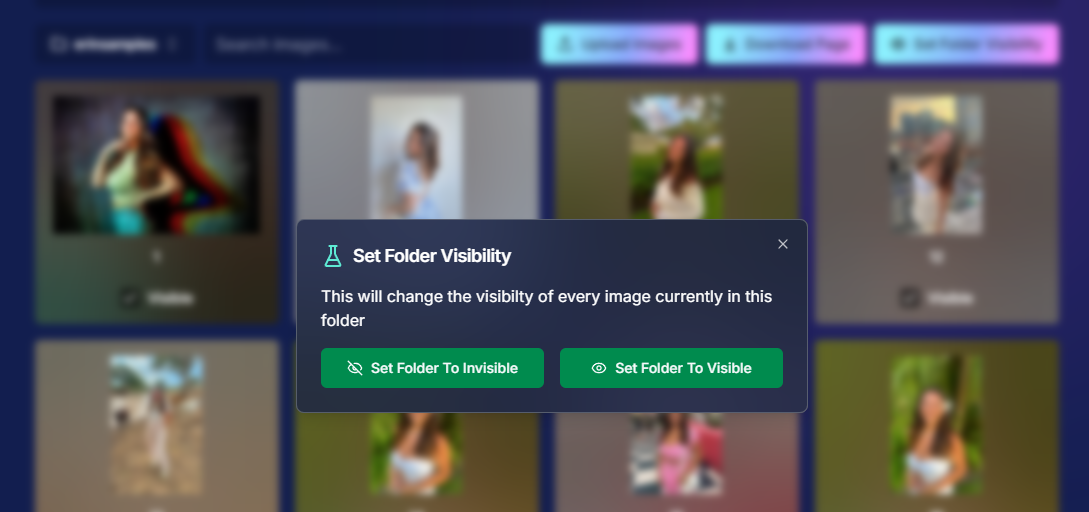
We've added a handy button in the Manage Images page, when you have a folder selected:

‍

  • β—‹ Mark entire folders as visible or invisible with one click.
    ‍
  • β—‹ Use cases: Quickly hide a batch of images that need reworking, such as a blurry set.
    ‍
  • β—‹ Saves time: Streamlines the process of managing large numbers of images.

‍

Sometimes, mistakes happen! Now you can use this button to quickly hide images in bulk as you work to correct issues.
‍

‍

9. Customize "All Event Images" Gallery Settings πŸ–ΌοΈ

‍

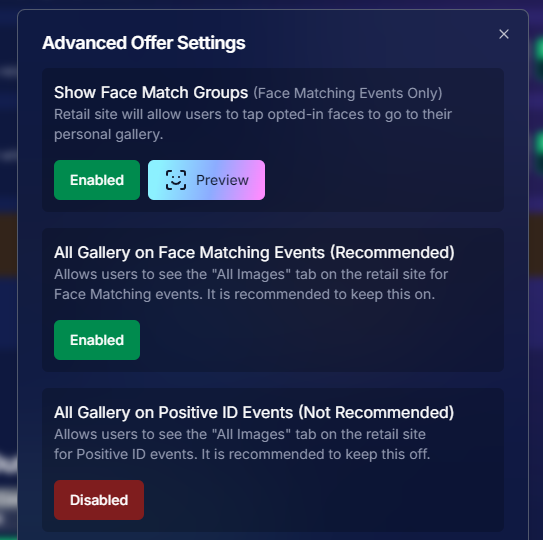
You now have more control over the All Event Images gallery:

‍

  • β—‹ Override default settings at the Offer level.
    ‍
  • β—‹ Options:
    ‍
    • Turn off the All Event Images gallery for Face Matching Events.
      ‍
    • Turn on the All Event Images gallery for Positive ID Events.
      ‍
  • β—‹ Recommendation: We suggest sticking with the defaults, but if you'd like to explore the pros and cons, click here to schedule a chat with us!

‍

Tailor the gallery experience to suit any event's needs!
‍

‍

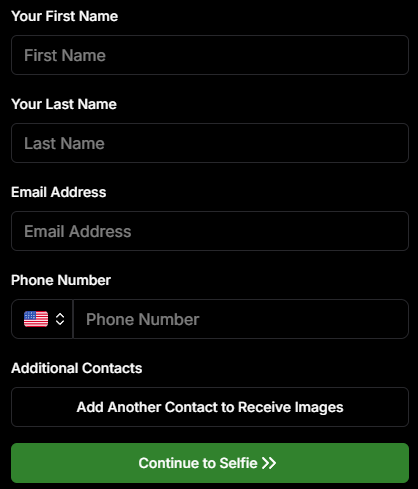
10. Simplified Selfie Check-In πŸ“²

‍

We've made the Selfie Check-In process even more user-friendly:

‍

  • β—‹ Only requires a cell number OR email address.
    ‍
  • β—‹ Encourages participation: Even though neither field says "optional," most people still provide both.
    ‍
  • β—‹ Addresses Fringe Issues: Every now and then, someone doesn't have (or refuses to provide) a cell or email address. This change will account for those individuals!

‍

Enhances guest engagement and reduces fringe support issues, with no changes on your part!
‍

Theme:Β Liquorice

‍

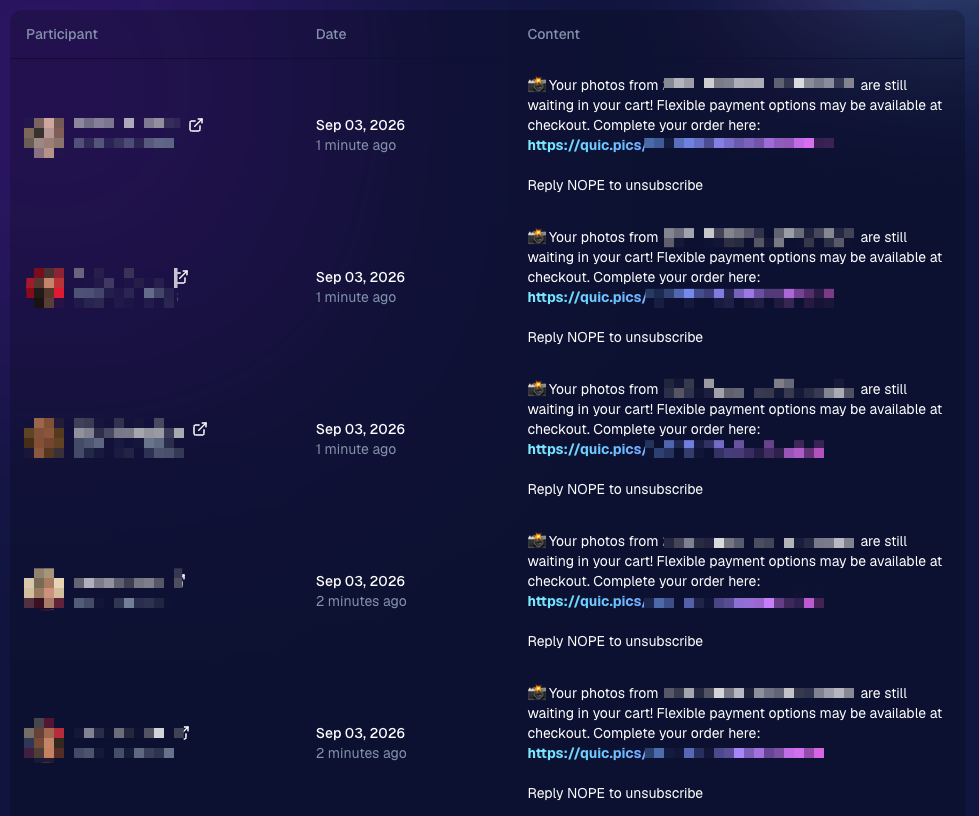
11. New Unsubscribe Keyword: "NOPE"! 🚫

‍

We've introduced a new, fun way for clients to manage their marketing preferences:

‍

  • "NOPE": Clients can reply with this word to opt out of marketing for a specific event.
    ‍
  • Future communications: They will still receive messages for future events unless they opt out again.
    ‍
  • Accidental "STOP" replies: If someone replies "STOP" though, they'll need to send "START" to our marketing number to resume receiving texts.

‍

This gives your clients more control while still keeping communication lines open for future events.

‍

‍

12. Seasonal Retail Themes: Apple Crumble & Candy Corn πŸ‚πŸŽƒ

‍

Get into the festive spirit with our new retail site themes:

‍

  • Apple Crumble:
    ‍
    • Autumn colors: Warm and inviting hues.
      ‍
    • Falling leaves: Adorable "leaves falling" animation upon gallery arrival, check-in completion, and after checkout.
      ‍
  • Candy Corn:
    ‍
    • Halloween vibes: Shades of black and bright orange.
      ‍
    • Candy corn confetti: Fun "candy corn toss" animation to celebrate the spooky season upon gallery arrival, check-in completion, and after checkout.
      ‍
    • Haunted Retail Site: A few ghosts frequently fly across your customer's screens as they shop!

‍

Delight your clients with these charming themes!

‍

Note: the Leaves &Β Candy Corn only fall across the screen upon gallery arrival, check-in completion, and after checkout - these GIFs are simply showing it in a loop :)

‍

Theme: Apple Crumble - Watermarking:Β Off

‍

Theme:Β Candy Corn - Watermarking:Β Off

‍

We hope these updates make your experience with NowCandid even more enjoyable and efficient.

‍

Your success is our top priority, and we're always here to support you. πŸ’–

‍

As always, if you have any questions or feedback, don't hesitate to reach out. We're all ears! πŸ‘‚

‍

Until next week, keep capturing those amazing moments!

‍

Cheers and sparkles,

‍

Candy 🍬

Related articles

Weekly Recap: Abandoned Cart Recovery, Batch AI Editing & Discount Links πŸ›’βœ¨
Feature Updates
September 4, 2026

Weekly Recap: Abandoned Cart Recovery, Batch AI Editing & Discount Links πŸ›’βœ¨

3
Β minutes read
Hey photo friends! πŸ‘‹

‍

Candy here with another weekly recap! This week’s biggest addition is a new Abandoned Cart Recovery marketing message designed to help bring shoppers back and complete purchases they already started.

‍

We’ve also made Quick Candy Image Studio more powerful for editing a selected group of images, added shareable discount links, and made several improvements across participant tools, Virtual Groups, and the Capture App.

‍

Let’s jump in!

‍

πŸ›’ NEW: Abandoned Cart Recovery Marketing

‍

Sometimes a customer gets all the way to building a cart... and then life happens.

‍

NowCandid will now automatically follow up with those shoppers via text + email to encourage them to come back and finish their order.

‍

πŸ“… Abandoned cart messaging will go out once a week!

‍

πŸ›οΈ Targets participants who created a cart but did not complete their purchase

‍

🚫 Participants who have already ordered are excluded

‍

1️⃣ Each participant can only receive one abandoned-cart follow-up per Event

‍

πŸ“Š Sends are still recorded on the Event’s Marketing History page

‍

This gives shoppers a helpful nudge to return to something they were already interested in buyingβ€”and hopefully turns a few more unfinished carts into completed sales. πŸ“ˆ

‍

Note:Β NowCandid's abandoned cart rate is already very low. Even so, we expect this to boost your overall sales by about 0.3% or more!

‍

‍

🎨 Batch AI Editing Gets More Powerful

‍

Quick Candy Image Studio on Manage Images continues to fill the gap between editing one image at a time and running Auto Editor across an entire folder or Event.

‍

Select a handful of images, open Quick Candy Image Studio, and apply an AI edit across the selection.

‍

This week, it also gained more of the controls available in the full Candy Image Studio:

‍

πŸ‘οΈ Mark Original Invisible

‍

βœ‚οΈ Mark Destination Folder as Background Removal Folder‍

  • Available when Background Removal is enabled for the Event.

‍

πŸ–ΌοΈ Custom image-input nodes fixed‍

  • Nodes that require another image as an input now behave correctly through Quick Candy Image Studio.

‍

This makes it much easier to apply the same edit to a small, intentional group of images without setting up a larger Auto Editor workflow.

‍

πŸ‘₯ Participant List Improvements

‍

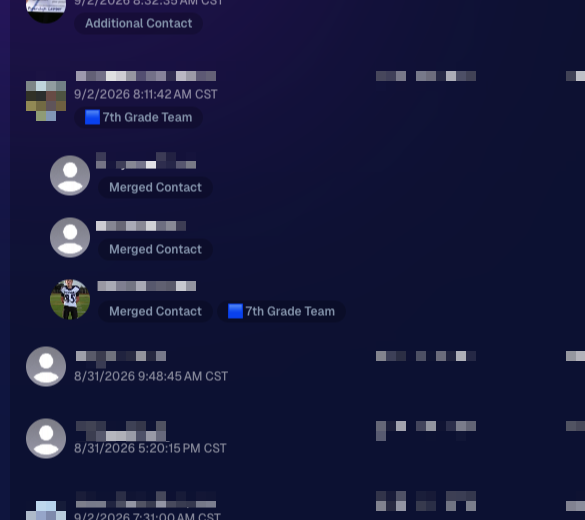
🏷️ PhotoTags now appear as badges‍

  • Participant rows now show assigned PhotoTags directly, similar to the existing Additional Contact badge.

‍

πŸ‘¨β€πŸ‘©β€πŸ‘§ Merged participants are easier to understand‍

  • Individual merged records now appear as separate, indented rows beneath the main merged participant.

‍

πŸ™ˆ Hidden PhotoTags stay hidden‍

  • Fixed hidden PhotoTags incorrectly appearing on Participant Details.

‍

‍

πŸ§‘β€πŸ€β€πŸ§‘ Virtual Group Builder Improvements

‍

↩️ Better Undo behavior for sliders

  • CTRL/CMD + Z now behaves more naturally when adjusting slider values.

‍

πŸ–±οΈ Better drag-and-drop with large groups‍

  • The Subjects pane is easier to work with when there are dozens of participants.

‍

πŸ–ΌοΈ Full-resolution render consistency fix‍

  • Fixed an edge case where the final full-res Virtual Group could differ from the Builder preview.

‍

πŸ€– Auto Editor & Background Removal

‍

πŸ™ˆ Hide Originals now handles BGR originals correctly‍

  • If Hide Originals is enabled and the original folder is marked for Background Removal, the original PNG will now be hidden too.

‍

The same behavior now applies in Candy Image Studio.

‍

πŸ“± Capture App 5.9.3

‍

iOS & Android OTA β€” September 1

‍

πŸ“‹ Shooting mode selector fixed on tablets‍

  • The popup is now scrollable, so options like Roster Check-In are always reachable.

‍

πŸ“Έ Photo Booth fix on iOS‍

  • Cancelling the countdown no longer accidentally disables the Event collage.

‍

That’s the week!

‍

Abandoned Cart Recovery is the big addition here, giving NowCandid another way to help turn existing shopper interest into completed orders. And with the improvements to Quick Candy Image Studio, you’ve got more flexibility for those β€œedit these five photos, not the entire folder” situations too.

‍

Keep creating magic,

Candy 🍬

Weekly Recap: Scheduled Client Outreach, Smarter Virtual Groups & New Candy Image Styles πŸ“…βœ¨
Feature Updates
August 28, 2026

Weekly Recap: Scheduled Client Outreach, Smarter Virtual Groups & New Candy Image Styles πŸ“…βœ¨

5
Β minutes read
Hey photo friends! πŸ‘‹

‍

Candy here with another weekly recap! This week’s biggest addition is a major upgrade to Client Outreach: you can now schedule texts and emails to send later. We’ve also added smarter Virtual Group tools, new Candy Image Studio looks, and a few useful retail and Dashboard fixes.

‍

Let’s jump in!

‍

πŸ“… Client Outreach Can Now Be Scheduled

‍

You can now schedule Client Outreach messages to send at a future date and time instead of having to send everything immediately.

‍

⏰ Schedule texts or emails up to 60 days in advance

‍

πŸ“‹ New Scheduled page to see upcoming sends

‍

❌ Cancel a scheduled outreach before it goes out

‍

πŸ’° See estimated sends and cost before the scheduled time

‍

πŸ”” Get notified when it sends

  • Dashboard Inbox notification
  • Mobile Dashboard push notification

‍

This makes Client Outreach much more useful for planned reminders, follow-ups, announcements, and other messages you already know you’ll want to send later.

‍

πŸ‘₯ Import from multiple Events at once

‍

When building a Client Outreach list from Event contacts, you can now select multiple Events in a single import instead of adding them one at a time.

‍

🏈 Virtual Group Builder Gets Smarter

‍

Virtual Group Builder picked up several new controls this week:

‍

πŸ”’ New Auto Order By Jerseys button‍

  • Automatically reorder subjects based on their jersey numbers.
  • This is powered by Jersey Jotter, but Jersey Jotter does not need to be enabled on the Event for you to use it.

‍

🧠 Improved Auto Headsize‍

  • Automatic subject sizing should now produce better results.

‍

πŸ‘€ Less disruptive participant additions‍

  • Adding one participant now places them at the bottom-right of the bottom row instead of automatically rearranging the entire group.

‍

🌈 New Saturation slider‍

  • Adjust an individual subject’s saturation from the Subject Inspector.

‍

πŸŒ‘ Drop Shadow can now be disabled‍

  • There’s a new toggle if you prefer the group without subject shadows. Drop Shadow behavior also works more naturally with Cutout Fade.

‍

🌫️ Simplified Cutout Fade‍

  • Cutout Fade and Cutout Fade Intensity have been combined into a single control with improved defaults and results.

‍

↕️ More vertical positioning freedom‍

  • Subjects can now be moved significantly farther downward when needed.

‍

πŸŽ›οΈ New Effects category‍

  • Some related controls have been reorganized to make the Builder easier to navigate.

‍

🎨 New Candy Image Studio Looks

‍

Two new low-cost styles are available:

‍

🌸 Mayfair β€” 4’‍

  • A polished filter-inspired look with its own distinct color treatment.

‍

🌈 Lively‍

  • Similar in spirit to Clarendon, but with a different look and feel. Give it a try!

‍

πŸ› οΈ Candy Image Studio fixes

‍

✨ Fixed some nodes not working through Quick Candy Image Studio on Manage Images

‍

πŸ–ΌοΈ Fixed the Retouch node failing on especially large image files

‍

πŸ–₯️ Dashboard Improvements

‍

πŸ“£ Event Marketing History links are more visible‍

  • Three important links on the page are now displayed as cards, matching the approach used elsewhere in the Dashboard.

‍

🏷️ Remove PhotoTags in bulk‍

  • Select multiple participants on the Participant List page and use the new Remove PhotoTags button to clear their PhotoTags at once.

‍

πŸ“± Mobile Dashboard

‍

No app update required:

  • ⬅️ Previous Page
  • ➑️ Next Page

‍

Both options are now available from the logo button / Quick Actions menu at the top of the Mobile Dashboard.

‍

πŸ›οΈ Retail & Quic Fixes

‍

πŸ“¦ Group package visibility fixed‍

  • Packages containing group products will no longer incorrectly appear when an Event has no group images.

‍

πŸ€– Auto Edited FreePics/FreePortraits images fixed‍

  • Fixed an issue where Event-level Auto Edits with Hide Originals enabled were not being texted once the edited image was ready.

‍

That’s the week!

‍

Scheduled Client Outreach opens up a lot more ways to plan customer communication ahead of time, while the new Virtual Group tools should make sports layouts quicker and easier to fine-tune.

‍

Keep creating magic,

Candy 🍬

Customer Spotlight: How Joe Photo Tampa Is Turning Heads with NowCandid's Auto Editor
Success Stories
August 27, 2026

Customer Spotlight: How Joe Photo Tampa Is Turning Heads with NowCandid's Auto Editor

5
Β minutes read
When you've been in the event photography business for nearly two decades, you've seen just about everything.

‍

But every once in a while, a new tool comes along that changes the game.

‍

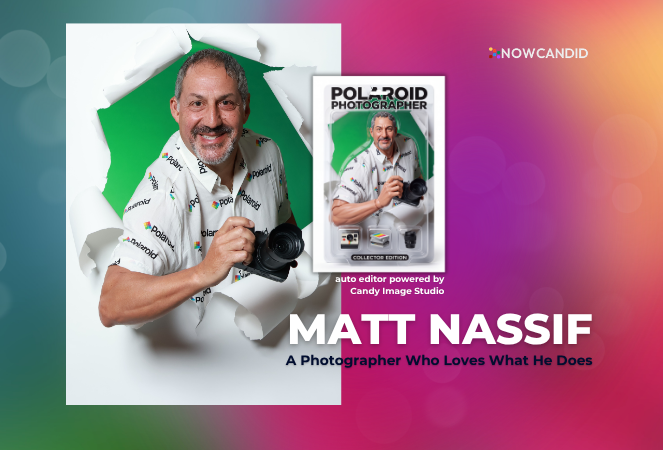
For Matt Nassif of Joe Photo Tampa, that tool has been NowCandid's Auto Editor.

‍

Nearly 20 Years of Capturing Memories

‍

Joe Photo Tampa has been photographing events across Florida for almost 20 years. Matt credits much of that journey to his longtime friend and mentor, Ed Kempf of Impact Photography/Joe Photo Iowa.

‍

Back in 2007, Ed introduced Matt to Candid Color Systems, inviting him to visit Oklahoma and see everything CCS had to offer firsthand. That visit marked the beginning of a partnership that continues nearly two decades later.

‍

"I'll be going into my 20th year this fall and feel incredibly blessed to have CCS as my lab. I'm also grateful for my mentor Ed, who has guided me throughout the years."

‍

When NowCandid was just getting started, Matt was there from the beginning. After reconnecting with Jack at a photography conference in Las Vegas in early 2020, he became one of the platform's original beta testers, working closely with the development team to help shape the software.

‍

Today, Matt has been using NowCandid for six years and believes Joe Photo Tampa is one of the platform's largest users.

‍

Taking a Chance on Something New

When Matt first learned about the Auto Editor through a NowCandid newsletter, he immediately saw an opportunity.

‍

One of his long-time clients was celebrating their 20th anniversary, with more than 600 guests expected to attend. Rather than offering another standard event experience, Matt wanted to surprise attendees with something they'd never seen before.

‍

The result?

‍

A huge success.

‍

More than 180 guests participated in the Auto Editor experience.

‍

"It was a TOTAL hit."

‍

Like many photographers, Matt admits he was initially hesitant because of the AI component.

‍

"My biggest hesitation was simply not knowing anything about AI."

‍

Fortunately, a little guidance helped turn uncertainty into excitement.

‍

Creating an Experience Guests Remember

‍

By his third Auto Editor event, Matt had found his rhythm.

‍

"What surprised me the most is how fun, different, and interactive the Auto Editor is."

‍

Guests weren't just participating. They were bringing their friends back to experience it themselves.

‍

"Guests would receive their character on their phone, then come back with more friends so they could try it too. That's a win-win for Joe Photo Tampa!"

‍

The response from event hosts has been equally enthusiastic.

‍

"My customers loved the product, and their guests were showing off their images and posting them online."

‍

More Than a Fun Feature: A Business Opportunity

‍

While the guest experience has been exciting, the business results have been just as impressive.

‍

At Matt's second Auto Editor event, one guest loved the experience so much that she booked Joe Photo Tampa on the spot for another event just 72 hours later.

‍

"The product sells itself."

‍

Matt also sees Auto Editor opening doors in an increasingly competitive market.

‍

"This is an upsell product that can definitely compete with the photo booth world."

‍

Instead of simply taking another picture, photographers can offer clients an interactive experience that guests talk about long after the event ends.

‍

Advice for Fellow Photographers

‍

Matt's advice for photographers considering Auto Editor is simple:

‍

"If not now, when?"

‍

He encourages photographers to spend some time experimenting before introducing it to clients.

‍

"Try it at the office. Test it. Learn what prompts work best for your style and events."

‍

He also offers one important reminder:

"AI isn't perfect. It takes some patience to learn what works best. Once you get your prompts dialed in, it becomes an incredible product."

‍

A Photographer Who Loves What He Does

‍

Whether it's corporate events, parties, or celebrations, Matt simply loves photographing people.

‍

His photography style?

‍

Fun. Outgoing. Professional.

‍

And when it comes to camera gear...

‍

"I bleed Nikon."

‍

Thank You, Joe Photo Tampa!

‍

Matt has been an incredible partner to NowCandid from the very beginning! From helping beta test the platform to embracing new features like Auto Editor and sharing honest feedback along the way.

‍

We're incredibly grateful for photographers like Matt who continue to push the platform forward while creating unforgettable experiences for their clients.

‍

Thank you, Matt, for being part of the NowCandid family. We can't wait to see what you create next.

Let’s get in touch

If you’re a photographer looking to add NowCandidβ„’ services to your wheelhouse, set up a call with us!

How to customize formatting for each rich text

How to customize formatting for each rich text

How to customize formatting for each rich text

How to customize formatting for each rich text

How to customize formatting for each rich text

‍

‍

What’s a Rich Text element?

The rich text element allows you to create and format headings, paragraphs, blockquotes, images, and video all in one place instead of having to add and format them individually. Just double-click and easily create content.

A rich text element can be used with static or dynamic content. For static content, just drop it into any page and begin editing. For dynamic content, add a rich text field to any collection and then connect a rich text element to that field in the settings panel. Voila!

Headings, paragraphs, blockquotes, figures, images, and figure captions can all be styled after a class is added to the rich text element using the "When inside of" nested selector system.

  • List One
  • List Two
  • List Three
  • List Four
  • List Five

This is a link

This is bold text

‍

  • ‍

‍