HomeNavigation arrowBlogNavigation arrow
Current page
Feature Updates

Weekly Recap: Virtual Group Builder, Client Outreach Updates & Smarter Retail Support 🎉📸

Weekly Recap: Virtual Group Builder, Client Outreach Updates & Smarter Retail Support 🎉📸
Hey photo friends! 👋

This is a big week! The headline feature is one many sports and volume photographers are going to love: An all-new Virtual Group Builder is now available directly on the Dashboard.

We’ve also added new Candy Image Studio tools, improved Client Outreach behavior, refreshed image assignment tools, and made retail support easier for shoppers and photographers alike.

Let’s jump in!

🧑‍🤝‍🧑 Big New Feature: Virtual Group Builder

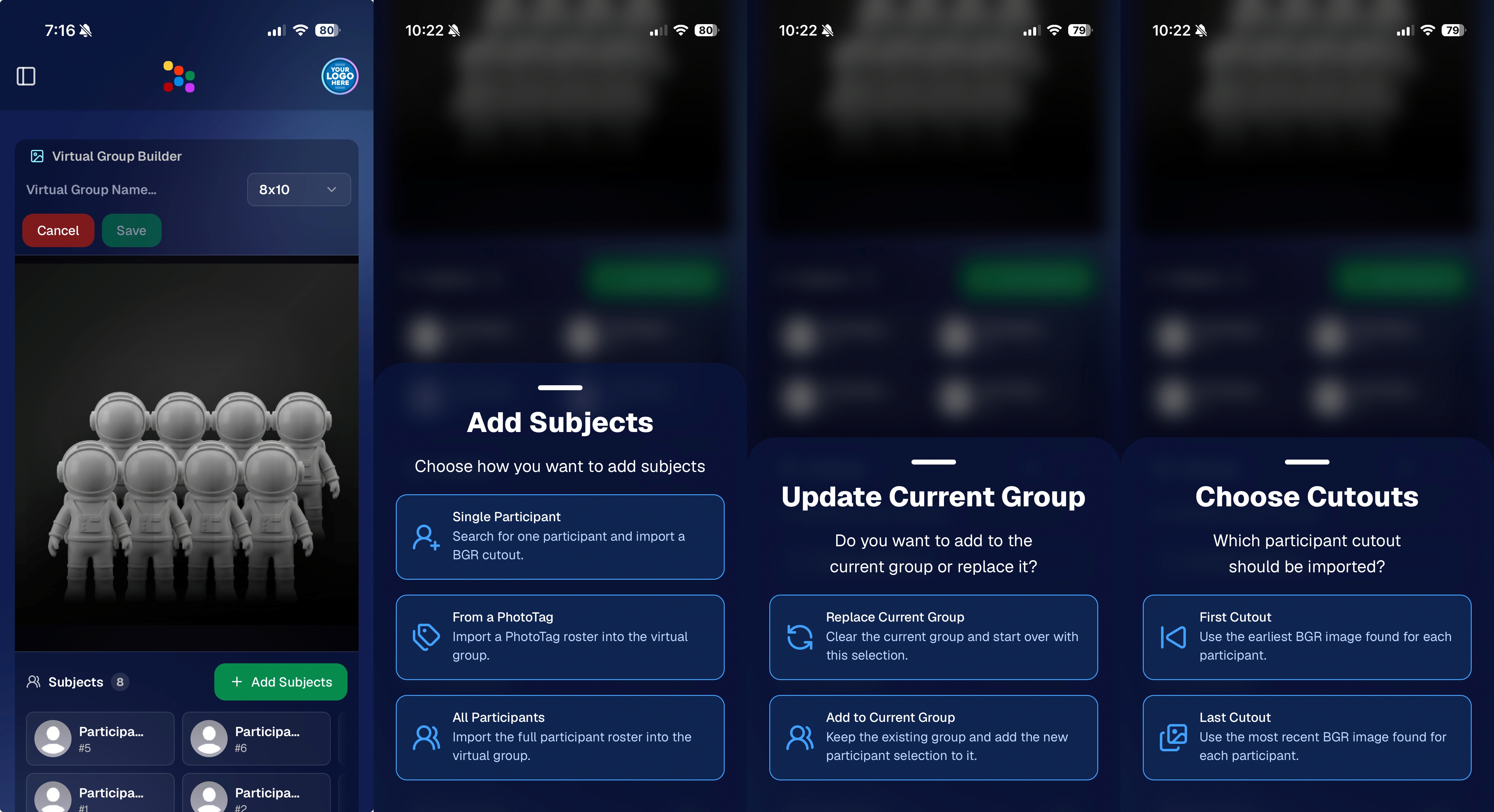
You can now build Virtual Groups directly on the Dashboard — with Mobile Dashboard support too!

Find it from an Event page by clicking Virtual Groups in the sidebar menu.

With Virtual Group Builder, you can:

👥 Import participants from the full Event, one at a time, or everyone with a specific PhotoTag

✂️ Use participant cutouts to build polished group images

🏷️ Build groups quickly when your Event has consistent cutouts and participants tagged with PhotoTags

🖼️ Create Virtual Groups in 4×6, 5×7, 8×10, or 11×14 formats

🎨 Choose from NowCandid default backgrounds, upload custom backgrounds, and add overlays

🧢 Add account logos to the corners

🔤 Toggle subject names on or off

📐 Preview crop lines and aspect ratio lines

🖱️ Zoom, pan, drag, reorder, resize, brighten, and position subjects

You can also adjust group-level settings like background, overlay, overall scale, vertical position, bottom shadow falloff, and individual cutout fade to help hide cropped legs.

When your Event is set up cleanly with cutouts and PhotoTags, you can create a full Virtual Group in just a few clicks. ✨

Docs page: https://app.nowcandid.com/docs/image-management/virtual-groups
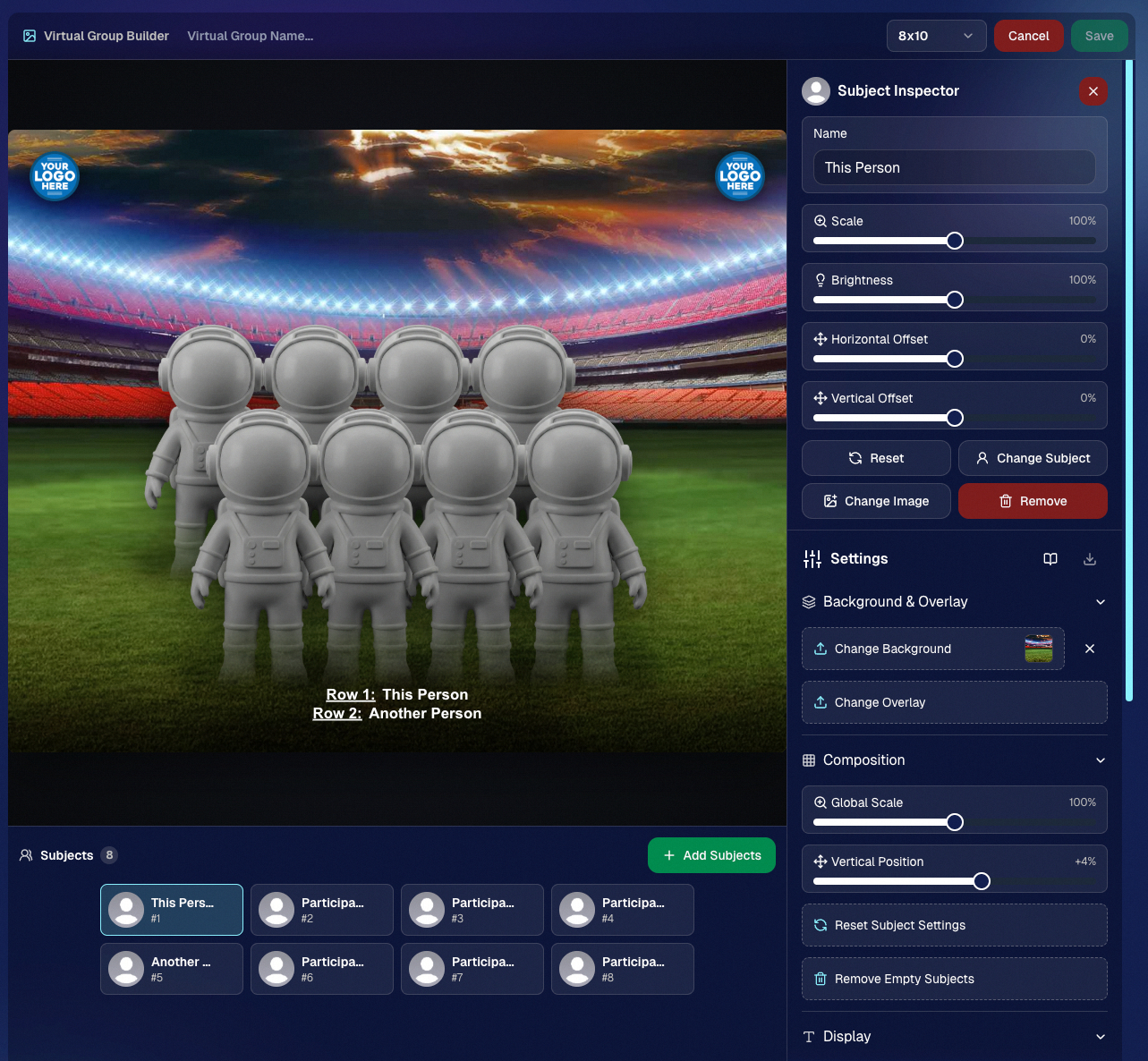
Desktop Dashboard view of the new Virtual Group Builder

Mobile Dashboard view of the new Virtual Group Builder

🎓 Candy Image Studio: New Graduation Tools

Candy Image Studio got some very timely upgrades for graduation season:

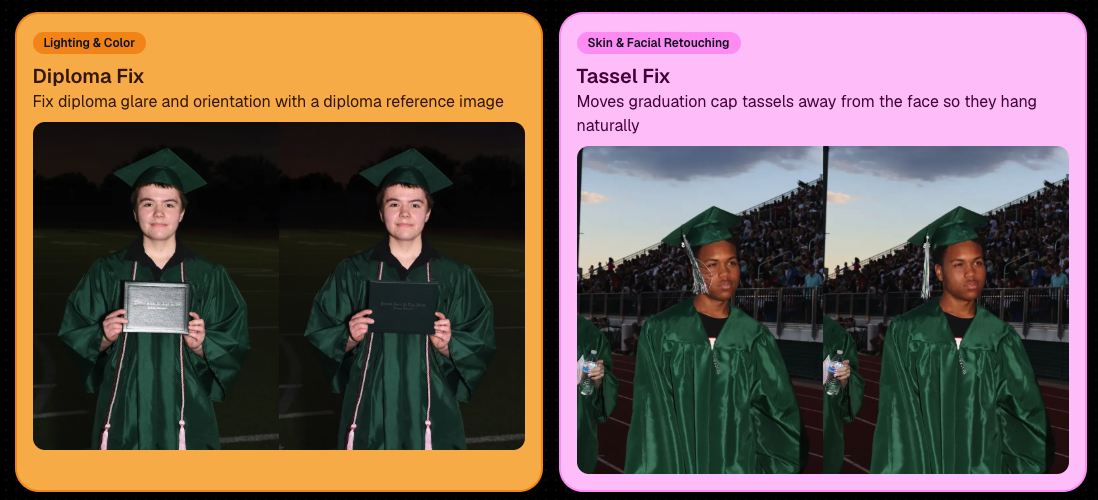
🎓 New “Diploma Fix” node

  • Helps fix diploma orientation and glare. You’ll need to upload a reference diploma so Candy knows what the diploma should look like, including details like school name, emblem, fonts, and colors.

🎗️ New “Tassel Fix” node

  • Helps adjust graduation tassels that are covering a subject’s face — similar to Stray Hair Removal, but tailored specifically for grad tassels.

👓 Improved Reduce Glass Glare

  • This node is now more reliable and less likely to accidentally add glasses to subjects who aren’t wearing them.
📣 Client Outreach Improvements

Client Outreach got a few useful updates to help save money and keep lists cleaner:

🚫 Unsubscribed contacts excluded by default

  • Imported Client Outreach contacts now exclude unsubscribed contacts unless you choose to include them.

🔘 New “Include unsubscribed contacts” toggle

  • You can still include them if needed, but the default helps avoid spending on contacts who can’t receive your outreach.

👀 Show Hidden on Client Lists

  • The Client Outreach list page now has a Show Hidden option, similar to Offers and PhotoRoster organizations.

🧭 Client List sidebar shortcut

  • The Client Outreach sidebar item now takes you back to the Client List page more clearly.

🖼️ Image Management & Dashboard Upgrades

🧩 Image Release Gallery redesign

  • The Image Release Gallery now uses a masonry layout like retail, supports lightboxes with arrow key navigation, has CMD/CTRL+F search support, and saves filters in the URL.

🧑‍💻 Manual Assignment page refresh

  • The Participant Manual Assignment page has a cleaner, more intuitive UI.

Camera star ratings on Image Details

  • If your camera includes star ratings, they now appear on the Image Details page.

⬇️ Image Details convenience buttons

  • Image Details now includes quick actions to download or open in Candy Image Studio.

🏷️ PhotoTag ampersand fix

  • PhotoTag names with ampersands now save correctly.

🧍 Merged participant name fix

  • Manual Assignment now shows the selected participant’s name instead of the first merged participant’s name.

🔙 Event sidebar remembers filters

  • When going back to the Event List from an Event Overview page, your filters are remembered as long as you haven’t refreshed.

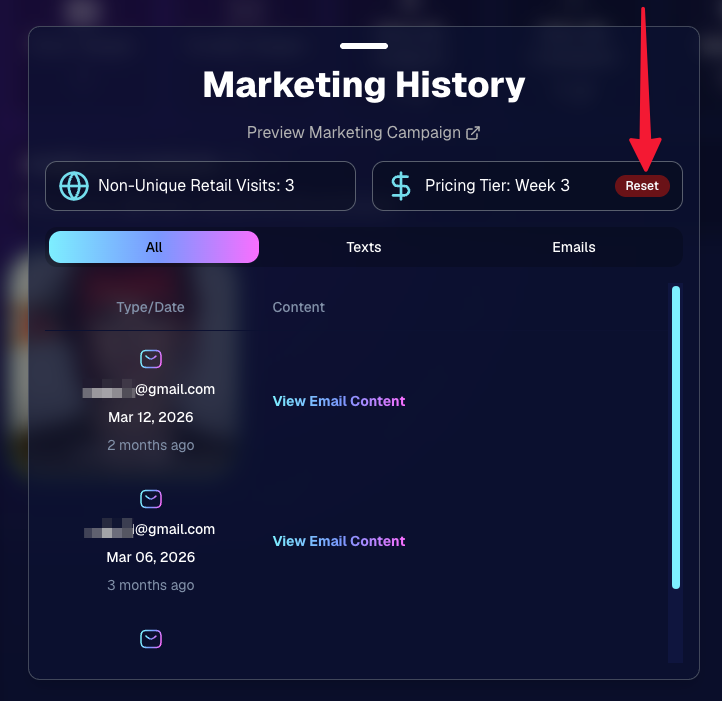
🔁 Pricing tier reset button

  • Participant marketing history now includes a button to reset a participant’s pricing tier start date, useful if support wants to re-offer first-week pricing.
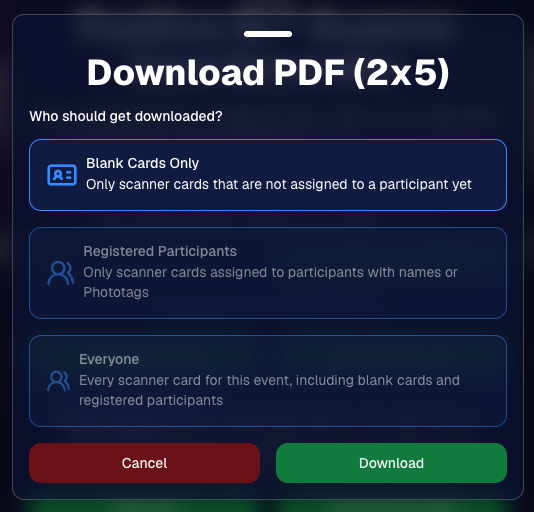
🪪 Positive ID QR Code downloader options

  • You can now download blank cards only, registered participants only, or everyone, making scan card PDFs easier to manage for multi-workflow sports events.
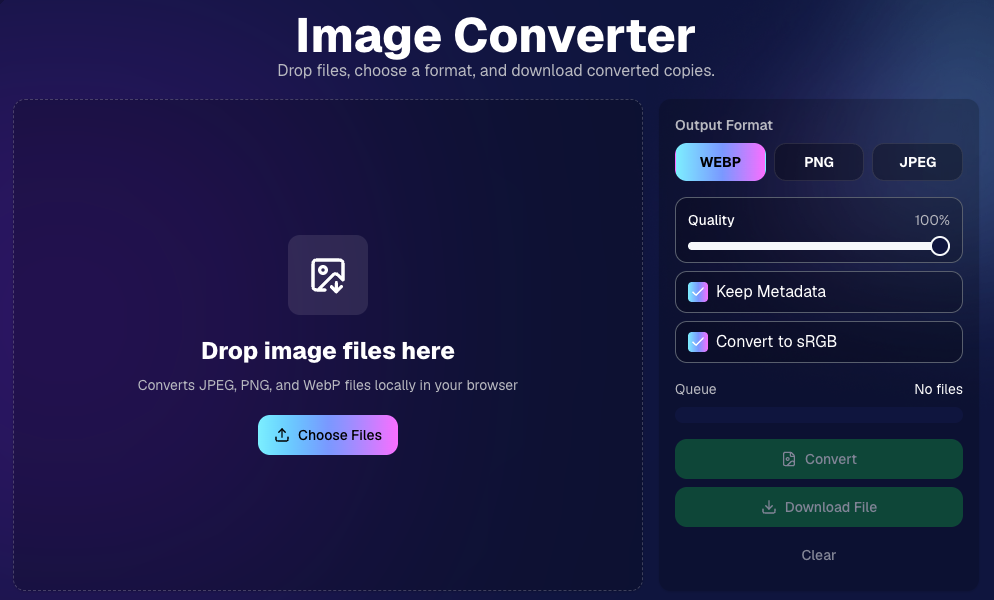
🛠️ New Tool: Image Converter

There’s a new tool under Tools & More → Image Converter.

Use it to:

🔄 Convert images to WEBP, PNG, or JPEG

🎨 Convert images to sRGB

Handy for preparing files before uploading them to NowCandid Events.
📚 New Capture App Camera Docs

We added a dedicated docs page for confirmed camera models that work with the Capture App.

More cameras may work than what’s listed, but this page focuses on models we’ve confirmed.

Docs page: https://app.nowcandid.com/docs/capture-app/cameras

🛍️ Retail Improvements

📬 New Contact Us form on retail

  • The Contact Us popup now includes a form that sends support an email with helpful details automatically included, such as browser info, window size, retail link, Event details, and order number when available. This should make support faster and reduce back-and-forth.

🖼️ Overlay step now comes before cropping

  • This prepares retail for future improvements while keeping product customization clearer.

🗓️ Smarter Year captions

  • Certain products now default the Year caption to the Event start year or participant Day 0 year instead of the current year. Helpful for late-December events or older graduation galleries.

🌍 International order fix

  • Fixed an edge case where some international orders could send multiple receipts and incorrectly show that the order wasn’t submitted.

🤳 Selfie Check-In & Capture App Updates

📶 Clearer Selfie Check-In upload errors

  • If a selfie upload fails, subjects now see a more specific error reason — like upload speed being too slow — so they know what to try next.

📱 Capture App 5.6.3 OTA update

  • Contact Info Settings now says Tap-A-Face or Type & Take based on the Event program
  • The 1000×1000 reference image requirement has been removed for Selfie Check-In Station and Roster Check-In, especially helpful for Android devices with lower-resolution cameras

That’s the week!

Virtual Group Builder is the big one, especially for sports and volume workflows — but between Client Outreach, Candy Image Studio, Image Converter, and retail support improvements, there’s a lot here to make your next Event easier to manage.

Keep creating magic,

Candy 🍬

Related articles

Big News: Introducing GroupTags for SportsPics! 🌟
Feature Updates
September 12, 2024

Big News: Introducing GroupTags for SportsPics! 🌟

5
 minutes read
Hey, sports photographers!

Candy here, and I’m super excited to share a brand-new feature designed to make your SportsPics Events even easier to manage—introducing GroupTags! 🎉⚽🏀⚾

So, what exactly are GroupTags? 🤔


GroupTags is a feature made specifically for our SportsPics Program!

When you’re managing a big sports shoot with group photos, GroupTags helps you stay organized and deliver a smoother experience for your clients.

Here’s how it works:

1. Before your Event

You can set up as many GroupTags as you need within an Event. These GroupTags could be team names, league divisions, or even different sports if you're covering all of one school's teams over the same weekend. 🏆

2. Once you’ve started photographing

Anytime you mark a photo as a Group Photo (either on the Capture & Upload App, or on the Web Dashboard), you’ll have the option to assign a GroupTag to it. 📸

3. Once They Visit the Retail Site

Your subjects will be able to choose from the GroupTags you set up, and easily find their group shots!

As soon as they arrive to the retail site via their person gallery link, they'll be prompted to choose a GroupTag.

4. Mission Accomplished!

And once they select a GroupTag, they'll see their personal images, in addition to their Group Photos!

How does this help your clients?

To recap:


When your customers open the link to their personal gallery, they’ll be prompted to select their GroupTag—whether that’s a team name, division, or whatever you’ve set up for the Event.

With their GroupTag selected, their Group Photos will show up right alongside their individual images, making it super easy for them to see everything at once! 🖼️

Plus! GroupTags automatically fill in the GroupTag Name on products like Memory Mates, Bag Tags, and more when ordering. How cool is that? ✨

Need to make changes? No problem!


GroupTags are easy to edit after the Event if you need to fix a mistake or assign a Group Photo to multiple GroupTags. And don’t worry—if there’s ever a typo or minor error, your customers can still browse and shop while you fix it in the background! 🛍️

Works with all Workflows!


Whether you’re using Face Matching or Positive ID Workflows, GroupTags are a fantastic way to organize your Group Photos for large sports leagues or any big SportsPics Event. ⚡

Quick Recap:

As a reminder, marking a photo as a Group Photo will only allow it to be purchased on Group Photo Products, allowing you to sell them on different prints at different prices, prevent the sale of digital downloads for Group Photos, and allow them to be selected on multi-image products like Memory Mates.

We hope GroupTags makes your next SportsPics Event even smoother!

As always, feel free to reach out with any questions. 💌

Until next time, happy shooting! 🏅📸

Cheers and sparkles,


Candy 🍬

Big News: Introducing QuicPics GO! 🌟
Feature Updates
August 30, 2024

Big News: Introducing QuicPics GO! 🌟

4
 minutes read
Hey, fabulous photographers! 🎉

Candy here with some sparkling news about a brand-new program that's just been added to the NowCandid family—introducing QuicPics GO! 🚀

You all know and love our QuicPics program, where you get paid upfront by an event organizer and deliver free downloads to your photo subjects throughout the event, all while still offering them the option to purchase physical products. It’s a fan favorite for those looking to provide an engaging, modern experience!

So, what’s new with QuicPics GO? 🤔

Well, the “GO” in QuicPics GO stands for Gallery Only! That’s right, this new program is designed to streamline the process by delivering just the image gallery link to your subjects—no individual MMS image files sent directly to them.

The QuicPics GO Gallery provides multiple ways for your subjects to download their free images, as well as the opportunity to purchase optional photo products, making sure they still have plenty of options to enjoy and share their favorite moments! 🎁

While this may be a less flashy approach, it’s perfect for those who are looking for a more cost-conscious solution, while still utilizing NowCandid's convenient Workflows & technologies to deliver free downloads to guests. 📷✨

Why choose QuicPics GO?

Affordable Pricing:

QuicPics GO offers a budget-friendly option with a fee of only 6 cents per image at this time of launch — that’s significantly lower than the 20 cents per image fee for standard QuicPics. Perfect for events where cost-conscious clients are looking for a great value!

Simple Experience:

While QuicPics provides that cool, interactive experience of receiving images via MMS throughout the event, QuicPics GO keeps it simple with just one link to the image gallery. It’s less flashy, but it gets the job done!

So whether you're working with a budget-conscious client or just looking for a way to offer a simpler service, QuicPics GO is here to provide that perfect middle ground. 🎈

Important Note:

Just like with QuicPics, you’ll need to have a credit card on file with your NowCandid account to use QuicPics GO. This ensures a smooth, hassle-free experience for everyone involved. 💳

Streamlined Free Checkout for QuicPics GO! 🚀

We’ve made grabbing your free QuicPics images easier than ever! While easy downloads are available directly from the site, we’ve also simplified the checkout process for those who prefer it. 🎉

Now, instead of filling out billing and shipping info for a $0 cart, all your subjects need is a cell phone number and email address to complete the free checkout.

Quick, convenient, and hassle-free—just the way it should be! 🖼️📲

We’re thrilled to bring you this new addition, and we can’t wait to see how you’ll make the most of it!

As always, if you have any questions or need a little help, just reach out. We’re here for you! 💌

Cheers and sparkles,


Candy 🍬

Big News: Introducing NowCandid’s All-New Web Dashboard! 🌟💻
Feature Updates
August 23, 2024

Big News: Introducing NowCandid’s All-New Web Dashboard! 🌟💻

9
 minutes read
Hey there, amazing photographers!

Candy here with the latest and greatest update in our “Big News” series. We’re thrilled to announce the launch of Web Dashboard 2.0—the final piece in our massive overhaul of the entire NowCandid platform this year.

With this release, we’ve essentially delivered completely new versions of every aspect of NowCandid, including the Web Dashboard, Mobile Dashboard App, Capture & Upload App, and Retail Site. Welcome to a new era of NowCandid! 🎉

Want to check it out yourself? Head to (app.nowcandid.com) and log in!

A Whole New Experience 🚀

With Web Dashboard 2.0, you’ll notice a fresh, intuitive interface and a host of new features designed to make managing your photography business easier and more efficient.

Offer Creation is one of the biggest additions to the new Dashboard, but since we’ve already covered that in a previous blog post (click here to read that blog post), let’s dive into the other exciting updates! 🌐

New Home Tab: Stay on Top of Everything 🏠

Your new Home Tab provides an at-a-glance overview of recent activity in your account. You can quickly see orders, sales, and upcoming, active, or recent Events. We’ve also rebuilt the Sales & Events reports from the ground up.

These reports now include more filter options and can be easily downloaded, giving you the data you need, when you need it.

Expanded Event Management Tools 🎛️

Event creation may feel familiar, but there are now way more tools at your disposal for managing Events. Let’s dive into each of these new features!

Marketing History 📊

Now you can view the full marketing history for each Event directly from the dashboard. This lets you track all your promotional efforts and ensure things are running smoothly as your Event progresses.

Participant Management 👥

Participants are now fully visible and editable in the dashboard. You can also access and share their personal gallery links directly from this section, making it easier to manage and support your clients.

Roster Uploads 📋

Got a list of participants? You can now upload rosters directly to your Event, streamlining the process of adding participants manually and enabling NowCandid's (Name Lookup Workflow)

Full-Resolution Image Downloads 📸

Need to pull an image for a customer or event organizer? You can now download your full-resolution images directly from the Manage Images section of the dashboard.

Image Uploader Improvements 🖼️

The image uploader now checks all images for compatibility before uploading them. This includes checking for correct file type, DPI, color profile, and more, helping you (and us!) avoid production and support issues before they arise.

Custom Backgrounds 🌈

Add a personal touch to your Events with our new Custom Backgrounds feature. You can upload up to 4 custom backgrounds per Event, allowing your clients to choose a backdrop that suits their style.

Learn more in our (Custom Backgrounds blog post)

Full Frame Overlays 🎨

Our new Full Frame Overlay feature lets you apply full-frame graphics to your photos, giving them a unique, professional look.

Explore how this can enhance your photos in our (Full Frame Overlay blog post)

"Greek" Keyboard 🇬🇷

Now you can use a Greek keyboard when adding text titles to your photos, offering more personalization to Text Overlays for your fraternity and sorority clients.

Customizable QuicPics Texts ✉️

The “Your images are arriving soon” text that gets sent via QuicPics is now customizable! Tailor your messaging to better suit the tone and style of your Event, or even promote an Event's sponsor!

Event Management Portal: Selective Access for Photographers 🔑

Introducing the new Event Management Portal! This tool allows you to provide selective access to your Events for lead photographers without giving them full access to your account.

The portal uses the same email + passcode login as the Capture & Upload App and grants the user access to the following settings and features:

  • Image Viewing & Retail Image Visibility Settings
  • Manual Image Uploading
  • Participant Editing & Manual Participant Adding
  • All Gallery Access & Personal Galleries Access
  • LiveLoop URL Access
  • Image File Downloading
  • QR Code Access

This is perfect for giving your photographers the tools they need without compromising the security of your entire account. The portal can be accessed at (www.quic.pics/portal), so it doesn’t even mention NowCandid—keeping things sleek and professional.

Private Shareable Gallery URL 🌐

Need to share Event photos with an organizer? We’ve got you covered with a new private shareable downloadable gallery URL.

This makes it easy to provide event organizers with any photos they need, all in one convenient place, without transmitting hundreds of large image files via Dropbox, Google Drive, or similar services.

New Image Upload Tester 🧪

Worried about compatibility issues? The new image upload tester allows you to test a single image before even trying to upload it to your Event.

It checks for issues like color profile, DPI, file size, file type, and incompatible characters in the file name—making sure everything runs smoothly.

Rebuilt UI for Key Pages 🎨

We’ve also rebuilt the Account Settings, Resources, and FaceMatch Import pages from the ground up with a fresh new UI. These updates ensure a more intuitive and efficient experience across the (dash)board!

And More to Come… 🔮

We’re not done yet, folks! There’s more exciting stuff on the way, so stay tuned for future updates.

We can’t wait to see how you use our new Web Dashboard to take your photography business to the next level.

As always, if you have any questions or need assistance, we’re here to help!

Cheers and sparkles,


Candy 🍬

Let’s get in touch

If you’re a photographer looking to add NowCandid services to your wheelhouse – set up a call by clicking the button below.

How to customize formatting for each rich text

How to customize formatting for each rich text

How to customize formatting for each rich text

How to customize formatting for each rich text

How to customize formatting for each rich text

What’s a Rich Text element?

The rich text element allows you to create and format headings, paragraphs, blockquotes, images, and video all in one place instead of having to add and format them individually. Just double-click and easily create content.

A rich text element can be used with static or dynamic content. For static content, just drop it into any page and begin editing. For dynamic content, add a rich text field to any collection and then connect a rich text element to that field in the settings panel. Voila!

Headings, paragraphs, blockquotes, figures, images, and figure captions can all be styled after a class is added to the rich text element using the "When inside of" nested selector system.

  • List One
  • List Two
  • List Three
  • List Four
  • List Five

This is a link

This is bold text