HomeNavigation arrowBlogNavigation arrow
Current page
Feature Updates

Weekly Recap: Upgraded Grad Plaque, Retail Polish & More🎓✨

Weekly Recap: Upgraded Grad Plaque, Retail Polish & More🎓✨
Hey photo friends! 👋


Candy here. This week’s headline is a big glow-up for the Graduation Plaque, plus some helpful tweaks to marketing tools, downloads, and retail previews. Here’s what changed.

🎓 Graduation Plaque: New Look, New Render

The Graduation Plaque just got a major upgrade:

  • 🆕 New physical product with an updated finish and feel
  • 💰 Cost increase of $0.48 to match the upgraded production
  • 🌀 New live 3D render on the store sheet (like the Premium Print/Plaque experience)
  • 🖼️ 2D render on the checkout sheet for performance
  • 🔻 Diamond Press upsell removed (was available on the previous version, may return in the future)

You can spin and inspect the new design in 3D here: 👉 Preview the new Graduation Plaque in 3D
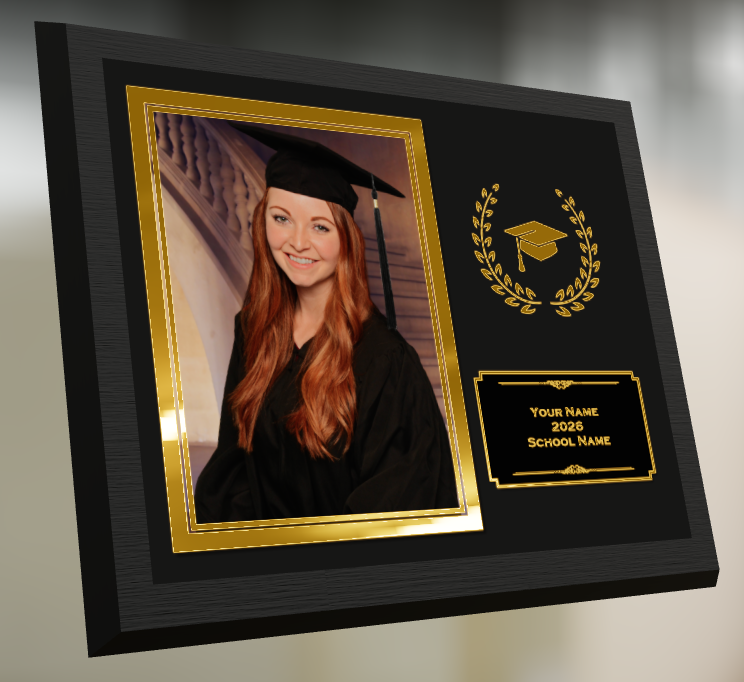
Perfect for seniors and ceremonies where your customers want a keepsake that really feels special.

🔒 Private Image Download Gallery

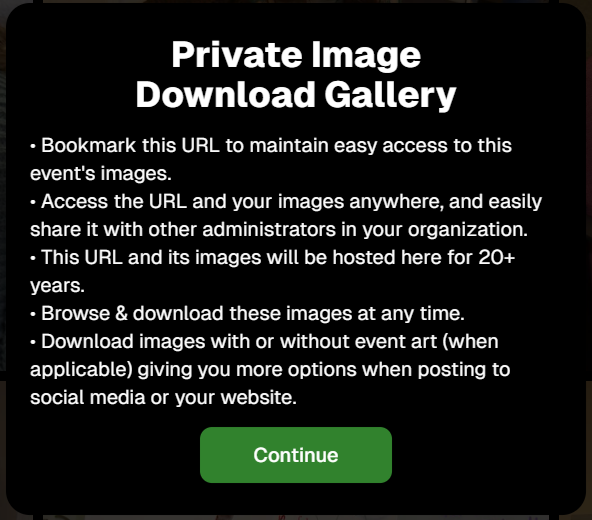
The Private Image Download Gallery now has a new landing popup.

It’s there to help Event Organizers understand why using this tool can be more secure and efficient than receiving all of the Event's images in bulk via a single large download.
📊 Dashboard Updates

📈 Marketing History chart improvements

  • Chart is now hidden when empty, so no more blank space
  • You can switch between Daily / Weekly / Monthly views

📑 Participant Download spreadsheet upgrades

  • Now includes each participant’s retail gallery URL
  • Handy if you’re doing third-party marketing or need to drop direct links into outside tools or messages

🛍️ Retail Site Improvements

🔘 Photo Button render updated

  • New live render that is larger, cleaner, and has no background
  • Matches the style of other renders
  • Render assets are about 15% smaller (faster loads)

⬇️ Press-and-hold download wording fixed

  • Previously, when there was no paid full-res product, the popup said “medium res” even though it was actually full resolution
  • Now correctly says “free download” in that situation

📸 Press-and-hold download fixed on QuicPortraits

  • Press-and-hold works properly again on QuicPortraits Events

🖼️ Luxe Prints artwork fix

  • Store sheet no longer shows artwork overlays on Luxe Prints (since art isn’t available on that product, yet!)

🧱 3D render cropping fix

  • Horizontal previews for 3D renders on the store sheet now use a center crop, not a full-fit that squished the image in the render, whoops!

🧩 Misc / QuicPics GO

👥 Group image flagging in QuicPics GO!

  • You can now flag images as Group Photos in QuicPics GO! via the Dashboard
  • Works similarly to other non-Quic event programs and keeps group images organized for marketing and gallery behavior

That’s it for this week!

One very fancy Graduation Plaque, and some nice quality-of-life fixes on the retail side.

Keep doing great work,

Candy 🍬

Related articles

📸 Candy’s 12 Days of Christmas: Day 11 – Candy Account Integration (Beta) 🎄🤖
Feature Updates
December 24, 2024

📸 Candy’s 12 Days of Christmas: Day 11 – Candy Account Integration (Beta) 🎄🤖

3
 minutes read
Hello again, my ever-curious photographers! 🎅

Candy here, and welcome to Day 11 of our 12 Days of Christmas countdown.

Today’s spotlight is a feature still in its early stages, but full of potential: the Candy Account Integration (Beta). Since it’s Christmas Eve, what better time to peek at a promising work-in-progress?

Key Highlights:

  • Account-Level Insights:

    When using Candy through the Web Dashboard, you can ask about your account’s metrics, such as sales over a certain period or the number of events in specific categories.
  • A Learning AI Assistant:

    Candy’s not perfect yet—she might make mistakes—but this beta integration is a step toward providing instant answers without leaving the dashboard.
  • Future Potential:

    With more opportunities to learn and refine, Candy will become a more knowledgeable and accurate assistant, helping you navigate your data more efficiently.

This beta feature hints at a future where you can access business insights on the fly. 🎉

Check back tomorrow, December 25th, for the final day of our countdown. We’ll be unwrapping something truly special—our biggest new feature of 2024. Don’t miss it!

Candy 🍬

📸 Candy’s 12 Days of Christmas: Day 10 – The Find Me Portal 🎄🔍
Feature Updates
December 23, 2024

📸 Candy’s 12 Days of Christmas: Day 10 – The Find Me Portal 🎄🔍

3
 minutes read
Hello once more, my resourceful photographers! 🎅

Candy here, and welcome to Day 10 of our 12 Days of Christmas countdown. Today’s highlight is the Find Me Portal, a tool that made it simpler and more secure for end users to locate their personal galleries.

Key Highlights:

  • Convenient Access:

    Clients visit quic.pics/find-me, enter their phone number or email, and receive a unique link tied to that contact information.
  • All Galleries in One Place:

    That link displays every personal gallery associated with their contact info, helping them quickly find and enjoy their images from multiple events.
  • Enhanced Privacy & Security:

    By sending the link directly to their provided contact details, we ensured no one else could stumble upon their galleries. It’s both user-friendly and secure.

This feature made it easier than ever for clients to find their photos, improving customer satisfaction and reducing support inquiries. 🎉

Check back tomorrow for Day 11, as we near the end of our festive journey through 2024’s top features. And don’t forget—something extra special awaits on December 25th!

Candy 🍬

📸 Candy’s 12 Days of Christmas: Day 9 – Image Timeline Report & Unique Faces Count 🎄📊
Feature Updates
December 22, 2024

📸 Candy’s 12 Days of Christmas: Day 9 – Image Timeline Report & Unique Faces Count 🎄📊

3
 minutes read
Hello again, my detail-oriented photographers! 🎅

Candy here, and welcome to Day 9 of our 12 Days of Christmas countdown.

Today’s spotlight is on a feature that arrived in November, giving you fresh ways to understand your event coverage: the Image Timeline Report & Unique Faces Count.

Key Highlights:

  • Image Timeline Report:

    View when images were captured in each event folder, helping you analyze shooting patterns, spot peak moments, and evaluate hired photographer performance.
  • Unique Faces Count (Post Group-by-Face):

    After running Group-by-Face, see an estimate of how many unique individuals were photographed. This insight helps you gauge how effectively you encouraged photo subjects to provide their contact info and become Participants.

By understanding shooting trends and estimating how many distinct people you captured, you can refine your approach for future events and ensure no one’s left out. 🎉

Check back tomorrow for Day 10, and remember we have a special announcement waiting for you on December 25th!

Candy 🍬

Let’s get in touch

If you’re a photographer looking to add NowCandid services to your wheelhouse – set up a call by clicking the button below.

How to customize formatting for each rich text

How to customize formatting for each rich text

How to customize formatting for each rich text

How to customize formatting for each rich text

How to customize formatting for each rich text

What’s a Rich Text element?

The rich text element allows you to create and format headings, paragraphs, blockquotes, images, and video all in one place instead of having to add and format them individually. Just double-click and easily create content.

A rich text element can be used with static or dynamic content. For static content, just drop it into any page and begin editing. For dynamic content, add a rich text field to any collection and then connect a rich text element to that field in the settings panel. Voila!

Headings, paragraphs, blockquotes, figures, images, and figure captions can all be styled after a class is added to the rich text element using the "When inside of" nested selector system.

  • List One
  • List Two
  • List Three
  • List Four
  • List Five

This is a link

This is bold text