

Weekly Recap: Scheduled Client Outreach, Smarter Virtual Groups & New Candy Image Styles 📅✨
.png)
Hey photo friends! 👋
Candy here with another weekly recap! This week’s biggest addition is a major upgrade to Client Outreach: you can now schedule texts and emails to send later. We’ve also added smarter Virtual Group tools, new Candy Image Studio looks, and a few useful retail and Dashboard fixes.
Let’s jump in!
📅 Client Outreach Can Now Be Scheduled
You can now schedule Client Outreach messages to send at a future date and time instead of having to send everything immediately.
⏰ Schedule texts or emails up to 60 days in advance
📋 New Scheduled page to see upcoming sends
❌ Cancel a scheduled outreach before it goes out
💰 See estimated sends and cost before the scheduled time
🔔 Get notified when it sends
- Dashboard Inbox notification
- Mobile Dashboard push notification
This makes Client Outreach much more useful for planned reminders, follow-ups, announcements, and other messages you already know you’ll want to send later.
👥 Import from multiple Events at once
When building a Client Outreach list from Event contacts, you can now select multiple Events in a single import instead of adding them one at a time.
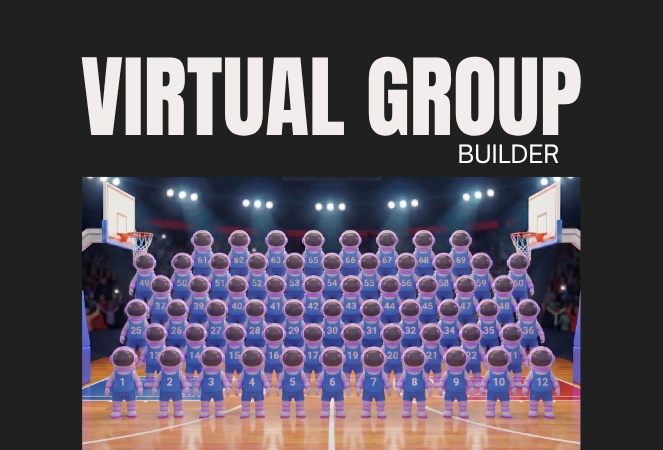
🏈 Virtual Group Builder Gets Smarter
Virtual Group Builder picked up several new controls this week:
🔢 New Auto Order By Jerseys button
- Automatically reorder subjects based on their jersey numbers.
- This is powered by Jersey Jotter, but Jersey Jotter does not need to be enabled on the Event for you to use it.
🧠 Improved Auto Headsize
- Automatic subject sizing should now produce better results.
👤 Less disruptive participant additions
- Adding one participant now places them at the bottom-right of the bottom row instead of automatically rearranging the entire group.
🌈 New Saturation slider
- Adjust an individual subject’s saturation from the Subject Inspector.
🌑 Drop Shadow can now be disabled
- There’s a new toggle if you prefer the group without subject shadows. Drop Shadow behavior also works more naturally with Cutout Fade.
🌫️ Simplified Cutout Fade
- Cutout Fade and Cutout Fade Intensity have been combined into a single control with improved defaults and results.
↕️ More vertical positioning freedom
- Subjects can now be moved significantly farther downward when needed.
🎛️ New Effects category
- Some related controls have been reorganized to make the Builder easier to navigate.
🎨 New Candy Image Studio Looks
Two new low-cost styles are available:
🌸 Mayfair — 4¢
- A polished filter-inspired look with its own distinct color treatment.
🌈 Lively
- Similar in spirit to Clarendon, but with a different look and feel. Give it a try!
🛠️ Candy Image Studio fixes
✨ Fixed some nodes not working through Quick Candy Image Studio on Manage Images
🖼️ Fixed the Retouch node failing on especially large image files
🖥️ Dashboard Improvements
📣 Event Marketing History links are more visible
- Three important links on the page are now displayed as cards, matching the approach used elsewhere in the Dashboard.
🏷️ Remove PhotoTags in bulk
- Select multiple participants on the Participant List page and use the new Remove PhotoTags button to clear their PhotoTags at once.
📱 Mobile Dashboard
No app update required:
- ⬅️ Previous Page
- ➡️ Next Page
Both options are now available from the logo button / Quick Actions menu at the top of the Mobile Dashboard.
🛍️ Retail & Quic Fixes
📦 Group package visibility fixed
- Packages containing group products will no longer incorrectly appear when an Event has no group images.
🤖 Auto Edited FreePics/FreePortraits images fixed
- Fixed an issue where Event-level Auto Edits with Hide Originals enabled were not being texted once the edited image was ready.
That’s the week!
Scheduled Client Outreach opens up a lot more ways to plan customer communication ahead of time, while the new Virtual Group tools should make sports layouts quicker and easier to fine-tune.
Keep creating magic,
Candy 🍬

.svg)


