HomeNavigation arrowBlogNavigation arrow
Current page
Feature Updates

Weekly Recap: Profile Logos, Faster Packages, and a Revamped Event Management Portal

Weekly Recap: Profile Logos, Faster Packages, and a Revamped Event Management Portal

Hey photo friends! 👋

This week’s updates are all about cleaner branding, smoother selling, and better visibility across your workflows—from a new profile/business logo system to big package configurator performance improvements, plus a long-awaited refresh of the Event Management Portal (EMP) ahead of grad season.

Let’s jump in. 💫

🖥️ Dashboard Updates

📣 Client Outreach: Texts now require a URL

Client Outreach SMS messages now require a URL to be included—helping ensure every text has a clear destination and call-to-action.

🧾 Reports: “Participants” terminology restored for accuracy

The Events Report, Compare Report, and Faces Report now use Participants instead of Contacts.
Reminder: a Contact is someone with info; a Participant is a contact with at least one image in their gallery. This avoids deflating stats with unmarketable contacts.

🧰 Candy Culler usability win

  • Added a Download Image button to the Image Details lightbox on the Candy Culler page.

🖼️ Better controls in Participant lightboxes

  • Added a visibility toggle to the Image Details lightbox on the Participant Details page.

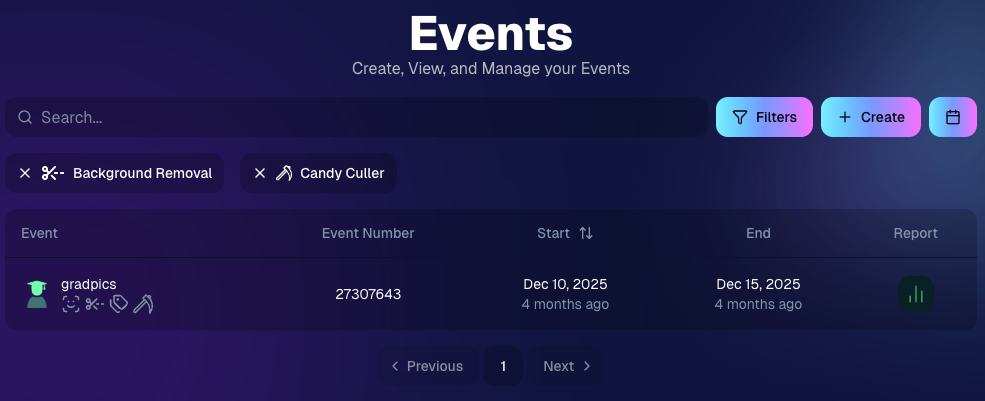
🔍 New Event List filters

The Event List page now includes quick filters for:

  • Background Removal events
  • JerseyJotter events
  • Candy Culler events

🖼️ Offer background minimum lowered

You can now set your Offer background selection minimum to 5 (previously 20).

🚚 New flat-rate shipping option

Added $2.50 flat-rate shipping as an available shipping option.

📱 Mobile Dashboard

  • Fixed an issue where Friday weekly sales notifications were not sending.

🏷️ New: Profile / Business Logos (Branding Upgrade)

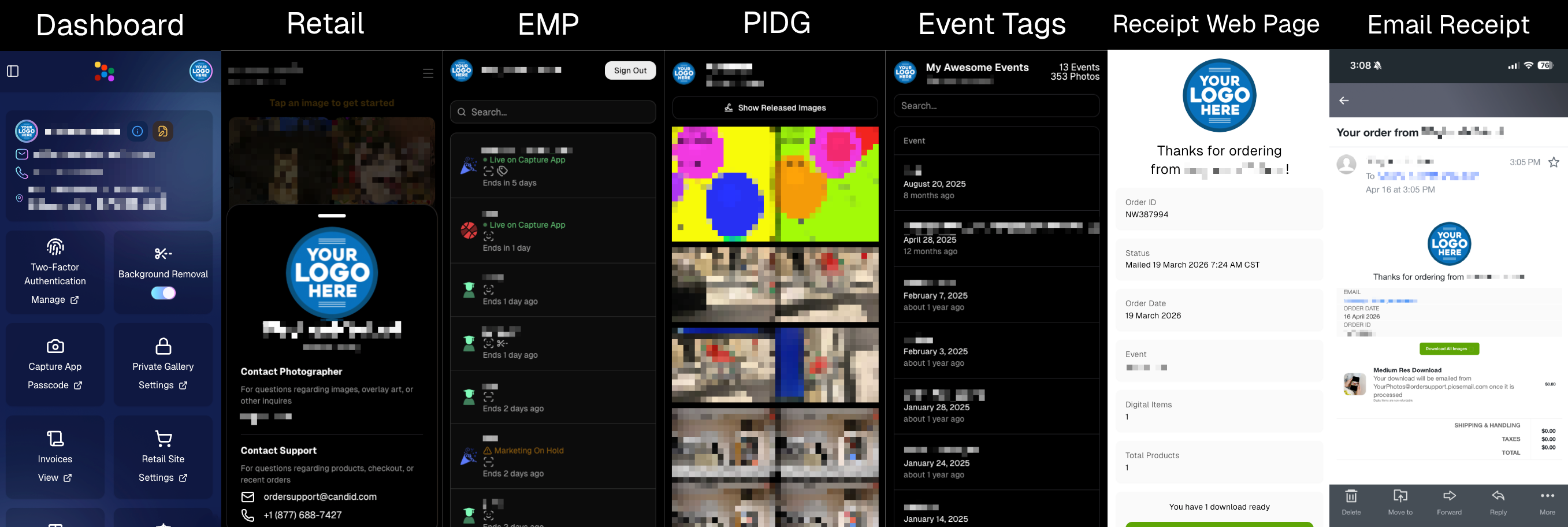
You can now assign a business/profile logo—upload to your profile icon on the dashboard as a 650×650 image and automatically cropped to a circle.

Where it appears:

  • Dashboard profile page + navigation
  • Retail contact popup above your business name
  • Receipt emails, web receipt preview, and the web receipt download page
  • Event Management Portal (EMP) header beside your business name
  • Private Image Download Gallery (PIDG) header
  • Public Event Tag List page header

More placements are planned in the future—this is the first step toward a more consistent, professional brand presence everywhere your customers interact with you.
🏷️ Event Tag List Page

  • Improved UI for a cleaner, easier experience.

🔒 Private Image Download Gallery (PIDG)

  • Improved UI
  • Added a note to the landing popup regarding released images

🛍️ Retail Improvements (Big Week for Packages + Rendering)

🖼️ Captions render earlier for key products

Graduation Plaque and Titled Luxe Prints now render custom captions earlier in the process, rather than waiting until the captions step.

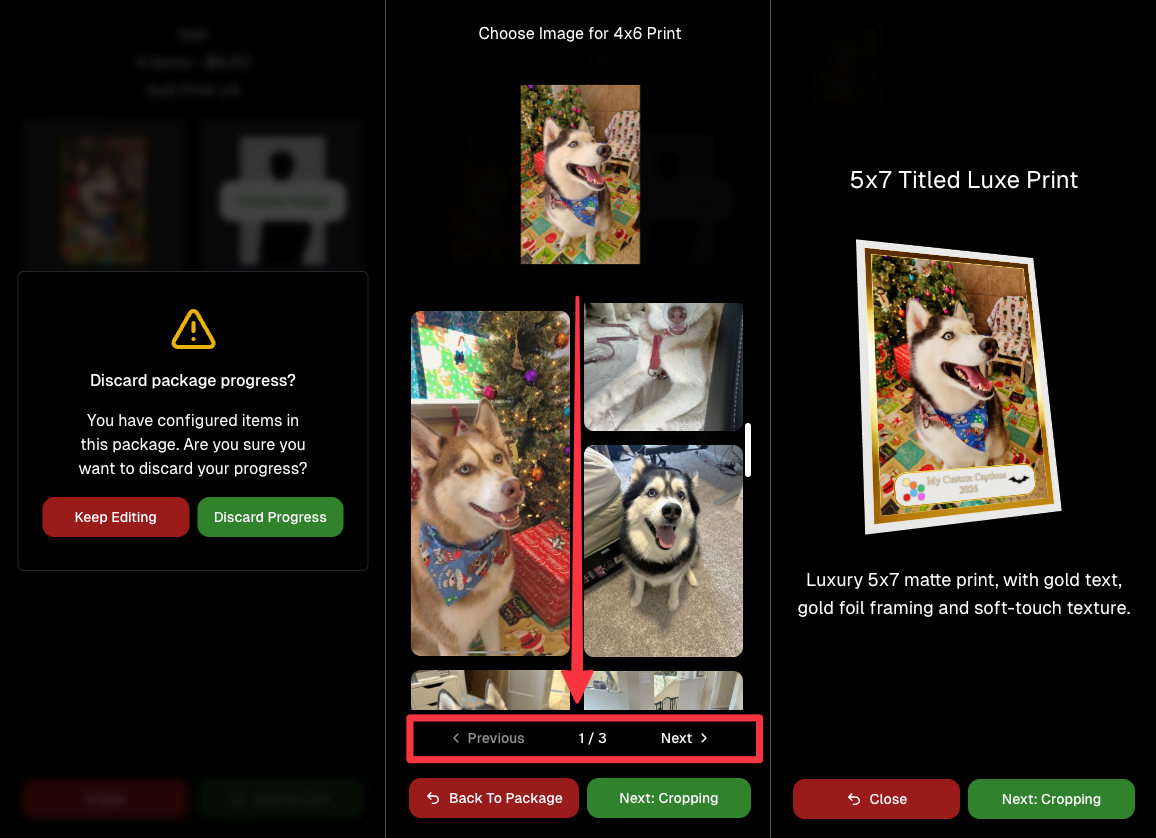
📦 Package configurator upgrades

The package configurator received several improvements:

  • Added pagination to the All Gallery tab in the “Next Package Item Image Picker” step
  • Added a “Discard package progress?” popup when backing out after configuring at least one item to prevent accidental loss of progress
  • Fixed an edge-case crash on mobile when configuring large packages in offers with 3D items
  • Overall package configurating is now much more performant
🧩 Z-Crop improvements

Several improvements were made to ZCrop images to improve behavior and consistency.

🏷️ Group photo refresh fix

Fixed user-added dynamic gallery group photos showing as not group after refresh.

🎨 Background order consistency

Custom offer background order now matches the order in the offer details editor—drag and drop reordering on the dashboard offer editor.

📸 Capture App (iOS & Android OTA): 5.4.3 + 5.4.4

  • 5.4.3: Fixed a crash when toggling a Group Photo without any service
  • 5.4.4: Fixed a keypad popup issue on very large screens (like 13” iPad) where opt-in/cancel buttons were being cropped out

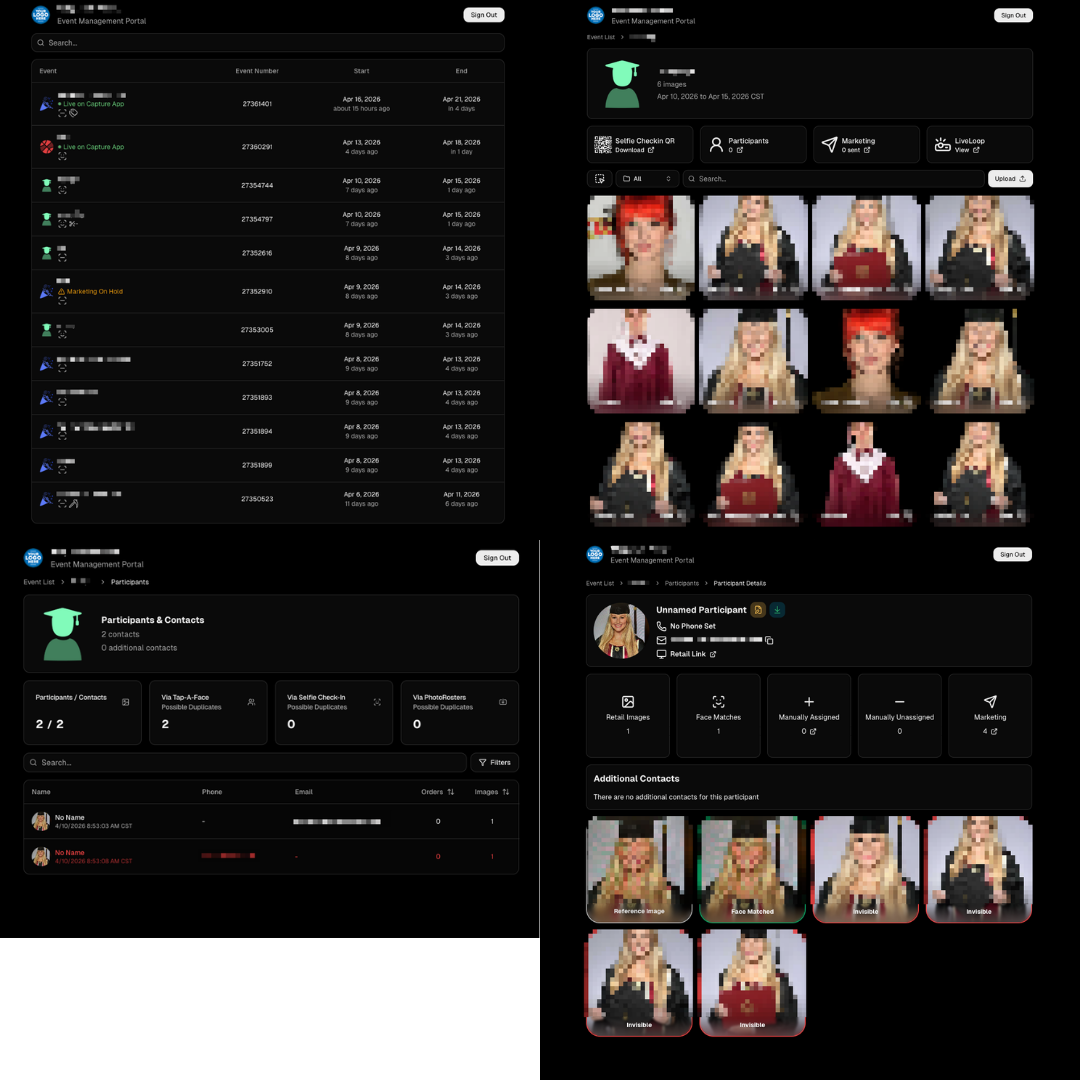
🧾 Event Management Portal (EMP) — Major Refresh (quic.pics/portal)

Quick reminder: the Event Management Portal (EMP) is a mini-dashboard on quic.pics that uses the Capture App login—so you can do “dashboard-like” tasks without downloading an app or using a full account login. It hasn’t been talked about much lately, but this week it got a big refresh in preparation for grad season.

What’s new:

  • Improved security
  • Tons of UI changes and a new dark-only theme
  • Event list page now includes a search bar
  • Event list page updated to “Live on Capture App” (instead of “Active”)
  • Event list page shows attributes like the main Dashboard + adds an Event Number column
  • Header now shows business name and logo
  • Fixed a crash on the Marketing History page
  • Added text/email filter on Marketing History
  • Images now use lightboxes with arrow key navigation
  • Participant Details now shows Additional Contacts
  • Participant Details now shows Invisible images
That’s the week! 💫

Between profile/business logos, a smoother package configurator, better report accuracy, and the EMP glow-up for grad season, this update should help you move faster, look more professional, and reduce friction across the whole customer experience.

Keep creating magic,
— The NowCandid Team 🍬
Related articles

Weekly Recap: New Unified Sidebar, Valentine’s Theme & Pano Updates 🍬❤️
Feature Updates
February 13, 2026

Weekly Recap: New Unified Sidebar, Valentine’s Theme & Pano Updates 🍬❤️

4
 minutes read

Hey photo friends! 👋


Big week. We’ve rolled out a brand-new unified Sidebar, added new pano options, improved Dashboard speed, and dropped a Valentine’s-ready retail theme.

Let’s break it down.

🧭 New Unified Sidebar (Desktop + Mobile)

The Dashboard navigation just got a major upgrade.

🖥️📱 One unified sidebar across desktop and mobile

  • No more different layouts depending on device. Navigation is now consistent everywhere.

🔎 “Sidebar Find” (press F to search)

  • The old command palette is now built into the Sidebar.
  • Press F and start typing to jump anywhere.

🍬 Candy Navigation Assistant

  • If no results are found, Candy will try to take you where you meant to go!

👀 Previously hidden items (like Extras) are now much easier to find.

This is one of the biggest usability upgrades we’ve shipped in a while!

🖼️ Panoramic Updates

🖨️ New 24×8 Panoramic Print (non-group version)

  • In addition to the group-only pano lineup, there’s now a non-group 24×8 option.

🏷️ Existing panos renamed to “X Group Print”

  • Makes it clearer which pano products are group-only.

🧱 Extreme aspect ratio images (1:3 or 3:1)

  • These are now limited to Panoramic Print products only.

🧼 Fixed banner artwork incorrectly appearing on pano products in the store sheet.

🛍️ Retail Improvements

Much faster initial image grid rendering

✨ Removed quick “No Images” flash during load

🎨 Fixed “View Images” hero button text being too dark on some themes

✂️ Crop size checker now correctly respects orientation for large-format products

💕 New SweetHearts Theme (Valentine’s Ready)

💖 SweetHearts retail theme released

🎉 Includes custom heart confetti at checkout

Just in time for Valentine’s Day sessions!

🖥️ Dashboard Improvements

🌾 Candy Culler upgrades

  • Can now set an entire filter to visible or invisible (except duplicates)
  • No longer also culls PhotoRoster reference images (whoops!)

🧑‍🤝‍🧑 Group Photo toggle added for Portraits Program

📂 Increased row limits for roster and PhotoRoster uploads

🛠️ Fixed overlay import not working properly

📏 Improved DPI validation on banner artwork (matching full frame improvements)

⚡ Faster requests across many areas including:

  • Profile updates
  • 2FA verification
  • Invoice loading/downloading
  • Retail settings updates
  • Bank info updates
  • Password reset emails

📱 Fixed mobile dashboard scrolling/focus issues in popups

🧾 Fixed create event occasionally not redirecting correctly

📸 Fixed QuicPics creation confirmation spam edge case

📬 Fixed unread inbox items appearing from before account creation

🔐 Security Improvements

🔒 Improved password reset security

🔑 Strengthened 2FA flows and verification handling

🤳 Selfie Check-In

🖼️ Images under 100×100 are now blocked (lab requirement enforcement)

🌀 LiveLoop

🌫️Updated backdrop blur

  • Looks better and is more performant, reducing crashes on WebKit browsers.

That’s the week!

A cleaner, unified Dashboard experience, smarter pano handling, better retail performance, and a Valentine’s-ready theme to boot.

Keep creating magic,

Candy 🍬

Weekly Recap: New 24×8 Panoramic Print, and More! 🖼️🧾
Feature Updates
January 30, 2026

Weekly Recap: New 24×8 Panoramic Print, and More! 🖼️🧾

3
 minutes read
Hey photo friends! 👋


This week is a mix of one new product and a handful of refinements across retail pricing, check-in validation, and Dashboard tools.

Here’s what changed.

🆕 New Product

🖼️ 24×8 Panoramic Print (Group-only)

  • A new panoramic option in the same aspect ratio as the other pano prints, built for team and group shots. (Like the others, it’s group-only.)

🛍️ Retail: Pricing & Editing Improvements

💸 Package “slashed” pricing corrected and standardized

  • Fixes around week 2/3 slash amounts so package comparisons are more accurate and consistent (including cases where tiered pricing is disabled on Quic events).

✍️ Captions editor now allows hyphens and periods

  • Small change, big relief for subjects with multi-hyphenate names.

✅ Check-In Page: Better Email Validation

📧 Improved email validation

  • Now also requires at least one period
  • Now blocks obvious typos like addresses ending in “.con”
  • These are in addition to previously existing "catches" we had in place to help customers avoid typos

👥 Additional Contacts now use the same validation rules

  • Makes additional contact info more typo-proof too!

🖥️ Dashboard: Fewer Snags, More Visibility

🧪 Image Tester now supports PNG files

  • Helpful for validating cutouts and art files.

📏 Improved DPI validation for artwork uploads (and Image Tester)

  • Better handling for images that don’t explicitly include DPI metadata.

📦 Package editor expanded limits

  • You can now include up to 16 4×6 and 5×7 prints in a package
  • (Digital downloads remain capped at 16; most other items remain capped at 8).

📁 Manage Images: Folder Download fixed for large folders

  • Folders over 100 images now reliably download in multiple ZIPs (no more stopping after the first chunk).

🧾 Order Details page got a big clarity upgrade

You can now see key indicators and selections more directly, including:

  • ✨ product finish/overlay indicators
  • 🖼️ backgrounds / AI background indicators (where applicable)
  • 📝 captions and chosen colors
  • ⬇️ background downloads working correctly again

🍬 Candy Culler Improvements

📊 Results update automatically while culling runs

  • As progress changes, search results refresh so culled images can appear without you manually refreshing.

🗂️ New downloadable folder report

  • Quick export alongside the toggle for easier review/sharing.

💬 Misc

📲 Day 0 SMS link placement updated

  • The retail link now appears after the unsubscribe text to encourage better MMS link previews.

That’s the week!

Another new pano option, tighter retail pricing presentation, cleaner check-ins, and a more informative Dashboard where it counts.

Candy 🍬

Weekly Recap: New Panoramic Prints, Smarter Culling Tools & Checkout Improvements🖼️🧾
Feature Updates
January 23, 2026

Weekly Recap: New Panoramic Prints, Smarter Culling Tools & Checkout Improvements🖼️🧾

5
 minutes read
Hey photo friends! 👋

Candy here with this week’s updates. Highlights include two new panoramic print products, a bunch of Manage Images + Candy Culler usability wins, and retail checkout + link preview improvements.

Let’s jump in!

🆕 New Products: Panoramic Prints (Group-Only)

🖼️ 15×5 Panoramic Print (Group-only)


🖼️ 30×10 Panoramic Print (Group-only)

These are available across both Dashboard + Retail.

Reminders:

When you flag photos as Group Photos, they will become purchasable on Group products only IF you have Group Products in your Event's Offer.

If there are NOT Group Products in your Event's Offer, then images marked as Group Photos will be purchasable on any product (including downloads).

🖥️ Dashboard: Manage Images + Candy Culler Improvements

🧰 More Tools always visible on Manage Images

  • Previously it only appeared after an event had at least one image.

🌾 Candy Culler icon updated (axe → scythe)

👁️ Visibility toggle added right on the Cull page

  • Toggle visibility from the top-right of the image without opening the lightbox.

📦 Download Folder improves naming

  • Downloads now default to the folder name for the ZIP file, and you can choose where to save or rename it.

⌨️ CTRL/CMD+F supported on the Event PhotoTags page

🧑‍🤝‍🧑 Rosters, PhotoTags & Participant Fixes

🏷️ Roster upload now accepts “PhotoTags” column header

  • Previously only accepted “PhotoTag”.

🧩 PhotoTag filtering fixed on Participant List + Participant Details

  • Especially in edge cases where a later-merged record had the PhotoTag but the initial record didn’t.

📇 PhotoRoster Data Upload now supports 3 Additional Contacts (up from 2)

🧾 Image Release Gallery fixes

  • Face count edge cases resolved (duplicates/additional contacts/duplicate submissions)
  • Program filter fixed

🛍️ Retail: Checkout & Sharing Improvements

🧾 Improved checkout backend

  • Includes protections to reduce the edge case of double charges during backend disruptions.

🔗 Link previews fixed for non-QuicPics events

  • Previews should reliably appear in apps like iMessage and Discord.
    • If a retail hero exists, it’s used
    • Otherwise, the first relevant gallery image is used

🛡️ GalleryGuard enabled when watermark opacity is 0%

  • For events where the retail watermark setting is set to 0% opacity, GalleryGuard will still protect images.
    (Still disabled for Quic-type events.)

🌀 LiveLoop™ Fixes

🧠 Fixed out-of-memory crashing sometimes for LiveLoops with artwork renders

🖼️ Fixed artwork sometimes disappearing after LiveLoop runs for a long time

⚡ Performance & UI Fixes (Small but Helpful)

🚀 Offer list + Event Details load a bit faster

👤 Some profile actions are faster (passcode changes, retail settings, account data used by PhotoCoach / PortraitPress popups)

🧩 Fixed some Participant Details pages not loading

🖼️ Fixed Manage Images lightbox details getting out of sync when using arrow keys

🧷 Fixed Manage Images scrolling to the top when toggling visibility

🔑 Fixed Forgot Password page not sending email

📦 Offer Creator: New “À La Carte” Package Breakdown

🧮 New “À La Carte” section inside packages shows:

  • Individual item costs (if each package item is present in the offer as an individual product)
  • The package discount a shopper is getting (shows 0% if discount would be negative)

Note / Feature-Preview: In the near future, this will also be expanded to better highlight savings on packages on the retail site to your customers, automatically!

✅ Misc + Check-In Improvement

💬 Text campaigns weekend test: recurring (non-day-0) texts will now place the retail link at the very end to encourage link previews.

🤳 Selfie Check-In reliability improvements

That’s the week!

New panoramic prints, smoother culling, better retail reliability, and a bunch of cleanup that should make day-to-day usage feel tighter.

Keep creating magic,

Candy 🍬

Let’s get in touch

If you’re a photographer looking to add NowCandid services to your wheelhouse – set up a call by clicking the button below.

How to customize formatting for each rich text

How to customize formatting for each rich text

How to customize formatting for each rich text

How to customize formatting for each rich text

How to customize formatting for each rich text

What’s a Rich Text element?

The rich text element allows you to create and format headings, paragraphs, blockquotes, images, and video all in one place instead of having to add and format them individually. Just double-click and easily create content.

A rich text element can be used with static or dynamic content. For static content, just drop it into any page and begin editing. For dynamic content, add a rich text field to any collection and then connect a rich text element to that field in the settings panel. Voila!

Headings, paragraphs, blockquotes, figures, images, and figure captions can all be styled after a class is added to the rich text element using the "When inside of" nested selector system.

  • List One
  • List Two
  • List Three
  • List Four
  • List Five

This is a link

This is bold text