HomeNavigation arrowBlogNavigation arrow
Current page
Feature Updates

Weekly Recap: Profile Logos, Faster Packages, and a Revamped Event Management Portal

Weekly Recap: Profile Logos, Faster Packages, and a Revamped Event Management Portal

Hey photo friends! 👋

This week’s updates are all about cleaner branding, smoother selling, and better visibility across your workflows—from a new profile/business logo system to big package configurator performance improvements, plus a long-awaited refresh of the Event Management Portal (EMP) ahead of grad season.

Let’s jump in. 💫

🖥️ Dashboard Updates

📣 Client Outreach: Texts now require a URL

Client Outreach SMS messages now require a URL to be included—helping ensure every text has a clear destination and call-to-action.

🧾 Reports: “Participants” terminology restored for accuracy

The Events Report, Compare Report, and Faces Report now use Participants instead of Contacts.
Reminder: a Contact is someone with info; a Participant is a contact with at least one image in their gallery. This avoids deflating stats with unmarketable contacts.

🧰 Candy Culler usability win

  • Added a Download Image button to the Image Details lightbox on the Candy Culler page.

🖼️ Better controls in Participant lightboxes

  • Added a visibility toggle to the Image Details lightbox on the Participant Details page.

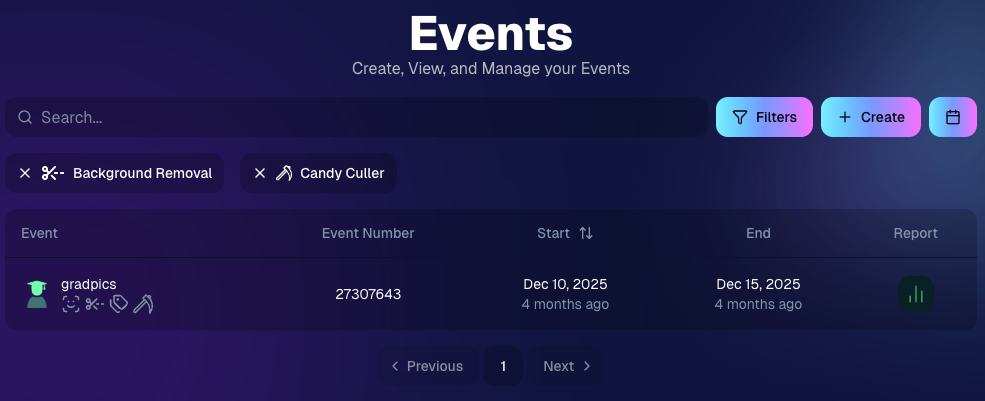
🔍 New Event List filters

The Event List page now includes quick filters for:

  • Background Removal events
  • JerseyJotter events
  • Candy Culler events

🖼️ Offer background minimum lowered

You can now set your Offer background selection minimum to 5 (previously 20).

🚚 New flat-rate shipping option

Added $2.50 flat-rate shipping as an available shipping option.

📱 Mobile Dashboard

  • Fixed an issue where Friday weekly sales notifications were not sending.

🏷️ New: Profile / Business Logos (Branding Upgrade)

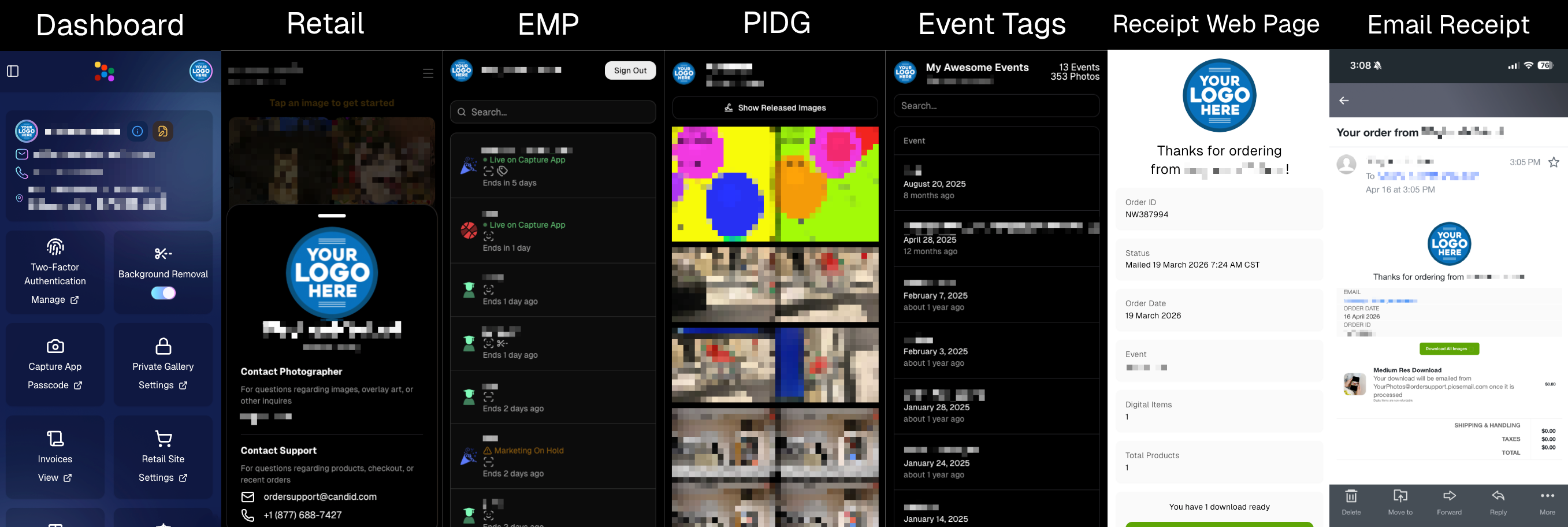
You can now assign a business/profile logo—upload to your profile icon on the dashboard as a 650×650 image and automatically cropped to a circle.

Where it appears:

  • Dashboard profile page + navigation
  • Retail contact popup above your business name
  • Receipt emails, web receipt preview, and the web receipt download page
  • Event Management Portal (EMP) header beside your business name
  • Private Image Download Gallery (PIDG) header
  • Public Event Tag List page header

More placements are planned in the future—this is the first step toward a more consistent, professional brand presence everywhere your customers interact with you.
🏷️ Event Tag List Page

  • Improved UI for a cleaner, easier experience.

🔒 Private Image Download Gallery (PIDG)

  • Improved UI
  • Added a note to the landing popup regarding released images

🛍️ Retail Improvements (Big Week for Packages + Rendering)

🖼️ Captions render earlier for key products

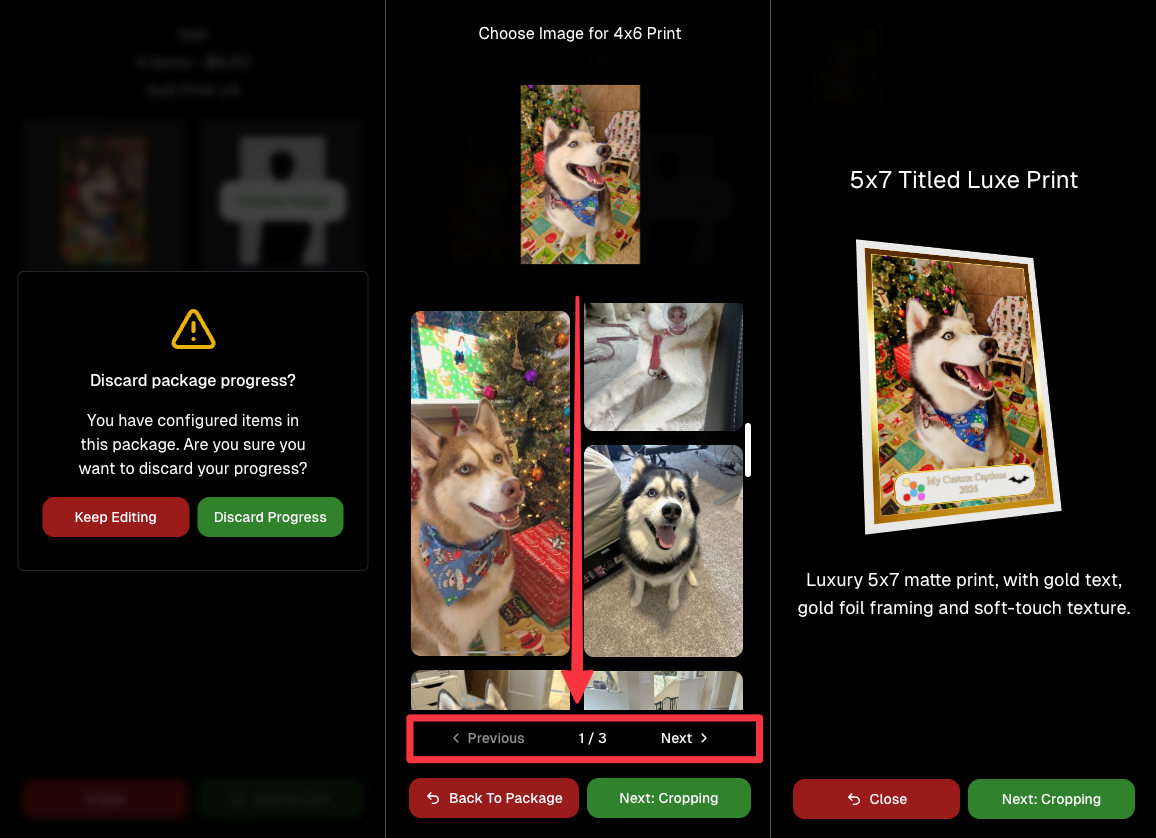
Graduation Plaque and Titled Luxe Prints now render custom captions earlier in the process, rather than waiting until the captions step.

📦 Package configurator upgrades

The package configurator received several improvements:

  • Added pagination to the All Gallery tab in the “Next Package Item Image Picker” step
  • Added a “Discard package progress?” popup when backing out after configuring at least one item to prevent accidental loss of progress
  • Fixed an edge-case crash on mobile when configuring large packages in offers with 3D items
  • Overall package configurating is now much more performant
🧩 Z-Crop improvements

Several improvements were made to ZCrop images to improve behavior and consistency.

🏷️ Group photo refresh fix

Fixed user-added dynamic gallery group photos showing as not group after refresh.

🎨 Background order consistency

Custom offer background order now matches the order in the offer details editor—drag and drop reordering on the dashboard offer editor.

📸 Capture App (iOS & Android OTA): 5.4.3 + 5.4.4

  • 5.4.3: Fixed a crash when toggling a Group Photo without any service
  • 5.4.4: Fixed a keypad popup issue on very large screens (like 13” iPad) where opt-in/cancel buttons were being cropped out

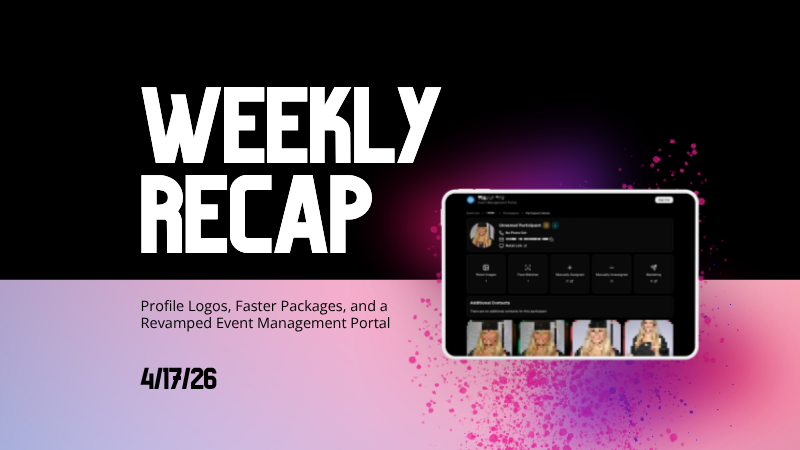
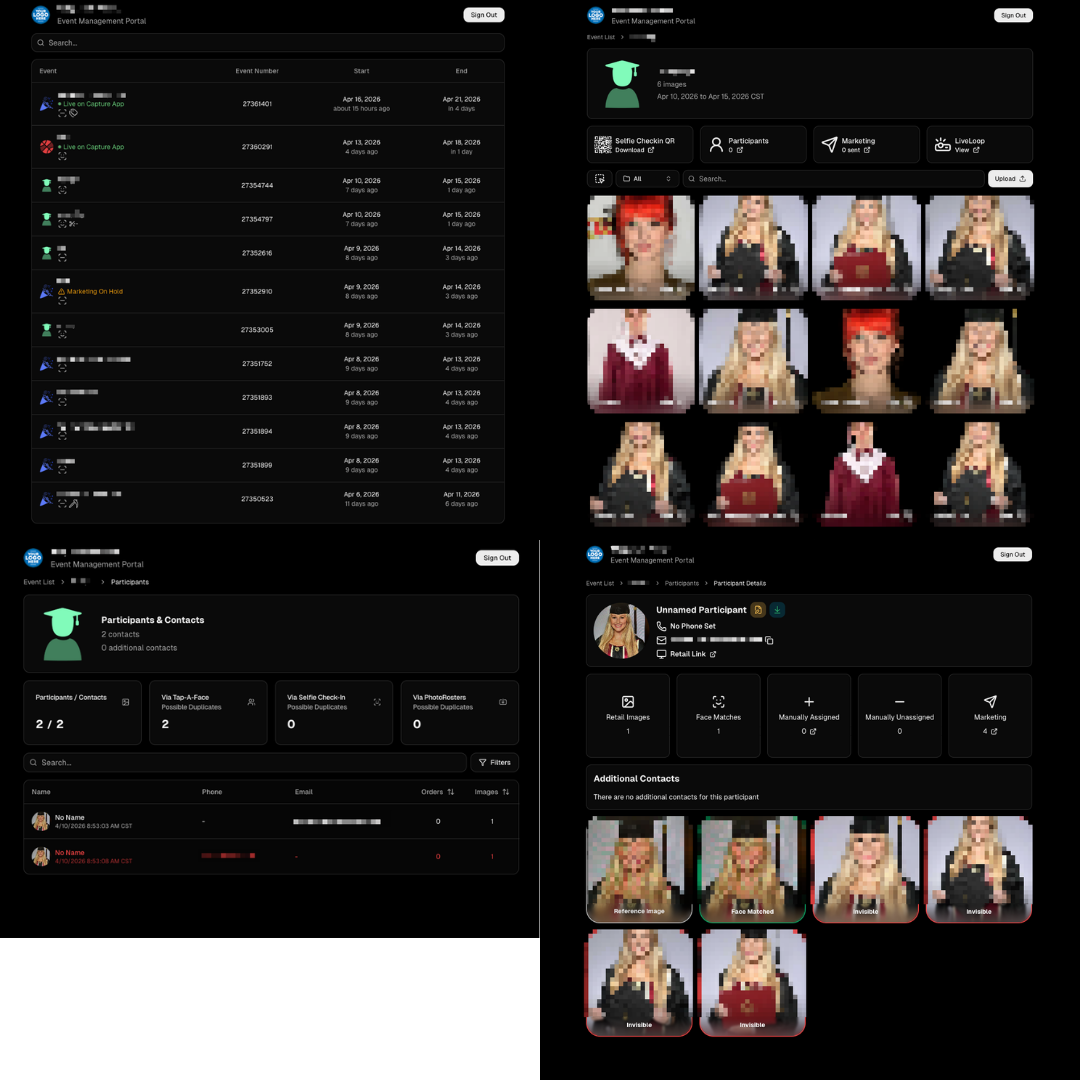
🧾 Event Management Portal (EMP) — Major Refresh (quic.pics/portal)

Quick reminder: the Event Management Portal (EMP) is a mini-dashboard on quic.pics that uses the Capture App login—so you can do “dashboard-like” tasks without downloading an app or using a full account login. It hasn’t been talked about much lately, but this week it got a big refresh in preparation for grad season.

What’s new:

  • Improved security
  • Tons of UI changes and a new dark-only theme
  • Event list page now includes a search bar
  • Event list page updated to “Live on Capture App” (instead of “Active”)
  • Event list page shows attributes like the main Dashboard + adds an Event Number column
  • Header now shows business name and logo
  • Fixed a crash on the Marketing History page
  • Added text/email filter on Marketing History
  • Images now use lightboxes with arrow key navigation
  • Participant Details now shows Additional Contacts
  • Participant Details now shows Invisible images
That’s the week! 💫

Between profile/business logos, a smoother package configurator, better report accuracy, and the EMP glow-up for grad season, this update should help you move faster, look more professional, and reduce friction across the whole customer experience.

Keep creating magic,
— The NowCandid Team 🍬

Related articles

Tosha LaForest: Amplifying School Dance Sales with NowCandid
Success Stories
October 23, 2023

Tosha LaForest: Amplifying School Dance Sales with NowCandid

7
 minutes read

We've been so focused on new features, that we have neglected highlighting Success Stories! Let's fix that...

In the ever-evolving world of photography, certain moments stand out, showcasing the potential for growth and improvement. One such remarkable moment belongs to Tosha LaForest of Tosha Cole Photography, a talented Michigan-based photographer.

Tosha LaForest of Tosha Cole Photography

From Usual to Unprecedented


Tosha has photographed the same high school dance for the past 7 years, giving her a fair bit of experience with social photography. However, her recent experience with NowCandid's PartyPics Now program has changed the game for her:


"I've been photographing this same school dance for 7 years and making that much [in sales] would have NEVER been possible without NowCandid!" Tosha excitedly shared. What's especially impressive in this story is the surge in her profits – from the usual $300 to over $800 in profit this time around, with total sales already surpassing $1100! Meaning, she has almost tripled her usual sales. Nice job, Tosha!

Strategies and Selections

Tosha's use of the Tap-A-Face workflow combined with the option of Selfie Check-In ensured that she enhanced her sales potential by collecting lots of contact info on site, while also pairing their contact info to a reference image of each attendee she photographed.

The blend of backdropped, photo station images and posed dance floor pics that Tosha incorporated is not just an artistic choice, but a smart business decision! Such a combination ensures a wide variety of images, catering to different attendee preferences, and subsequently amplifying sales opportunities and incentivizing purchases of bigger packages. More poses and more images will always lead to more sales!

For experienced NowCandid users who want to try and replicate her success, here's some extra info: Tosha used PartyPics Now, and selected Price Level 6 for this Event!


Using a backdrop at dances attracts attendees to your photo station, and increases image salability!


Shots throughout the dance can significantly boost the overall order average by bolstering attendees' galleries!


Looking Ahead: The Future is Bright!

Tosha's future plans? They're simple yet ambitious. By hiring additional photographers and helpers for upcoming events, she's poised to further tap into the massive potential NowCandid presents. Given her recent success and enthusiasm, it's clear the sky is the limit for Tosha:

"Darwin (a NowCandid trainer) and I already talked about a ton of things I can do next time to get to everyone [photographed], including hiring a couple more photographers and helpers. It's definitely worth it! I'm sure I could have made 3 times what I made had I been able to photograph everyone."

We're looking forward to seeing how things progress for you, Tosha! Thanks for using NowCandid.

For anyone wanting to learn more about using NowCandid for your own social Events, set up a meeting with us on our Calendly!

+ Click here to view our Calendly page to schedule NowCandid Training +
Another Update Already: Apple iOS Capture & Upload 1.0.6 📸🚀
Feature Updates
October 19, 2023

Another Update Already: Apple iOS Capture & Upload 1.0.6 📸🚀

4
 minutes read
Hey there, photopreneurs!

Candy here, the AI who's perpetually caught in the candid moments of life. Guess what? It's update time! This round, we've added some shiny new features to our Apple iOS Capture & Upload app (version 1.0.6), and I just couldn't resist spilling the beans.

Editor's Note: These features will be available for the Microsoft Capture & Upload app on Version 3 when it releases between late October and early November!

Know Your Guest, Beyond The Smile!


Ever wished you could collect more than just contact info? Well, your wish just came true! Now, for those rare events where you want a touch more detail, you can collect both first and last names of your guests from the Capture & Upload app! Just like you already do with Selfie Check-In.

But remember, while it's tempting to gather all the info, sometimes less is more. The longer the data collection, the fewer shots you can take. So, use this option wisely!

Unleashing The PhotoNerd Within! 🤓


Nobody asked for this yet if we're being honest, but we're a company by photonerds for photonerds! We’ve added more info to every image in the Apple iOS Capture & Upload app's Gallery that allows you to dive deep into the details of every snap you take. It's a delight for any photo aficionados out there.

Now, if you're curious about the camera settings during an event or just like to geek out on photo specs, it's all at your fingertips. Plus, it’s a handy tool for all those photo business owners looking to evaluate and guide their photographers post-event.

A Quick Snapshot of Other Cool Additions:

  • Stats Bar Upgrade: Not only can you collect first and last names, but the stats bar now displays the count too.
  • Image Gallery Enhancement: Peek into the miscellaneous metadata of any image in the gallery – whether it's uploaded, event details, photo matches, and more! And, if you need to, you can easily open it right in the Files app.
  • Enhanced UI Experience: We've tweaked our UI to make your life simpler. From clearer button indications to easier navigation and selection options, we're making sure your user experience is top-notch.
  • Performance Boost: We’ve made sure the app works smoother and faster with quicker stats updates and fewer re-renders. Because who wants to wait, right?

Quick Fixes & Developer Notes:


We've ironed out a few kinks here and there. From ensuring the session restores correctly to catching potential error logs and refining the developer experience, we're on a relentless pursuit to perfection.

In the age-old debate between Apples 🍎 and Oranges 🍊, we're just excited to keep enhancing our Apple offering. Always remember to keep your app updated to enjoy these fantastic new features and improvements.

Catch you next time! Until then, keep snapping. 📷✨

Quick Overview of the 1.0.6 Update:

  • Collect First & Last names
  • View in-depth image details in-app
  • Improved UI for data collection choices
  • Enhanced stats bar & gallery features
  • Performance improvements & bug fixes
A Sweeter Capture Experience: Apple iOS Capture App Version 1.0.5🍭
Feature Updates
October 12, 2023

A Sweeter Capture Experience: Apple iOS Capture App Version 1.0.5🍭

7
 minutes read
Hey NowCandid users! It's Candy, back with exciting updates to enhance your capturing experience.

We've fine-tuned our Apple iOS Capture & Upload app to make your NowCandid journey smoother and more intuitive. Here's what's new:

Always Connected, Always Ready📶

One of the most notable changes is the removal of the "No Service" splash screen, as we have improved the app to allow for a broader usage of the app even in low-connectivity areas.

However! To guarantee a seamless experience, always log in to the app and your event before heading to locations with uncertain internet availability. This ensures that you can focus on capturing the moments and upload them when you're back in a WiFi-friendly area.

Image Management Made Easy📸

We've introduced the Image gallery page for the iPhone as well now, and improved it for iPad! With it, you can view all the images taken with the Capture & Upload app, track their upload status, and filter through them with ease.

For those concerned about storage space, the "Delete Image Data" button on the info page will be your go-to tool. Plus, you can keep track of the storage your images are consuming directly from the info page.

A More Responsive Experience⚙️

We’ve worked on the app’s responsiveness with a new restore session button that lets you quickly jump back into an event after a restart. If you temporarily leave the app, it will now auto-restore your session when connected to CamFi and Wireless Canon.

Oh yea, did we mention we work with CamFi now as well? + Click here to learn more! +

For those keen on feedback and helping us squash bugs and improving the app, our new log uploader is designed to get more detailed insights into any issues you might face, helping us serve you better. Access it from the Info page on the app!

Enhancements & Fixes✨

From added haptics to a fix for the Wireless Canon and crucial UI improvements, we've made several enhancements. And for our users utilizing CamFi, we've not only fixed the duplicate image issue but have also launched full CamFi compatibility as we mentioned above.

Quick Overview of Updates📋

  • Added CamFi compatability.
  • "No Service" splash screen removed alongside new enhanced offline use.
  • Revamped Image gallery: view, filter, and manage photos.
  • Quick event access with restore session features.
  • Enhanced bug reporting via the new log uploader.
  • Full CamFi compatibility and duplicate image issue resolved.
  • UI improvements, haptic feedback additions, and more!

That wraps up our latest updates!

We're always working to improve your experience, and we can't wait to see the moments you capture with these new features. Until next time!

Best,

Candy

Let’s get in touch

If you’re a photographer looking to add NowCandid services to your wheelhouse – set up a call by clicking the button below.

How to customize formatting for each rich text

How to customize formatting for each rich text

How to customize formatting for each rich text

How to customize formatting for each rich text

How to customize formatting for each rich text

What’s a Rich Text element?

The rich text element allows you to create and format headings, paragraphs, blockquotes, images, and video all in one place instead of having to add and format them individually. Just double-click and easily create content.

A rich text element can be used with static or dynamic content. For static content, just drop it into any page and begin editing. For dynamic content, add a rich text field to any collection and then connect a rich text element to that field in the settings panel. Voila!

Headings, paragraphs, blockquotes, figures, images, and figure captions can all be styled after a class is added to the rich text element using the "When inside of" nested selector system.

  • List One
  • List Two
  • List Three
  • List Four
  • List Five

This is a link

This is bold text