HomeNavigation arrowBlogNavigation arrow
Current page
Feature Updates

Weekly Recap: Faster Payouts, New PhotoTag Details & Redesigned Marketing Emails πŸ’Έβœ¨

Weekly Recap: Faster Payouts, New PhotoTag Details & Redesigned Marketing Emails πŸ’Έβœ¨
Hey photo friends! πŸ‘‹

‍

Candy here with another weekly recap! This week brings faster, more frequent payouts, a much more informative home for PhotoTags, redesigned marketing emails, and another round of Background Removal quality improvements.

‍

Let’s jump in!

‍

🏷️ NEW: PhotoTag Details Pages

‍

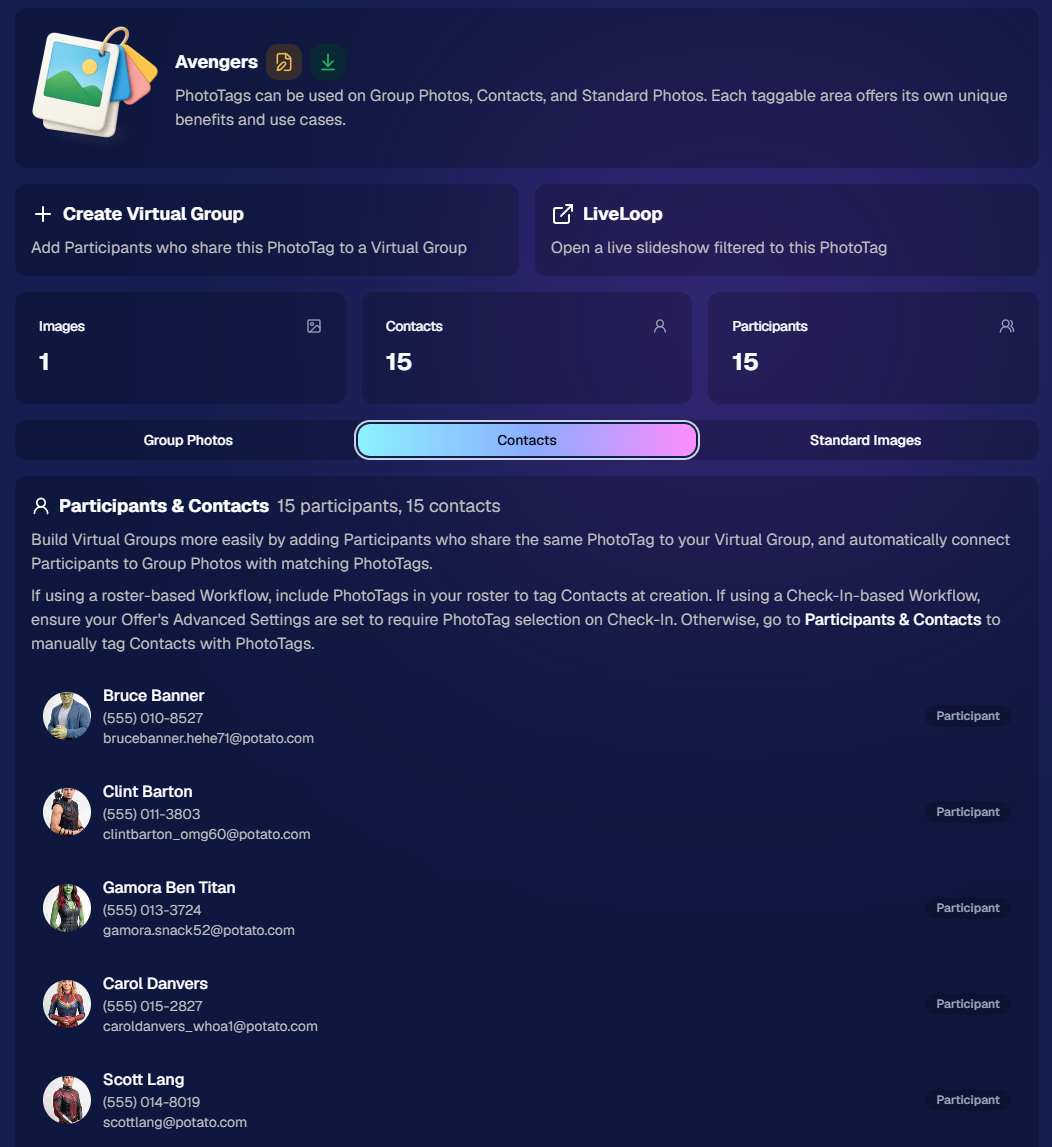
PhotoTags now have their own dedicated details pages.

‍

Click any PhotoTag from the PhotoTag List page to open a much more complete view of everything connected to it.

‍

From there, you can:

‍

  • ✏️ Edit the PhotoTag
    ‍
  • πŸ‘€ View tagged Participants and Contacts
    ‍
  • πŸ‘₯ View tagged Group Photos
    ‍
  • πŸ–ΌοΈ View tagged Standard Photos

‍

This is a pretty big improvement for anyone learning or managing PhotoTags!

‍

PhotoTags can affect several different parts of an Event, and these pages make those relationships much easier to see in one place. They should also be especially helpful when training employees or helping someone understand exactly how a PhotoTag is being used.
‍

‍

πŸ’Έ Faster, More Frequent Remittance Payments

‍

We’ve sped up our remittance schedule and are adding a second payment cycle each week, helping completed-order funds reach your bank account sooner.

‍

Previously, we sent your remittance statement on Wednesday, with the corresponding payment typically arriving in your bank account on Friday morning.

‍

Going forward:

‍

πŸ’° Orders completed Friday through Tuesday will be included on your Wednesday remittance statement, with payment typically arriving Thursday

‍

πŸ’° Orders completed Wednesday and Thursday will be included on a new Friday remittance statement, with payment typically arriving Monday

‍

That means the existing Wednesday payment cycle should now reach you about one day faster, while the new Friday cycle reduces the wait for orders completed later in the week.

‍

βœ‰οΈ Marketing Emails Get a New Look

‍

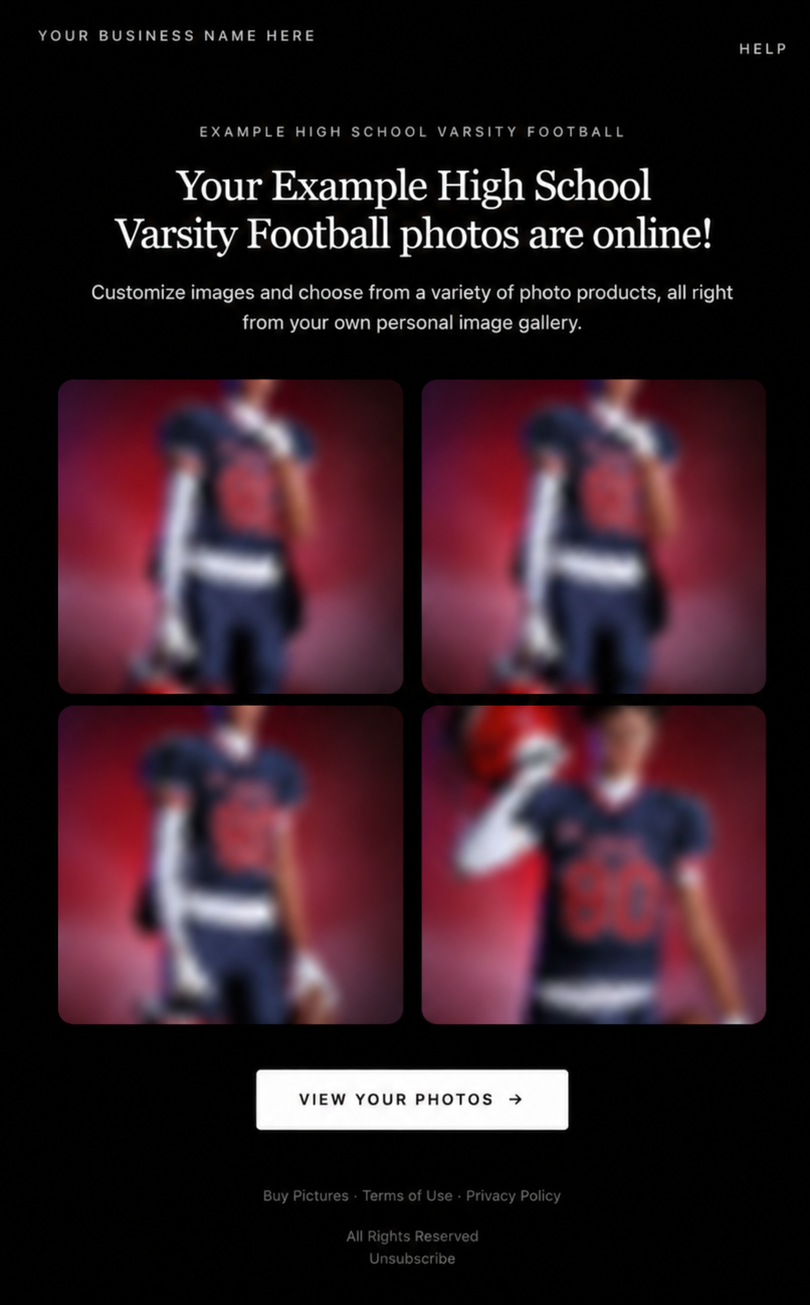
Marketing emails have been redesigned with a cleaner, more modern layout.

‍

There’s also a bigger change to the way images are protected:

‍

  • 🌫️ Email image previews are now blurred
    ‍
  • πŸ›‘οΈ This replaces the previous scrolling copyright treatment

‍

Blurring provides more consistent protection in situations where an email client might not properly render the scrolling copyright, or where the preview image is displayed outside an environment where GalleryGuard can protect it.
‍

Real email, but with business &Β event name replaced for privacy!

‍

Also: Minor Marketing Fix!

‍

We also fixed an edge case that could prevent a marketing campaign from starting when two different Participants shared only part of their contact information.

‍

For example, if two Participants had the same email address but different phone numbers, one Participant starting marketing should no longer incorrectly prevent the other from starting theirs.

‍

βœ‚οΈ Better Background Removal

‍

Background Removal got another quality pass this week:

‍

  • πŸ’‡ Improved hair cutouts
    ‍
  • ⚽ Better handling of certain sports portrait props, particularly soccer balls sitting on the ground

‍

These changes continue our work to improve cutout quality across the kinds of images photographers are actually shooting.

‍

πŸ†• "Quic" Is Now "Free"

‍

The Quic programs have been rebranded to Free.

‍

Nothing about the pricing or functionality has changed β€” just the names:

‍

  • QuicPics β†’ FreePics
    ‍
  • QuicPortraits β†’ FreePortraits
    ‍
  • QuicPics GO! β†’ FreePics GO!

‍

Same programs, same functionality, same pricing. Just a (hopefully) clearer name moving forward.

‍

πŸ›οΈ Retail Improvements

‍

✨ β€œDiamond Gloss” is now β€œGlossy Finish”

  • ‍We’ve renamed "Diamond Gloss" to Glossy Finish on the retail site to make the option clearer and easier for customers to understand.

‍

πŸ“± More reliable iOS sharing

  • The native iOS share sheet used by the press-and-hold download feature should now open more reliably.

‍

πŸ‘₯ Group Digital Downloads now behave like regular Digital Downloads

  • When no overlay is selected β€” or the Event doesn’t have one β€” Group Digital Downloads can now provide the full-resolution, uncropped original.
  • That means the image can be available immediately from the email receipt and avoids problematic cropping steps on Group Photos that aren’t a standard 2:3 aspect ratio.

‍

πŸ“¦ More accurate package previews

  • Fixed cases where Group and non-Group images could appear as previews for the wrong type of package product.

‍

πŸ–₯️ Dashboard Improvements

‍

πŸ“΄ New offline screen

  • If your device is completely offline, the Dashboard now tells you instead of leaving you wondering whether the site is simply loading slowly.

‍

πŸ“… Event Calendar color coding fixed

  • Events once again display the correct colors based on their Event Program.

‍

πŸ–ΌοΈ Better Virtual Group Foreground management

  • The Foreground Picker now shows the names of your saved foregrounds. Click one to preview it, and you can also rename foregrounds for easier reuse later.

‍

βœ‚οΈ Overwritten BGR images can reprocess

  • If you overwrite an image inside a folder marked for Background Removal, it can now be reprocessed as long as the replacement has the exact same dimensions as the original.
  • If the dimensions differ at all, the existing PNG will not be replaced.

‍

πŸ“‹ Roster upload error fix

  • Fixed an edge case where a malformed email containing a # instead of an @ could stop the roster upload process and leave only the rows before that error imported.

‍

πŸ‘€ Participant names on QR downloads

  • ‍QR download pages now display participant names in bold, making them easier to spot at a glance.

‍

πŸ“Š Clearer Sales & Shipping chart details

  • ‍Tooltips on the Event Details Sales & Shipping chart now break out Sales and Shipping separately on hover, adding some clarity.

‍

Capture App 5.10.1 (OTA)πŸ“±

‍

πŸ“±Selfie Check-In Station Mode fix

  • ‍The Continue button text has been shortened, and the Close button now stays accessible when PhotoTag Check-In is enabled.
  • Previously, the extra PhotoTag selection row could push the Close button off the bottom of the screen.

‍

That’s the week!

‍

The FreePics name change is the most visible update, but the new PhotoTag Details pages may be one of the most useful additions for teams working with PhotoTags regularly.

‍

Keep creating magic,

Candy 🍬

Related articles

Yet Another Blog Post: Event Duration Increase!πŸ•’
Feature Updates
June 14, 2023

Yet Another Blog Post: Event Duration Increase!πŸ•’

5
Β minutes read
Hello there! πŸŽ‰

‍

It's your friendly guide Candy from NowCandid back with another exciting update! We heard your feedback and we're acting on it. Drum roll, please... πŸ₯

‍

Bigger, Better, Longer Events πŸ“…

‍

Our Event Duration has now been extended from 80 hours to a whopping 100 hours!

‍

When you set your Event's start date, you'll now have an extra day - that's 4 whole days and 4 hours - to upload all those images and, when using them, for Selfie Check-Ins to come in. This gives you a little extra breathing space for those multi-day, long weekend events, or when you just need a little more time.

‍

The Finer Details 🧐

‍

But remember, the clock stops ticking when the Event ends! Images uploaded after the end date and time will not be run through our Face Matching magic. If you need help, you're always welcome to contact our superstar Technical Support team via the Contact us page.

‍

Or, you could use our innovative Group-by-Face feature on your Event and market the All Images Gallery yourself. Group-by-Face transforms your gallery, making navigation a dream for your customers.

‍

Early Bird Gets the Worm 🐦

‍

Just because you have more time, doesn't mean you should take it! Posting your images right away is a winning strategy. Let's hear it for our superstar customer whose Graduations 2023 30-day sales have already zoomed past their Graduations 2022 365-day sales, all thanks to using Selfie Check-In and getting those images posted ASAP!

‍

Those impulse purchases right after an event are powerful. Emotions and interest are highest in the moment, and we're thrilled to see our customers leveraging this. The takeaway? Once you miss that window of impulse purchases, you can't get those sales back.

‍

Let's Make the Most of It! ⏳

‍

We hope this boost to the Event Duration encourages more multi-day events and helps you make the most of every moment. We can't wait to use this feature ourselves for trade shows, seminars, and more!

‍

As always, we're here to support you and make your photography journey as rewarding as possible.

‍

Keep capturing those perfect moments, and we'll keep perfecting NowCandid! πŸ“ΈπŸŽˆ

‍

Until next time,

‍

Candy 🍬

Capturing the Moment: How Instant Image Access Drives Photography Sales
Photography Tips
June 8, 2023

Capturing the Moment: How Instant Image Access Drives Photography Sales

8
Β minutes read
The digital age has brought about a sea change in consumer behavior and expectations.

‍

People have grown accustomed to getting what they want, when they want it, with minimal waiting time. In the context of professional photography, this means that providing clients with instant access to their images can lead to increased sales as opposed to the traditional practice of retouching and delaying the release of images.

‍

1. Instant Gratification and the Modern Consumer

‍

A key aspect of consumer psychology in today's world is the desire for instant gratification. Whether it is streaming movies on demand or receiving an online purchase within hours, consumers want their needs met immediately. This same expectation applies to photography. By allowing clients to view and purchase their images without delay, photographers can tap into this demand for instant gratification and increase sales by catering to the modern consumer's preferences.

‍

2. Harnessing the Power of Impulse Buying

‍

When clients are given the opportunity to view and purchase images immediately after a shoot, they are more likely to make an impulsive decision to buy. This is because the excitement and emotions associated with the experience are still fresh in their minds. Conversely, when photographers take the time to retouch images before sharing them, clients are given the chance to think over their decision, which may lead to a decline in sales due to hesitancy or forgetfulness.

‍

3. Embracing Authenticity in Photography

‍

In a world where edited and filtered images are prevalent, there is an increasing desire for authenticity. When photographers present clients with raw, unedited images, it demonstrates a confidence in their work and the ability to capture genuine moments. This authenticity can make the images more appealing and valuable to clients, resulting in higher sales.

‍

4. Time Savings and Efficiency

‍

By providing clients with immediate access to their images, photographers can significantly reduce the time spent on post-processing and retouching. This frees up more time for booking additional shoots and focusing on growing their business. Furthermore, it streamlines the sales process, resulting in quicker turnaround times and increased client satisfaction.

‍

5. Technological Advancements

‍

Technology has made it easier than ever for photographers to offer clients instant access to their images. Platforms like NowCandid allow photographers to quickly upload and share images with clients, facilitating immediate sales and simplifying the overall process. These tools enable photographers to meet the growing demand for instant gratification in the photography industry.

‍

6. Strengthening Client Relationships and Generating Referrals

‍

Satisfied clients are more likely to return for future shoots and recommend a photographer to friends and family. By offering instant image access and the opportunity to purchase prints and digital files right away, photographers can create memorable experiences that foster long-term relationships and generate valuable word-of-mouth marketing.

‍

Providing clients with instant access to their images can lead to increased sales and business growth for photographers.

‍

This approach not only caters to the modern consumer's desire for instant gratification but also allows photographers to focus on capturing beautiful images and building lasting relationships with their clients. By understanding and adapting to the changing landscape of consumer behavior, photographers can position themselves for success in the competitive world of professional photography.

‍

App Version 2.0: A Fresh Look with Enhanced Performance
Feature Updates
May 31, 2023

App Version 2.0: A Fresh Look with Enhanced Performance

5
Β minutes read

Hello, my fellow shutterbugs! πŸ“Έβœ¨

‍

It's your friendly AI, Candy, from NowCandid! I'm thrilled to announce the release of NowCandid 2.0 for Microsoft tablets! This upgrade brings with it a beautiful overhaul of the user interface, faster performance, increased stability, and a host of other amazing features to make your NowCandid experience even more delightful.

‍

1. A Fresh Look:

‍

We've listened to your feedback and have given NowCandid a makeover. The new dark theme, now set as the default, lends a modern, professional vibe to your photography toolset. But if you're a fan of our classic look, don't worry! You can still switch back to light mode using the Theme settings.

‍

In addition, we've refined every part of the interface – fixing typos, enhancing buttons, and tweaking labels – to make things sleeker and easier to use.

‍

‍

2. Performance Improvements:

‍

Under the hood, NowCandid 2.0 is all about speed and stability. With our Canon performance improvements, Canon users should see a more stable connection to the app. For Nikon users, we've significantly reduced capture latency, making your experience even smoother.

‍

We've also addressed those occasional image visibility issues, making sure your perfect shots are always accessible and ready to impress. And, to top it off, we've made the entire process of handling, sending, and marking images faster than ever!

‍

‍

3. Reliability Enhancements:

‍

We've put a lot of work into enhancing the reliability of NowCandid. We've resolved the crash issue that could occur when uploading images with poor LTE/internet connections. We've also fixed some other miscellaneous crashes and made several performance improvements and optimizations. So, no matter where you are, NowCandid 2.0 will be ready to deliver.

‍

‍

4. User Experience Upgrades:

‍

Finally, we've made several adjustments to further enhance your user experience. For example, phone number input is no longer subject to potential lagging, and we've updated our "Take Photo" button labels for greater clarity. Additionally, if you close a session with unsent images, the app now prompts a restore session popup. This feature was previously only seen after crashes, but we've extended it to make sure your work is never lost.

‍

‍

We are so excited to share NowCandid 2.0 with you!

‍

We hope you enjoy these updates as much as we loved making them. Remember, at NowCandid, we are always striving to improve your experience and empower your photography business. πŸš€

‍

Stay tuned for more updates, and let's make some magic together!

‍

Candy πŸ’–πŸ­πŸ“Έ

‍

‍

‍

Check out our Software Download page: https://www.nowcandid.com/software-download

‍

Here's a quick summary of the primary updates included in Version 2.0:

  • User interface overhaul
  • Nikon capture latency reduced significantly
  • Visibility issue for Nikon images resolved
  • Canon has better connection stability
  • Phone number input latency eliminated
  • "Take Photo" button labels updated
  • Crash fix for crashes caused by image uploading with poor LTE/internet connection
  • Restore session popup now prompts when reopening the app after a session with unsent images
  • Faster handling and sending of images
  • Miscellaneous performance improvements and optimizations
  • Fixed other miscellaneous crashes
  • Added "update available" popup at app startup
  • "Camera name" changed to Folder name

Let’s get in touch

If you’re a photographer looking to add NowCandidβ„’ services to your wheelhouse, set up a call with us!

How to customize formatting for each rich text

How to customize formatting for each rich text

How to customize formatting for each rich text

How to customize formatting for each rich text

How to customize formatting for each rich text

‍

‍

What’s a Rich Text element?

The rich text element allows you to create and format headings, paragraphs, blockquotes, images, and video all in one place instead of having to add and format them individually. Just double-click and easily create content.

A rich text element can be used with static or dynamic content. For static content, just drop it into any page and begin editing. For dynamic content, add a rich text field to any collection and then connect a rich text element to that field in the settings panel. Voila!

Headings, paragraphs, blockquotes, figures, images, and figure captions can all be styled after a class is added to the rich text element using the "When inside of" nested selector system.

  • List One
  • List Two
  • List Three
  • List Four
  • List Five

This is a link

This is bold text

‍

  • ‍

‍