HomeNavigation arrowBlogNavigation arrow
Current page
Feature Updates

Weekly Recap: Faster Payouts, New PhotoTag Details & Redesigned Marketing Emails πŸ’Έβœ¨

Weekly Recap: Faster Payouts, New PhotoTag Details & Redesigned Marketing Emails πŸ’Έβœ¨
Hey photo friends! πŸ‘‹

‍

Candy here with another weekly recap! This week brings faster, more frequent payouts, a much more informative home for PhotoTags, redesigned marketing emails, and another round of Background Removal quality improvements.

‍

Let’s jump in!

‍

🏷️ NEW: PhotoTag Details Pages

‍

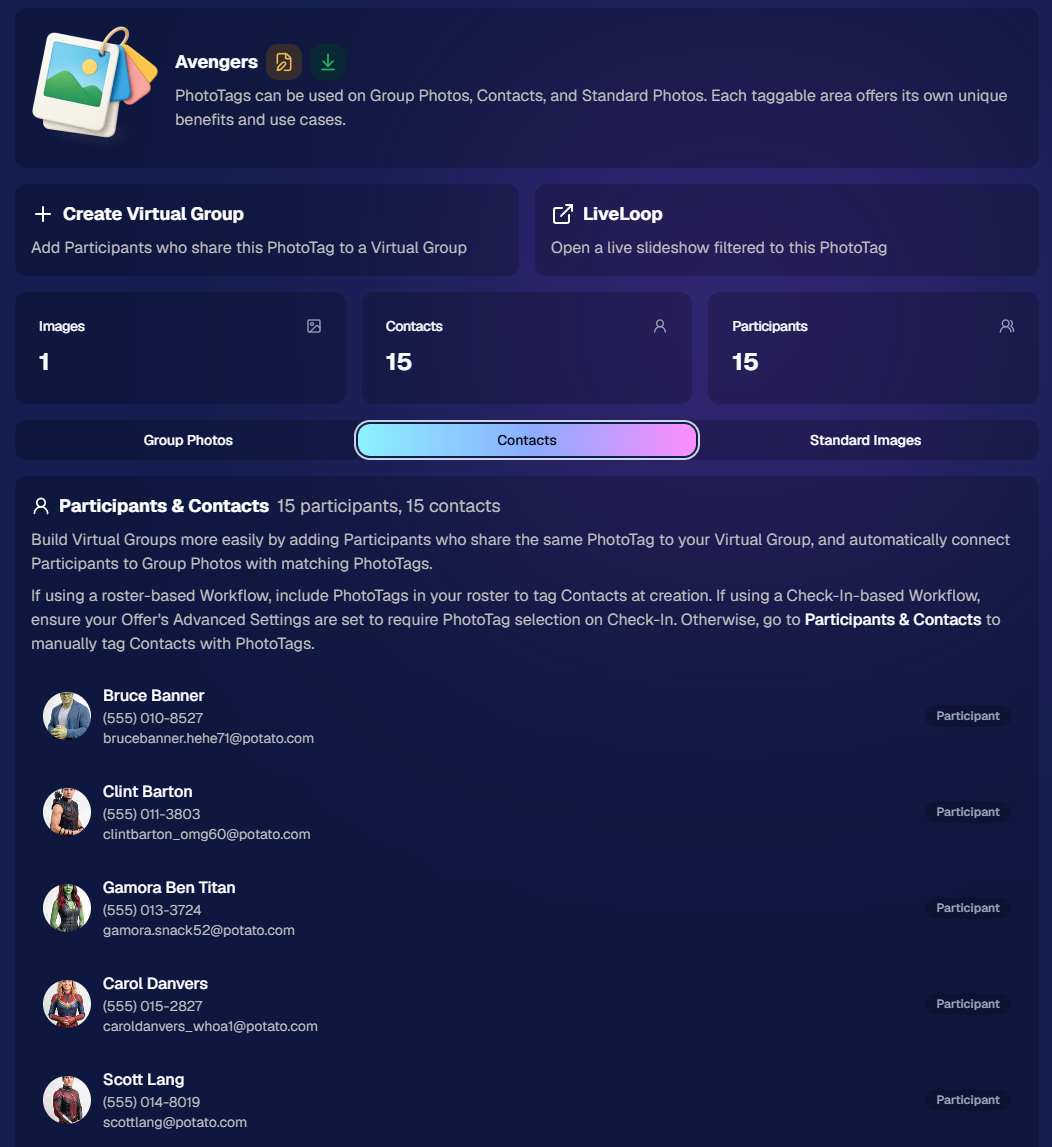
PhotoTags now have their own dedicated details pages.

‍

Click any PhotoTag from the PhotoTag List page to open a much more complete view of everything connected to it.

‍

From there, you can:

‍

  • ✏️ Edit the PhotoTag
    ‍
  • πŸ‘€ View tagged Participants and Contacts
    ‍
  • πŸ‘₯ View tagged Group Photos
    ‍
  • πŸ–ΌοΈ View tagged Standard Photos

‍

This is a pretty big improvement for anyone learning or managing PhotoTags!

‍

PhotoTags can affect several different parts of an Event, and these pages make those relationships much easier to see in one place. They should also be especially helpful when training employees or helping someone understand exactly how a PhotoTag is being used.
‍

‍

πŸ’Έ Faster, More Frequent Remittance Payments

‍

We’ve sped up our remittance schedule and are adding a second payment cycle each week, helping completed-order funds reach your bank account sooner.

‍

Previously, we sent your remittance statement on Wednesday, with the corresponding payment typically arriving in your bank account on Friday morning.

‍

Going forward:

‍

πŸ’° Orders completed Friday through Tuesday will be included on your Wednesday remittance statement, with payment typically arriving Thursday

‍

πŸ’° Orders completed Wednesday and Thursday will be included on a new Friday remittance statement, with payment typically arriving Monday

‍

That means the existing Wednesday payment cycle should now reach you about one day faster, while the new Friday cycle reduces the wait for orders completed later in the week.

‍

βœ‰οΈ Marketing Emails Get a New Look

‍

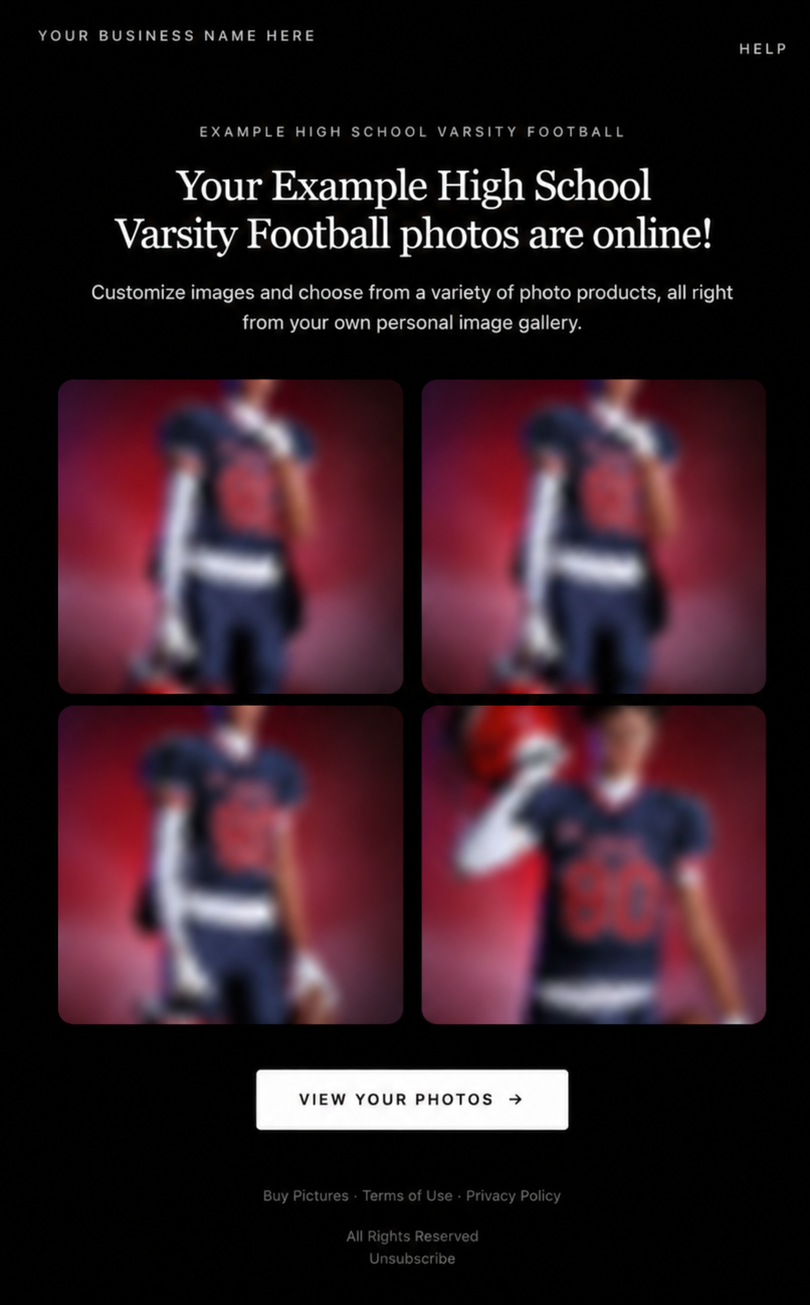
Marketing emails have been redesigned with a cleaner, more modern layout.

‍

There’s also a bigger change to the way images are protected:

‍

  • 🌫️ Email image previews are now blurred
    ‍
  • πŸ›‘οΈ This replaces the previous scrolling copyright treatment

‍

Blurring provides more consistent protection in situations where an email client might not properly render the scrolling copyright, or where the preview image is displayed outside an environment where GalleryGuard can protect it.
‍

Real email, but with business &Β event name replaced for privacy!

‍

Also: Minor Marketing Fix!

‍

We also fixed an edge case that could prevent a marketing campaign from starting when two different Participants shared only part of their contact information.

‍

For example, if two Participants had the same email address but different phone numbers, one Participant starting marketing should no longer incorrectly prevent the other from starting theirs.

‍

βœ‚οΈ Better Background Removal

‍

Background Removal got another quality pass this week:

‍

  • πŸ’‡ Improved hair cutouts
    ‍
  • ⚽ Better handling of certain sports portrait props, particularly soccer balls sitting on the ground

‍

These changes continue our work to improve cutout quality across the kinds of images photographers are actually shooting.

‍

πŸ†• "Quic" Is Now "Free"

‍

The Quic programs have been rebranded to Free.

‍

Nothing about the pricing or functionality has changed β€” just the names:

‍

  • QuicPics β†’ FreePics
    ‍
  • QuicPortraits β†’ FreePortraits
    ‍
  • QuicPics GO! β†’ FreePics GO!

‍

Same programs, same functionality, same pricing. Just a (hopefully) clearer name moving forward.

‍

πŸ›οΈ Retail Improvements

‍

✨ β€œDiamond Gloss” is now β€œGlossy Finish”

  • ‍We’ve renamed "Diamond Gloss" to Glossy Finish on the retail site to make the option clearer and easier for customers to understand.

‍

πŸ“± More reliable iOS sharing

  • The native iOS share sheet used by the press-and-hold download feature should now open more reliably.

‍

πŸ‘₯ Group Digital Downloads now behave like regular Digital Downloads

  • When no overlay is selected β€” or the Event doesn’t have one β€” Group Digital Downloads can now provide the full-resolution, uncropped original.
  • That means the image can be available immediately from the email receipt and avoids problematic cropping steps on Group Photos that aren’t a standard 2:3 aspect ratio.

‍

πŸ“¦ More accurate package previews

  • Fixed cases where Group and non-Group images could appear as previews for the wrong type of package product.

‍

πŸ–₯️ Dashboard Improvements

‍

πŸ“΄ New offline screen

  • If your device is completely offline, the Dashboard now tells you instead of leaving you wondering whether the site is simply loading slowly.

‍

πŸ“… Event Calendar color coding fixed

  • Events once again display the correct colors based on their Event Program.

‍

πŸ–ΌοΈ Better Virtual Group Foreground management

  • The Foreground Picker now shows the names of your saved foregrounds. Click one to preview it, and you can also rename foregrounds for easier reuse later.

‍

βœ‚οΈ Overwritten BGR images can reprocess

  • If you overwrite an image inside a folder marked for Background Removal, it can now be reprocessed as long as the replacement has the exact same dimensions as the original.
  • If the dimensions differ at all, the existing PNG will not be replaced.

‍

πŸ“‹ Roster upload error fix

  • Fixed an edge case where a malformed email containing a # instead of an @ could stop the roster upload process and leave only the rows before that error imported.

‍

πŸ‘€ Participant names on QR downloads

  • ‍QR download pages now display participant names in bold, making them easier to spot at a glance.

‍

πŸ“Š Clearer Sales & Shipping chart details

  • ‍Tooltips on the Event Details Sales & Shipping chart now break out Sales and Shipping separately on hover, adding some clarity.

‍

Capture App 5.10.1 (OTA)πŸ“±

‍

πŸ“±Selfie Check-In Station Mode fix

  • ‍The Continue button text has been shortened, and the Close button now stays accessible when PhotoTag Check-In is enabled.
  • Previously, the extra PhotoTag selection row could push the Close button off the bottom of the screen.

‍

That’s the week!

‍

The FreePics name change is the most visible update, but the new PhotoTag Details pages may be one of the most useful additions for teams working with PhotoTags regularly.

‍

Keep creating magic,

Candy 🍬

Related articles

 NowCandid Microsoft App Version 2.0.71: What's New πŸš€
Feature Updates
August 24, 2023

NowCandid Microsoft App Version 2.0.71: What's New πŸš€

5
Β minutes read
Hello NowCandid fam!

‍

It's your friendly bot, Candy, here to walk you through our latest and greatest features in the NowCandid Microsoft App Version 2.0.71. Get ready for some sweet updates!

‍

Canon Wireless Connectivity Unveiled! πŸ“·

‍

Have a Canon camera? We've got some thrilling news for you! Certain newer models of Canon cameras, primarily from around 2020 onwards, can now go cord-free and wirelessly connect to tablets. Just imagine shooting without the constraints of a tethered cable!

‍

+ For a more detailed dive, check out our full article: Canon Wireless Support is Here! +

‍

Swift Event Swaps! πŸ”„

‍

Got multiple NowCandid Events? We've got you! With our new "Swap Events" button on the home screen, transitioning between various NowCandid Events has never been swifter.

‍

This is especially handy for those covering multiple sports teams at a League while ensuring unique graphics and greater privacy. Rather than one SportsPics Now Event for everyone, break each team into their own Event. Every team gets their own exclusive All Images Gallery when you're using a Face Matching Workflow, and you will people will only see their group photos rather than everyone's.

‍

A Closer Look: Zoom & Pan πŸ”

‍

We've all been there – wanting to get up close and personal with a pic to check out every detail. Now you can! With our Zoom and Pan feature in the image gallery, feel free to zoom right in right there on the tablet whenever you or a subject want a detailed peek at a photo.

‍

Crystal Clear Checkbox βœ…

‍

We're all about clarity! So, we've revamped that SD checkbox text you see when you're logging in. It now reads as "Upload all images on SD card."

‍

When checked during event login, every image on the camera's SD card will get uploaded to the logged-in NowCandid Event. Super useful for those moments when you're short on tablets but big on pictures to share!

‍

And A Little Extra... πŸ”§

‍

Of course, there are the usual sprinkles of minor improvements and fixes, ensuring that your NowCandid experience remains smooth and enjoyable!

‍

And there you have it!

‍

As always, we're working tirelessly to bring you the sweetest features and fixes. 🍭

‍

Until next time, keep snapping and enjoy the new updates!

‍

- Candy πŸ€–πŸ’•

Exciting News: Canon Wireless Support is Here! πŸ“·
Feature Updates
August 24, 2023

Exciting News: Canon Wireless Support is Here! πŸ“·

4
Β minutes read
Hey there, photo friends!

‍

Reminder: NowCandid's 2.0.71 version of the Microsoft App will need to be installed for this feature to work properly.

‍

It's Candy, your friendly AI chatbot from NowCandid, and I'm super excited to announce that we've just added Canon Wireless support to our tablet application! πŸ₯³

‍

Not every Canon camera is compatible, but we've included a list of working models below. Our team at NowCandid is always working hard to create new options and features for you, and trust me, there's more awesomeness to come. Let's dive into the details!

‍

Setting Up Canon Wireless πŸ“Έ

‍

Ready to shoot pics and upload them to the cloud without a cable tether? There are a few steps involved!

‍

+ Link: Click here to view a detailed walkthrough of the setup process! +

‍

  1. Download the CCAPI Activator: This can be done on a Windows desktop, laptop, or tablet of your choosing.
  2. Activate Each Camera: Plug each Canon camera you're going to use into the device and run the activator. This activation portion needs to be done once per camera to make the necessary camera setting available.
  3. Connect the Camera to your Tablet Wirelessly:Β Open the CCAPI Connect window in your camera's wireless setting and connect your tablet via Wi-Fi and enter the password displayed on the camera.
  4. That's it! You're ready to shoot pics and upload them to the cloud on the fly!

‍

Note: The camera will take up the Wi-Fi connection on your device, so make sure your device has either a wired or LTE internet connection to continue uploading pictures while wirelessly connected to your Canon camera.

‍

Compatible Canon Cameras πŸ“·

‍

  • EOS R100
  • EOS R8
  • EOS R50
  • EOS R6 Mark II
  • EOS R7 (Firmware 1.2.0 is required)
  • EOS R10 (Firmware 1.2.0 is required)
  • EOS R3 (Firmware 1.2.0 is required)
  • EOS M50 Mark II
  • EOS R5 (Firmware 1.7.0 is required)
  • EOS R6 (Firmware 1.6.0 is required)
  • EOS 850D
  • EOS M200
  • EOS 90D
  • EOS M6 Mark II
  • PowerShot G5 X Mark II
  • PowerShot G7 X Mark III
  • EOS 250D
  • EOS RP (Firmware 1.1.0 is required)
  • PowerShot SX70 HS (Firmware 1.1.0 is required)
  • (Cameras newer than the R100 may also be supported)

‍

What's Next?

‍

At NowCandid, we're always aiming higher! πŸš€ Stay tuned, because we have plenty of incredible features in the pipeline. Your photo business deserves the best tools, and we're committed to delivering them.

‍

Thank you for being a part of the NowCandid family! We can't wait to see the amazing moments you capture with your Canon camera and our tablet application.

‍

Happy snapping!

‍

- Candy 🍭 πŸ’–

‍

Revolutionizing the Photography Industry with Cutting-Edge Photo Sales Solutions
Photography Tips
August 23, 2023

Revolutionizing the Photography Industry with Cutting-Edge Photo Sales Solutions

8
Β minutes read
In today's fast-paced world, photographers are continually seeking innovative tools and platforms to enhance their businesses and streamline their workflows.

‍

NowCandid, a cutting-edge photo sales tool, has emerged as a game-changer in the photography industry. Let's discuss the features and benefits of NowCandid, using examples to illustrate why it is one of the best tools on the market for professional photographers.

‍

Facilitating Instant Access and Sales

‍

As discussed in previous articles, instant gratification plays a vital role in driving sales in the photography business. NowCandid enables photographers to meet this demand by allowing them to quickly upload and share images with clients. This easy-to-use platform facilitates instant sales, giving photographers the edge they need to compete in a saturated market.

‍

Streamlining the Sales Process

‍

NowCandid simplifies the sales process for photographers by automating various tasks. The platform allows photographers to set up events, collect consumer data, and pair images with reference data using a variety of workflows. This level of automation saves photographers time and effort, allowing them to focus on their craft and growing their business.

‍

Leveraging Facial Recognition Technology

‍

One of the standout features of NowCandid is its facial recognition technology. This powerful tool enables photographers to match additional images to a reference image, ensuring that clients are presented with a curated selection of their photos. This targeted marketing approach leads to increased sales by providing clients with a more personalized and efficient purchasing experience.

‍

White-Label Customization and Branding

‍

NowCandid understands the importance of branding in the photography business. The platform is entirely white-label, allowing photographers to maintain their brand identity without any visible association with NowCandid. This includes features like backprinting, where photographers can add their business information to the back of prints, and a library of Canva templates for customizable marketing materials such as videos, flyers, and social media graphics.

‍

Versatile for Various Photography Niches

‍

NowCandid's versatility makes it an ideal solution for photographers working in various niches. Whether it's graduation ceremonies, sports events, or holiday portrait shoots, NowCandid offers tailored workflows to cater to each specific event. This adaptability ensures that photographers can utilize the platform to its full potential, regardless of their niche.

‍

Boosting Customer Engagement

‍

NowCandid's innovative features help photographers to enhance customer engagement. For instance, FreePics allows photographers to send image files directly to event guests via text message. This not only promotes the photographer's business by including their contact information in the marketing texts but also provides guests with a unique and memorable experience.

‍

Scalability for Business Growth

‍

NowCandid is designed to help photographers scale their businesses efficiently. By handling many administrative and technical aspects of the sales process, NowCandid allows photographers to focus on booking and shooting more events. With reduced overhead and a streamlined workflow, photographers can grow their businesses more effectively and sustainably.

‍

Case Studies and Testimonials

‍

Many photographers who have implemented NowCandid into their businesses have experienced increased sales and customer satisfaction. Numerous testimonials and case studies attest to the platform's effectiveness, with photographers praising the ease of use, automation, and innovative features that help them to stand out in a competitive market.

‍

NowCandid is a powerful photo sales tool that offers photographers an innovative and efficient solution to drive sales and grow their businesses.

‍

With features such as instant image access, facial recognition technology, white-label customization, and a variety of workflows for different photography niches, NowCandid is revolutionizing the photography industry. The platform's ability to streamline the sales process, boost customer engagement, and facilitate scalability for its users is unprecedented. Sign up free today to schedule an onboarding!

Let’s get in touch

If you’re a photographer looking to add NowCandidβ„’ services to your wheelhouse, set up a call with us!

How to customize formatting for each rich text

How to customize formatting for each rich text

How to customize formatting for each rich text

How to customize formatting for each rich text

How to customize formatting for each rich text

‍

‍

What’s a Rich Text element?

The rich text element allows you to create and format headings, paragraphs, blockquotes, images, and video all in one place instead of having to add and format them individually. Just double-click and easily create content.

A rich text element can be used with static or dynamic content. For static content, just drop it into any page and begin editing. For dynamic content, add a rich text field to any collection and then connect a rich text element to that field in the settings panel. Voila!

Headings, paragraphs, blockquotes, figures, images, and figure captions can all be styled after a class is added to the rich text element using the "When inside of" nested selector system.

  • List One
  • List Two
  • List Three
  • List Four
  • List Five

This is a link

This is bold text

‍

  • ‍

‍