HomeNavigation arrowBlogNavigation arrow
Current page
Feature Updates

Weekly Recap: Faster Payouts, New PhotoTag Details & Redesigned Marketing Emails πŸ’Έβœ¨

Weekly Recap: Faster Payouts, New PhotoTag Details & Redesigned Marketing Emails πŸ’Έβœ¨
Hey photo friends! πŸ‘‹

‍

Candy here with another weekly recap! This week brings faster, more frequent payouts, a much more informative home for PhotoTags, redesigned marketing emails, and another round of Background Removal quality improvements.

‍

Let’s jump in!

‍

🏷️ NEW: PhotoTag Details Pages

‍

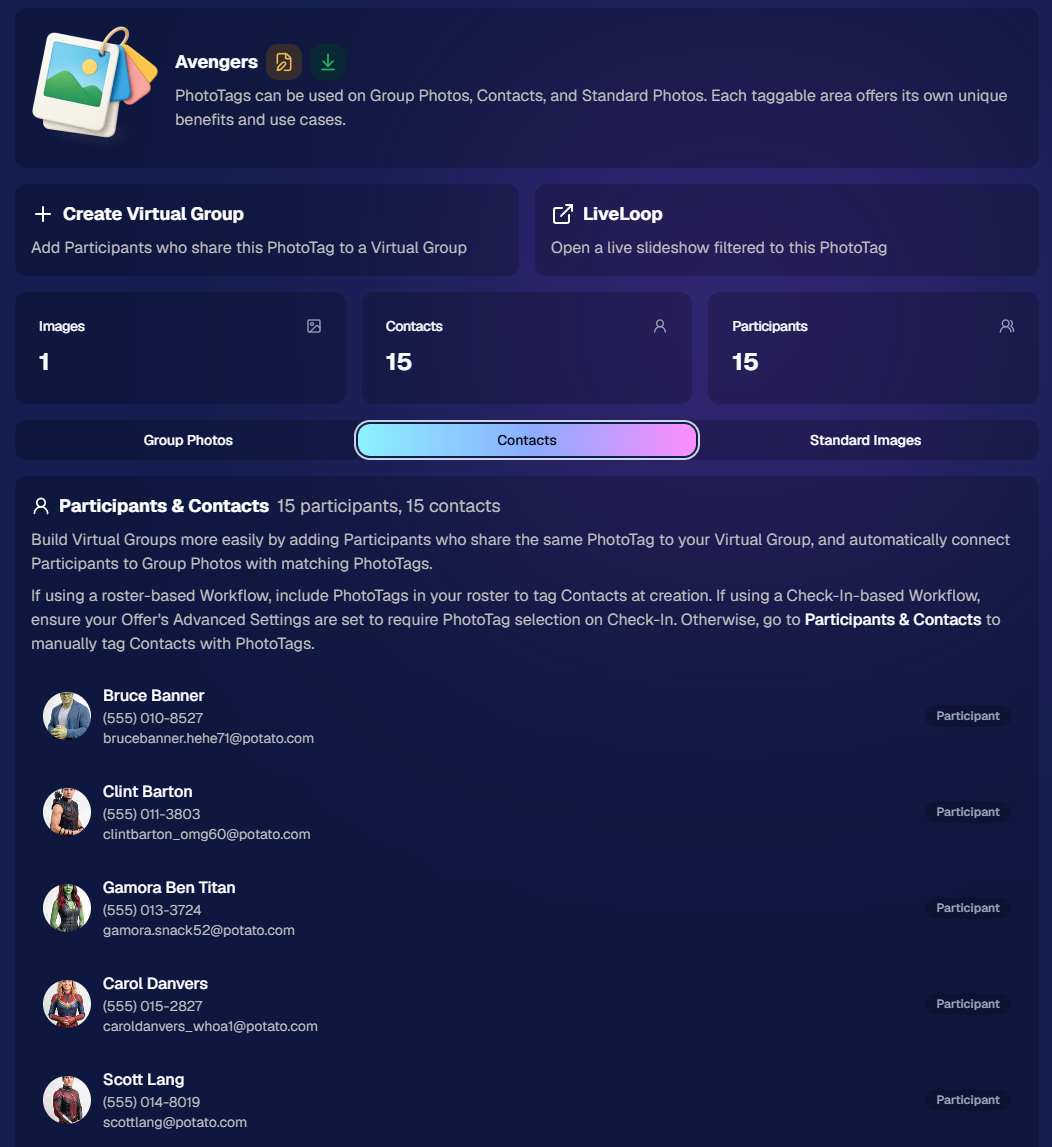
PhotoTags now have their own dedicated details pages.

‍

Click any PhotoTag from the PhotoTag List page to open a much more complete view of everything connected to it.

‍

From there, you can:

‍

  • ✏️ Edit the PhotoTag
    ‍
  • πŸ‘€ View tagged Participants and Contacts
    ‍
  • πŸ‘₯ View tagged Group Photos
    ‍
  • πŸ–ΌοΈ View tagged Standard Photos

‍

This is a pretty big improvement for anyone learning or managing PhotoTags!

‍

PhotoTags can affect several different parts of an Event, and these pages make those relationships much easier to see in one place. They should also be especially helpful when training employees or helping someone understand exactly how a PhotoTag is being used.
‍

‍

πŸ’Έ Faster, More Frequent Remittance Payments

‍

We’ve sped up our remittance schedule and are adding a second payment cycle each week, helping completed-order funds reach your bank account sooner.

‍

Previously, we sent your remittance statement on Wednesday, with the corresponding payment typically arriving in your bank account on Friday morning.

‍

Going forward:

‍

πŸ’° Orders completed Friday through Tuesday will be included on your Wednesday remittance statement, with payment typically arriving Thursday

‍

πŸ’° Orders completed Wednesday and Thursday will be included on a new Friday remittance statement, with payment typically arriving Monday

‍

That means the existing Wednesday payment cycle should now reach you about one day faster, while the new Friday cycle reduces the wait for orders completed later in the week.

‍

βœ‰οΈ Marketing Emails Get a New Look

‍

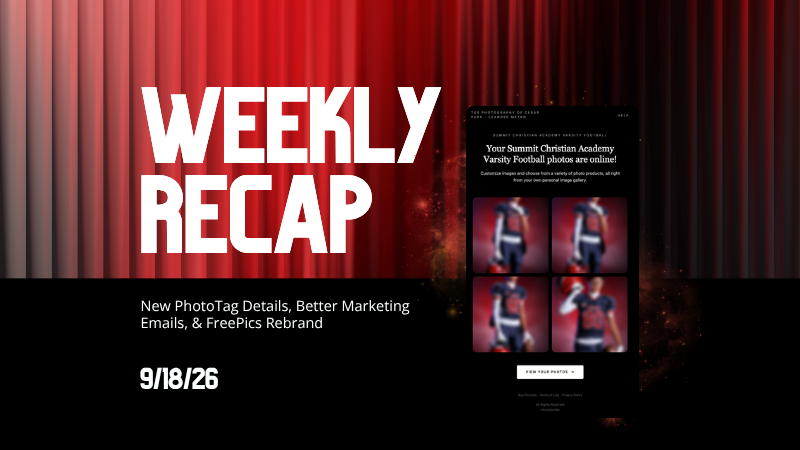
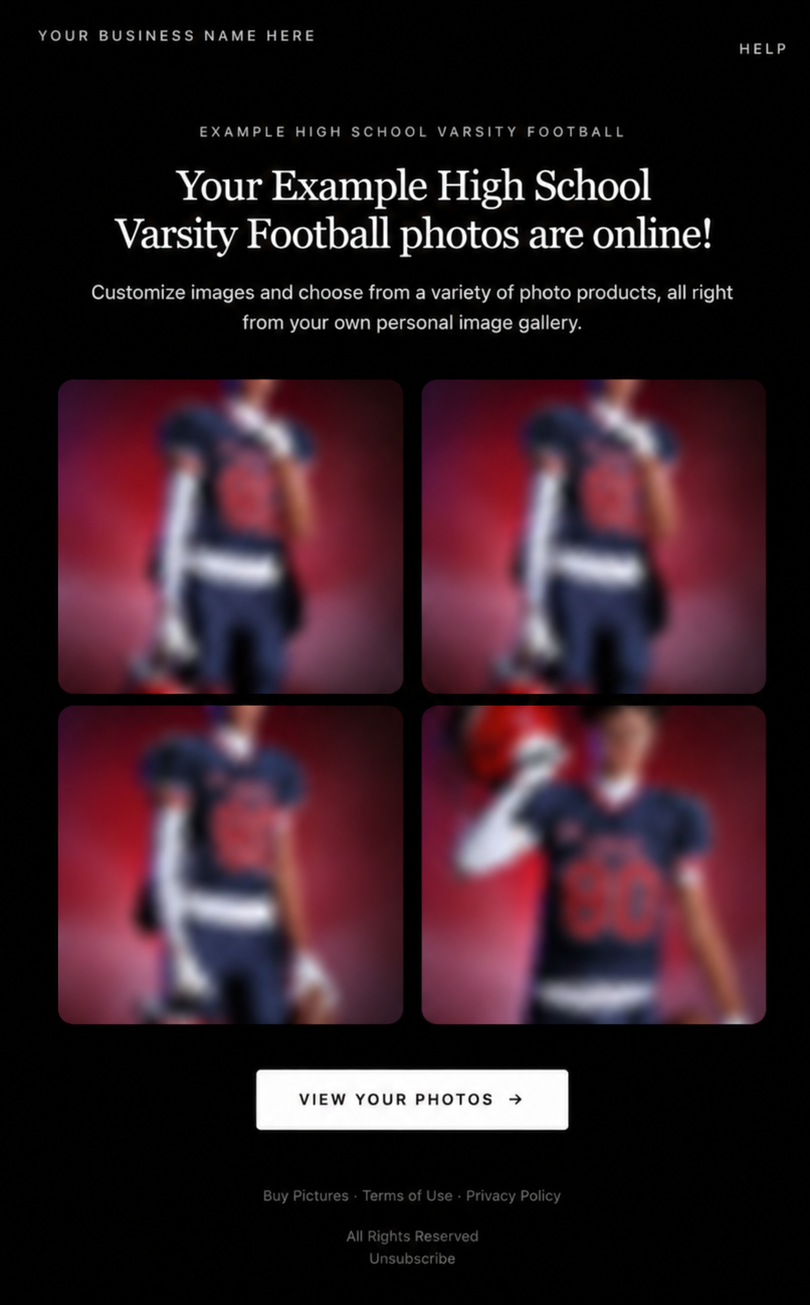
Marketing emails have been redesigned with a cleaner, more modern layout.

‍

There’s also a bigger change to the way images are protected:

‍

  • 🌫️ Email image previews are now blurred
    ‍
  • πŸ›‘οΈ This replaces the previous scrolling copyright treatment

‍

Blurring provides more consistent protection in situations where an email client might not properly render the scrolling copyright, or where the preview image is displayed outside an environment where GalleryGuard can protect it.
‍

Real email, but with business &Β event name replaced for privacy!

‍

Also: Minor Marketing Fix!

‍

We also fixed an edge case that could prevent a marketing campaign from starting when two different Participants shared only part of their contact information.

‍

For example, if two Participants had the same email address but different phone numbers, one Participant starting marketing should no longer incorrectly prevent the other from starting theirs.

‍

βœ‚οΈ Better Background Removal

‍

Background Removal got another quality pass this week:

‍

  • πŸ’‡ Improved hair cutouts
    ‍
  • ⚽ Better handling of certain sports portrait props, particularly soccer balls sitting on the ground

‍

These changes continue our work to improve cutout quality across the kinds of images photographers are actually shooting.

‍

πŸ†• "Quic" Is Now "Free"

‍

The Quic programs have been rebranded to Free.

‍

Nothing about the pricing or functionality has changed β€” just the names:

‍

  • QuicPics β†’ FreePics
    ‍
  • QuicPortraits β†’ FreePortraits
    ‍
  • QuicPics GO! β†’ FreePics GO!

‍

Same programs, same functionality, same pricing. Just a (hopefully) clearer name moving forward.

‍

πŸ›οΈ Retail Improvements

‍

✨ β€œDiamond Gloss” is now β€œGlossy Finish”

  • ‍We’ve renamed "Diamond Gloss" to Glossy Finish on the retail site to make the option clearer and easier for customers to understand.

‍

πŸ“± More reliable iOS sharing

  • The native iOS share sheet used by the press-and-hold download feature should now open more reliably.

‍

πŸ‘₯ Group Digital Downloads now behave like regular Digital Downloads

  • When no overlay is selected β€” or the Event doesn’t have one β€” Group Digital Downloads can now provide the full-resolution, uncropped original.
  • That means the image can be available immediately from the email receipt and avoids problematic cropping steps on Group Photos that aren’t a standard 2:3 aspect ratio.

‍

πŸ“¦ More accurate package previews

  • Fixed cases where Group and non-Group images could appear as previews for the wrong type of package product.

‍

πŸ–₯️ Dashboard Improvements

‍

πŸ“΄ New offline screen

  • If your device is completely offline, the Dashboard now tells you instead of leaving you wondering whether the site is simply loading slowly.

‍

πŸ“… Event Calendar color coding fixed

  • Events once again display the correct colors based on their Event Program.

‍

πŸ–ΌοΈ Better Virtual Group Foreground management

  • The Foreground Picker now shows the names of your saved foregrounds. Click one to preview it, and you can also rename foregrounds for easier reuse later.

‍

βœ‚οΈ Overwritten BGR images can reprocess

  • If you overwrite an image inside a folder marked for Background Removal, it can now be reprocessed as long as the replacement has the exact same dimensions as the original.
  • If the dimensions differ at all, the existing PNG will not be replaced.

‍

πŸ“‹ Roster upload error fix

  • Fixed an edge case where a malformed email containing a # instead of an @ could stop the roster upload process and leave only the rows before that error imported.

‍

πŸ‘€ Participant names on QR downloads

  • ‍QR download pages now display participant names in bold, making them easier to spot at a glance.

‍

πŸ“Š Clearer Sales & Shipping chart details

  • ‍Tooltips on the Event Details Sales & Shipping chart now break out Sales and Shipping separately on hover, adding some clarity.

‍

Capture App 5.10.1 (OTA)πŸ“±

‍

πŸ“±Selfie Check-In Station Mode fix

  • ‍The Continue button text has been shortened, and the Close button now stays accessible when PhotoTag Check-In is enabled.
  • Previously, the extra PhotoTag selection row could push the Close button off the bottom of the screen.

‍

That’s the week!

‍

The FreePics name change is the most visible update, but the new PhotoTag Details pages may be one of the most useful additions for teams working with PhotoTags regularly.

‍

Keep creating magic,

Candy 🍬

Related articles

Weekly Recap: Abandoned Cart Recovery, Batch AI Editing & Discount Links πŸ›’βœ¨
Feature Updates
September 4, 2026

Weekly Recap: Abandoned Cart Recovery, Batch AI Editing & Discount Links πŸ›’βœ¨

3
Β minutes read
Hey photo friends! πŸ‘‹

‍

Candy here with another weekly recap! This week’s biggest addition is a new Abandoned Cart Recovery marketing message designed to help bring shoppers back and complete purchases they already started.

‍

We’ve also made Quick Candy Image Studio more powerful for editing a selected group of images, added shareable discount links, and made several improvements across participant tools, Virtual Groups, and the Capture App.

‍

Let’s jump in!

‍

πŸ›’ NEW: Abandoned Cart Recovery Marketing

‍

Sometimes a customer gets all the way to building a cart... and then life happens.

‍

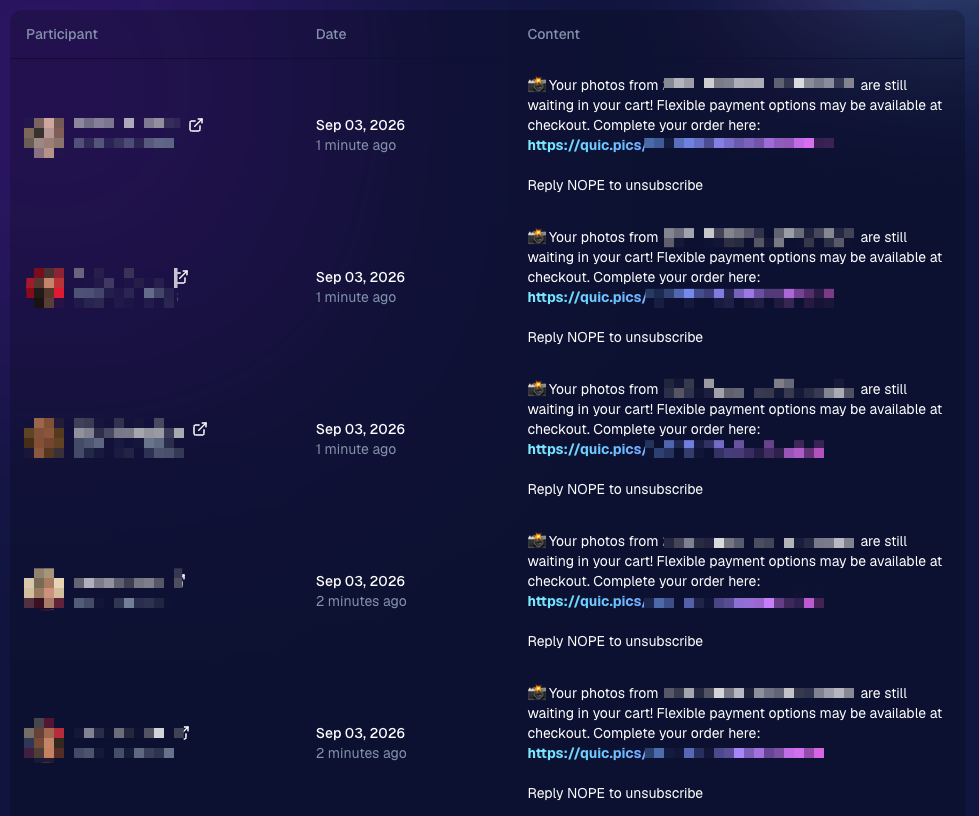
NowCandid will now automatically follow up with those shoppers via text + email to encourage them to come back and finish their order.

‍

πŸ“… Abandoned cart messaging will go out once a week!

‍

πŸ›οΈ Targets participants who created a cart but did not complete their purchase

‍

🚫 Participants who have already ordered are excluded

‍

1️⃣ Each participant can only receive one abandoned-cart follow-up per Event

‍

πŸ“Š Sends are still recorded on the Event’s Marketing History page

‍

This gives shoppers a helpful nudge to return to something they were already interested in buyingβ€”and hopefully turns a few more unfinished carts into completed sales. πŸ“ˆ

‍

Note:Β NowCandid's abandoned cart rate is already very low. Even so, we expect this to boost your overall sales by about 0.3% or more!

‍

‍

🎨 Batch AI Editing Gets More Powerful

‍

Quick Candy Image Studio on Manage Images continues to fill the gap between editing one image at a time and running Auto Editor across an entire folder or Event.

‍

Select a handful of images, open Quick Candy Image Studio, and apply an AI edit across the selection.

‍

This week, it also gained more of the controls available in the full Candy Image Studio:

‍

πŸ‘οΈ Mark Original Invisible

‍

βœ‚οΈ Mark Destination Folder as Background Removal Folder‍

  • Available when Background Removal is enabled for the Event.

‍

πŸ–ΌοΈ Custom image-input nodes fixed‍

  • Nodes that require another image as an input now behave correctly through Quick Candy Image Studio.

‍

This makes it much easier to apply the same edit to a small, intentional group of images without setting up a larger Auto Editor workflow.

‍

πŸ‘₯ Participant List Improvements

‍

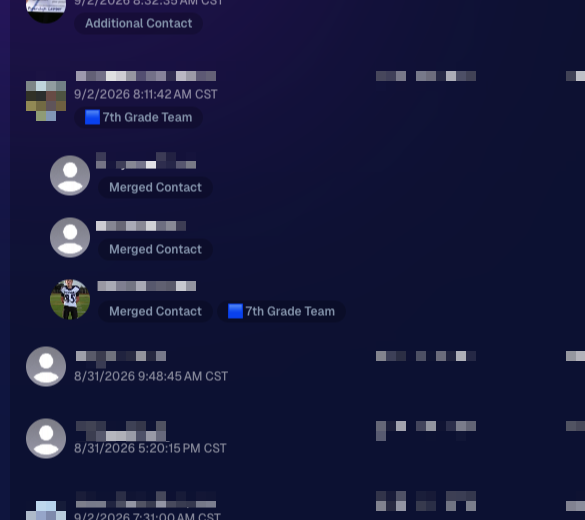
🏷️ PhotoTags now appear as badges‍

  • Participant rows now show assigned PhotoTags directly, similar to the existing Additional Contact badge.

‍

πŸ‘¨β€πŸ‘©β€πŸ‘§ Merged participants are easier to understand‍

  • Individual merged records now appear as separate, indented rows beneath the main merged participant.

‍

πŸ™ˆ Hidden PhotoTags stay hidden‍

  • Fixed hidden PhotoTags incorrectly appearing on Participant Details.

‍

‍

πŸ§‘β€πŸ€β€πŸ§‘ Virtual Group Builder Improvements

‍

↩️ Better Undo behavior for sliders

  • CTRL/CMD + Z now behaves more naturally when adjusting slider values.

‍

πŸ–±οΈ Better drag-and-drop with large groups‍

  • The Subjects pane is easier to work with when there are dozens of participants.

‍

πŸ–ΌοΈ Full-resolution render consistency fix‍

  • Fixed an edge case where the final full-res Virtual Group could differ from the Builder preview.

‍

πŸ€– Auto Editor & Background Removal

‍

πŸ™ˆ Hide Originals now handles BGR originals correctly‍

  • If Hide Originals is enabled and the original folder is marked for Background Removal, the original PNG will now be hidden too.

‍

The same behavior now applies in Candy Image Studio.

‍

πŸ“± Capture App 5.9.3

‍

iOS & Android OTA β€” September 1

‍

πŸ“‹ Shooting mode selector fixed on tablets‍

  • The popup is now scrollable, so options like Roster Check-In are always reachable.

‍

πŸ“Έ Photo Booth fix on iOS‍

  • Cancelling the countdown no longer accidentally disables the Event collage.

‍

That’s the week!

‍

Abandoned Cart Recovery is the big addition here, giving NowCandid another way to help turn existing shopper interest into completed orders. And with the improvements to Quick Candy Image Studio, you’ve got more flexibility for those β€œedit these five photos, not the entire folder” situations too.

‍

Keep creating magic,

Candy 🍬

Weekly Recap: Scheduled Client Outreach, Smarter Virtual Groups & New Candy Image Styles πŸ“…βœ¨
Feature Updates
August 28, 2026

Weekly Recap: Scheduled Client Outreach, Smarter Virtual Groups & New Candy Image Styles πŸ“…βœ¨

5
Β minutes read
Hey photo friends! πŸ‘‹

‍

Candy here with another weekly recap! This week’s biggest addition is a major upgrade to Client Outreach: you can now schedule texts and emails to send later. We’ve also added smarter Virtual Group tools, new Candy Image Studio looks, and a few useful retail and Dashboard fixes.

‍

Let’s jump in!

‍

πŸ“… Client Outreach Can Now Be Scheduled

‍

You can now schedule Client Outreach messages to send at a future date and time instead of having to send everything immediately.

‍

⏰ Schedule texts or emails up to 60 days in advance

‍

πŸ“‹ New Scheduled page to see upcoming sends

‍

❌ Cancel a scheduled outreach before it goes out

‍

πŸ’° See estimated sends and cost before the scheduled time

‍

πŸ”” Get notified when it sends

  • Dashboard Inbox notification
  • Mobile Dashboard push notification

‍

This makes Client Outreach much more useful for planned reminders, follow-ups, announcements, and other messages you already know you’ll want to send later.

‍

πŸ‘₯ Import from multiple Events at once

‍

When building a Client Outreach list from Event contacts, you can now select multiple Events in a single import instead of adding them one at a time.

‍

🏈 Virtual Group Builder Gets Smarter

‍

Virtual Group Builder picked up several new controls this week:

‍

πŸ”’ New Auto Order By Jerseys button‍

  • Automatically reorder subjects based on their jersey numbers.
  • This is powered by Jersey Jotter, but Jersey Jotter does not need to be enabled on the Event for you to use it.

‍

🧠 Improved Auto Headsize‍

  • Automatic subject sizing should now produce better results.

‍

πŸ‘€ Less disruptive participant additions‍

  • Adding one participant now places them at the bottom-right of the bottom row instead of automatically rearranging the entire group.

‍

🌈 New Saturation slider‍

  • Adjust an individual subject’s saturation from the Subject Inspector.

‍

πŸŒ‘ Drop Shadow can now be disabled‍

  • There’s a new toggle if you prefer the group without subject shadows. Drop Shadow behavior also works more naturally with Cutout Fade.

‍

🌫️ Simplified Cutout Fade‍

  • Cutout Fade and Cutout Fade Intensity have been combined into a single control with improved defaults and results.

‍

↕️ More vertical positioning freedom‍

  • Subjects can now be moved significantly farther downward when needed.

‍

πŸŽ›οΈ New Effects category‍

  • Some related controls have been reorganized to make the Builder easier to navigate.

‍

🎨 New Candy Image Studio Looks

‍

Two new low-cost styles are available:

‍

🌸 Mayfair β€” 4’‍

  • A polished filter-inspired look with its own distinct color treatment.

‍

🌈 Lively‍

  • Similar in spirit to Clarendon, but with a different look and feel. Give it a try!

‍

πŸ› οΈ Candy Image Studio fixes

‍

✨ Fixed some nodes not working through Quick Candy Image Studio on Manage Images

‍

πŸ–ΌοΈ Fixed the Retouch node failing on especially large image files

‍

πŸ–₯️ Dashboard Improvements

‍

πŸ“£ Event Marketing History links are more visible‍

  • Three important links on the page are now displayed as cards, matching the approach used elsewhere in the Dashboard.

‍

🏷️ Remove PhotoTags in bulk‍

  • Select multiple participants on the Participant List page and use the new Remove PhotoTags button to clear their PhotoTags at once.

‍

πŸ“± Mobile Dashboard

‍

No app update required:

  • ⬅️ Previous Page
  • ➑️ Next Page

‍

Both options are now available from the logo button / Quick Actions menu at the top of the Mobile Dashboard.

‍

πŸ›οΈ Retail & Quic Fixes

‍

πŸ“¦ Group package visibility fixed‍

  • Packages containing group products will no longer incorrectly appear when an Event has no group images.

‍

πŸ€– Auto Edited FreePics/FreePortraits images fixed‍

  • Fixed an issue where Event-level Auto Edits with Hide Originals enabled were not being texted once the edited image was ready.

‍

That’s the week!

‍

Scheduled Client Outreach opens up a lot more ways to plan customer communication ahead of time, while the new Virtual Group tools should make sports layouts quicker and easier to fine-tune.

‍

Keep creating magic,

Candy 🍬

Customer Spotlight: How Joe Photo Tampa Is Turning Heads with NowCandid's Auto Editor
Success Stories
August 27, 2026

Customer Spotlight: How Joe Photo Tampa Is Turning Heads with NowCandid's Auto Editor

5
Β minutes read
When you've been in the event photography business for nearly two decades, you've seen just about everything.

‍

But every once in a while, a new tool comes along that changes the game.

‍

For Matt Nassif of Joe Photo Tampa, that tool has been NowCandid's Auto Editor.

‍

Nearly 20 Years of Capturing Memories

‍

Joe Photo Tampa has been photographing events across Florida for almost 20 years. Matt credits much of that journey to his longtime friend and mentor, Ed Kempf of Impact Photography/Joe Photo Iowa.

‍

Back in 2007, Ed introduced Matt to Candid Color Systems, inviting him to visit Oklahoma and see everything CCS had to offer firsthand. That visit marked the beginning of a partnership that continues nearly two decades later.

‍

"I'll be going into my 20th year this fall and feel incredibly blessed to have CCS as my lab. I'm also grateful for my mentor Ed, who has guided me throughout the years."

‍

When NowCandid was just getting started, Matt was there from the beginning. After reconnecting with Jack at a photography conference in Las Vegas in early 2020, he became one of the platform's original beta testers, working closely with the development team to help shape the software.

‍

Today, Matt has been using NowCandid for six years and believes Joe Photo Tampa is one of the platform's largest users.

‍

Taking a Chance on Something New

When Matt first learned about the Auto Editor through a NowCandid newsletter, he immediately saw an opportunity.

‍

One of his long-time clients was celebrating their 20th anniversary, with more than 600 guests expected to attend. Rather than offering another standard event experience, Matt wanted to surprise attendees with something they'd never seen before.

‍

The result?

‍

A huge success.

‍

More than 180 guests participated in the Auto Editor experience.

‍

"It was a TOTAL hit."

‍

Like many photographers, Matt admits he was initially hesitant because of the AI component.

‍

"My biggest hesitation was simply not knowing anything about AI."

‍

Fortunately, a little guidance helped turn uncertainty into excitement.

‍

Creating an Experience Guests Remember

‍

By his third Auto Editor event, Matt had found his rhythm.

‍

"What surprised me the most is how fun, different, and interactive the Auto Editor is."

‍

Guests weren't just participating. They were bringing their friends back to experience it themselves.

‍

"Guests would receive their character on their phone, then come back with more friends so they could try it too. That's a win-win for Joe Photo Tampa!"

‍

The response from event hosts has been equally enthusiastic.

‍

"My customers loved the product, and their guests were showing off their images and posting them online."

‍

More Than a Fun Feature: A Business Opportunity

‍

While the guest experience has been exciting, the business results have been just as impressive.

‍

At Matt's second Auto Editor event, one guest loved the experience so much that she booked Joe Photo Tampa on the spot for another event just 72 hours later.

‍

"The product sells itself."

‍

Matt also sees Auto Editor opening doors in an increasingly competitive market.

‍

"This is an upsell product that can definitely compete with the photo booth world."

‍

Instead of simply taking another picture, photographers can offer clients an interactive experience that guests talk about long after the event ends.

‍

Advice for Fellow Photographers

‍

Matt's advice for photographers considering Auto Editor is simple:

‍

"If not now, when?"

‍

He encourages photographers to spend some time experimenting before introducing it to clients.

‍

"Try it at the office. Test it. Learn what prompts work best for your style and events."

‍

He also offers one important reminder:

"AI isn't perfect. It takes some patience to learn what works best. Once you get your prompts dialed in, it becomes an incredible product."

‍

A Photographer Who Loves What He Does

‍

Whether it's corporate events, parties, or celebrations, Matt simply loves photographing people.

‍

His photography style?

‍

Fun. Outgoing. Professional.

‍

And when it comes to camera gear...

‍

"I bleed Nikon."

‍

Thank You, Joe Photo Tampa!

‍

Matt has been an incredible partner to NowCandid from the very beginning! From helping beta test the platform to embracing new features like Auto Editor and sharing honest feedback along the way.

‍

We're incredibly grateful for photographers like Matt who continue to push the platform forward while creating unforgettable experiences for their clients.

‍

Thank you, Matt, for being part of the NowCandid family. We can't wait to see what you create next.

Let’s get in touch

If you’re a photographer looking to add NowCandidβ„’ services to your wheelhouse, set up a call with us!

How to customize formatting for each rich text

How to customize formatting for each rich text

How to customize formatting for each rich text

How to customize formatting for each rich text

How to customize formatting for each rich text

‍

‍

What’s a Rich Text element?

The rich text element allows you to create and format headings, paragraphs, blockquotes, images, and video all in one place instead of having to add and format them individually. Just double-click and easily create content.

A rich text element can be used with static or dynamic content. For static content, just drop it into any page and begin editing. For dynamic content, add a rich text field to any collection and then connect a rich text element to that field in the settings panel. Voila!

Headings, paragraphs, blockquotes, figures, images, and figure captions can all be styled after a class is added to the rich text element using the "When inside of" nested selector system.

  • List One
  • List Two
  • List Three
  • List Four
  • List Five

This is a link

This is bold text

‍

  • ‍

‍