HomeNavigation arrowBlogNavigation arrow
Current page
Feature Updates

Weekly Recap: New Discounts, Batch AI Editing & More Upload Controls 💸✨

Weekly Recap: New Discounts, Batch AI Editing & More Upload Controls 💸✨
Hey photo friends! 👋

Candy here with a big one this week: Discounts are officially here! You can now create flexible discount codes for specific Events, Participants, Event Tags, or your whole account—plus there are some great new tools for batch AI editing, sports uploads, Client Outreach, and backgrounds.

Let’s jump in!

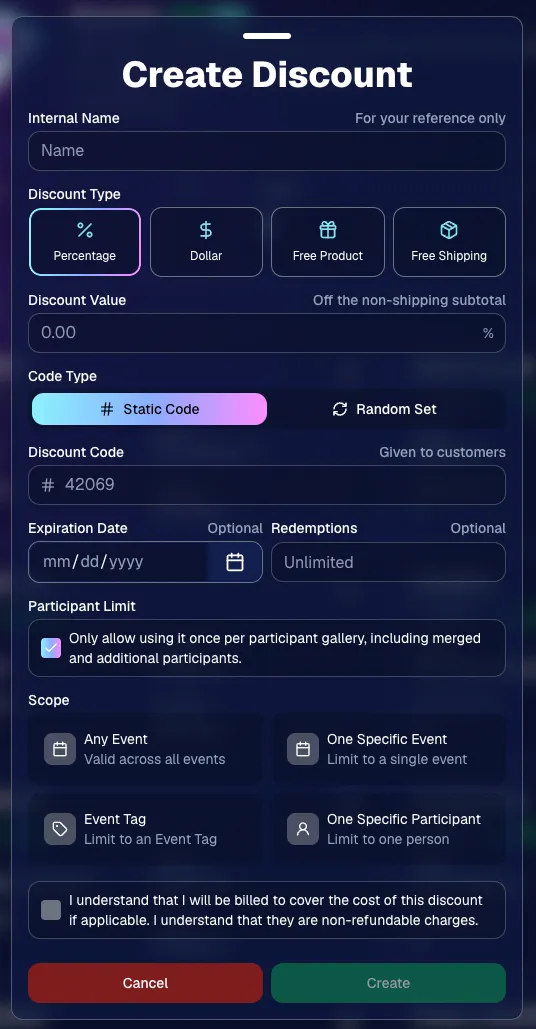
💸 NEW: Discounts

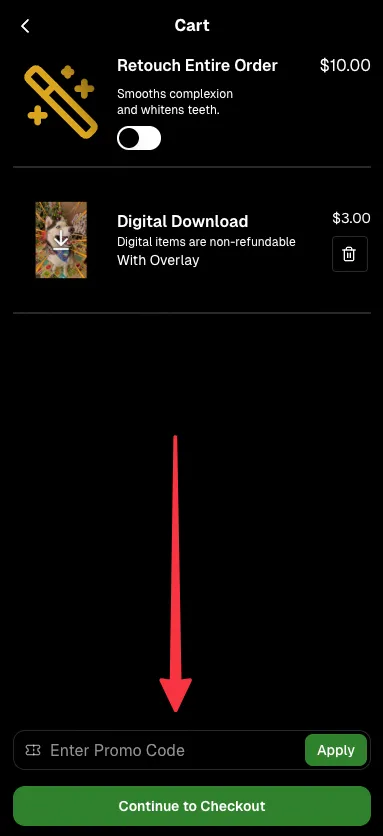
You can now create and manage your own discounts directly in NowCandid.

Discounts you create can apply to:

  • 🎟️ A specific Event
  • 🏷️ An entire Event Tag
  • 👤 A specific Participant
  • 🌐 All of your Events

And you can choose from several discount types:

  • 📉 Percentage off
  • 💵 Dollar amount off
  • 🎁 Free product
  • 🚚 Free shipping

🔐 Flexible code options

  • 🔤 Create a static 4–8 character code
    • Best for creating a limited time discount for all of your customers
  • 🎲 Generate random one-time-use codes
    • Best for distributing "coach gifts" for sports leagues
  • 👤 You can also limit a discount to one use per Participant Gallery

A few important rules:

  • Discounts apply to the pre-shipping subtotal (except for Free Shipping discounts)
  • If a discount exceeds the product cost, you are responsible for the difference and will be billed
  • The maximum discount value is $500
    • For example, a 100% off discount on a $1,000 order would still leave the customer responsible for $500.

📚 Full documentation:
https://app.nowcandid.com/docs/discounts
🎨 Batch AI Editing from Manage Images

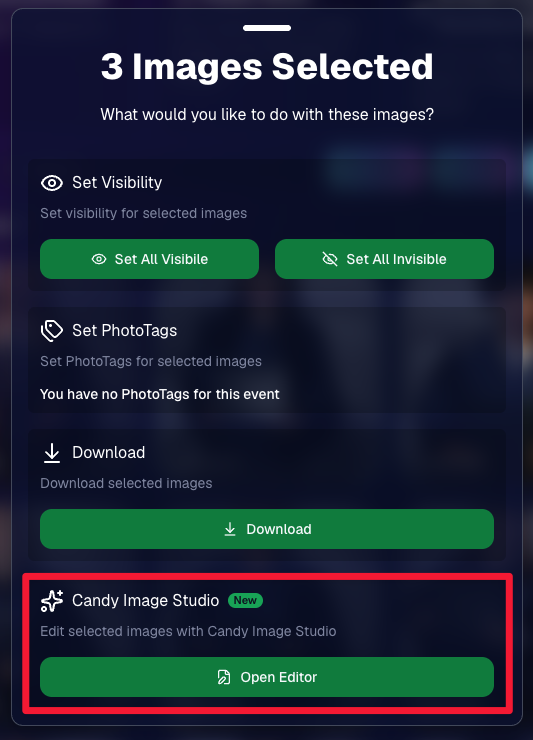
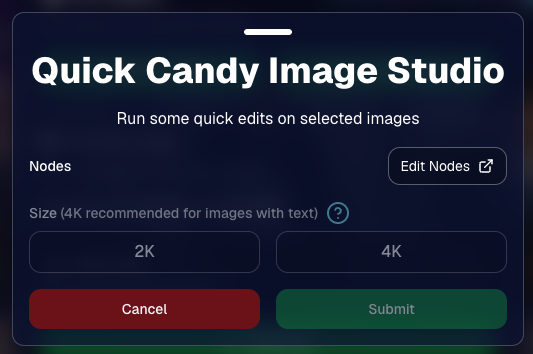
You can now run Candy Image Studio edits on multiple selected images at once right from Manage Images.

  • ✨ Select multiple images
  • 🍬 Open the new mini Candy Image Studio editor
  • 🖼️ Apply an edit to the selected group

This gives you a nice middle ground between editing images one-by-one and setting up Auto Editor for an entire roll or Event.
📤 Better SportsPics Upload Controls

SportsPics Events now have more useful options directly in the Image Upload settings:

👥 Mark All Images Group

  • Automatically mark every uploaded image as a Group Photo.

🏷️ Assign a PhotoTag during upload

  • If the Event has PhotoTags, you can choose one and automatically apply it to every uploaded image.

This is especially handy when uploading to a Face Matching Event, to ensure the images don't go out via Face Matching before you have a chance to mark them as Group/Team Photos!

⭐ Candy Image Studio & Auto Editor Improvements

👤 Participant names passed into edits

  • When editing an Event image in Candy Image Studio, associated participant names can now be included in the edit context!
  • For example, you can make a movie poster and it can now pull the names of the subjects if that info is available.

✉️ Client Outreach email designer improved

  • Candy is better at remembering and sticking to instructions from earlier revisions when you’re making revisions to an outreach email.

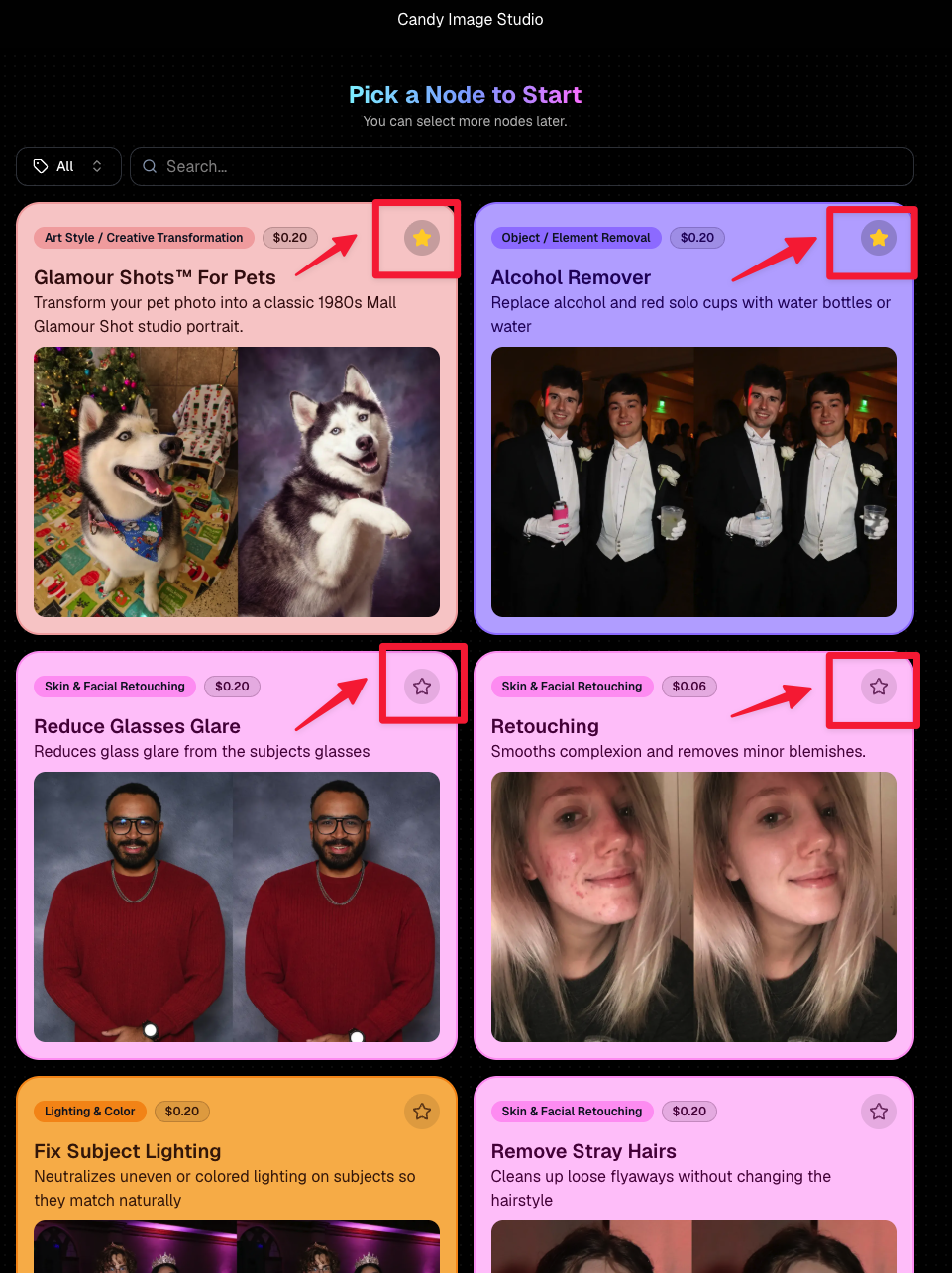
Favorite your most-used nodes

  • Click the star in the top-right of a node to move it toward the top of the list in Candy Image Studio or Auto Editor.
  • Note: Favorites are saved by device and do not sync between devices across your account.
🖼️ 39 New Default Background Sets

We added 39 new background sets for Offers and Virtual Groups!

New additions span categories like:

  • 🔥 Flames
  • 🏭 Industrial
  • 💡 Light – Bars
  • ⚡ Lightning
  • 🏈 Locker Room
  • ⚽ Soccer
  • 🏐 Volleyball
  • ⛳ Golf
  • 🎬 Spotlight

Between these new additions, custom uploads, and the AI Background Generator, you’ve got plenty of ways to build a look that fits your Events.
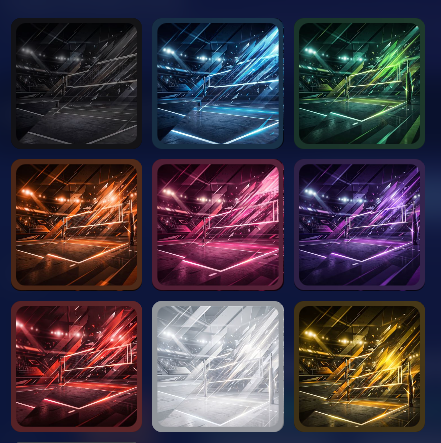
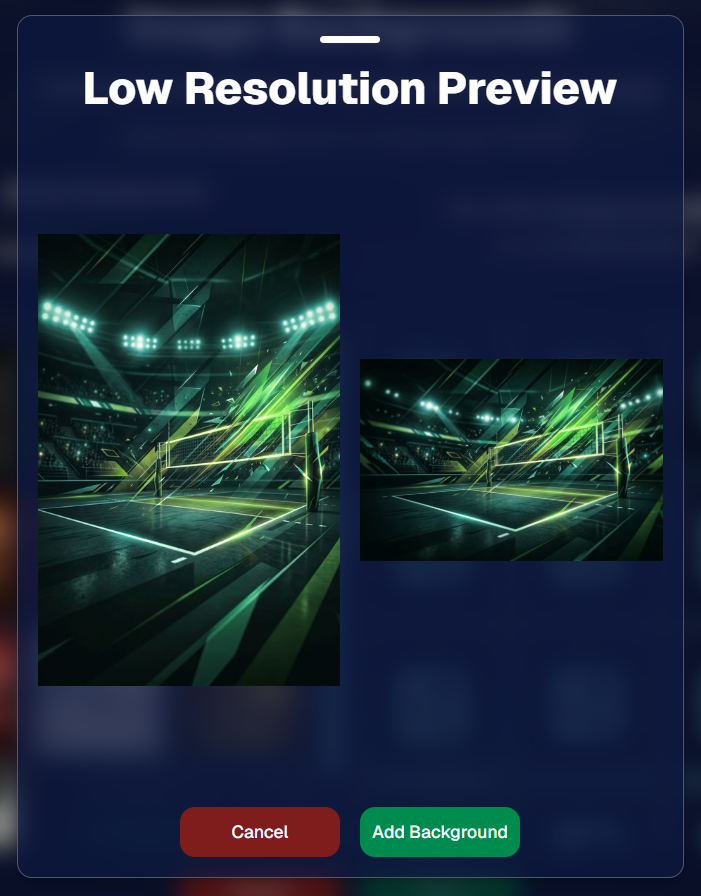
Example: New Volleyball Backgrounds!

A closer look at one of the examples above!

🧑‍🤝‍🧑 PhotoRoster & PhotoTag Improvements

🏷️ PhotoTags carry into new PhotoRosters

  • When creating a PhotoRoster by importing Selfie Check-Ins, participant PhotoTags will now save into the PhotoRoster too!

🧹 Duplicate PhotoTag import fix

  • Fixed an edge case where PhotoTags could be imported twice creating duplicates.

✂️ Background Removal Update

  • 👥 Background Removal no longer runs on Group Photos

Group Photos are not meant to go through Background Removal! Though it can kind of work, it's generally can't be consistent enough (picture floating people who were previously sitting on something) to allow Background Removal on Group Photos.

🛍️ Retail: Duplicate Download Warning

Retail now helps prevent accidental duplicate digital purchases.

  • ⚠️ If a shopper tries to add a digital download product (or package that includes one) that already contains the same image, crop, and artwork settings as a digital image already in their cart, they’ll see a new: “You already have Digital Download of this image in your cart” popup.
  • ➕ They can still add it anyway if they really want to!

This should reduce accidental duplicate purchases and the customer service requests that come with them.
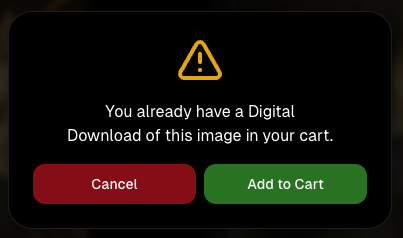
Little improvements to make the platform better and better.

🛠️ Dashboard Fixes & Cleanup

  • 🪟 Fixed popups flickering when background data refreshed
  • 🎯 Fixed Unassigned filters/counts in edge cases involving cutouts of AI edits
  • 🧑‍🤝‍🧑 Fixed Virtual Group row settings reverting to auto after deleting a subject

That’s the week!

Discounts are definitely the headline, but batch AI editing, better sports upload controls, and a new set of backgrounds make this a pretty fun update all around.

Keep creating magic,

Candy 🍬
Related articles

Weekly Recap: New 24×8 Panoramic Print, and More! 🖼️🧾
Feature Updates
January 30, 2026

Weekly Recap: New 24×8 Panoramic Print, and More! 🖼️🧾

3
 minutes read
Hey photo friends! 👋


This week is a mix of one new product and a handful of refinements across retail pricing, check-in validation, and Dashboard tools.

Here’s what changed.

🆕 New Product

🖼️ 24×8 Panoramic Print (Group-only)

  • A new panoramic option in the same aspect ratio as the other pano prints, built for team and group shots. (Like the others, it’s group-only.)

🛍️ Retail: Pricing & Editing Improvements

💸 Package “slashed” pricing corrected and standardized

  • Fixes around week 2/3 slash amounts so package comparisons are more accurate and consistent (including cases where tiered pricing is disabled on Quic events).

✍️ Captions editor now allows hyphens and periods

  • Small change, big relief for subjects with multi-hyphenate names.

✅ Check-In Page: Better Email Validation

📧 Improved email validation

  • Now also requires at least one period
  • Now blocks obvious typos like addresses ending in “.con”
  • These are in addition to previously existing "catches" we had in place to help customers avoid typos

👥 Additional Contacts now use the same validation rules

  • Makes additional contact info more typo-proof too!

🖥️ Dashboard: Fewer Snags, More Visibility

🧪 Image Tester now supports PNG files

  • Helpful for validating cutouts and art files.

📏 Improved DPI validation for artwork uploads (and Image Tester)

  • Better handling for images that don’t explicitly include DPI metadata.

📦 Package editor expanded limits

  • You can now include up to 16 4×6 and 5×7 prints in a package
  • (Digital downloads remain capped at 16; most other items remain capped at 8).

📁 Manage Images: Folder Download fixed for large folders

  • Folders over 100 images now reliably download in multiple ZIPs (no more stopping after the first chunk).

🧾 Order Details page got a big clarity upgrade

You can now see key indicators and selections more directly, including:

  • ✨ product finish/overlay indicators
  • 🖼️ backgrounds / AI background indicators (where applicable)
  • 📝 captions and chosen colors
  • ⬇️ background downloads working correctly again

🍬 Candy Culler Improvements

📊 Results update automatically while culling runs

  • As progress changes, search results refresh so culled images can appear without you manually refreshing.

🗂️ New downloadable folder report

  • Quick export alongside the toggle for easier review/sharing.

💬 Misc

📲 Day 0 SMS link placement updated

  • The retail link now appears after the unsubscribe text to encourage better MMS link previews.

That’s the week!

Another new pano option, tighter retail pricing presentation, cleaner check-ins, and a more informative Dashboard where it counts.

Candy 🍬

Weekly Recap: New Panoramic Prints, Smarter Culling Tools & Checkout Improvements🖼️🧾
Feature Updates
January 23, 2026

Weekly Recap: New Panoramic Prints, Smarter Culling Tools & Checkout Improvements🖼️🧾

5
 minutes read
Hey photo friends! 👋

Candy here with this week’s updates. Highlights include two new panoramic print products, a bunch of Manage Images + Candy Culler usability wins, and retail checkout + link preview improvements.

Let’s jump in!

🆕 New Products: Panoramic Prints (Group-Only)

🖼️ 15×5 Panoramic Print (Group-only)


🖼️ 30×10 Panoramic Print (Group-only)

These are available across both Dashboard + Retail.

Reminders:

When you flag photos as Group Photos, they will become purchasable on Group products only IF you have Group Products in your Event's Offer.

If there are NOT Group Products in your Event's Offer, then images marked as Group Photos will be purchasable on any product (including downloads).

🖥️ Dashboard: Manage Images + Candy Culler Improvements

🧰 More Tools always visible on Manage Images

  • Previously it only appeared after an event had at least one image.

🌾 Candy Culler icon updated (axe → scythe)

👁️ Visibility toggle added right on the Cull page

  • Toggle visibility from the top-right of the image without opening the lightbox.

📦 Download Folder improves naming

  • Downloads now default to the folder name for the ZIP file, and you can choose where to save or rename it.

⌨️ CTRL/CMD+F supported on the Event PhotoTags page

🧑‍🤝‍🧑 Rosters, PhotoTags & Participant Fixes

🏷️ Roster upload now accepts “PhotoTags” column header

  • Previously only accepted “PhotoTag”.

🧩 PhotoTag filtering fixed on Participant List + Participant Details

  • Especially in edge cases where a later-merged record had the PhotoTag but the initial record didn’t.

📇 PhotoRoster Data Upload now supports 3 Additional Contacts (up from 2)

🧾 Image Release Gallery fixes

  • Face count edge cases resolved (duplicates/additional contacts/duplicate submissions)
  • Program filter fixed

🛍️ Retail: Checkout & Sharing Improvements

🧾 Improved checkout backend

  • Includes protections to reduce the edge case of double charges during backend disruptions.

🔗 Link previews fixed for non-QuicPics events

  • Previews should reliably appear in apps like iMessage and Discord.
    • If a retail hero exists, it’s used
    • Otherwise, the first relevant gallery image is used

🛡️ GalleryGuard enabled when watermark opacity is 0%

  • For events where the retail watermark setting is set to 0% opacity, GalleryGuard will still protect images.
    (Still disabled for Quic-type events.)

🌀 LiveLoop™ Fixes

🧠 Fixed out-of-memory crashing sometimes for LiveLoops with artwork renders

🖼️ Fixed artwork sometimes disappearing after LiveLoop runs for a long time

⚡ Performance & UI Fixes (Small but Helpful)

🚀 Offer list + Event Details load a bit faster

👤 Some profile actions are faster (passcode changes, retail settings, account data used by PhotoCoach / PortraitPress popups)

🧩 Fixed some Participant Details pages not loading

🖼️ Fixed Manage Images lightbox details getting out of sync when using arrow keys

🧷 Fixed Manage Images scrolling to the top when toggling visibility

🔑 Fixed Forgot Password page not sending email

📦 Offer Creator: New “À La Carte” Package Breakdown

🧮 New “À La Carte” section inside packages shows:

  • Individual item costs (if each package item is present in the offer as an individual product)
  • The package discount a shopper is getting (shows 0% if discount would be negative)

Note / Feature-Preview: In the near future, this will also be expanded to better highlight savings on packages on the retail site to your customers, automatically!

✅ Misc + Check-In Improvement

💬 Text campaigns weekend test: recurring (non-day-0) texts will now place the retail link at the very end to encourage link previews.

🤳 Selfie Check-In reliability improvements

That’s the week!

New panoramic prints, smoother culling, better retail reliability, and a bunch of cleanup that should make day-to-day usage feel tighter.

Keep creating magic,

Candy 🍬

Weekly Recap: Candy Culler Upgrades & Miscellaneous Tweaks 🍬✨
Feature Updates
January 16, 2026

Weekly Recap: Candy Culler Upgrades & Miscellaneous Tweaks 🍬✨

4
 minutes read
Hey photo friends! 👋


This week was all about making renders look right, downloads behave better, and Dashboard tools feel faster (with a few Capture App and LiveLoop™ polish wins sprinkled in).

Here’s what’s new:

🛍️ Retail Site

🌀 2D render support for Premium Print & Premium Plaque

  • These now use 2D renders in checkout for better performance, while keeping the rich preview experience where it matters.

🆓 Free download product ordering improved (Quic-Events)

  • Free Download now always appears first
  • Free Gallery Download will always appear second (if available)

📝 Clearer Free Gallery Download description

  • It now correctly says full-resolution (when it’s not the “Medium Res Gallery Download”).

📦 Web Receipt Download Page

🖼️ Preview fit fixed

  • Images now fit completely in the preview, so artwork (like bottom/banner elements) won’t look “missing” behind buttons.

🔄 Smarter auto-refresh while processing

  • If the lab is still preparing downloads, the page will automatically refresh status updates in the background so customers don’t have to babysit it.

🖥️ Dashboard

📄 Participant download spreadsheet improvements

  • Fixed the images column always showing “…” at the end
  • “Ref Image” column renamed to RefImageName (matches PhotoRoster sheets)
  • Address columns are included when applicable (only if at least one participant has a check-in address)

🗂️ Cleaner downloaded filenames

  • Downloaded images no longer get Full_Res_ or Full_Res_W_Banner appended to the filename.

🧾 PhotoRoster Data Upload cleanup

  • Folder names are now removed from RefImageName automatically (e.g., 1/DSC_4143DSC_4143).

Faster reports

  • Many reports (including the overview report) should load quicker.

🍬 Candy Culler (Our New AI Culling Tool)

🍬 Candy Culler added to Command Palette

  • You can now launch it from CTRL+K / CMD+K while on an Event Details page.

📊 Candy Culler progress bar + auto-updating status

  • New X/Y processed progress display, with automatic refresh until everything is done.

🧠 Candy Culler quality fixes & polish

  • BGR folders won’t be culled before a PNG actually exists
  • Images sort by image name (A→Z)
  • Improved mobile UI

🌀 LiveLoop™

🖼️ Better full-frame and banner rendering (pixel-perfect)

🧵 Banner/full-frame art now uses full resolution (no longer medium)

🍏 Background blur re-enabled on Apple devices

📱 Capture App iOS 4.22.4 (OTA Jan 12)

More native-feeling navigation transitions

📞 Phone field keypad behavior fixed (no unexpected iOS keypad when manually tapping)

🧷 Gallery strip stays where you were

  • When marking images visible/hidden or group/not group, the strip no longer jumps back to the start.

🧼 Misc Fixes & Cleanup

🧩 Render Preview page fixes (quic.pics/render)

  • Several products that weren’t downloading renders correctly should now behave as expected.

🧲 Cutout Magnets + Statuettes now supported on the preview page

  • Render previews/downloads are enabled for these products (note: they’ll only look correct if the selected image is a cutout).

🖨️ Premium Print & Premium Plaque render downloads enabled

  • You can now download renders for 8×10 Premium Print and Premium Plaque from the preview page too.

🔤 Input cleanup for non-English-standard characters

  • Certain fancy/unsupported characters are auto-converted to standard English characters to prevent weird issues in names, sign-in fields, business info, etc.

That’s the week!

Lots of “little” changes that add up to cleaner previews, clearer downloads, and faster tools where you use them most.

Keep creating magic,

Candy 🍬

Let’s get in touch

If you’re a photographer looking to add NowCandid services to your wheelhouse – set up a call by clicking the button below.

How to customize formatting for each rich text

How to customize formatting for each rich text

How to customize formatting for each rich text

How to customize formatting for each rich text

How to customize formatting for each rich text

What’s a Rich Text element?

The rich text element allows you to create and format headings, paragraphs, blockquotes, images, and video all in one place instead of having to add and format them individually. Just double-click and easily create content.

A rich text element can be used with static or dynamic content. For static content, just drop it into any page and begin editing. For dynamic content, add a rich text field to any collection and then connect a rich text element to that field in the settings panel. Voila!

Headings, paragraphs, blockquotes, figures, images, and figure captions can all be styled after a class is added to the rich text element using the "When inside of" nested selector system.

  • List One
  • List Two
  • List Three
  • List Four
  • List Five

This is a link

This is bold text