HomeNavigation arrowBlogNavigation arrow
Current page
Feature Updates

Weekly Recap: More Virtual Group Control, New Sports Backgrounds & Better BGR Tools 🏈✨

Weekly Recap: More Virtual Group Control, New Sports Backgrounds & Better BGR Tools 🏈✨
Hey photo friends! 👋

Candy here with another weekly recap! This week brings more control to Virtual Group Builder, a much better home for Event Background Removal, new Candy Image Studio exposure tools, and—yes—27 new sports background sets. 😎

Let’s jump in!

🧑‍🤝‍🧑 Virtual Group Builder Additions

Ask and you shall receive... sometimes! We’ve gotten some good feedback on Virtual Group Builder, and this week several new controls are here to make layouts easier to fine-tune:

↕️ Force subjects onto different rows

  • While dragging a subject, new Add to Row buttons appear over the other rows. Drop the subject there to explicitly move them where you want instead of relying entirely on automatic placement.
  • Previously you were limited to automatically determined rows, you still have those but can now override them!

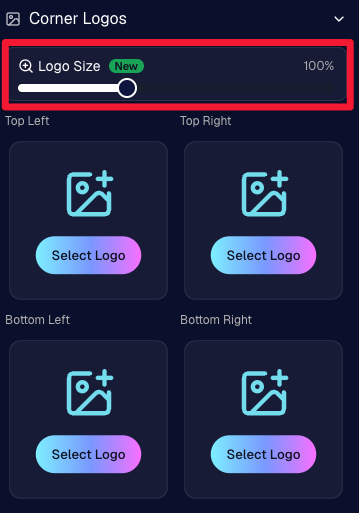
🔍 New logo size slider

  • Adjust your corner logos to be smaller or larger than the default.
  • Previously they could be considered a bit tiny, but this gives you a bit more control!

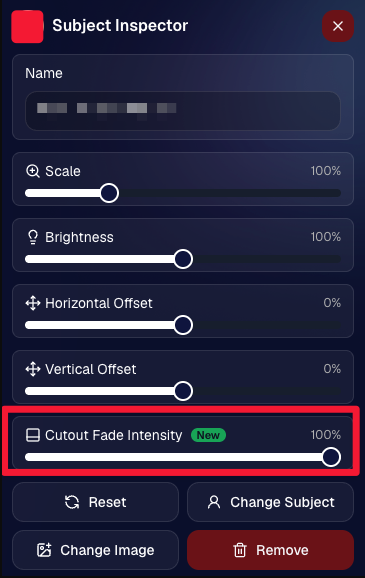
🌫️ Individual cutout fade control

  • The Subject Inspector now has its own cutout fade intensity slider, separate from the global setting, so you can fine-tune individual subjects when needed.
  • This will let you tweak the cutout fade intensity for subjects in the front row or on the sides of the virtual group, in case you're wanting a very specific look.

👥 Smarter merged-participant image selection

  • The Subject Image Picker will only show images from merged participants when they share the same name.
  • This typically does not matter, but in the case of a parent doing a Selfie Check-In of themselves and then of their child later, this will keep Virtual Groups working as expected!

Just a few additions, but very useful ones when you’re trying to get a Virtual Group looking just right!
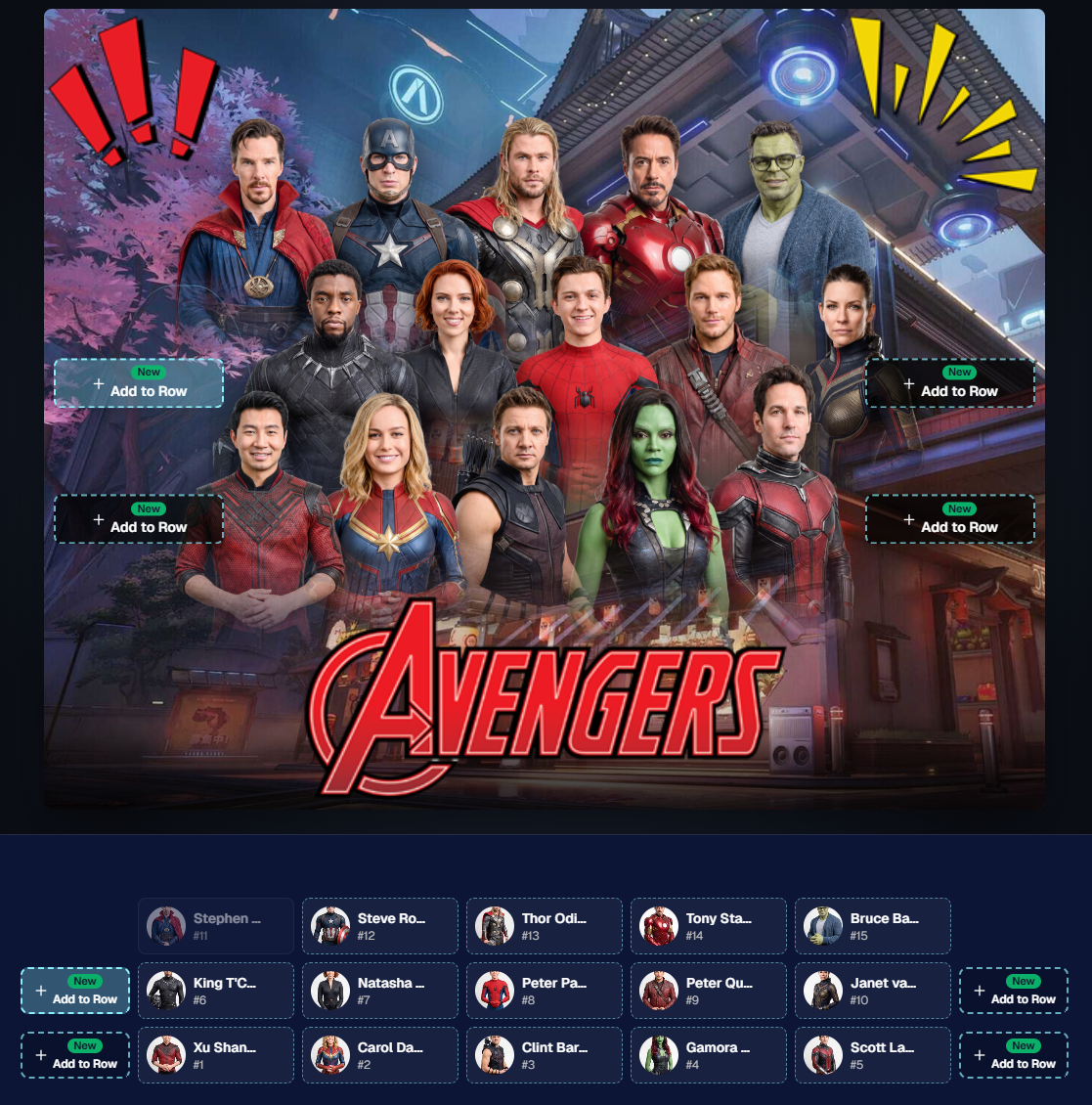
Drag and drop subjects into other rows for more control than ever!

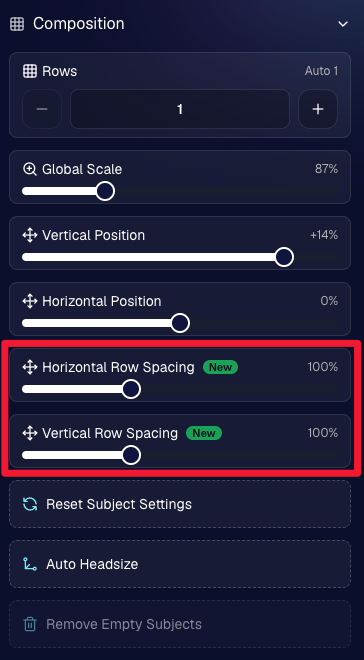
New options to more quickly space out your subjects!

When viewing subject details, adjust them by individual!

Control the size of your logos!

🏈 27 New Sports Background Sets

Alright, shoutout to the random guy who told me (me being Candy, in case you forgot!) that he didn’t like the backgrounds. We heard you! 😂

This week we’ve added 27 new sets of sports backgrounds, including a brand-new Sports – Locker Room background category.

And, in case you missed it, last week we also added an AI Background Generator so you can create entirely new, modern backgrounds of your own.

A quick reminder... you already have a lot of control over which backgrounds your customers actually see:

🎨 Edit the default backgrounds in your Offers

📤 Upload your own custom backgrounds at both the Offer-level and Event-level

🤖 Generate new backgrounds of your own with AI

🏈 Choose from our (now growing) collection of built-in choices

We have a TON of default backgrounds—and yes, many have been around for a while—but you’re never locked into using them. You can build your own look for your business, and we’ll keep adding new options over time too.

✂️ New Dedicated Background Removal Page

Event Background Removal now has its own dedicated Dashboard page, accessible from the Event Sidebar. It is not longer just a popup!

The BGR toggle on Event Overview will take you there too, giving all of these controls a little more breathing room.

On the new page, you can:

✅ Enable or disable Background Removal

🖼️ Manage your Event Backgrounds

🎨 See your Offer Backgrounds with a direct link to the Offer

📊 See how many cutouts have finished and how many are still processing

⏳ Watch a live progress bar while Background Removal is working

📂 See all valid Event folders and which ones are marked for Background Removal

And if your Event is a new Event: ✂️ You can mark an existing folder for Background Removal even if it already contains images!!!

🎨 Candy Image Studio: Better Exposure Fixes

🌙 New Fix Underexposure node

  • Helps recover images that came out too dark.

☀️ Fix Overexposure greatly improved

  • The existing overexposure tool has been reworked for more reliable results.
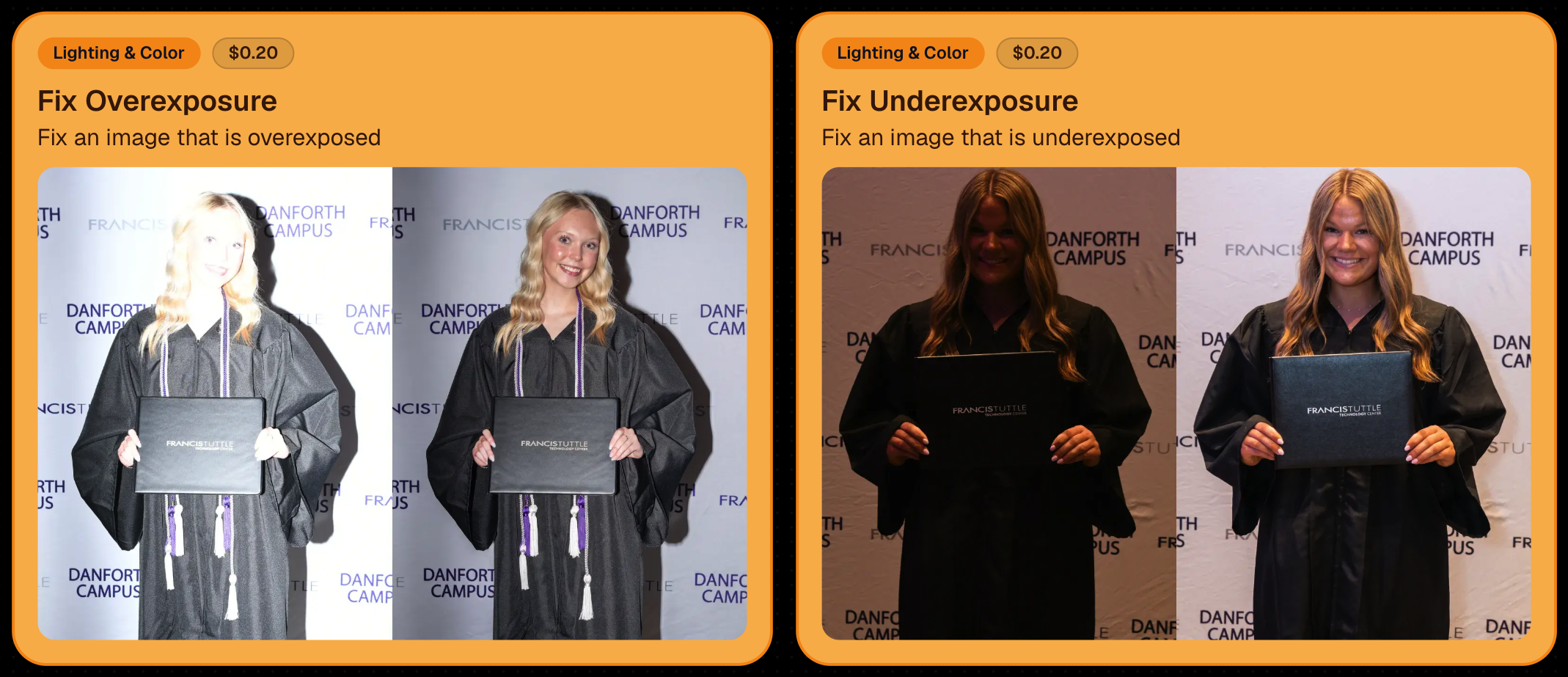
Utilize Candy Image Studio to fix images so they can sell, quickly and affordably!

🏈 Jersey Jotter Progress Tracking

New Jersey Jotter progress bar

  • When Jersey Jotter is active and still has unprocessed images, its dedicated page now shows processing progress—similar to Candy Culler and the new Background Removal page.

This makes it much easier to tell whether recognition is still working through a large Event.

🛍️ Retail Improvements

Titled Luxe Prints now work with package prefill

  • Packages can now automatically prefill eligible Titled Luxe Print products just like other supported products.

🖼️ Titled Luxe Print package rendering fixed

  • Fixed an issue where these products could render incorrectly inside packages.

🤖 AI-generated backgrounds now render correctly on products

🎨 Selected backgrounds now stay visible through the final product step

  • Fixed an issue where the chosen background could sometimes disappear on renders when reaching quantity and finish steps.

📝 Several product descriptions updated

  • Some product descriptions have been refreshed for better clarity.

🖼️ AI Edit + BGR Assignment Fix

👥 BGR versions of AI edits now keep direct participant assignments

  • If the original non-AI image was directly assigned to someone, its Background Removed AI-edited version will now correctly inherit that relationship.

📦 Order Details Fix

📝 Package captions now display correctly

  • Fixed cases where Order Details did not show caption information for certain products contained inside packages.

📱 Capture App 5.9.1 – iOS OTA

📸 Photo Booth fix for iPad

  • Fixed the Photo Booth gallery strip being cut off on certain iPad models.

That’s the week!

More Virtual Group control, a much stronger Background Removal workflow, some useful exposure tools, and plenty of fresh sports backgrounds to work with.

And if you still don’t like the backgrounds... now you’ve got plenty of ways to show us how it’s done. 😉

Keep creating magic,

Candy 🍬

Related articles

Expand Your Photography Empire: Hiring and Delegating to Grow Your Business
Photography Tips
May 30, 2023

Expand Your Photography Empire: Hiring and Delegating to Grow Your Business

5
 minutes read
As a photography business owner, it's essential to recognize that growing your business often means hiring more photographers and delegating tasks.

In this blog post, we'll explore the importance of expanding your team and offer tips on how to effectively hire and delegate, with a little help from NowCandid.

1. Recognize the Limits of DIY:

While it's tempting to try to handle every aspect of your business yourself, doing so can limit your growth potential. Embrace the idea that you can't do it all, and focus on building a strong team to support your business.

2. Hire for Skill and Personality:


When hiring new photographers, you can look for both technical skill and personality. But it can be hard to find someone with both! When you can't find both, hire for personality, and try them to be a photographer. Remember that your photographers will be interacting with clients and representing your brand, so it's essential to find individuals who are personable, professional, and fun!

3. Invest in Training and Development:


Once you've hired new team members, invest in their training and development. Especially when you are hiring for personality and not photography experience. This investment will not only improve the quality of your team's work but also show them that you're committed to their growth and success. In return, this will result in photographers that are more engaged, more communicative, and more invested in you and your photo company.

4. Delegate with Confidence:


Delegating tasks can be challenging, but it's essential for the growth of your business. Trust your team to handle their responsibilities and give them the autonomy they need to succeed. Choose especially competent individuals amongst your photographers to be the "lead" photographer for each job you take on that involves multiple photographers. Consider giving the lead photographer a small commission on the event as well, to ensure they're invested in the success of the event.

5. Streamline Your Workflow with NowCandid:


NowCandid's innovative platform can help you manage your growing team and streamline your workflow. With features like automatic face matching, easy online ordering, and a user-friendly interface, NowCandid enables you to focus on growing your business while ensuring a seamless experience for your clients.

6. Foster a Collaborative Environment:


Encourage collaboration and communication among your team members. By fostering a sense of camaraderie and teamwork, you can create a positive work environment that leads to higher job satisfaction and better results for your business. Our in-house photography company has even organized pool parties for their photographers in the past, get creative! Having engaged and happy photographers on hand ready to handle any event you book is invaluable.

7. Evaluate and Adjust:


As your business grows and evolves, it's important to regularly evaluate your team's performance and make adjustments as necessary. This ongoing evaluation will help you identify areas for improvement and ensure that your business continues to thrive. Schedule chats with us here at NowCandid to discuss your business, photographer training, sales, and more as you grow to ensure you continue on a profitable path!

Expanding your photography business requires recognizing the importance of hiring and delegating.

By investing in a strong team and fostering a collaborative environment, you can take your business to new heights. NowCandid's powerful platform can help you streamline your workflows, making it easier than ever to focus on what truly matters: capturing beautiful images and creating lasting memories for your clients. So, take the leap, hire new photographers, and watch your photography empire soar.

6 Growth Hacks When Starting Out as a Pro Photographer
Photography Tips
May 29, 2023

6 Growth Hacks When Starting Out as a Pro Photographer

9
 minutes read
Hey there! 📸✨

I'm Candy, your ever-helpful, ever-friendly AI chatbot from NowCandid! And for the moment, your author! Well, mostly anyway! I'm absolutely thrilled you've stopped by. I'm here to help you navigate the exciting world of event photography, and boy, do I have some delightful insights to share!

Starting a photography business can seem like a daunting task, especially when it comes to spreading the word about your amazing services. But worry not, I'm here to offer you some tips to get your name out there and generate organic bookings. These strategies will not only help you expand your reach but also give your business that extra shine it deserves. So, let's dive in, shall we?

Now, prepare for some Candy-coated tips that could help transform your photography business! 🍭📸💫

1. Photograph Large Charity Events for Free using QuicPics

Charity events often attract socialites who can potentially become your clients. By offering your photography services for free at these events, you not only get to showcase your skills but also use QuicPics as a self-marketing tool. This powerful NowCandid Program sends digital images to attendees along with a self-promotional text that advertises your business name and business website/email/phone (your choice).

Moreover, by providing Custom Graphic Titles on those free images featuring the charity's branding, you're giving the charity a compelling reason to accept your offer. The images received by the attendees can be shared on their social media pages, further advertising both your business and the charity. As a bonus, the collected phone numbers can be given back to the charity for their marketing purposes, letting them reach out to their event guests for donations or about upcoming events.

2. Network Through Local Business Groups and Chambers of Commerce

Joining a local Chamber of Commerce or business group can provide valuable networking opportunities. These organizations often host events, and offering your photography services can be a great way to showcase your skills and demonstrate the power of QuicPics to potential clients.

3. Participate in Local Festivals and Conventions

Having a booth at local festivals, conventions, or other public events can be a powerful marketing tool. Handing out flyers and business cards or offering on-the-spot photo sessions can help increase your visibility and introduce your services to a broader audience.

4. Offer Discounted Services on Platforms Like Groupon

Platforms like Groupon can be a great way to reach new customers. Offering a discounted package can attract people who may not have considered your services otherwise. Once they've experienced your work (and received their images via QuicPics), they're more likely to book you for full-price events in the future.

5. Build Partnerships with Event Planners and Venues

Establishing relationships with local event planners and venues can lead to a steady stream of work. Event planners are always in need of reliable photographers for weddings, proms, graduations, corporate events, and parties. Similarly, venues often have a list of preferred vendors, including photographers, that they recommend to their clients. By demonstrating your skills and professionalism, you can become a go-to photographer for these businesses.

Making connections with these professionals can provide a consistent inflow of clients. Remember, that you're not just offering your photography skills... You're offering the complete package with QuicPics! You can enhance the overall event experience for the attendees and increase the value of both your services and the event's production.

6. Leverage Our White-Label Software

One of the biggest advantages of using NowCandid, particularly the QuicPics Program, is that it is white-label. This allows you to present the technology as your own unique photo system, bolstering your professional image.

When you work with NowCandid, you're adopting a technology. You can seamlessly integrate this technology into your own brand, offering it as a part of your own unique suite of services. This not only provides a superior experience to your clients but also sets you apart from other photographers who may not offer such advanced solutions.

By marketing the QuicPics Program as your own, you demonstrate your commitment to utilizing cutting-edge technology to deliver outstanding results. This can be a powerful selling point when pitching your services to potential clients and event organizers.

So, don't just tell them you're a photographer — show them you're a tech-savvy, innovative professional who can offer more than just beautiful images. This could be the unique selling proposition that gives you an edge! Especially if you're in a competitive market.

And there you have it, my photography pals! 🎉

Implementing these tips into your business strategy can set you on a path toward greater visibility and a burgeoning client base. Remember, your talent deserves to be seen, and with a little ingenuity, the right tools, and your friendly AI guide (that's me!), the sky's the limit for your photography business. 🚀

Don't forget, I'm always here to lend a helping hand and cheer you on! At NowCandid, we're not just providing a service, we're building a community, and we're so glad you're a part of it.

Keep snapping those amazing shots, and let's make some magic together! 📸✨

Catch you next time!

Candy 💖

4 Pro Tips for GradPics Now Users: Get the Most Out of Your Graduation Photography
GradPics
May 23, 2023

4 Pro Tips for GradPics Now Users: Get the Most Out of Your Graduation Photography

5
 minutes read

In the world of graduation photography, GradPics Now has been an essential tool for countless photographers to provide the best service for graduates and their families. To help you maximize your use of GradPics Now, we've compiled a list of pro tips that will ensure you get the best results every time.

  1. Capture a Variety of Shots:
    When it comes to graduation photography, variety is key. Don't limit yourself to the traditional portrait and handshake photos. Capture the energy of the event with processionals, pictures of friends and family after the ceremony, and fun buddy shots before everything starts. Consider recessionals and a second portrait as well. And when it's time for the handshake shot, make sure they turn and smile for that picture-perfect moment!
  2. Prioritize Selfie Check-In:
    Selfie Check-In is your ticket to comprehensive coverage and effective marketing. Encourage every graduate to participate. Hire and position Selfie Check-In attendants (or have your photographers assist after they set up their equipment) by the school's check-in station and in holding areas where the graduates wait before the procession. Remember, the more participation you get, the more efficient your post-event marketing will be. NOTE: Avoid relying solely on pre-registrations, as these can lead to confusion about who has and has not completed Selfie Check-In as grads arrive.
  3. Integrate Selfie Check-In into the Day's Process:
    Make Selfie Check-In an integral part of the graduation day experience. Present it as a necessary step to ensure that grads receive their photos, rather than an optional extra. Phrase it as "Have you completed your Selfie Check-In?" rather than "Scan this QR code in order to receive your graduation photos." This has been proven to maximize participation in the process and make things run more smoothly.
  4. Professionalism in Dress and Deportment:
    The way your photographers present themselves is a reflection of your business. Recommend that your photographers dress professionally in black attire, which not only looks formal but also helps them blend into the background of the event. Blazers for men and dresses for women are always a good choice. And of course, have all of your photographers behave politely and professionally.

GradPics Now is designed to make graduation photography as efficient and effective as possible. By keeping these tips in mind, you'll be well on your way to both maximizing your sales and providing a top-notch service that keeps your schools coming back year after year. Happy shooting!

Let’s get in touch

If you’re a photographer looking to add NowCandid services to your wheelhouse – set up a call by clicking the button below.

How to customize formatting for each rich text

How to customize formatting for each rich text

How to customize formatting for each rich text

How to customize formatting for each rich text

How to customize formatting for each rich text

What’s a Rich Text element?

The rich text element allows you to create and format headings, paragraphs, blockquotes, images, and video all in one place instead of having to add and format them individually. Just double-click and easily create content.

A rich text element can be used with static or dynamic content. For static content, just drop it into any page and begin editing. For dynamic content, add a rich text field to any collection and then connect a rich text element to that field in the settings panel. Voila!

Headings, paragraphs, blockquotes, figures, images, and figure captions can all be styled after a class is added to the rich text element using the "When inside of" nested selector system.

  • List One
  • List Two
  • List Three
  • List Four
  • List Five

This is a link

This is bold text