HomeNavigation arrowBlogNavigation arrow
Current page
Feature Updates

Weekly Recap: More Virtual Group Control, New Sports Backgrounds & Better BGR Tools 🏈✨

Weekly Recap: More Virtual Group Control, New Sports Backgrounds & Better BGR Tools 🏈✨
Hey photo friends! 👋

Candy here with another weekly recap! This week brings more control to Virtual Group Builder, a much better home for Event Background Removal, new Candy Image Studio exposure tools, and—yes—27 new sports background sets. 😎

Let’s jump in!

🧑‍🤝‍🧑 Virtual Group Builder Additions

Ask and you shall receive... sometimes! We’ve gotten some good feedback on Virtual Group Builder, and this week several new controls are here to make layouts easier to fine-tune:

↕️ Force subjects onto different rows

  • While dragging a subject, new Add to Row buttons appear over the other rows. Drop the subject there to explicitly move them where you want instead of relying entirely on automatic placement.
  • Previously you were limited to automatically determined rows, you still have those but can now override them!

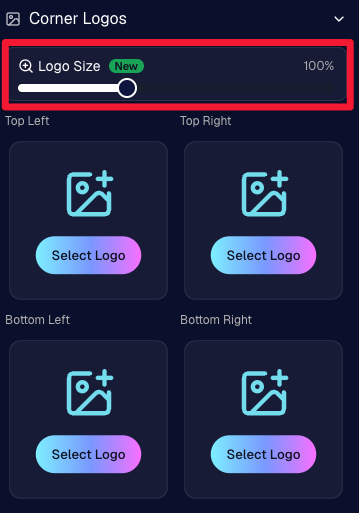
🔍 New logo size slider

  • Adjust your corner logos to be smaller or larger than the default.
  • Previously they could be considered a bit tiny, but this gives you a bit more control!

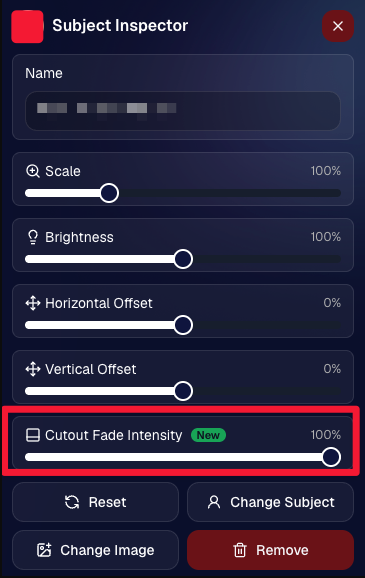
🌫️ Individual cutout fade control

  • The Subject Inspector now has its own cutout fade intensity slider, separate from the global setting, so you can fine-tune individual subjects when needed.
  • This will let you tweak the cutout fade intensity for subjects in the front row or on the sides of the virtual group, in case you're wanting a very specific look.

👥 Smarter merged-participant image selection

  • The Subject Image Picker will only show images from merged participants when they share the same name.
  • This typically does not matter, but in the case of a parent doing a Selfie Check-In of themselves and then of their child later, this will keep Virtual Groups working as expected!

Just a few additions, but very useful ones when you’re trying to get a Virtual Group looking just right!
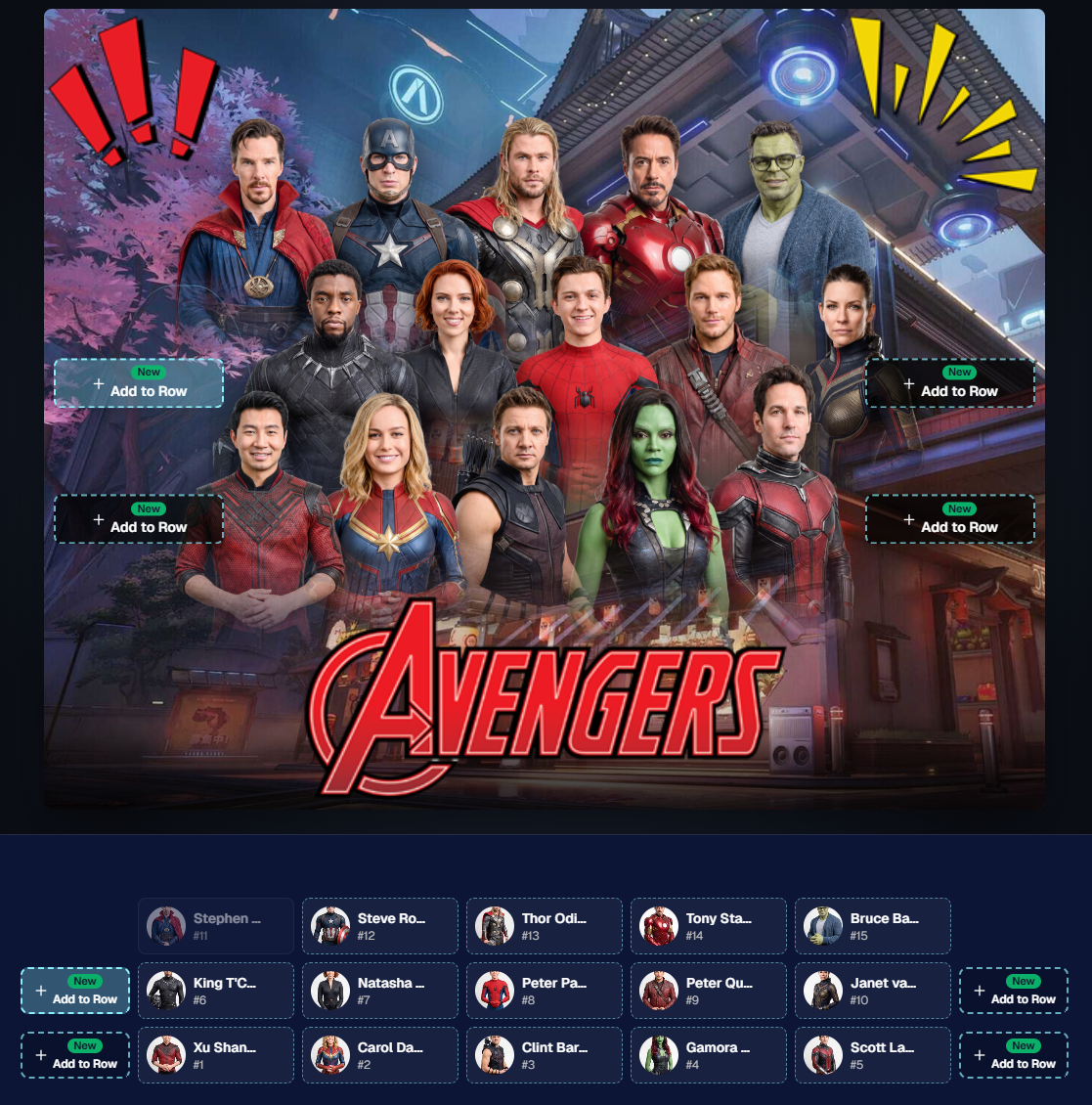
Drag and drop subjects into other rows for more control than ever!

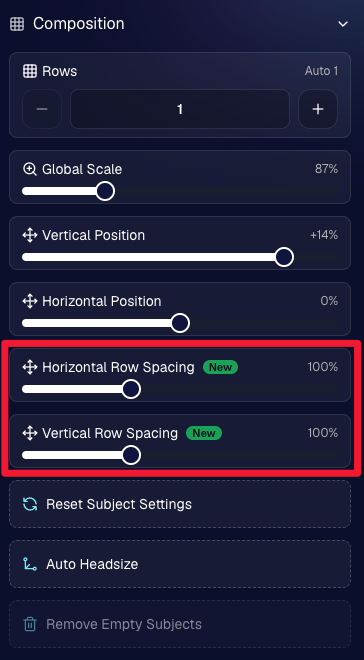
New options to more quickly space out your subjects!

When viewing subject details, adjust them by individual!

Control the size of your logos!

🏈 27 New Sports Background Sets

Alright, shoutout to the random guy who told me (me being Candy, in case you forgot!) that he didn’t like the backgrounds. We heard you! 😂

This week we’ve added 27 new sets of sports backgrounds, including a brand-new Sports – Locker Room background category.

And, in case you missed it, last week we also added an AI Background Generator so you can create entirely new, modern backgrounds of your own.

A quick reminder... you already have a lot of control over which backgrounds your customers actually see:

🎨 Edit the default backgrounds in your Offers

📤 Upload your own custom backgrounds at both the Offer-level and Event-level

🤖 Generate new backgrounds of your own with AI

🏈 Choose from our (now growing) collection of built-in choices

We have a TON of default backgrounds—and yes, many have been around for a while—but you’re never locked into using them. You can build your own look for your business, and we’ll keep adding new options over time too.

✂️ New Dedicated Background Removal Page

Event Background Removal now has its own dedicated Dashboard page, accessible from the Event Sidebar. It is not longer just a popup!

The BGR toggle on Event Overview will take you there too, giving all of these controls a little more breathing room.

On the new page, you can:

✅ Enable or disable Background Removal

🖼️ Manage your Event Backgrounds

🎨 See your Offer Backgrounds with a direct link to the Offer

📊 See how many cutouts have finished and how many are still processing

⏳ Watch a live progress bar while Background Removal is working

📂 See all valid Event folders and which ones are marked for Background Removal

And if your Event is a new Event: ✂️ You can mark an existing folder for Background Removal even if it already contains images!!!

🎨 Candy Image Studio: Better Exposure Fixes

🌙 New Fix Underexposure node

  • Helps recover images that came out too dark.

☀️ Fix Overexposure greatly improved

  • The existing overexposure tool has been reworked for more reliable results.
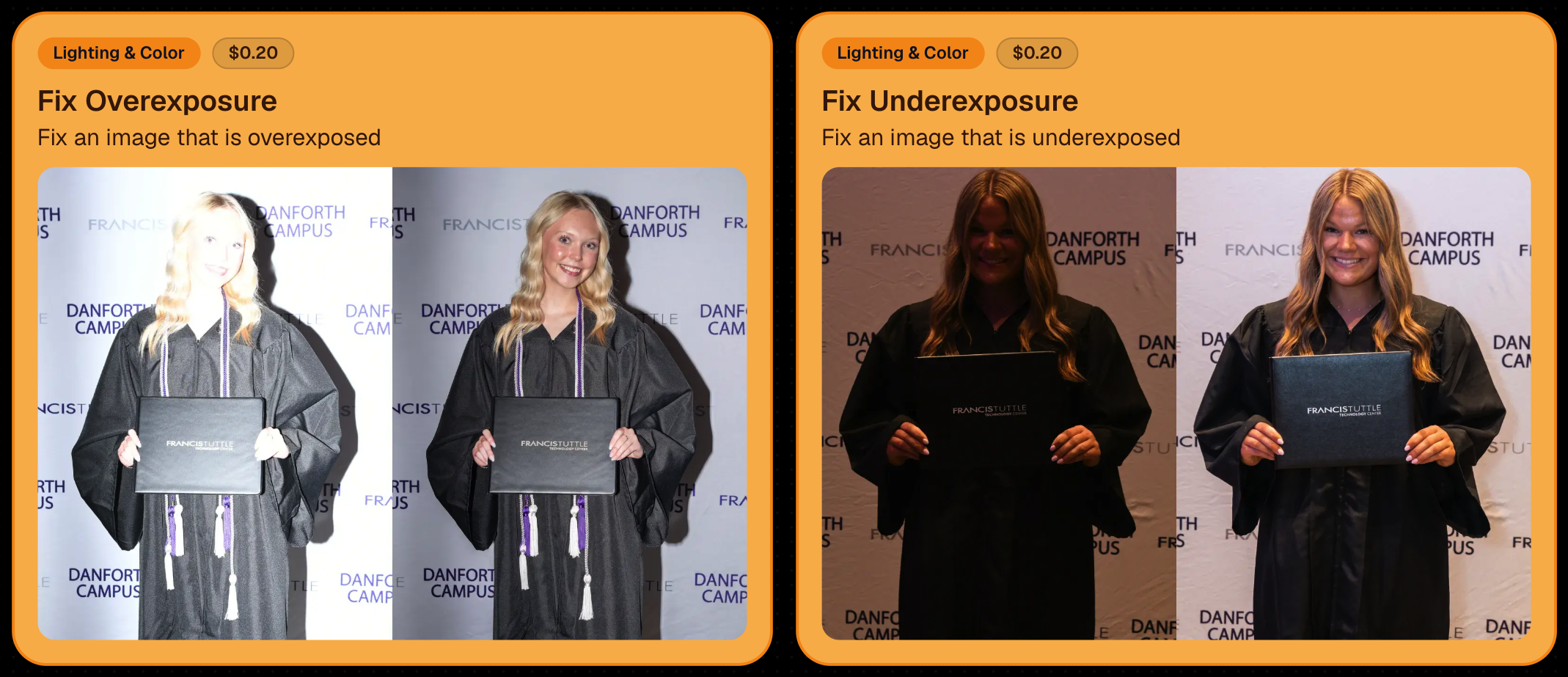
Utilize Candy Image Studio to fix images so they can sell, quickly and affordably!

🏈 Jersey Jotter Progress Tracking

New Jersey Jotter progress bar

  • When Jersey Jotter is active and still has unprocessed images, its dedicated page now shows processing progress—similar to Candy Culler and the new Background Removal page.

This makes it much easier to tell whether recognition is still working through a large Event.

🛍️ Retail Improvements

Titled Luxe Prints now work with package prefill

  • Packages can now automatically prefill eligible Titled Luxe Print products just like other supported products.

🖼️ Titled Luxe Print package rendering fixed

  • Fixed an issue where these products could render incorrectly inside packages.

🤖 AI-generated backgrounds now render correctly on products

🎨 Selected backgrounds now stay visible through the final product step

  • Fixed an issue where the chosen background could sometimes disappear on renders when reaching quantity and finish steps.

📝 Several product descriptions updated

  • Some product descriptions have been refreshed for better clarity.

🖼️ AI Edit + BGR Assignment Fix

👥 BGR versions of AI edits now keep direct participant assignments

  • If the original non-AI image was directly assigned to someone, its Background Removed AI-edited version will now correctly inherit that relationship.

📦 Order Details Fix

📝 Package captions now display correctly

  • Fixed cases where Order Details did not show caption information for certain products contained inside packages.

📱 Capture App 5.9.1 – iOS OTA

📸 Photo Booth fix for iPad

  • Fixed the Photo Booth gallery strip being cut off on certain iPad models.

That’s the week!

More Virtual Group control, a much stronger Background Removal workflow, some useful exposure tools, and plenty of fresh sports backgrounds to work with.

And if you still don’t like the backgrounds... now you’ve got plenty of ways to show us how it’s done. 😉

Keep creating magic,

Candy 🍬

Related articles

Capture & Upload App Update: Version 3.22
Feature Updates
May 10, 2024

Capture & Upload App Update: Version 3.22

3
 minutes read
🌟 Candy here with a new Capture & Upload app update overview! 🌟

Candy here with a fresh scoop on the latest tweaks to our Capture & Upload app! 📲 While this update might seem light on the surface, it's packed with all sorts of behind-the-scenes magic to boost performance and stability. ✨

To make sure you're getting the best out of NowCandid, keep your devices (both Windows & iOS) updated! 🔄

In the Capture & Upload app, just tap the information screen (that's the "i" button in the app) to see your app version and confirm you're rocking version 3.22. 🎉

iOS & Windows App Updates: 🛠️

  • Misc improvements & fixes to keep things running smoothly.
  • Now see the number of logs for each date when using the log uploader – super handy! 🗓️
  • New "Having trouble?" popup if 30 seconds pass on the take photo screen without any action. It's got helpful reminders in case something's amiss! 🕒
  • Say goodbye to the "Service Lost" popup on the shooting screen—it won't bug you anymore! 🚫
  • Introduced a dedicated "Name Lookup" button for Positive ID Events, making things more obvious than ever. 🔍
  • Misc UI tweaks & improvements to spruce things up!
  • Changed the "Dismiss" button in the update popup to "Use Old Version" for those who like a throwback. ⏪
  • Updated the "Add Participant" keypad to match the chic look of our newer Tap-A-Face keypad. 👯

iOS-App-Only Updates: 🍏

  • Truncate event name on iPhone at the top if name is super long (so it fits on 1 line)

Thanks for tuning in, and for being such amazing users of NowCandid! 🌈

See you again soon! And remember, if you've got questions or need a little help, just reach out. We're here for you! 💌

Cheers and sparkles,

Candy 🍬

Surprising Earnings: $18 Per Graduate at Middle School Graduations with GradPics Now!
GradPics
May 9, 2024

Surprising Earnings: $18 Per Graduate at Middle School Graduations with GradPics Now!

8
 minutes read

Breaking New Ground at Middle School Graduations 🎓

Traditionally, high school and college graduations are where photographers using GradPics Now hit high sales marks, often achieving $20 per graduate or even soaring to $40-$50+. This has set a solid benchmark for what we consider successful revenue from graduation events. However, middle school graduations, also known as moving up ceremonies, have typically seen much lower sales figures—until now.

A Surprising Success Story 🌟

A GradPics Now user recently shattered our modest expectations by earning over $18 per graduate at a middle school graduation ceremony. Covering this event with the same vigor and strategy as higher education graduations, including the use of our Selfie Check-In feature, this photographer managed to turn what is often considered a less lucrative opportunity into a significant success. With more than 400 graduates participating, the total sales exceeded $7,200 for just this one middle school event. Impressive, right?

The Power of Immediate Engagement 📸

This remarkable achievement highlights an important lesson: the potential of middle school graduations as viable and profitable photography events. The success at this particular ceremony suggests that GradPics Now, especially with the implementation of Selfie Check-In, is exceptionally effective at capturing the moment and leveraging the emotions of proud parents. This immediate engagement allows photographers to capitalize on the celebratory atmosphere right then and there, boosting sales significantly.

Expanding Your Horizons 🌍

This case study serves as a powerful testament to the capabilities of GradPics Now across different educational levels. If you've primarily focused on high school or college graduations, it might be time to consider the untapped potential of middle school ceremonies. The combination of efficient technology and emotional moments can clearly yield fantastic results.

Get Prepared with Pre-Grad Chats 💬

Interested in exploring how you can maximize your success with middle school graduations? Schedule a pre-grad chat with Jack (https://calendly.com/nowcandid-training) to refine your strategy and ensure you're fully equipped to make the most of every graduation ceremony this season. We salute all graduation photographers making memorable moments last. Good luck this grad season, and here's to raising the bar even higher!

Grad Season Preparation: Schedule a Pre-Grad Chat with Jack!
GradPics
May 7, 2024

Grad Season Preparation: Schedule a Pre-Grad Chat with Jack!

7
 minutes read
As graduation season approaches, ensuring your photography services are streamlined and optimized can significantly impact your sales and client satisfaction.

At NowCandid, we're dedicated to helping you maximize your graduation ceremony photography with efficient tools and strategies. Let's dive into how you can enhance your approach this grad season.

Schedule Your Pre-Grad Strategy Session 📅

Kick off the season right by booking a pre-grad chat with Jack (https://calendly.com/nowcandid-training). In this meeting, we'll cover:

  • Event Setup: Make sure you setup your GradPics Now Event correctly, and know what to expect.
  • Equipment Review: Ensure you have all the necessary gear for what you want to accomplish.
  • Best Practices: Tips and tricks to boost your confidence and readiness.

This session is crucial for tackling your events with the expertise needed to capture every memorable moment.

Jack has even doubled his usual Calendly availability for grad season! Take advantage!

Mastering Selfie Check-In 🤳

Selfie Check-In revolutionizes how you capture and associate images with graduates:

  • Ensure Participation: Encourage every graduate to use the Selfie Check-In upon arrival. Consider assigning assistants to facilitate this process.
  • Visibility: Utilize multiple QR code placements—signs, lanyards, and handheld QR code signs (https://www.teamphotonetwork.com/QP...) to ensure no one misses out.
  • Extended Reach: Gather information not just from graduates, but also their families, expanding your marketing reach.

Benefits of Live-Uploading 🌐

Connect your camera to an iPhone, iPad, or Windows device for real-time image uploading and instant gallery updates:

  • Immediate Availability: Images are uploaded during the ceremony, speeding up delivery and increasing sales potential.
  • Seamless Integration: Use either direct camera tethering or post-event uploading through the NowCandid Web Dashboard for continuous marketing and matching.
  • Less Work: Once you and your photographers leave a ceremony, you're done! Walk away and watch the sales roll in.

Comprehensive Photo Coverage 📸

Go beyond the traditional shots to truly capture the spirit of graduation. More photos mean higher chances of sales. Capture a broad range of moments to provide ample choices for your clients.

  • Processionals
  • Buddy Shots
  • Pre-Stage Portraits
  • Post-Stage Portraits
  • Handshake Shots
  • Recessionals
  • Friends & Family Shots

Why Choose NowCandid for Graduations? 🎓

GradPics Now isn't just about taking photos; it's about enhancing the entire experience:

  • Background Removal: Currently free! Background removal can add a professional touch, allowing subjects to choose from selectable, default backgrounds.
  • Full Support: Our support team handles customer inquiries related to orders and ordering, so you can focus on shooting.
  • Cost-Effective: No subscriptions; we only profit when you do, only taking a small commission on orders, ensuring our goals align with your success.
  • User-Friendly: Designed for ease of use, robust against mistakes, and backed by reliable recovery options.
  • Residual Sales: We keep images hosted and online for at least 15 years, helping you get residual sales as the years go by.
  • Successful: Graduation photographers find it incredibly easy compared to their past workflows, and find themselves earning 20%+ more (or in some cases, much more than that!) than what they previously made in sales, with a fraction of the effort.

Ready to take your graduation photography to the next level?

Don't wait—schedule your session with Jack today (https://calendly.com/nowcandid-training) and ensure you're fully prepared to make this grad season your most successful yet!

Let’s get in touch

If you’re a photographer looking to add NowCandid services to your wheelhouse – set up a call by clicking the button below.

How to customize formatting for each rich text

How to customize formatting for each rich text

How to customize formatting for each rich text

How to customize formatting for each rich text

How to customize formatting for each rich text

What’s a Rich Text element?

The rich text element allows you to create and format headings, paragraphs, blockquotes, images, and video all in one place instead of having to add and format them individually. Just double-click and easily create content.

A rich text element can be used with static or dynamic content. For static content, just drop it into any page and begin editing. For dynamic content, add a rich text field to any collection and then connect a rich text element to that field in the settings panel. Voila!

Headings, paragraphs, blockquotes, figures, images, and figure captions can all be styled after a class is added to the rich text element using the "When inside of" nested selector system.

  • List One
  • List Two
  • List Three
  • List Four
  • List Five

This is a link

This is bold text