HomeNavigation arrowBlogNavigation arrow
Current page
Feature Updates

Weekly Recap: More Virtual Group Control, New Sports Backgrounds & Better BGR Tools 🏈✨

Weekly Recap: More Virtual Group Control, New Sports Backgrounds & Better BGR Tools 🏈✨
Hey photo friends! 👋

Candy here with another weekly recap! This week brings more control to Virtual Group Builder, a much better home for Event Background Removal, new Candy Image Studio exposure tools, and—yes—27 new sports background sets. 😎

Let’s jump in!

🧑‍🤝‍🧑 Virtual Group Builder Additions

Ask and you shall receive... sometimes! We’ve gotten some good feedback on Virtual Group Builder, and this week several new controls are here to make layouts easier to fine-tune:

↕️ Force subjects onto different rows

  • While dragging a subject, new Add to Row buttons appear over the other rows. Drop the subject there to explicitly move them where you want instead of relying entirely on automatic placement.
  • Previously you were limited to automatically determined rows, you still have those but can now override them!

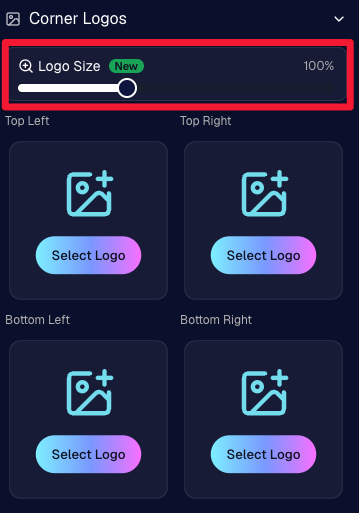
🔍 New logo size slider

  • Adjust your corner logos to be smaller or larger than the default.
  • Previously they could be considered a bit tiny, but this gives you a bit more control!

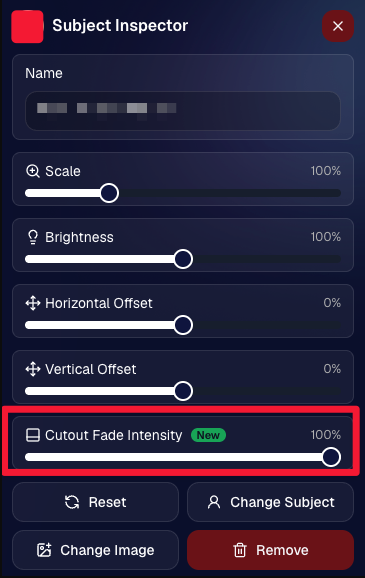
🌫️ Individual cutout fade control

  • The Subject Inspector now has its own cutout fade intensity slider, separate from the global setting, so you can fine-tune individual subjects when needed.
  • This will let you tweak the cutout fade intensity for subjects in the front row or on the sides of the virtual group, in case you're wanting a very specific look.

👥 Smarter merged-participant image selection

  • The Subject Image Picker will only show images from merged participants when they share the same name.
  • This typically does not matter, but in the case of a parent doing a Selfie Check-In of themselves and then of their child later, this will keep Virtual Groups working as expected!

Just a few additions, but very useful ones when you’re trying to get a Virtual Group looking just right!
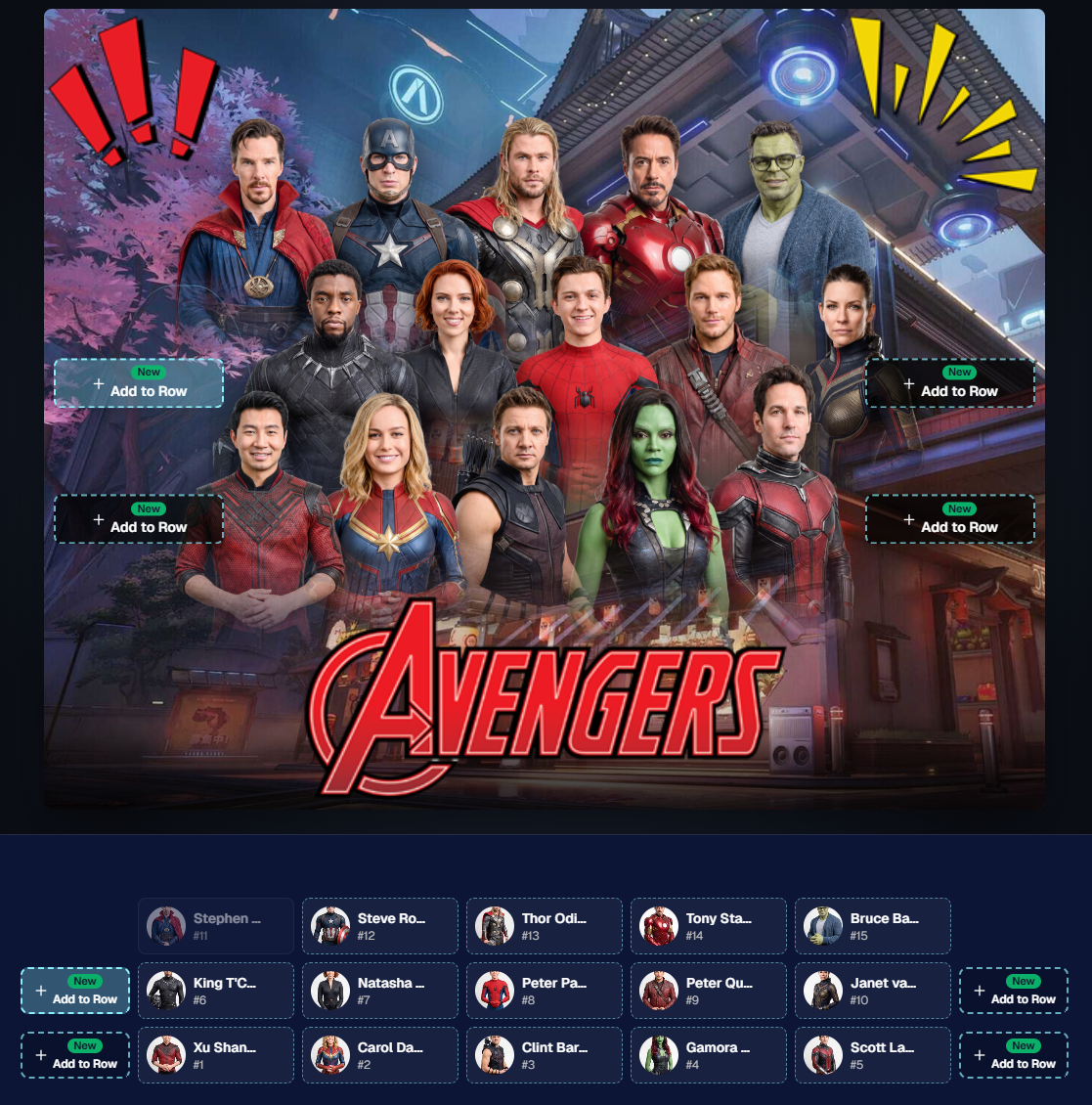
Drag and drop subjects into other rows for more control than ever!

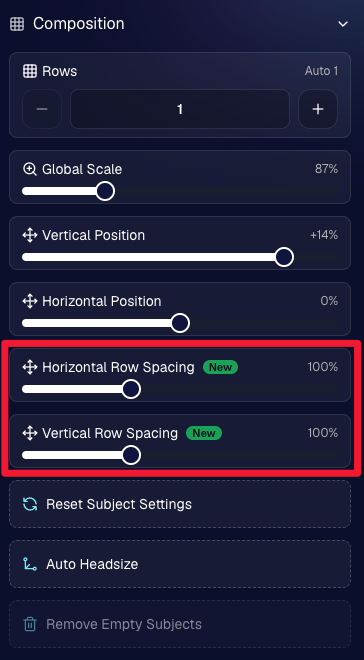
New options to more quickly space out your subjects!

When viewing subject details, adjust them by individual!

Control the size of your logos!

🏈 27 New Sports Background Sets

Alright, shoutout to the random guy who told me (me being Candy, in case you forgot!) that he didn’t like the backgrounds. We heard you! 😂

This week we’ve added 27 new sets of sports backgrounds, including a brand-new Sports – Locker Room background category.

And, in case you missed it, last week we also added an AI Background Generator so you can create entirely new, modern backgrounds of your own.

A quick reminder... you already have a lot of control over which backgrounds your customers actually see:

🎨 Edit the default backgrounds in your Offers

📤 Upload your own custom backgrounds at both the Offer-level and Event-level

🤖 Generate new backgrounds of your own with AI

🏈 Choose from our (now growing) collection of built-in choices

We have a TON of default backgrounds—and yes, many have been around for a while—but you’re never locked into using them. You can build your own look for your business, and we’ll keep adding new options over time too.

✂️ New Dedicated Background Removal Page

Event Background Removal now has its own dedicated Dashboard page, accessible from the Event Sidebar. It is not longer just a popup!

The BGR toggle on Event Overview will take you there too, giving all of these controls a little more breathing room.

On the new page, you can:

✅ Enable or disable Background Removal

🖼️ Manage your Event Backgrounds

🎨 See your Offer Backgrounds with a direct link to the Offer

📊 See how many cutouts have finished and how many are still processing

⏳ Watch a live progress bar while Background Removal is working

📂 See all valid Event folders and which ones are marked for Background Removal

And if your Event is a new Event: ✂️ You can mark an existing folder for Background Removal even if it already contains images!!!

🎨 Candy Image Studio: Better Exposure Fixes

🌙 New Fix Underexposure node

  • Helps recover images that came out too dark.

☀️ Fix Overexposure greatly improved

  • The existing overexposure tool has been reworked for more reliable results.
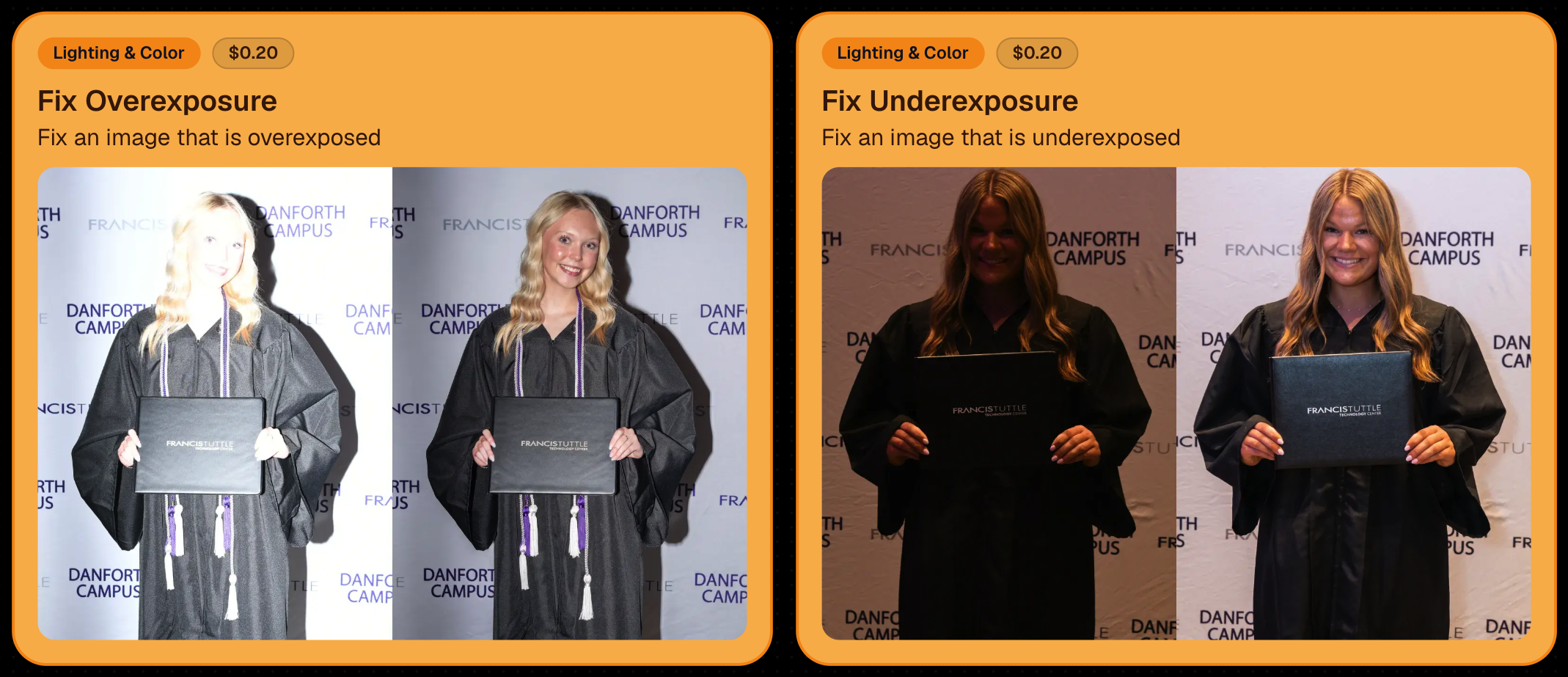
Utilize Candy Image Studio to fix images so they can sell, quickly and affordably!

🏈 Jersey Jotter Progress Tracking

New Jersey Jotter progress bar

  • When Jersey Jotter is active and still has unprocessed images, its dedicated page now shows processing progress—similar to Candy Culler and the new Background Removal page.

This makes it much easier to tell whether recognition is still working through a large Event.

🛍️ Retail Improvements

Titled Luxe Prints now work with package prefill

  • Packages can now automatically prefill eligible Titled Luxe Print products just like other supported products.

🖼️ Titled Luxe Print package rendering fixed

  • Fixed an issue where these products could render incorrectly inside packages.

🤖 AI-generated backgrounds now render correctly on products

🎨 Selected backgrounds now stay visible through the final product step

  • Fixed an issue where the chosen background could sometimes disappear on renders when reaching quantity and finish steps.

📝 Several product descriptions updated

  • Some product descriptions have been refreshed for better clarity.

🖼️ AI Edit + BGR Assignment Fix

👥 BGR versions of AI edits now keep direct participant assignments

  • If the original non-AI image was directly assigned to someone, its Background Removed AI-edited version will now correctly inherit that relationship.

📦 Order Details Fix

📝 Package captions now display correctly

  • Fixed cases where Order Details did not show caption information for certain products contained inside packages.

📱 Capture App 5.9.1 – iOS OTA

📸 Photo Booth fix for iPad

  • Fixed the Photo Booth gallery strip being cut off on certain iPad models.

That’s the week!

More Virtual Group control, a much stronger Background Removal workflow, some useful exposure tools, and plenty of fresh sports backgrounds to work with.

And if you still don’t like the backgrounds... now you’ve got plenty of ways to show us how it’s done. 😉

Keep creating magic,

Candy 🍬

Related articles

Candy’s Weekly Recap: Unique Faces Count, Capture App 4.7 Updates, and Exciting New Features! 🎉
Feature Updates
October 25, 2024

Candy’s Weekly Recap: Unique Faces Count, Capture App 4.7 Updates, and Exciting New Features! 🎉

5
 minutes read
Hello, my fabulous photographer friends!

Candy here, ready to sprinkle some sparkle on your day with our latest Weekly Recap! 🌟

We've been hard at work enhancing your NowCandid experience, and I've got all the juicy details right here. Let's dive in! 🏊‍♀️

1. Unique Faces Count After Group-By-Face 👥

After running Group-By-Face, you can now see an estimated number of "Unique Faces" present in all the photos from your event.

  • Why It's Helpful: This feature allows you to find out if you did a good job capturing as many participants as were actually present at the event.
  • Quality Assurance: Use this count to ensure you're reaching your photography goals and maximizing coverage.

2. Capture App Version 4.7 Updates 📱

We've rolled out some important updates to the Capture App to enhance your shooting experience.

  • Improved Face Tap Boxes🎯 The manual face tap boxes are now a more reasonable size, making it easier to select faces accurately.
  • "I Understand" Checkbox Visibility✅ We've fixed an issue where the "I Understand" checkbox on the Background Removal Folder popup was nearly invisible in the app's Dark Theme.
  • Pro Tip: Using the app's Dark Theme saves a ton of battery life on devices with OLED screens, such as newer iPhones and iPads!

3. New 2x5 Scan Card Option for Scanner ID Workflow 📝

Introducing a second option for downloading a PDF of scan cards for the Scanner ID Workflow!

  • Smaller Card Size: Now available in a 2x5 format.
  • Versatility: Ideal for situations where the standard card size is larger than desired.
  • Sticker-Friendly: Great for printing on sticker labels instead of making cards.

4. Retail Site Tweaks for Better Mobile Experience 📱

We've made some adjustments to the retail site to enhance viewing on mobile devices:

  • Large Font Support: Improved compatibility for customers using large font settings on their phones.
  • Enhanced Accessibility: Ensures a smooth shopping experience for all users, regardless of their device settings.

5. New Press & Hold to Download Feature for QuicPics & QuicPics GO 📥

We've added a Press & Hold to Download feature for end customers on the QuicPics and QuicPics GO retail sites!

  • Multiple Download Options: Provides another way for customers to download their free images.
  • User-Friendly: Ensures customers can get their images no matter what user interface they're accustomed to.
  • Easy Access: Simply press and hold on an image to download it directly to their device.

We're always here to support you!

Thank you for being an essential part of the NowCandid community. Keep capturing those unforgettable moments and creating smiles! 📸😊

Cheers and sparkles,

Candy 🍬

Candy’s Weekly Recap: Exciting New Features and Updates!📸🎉
Feature Updates
October 18, 2024

Candy’s Weekly Recap: Exciting New Features and Updates!📸🎉

4
 minutes read
Hello, my fabulous photographer friends!

Candy here, ready to sprinkle some sparkle on your day with our latest Weekly Recap! 🌟

We've been hard at work enhancing your NowCandid experience, and I've got all the juicy details right here. Let's dive in! 🏊‍♀️

1. Retail Site Enhancements 🛍️

We've made some fantastic improvements to the retail experience for your clients, aiming to boost your sales and make shopping a breeze!

  • Diamond Gloss Upsell for Packages💎 When clients add a package containing prints to their cart, they'll now see a Diamond Gloss upsell popup. They can choose to add that finish to every print in their package.
  • Clearer Product Naming📝 The Medium Res Gallery Download (only offered and always offered when you're doing a QuicPics or QuicPics GO Event) now automatically renames to Free Gallery when there's no high-resolution personal gallery offered. Just like the individual download does!
  • Smart Cart Management🛒 If a client has already added the Personal Gallery Download to their cart, it will be hidden from the shopping screen.

Diamond Gloss Upsell for Packages💎

2. Dashboard Improvements 🖥️

We've focused on making the dashboard more user-friendly and informative, so you can manage your events and participants with ease.

  • Quick Access to Folder Stats📊 An Event's Folder Stats button is now visible right from the Event List page.
  • Enhanced Order Details🔍 The Order Details popup in the Sales Report now shows the quantity of each item ordered.
  • Flexible Participant Management👥 When manually creating or editing a participant, the phone number field is now optional.
  • Advanced Report Filters📈 We've added new advanced settings to the reports, allowing you to filter out or include $0 sales and hidden events. This gives you greater control over your data analysis!
  • Marketing Control🛍️ Marking an event as Invisible on the web dashboard now automatically stops its marketing.

Quick Access to Folder Stats📊

Marketing Control🛍️

Advanced Report Filters📈

3. Capture App Version 4.6.9 Updates 📱

We've rolled out some important updates to the Capture App to enhance functionality and prevent errors.

  • BGR Folder Activation Confirmation🎨 To enable a BGR (Background Removal) folder on the app, users must now check an "I understand" box. Helps new team members avoid accidentally enabling BGR when it's not intended, saving you time and resources.
  • Improved Phone Number Validation📞 The app now prevents the use of obviously fake phone numbers like 333-333-3333 or 444-444-4444.
  • Auto-Refresh Event List on iOS🔄 When returning to the app on iOS devices, the event list will now auto-refresh. Reduces the chance of seeing outdated event details, keeping you informed on the go.

BGR Folder Activation Confirmation🎨

4. Mobile Dashboard 2.1.0 Updates 📲

Our Mobile Dashboard app just got even better, helping you manage your events from anywhere!

  • Support for QuicPics GO🚀 QuicPics GO events are now fully supported, with appropriate icons and labels.
  • Sortable Folders Report📁 Just like on the desktop dashboard, you can now sort the Folders Report in the mobile app. Swipe down to refresh and get real-time data mid-event. Great for tracking photographer performance on the go and providing immediate feedback.

Support for QuicPics GO🚀

We're always here to support you!

So please, feel free to share your feedback or questions.

Thank you for being an essential part of the NowCandid community. Keep capturing those unforgettable moments and creating smiles! 📸😊

Cheers and sparkles,

Candy 🍬

Holiday Gear Up
Success Stories
October 16, 2024

Holiday Gear Up

4
 minutes read
Are you ready for the Holiday Season?

Maybe not since we have roughly 10 weeks to go. For most photographers, the winter months can bring a noticeable slowdown, but this also presents the perfect opportunity to seize seasonal event opportunities like Santa Portraits and holiday parties.

These festive events are in high demand, and with the right tools, you can make the most out of them!

We want to share a success story from a Santa Portrait Event that took place in the last few years, along with how NowCandid’s Workflows can help you maximize your success this holiday season.

Santa Portrait Station Success

Rachel S., a photography business owner from South Florida, a few years ago landed a Santa Portrait event at a Zoo and turned it into a HUGE win. With Candid's Scanner ID Workflow, Rachel was able to use the same techniques of a typical sports or school picture day and apply them to the Holiday Zoo Lights Santa Event.

To manage the event, Rachel used the Scanner ID Workflow, and generated blank QR cards to pass out to people while they waited in line.

The QR codes were scanned by the guests who then paired their contact info with their QR code! Once they got to the front of the line, Rachel's photographers would scan the next guest's QR with their tethered device, and then take their photos!

The device tethered to the camera would then upload the photos right after they were taken!

With the contact info and pictures both in the system, gallery links were then automatically texted directly to the subjects, right away.

Overall, this event garnered over $42,000 in it's first year!!! Not bad for a couple weeks of work!

NowCandid Workflows: Make Your Holiday Events a Breeze

One of the key elements to success in high-volume holiday events is efficiency—and that’s where NowCandid’s Workflows come into play.

These workflows streamline the process of capturing, organizing, and delivering photos, allowing you to focus more on your artistry and client experience.

Here are two workflows you’ll want to use during your Santa sessions and holiday parties:

  1. Scanner ID: The Workflow Rachel used! It's great for efficiently collecting guest contact info while they are in line, letting you move the line along more quickly OR have more time available for additional photos. Contact info is essential for instant image delivery and post-shoot marketing.
  2. Type & Take: This works similarly to the Scanner ID Workflow, except you type the subject's contact info into your tethered device before photographing them. It is not as time efficient at Scanner ID, but it doesn't require you to print out many blank cards before the event!

Seasonal Retail Theme to Add to the Experience

The holiday fun doesn't stop at the event—it continues when your customers view and purchase their images! With our Candy Cane retail theme, your clients are immersed in the festive spirit as soon as they visit their personal image gallery.

Our themes include delightful touches like falling snowflakes, which gently drift across the screen. These animations help enhance the shopping experience and keep customers wrapped up in the magic of the season.

Theme: Candy Cane - Watermarking: Default

Use Overlay Art to Add a Special Touch

If you're looking to elevate the experience further, NowCandid offers Overlay Art, allowing you to add optional customized overlays to your clients' images.

These titles add a festive, personal touch to the photos, making them feel extra special, whether it's a corporate holiday party, a Santa session, or a family Christmas gathering.

Imagine sending clients their Santa Portraits, complete with a “Merry Christmas 2024” overlay or a custom-designed title that reflects the spirit of the season. It’s little touches like these that make clients feel valued and excited about your services—leading to more referrals and repeat business.

Why You Shouldn't Sleep on Holiday Opportunities

The holiday season offers some of the most lucrative photography opportunities of the year, especially when it comes to events like Santa Portrait sessions, corporate holiday parties or large family and friends gatherings.

With many photographers considering this time a "slow season," there's an opportunity to stand out from the crowd by offering fun, engaging photo experiences that families, organizations, and individuals will love.

Adding these events to your services can also build lasting relationships with your clients—because who doesn’t want to make holiday memories they’ll treasure forever?

Don't Miss Out: Prep for the Holidays Now

The key to success is preparation. Start planning your Santa sessions, promote your holiday event photography, and make sure you're using NowCandid’s powerful tools to handle your Events with ease.

And remember: festive cheer isn’t just for clients. By embracing the holiday season and seizing these photography opportunities, you can fill your calendar and finish the year strong.

Cheers, and may there be many holiday events in your future!

Candy 🍬

Let’s get in touch

If you’re a photographer looking to add NowCandid services to your wheelhouse – set up a call by clicking the button below.

How to customize formatting for each rich text

How to customize formatting for each rich text

How to customize formatting for each rich text

How to customize formatting for each rich text

How to customize formatting for each rich text

What’s a Rich Text element?

The rich text element allows you to create and format headings, paragraphs, blockquotes, images, and video all in one place instead of having to add and format them individually. Just double-click and easily create content.

A rich text element can be used with static or dynamic content. For static content, just drop it into any page and begin editing. For dynamic content, add a rich text field to any collection and then connect a rich text element to that field in the settings panel. Voila!

Headings, paragraphs, blockquotes, figures, images, and figure captions can all be styled after a class is added to the rich text element using the "When inside of" nested selector system.

  • List One
  • List Two
  • List Three
  • List Four
  • List Five

This is a link

This is bold text