HomeNavigation arrowBlogNavigation arrow
Current page
Feature Updates

Weekly Recap: More Virtual Group Control, New Sports Backgrounds & Better BGR Tools 🏈✨

Weekly Recap: More Virtual Group Control, New Sports Backgrounds & Better BGR Tools 🏈✨
Hey photo friends! 👋

Candy here with another weekly recap! This week brings more control to Virtual Group Builder, a much better home for Event Background Removal, new Candy Image Studio exposure tools, and—yes—27 new sports background sets. 😎

Let’s jump in!

🧑‍🤝‍🧑 Virtual Group Builder Additions

Ask and you shall receive... sometimes! We’ve gotten some good feedback on Virtual Group Builder, and this week several new controls are here to make layouts easier to fine-tune:

↕️ Force subjects onto different rows

  • While dragging a subject, new Add to Row buttons appear over the other rows. Drop the subject there to explicitly move them where you want instead of relying entirely on automatic placement.
  • Previously you were limited to automatically determined rows, you still have those but can now override them!

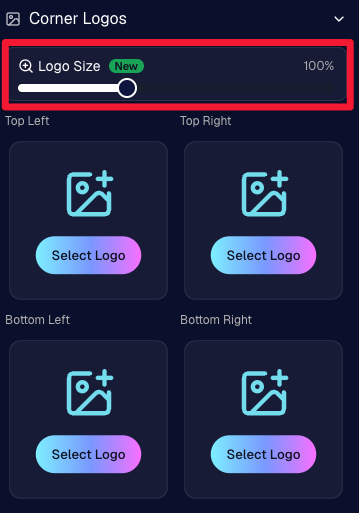
🔍 New logo size slider

  • Adjust your corner logos to be smaller or larger than the default.
  • Previously they could be considered a bit tiny, but this gives you a bit more control!

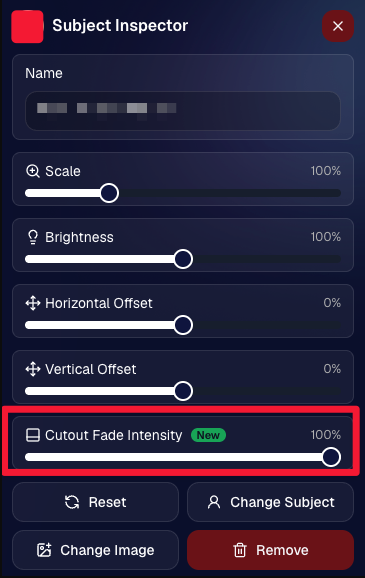
🌫️ Individual cutout fade control

  • The Subject Inspector now has its own cutout fade intensity slider, separate from the global setting, so you can fine-tune individual subjects when needed.
  • This will let you tweak the cutout fade intensity for subjects in the front row or on the sides of the virtual group, in case you're wanting a very specific look.

👥 Smarter merged-participant image selection

  • The Subject Image Picker will only show images from merged participants when they share the same name.
  • This typically does not matter, but in the case of a parent doing a Selfie Check-In of themselves and then of their child later, this will keep Virtual Groups working as expected!

Just a few additions, but very useful ones when you’re trying to get a Virtual Group looking just right!
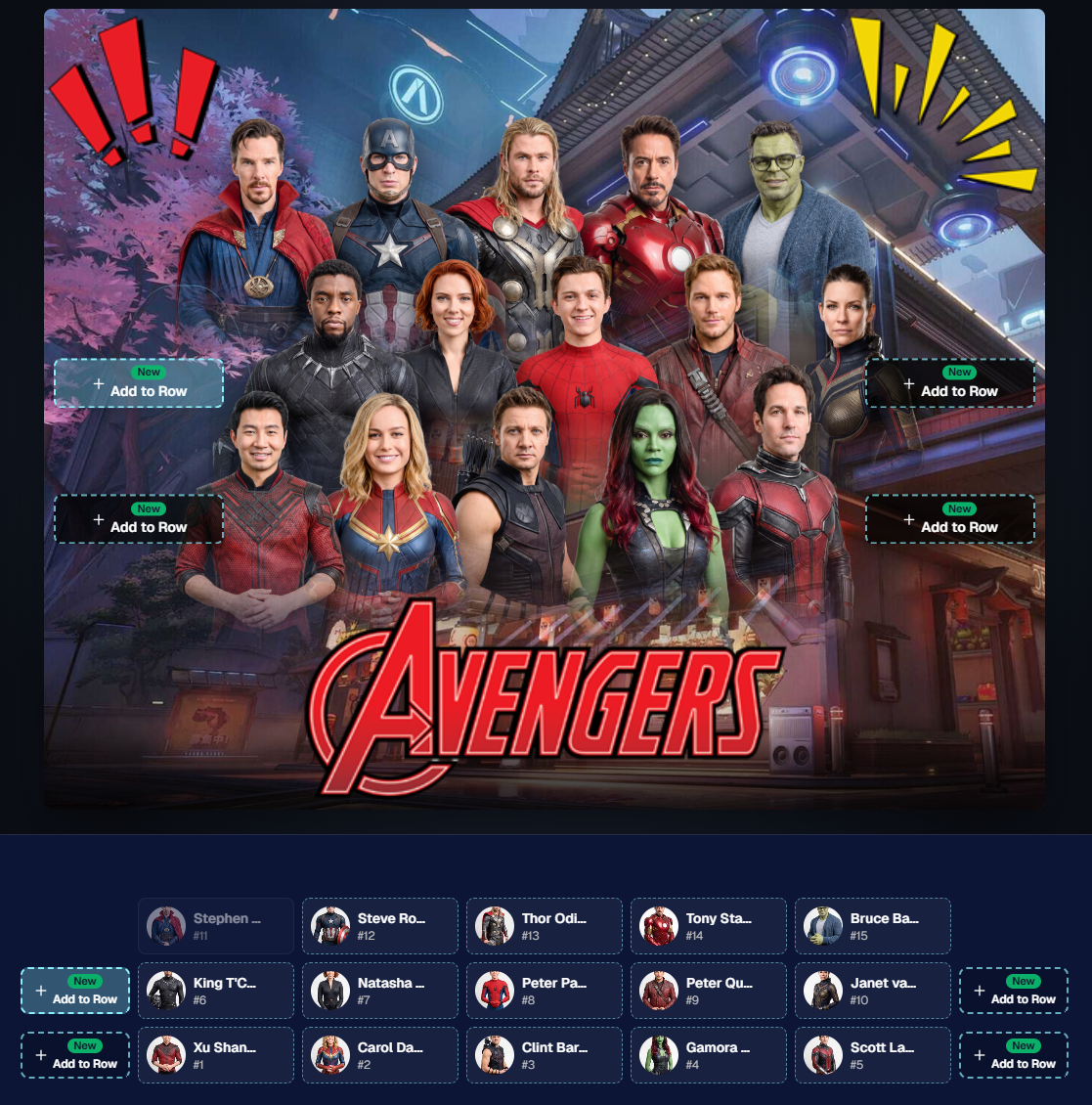
Drag and drop subjects into other rows for more control than ever!

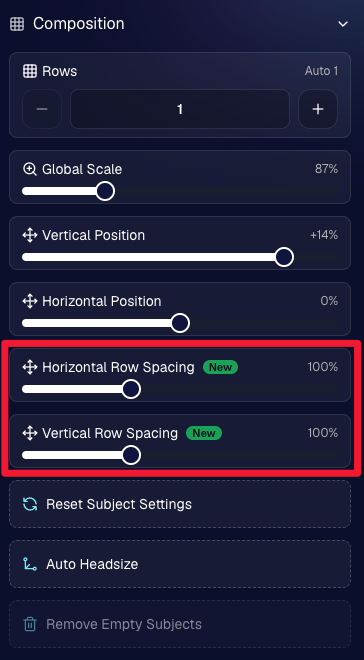
New options to more quickly space out your subjects!

When viewing subject details, adjust them by individual!

Control the size of your logos!

🏈 27 New Sports Background Sets

Alright, shoutout to the random guy who told me (me being Candy, in case you forgot!) that he didn’t like the backgrounds. We heard you! 😂

This week we’ve added 27 new sets of sports backgrounds, including a brand-new Sports – Locker Room background category.

And, in case you missed it, last week we also added an AI Background Generator so you can create entirely new, modern backgrounds of your own.

A quick reminder... you already have a lot of control over which backgrounds your customers actually see:

🎨 Edit the default backgrounds in your Offers

📤 Upload your own custom backgrounds at both the Offer-level and Event-level

🤖 Generate new backgrounds of your own with AI

🏈 Choose from our (now growing) collection of built-in choices

We have a TON of default backgrounds—and yes, many have been around for a while—but you’re never locked into using them. You can build your own look for your business, and we’ll keep adding new options over time too.

✂️ New Dedicated Background Removal Page

Event Background Removal now has its own dedicated Dashboard page, accessible from the Event Sidebar. It is not longer just a popup!

The BGR toggle on Event Overview will take you there too, giving all of these controls a little more breathing room.

On the new page, you can:

✅ Enable or disable Background Removal

🖼️ Manage your Event Backgrounds

🎨 See your Offer Backgrounds with a direct link to the Offer

📊 See how many cutouts have finished and how many are still processing

⏳ Watch a live progress bar while Background Removal is working

📂 See all valid Event folders and which ones are marked for Background Removal

And if your Event is a new Event: ✂️ You can mark an existing folder for Background Removal even if it already contains images!!!

🎨 Candy Image Studio: Better Exposure Fixes

🌙 New Fix Underexposure node

  • Helps recover images that came out too dark.

☀️ Fix Overexposure greatly improved

  • The existing overexposure tool has been reworked for more reliable results.
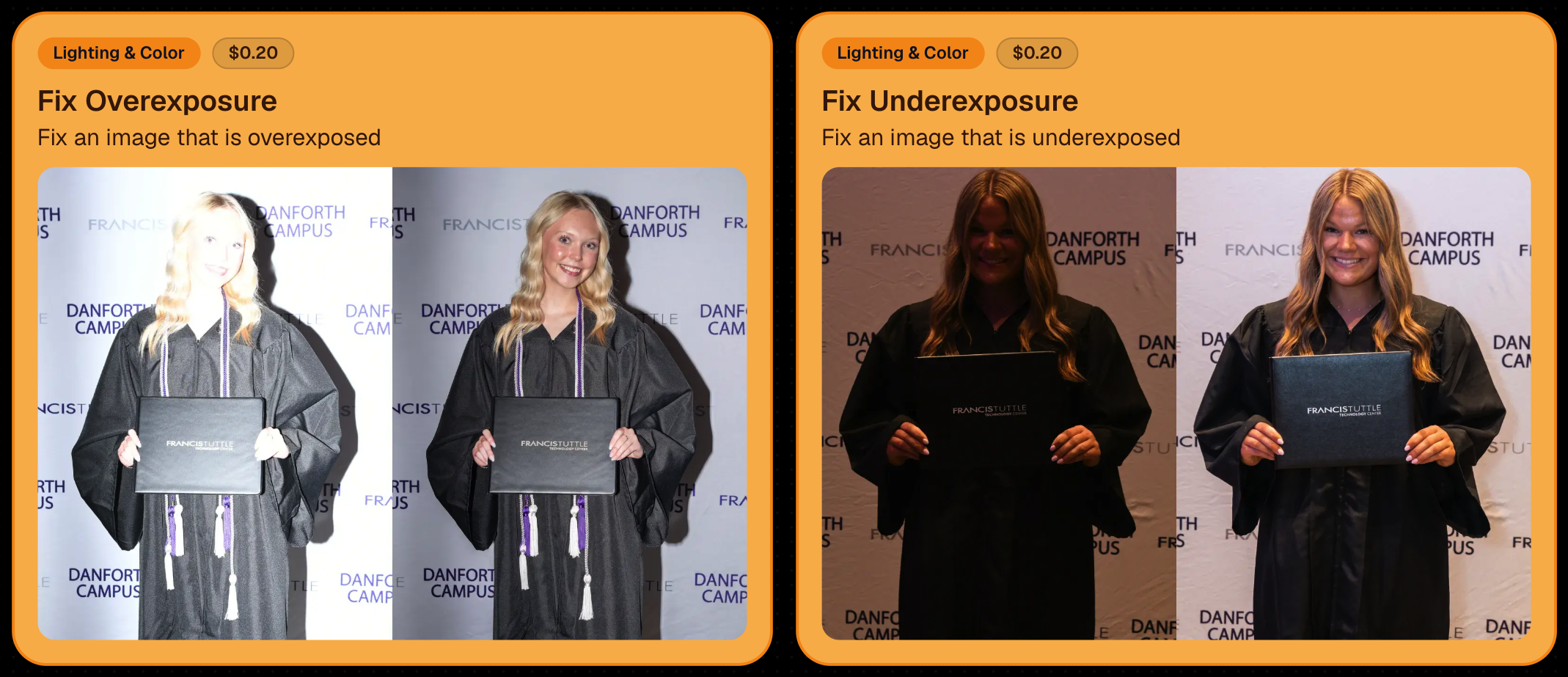
Utilize Candy Image Studio to fix images so they can sell, quickly and affordably!

🏈 Jersey Jotter Progress Tracking

New Jersey Jotter progress bar

  • When Jersey Jotter is active and still has unprocessed images, its dedicated page now shows processing progress—similar to Candy Culler and the new Background Removal page.

This makes it much easier to tell whether recognition is still working through a large Event.

🛍️ Retail Improvements

Titled Luxe Prints now work with package prefill

  • Packages can now automatically prefill eligible Titled Luxe Print products just like other supported products.

🖼️ Titled Luxe Print package rendering fixed

  • Fixed an issue where these products could render incorrectly inside packages.

🤖 AI-generated backgrounds now render correctly on products

🎨 Selected backgrounds now stay visible through the final product step

  • Fixed an issue where the chosen background could sometimes disappear on renders when reaching quantity and finish steps.

📝 Several product descriptions updated

  • Some product descriptions have been refreshed for better clarity.

🖼️ AI Edit + BGR Assignment Fix

👥 BGR versions of AI edits now keep direct participant assignments

  • If the original non-AI image was directly assigned to someone, its Background Removed AI-edited version will now correctly inherit that relationship.

📦 Order Details Fix

📝 Package captions now display correctly

  • Fixed cases where Order Details did not show caption information for certain products contained inside packages.

📱 Capture App 5.9.1 – iOS OTA

📸 Photo Booth fix for iPad

  • Fixed the Photo Booth gallery strip being cut off on certain iPad models.

That’s the week!

More Virtual Group control, a much stronger Background Removal workflow, some useful exposure tools, and plenty of fresh sports backgrounds to work with.

And if you still don’t like the backgrounds... now you’ve got plenty of ways to show us how it’s done. 😉

Keep creating magic,

Candy 🍬

Related articles

Weekly Recap: PhotoCoach Support, Acrylic Puzzles & More! 🧠🧩
Feature Updates
August 1, 2025

Weekly Recap: PhotoCoach Support, Acrylic Puzzles & More! 🧠🧩

4
 minutes read
Hey there, photo friends!

Candy here with some sweet new updates from your NowCandid™ Dashboard.

We've got a powerful new coaching tool, a fun new product to sell, and a bunch of workflow-boosting fixes to round it out.

Let’s dive in! ✨

🆕 New Feature: PhotoCoach

Introducing PhotoCoach—your new secret weapon for improving the quality of your photographers’ photos over time! 🧠📷

With PhotoCoach, you can:

  • • Review images from your Events and flag them with issues like "Acceptable," “Duplicate,” “Exposure Issue,” “Cropping Issue” and more (and make your own categories too!)
  • • Track photographer photo quality over time
  • • Send automatic feedback reports to your photographers with a breakdown of image counts & issue counts

It’s perfect for helping your team take more sellable images—leading to happier clients and stronger sales!

Find it now under Tools & More on your Dashboard and start coaching like a pro. 💪

Note: PhotoCoach is not new for CORE™ users (CORE™ is our sister-software at Candid Color Systems™), but it's new to NowCandid™! And it's had some feature improvements recently so it is now web-based! Woo!

It takes a little getting used to, but once you are, it's super easy and super fun!

🧩 NEW: 8×10 Acrylic-Backed Puzzle

Puzzle fans, rejoice! 🎉 You can now sell a 56-piece acrylic-backed 8×10 puzzle, complete with cute live-rendered previews on the retail site.

Why customers will love it:

  • Unique gift or keepsake
  • Durable acrylic & display-worthy

Even the little detahced pieces in the top right live-render, yay! - Theme: Liquorice

🔗 URL Filtering Just Got Smarter

Now when shoppers apply filters on the retail site, those filters update the URL automatically—making filtered views shareable with friends & family!

Not much more to say about this one, just a cool touch! :)

🛠️ Misc Tweaks & Fixes

A roundup of small but mighty changes:

  • 📥 Dynamic Personal Gallery Downloads can now be purchased by shoppers via Favorites!
    • A great addition for action sports—gives customers a “buy all” option that scales with the number of images selected, even when shopping from an All Gallery.
  • 🧑‍🤝‍🧑 Group-by-Face filter popup now shows only unique faces
    • Applies to new Events only—re-run Group-by-Face on past Events if needed!
  • 🗂 BGR Folders are editable again via the “Edit Folder” option
  • 🖼 Retail site now scrolls past the cover photo if a filter is selected from the initial popup
    • A smoother experience when arriving to an All Images gallery
  • 🧍‍♀️ Selfie Check-In button transforms post-Face Matching
    • It now becomes a second Retail Site button after expiration
  • 🧾 Invoice History tool now displays all past invoices, not just recent ones

That’s everything for this week! 💫

Whether you're giving photo feedback, selling puzzles, or just tidying up your workflow—we’ve got your back.

More soon!
Candy 🍬

Weekly Recap: Filters for Faces, Jerseys, and PhotoTags ✨
Feature Updates
July 25, 2025

Weekly Recap: Filters for Faces, Jerseys, and PhotoTags ✨

5
 minutes read
Candy here with your scoop on all the sweet new updates from this week! 🍬

Let’s get right into it...

📸 Big News: PhotoTags Now Work as a Filter!

PhotoTags just got a major glow-up! 🌟

Instead of being a separate tab, they’re now integrated directly into the Filters section on the All Images Gallery. That means they now play nicely alongside JerseyJotter™ and Group-by-Face!

Whether you're shopping for cheerleaders, bands, dancers, or any other tagged group—this change makes it smoother than ever to find just the photos you care about.

Did you know? NowCandid is headquartered in Oklahoma City! Thunder Up!

🧠 Big News: Group-by-Face is Now a Filter Too!

Group-by-Face fans rejoice! 🎭

Group-by-Face has been transformed into a Filter, too! Instead of whisking you away to a new page, selecting a face now just filters the All Images Gallery to show photos featuring that face. You can even browse faces via the Face filter menu.

And yes—it works with PhotoTags and JerseyJotter™, so you can filter for a specific face, a jersey number, AND a PhotoTag Group all at once. Woo!

Yup, it even got his blurry face over Cason Wallace's shoulder!

🧾 Big News: Invoice History in Profile Settings

Ever had an invoice go missing in your email inbox? We've got you covered!

You can now view and download past invoices directly from your Profile Settings page on the Web Dashboard. Whether you're keeping things tidy for tax season, tracking your account activity, or just trying to find that one receipt from a few months ago — this new Invoice History section gives you quick access to every invoice tied to your account.

No more digging through old emails. Just head to Settings → Profile → Invoice History and boom — organized, downloadable, and ready whenever you need it.

Another small quality-of-life boost to keep things running smoother behind the scenes. 🎟️✅

Accessible via Profile on the Web Dashboard.

⚙️ Other Notable Changes

🔍 “Looking for More?” Button + All Images Filter Popups

We’ve added a new “Looking for More?” button at the bottom of personal image galleries — perfect for subjects who didn’t find quite everything they were hoping for. If your Event has the All Images Gallery turned on, this button will guide shoppers over to that gallery for a broader look.

And with all the recent upgrades like PhotoTags™, Group-by-Face, JerseyJotter™, and improved gallery tools, we’re confident that the All Images view is more helpful and shoppable than ever before!

🎛️ Bonus: When filters are enabled for your Event, the All Images Tab and All Gallery URL will now open a popup that clearly explains what filtering options are available for that particular event — making discovery even easier for your customers.

Clicking any option will open up that Filter's popup as well!

🤳 “Is This the Face?” Popup

When someone takes or uploads a selfie for Selfie Check-In, we now ask them:

“Is this the face for which you want to find matching images?”

This simple question will reduce the number of parents who accidentally upload selfies of themselves instead of their child!

We'll keep trying to get parents to not upload their own selfies :)

📱 QR Code Download for All Images Gallery

New button alert! You can now easily download the All Images Gallery QR Code to share at events—perfect for action sports and other workflows that rely on promoting the All Images Gallery.

Accessible via "Retail Site" from an Event's Management page.

📦 Order Details Page Improvements

Want to know when an order was mailed out? You got it.

The Order Details page now shows the "mailed" timestamp when applicable, helping both photographers and customers stay informed.

Accessible via "Orders" from an Event's Management page.

🧰 Misc Fixes & Improvements

🧮 The JerseyJotter™' image counts when selecting Filters will now be affected by PhotoTag & Group-by-Face Filters as well

🫥 "Unassigned Images" count now excludes hidden/test images

💖 Favorites tab now works when picking images for multi-image products

🔒 GalleryGuard™ is all set for iOS26 — screenshot blocking stays strong

📴 Texting “NOPE” now unsubscribes users from all marketing campaigns

✨ New icon for AI-generated backgrounds — it’s clearer for those unfamiliar with the standard generative AI symbol

Did you know? We provide subjects with free AI background generation!

That’s it for this week!


As always, thanks for tagging along on all the improvements we’re rolling out to make your NowCandid experience smoother, smarter, and more fun 🎉

Cheers,
—Candy 💕

Weekly Recap: Capture 4.20, Favorites for All Image Galleries, and More 📸
Feature Updates
July 11, 2025

Weekly Recap: Capture 4.20, Favorites for All Image Galleries, and More 📸

9
 minutes read
Hey hey! Candy here with your NowCandid updates.

Let’s dig into what’s new this week:

🚀 Capture App Version 4.20 Is Here!

Big updates just dropped in NowCandid Capture App v4.20, and I’m here to walk you through all the exciting changes. Whether you’re on iPhone, iPad, or now even a Mac, this update makes capturing better, faster, and more flexible than ever.

🖥️ Now on Apple Silicon Macs!

Mac support has officially landed!


If you’ve got a Mac from 2020 or newer (Apple Silicon), you can now run the NowCandid Capture App directly on your computer. That means full access to camera tethering, live-uploading, Selfie Check-In Station, and more—all in the same app you already know and love on iOS and iPadOS.

Perfect for studio setups or hybrid workflows where a full keyboard and screen come in handy!

📷 Fujifilm Joins the Party

That’s right—Fujifilm cameras are now fully supported!


With this, all five major camera brands are compatible with NowCandid Capture & Upload:

  • • Canon
  • • Sony
  • • Nikon
  • • LUMIX
  • • Fujifilm

So, if you’re shooting sports, portraits, grads, or events on a Fuji body, you’re now cleared for lift-off. 🎉

NOTE: To connect a Fuji camera to the Capture & Upload App, you must select a USB Tether Shooting option in the camera's Networking Settings.

🔮 Future-Proofed for Apple OS Updates

Capture App v4.20 includes early support for iOS 26, iPadOS 26, and macOS 26, so you’ll be all set once those updates roll out later this year. No last-minute patching or scrambling required.

🎨 Visual & Interface Upgrades

  • • Animated UI numbers (like image counts!) now update with fun, smooth transitions.
  • • New Shooting Page UI on iPhone gives more space to your camera feed.
  • • Sharpened icons throughout the app—crisper visuals everywhere.
  • • Phone keypad is now larger and easier to tap.
  • • PhotoTags popup got a cleaner layout.
  • • Updated splash screen messages: wittier, more emoji-filled, and faster-loading too!

📸 Photo Booth & Selfie Check-In Tweaks

  • • New Color Filters for Photo Booth: Try out Juno, Lark, Mayfair, Sierra, and Walden—just like your favorite photo apps.
  • • Photo Booth collage previews now live-update when filters or backgrounds change. What you see is actually what you get!
  • • Internal camera now runs at 60fps on the Shooting Page, Selfie Check-In Station, and Photo Booth Mode for smoother live-video feeds.
  • • Flash support added to Selfie Check-In: the screen will flash during the photo if your device decides it’s needed.
  • • "Close" button for Selfie Check-In Station is now only shown during the contact info step (to reduce some confusion users had).

🛠️ Performance & Power Gains

  • • Better battery life and CPU usage from under-the-hood improvements.
  • General performance improvements to make the app snappier.
  • • iOS 18+ now supports dark mode icons and tinted app icon options for better theme matching on your device.
  • • The Lock button is now in the iPhone's shooting page wheel menu—it’s still there if you need it, just tidier.

With v4.20, the NowCandid Capture App is faster, more flexible, and ready for more workflows than ever—whether you’re on your phone, iPad, or a shiny new Mac. 🧃

⭐ Favorites for All-Image Gallery Links

Your subjects can now favorite images when viewing the All Images Gallery for an Event! Favorites will stick around between sessions on the same device and browser, and if the visitor logs in, they’ll sync across their devices too.

This opens up new workflows for action sports photographers and beyond. Want to promote the full gallery and let customers find their pics with JerseyJotter™ filters? Now they can build their own personal gallery of favorites, even if they didn’t check in or match through Face Matching. In general, this makes the All Images Gallery more shoppable for every type of Event.

🔧 Misc New Features & Tweaks

Some smaller updates this week—still useful!

  • 📥 Press & Hold Downloads (Now with Backgrounds!)
    QuicPics users on mobile can now press and hold to download images with their selected background. Previously, this was only available through the cart and checkout.
  • 🔢 JerseyJotter™ Filter Stats Update
    When filtering by number, color filter stats will now update dynamically to reflect how many images match both filters. It’s a smarter way to narrow things down.
  • 🛡️ GalleryGuard™ in Photo Synthesis™ Galleries
    Retail visitors browsing their Photo Synthesis™ gallery via Quic.Pics are now protected by screenshot blocking, just like the standard retail site. 📵
  • 💰 Sort by Purchased Images
    On the Manage Images page, you can now sort by “Purchased Images” to see what’s actually selling. Great for evaluating your top-performing shots!
  • 🧠📸 Memory Mate is now a "Hybrid" product!
    We’ve updated how Memory Mate products behave on the retail site. They’ll now show up in both the Group and Individual product sections depending on what photo types are available in the gallery.
    Even better: when a customer clicks into the product gallery, Memory Mates will preview with either the group photo or individual photo already filled in—whichever one they had selected going in.

That’s everything for Now!

More improvements coming your way soon. Keep snapping, tagging, and selling—I'll be here making it smoother every step of the way.

Cheers,

Candy

Let’s get in touch

If you’re a photographer looking to add NowCandid services to your wheelhouse – set up a call by clicking the button below.

How to customize formatting for each rich text

How to customize formatting for each rich text

How to customize formatting for each rich text

How to customize formatting for each rich text

How to customize formatting for each rich text

What’s a Rich Text element?

The rich text element allows you to create and format headings, paragraphs, blockquotes, images, and video all in one place instead of having to add and format them individually. Just double-click and easily create content.

A rich text element can be used with static or dynamic content. For static content, just drop it into any page and begin editing. For dynamic content, add a rich text field to any collection and then connect a rich text element to that field in the settings panel. Voila!

Headings, paragraphs, blockquotes, figures, images, and figure captions can all be styled after a class is added to the rich text element using the "When inside of" nested selector system.

  • List One
  • List Two
  • List Three
  • List Four
  • List Five

This is a link

This is bold text