HomeNavigation arrowBlogNavigation arrow
Current page
Feature Updates

Weekly Recap: More Virtual Group Control, New Sports Backgrounds & Better BGR Tools 🏈✨

Weekly Recap: More Virtual Group Control, New Sports Backgrounds & Better BGR Tools 🏈✨
Hey photo friends! 👋

Candy here with another weekly recap! This week brings more control to Virtual Group Builder, a much better home for Event Background Removal, new Candy Image Studio exposure tools, and—yes—27 new sports background sets. 😎

Let’s jump in!

🧑‍🤝‍🧑 Virtual Group Builder Additions

Ask and you shall receive... sometimes! We’ve gotten some good feedback on Virtual Group Builder, and this week several new controls are here to make layouts easier to fine-tune:

↕️ Force subjects onto different rows

  • While dragging a subject, new Add to Row buttons appear over the other rows. Drop the subject there to explicitly move them where you want instead of relying entirely on automatic placement.
  • Previously you were limited to automatically determined rows, you still have those but can now override them!

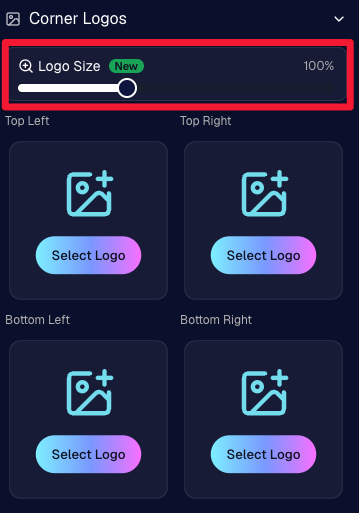
🔍 New logo size slider

  • Adjust your corner logos to be smaller or larger than the default.
  • Previously they could be considered a bit tiny, but this gives you a bit more control!

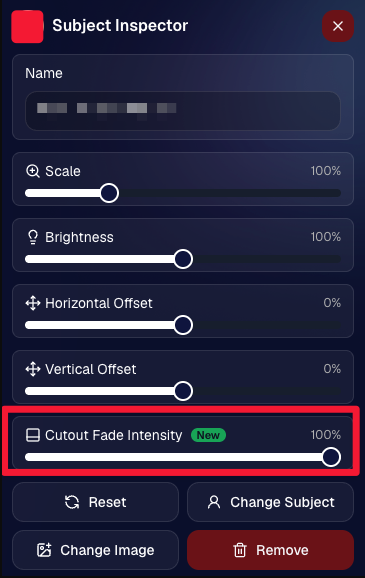
🌫️ Individual cutout fade control

  • The Subject Inspector now has its own cutout fade intensity slider, separate from the global setting, so you can fine-tune individual subjects when needed.
  • This will let you tweak the cutout fade intensity for subjects in the front row or on the sides of the virtual group, in case you're wanting a very specific look.

👥 Smarter merged-participant image selection

  • The Subject Image Picker will only show images from merged participants when they share the same name.
  • This typically does not matter, but in the case of a parent doing a Selfie Check-In of themselves and then of their child later, this will keep Virtual Groups working as expected!

Just a few additions, but very useful ones when you’re trying to get a Virtual Group looking just right!
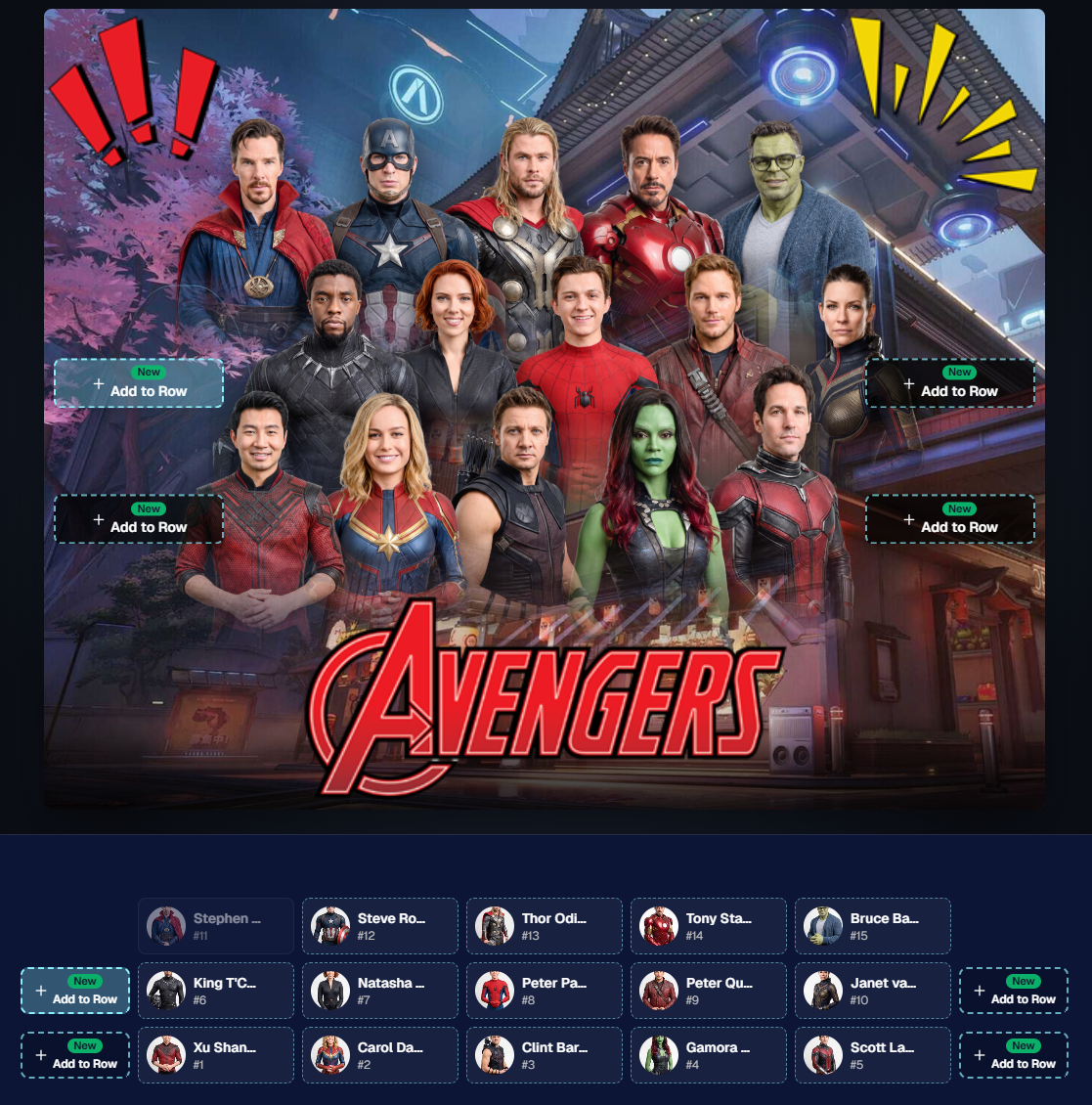
Drag and drop subjects into other rows for more control than ever!

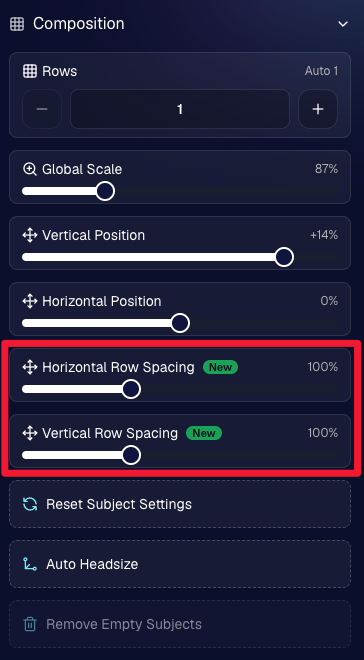
New options to more quickly space out your subjects!

When viewing subject details, adjust them by individual!

Control the size of your logos!

🏈 27 New Sports Background Sets

Alright, shoutout to the random guy who told me (me being Candy, in case you forgot!) that he didn’t like the backgrounds. We heard you! 😂

This week we’ve added 27 new sets of sports backgrounds, including a brand-new Sports – Locker Room background category.

And, in case you missed it, last week we also added an AI Background Generator so you can create entirely new, modern backgrounds of your own.

A quick reminder... you already have a lot of control over which backgrounds your customers actually see:

🎨 Edit the default backgrounds in your Offers

📤 Upload your own custom backgrounds at both the Offer-level and Event-level

🤖 Generate new backgrounds of your own with AI

🏈 Choose from our (now growing) collection of built-in choices

We have a TON of default backgrounds—and yes, many have been around for a while—but you’re never locked into using them. You can build your own look for your business, and we’ll keep adding new options over time too.

✂️ New Dedicated Background Removal Page

Event Background Removal now has its own dedicated Dashboard page, accessible from the Event Sidebar. It is not longer just a popup!

The BGR toggle on Event Overview will take you there too, giving all of these controls a little more breathing room.

On the new page, you can:

✅ Enable or disable Background Removal

🖼️ Manage your Event Backgrounds

🎨 See your Offer Backgrounds with a direct link to the Offer

📊 See how many cutouts have finished and how many are still processing

⏳ Watch a live progress bar while Background Removal is working

📂 See all valid Event folders and which ones are marked for Background Removal

And if your Event is a new Event: ✂️ You can mark an existing folder for Background Removal even if it already contains images!!!

🎨 Candy Image Studio: Better Exposure Fixes

🌙 New Fix Underexposure node

  • Helps recover images that came out too dark.

☀️ Fix Overexposure greatly improved

  • The existing overexposure tool has been reworked for more reliable results.
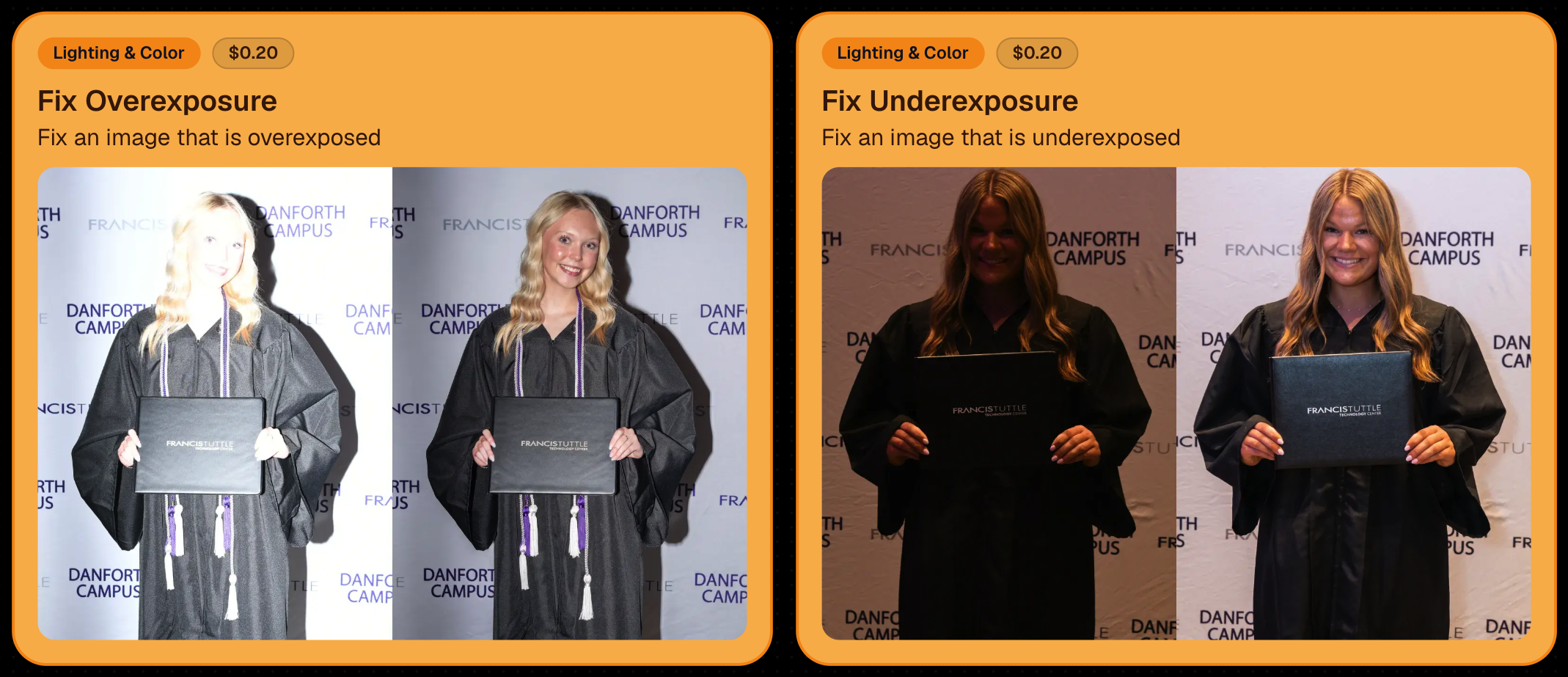
Utilize Candy Image Studio to fix images so they can sell, quickly and affordably!

🏈 Jersey Jotter Progress Tracking

New Jersey Jotter progress bar

  • When Jersey Jotter is active and still has unprocessed images, its dedicated page now shows processing progress—similar to Candy Culler and the new Background Removal page.

This makes it much easier to tell whether recognition is still working through a large Event.

🛍️ Retail Improvements

Titled Luxe Prints now work with package prefill

  • Packages can now automatically prefill eligible Titled Luxe Print products just like other supported products.

🖼️ Titled Luxe Print package rendering fixed

  • Fixed an issue where these products could render incorrectly inside packages.

🤖 AI-generated backgrounds now render correctly on products

🎨 Selected backgrounds now stay visible through the final product step

  • Fixed an issue where the chosen background could sometimes disappear on renders when reaching quantity and finish steps.

📝 Several product descriptions updated

  • Some product descriptions have been refreshed for better clarity.

🖼️ AI Edit + BGR Assignment Fix

👥 BGR versions of AI edits now keep direct participant assignments

  • If the original non-AI image was directly assigned to someone, its Background Removed AI-edited version will now correctly inherit that relationship.

📦 Order Details Fix

📝 Package captions now display correctly

  • Fixed cases where Order Details did not show caption information for certain products contained inside packages.

📱 Capture App 5.9.1 – iOS OTA

📸 Photo Booth fix for iPad

  • Fixed the Photo Booth gallery strip being cut off on certain iPad models.

That’s the week!

More Virtual Group control, a much stronger Background Removal workflow, some useful exposure tools, and plenty of fresh sports backgrounds to work with.

And if you still don’t like the backgrounds... now you’ve got plenty of ways to show us how it’s done. 😉

Keep creating magic,

Candy 🍬

Related articles

Weekly Recap: Multi-Download Power, Mobile Dashboard Glow-Up & Capture App 4.20.8 📱💻
Feature Updates
October 3, 2025

Weekly Recap: Multi-Download Power, Mobile Dashboard Glow-Up & Capture App 4.20.8 📱💻

4
 minutes read
Hey photo friends!

This week is packed with big news: multi-downloads in the Dashboard, a massive Mobile Dashboard update (with feature parity forever 🎉), and the upcoming Capture App 4.20.8 release.

Let’s jump in:

📋 Dashboard

  • 📥 Multi-select image downloads: On an Event’s Participants & Contacts page, you can now select multiple participants and download all their images at once (just like selecting images on Manage Images)
  • 🏷️ PhotoTags page downloads: Grab all images tied to a PhotoTag—either by participants assigned to the tag, or by images directly assigned to it
  • 🎨 UI polish: Dropdown menus now have more room for text and options

📱 Mobile Dashboard (NowCandid App)

  • 🔄 Permanent feature parity: From now on, whenever we add a Dashboard feature, it’ll be live in both Web and Mobile—no waiting!
  • 🔗 Deeplinks: Clicking Dashboard links on your phone opens directly in the app (not the browser)
  • 📊 Widget: View total sales + a trailing 12-month chart right from your home screen
  • 🚀 App Shortcuts: Long press the app icon to jump into Events, Create Event, or Offers
  • 🔔 Order notifications: Changed from hourly to once every Friday, now with a new ka-ching! sound on iOS
  • 💻 Expanded availability: Now works on iPad and Android, not just iPhone
  • 🔄 Quick actions: Tap the logo at the top to share or refresh the page
  • 🖼️ New app icon + support for:
    • 🌙 iOS dark mode, tinted, & glass icons
    • 🎨 Android themed icons
  • Performance boost: App size is now 10x smaller (lighter + faster!)

Screenshots below!

📷 Capture & Upload App 4.20.8 (coming Oct 3–5)

  • 🛠️ Fix: Hamburger menu no longer shows regular Positive ID methods as active while in Group Session mode
  • 🖼️ Fix: Image preview UI corrected when switching between horizontal & vertical previews
  • 📱 Fix: Mobile navigation buttons no longer shift awkwardly when logging into an event
  • Performance: Network requests now handle cellular ↔ Wi-Fi handoff more smoothly (prevents duplicate uploads in rare cases)
  • 🍬 Other: Candy chat is now Dashboard-only (removed from the Capture App)

That’s everything for this week! 💫

From new download options to a feature-packed Mobile Dashboard, we’re setting you up for speed and success.

Keep being amazing,
Candy 🍬

Weekly Recap: Capture App 4.20.7, GalleryGuard Boost & Retail Tweaks 📸🛡️
Feature Updates
September 19, 2025

Weekly Recap: Capture App 4.20.7, GalleryGuard Boost & Retail Tweaks 📸🛡️

3
 minutes read
Hey photo friends!

Big update week! The Capture & Upload App v4.20.7 is right around the corner, and we’ve got some great new features for sports workflows, roster clarity, and retail protections.

Let’s dig in:

📱 Capture & Upload App 4.20.7 (releasing Sept 19–22)

  • 🔍 Smarter search: Search Name Lookup with both first and last name in one query (not just one or the other)
  • 🔄 Swap Events: New option in the shooting page menu for Positive ID events
  • 🏈 Group Session mode: Added to the shooting page menu for sports events
  • 🗂️ BGR support: Can now shoot in Group Session mode inside BGR folders - uploads into a new folder name “(OriginalFolderName)b”
  • 🏷️ PhotoTags on Group Photos in BGR Folders: Add tags to group shots in Group Session mode when in BGR folders
  • ⌨️ Type & Take Participants now appear in Name Lookup
  • 🎛️ New context menu UI: Wheel/circle menus replaced with clearer buttons and room for more options
  • 📱 UI tweaks:
    • “Manual Name Lookup” renamed simply “Name Lookup” on iPad
    • iOS 26 only: Liquid Glass context menus, native dialogs, keyboards, and controls
    • Error toasts are now native dialogs (prettier + don’t disappear too fast)
    • Info dialogs on event overview use native UI
    • Name Lookup modal now correctly titled “Name Lookup”
  • 🛠️ Fix: Upload toast now shows correct number of uploaded images

🛍️ Retail Site

  • 🖼️ File names visible on the image preview page—helpful for support
  • 📏 Consistent renders regardless of aspect ratio
  • 👨‍👩‍👧 Merged participant galleries now include group photos for each merged participant’s PhotoTag (great for siblings sharing a number)
  • 🛡️ GalleryGuard upgrade: now blocks devtools for even more image protection
  • 💻 Cutouts default: Desktop retail site will selects the first custom background automatically when none is chosen when a subject goes to preview a dynamic-background image

📋 Dashboard

  • 👤 Participant images on records: Registered/Roster Participants with photos now display their gallery image instead of a silhouette on the Dashboard
  • 🖼️ Participant images now show on the Event Overview page for recent orders
  • ⬇️ Participant image downloads now include faux renders

🛠️ Misc

  • 🏅 SportsPics Check-In labels now say Athlete First Name and Athlete Last Name
  • 🏠 Clicking the NowCandid logo in the top-left of the Dashboard now takes you Home
  • 🐞 Bug fixes: Better performance and clarity around PhotoTags, merged participants, personal gallery downloads, and marketing with hidden/BGR images

That’s the roundup! 💫

Keep being amazing,
Candy 🍬

Weekly Recap: Capture App 4.20.6, GalleryGuard Expansion & Dashboard Upgrades 📸✨
Feature Updates
September 12, 2025

Weekly Recap: Capture App 4.20.6, GalleryGuard Expansion & Dashboard Upgrades 📸✨

5
 minutes read
Hey photo friends!

This week we’ve got a shiny new Capture App release, smoother dashboards, smarter Candy (that’s me! 🍬), and some retail fixes to keep things running smoothly.

Let’s dive in:

📱 Capture App 4.20.6

  • 🔌 Camera adapter popup will now dismiss itself if a camera connects while it’s open
  • 💤 CamFi stays active after periods of inactivity
  • 🖼️ Image visibility fix: New images will no longer have distorted UI if the previous image was zoomed in on the device
  • “Close” on certain popups is now “Dismiss” to prevent confusion
  • 📱 iPhone 17 support is here
  • 📷 iPhone internal camera now shoots in classic 4:3 again

📋 Dashboard Improvements

  • 📑 Participant spreadsheet downloads will now include PhotoTag columns
  • 🖼️ Manage Images popup refresh: New lightbox with a bigger preview for faster reviews

The new image preview user interface!

🛍️ Retail Site Fixes & Improvements

  • 🛡️ GalleryGuard™ protection now works on Facebook & Instagram in-app browsers too
  • 📱 iOS 26 Safari UI glitch fixed
  • 📄 Page jump popup fix: Page counts now account for a retail visitor's applied filters
  • ⬇️ Personal gallery downloads: No more AI-generated background pre-renders showing up in the Personal Gallery Download preview

🍬 Candy Upgrades

  • 🧠 I got smarter (yes, really!)
  • 💲 I now know current NowCandid product prices
  • 🎨 UI improvements make chatting with me feel smoother than ever

Try it for yourself!

That’s all for this week! 💫

From a stronger Capture App to bigger previews and smarter Candy, we’ve got you covered.

Keep being amazing,


Candy 🍬

Let’s get in touch

If you’re a photographer looking to add NowCandid services to your wheelhouse – set up a call by clicking the button below.

How to customize formatting for each rich text

How to customize formatting for each rich text

How to customize formatting for each rich text

How to customize formatting for each rich text

How to customize formatting for each rich text

What’s a Rich Text element?

The rich text element allows you to create and format headings, paragraphs, blockquotes, images, and video all in one place instead of having to add and format them individually. Just double-click and easily create content.

A rich text element can be used with static or dynamic content. For static content, just drop it into any page and begin editing. For dynamic content, add a rich text field to any collection and then connect a rich text element to that field in the settings panel. Voila!

Headings, paragraphs, blockquotes, figures, images, and figure captions can all be styled after a class is added to the rich text element using the "When inside of" nested selector system.

  • List One
  • List Two
  • List Three
  • List Four
  • List Five

This is a link

This is bold text