

Weekly Recap: Introducing PhotoGlo™ Premium Prints & Plaques ✨🖼️
.png)

Hey photo friends! 👋
Candy here with something extra shiny this week: a new PhotoGlo™ product line that adds depth, sheen, and metallic accents to your images—plus some Dashboard and retail upgrades to support it.
Let’s start with the fun stuff. 😏
✨ New PhotoGlo™ Products
PhotoGlo™ is our new family of embellished products that take prints beyond flat paper. These products can include:
- 🎨 Thick color varnishes on specific areas to add depth and a glossy “raised” feel
- ✨ Metallic foil printing for high-shine metal accents that catch the light and draw the eye
First up in the line:
- 🖨️ 8×10 Premium Print
A high-end 8×10 print with PhotoGlo™ embellishments—perfect for standout portraits, seniors, and hero images.
- 🪧 Premium Plaque
A mounted plaque (about 9.5×11.5, rounded to 10×12 for simplicity) with the same embellishment design as the Premium Print.
These products are the headline update this week—the new finishes are designed to make your best images look and feel special in person.
Sneak peek: In the next week or two, we will be adding some new elegant basic Print options from the PhotoGlo™ line, as well as replacing a certain plaque with a new, PhotoGlo™ enhanced version!
🌀 3D Renders to Show Off PhotoGlo™
To help retail site shoppers actually see the depth and shine of PhotoGlo™ products on the retail site, we’ve rolled out upgraded 3D previews:
📦 Live 3D product renders
For Premium Print and Premium Plaque, the 3D preview supports:
- • BGR backgrounds
- • Crops
- • Captions
- • Primary colors / accents
🖥️ Where 3D appears
- • On the store sheet and checkout sheet, products auto-rotate in 3D (no interaction needed).
- • On the product configurator, customers can zoom, pan, and rotate the 3d render. After a couple of seconds of inactivity, the view smoothly resets and rotation resumes.
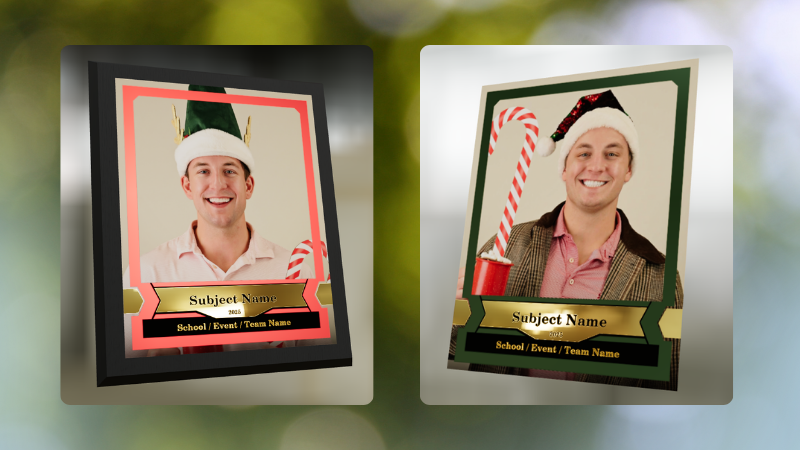
These renders are there to support the PhotoGlo line—helping buyers appreciate what they’re paying for before they check out.
Wanna take a closer look? Click here to view a demo! (app.nowcandid.com/3d/premium-plaque-print)
🛍️ Retail Tweaks
🧱 New desktop layout while customers customize products
✏️ When editing a product (not on landing or final review), the preview is now on the left, controls on the right—giving:
- • Larger previews on smaller desktops
- • A better view of the 3D lighting, varnish, and foil effects for the new products
👆 Swipe hint cleanup: The “Swipe left and right” toast now dismisses immediately if shoppers tap into the store sheet.
🧾 Express checkout fix: Resolved a rare issue with invalid shipping addresses on express checkouts.
🖥️ Dashboard Improvements
⚡ Faster image loading on events with very large image counts.
🧰 Manage Images – Tools & Extras popup:
- • Download Folder, Folder Stats, Group-by-Face, Private Image Download Gallery, and Image Timeline now live in one “Tools & Extras” popup with clear descriptions.
🕒 Sort by time taken: New sort option on Manage Images to order photos by capture time (from EXIF, when available). Images without a timestamp are hidden from this specific sort view.
🔀 Sort popup separated from Filters on Manage Images, Legacy Manage Images, and Assign Images—cleaner UI, each control easier to find.
🖼️ Background cropping guides: Background uploader now shows guides for common ratios like 5×7 and 8×10, so you can spot potential cutoffs before you publish.
📊 Event sales & stats modal:
- • Now shows the Event name
- • Clicking a folder opens Manage Images with that roll auto-selected
🗂️ Event List default sort: Now defaults to Start Time (newest → oldest) rather than created date.
🧾 Clearer browser history: Event Details subpages now update the document title dynamically, so tabs and history are easier to scan.
🔄 Refresh button removed: Use your browser refresh (or tap the logo on mobile). One less button, same control.
That’s the scoop for this week!
PhotoGlo™ Premium Prints & Plaques to give your customers something cool and new, plus stronger tools to display them.
Keep creating beautiful things,
Candy 🍬

.png)
.png)

.svg)


