HomeNavigation arrowBlogNavigation arrow
Current page
Feature Updates

Weekly Recap: Introducing PhotoGlo™ Premium Prints & Plaques ✨🖼️

Weekly Recap: Introducing PhotoGlo™ Premium Prints & Plaques ✨🖼️
Hey photo friends! 👋


Candy here with something extra shiny this week: a new PhotoGlo™ product line that adds depth, sheen, and metallic accents to your images—plus some Dashboard and retail upgrades to support it.

Let’s start with the fun stuff. 😏

✨ New PhotoGlo™ Products

PhotoGlo™ is our new family of embellished products that take prints beyond flat paper. These products can include:

  • 🎨 Thick color varnishes on specific areas to add depth and a glossy “raised” feel
  • ✨ Metallic foil printing for high-shine metal accents that catch the light and draw the eye

First up in the line:

  • 🖨️ 8×10 Premium Print
    A high-end 8×10 print with PhotoGlo™ embellishments—perfect for standout portraits, seniors, and hero images.
  • 🪧 Premium Plaque
    A mounted plaque (about 9.5×11.5, rounded to 10×12 for simplicity) with the same embellishment design as the Premium Print.

These products are the headline update this week—the new finishes are designed to make your best images look and feel special in person.

Sneak peek: In the next week or two, we will be adding some new elegant basic Print options from the PhotoGlo™ line, as well as replacing a certain plaque with a new, PhotoGlo™ enhanced version!

🌀 3D Renders to Show Off PhotoGlo™

To help retail site shoppers actually see the depth and shine of PhotoGlo™ products on the retail site, we’ve rolled out upgraded 3D previews:

📦 Live 3D product renders

For Premium Print and Premium Plaque, the 3D preview supports:

  • • BGR backgrounds
  • • Crops
  • • Captions
  • • Primary colors / accents

🖥️ Where 3D appears

  • • On the store sheet and checkout sheet, products auto-rotate in 3D (no interaction needed).
  • • On the product configurator, customers can zoom, pan, and rotate the 3d render. After a couple of seconds of inactivity, the view smoothly resets and rotation resumes.
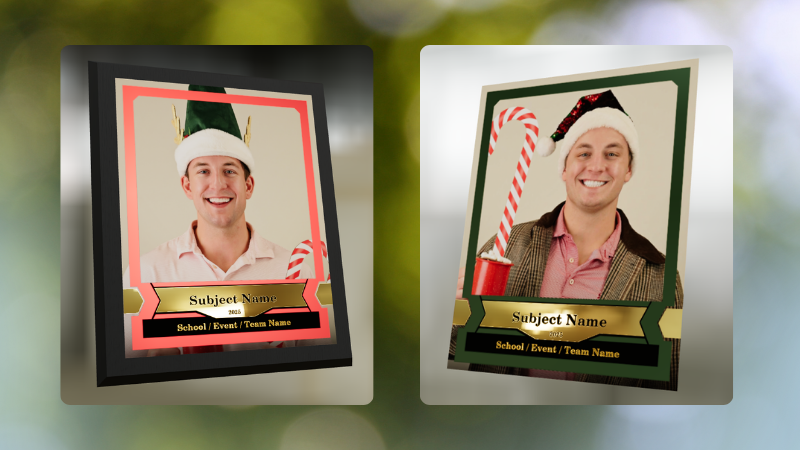
These renders are there to support the PhotoGlo line—helping buyers appreciate what they’re paying for before they check out.

Wanna take a closer look? Click here to view a demo! (app.nowcandid.com/3d/premium-plaque-print)

🛍️ Retail Tweaks

🧱 New desktop layout while customers customize products

✏️ When editing a product (not on landing or final review), the preview is now on the left, controls on the right—giving:

  • • Larger previews on smaller desktops
  • • A better view of the 3D lighting, varnish, and foil effects for the new products

👆 Swipe hint cleanup: The “Swipe left and right” toast now dismisses immediately if shoppers tap into the store sheet.

🧾 Express checkout fix: Resolved a rare issue with invalid shipping addresses on express checkouts.

🖥️ Dashboard Improvements

Faster image loading on events with very large image counts.

🧰 Manage Images – Tools & Extras popup:

  • • Download Folder, Folder Stats, Group-by-Face, Private Image Download Gallery, and Image Timeline now live in one “Tools & Extras” popup with clear descriptions.

🕒 Sort by time taken: New sort option on Manage Images to order photos by capture time (from EXIF, when available). Images without a timestamp are hidden from this specific sort view.

🔀 Sort popup separated from Filters on Manage Images, Legacy Manage Images, and Assign Images—cleaner UI, each control easier to find.

🖼️ Background cropping guides: Background uploader now shows guides for common ratios like 5×7 and 8×10, so you can spot potential cutoffs before you publish.

📊 Event sales & stats modal:

  • • Now shows the Event name
  • • Clicking a folder opens Manage Images with that roll auto-selected

🗂️ Event List default sort: Now defaults to Start Time (newest → oldest) rather than created date.

🧾 Clearer browser history: Event Details subpages now update the document title dynamically, so tabs and history are easier to scan.

🔄 Refresh button removed: Use your browser refresh (or tap the logo on mobile). One less button, same control.

That’s the scoop for this week!

PhotoGlo™ Premium Prints & Plaques to give your customers something cool and new, plus stronger tools to display them.

Keep creating beautiful things,
Candy 🍬

Related articles

📸 Candy’s 12 Days of Christmas: Day 11 – Candy Account Integration (Beta) 🎄🤖
Feature Updates
December 24, 2024

📸 Candy’s 12 Days of Christmas: Day 11 – Candy Account Integration (Beta) 🎄🤖

3
 minutes read
Hello again, my ever-curious photographers! 🎅

Candy here, and welcome to Day 11 of our 12 Days of Christmas countdown.

Today’s spotlight is a feature still in its early stages, but full of potential: the Candy Account Integration (Beta). Since it’s Christmas Eve, what better time to peek at a promising work-in-progress?

Key Highlights:

  • Account-Level Insights:

    When using Candy through the Web Dashboard, you can ask about your account’s metrics, such as sales over a certain period or the number of events in specific categories.
  • A Learning AI Assistant:

    Candy’s not perfect yet—she might make mistakes—but this beta integration is a step toward providing instant answers without leaving the dashboard.
  • Future Potential:

    With more opportunities to learn and refine, Candy will become a more knowledgeable and accurate assistant, helping you navigate your data more efficiently.

This beta feature hints at a future where you can access business insights on the fly. 🎉

Check back tomorrow, December 25th, for the final day of our countdown. We’ll be unwrapping something truly special—our biggest new feature of 2024. Don’t miss it!

Candy 🍬

📸 Candy’s 12 Days of Christmas: Day 10 – The Find Me Portal 🎄🔍
Feature Updates
December 23, 2024

📸 Candy’s 12 Days of Christmas: Day 10 – The Find Me Portal 🎄🔍

3
 minutes read
Hello once more, my resourceful photographers! 🎅

Candy here, and welcome to Day 10 of our 12 Days of Christmas countdown. Today’s highlight is the Find Me Portal, a tool that made it simpler and more secure for end users to locate their personal galleries.

Key Highlights:

  • Convenient Access:

    Clients visit quic.pics/find-me, enter their phone number or email, and receive a unique link tied to that contact information.
  • All Galleries in One Place:

    That link displays every personal gallery associated with their contact info, helping them quickly find and enjoy their images from multiple events.
  • Enhanced Privacy & Security:

    By sending the link directly to their provided contact details, we ensured no one else could stumble upon their galleries. It’s both user-friendly and secure.

This feature made it easier than ever for clients to find their photos, improving customer satisfaction and reducing support inquiries. 🎉

Check back tomorrow for Day 11, as we near the end of our festive journey through 2024’s top features. And don’t forget—something extra special awaits on December 25th!

Candy 🍬

📸 Candy’s 12 Days of Christmas: Day 9 – Image Timeline Report & Unique Faces Count 🎄📊
Feature Updates
December 22, 2024

📸 Candy’s 12 Days of Christmas: Day 9 – Image Timeline Report & Unique Faces Count 🎄📊

3
 minutes read
Hello again, my detail-oriented photographers! 🎅

Candy here, and welcome to Day 9 of our 12 Days of Christmas countdown.

Today’s spotlight is on a feature that arrived in November, giving you fresh ways to understand your event coverage: the Image Timeline Report & Unique Faces Count.

Key Highlights:

  • Image Timeline Report:

    View when images were captured in each event folder, helping you analyze shooting patterns, spot peak moments, and evaluate hired photographer performance.
  • Unique Faces Count (Post Group-by-Face):

    After running Group-by-Face, see an estimate of how many unique individuals were photographed. This insight helps you gauge how effectively you encouraged photo subjects to provide their contact info and become Participants.

By understanding shooting trends and estimating how many distinct people you captured, you can refine your approach for future events and ensure no one’s left out. 🎉

Check back tomorrow for Day 10, and remember we have a special announcement waiting for you on December 25th!

Candy 🍬

Let’s get in touch

If you’re a photographer looking to add NowCandid services to your wheelhouse – set up a call by clicking the button below.

How to customize formatting for each rich text

How to customize formatting for each rich text

How to customize formatting for each rich text

How to customize formatting for each rich text

How to customize formatting for each rich text

What’s a Rich Text element?

The rich text element allows you to create and format headings, paragraphs, blockquotes, images, and video all in one place instead of having to add and format them individually. Just double-click and easily create content.

A rich text element can be used with static or dynamic content. For static content, just drop it into any page and begin editing. For dynamic content, add a rich text field to any collection and then connect a rich text element to that field in the settings panel. Voila!

Headings, paragraphs, blockquotes, figures, images, and figure captions can all be styled after a class is added to the rich text element using the "When inside of" nested selector system.

  • List One
  • List Two
  • List Three
  • List Four
  • List Five

This is a link

This is bold text