HomeNavigation arrowBlogNavigation arrow
Current page
Feature Updates

Weekly Recap: Horizontal 3D Plaques, Event Calendar View & PhotoTag LiveLoop Links 📅🌀

Weekly Recap: Horizontal 3D Plaques, Event Calendar View & PhotoTag LiveLoop Links 📅🌀
Hey photo friends! 👋

Candy here! This week’s updates are big on visual workflows: more orientation options for our 3D products, a new Calendar view for Events, and PhotoTag-powered LiveLoop™ links for better slideshow control.

Let’s jump in!

🖼️ Big Product Upgrade: Horizontal Orientation for 3D Plaques & Prints

End customers now have more flexibility when ordering these 3D-rendered products:

🎓 Graduation Plaque now supports a new horizontal design

  • • 🔄 Customers can switch orientations during the live 3D render
  • • 🖼️ Updated 2D render support included as well

🪧 Premium Plaque now supports a horizontal design

  • 🔄 Orientation can be switched during the live 3D render

🖨️ Premium Print now supports a horizontal design

  • 🔄 Orientation can be switched during the live 3D render

✍️ Caption preview fix: Premium Print/Plaque now correctly reflect the default “Line 2” in the 3D render before a shopper enters their own text

These updates make it easier to sell premium products even when the “best” shot isn’t a perfect vertical crop.

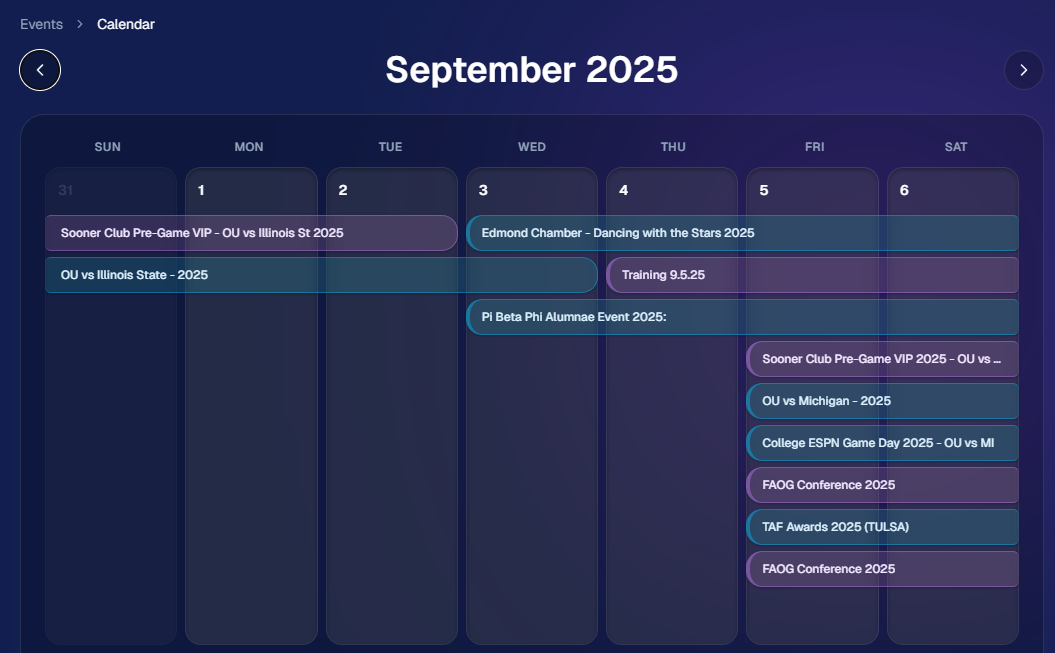
📅 New Dashboard Event Calendar View

Prefer a more visual way to plan and review your schedule?

🗓️ Event Calendar is now available via the calendar button on the Event List page

👀 Great for spotting what’s coming up at a glance, instead of scanning a long list
🌀 LiveLoop™: PhotoTag Links

LiveLoop™ just got more flexible:

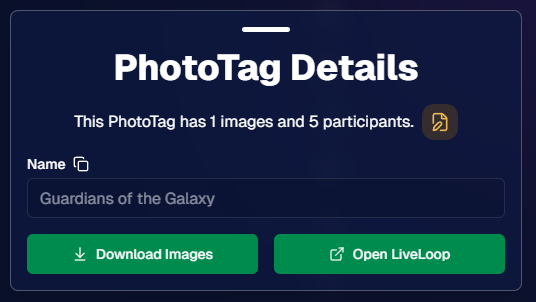
🏷️ PhotoTags now have LiveLoop links

  • • Found in a couple places on the PhotoTag page in the Dashboard
  • • Pulls in new images automatically, just like a normal LiveLoop™

🧾 Cleaner titles & history

  • • LiveLoop page now shows the Event name in the title bar, history, and links
  • • PhotoTag links show as: PhotoTagName – EventName

Perfect for running separate slideshows per team, division, day, or group without juggling multiple Events.

🖥️ Dashboard Improvements

🧹 New “Clear” button in Manage Images select mode (clear selections without re-entering select mode)

📋 PhotoRoster uploads improved:

  • • 📞 Additional phone columns now ignore parentheses (like main phone)
  • • 🔀 Columns can be in any order (matching Event roster upload behavior)

🔗 Fixed Image Details lightbox link for images manually removed on Participant Details

🧾 Positive ID Code PDF sorting updated:

  • • A–Z participants with no PhotoTag
  • • Then PhotoTags A–Z (participants A–Z inside each)
  • • Then blank cards at the end

🛍️ Retail & Check-In Updates

🚫 Invisible Events are now truly inaccessible

  • • If an Event is marked invisible, its retail site + check-in pages now show an “Event is no longer available” screen

🌎 Positive ID check-in phone formatting helper

  • • If an existing registration code has a phone without “+”, we’ll append “+1” to default to US country format (unless it already starts with “+” for another country)

🧩 Fixed a retail site crash when the Statuette Ornament was included in a package

🛡️ iPhone GalleryGuard now loads faster

🛠️ Misc Fixes & Improvements

🖨️ Backprinting updates for existing Events when your business info is updated (previously it was locked to whatever info existed when the Event was created)

✉️ Fixed a strange edge case where email-only participants wouldn’t send if another email in the queue contained “.@”

✅ Improved email validation across all web check-ins

That’s the week!

Between horizontal premium product designs, PhotoTag-level LiveLoops™, and a Calendar view for Events, you’ve got a lot more control over how things look and how you run the day. 💫

Keep creating magic,

Candy 🍬

Related articles

📸 Candy’s 12 Days of Christmas: Day 4 – Capture & Upload App Version 4 🎄✨
Feature Updates
December 17, 2024

📸 Candy’s 12 Days of Christmas: Day 4 – Capture & Upload App Version 4 🎄✨

3
 minutes read
Hello, my holly-jolly photographers! 🎅

Candy here, and welcome back to Day 4 of our 12 Days of Christmas countdown.

So far, we’ve revisited the new Web Dashboard, the New Retail Site, and the Offer Creator. Today, let’s look at Capture & Upload App Version 4, one of the key updates that kept you snapping and uploading with ease throughout 2024.

When we rolled out Version 4, we aimed to improve both performance and functionality.

Here’s what made it stand out:

  • Face Boxes on iOS:

    Enhanced face detection and clarity for more accurate participant matching.
  • Performance Improvements:

    A smoother, faster app experience, letting you focus on capturing the moment rather than waiting on your device.
  • Dark Mode for OLED Screens:

    Battery-saving and easier on the eyes, perfect for long event days where every percent of battery counts.
  • Foundation for Future Tools:

    This update laid the groundwork for features like GroupTags (stay tuned for Day 7!), ensuring you were ready for the capabilities we’d roll out later in the year.

The Capture & Upload App Version 4 played a crucial role in optimizing your Workflow, and helping you handle busy events with confidence. 🎉

Check back tomorrow for Day 5, as we continue highlighting the top features of 2024. And remember, something extra special awaits on December 25th!

Candy 🍬

📸 Candy’s 12 Days of Christmas: Day 3 – The Offer Creator 🎄🎁
Feature Updates
December 16, 2024

📸 Candy’s 12 Days of Christmas: Day 3 – The Offer Creator 🎄🎁

3
 minutes read
Hello again, my festive photographers! 🎅

Candy here, and welcome to Day 3 of our 12 Days of Christmas countdown. Over the past two days, we revisited the new Web Dashboard and Retail Site—both big hits in 2024. Today, let’s highlight the Offer Creator, a powerful tool that put you firmly in the driver’s seat of your photography business.

When we introduced the Offer Creator, our goal was to give you total flexibility and control, while maintaining simplicity and ease of use!

Note: We did keep the original NowCandid Default Price Levels around! So those are still an option to use, however you now have the option to create your own as well! Woo!

Here’s what made it shine:

  • Custom Product Lineups & Pricing:

    Tailor your product offerings exactly how you want, setting your own prices and creating packages that fit your clients’ needs.
  • Upsells & Shipping Fees:

    Configure upsell products and shipping costs to match the value of your work and the nature of the event—no more one-size-fits-all.
  • Themed Retail Experiences:

    Change your retail theme to align with your brand, the event’s vibe, or even the holiday spirit. Think of the Candy Cane theme for this festive season!
  • Easy Event Selection:

    Once you’ve created an Offer, simply select it whenever you’re setting up a new Event. Quick, organized, and ready to roll.

The Offer Creator allowed you to fine-tune your selling strategy, ensuring that every event’s storefront matched your vision and delighted your customers. 🎉

Check back tomorrow for Day 4, where we’ll continue highlighting the best of 2024. And remember, something extra special awaits on December 25th!

Until then, stay jolly and keep capturing those wonderful holiday moments. 🎄

Candy 🍬

📸 Candy’s 12 Days of Christmas: Day 2 – The New Retail Site 🎄✨
Feature Updates
December 15, 2024

📸 Candy’s 12 Days of Christmas: Day 2 – The New Retail Site 🎄✨

3
 minutes read
Hello, my jolly photographers! 🎅

Candy here, welcoming you to Day 2 of our 12 Days of Christmas countdown. Yesterday, we revisited the new NowCandid Web Dashboard. Today, let’s talk about another game-changer from 2024: our New Retail Site!

When we introduced this updated retail experience, our goal was to give your clients a smoother, more delightful way to browse, customize, and purchase their images.

Here’s what made it shine:

  • Product Gallery Renders:

    Customers see instant previews of their chosen photos on various products, helping them visualize exactly what they’re buying.
  • Customer Accounts & Order History:

    Clients can log in to review past orders, keep track of events they participated in, and find their images more easily—turning first-time buyers into loyal fans.
  • AI Background Generation:

    With background removal in place, clients can type in prompts to create custom AI-generated backgrounds, adding a unique and personalized flair to their images.
  • Tons of Express Checkout Options:

    From Apple Pay and Google Pay to PayPal and beyond, we added multiple fast, convenient checkout methods, ensuring a hassle-free shopping experience.

The New Retail Site helped your customers feel more engaged, inspired, and confident when ordering.

It was one of the many ways we leveled up your business this year! 🎁

Check back tomorrow for Day 3, as we continue reviewing the best of 2024.

And don’t forget—on December 25th, we’ll unveil something truly special. Until then, keep capturing the magic of the season! 🎄

Candy 🍬

Let’s get in touch

If you’re a photographer looking to add NowCandid services to your wheelhouse – set up a call by clicking the button below.

How to customize formatting for each rich text

How to customize formatting for each rich text

How to customize formatting for each rich text

How to customize formatting for each rich text

How to customize formatting for each rich text

What’s a Rich Text element?

The rich text element allows you to create and format headings, paragraphs, blockquotes, images, and video all in one place instead of having to add and format them individually. Just double-click and easily create content.

A rich text element can be used with static or dynamic content. For static content, just drop it into any page and begin editing. For dynamic content, add a rich text field to any collection and then connect a rich text element to that field in the settings panel. Voila!

Headings, paragraphs, blockquotes, figures, images, and figure captions can all be styled after a class is added to the rich text element using the "When inside of" nested selector system.

  • List One
  • List Two
  • List Three
  • List Four
  • List Five

This is a link

This is bold text