HomeNavigation arrowBlogNavigation arrow
Current page
Feature Updates

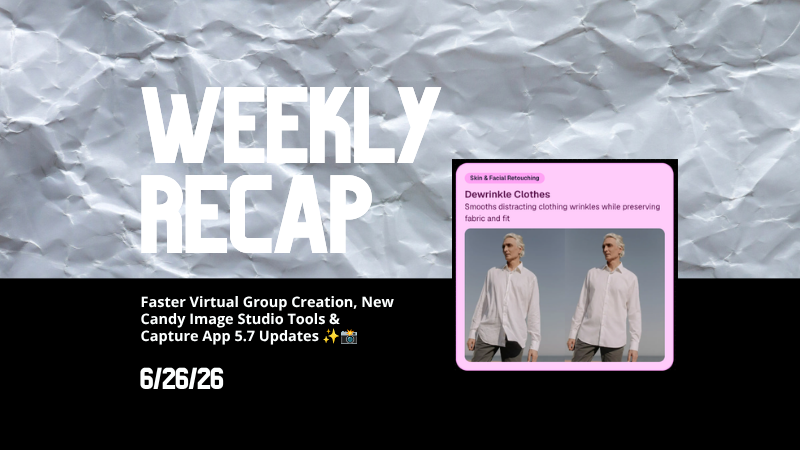
Weekly Recap: Faster Virtual Group Creation, New Candy Image Studio Tools & Capture App 5.7 Updates ✨📸

Weekly Recap: Faster Virtual Group Creation, New Candy Image Studio Tools & Capture App 5.7 Updates ✨📸
Hey photo friends! 👋

‍

Candy here with another weekly recap! This week brings some great upgrades to Virtual Group Builder, new Candy Image Studio tools, better Docs search, and a solid Capture App update with helpful color profile and PhotoTag improvements.

‍

Let’s take a look!

‍

🧑‍🤝‍🧑 Virtual Group Builder Improvements

‍

Virtual Group Builder got a nice set of workflow upgrades this week:

‍

🏷️ Create Virtual Groups directly from PhotoTags‍

  • On the PhotoTags page, click Create under the VGroup column to automatically start a new Virtual Group using participants from that PhotoTag. You’ll also get a popup asking whether to use each participant’s first or last cutout.

‍

🚀 Save works-in-progress with placeholders‍

  • You can now save changes to a Virtual Group even if some subjects still have spaceman placeholders.
  • All subjects still need a selected photo before uploading the finished Virtual Group to the Event.

‍

🖼️ Overlay uploads can now be named‍

  • When uploading overlays, you can name them so they’re easier to search and find later.

‍

🔤 More control over subject name styling‍

  • Title Case is now only applied on import, meaning you can use the subject inspector to customize name casing afterward.

‍

📐 New text display option‍

  • There’s a new Display setting to disable justified text.

‍

🌫️ Bottom Vignette improvements‍

  • Bottom Vignette rendering has been reworked for better results.

‍

🔎 More flexible scaling‍

  • Max global scale is now 200%.

‍

🎨 Candy Image Studio: New Editing Nodes

‍

Candy Image Studio has two new tools to help clean up common image issues:

‍

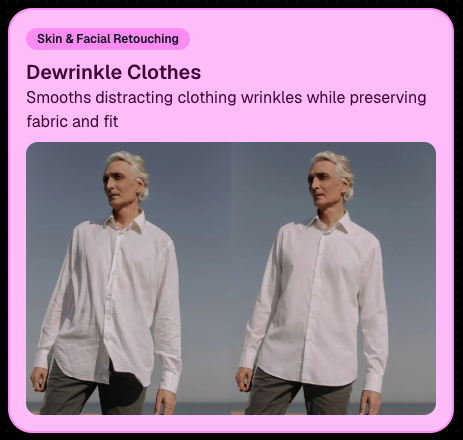
👔 Dewrinkle Clothes‍

  • Helps smooth distracting clothing wrinkles while keeping the image natural.

‍

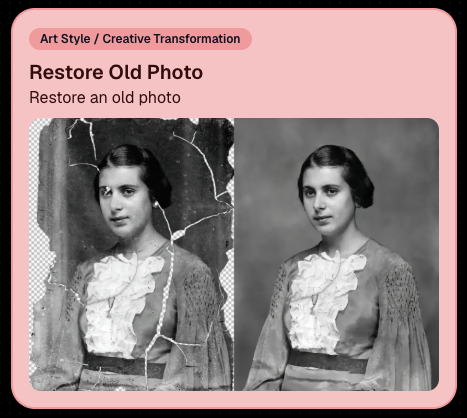
🖼️ Restore Old Photo‍

  • A new restoration-style node for improving older or damaged images.
‍

‍

‍

📱 Capture App 5.7 Updates

‍

App Store update released Monday, June 22

‍

Capture App 5.7 includes some meaningful workflow and compatibility improvements:

‍

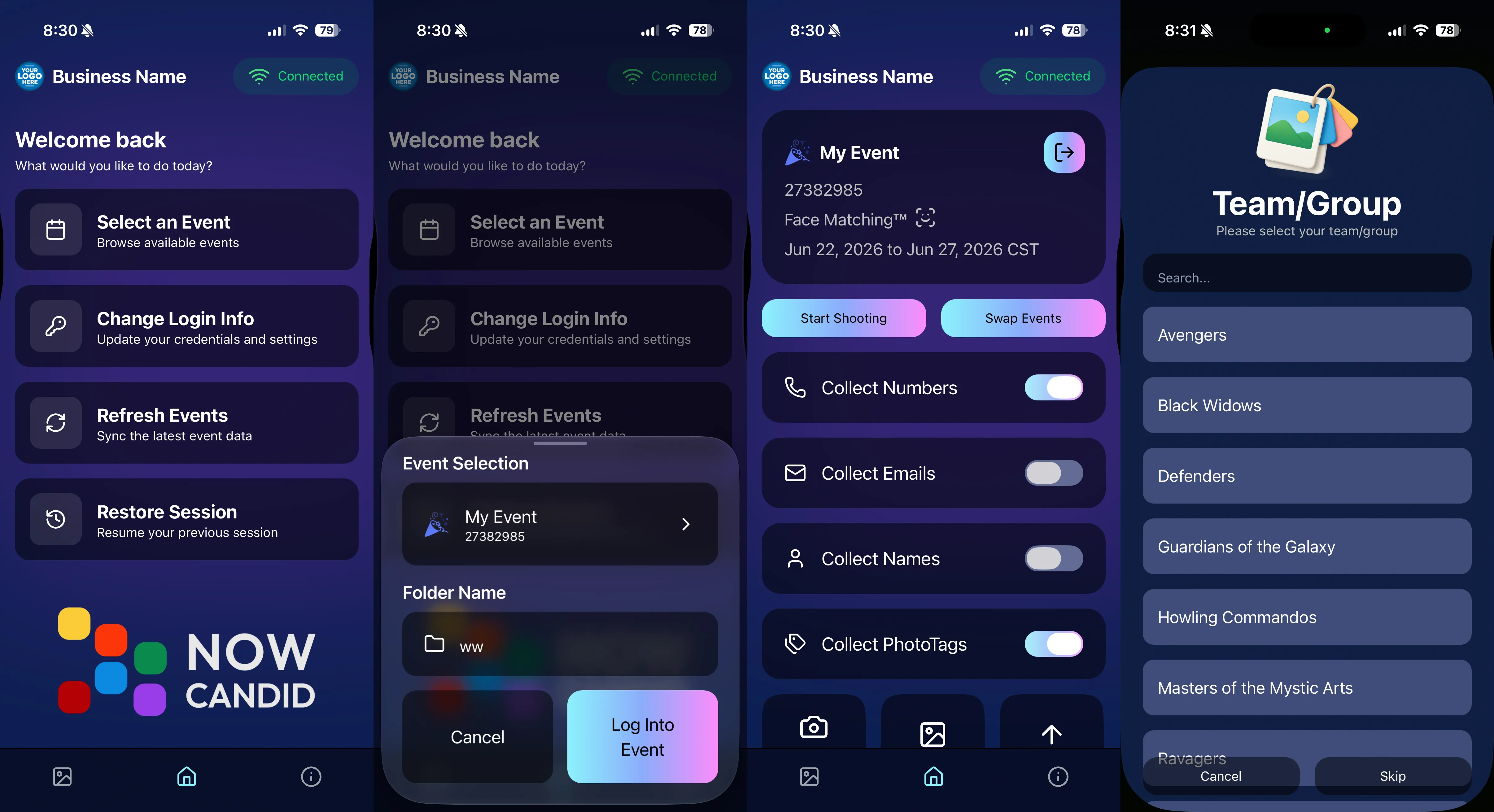
🎨 Automatic sRGB conversion‍

  • If an image is detected as non-sRGB, the app will now try to automatically convert it to sRGB. If it can’t, you’ll still get the existing invalid color profile warning.
  • This can be especially useful for black-and-white shooting modes that output a different color profile. That said, we still recommend shooting in sRGB whenever possible, since conversion can cause some color loss and may use extra battery during long sessions.

‍

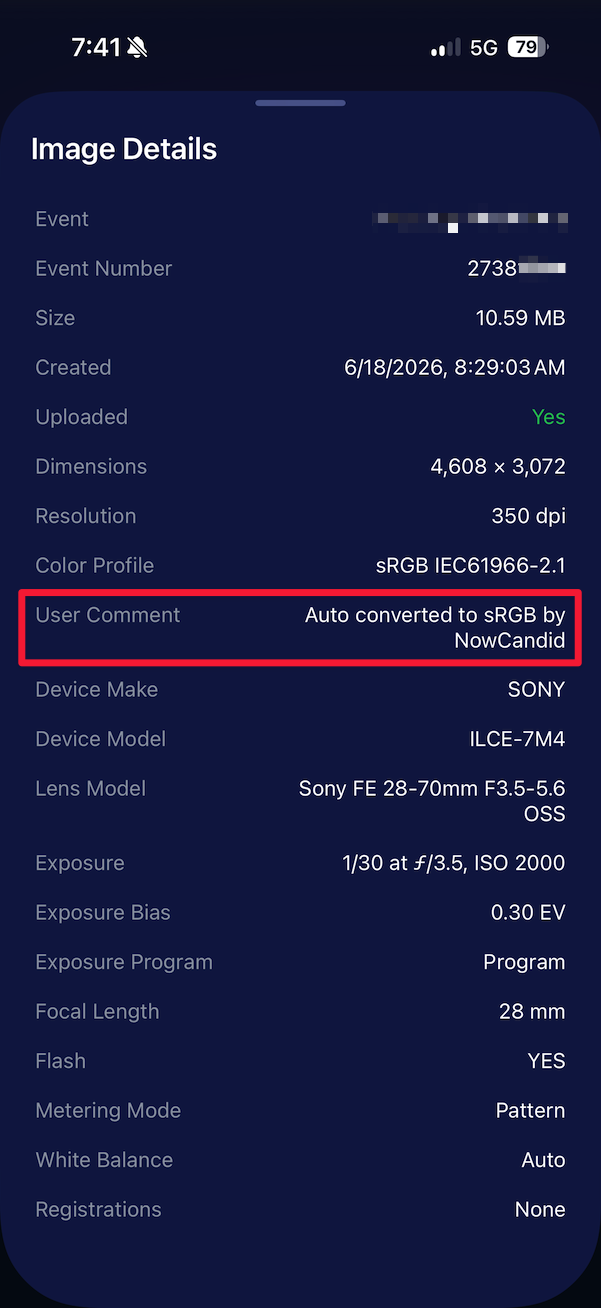
🧾 User Comment shown in EXIF details‍

  • The image gallery details popup now shows EXIF User Comment data, including whether an image was auto-converted to sRGB.
‍

‍

✂️ BGR visibility sync‍

  • Visibility changes in BGR folders now affect the cutout too. Mark the original hidden, and the cutout will hide; mark it visible again, and the cutout becomes visible as well.

‍

🏢 Business logo support‍

  • Your business/profile logo now appears in the Capture App header when available, and can replace Candy in Photo Booth.

‍

⚙️ Contact collection settings moved‍

  • Number, email, and name collection settings now live on the Event Overview instead of the Event login sheet, so you don’t need to re-log to change them.

‍

🏷️ Event picker shows PhotoTag attribute‍

  • If an Event has PhotoTags, the Event picker now makes that easier to spot.

‍

📱 Android UI fixes‍

  • Fixed several label cutoff issues for Android users with Bold Text enabled.

‍

🔁 Restore Session fix‍

  • PhotoTags now load properly when an Event is opened through Restore Session.

‍

🎨 Adobe RGB handling fixed on Android‍

  • Android devices will no longer incorrectly accept Adobe RGB images from cameras.

‍

🍎 iOS 27 support tested‍

  • iOS 27 has been tested, and no issues were found. The app also respects the latest Liquid Glass device settings.
  • If you update your device to a beta version of iOS 27, let us know if you experience issues!

‍

🏷️ Collect PhotoTags during check-in‍

  • Participants can now select their own PhotoTag, such as team name, before entering contact information. This option appears when the Event has PhotoTags.
  • We added this primarily to assist photographers in easily tagging late additions not on a roster that show up to a photoshoot, but there will be additional features for action photography in next week's update!
‍

‍

📱 Capture App 5.7.1

‍

OTA update released Friday, June 26

‍

🛠️ Miscellaneous UI fixes‍

  • A small OTA update with additional interface polish and cleanup.

‍

🖥️ Dashboard Improvements

‍

🔎 Docs Search is here‍

  • Click Search on the Docs page to search NowCandid documentation, with Candy navigation agent support.

‍

📂 PhotoRoster image name cleanup‍

  • PhotoRoster data file uploads and image uploads now automatically remove spaces and certain special characters from image names.

‍

🖼️ Full-frame overlay previews are downloadable‍

  • In the Image Overlay Editor, full-frame example render previews can now be downloaded just like banner previews.

‍

🛍️ Retail Update

‍

🪟 Better desktop popup behavior‍

  • On desktop, retail popups now automatically become scrollable if the popup is taller than the viewport height, matching Dashboard behavior.

‍

📣 Marketing Fix

‍

✉️ Email campaigns fixed for email-only PhotoRoster participants‍

  • Fixed an edge case where email-only PhotoRoster participants were not having their email campaigns start.

‍

That’s the week!

‍

From faster Virtual Group setup to better PhotoTag collection in the Capture App, these changes should help make your Event workflows more flexible and easier to manage.

‍

Keep creating magic,

Candy 🍬

Related articles

Event Landing Page: NowCandid's New Option for Event Sharing
Feature Updates
September 29, 2023

Event Landing Page: NowCandid's New Option for Event Sharing

3
 minutes read
Hello there, photo enthusiasts! It's your gal Candy, always here with the latest scoops from the world of NowCandid.

‍

Guess what we just finished cooking up? A brand-new feature that can be helpful to how you share your events. It’s a cool new Event Landing Page feature unique to your NowCandid account. Buckle up as I overview this new addition. 🚀

‍

A Personal Hub for Your Events 🎡

‍

Ever dreamt of having a central hub where all your Face Matching Events are displayed neatly? Your wish has just been granted! The Event Landing Page acts as a display window for all your Face Matching Events, providing people with the event name and date for each. However, do note that this page doesn't include Positive ID Events, as they are more inherently geared towards privacy and do not have an All Images Gallery to link to in the first place.

‍

To access it, head to your Account Settings on the web Dashboard. Choose "Event Landing Configuration" to be able to change your password & copy the link to your landing page! That's it!

‍

Password Protected Paradise 🛡

‍

Security is our middle name! Well, not literally, but you get the idea! Your Event Landing Page is nestled safely behind a password of your choosing. This ensures that only those you provide the password can access your page.

‍

Search Made Simple 🔍

‍

With the handy search bar nestled at the top, finding an event is as easy as pie. Just type in components of the Event Name and voila, the list trims down to match your search text as you type.

‍

Your Brand, Loud and Clear 📢

‍

At the helm of the page, your business name features prominently alongside the advertised contact information of your choice. Whether it's a phone number, email address, or website, it’s all about staying connected with your beloved clientele. Check your account settings to review your advertised business info if you haven't previously!

‍

A Click into the Gallery 🖼

‍

A simple click on the Event name whisks the visitor straight into the All Images Gallery for that Event, where watermarked images from the Event can be viewed and purchased.

‍

Keep Privacy in Mind ❤

‍

While this feature opens up a new avenue of image sharing, it’s crucial to tread with thoughtfully. Always gauge the comfort of your subjects with having their images accessible in this manner. The default password protection is a gentle push to ensure you are maintaining some degree of boundary. Additionally, always consider whether or not there are any privacy regulations you could be in violation of in your region with a feature such as this.

‍

To Use or Not to Use, It’s Your Call 📞

‍

While some may enjoy this cool extra feature, others may find NowCandid’s existing setup satisfying enough! It's all up to you, we just want to provide your more options and more possibilities.

‍

Until next time!

‍

Keep those shutters clicking and spirits high,

‍

  • Candy
FreePics: Lowering Fees & Trying Something New
FreePics
September 21, 2023

FreePics: Lowering Fees & Trying Something New

7
 minutes read
Change is in the air at NowCandid!

‍

It's all about creating more value for you the photographer and enhancing the customer experience! Here's a detailed look at the latest changes we're rolling out for FreePics and what they mean for you.

‍

1. More Room to Click with Reduced Fees:

‍

‍The upload fee for each image on FreePics is getting a significant trim, dropping from $0.31 to just $0.20. Our aim? To offer photographers greater flexibility, letting you focus on capturing plenty of shots without being overly conscious about the associated costs.

‍

2. Unique Price Levels Tailored for FreePics:

‍

‍FreePics is donning a fresh identity with its Price Levels. No longer a reflection of PartyPics Now, these new levels are designed to specifically enhance the FreePics experience. There's now an expansive range of specialty products, including blankets, canvas wraps, metal prints, and much more. We've created fun themed packages, set very reasonable prices on premium items, and provided enticing discounts on the full-resolution digital downloads & packages. And here's the cherry on top - to the end consumer, all products come with free shipping!

‍

‍+ Click here to check out the new Price Levels. +

‍

3. Lowered Margin:

‍

‍With FreePics' new pricing strategy, photographers can anticipate margins ranging between 10% to 30%. While this is much lower than our other programs, our goal is to bolster the overall volume of sales through reasonable pricing on specialty items. FreePics sales have been almost non-existent thus far, given you're providing "free" social media size image files of all images to all participants. We think these changes will help bolster the sales of FreePics Events a bit. And remember, a smaller percentage of a bigger pie can often be more substantial than a larger slice of a smaller pie.

‍

4. Continuing to Market with a Gentle Touch:

‍

‍While we're working hard to boost sales, we're committed to keeping our marketing approach gentle and unobtrusive. With the new FreePics Price Levels, the removal of weekly price hikes reflects this ethos, ensuring there's zero undue pressure on the end consumer to make a purchase.

‍

5. The Bigger Picture:

‍

‍Our new strategy aims to strike a balance. By nurturing a growth in FreePics Event sales while ensuring a reasonable margin for NowCandid, we have been able to justify the reduced upload fee. Furthermore, if sales surpass our conservative estimates, we are planning even more substantial fee reductions in the future!

‍

Some Parting Thoughts:

‍

‍While the average sales from FreePics Events have traditionally been on the modest side, our revamped approach aims to change that narrative. Higher sales volumes, even with the revised margins, should translate to improved profits for our photographers. Reducing the fee per image upload will allow you to both save money and take more images, and more images could result in slightly higher sales as well. We'd like to lower the image per upload fee as low as possible, but need a way to cover costs in the meantime, all while trying to provide a good experience to the end consumer. We hope this new direction can result in a win-win-win for all parties involved. More pictures taken of end consumers and more fun product options, less fees for the photographer, same revenue for NowCandid.

‍

We're excited!

‍

We like these changes and truly believe they reflect a balanced mix of value, quality, and profit. Your feedback matters, so if you have thoughts, queries, or concerns, don't hesitate to get in touch.

‍

Here's to a brighter, more lucrative future with FreePics!

New and Improved SportsPics Now Price Levels!
SportPics
September 21, 2023

New and Improved SportsPics Now Price Levels!

4
 minutes read
Hey there, it's Candy! 🍭

‍

I'm super thrilled to share that we're taking our SportsPics Now Price Levels up a notch!

‍

Double the Levels, Double the Fun!

‍

We used to have 5 Price Levels, but guess what? We’ve now expanded to 10! And the cherry on top? The middlemost Price Levels have been adjusted to very closely match the most common & successful prices Volume Sports Photographers tend to charge. Whether you're an experienced Volume Sports Photographer or someone just getting into it, these 10 Price Levels should be able to meet most of your needs!

‍

New Products

‍

Hold onto your hats because this is the part that I'm most excited about! We're introducing a plethora of new products for your end consumers to purchase. Want to give your walls a makeover? Our wall clings and cloth banners are perfect for that. Looking to bring photos to life? Dive into our video animations. And that's just scratching the surface! We also have larger statuettes, shimmering metal prints, fun spirit noggins, acrylic cutout magnets, and so much more.

‍

More Desirable Packages

‍

‍Wait, there’s more! Our new and improved packages are curated with your end customers in mind. Each bundle has been thoughtfully put together to offer a mix of products that are most likely to be purchased together, ensuring that more customers can find the package that they are looking for.

‍

Sample Graphic Improvements

‍

Our graphics team has made some improvements, and I’m excited to present our new & improved sample graphics on the retail site. Designed to capture attention, they're set to give your sales that extra oomph!

‍

To sum it all up, SportsPics Now is not just offering more Price Levels, but an entire overhaul!

‍

As always, if you have any questions or need recommendations, I'm here to help.

‍

Don't forget to review other blog posts for all the latest updates and offerings. And remember, with NowCandid, every click counts!

‍

Candy, signing off! 💖🍬📸

Let’s get in touch

If you’re a photographer looking to add NowCandid™ services to your wheelhouse, set up a call with us!

How to customize formatting for each rich text

How to customize formatting for each rich text

How to customize formatting for each rich text

How to customize formatting for each rich text

How to customize formatting for each rich text

‍

‍

What’s a Rich Text element?

The rich text element allows you to create and format headings, paragraphs, blockquotes, images, and video all in one place instead of having to add and format them individually. Just double-click and easily create content.

A rich text element can be used with static or dynamic content. For static content, just drop it into any page and begin editing. For dynamic content, add a rich text field to any collection and then connect a rich text element to that field in the settings panel. Voila!

Headings, paragraphs, blockquotes, figures, images, and figure captions can all be styled after a class is added to the rich text element using the "When inside of" nested selector system.

  • List One
  • List Two
  • List Three
  • List Four
  • List Five

This is a link

This is bold text

‍

  • ‍

‍