HomeNavigation arrowBlogNavigation arrow
Current page
Feature Updates

Weekly Recap: Faster Background Removal, Smarter Digital Downloads & New AI Editing Tools 📸✨

Weekly Recap: Faster Background Removal, Smarter Digital Downloads & New AI Editing Tools 📸✨
Hey photo friends! 👋

Last week, we were busy hosting our annual Summer Seminar in Denver, Colorado—and we had a great time with everyone who joined us!

That means this week’s recap includes two weeks of updates. Nothing too wild, but plenty of useful improvements across Retail, the Dashboard, Auto Editor, Capture App, and more while we continue working on some bigger changes behind the scenes.

Let’s catch up!

⚡ Faster Background Removal

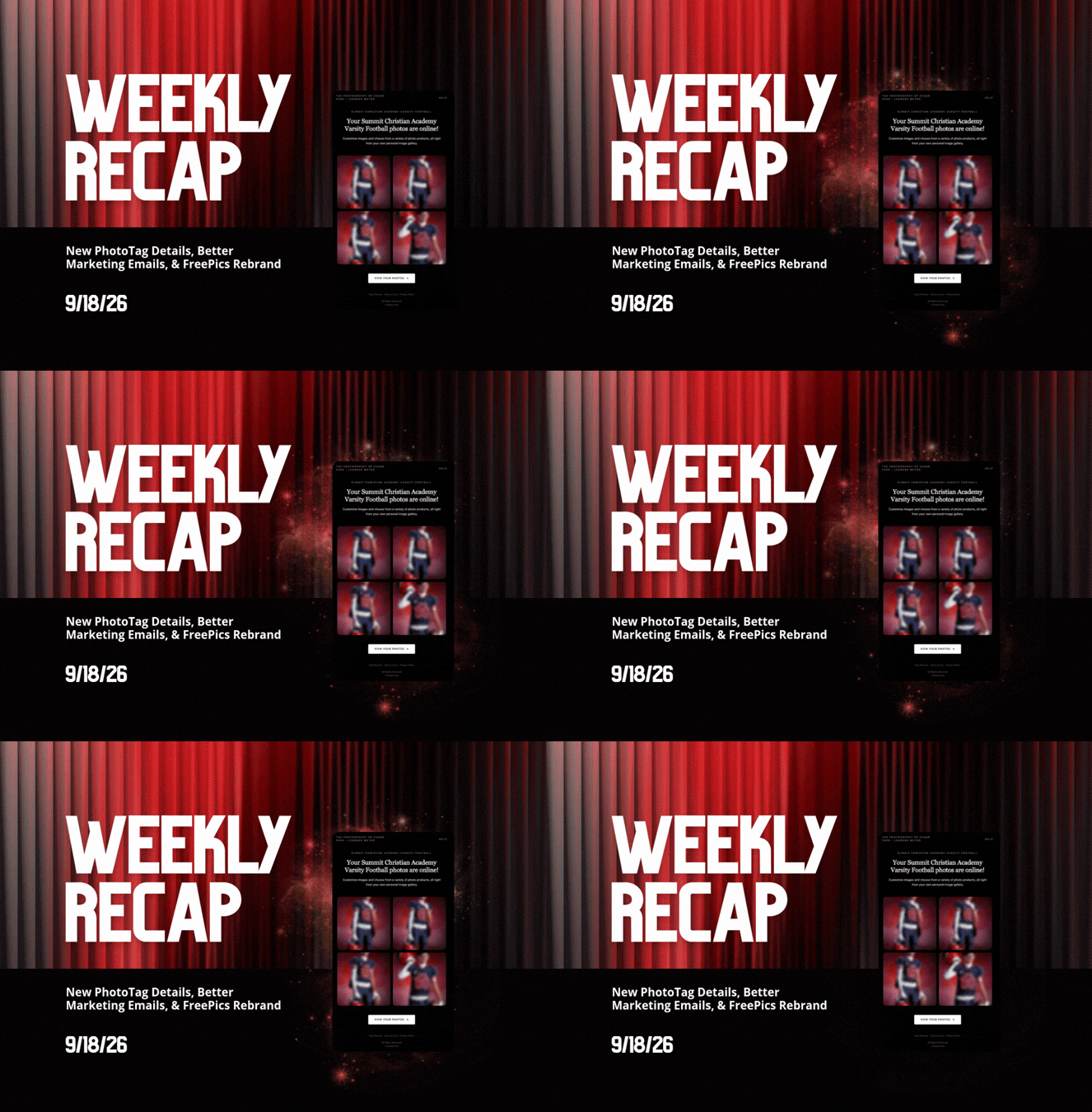
✂️ Background Removal processing is faster

  • We made multiple speed improvements over the past two weeks to help cutouts finish sooner, especially during higher-volume periods.

📥 Smarter Digital Download Delivery

Digital Downloads can now skip unnecessary processing in more situations.

Some downloads are now available immediately

  • If a customer selects No Overlay, the Event has no artwork, and/the image is not a BGR image, the customer will skip the cropping step on the retail site and receive the full-resolution image without waiting for an 8×12 rendered version.

🖼️ Full aspect ratio is preserved

  • These downloads bypass the cropping step and work more like Personal Gallery Download products.

🆓 Also applies to Medium Res and Free Downloads

  • This includes cases where those downloads are automatically upgraded to full resolution.

📧 Clearer receipt messaging for custom renders

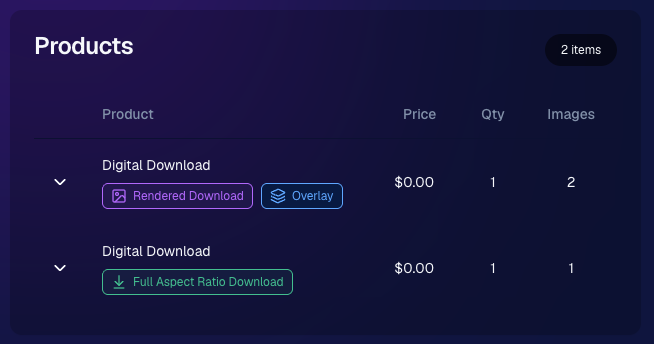
🧾 Order Details now identifies each download type

  • Digital Downloads can now show a Rendered Download or a Full Aspect Ratio Download badge, making it clearer which version was delivered to your customers.
🎨 Auto Editor & Candy Image Studio Updates

🧩 Auto Editor now supports image-input nodes

  • You can now use nodes such as:
    • Custom Image
    • Copy Style
    • Diploma Fix

🙈 Auto Edit originals won’t be texted too early

  • QuicPics and QuicPortraits will no longer send the original image by MMS when it belongs to an active Auto Edit with Hide Originals enabled. The system will wait for the edited version instead.

🕺 New Retro Pop node

  • Give images a colorful, retro-inspired treatment.

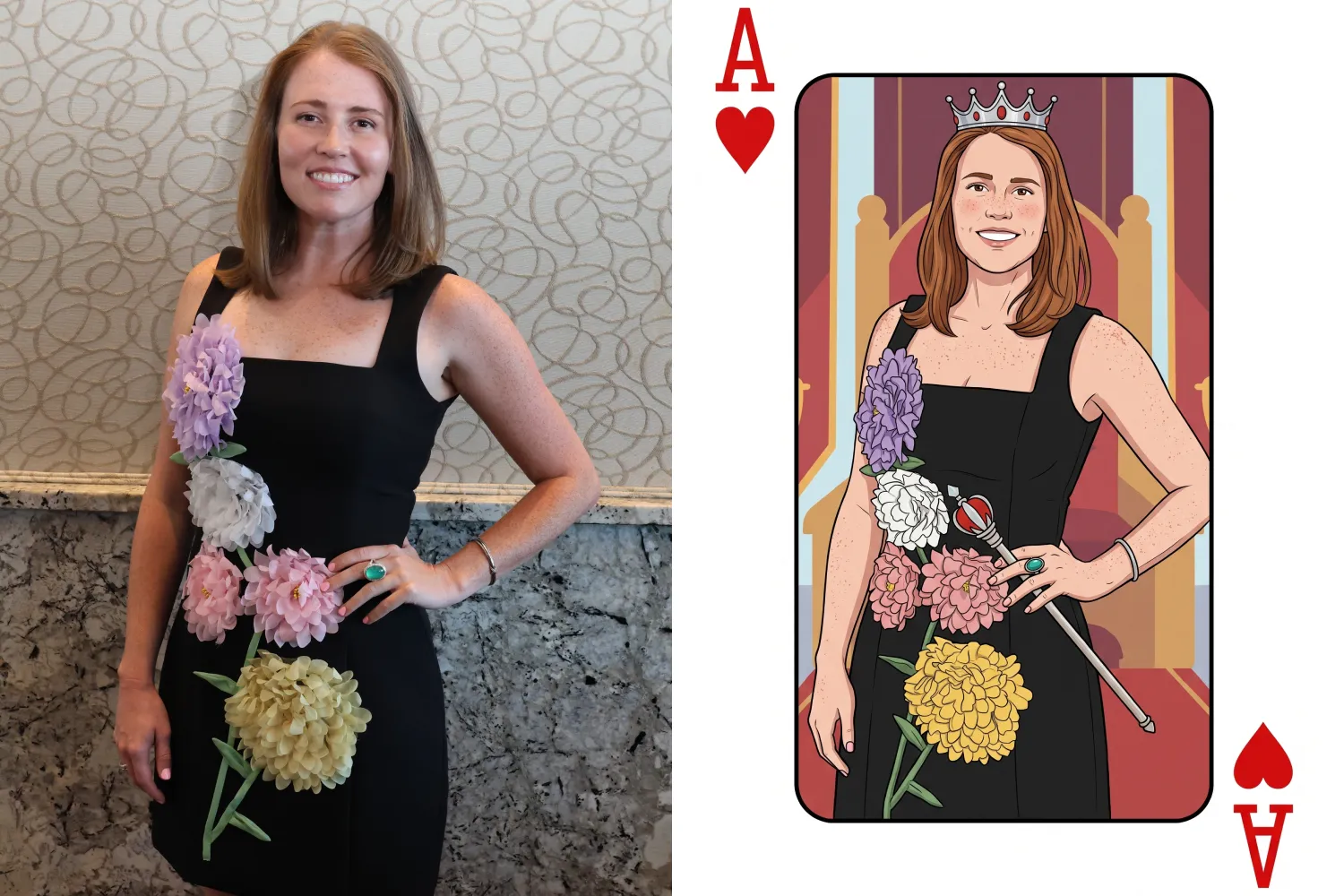
🂡 New Ace Card node

  • Turn subjects into a bold playing-card-style design.

💬 QuicPics & Marketing Improvements

👥 QuicPics can now send to multiple contacts on merged participants

  • If merged participant records contain different phone numbers or email addresses, regular QuicPics can now send to each unique contact.

✉️ Marketing startup fix for BGR cutouts

  • Fixed an edge case where marketing would not begin if the only visible images were cutouts from the newer Background Removal system.

🔗 Hot Links now better respect Hide Originals

  • Fixed an issue where the preview could temporarily show the original image before an Auto Edit finished generating.

📱 Capture App Updates

Capture App 5.8.1

iOS and Android OTA updates

🎨 Updated Event artwork is refreshed at login

  • If artwork changed, the latest file is pulled when logging into the Event normally.

🛠️ Small follow-up fix

  • An additional 5.8.1 update was released to address a minor issue.

Capture App 5.9

iOS and Android App Store update

📲 iOS OTA updates are easier to install

  • You no longer need to completely restart the app or return to the Home Screen to install an available Over-the-Air update.

🤖 Android compatibility updates

  • Required updates were made to stay current with new Google Play requirements.

🛍️ Retail Download Fixes

📱 Safari share sheet reliability improved

  • Press-and-hold downloads should now open the native share sheet more consistently on Safari.

🖼️ Virtual Group download cleanup

  • Virtual Groups in QuicPics no longer offer a Download with Art option.

🎨 Background selection fixes

  • Fixed cases where:
    • A PNG could be downloaded without selecting a background and receive an incorrect blue background
    • Faux renders showed no selected background in the download popup

🔐 Facebook login works again

🖥️ Dashboard Improvements

📊 Image Timeline cleanup

  • Fixed chart display issues, removed folders that were not useful in the timeline, and prevented multiple summaries from appearing when switching folders quickly.

🌾 Candy Culler controls are clearer

  • Filter visibility and report controls now use more descriptive buttons, similar to Manage Images.

📈 BGR Folder Stats fixed

  • Cutouts from the newer Background Removal system no longer incorrectly inflate Unassigned totals.

📱 Mobile Dashboard

🔗 More reliable deep linking

  • Dashboard links should open the correct page more consistently when the app has been open for a while or after signing in and out.

That’s the two-week update!

Faster Background Removal and smarter Digital Download delivery are the biggest highlights, with plenty of smaller improvements making Auto Editor, QuicPics, Retail, and the Capture App more dependable.

Thanks again to everyone who joined us in Denver for Summer Seminar—we loved seeing you!

Keep creating magic,

Candy 🍬
Related articles

Weekly Recap: Face Matching Got 28× Faster, Virtual Group Builder Upgrades & RCS Marketing Texts ⚡📸
Feature Updates
June 5, 2026

Weekly Recap: Face Matching Got 28× Faster, Virtual Group Builder Upgrades & RCS Marketing Texts ⚡📸

4
 minutes read
Hey photo friends! 👋


Candy here with a big follow-up from last week: we predicted our Face Matching improvements could make things up to 10× faster... and this past weekend, Face Matching ended up running 28× faster. 🎉

That is well above what we expected, and it came at a perfect time as image volume continues to hit new highs. We’re going to keep making improvements so NowCandid can better handle those big peak-season spikes.

We’re also improving parts of our retail support process, and later this month, we’ll be sending surveys to select end customers to learn more about their retail site and shopping experience. The goal is simple: keep improving the customer journey and help you get the most sales possible.

Now, let’s jump into what changed this week!

⚡ Face Matching Follow-Up: 28× Faster

🚀 Face Matching improvements performed even better than projected

  • Last week, we mentioned updates that could make Face Matching up to 10× faster. This past weekend, those improvements delivered around 28× faster performance.

📈 Built for peak volume

  • With more images coming in than ever, this speed improvement helps keep galleries moving during high-volume stretches like graduation season.

🛠️ More efficiency improvements are still coming

  • We’re continuing to tune systems behind the scenes so large event volume stays more manageable.

📣 Marketing Texts Now Support RCS

💬 Marketing texts now use RCS when available

  • All marketing texts, including QuicPics image texts, now send through RCS when supported, with SMS/MMS fallback for numbers that don’t support RCS.

Cleaner, more recognizable messages

  • Instead of appearing as a random phone number, supported messages can show as coming from QuicPics with a branded-style camera icon. This makes the text feel more familiar and easier for customers to recognize.

🛡️ Better deliverability potential

  • With mobile platforms continuing to add stronger spam filtering — including spam folders on iPhones — RCS gives our messages a better chance of feeling legitimate and avoiding the “unknown number” problem that can hurt visibility.

📱 Still works for everyone

  • If a customer’s phone or carrier doesn’t support RCS, the message will still fall back to normal SMS/MMS automatically.

Note: Client Outreach still sends through regular phone numbers for now. This RCS update applies to event marketing texts, 2FA in the Dashboard, the Find Me feature on quic.pics, and QuicPics image messages.

Oooooo shiny! Much more eye-catching than a simple phone number.

🧑‍🤝‍🧑 Virtual Group Builder Improvements

Virtual Group Builder got several upgrades this week:

Participant importing is much faster

  • Large imports should feel quicker and more responsive.

👨‍👩‍👧 Merged siblings now import properly

  • If siblings were merged through identical parent contact info, Virtual Group Builder will now pull them in correctly.

📂 New Subjects pane collapse button

  • Collapse the Subjects pane to make the preview area bigger. You can also toggle it with Shift + S.

🖼️ New cutout bottom fade slider

  • Adjust how strongly subject cutouts fade at the bottom.

🌫️ “Falloff Intensity” renamed to “Bottom Vignette”

  • Clearer wording for what the setting actually controls.

🖥️ Dashboard Improvements

🧰 More Tools moved out of the popup on Manage Images

  • Manage Images tools are now more visible instead of tucked away.

🗂️ Edit Folder is always visible

  • The Edit Folder button is now easier to find on Manage Images.

📬 New marketing column on Participant List

  • Quickly see how much marketing a participant has received.

👁️ Participant Details groups invisible images at the end

  • Makes the page easier to scan.

🎨 One Art Style node per edit

  • Candy Image Studio and Auto Editor now only allow one Art Style node per edit. This helps avoid confusion when selecting conflicting styles like Anime, Chibi, Action Figure, and Bobblehead together.

📈 Marketing History chart improved for new Events

  • New Events should no longer show one giant bar on the first day.

🏷️ Event Tags improvements

  • Hidden Event Tags are now hidden by default, and event search when adding Events to a tag is more flexible.

💰 Auto Editor total cost display fixed

  • The displayed total cost is now correct. Customers were charged correctly before; only the UI number was off.

🔢 Participant List now shows key report snapshots

  • You can now quickly see:
    • Images Per Participant
    • Sales Per Participant
    • % Participants Ordered

📱 Capture App 5.6.4

iOS & Android OTA update — Monday, June 1

🧍 Registered face boxes now show in the strip

  • When entering a shooting mode, existing images in the strip can show registered face boxes.

🔄 Restore Session fixes

  • Fixed Restore Session not loading saved registered participants for Positive ID Events or Face Matching Roster Check-In.

Face Matching Roster Check-In fix

  • Fixed an edge case where a registration could fail to save to an image.

📱 Android tablet UI fixes

  • Selfie Check-In Station camera UI fixed in vertical orientation
  • Image gallery name text no longer overflows in vertical orientation

That’s the week!

The big wins are definitely RCS marketing and Face Matching coming in 28× faster, but the Virtual Group Builder and Dashboard changes should make things easier during busy season too.

We’ll keep improving speed, support, and the retail experience as we go!

Keep creating magic,

Candy 🍬

Weekly Recap: Faster Face Matching, Virtual Group Tweaks & Reporting Upgrades ⚡📸
Feature Updates
May 29, 2026

Weekly Recap: Faster Face Matching, Virtual Group Tweaks & Reporting Upgrades ⚡📸

3
 minutes read
Hey photo friends! 👋


This week’s update is all about keeping up with the busiest season yet. We saw an enormous wave of images come through recently — more than ever — and Face Matching delays got much longer than we want them to be.

So, we’ve been making improvements accordingly. 💪

⚡ Face Matching Speed Improvements

🚀 Face Matching performance upgrades are in progress! We’re implementing changes that should help speed up Face Matching by up to 10× faster in some cases.

These improvements are especially important during high-volume stretches like graduation season, when thousands upon thousands of images are coming in at once. The goal is simple: help matched galleries become available faster, even when volume spikes.

📊 Reporting Upgrades

📈 Sales Report now supports up to 15,000 orders

  • The Sales Report list and Excel download can now include up to 15k orders at once. Previously, the limit was 1k.

💵 Sales Report download now includes eFee and COGs

  • The Excel export now includes eFee and COGs for each order, giving you more detailed financial visibility.

📦 Products Report sorting fixed

  • Column sorting now works correctly on the Products Report.

🏷️ Event Tags report filter fixed

  • Fixed an issue where the Event Tags filter could set the end date based on the newest Event end date instead of today, potentially missing newer report data.

🧑‍🤝‍🧑 Virtual Group Builder Improvements

📝 New Text Vertical Position slider

  • You can now adjust the vertical position of subject names in Virtual Group Builder.

🎯 Logo positioning fix

  • Fixed logos being off by a few pixels in Virtual Group Builder.

🧭 Edit redirect fix

  • Fixed an issue where editing a Virtual Group could sometimes send you back to Home.

🖼️ Dashboard Image Management Updates

🔢 Manage Images now shows total image count

  • At the top of the Manage Images page, you’ll now see how many images are included in your current search/filter results.

🏷️ PhotoTag duplicate prevention improved

  • PhotoTag creation now better prevents duplicates caused by extra empty space at the end of the PhotoTag name.

🛍️ Retail Improvements

🧑‍🤝‍🧑 PhotoTag group images appear first

  • When a participant is associated with a PhotoTag, group images tied to that same PhotoTag will now appear before general group images with no PhotoTag.

⬇️ Receipt download button cleanup

  • The Download All Images button is now hidden if the order does not include any downloads to reduce confusion.

Web Receipt Download Page processing message fixed

  • If a customer clicks the receipt download link before the order is fully loaded by the lab, the page will correctly say the order is still processing.

✂️ Z-crop product cropping improved

  • When cropping a z-cropped image during product configuration, retail now uses the z-cropped version directly instead of jumping back to the full original image.

🖼️ “Matte” clarified to “Standard”

  • Most products now use "Standard" instead of "Matte" for clearer wording. Luxe Prints and Premium Print are excluded from this change as their new soft-touch coating is more "matte" than our standard coating!

That’s the week!

Faster Face Matching is the big focus right now, and these reporting, Virtual Group, Dashboard, and retail updates should help keep things clearer and more manageable going forward for photographers as well!

Keep creating magic,

Candy 🍬

Deliver Faster and Start Selling Sooner
Events
May 26, 2026

Deliver Faster and Start Selling Sooner

7
 minutes read

Why timing is the most overlooked “marketing strategy” in event photography

In photography, timing matters.

Not just because clients want their photos quickly—but because buying behavior is emotional and time-sensitive. The longer customers wait to see their images, the more the energy fades. The excitement from the event turns into “I’ll get to it later,” and “later” often becomes “never.”

That’s why one of the biggest marketing advantages you can build into your business isn’t a fancy email template or a new ad campaign. It’s this:

Deliver faster—so you can start selling sooner.

NowCandid™ is built around that idea.

The real problem: attention decays fast

After an event, people are at peak interest:

  • •They’re excited.
  • •They’re already talking about it.
  • •They’re texting friends.
  • •They’re posting.
  • •They’re still in “memory mode.”

That’s the moment when they’re most likely to open a message, click a gallery link, and buy.

But when delivery drags out:

  • •They stop checking.
  • •They forget.
  • •They move on.
  • •They’re less likely to convert.

Even a delay of a couple days can change the outcome.

The NowCandid approach: proactive delivery, not passive browsing

A lot of platforms rely on customers to work hard to find their photos. The experience is often:

“Here’s a link. Good luck.”

NowCandid is designed to flip that.

Instead of waiting for customers to dig through a massive gallery, the platform is built to connect the right photos to the right people quickly, and then help you reach them while the moment still feels immediate.

Here’s what that looks like.

The “faster = more sales” workflow

1) Customers complete a quick Selfie Check-In™

Selfie Check-In gives customers a simple way to identify themselves and provide contact info, so your system has what it needs to deliver their images efficiently—without a bunch of manual work on your end.

The key benefit: less friction.
You’re not chasing names after the fact. They’re raising their hand while the event energy is still high.

2) Images can be live-uploaded as they are shot

When you can upload while you shoot, you change the entire sales timeline.

Instead of “photos delivered days later,” you’re moving toward:

  • •Same-day visibility
  • •Immediate browsing
  • •Faster order velocity

Even if you don’t upload every frame live, the ability to move photos quickly gives you leverage. It’s the difference between a slow drip and a real-time experience.

3) Galleries can be sent right away

Once customers are identified and images are flowing in, the next step is simple:

Send the gallery.

That’s where momentum turns into conversion.

You’re no longer hoping attendees remember to check a website later. You’re proactively reaching them with a direct path to their photos.

4) Customers receive images while it still feels immediate

This is the most important part.

People buy when:

  • •They can find themselves quickly
  • •The experience feels fresh
  • •They’re emotionally connected to the moment

When images arrive while the event still feels “present,” the purchase becomes part of the experience—not an afterthought.

That’s why speed isn’t just operational.
It’s marketing.

What this unlocks for photographers

When delivery speeds up, you’ll feel the impact in a few places immediately:

✅ More orders (because more people actually view their photos)

Fast delivery increases engagement. Engagement increases conversion.

✅ Higher order values (because customers stay in the moment)

When people browse while excited, they tend to buy more. They’re not minimizing the purchase—they’re celebrating the memory.

✅ Less support burden

Most support requests come from confusion and delay:

  • •“Where are my photos?”
  • •“How do I find my kid?”
  • •“I can’t remember the link.”

A fast, direct delivery workflow reduces those issues naturally.

✅ Better event/client satisfaction

Organizers don’t want complaints. Faster delivery means fewer unhappy guests and fewer incoming emails for the client—which makes you look professional (and helps you get rebooked).

The takeaway: timing is a growth strategy

If you want to grow your event photography business, you don’t always need more marketing.

Sometimes you need better timing.

NowCandid is built to help you:

  • •Identify customers quickly
  • •Upload faster
  • •Deliver sooner
  • •Convert while energy is high

Because in volume photography, the platform that helps you move faster is usually the platform that helps you sell more.

Want to see what “fast delivery” looks like in practice?

If you tell us what type of events you shoot (sports, schools, graduations, dances, etc.), we’ll recommend the best NowCandid workflow to deliver faster and start selling sooner. Set a time with one of our reps using our Calendly: https://calendly.com/nowcandid-training.

Let’s get in touch

If you’re a photographer looking to add NowCandid services to your wheelhouse – set up a call by clicking the button below.

How to customize formatting for each rich text

How to customize formatting for each rich text

How to customize formatting for each rich text

How to customize formatting for each rich text

How to customize formatting for each rich text

What’s a Rich Text element?

The rich text element allows you to create and format headings, paragraphs, blockquotes, images, and video all in one place instead of having to add and format them individually. Just double-click and easily create content.

A rich text element can be used with static or dynamic content. For static content, just drop it into any page and begin editing. For dynamic content, add a rich text field to any collection and then connect a rich text element to that field in the settings panel. Voila!

Headings, paragraphs, blockquotes, figures, images, and figure captions can all be styled after a class is added to the rich text element using the "When inside of" nested selector system.

  • List One
  • List Two
  • List Three
  • List Four
  • List Five

This is a link

This is bold text