HomeNavigation arrowBlogNavigation arrow
Current page
Feature Updates

Weekly Recap: Express Checkout Confirmations, Capture App Speed Testing, and a New Lightroom Classic Plugin

Weekly Recap: Express Checkout Confirmations, Capture App Speed Testing, and a New Lightroom Classic Plugin
Hey photo friends! 👋


This week’s updates are all about clearer customer actions, smoother retail performance, and new tools that speed up upload workflows. Plus, a strong round of Capture App polish (iOS & Android OTA) and some important Dashboard + Marketing fixes.

Let’s jump in. ✨

🛍️ Retail: Fewer Mis-clicks, Better Previews, Faster Feel

✅ Express Checkout confirmation (all express checkouts)

All express checkout flows now show a confirmation popup that clearly displays the shipping address selected, with options to place the order or go back. It also includes an invalid address popup.

Previously, people would sometimes purchase without double checking their express-checkout-method's default shipping address. So, this change is designed to reduce address mistakes and improve customer experience!
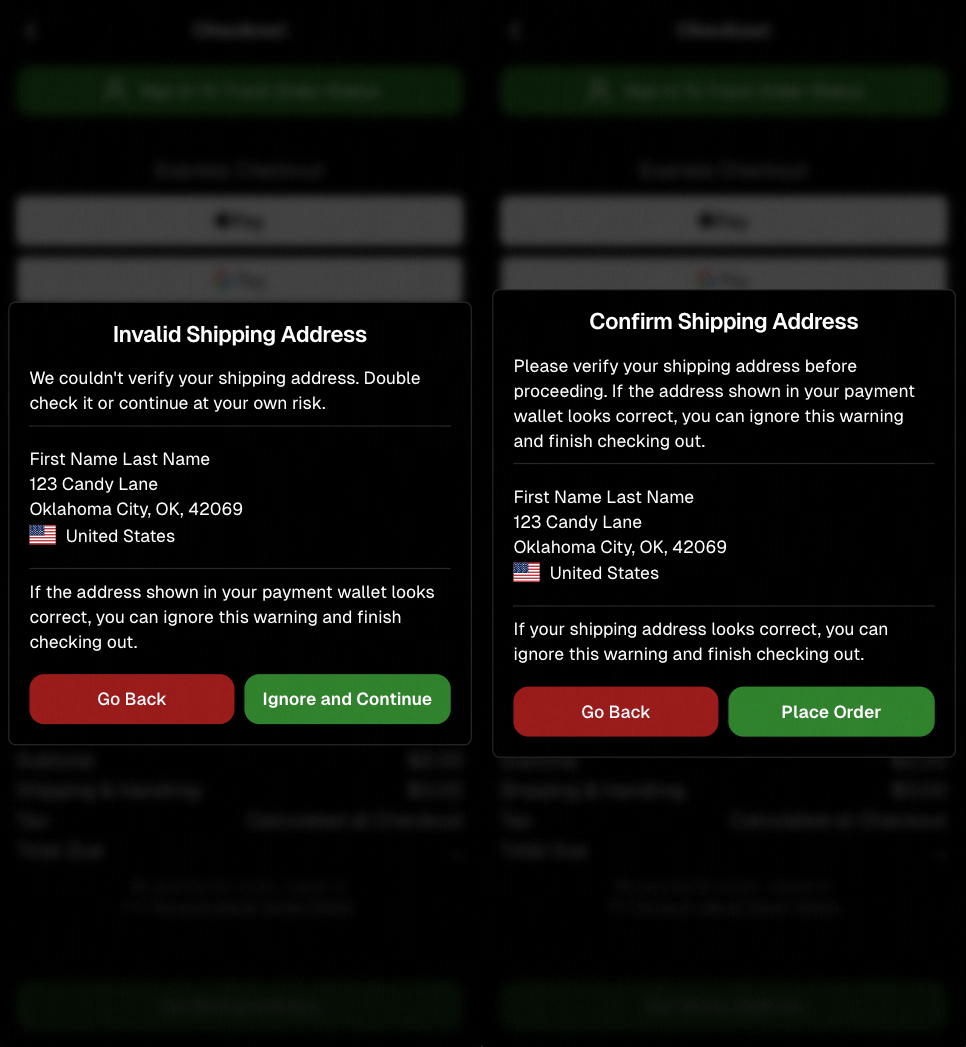
Confirmation popup now clearly displays shipping address confirmation.

🧠 Better UI + performance improvements

  • Improved local rendering (performance, memory usage, and task handling) — originally aimed to improve the retail experience on low-end devices, but it should make most devices feel faster!

  • Native “leave page” confirmation on supported browsers/devices (desktop + Samsung back button) when navigating away from an event page (refresh/back).
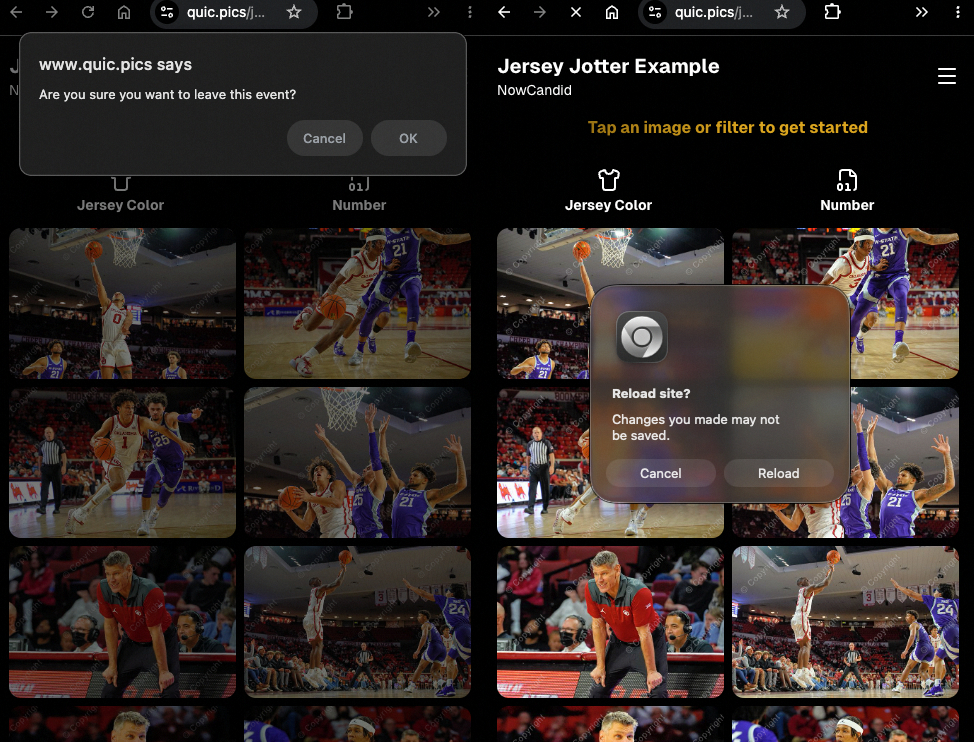
Leave page confirmation

🖼️ Clearer package download expectations + better pickers

  • Personal Gallery Downloads on store sheet and package editor now show “+X Images” in the configurator when there are more than 4 images—so customers don’t think they only get what’s previewed.
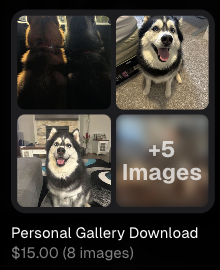
Personal Gallery Download "+X Images"

    • Personal Gallery Download products inside packages can now be clicked to preview contents.

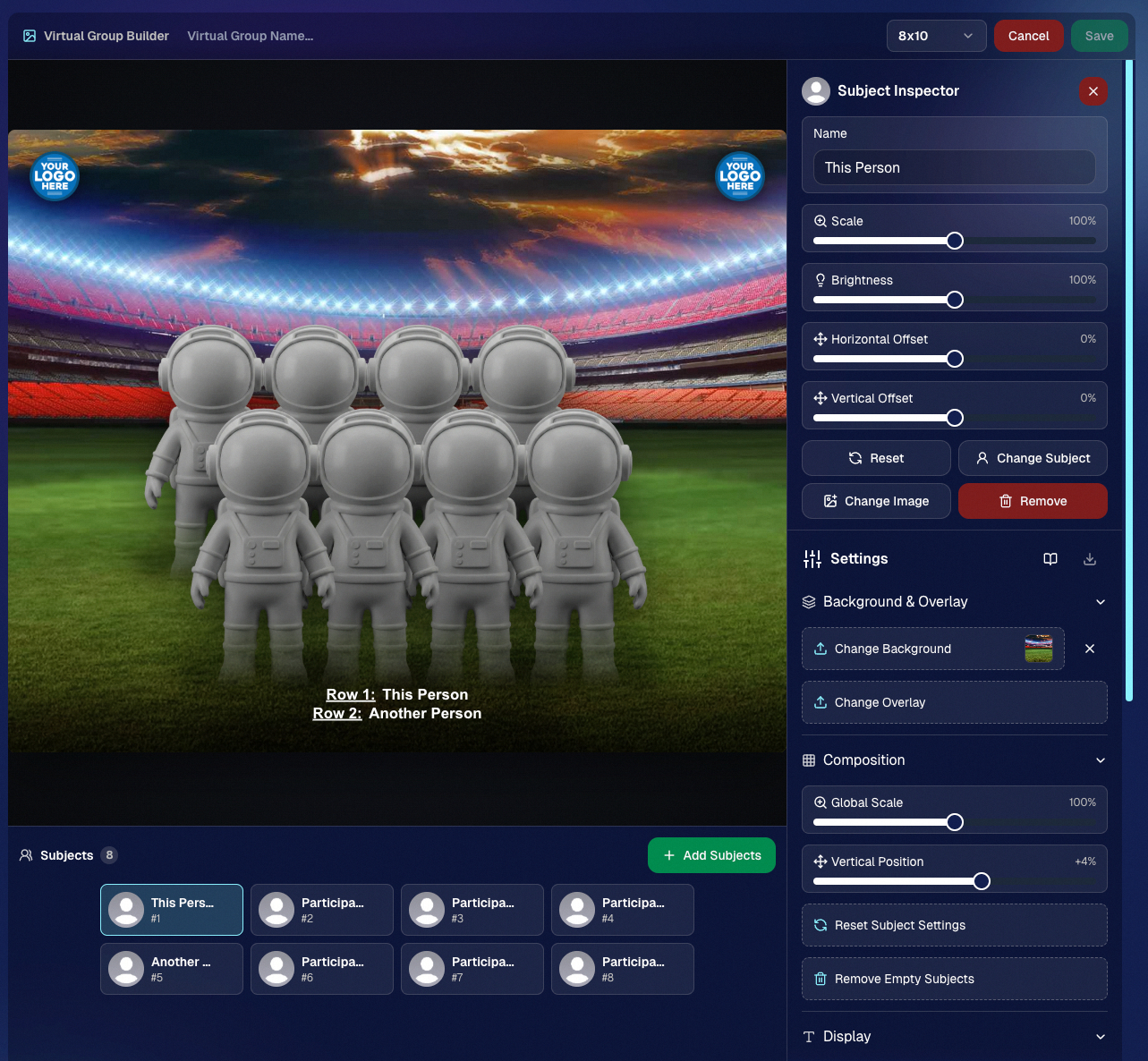
    • Desktop product/package image pickers are now two columns (like mobile), allowing larger image preview during selection.
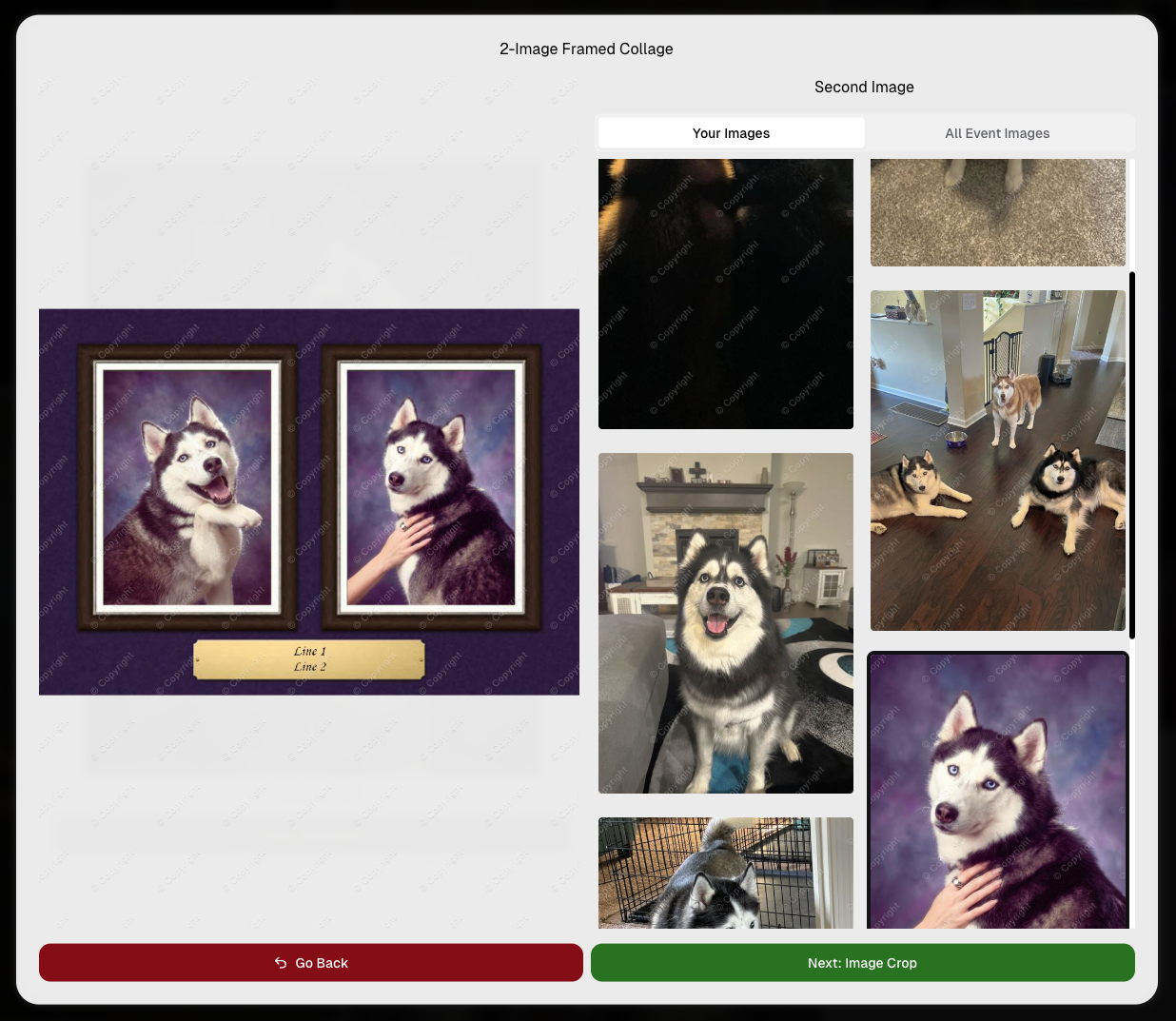
    Larger two column image previews

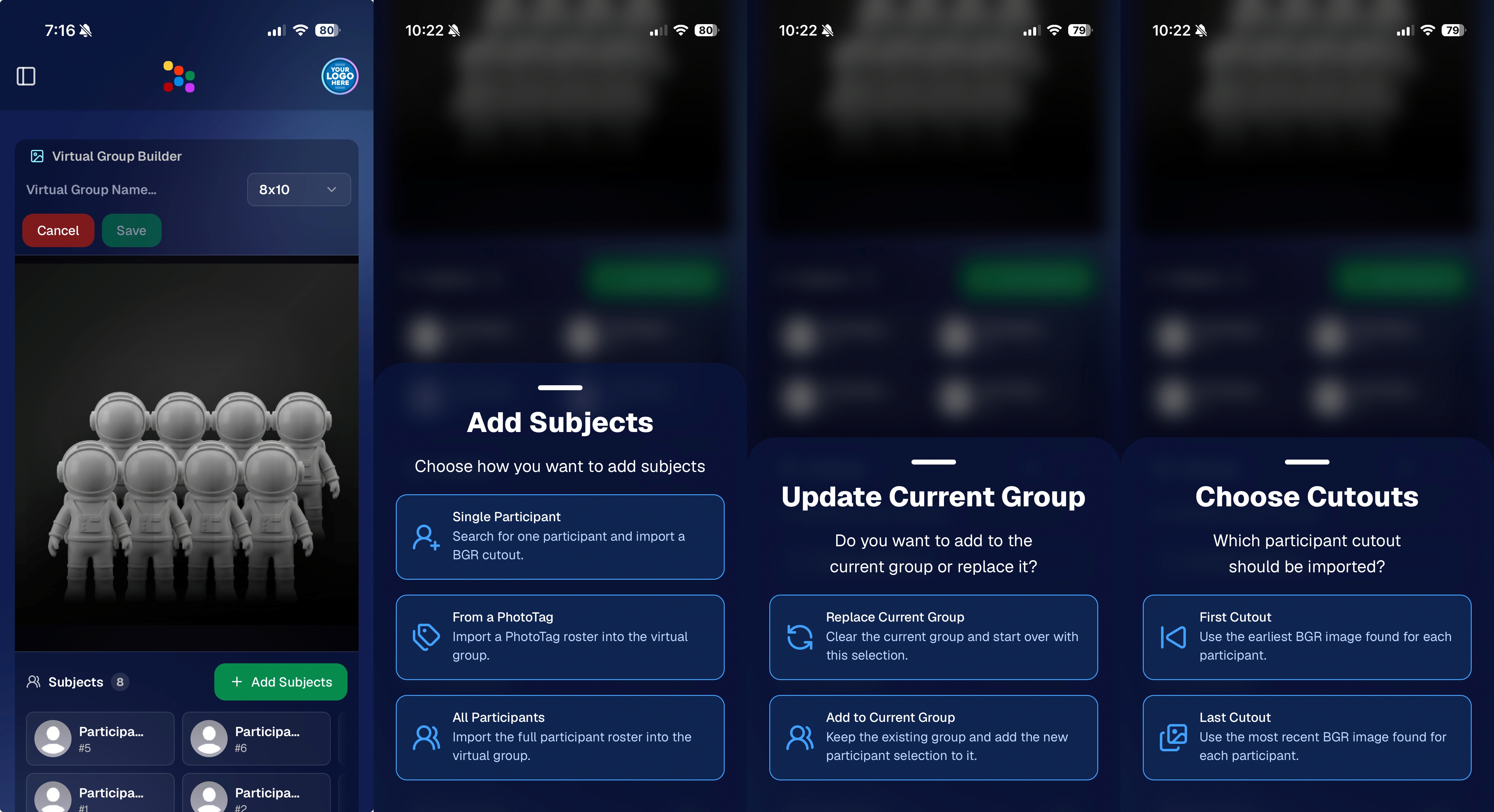
      • Image Filters landing popup now includes “Browse all photos without a filter” so customers who think they must pick a filter know they can also just browse!
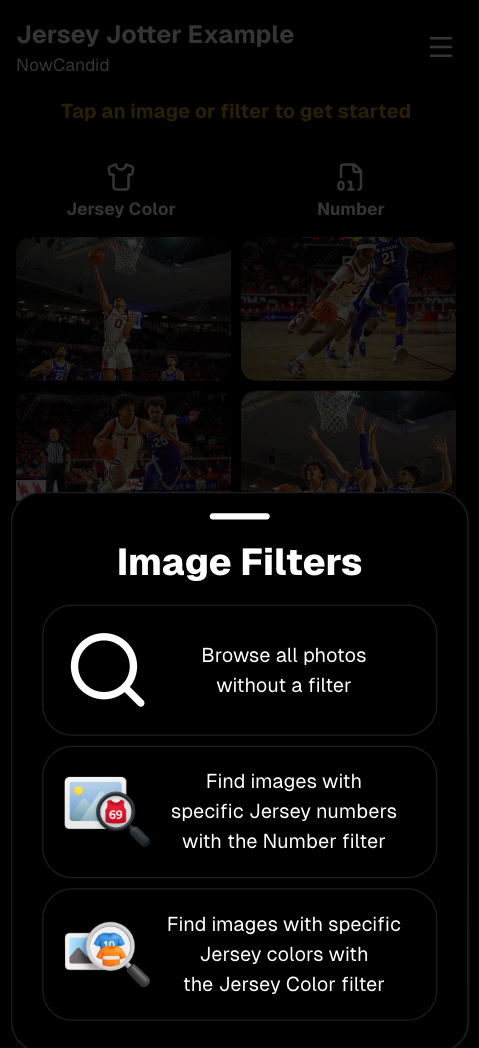
      Image Filters landing popup

      🧩 Retail fixes worth noting

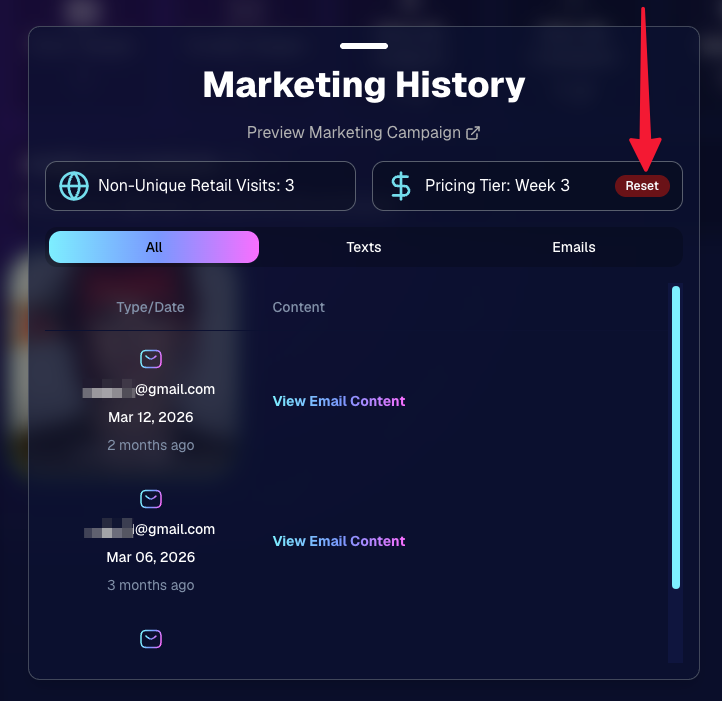
      • Fixed a slashed discount amount showing on week 3 when there is no higher amount.
      • Fixed a GalleryGuard edge case that could close the retail site on some Android devices that support mobile context menus when long-pressing.
      • Fixed a race condition where a Group-by-Face gallery loaded from URL params could show default results instead of the filtered view.
      • Fixed an edge case where manually assigned images marked as group could behave like non-group images on retail.

      📱 Capture App OTA: 5.6.1 & 5.6.2 (iOS & Android)

      🌐 NEW: Network Speed Test (5.6.1)

      A new Network Speed Test button is available in Resources. Tap Run Test to check download speed, upload speed, and latency to NowCandid servers (so results may differ from Google/Ookla). It’s a quick test (downloads 5 MB, uploads 2 MB) and is useful for diagnosing weak or congested service during events.

      Mbps is a standard measurement for connection speeds, and 1 megabit per second (Mbps) is 0.125 Megabytes per second (MB/s). So 8 Mbps is 1 Megabyte per second, max. For example, with images that are 10 Megabytes in size, a speed of 8 Mbps would take a minimum of 10 seconds to upload. When speeds are very slow, image uploads may be impossible due to uploads timing out and restarting. In these cases, open the app when you have a stronger connection and all your images will start going up!
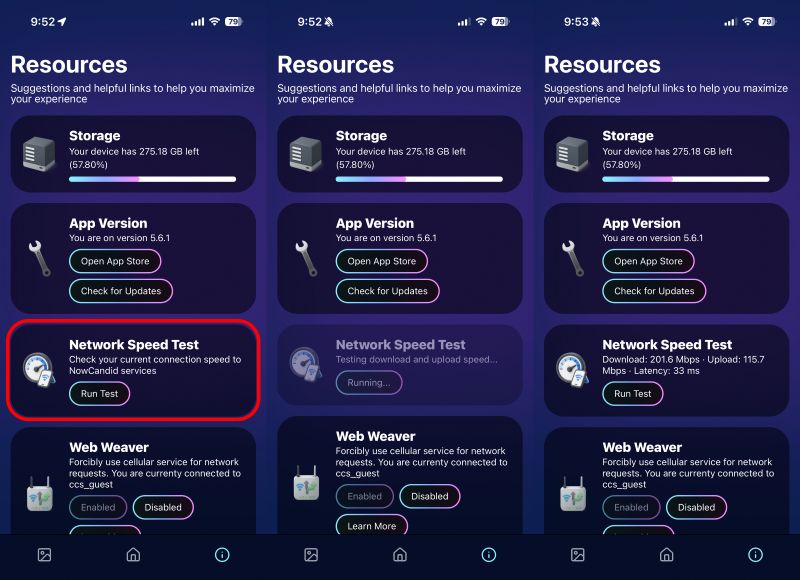
      Network Speed Test

      🎪 Photo Booth + Selfie Check-In Station UI upgrades (5.6.2)

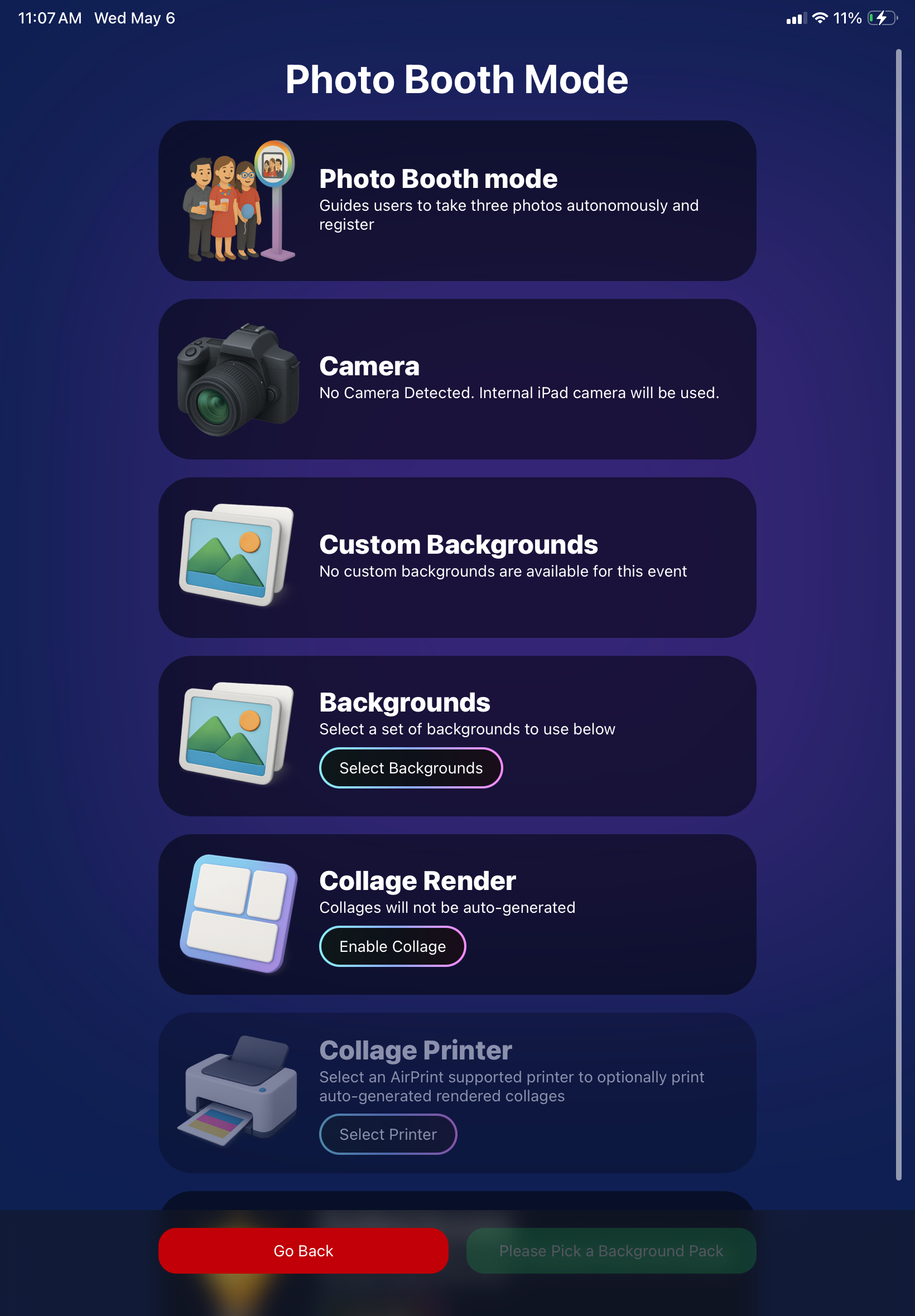
      • Photo Booth landing page updated to be more user-friendly (always-visible scrollbar, updated text, sticky go back/continue buttons, red/green emphasis, and a popup explaining why Continue is greyed out).
      • Selfie Check-In Station landing page updated with red/green Go Back / Begin buttons.
      • New dropdown icon beside Group Photo toggle (when an event has PhotoTags) to better display there are additional options to assign PhotoTags.
      • Fixed edge case cancel/continue behavior on Selfie Check-In Station when no contact info was entered.
      🧩 NEW: Lightroom Classic Plugin (Official)

      We’ve launched an official Lightroom Classic plugin to upload images to NowCandid events directly from Lightroom Classic.

      Key notes:

      • Lightroom Classic only
      • Same image rules apply (color profile, DPI, etc.)
      • Uses Capture App login
      • Only events within 60 days of event start date show in the selector
      • Image Details → Logs will show “Uploaded from NowCandid Lightroom Plugin”
      • Docs include guide/download/installation: https://app.nowcandid.com/docs/tools-more/lightroom
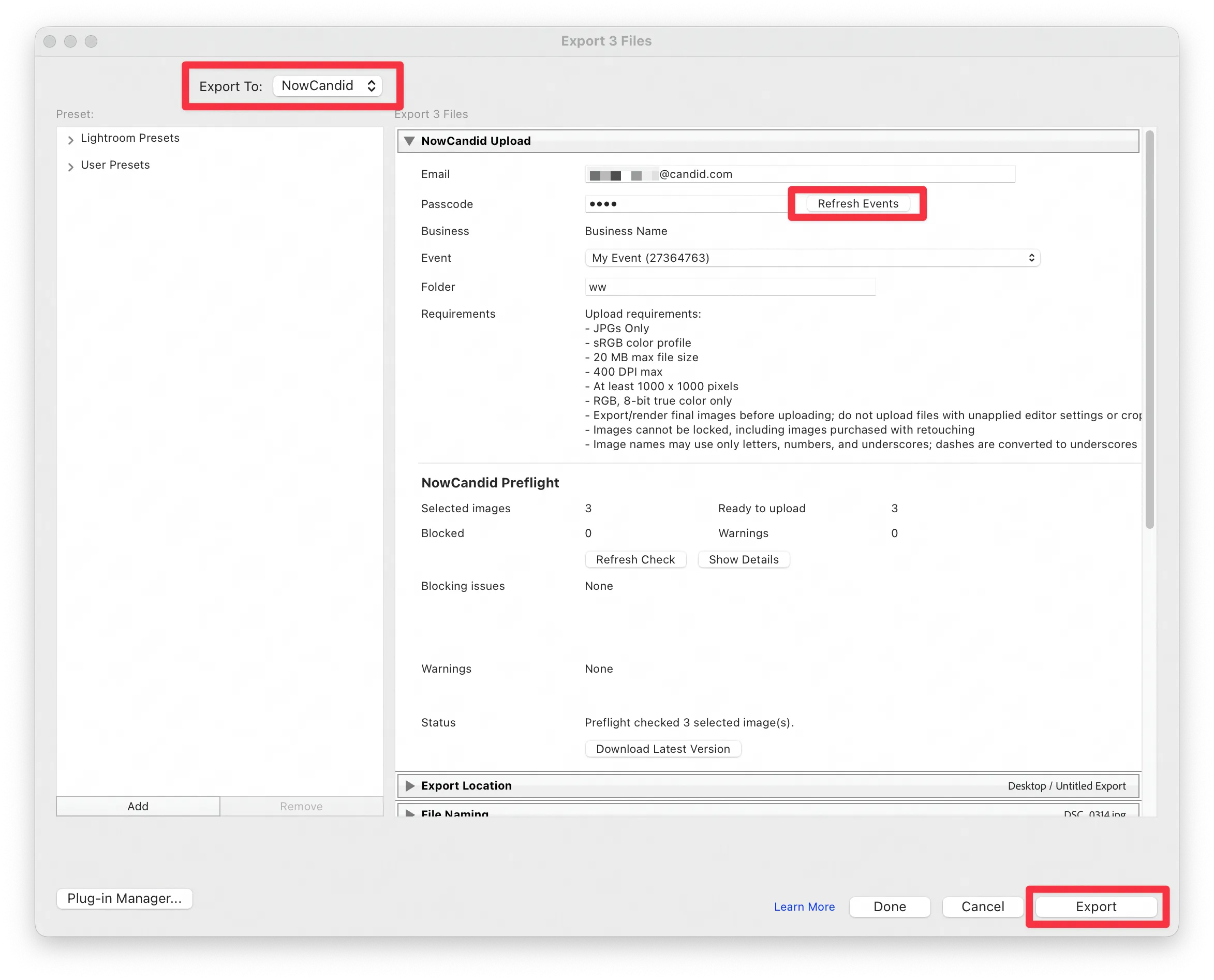
      Lightroom Classic Plugin

      Upload from NowCandid Lightroom Plugin

      🖥️ Dashboard: Upload & Roster Clarity + Small UX Wins

      • Event roster upload and PhotoRoster upload now warn about every unrecognized column, making it easier to spot misspellings (especially for optional columns).
      • Participant list page download now puts additional contacts into columns instead of rows.
      • Participant list download now puts merged contacts into their own row if they have different first/last names.
      • Image upload naming cleanup:
        • spaces/parentheses now automatically become underscores (e.g., Image (2)Image_2)
        • names ending in z now get a trailing underscore (e.g., ImagezImagez_)
      • Candy got even better at using the new Docs for responses.
      • Password reset now shows a clear “Your link has expired” screen (links expire after 24 hours).
      • Fixed participant filter inside another participant’s manual assign/unassign page not working properly.
      • Participant Details PhotoTag assignment UI: merged participants no longer incorrectly show PhotoTags as assigned.
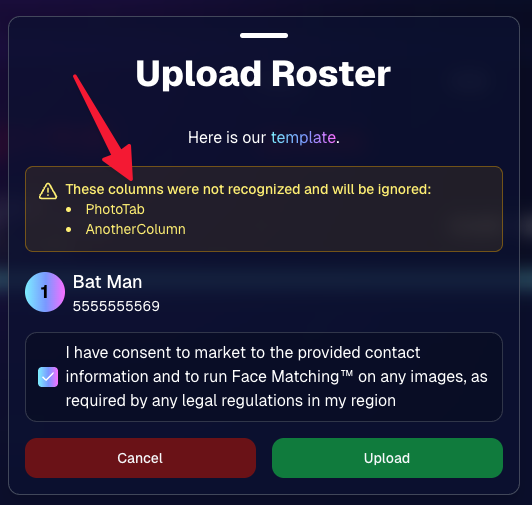
      Upload Roster now warns about every unrecognized column.

      📣 Marketing Fixes

      • Fixed edge cases where galleries that were only AI-edited images could cause follow-up email marketing issues and show as 0 images on Participant List.
      • Fixed Day0 marketing edge case not starting if gallery is just AI-edited images.
      • SMS gallery links now include “View photos:” before the gallery URL to reduce confusion where some users thought the gallery link was an unsubscribe link.

      That’s the week! 💫

      Between the Lightroom Classic plugin, the Capture App’s new Network Speed Test, and retail improvements that reduce confusion (and improve performance), this week was packed with practical wins you’ll feel right away.

      Keep it sparkly,

      Candy

      Related articles

      Weekly Recap: Smarter Upload Errors, Better Luxe Renders & Invoice Fixes 🍬✨
      Feature Updates
      March 27, 2026

      Weekly Recap: Smarter Upload Errors, Better Luxe Renders & Invoice Fixes 🍬✨

      2
       minutes read
      Hey photo friends! 👋

      This week’s updates are all about clearer feedback, smoother retail rendering, and a few helpful fixes across the Dashboard, Check-In, and Capture App.

      🖼️ Retail: Better Luxe 3D Renders

      A few important improvements landed for Luxe products on retail:

      Luxe Prints 3D renders now work correctly for horizontal images

      💡 Luxe render lighting improved so products look more natural and less over-bright

      📱 Mobile cropping on 3D renders is much more stable and performant

      • Fixed an issue where gesture-based cropping could crash on mobile devices

      If you’re selling Luxe products, this should make the preview experience feel more polished.

      📤 Dashboard: Clearer Image Upload Errors

      The Image Uploader now does a better job explaining what actually went wrong:

      🚫 Oversized files now show the real reason

      • Instead of a vague “Error uploading,” files over the limit will correctly say the image is too large

      📏 File size is now included in the error message

      • Example: File size is over 20 MB (25.3 MB)

      🌐 Network issues now say “Network Error”

      • Much clearer than a generic upload failure

      🔁 Automatic retry for network errors

      • The uploader will now retry up to 5 times before giving up

      A small change, but a much better experience when uploads hit a snag.

      🧾 Dashboard Fixes & Improvements

      📄 Profile invoices fixed

      • Invoices from January onward should now load correctly
      • Invoices are also now easier to find through Sidebar Find and Candy navigation

      👥 PhotoRosters wording updated

      • “Members” is now “Contacts” for better consistency across NowCandid

      📊 Participant image counts fixed on the Event Participant List for certain Positive ID edge cases

      🎨 Fixed an overlay importer edge case that could make Events appear twice in the list

      🤳 Check-In Improvements

      📋 Fixed the list of existing check-ins going off-screen for accounts with a lot of check-ins

      ✍️ Some check-in copy was updated for clarity

      📱 Capture App 5.4.1 (iOS OTA)

      🔒 Fixed PhotoBooth and Selfie Check-In Station close buttons not working on devices without a passcode set up

      That’s the update for this week! Better Luxe previews, clearer upload feedback, and a handful of fixes to keep things running smoothly.

      Keep creating magic,

      Candy 🍬

      Weekly Recap: Jersey Jotter Page, Smarter AI Edits & Android Improvements 🍬📸
      Feature Updates
      March 20, 2026

      Weekly Recap: Jersey Jotter Page, Smarter AI Edits & Android Improvements 🍬📸

      4
       minutes read
      Hey photo friends! 👋

      This week brings a mix of sports-focused tools, AI editing upgrades, and performance improvements across the Dashboard and Capture App.

      Let’s get into it.

      🏈 New: Dedicated Jersey Jotter Page (Sports Events)

      Jersey Jotter just got a big usability upgrade with its own dedicated page:

      🔢 Search images by jersey number or color (just like retail search)

      🎛️ Easily enable/disable number & color recognition

      📊 View totals for detected numbers and colors

      📍 Automatically appears for Sports events only

      If you’re working high-volume sports, this should make organizing and finding images much faster.

      Same filters your customers have come to expect, right in the Dashboard!

      🎨 Candy Image Studio: Better Results + New Styles

      Candy Image Studio continues to level up:

      Improved edit quality across multiple nodes

      🛡️ Smarter safety system for safer outputs

      🖼️ Example thumbnails added to many nodes (so you know what to expect)

      🆕 New AI Styles:

      🧸 Chibi

      🧍 3D Cartoon

      🦸 Action Figure

      Not sure when this one specifically would be helpful, but it's cool isn't it!

      ⚡ Dashboard Improvements

      🚀 Faster overall performance across the Dashboard

      🎬 Smoother transitions (faster, and some now morph instead of just fading)

      🧹 Roster uploads now auto-clean whitespace
      Prevents frustrating validation errors from accidental empty spaces in spreadsheets

      🔎 Fixed “Find a Participant” link in Sidebar Find

      🧪 Fixed false positives in Image Tester filename validation

      🏷️ Data & Upload Improvements

      📄 CORE spreadsheets now supported in roster and PhotoRoster uploads (for those working across CORE workflows)

      🛠️ Marketing & Check-In Fixes

      📩 Fixed duplicate text message edge cases

      🤳 Fixed “Upload From Camera Roll” issue on Check-In

      🤖 Capture App 5.4 (Android Improvements)

      This update focuses on improving the Android experience:

      📱 Immersive mode UI

      • Reduces accidental navigation and keeps the app more stable on devices like Samsung

      🎨 Dark-themed native dialogs for alerts and messages

      🔒 Orientation locked to vertical (matching iOS behavior)

      App size reduced ~20% (faster downloads, less storage)

      🔌 Fixed devices showing as generic “USB Camera Device” instead of model name

      🔄 Fixed Over-The-Air updates not working on some devices

      That’s the week!

      A strong mix of sports workflow improvements, better AI editing tools, and faster, cleaner performance across the board.

      See you next week,

      Candy 🍬

      Weekly Recap: Android Capture App Launch, PhotoTag Downloads & Upload Improvements 📸🍬
      Feature Updates
      March 13, 2026

      Weekly Recap: Android Capture App Launch, PhotoTag Downloads & Upload Improvements 📸🍬

      4
       minutes read
      Hey photo friends! 👋

      This week’s updates include something many of you have been waiting for: the first public release of the Capture App on Android. Alongside that launch, we’ve also improved PhotoRoster workflows, tightened up retail safeguards, and rolled out several capture app fixes across platforms.

      Let’s take a look.

      🤖 Capture App Now Available on Android (Beta)

      The first Android version of the Capture App (v5.0.1) is now available on Google Play.

      IMPORTANT: This is very new! So it's in BETA at the moment. Meaning, if you want to use Android, we encourage you to try a test Event at your home or office and make sure your flow works with your particular equipment! If you run into any issues, let us know right away!

      This release brings feature parity with the iOS app (with the exception of Photo Booth Mode and AirPrint, which currently are not planned for Android):

      📷 Supports all of our capture workflows

      ⚡ Same improved upload system introduced in iOS v5

      🔁 Camera-triggered auto-launch support

      🎨 Android themed icon support

      📱 Edge-to-edge Android UI support

      If you’ve been wanting to run Capture on Android devices, the foundation is now here!

      Screenshots from our new Android Capture & Upload App!

      📱 Capture App Improvements

      iOS – Version 5.0.1 (OTA)

      A few fixes and small usability improvements landed this week:

      🔎 Participant not found message when scanning cards

      • Instead of defaulting to the first participant, the app now clearly shows when a scan doesn’t match anyone.

      📊 Image gallery stats now update correctly during uploads.

      📂 TKO popup now dismisses properly when setting a folder as TKO.

      🖥 Windows Capture App – Version 4.21

      New image upload API improves upload speed and reduces device resource usage

      📡 Better behavior when signing into events with no connectivity

      📂 Event selector now shows only active events when offline, matching iOS behavior

      🏷️ Workflow Improvements

      📥 Download PhotoTags directly from the PhotoTags page

      • This makes it simple to reuse or share tags between events.

      📂 PhotoRoster uploads increased

      • Individual image uploads now support up to 5,000 images at once (previously 1,000).

      🎨 Candy Image Studio Reliability Fix

      Candy Image Studio uploads now behave more consistently.

      Edited images will now reliably appear in all the same places as the original image, including:

      • All galleries
      • QuicPics texts
      • Personal galleries

      Previously, images only appeared if they happened to match faces or were manually assigned.

      🛍️ Retail Improvements

      A couple improvements help prevent confusing edge cases for customers:

      👥 Group products now properly enforce group images

      • If someone tries selecting a non-group image for a group product, they’ll now see a clear error message.

      🌍 New international shipping notice

      • For non-US shipping addresses, customers now see a helpful reminder that customs or import fees may be charged by their country in addition to international shipping fees.

      🖥️ Dashboard Improvements

      Some smaller UI improvements landed this week:

      ✨ Toggle switches now animate smoothly instead of appearing choppy.

      That’s the week!

      The Android Capture App launch is a big step toward expanding device flexibility, and the PhotoTag downloads and PhotoRoster improvements should make event setup a little easier as well.

      See you next week,

      Candy 🍬

      Let’s get in touch

      If you’re a photographer looking to add NowCandid services to your wheelhouse – set up a call by clicking the button below.

      How to customize formatting for each rich text

      How to customize formatting for each rich text

      How to customize formatting for each rich text

      How to customize formatting for each rich text

      How to customize formatting for each rich text
      How to customize formatting for each rich text

      What’s a Rich Text element?

      The rich text element allows you to create and format headings, paragraphs, blockquotes, images, and video all in one place instead of having to add and format them individually. Just double-click and easily create content.

      A rich text element can be used with static or dynamic content. For static content, just drop it into any page and begin editing. For dynamic content, add a rich text field to any collection and then connect a rich text element to that field in the settings panel. Voila!

      Headings, paragraphs, blockquotes, figures, images, and figure captions can all be styled after a class is added to the rich text element using the "When inside of" nested selector system.

      • List One
      • List Two
      • List Three
      • List Four
      • List Five

      This is a link

      This is bold text