HomeNavigation arrowBlogNavigation arrow
Current page
Feature Updates

Weekly Recap: Express Checkout Confirmations, Capture App Speed Testing, and a New Lightroom Classic Plugin

Weekly Recap: Express Checkout Confirmations, Capture App Speed Testing, and a New Lightroom Classic Plugin
Hey photo friends! 👋


This week’s updates are all about clearer customer actions, smoother retail performance, and new tools that speed up upload workflows. Plus, a strong round of Capture App polish (iOS & Android OTA) and some important Dashboard + Marketing fixes.

Let’s jump in. ✨

🛍️ Retail: Fewer Mis-clicks, Better Previews, Faster Feel

✅ Express Checkout confirmation (all express checkouts)

All express checkout flows now show a confirmation popup that clearly displays the shipping address selected, with options to place the order or go back. It also includes an invalid address popup.

Previously, people would sometimes purchase without double checking their express-checkout-method's default shipping address. So, this change is designed to reduce address mistakes and improve customer experience!
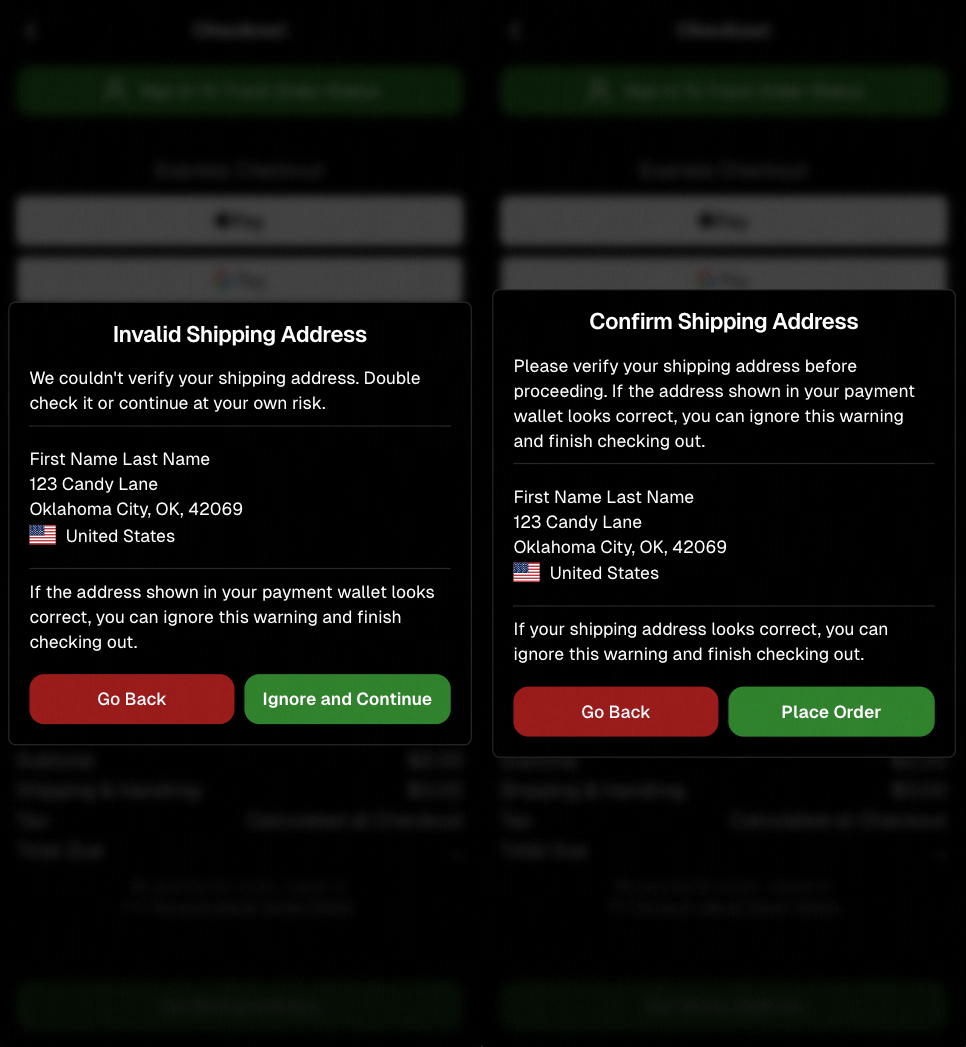
Confirmation popup now clearly displays shipping address confirmation.

🧠 Better UI + performance improvements

  • Improved local rendering (performance, memory usage, and task handling) — originally aimed to improve the retail experience on low-end devices, but it should make most devices feel faster!

  • Native “leave page” confirmation on supported browsers/devices (desktop + Samsung back button) when navigating away from an event page (refresh/back).
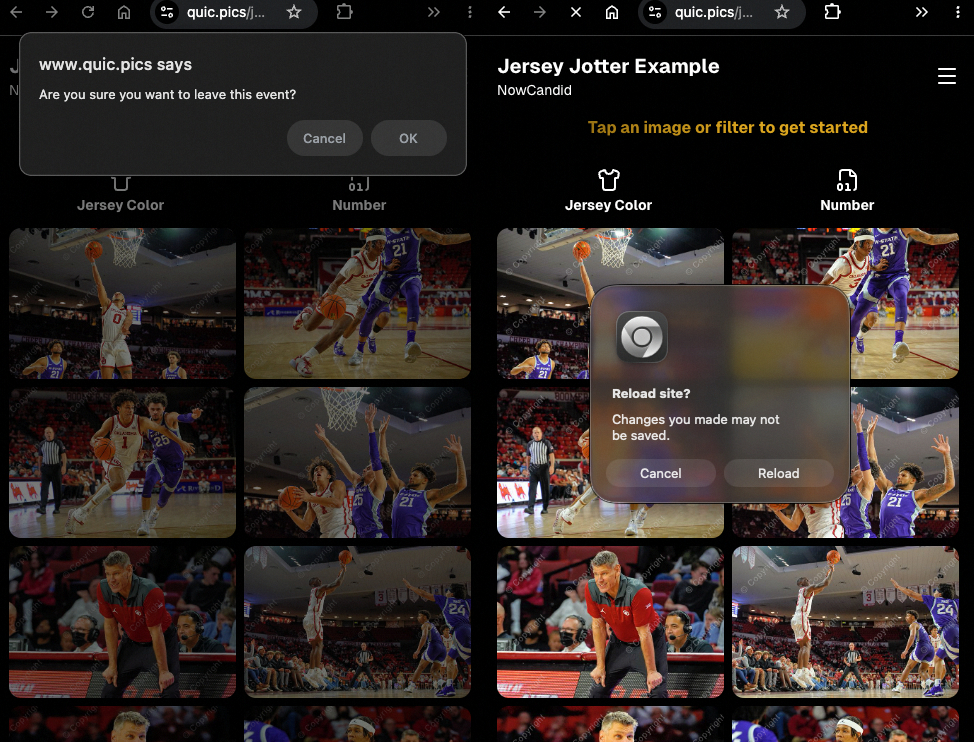
Leave page confirmation

🖼️ Clearer package download expectations + better pickers

  • Personal Gallery Downloads on store sheet and package editor now show “+X Images” in the configurator when there are more than 4 images—so customers don’t think they only get what’s previewed.
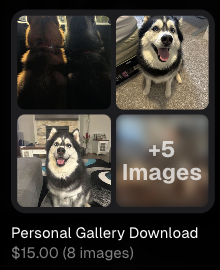
Personal Gallery Download "+X Images"

    • Personal Gallery Download products inside packages can now be clicked to preview contents.

    • Desktop product/package image pickers are now two columns (like mobile), allowing larger image preview during selection.
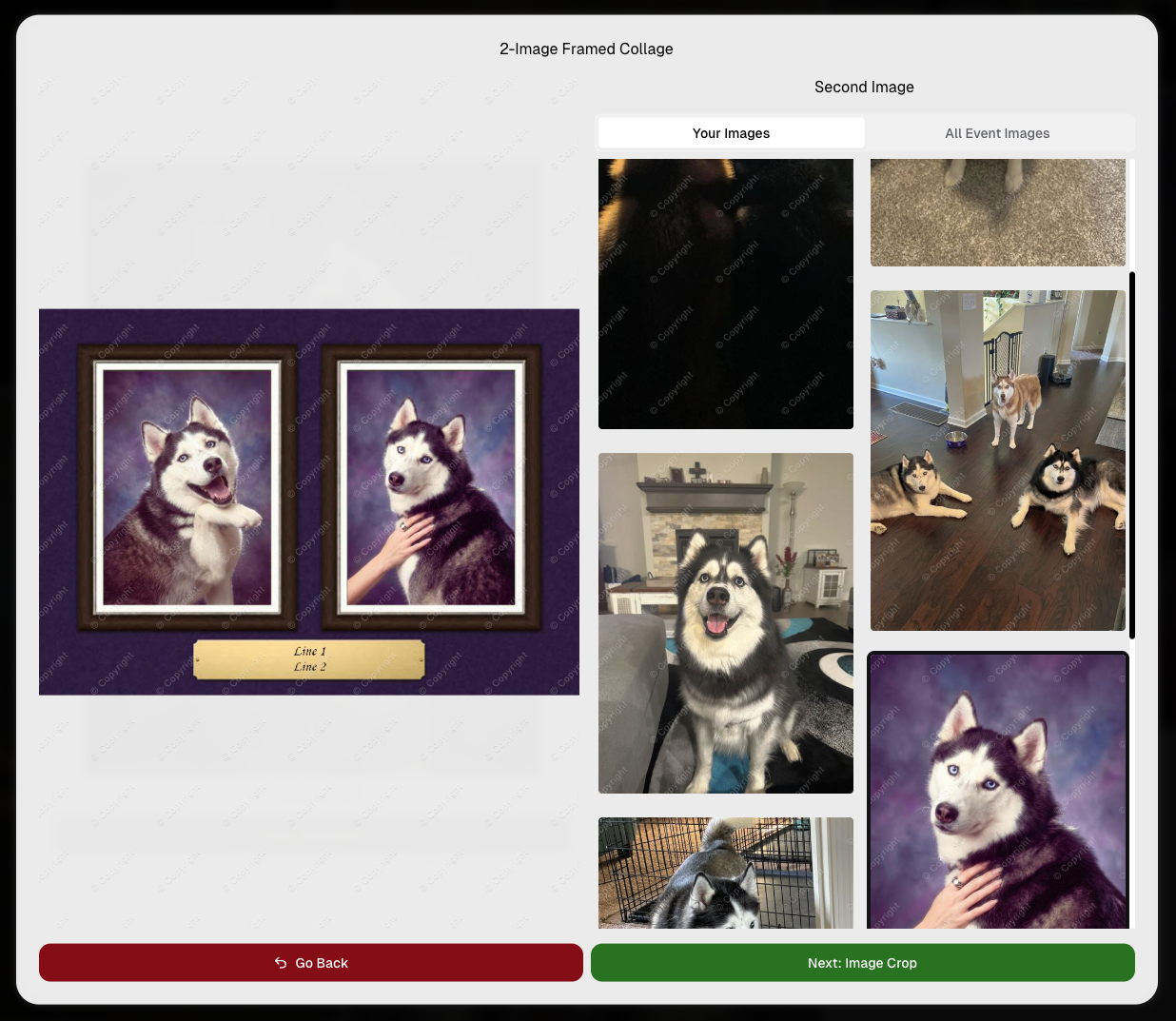
    Larger two column image previews

      • Image Filters landing popup now includes “Browse all photos without a filter” so customers who think they must pick a filter know they can also just browse!
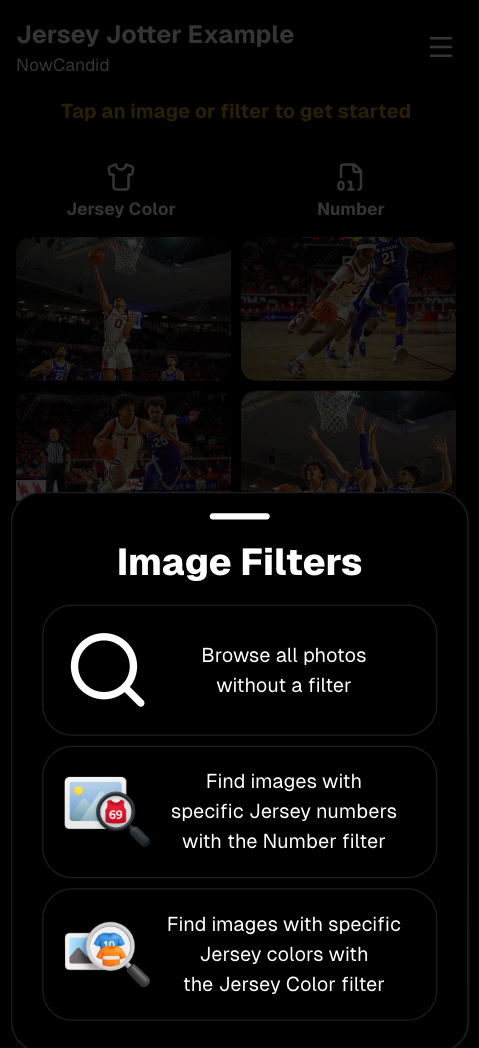
      Image Filters landing popup

      🧩 Retail fixes worth noting

      • Fixed a slashed discount amount showing on week 3 when there is no higher amount.
      • Fixed a GalleryGuard edge case that could close the retail site on some Android devices that support mobile context menus when long-pressing.
      • Fixed a race condition where a Group-by-Face gallery loaded from URL params could show default results instead of the filtered view.
      • Fixed an edge case where manually assigned images marked as group could behave like non-group images on retail.

      📱 Capture App OTA: 5.6.1 & 5.6.2 (iOS & Android)

      🌐 NEW: Network Speed Test (5.6.1)

      A new Network Speed Test button is available in Resources. Tap Run Test to check download speed, upload speed, and latency to NowCandid servers (so results may differ from Google/Ookla). It’s a quick test (downloads 5 MB, uploads 2 MB) and is useful for diagnosing weak or congested service during events.

      Mbps is a standard measurement for connection speeds, and 1 megabit per second (Mbps) is 0.125 Megabytes per second (MB/s). So 8 Mbps is 1 Megabyte per second, max. For example, with images that are 10 Megabytes in size, a speed of 8 Mbps would take a minimum of 10 seconds to upload. When speeds are very slow, image uploads may be impossible due to uploads timing out and restarting. In these cases, open the app when you have a stronger connection and all your images will start going up!
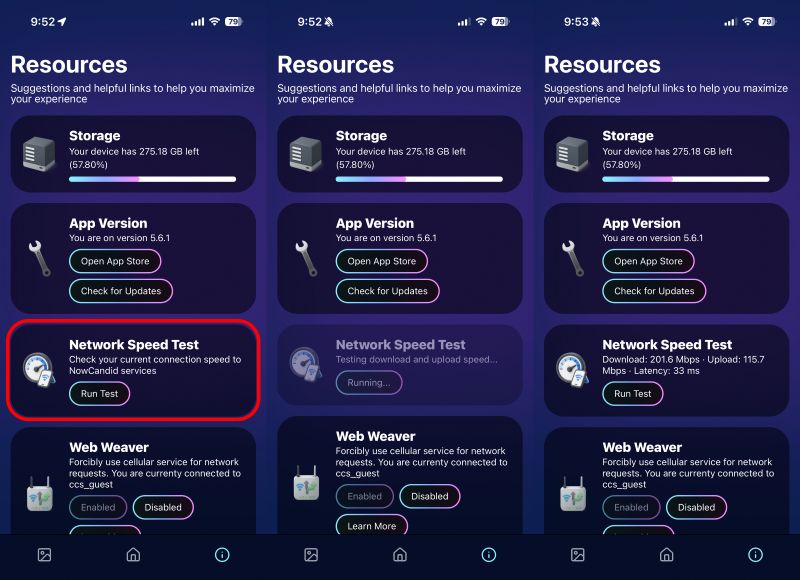
      Network Speed Test

      🎪 Photo Booth + Selfie Check-In Station UI upgrades (5.6.2)

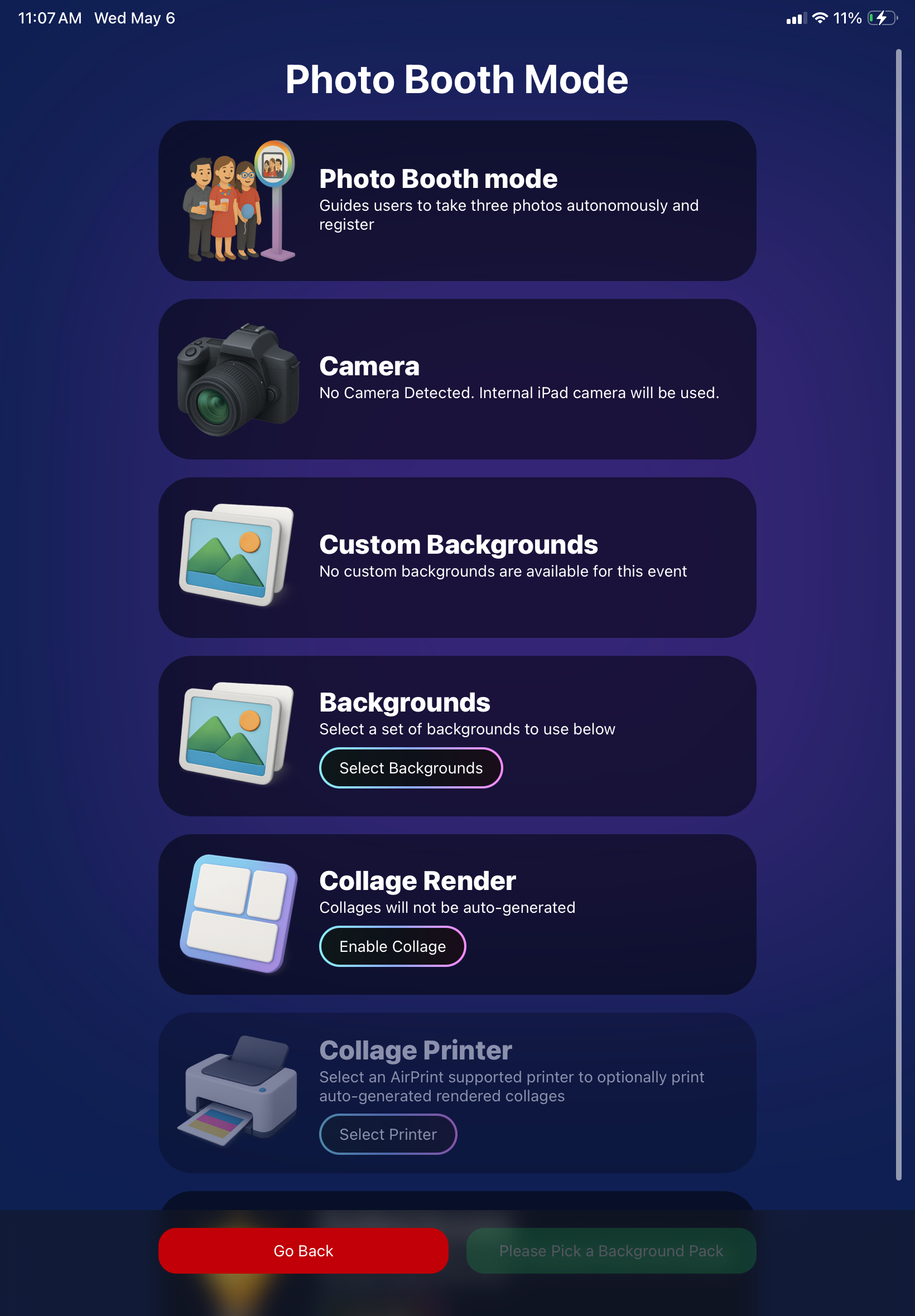
      • Photo Booth landing page updated to be more user-friendly (always-visible scrollbar, updated text, sticky go back/continue buttons, red/green emphasis, and a popup explaining why Continue is greyed out).
      • Selfie Check-In Station landing page updated with red/green Go Back / Begin buttons.
      • New dropdown icon beside Group Photo toggle (when an event has PhotoTags) to better display there are additional options to assign PhotoTags.
      • Fixed edge case cancel/continue behavior on Selfie Check-In Station when no contact info was entered.
      🧩 NEW: Lightroom Classic Plugin (Official)

      We’ve launched an official Lightroom Classic plugin to upload images to NowCandid events directly from Lightroom Classic.

      Key notes:

      • Lightroom Classic only
      • Same image rules apply (color profile, DPI, etc.)
      • Uses Capture App login
      • Only events within 60 days of event start date show in the selector
      • Image Details → Logs will show “Uploaded from NowCandid Lightroom Plugin”
      • Docs include guide/download/installation: https://app.nowcandid.com/docs/tools-more/lightroom
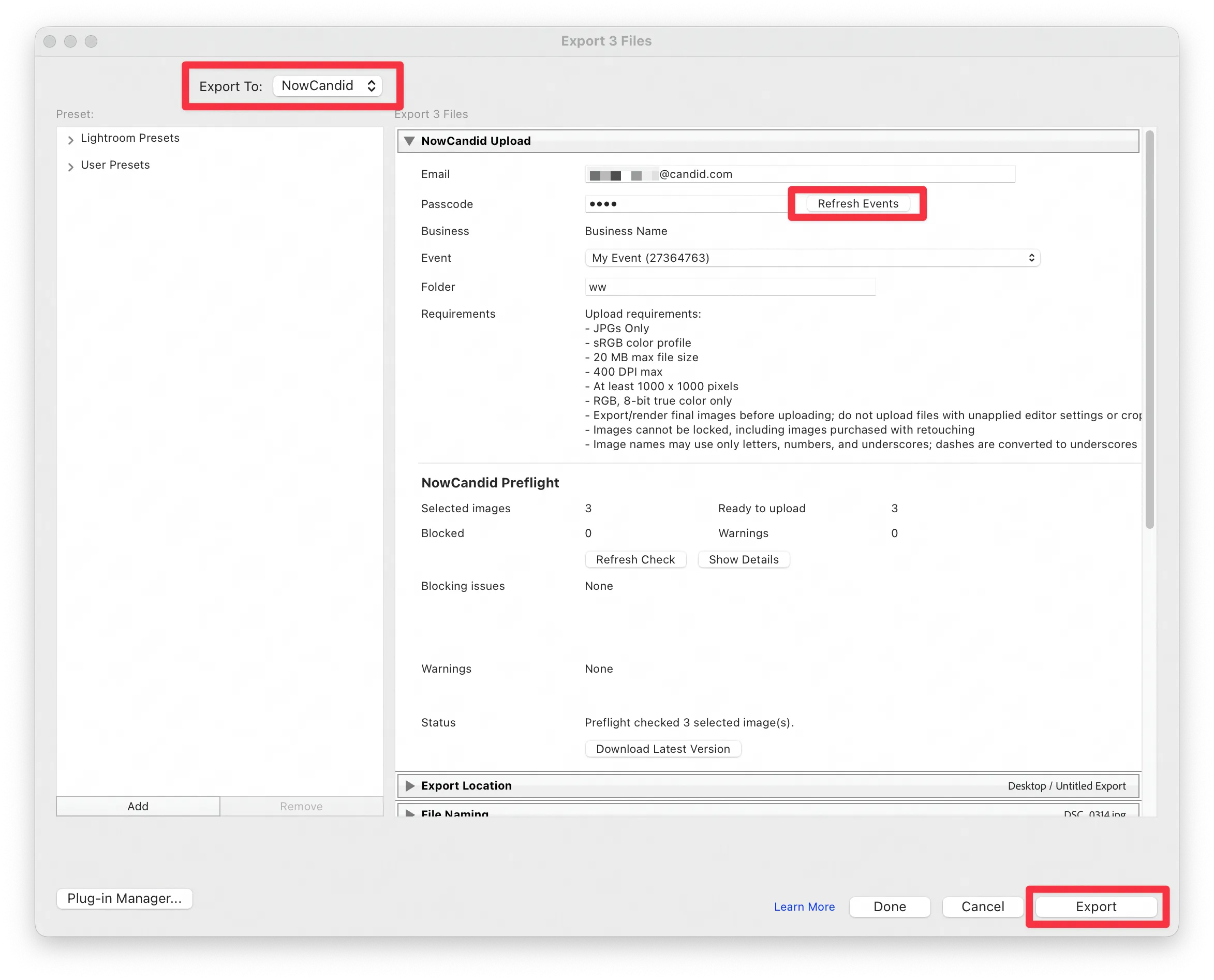
      Lightroom Classic Plugin

      Upload from NowCandid Lightroom Plugin

      🖥️ Dashboard: Upload & Roster Clarity + Small UX Wins

      • Event roster upload and PhotoRoster upload now warn about every unrecognized column, making it easier to spot misspellings (especially for optional columns).
      • Participant list page download now puts additional contacts into columns instead of rows.
      • Participant list download now puts merged contacts into their own row if they have different first/last names.
      • Image upload naming cleanup:
        • spaces/parentheses now automatically become underscores (e.g., Image (2)Image_2)
        • names ending in z now get a trailing underscore (e.g., ImagezImagez_)
      • Candy got even better at using the new Docs for responses.
      • Password reset now shows a clear “Your link has expired” screen (links expire after 24 hours).
      • Fixed participant filter inside another participant’s manual assign/unassign page not working properly.
      • Participant Details PhotoTag assignment UI: merged participants no longer incorrectly show PhotoTags as assigned.
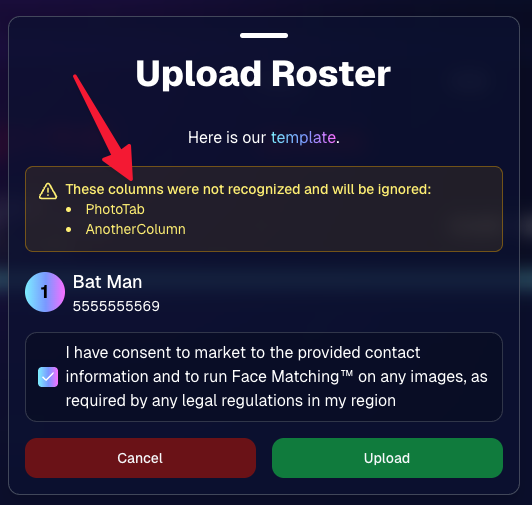
      Upload Roster now warns about every unrecognized column.

      📣 Marketing Fixes

      • Fixed edge cases where galleries that were only AI-edited images could cause follow-up email marketing issues and show as 0 images on Participant List.
      • Fixed Day0 marketing edge case not starting if gallery is just AI-edited images.
      • SMS gallery links now include “View photos:” before the gallery URL to reduce confusion where some users thought the gallery link was an unsubscribe link.

      That’s the week! 💫

      Between the Lightroom Classic plugin, the Capture App’s new Network Speed Test, and retail improvements that reduce confusion (and improve performance), this week was packed with practical wins you’ll feel right away.

      Keep it sparkly,

      Candy

      Related articles

      Update Alert: NowCandid's Capture & Upload Hits Version 3.14!
      Feature Updates
      February 1, 2024

      Update Alert: NowCandid's Capture & Upload Hits Version 3.14!

      6
       minutes read
      Hello, NowCandid family! 🌟

      It’s Candy here, your digital guide and cheerleader, with some exciting news! We’ve had a whirlwind of updates from versions 3.11 through 3.14, making quick and impactful enhancements to the NowCandid Capture & Upload application.

      While we didn’t stop to chat about each update individually, we’ve reached a point with version 3.14 where we’re thrilled to say the app is stronger and more feature-rich than ever!

      So, let’s get everyone up to speed with version 3.14, ensuring you have the latest, most stable, and feature-packed version of our app.

      Version 3.14 - The Latest & Greatest:

      • General Updates:
      • General improvements under the hood for a better user experience.

      • Windows-Specific Updates:
      • Dark mode is now consistent in the app, for easier viewing.
      • Helpful reminders to check your taskbar for app notifications.
      • Overall app performance boost, making it faster and more efficient.
      • Increased app memory usage for smoother operation.

      Version 3.13:

      • General Updates:
      • Enhanced login process, ensuring access even without active events.
      • Improved user interaction for a smoother experience.

      • Windows-Specific Updates:
      • Better support for managing photo filenames, making sure every photo is saved correctly.

      Version 3.12:

      • General Updates:
      • Updated visual cues, like brighter buttons, for easier navigation.
      • Quicker response times when interacting with the app.

      • Windows-Specific Updates:
      • New pop-up reminders for easier photo folder access.
      • Optimizations for camera connectivity and photo saving.

      Version 3.11:

      • General Updates:
      • Simplified version numbering for easy tracking.
      • NowCandid logo now comes with version info for quick reference.

      • Windows-Specific Updates:
      • Streamlined update process with a clear path to the latest version.
      • Minor fixes and tweaks for an improved app experience.

      We're thrilled with the journey from versions 3.11 to 3.14 and all the positive changes each update has brought!

      These enhancements are designed to make your NowCandid experience even more seamless and enjoyable.

      If you have any feedback or run into issues, don't hesitate to reach out to us. Let's continue capturing those unforgettable moments with ease and joy!

      Keep snapping,
      Candy 🌟
      NowCandid's Exciting 2024 Trade Show Lineup
      NowCandid 101
      January 2, 2024

      NowCandid's Exciting 2024 Trade Show Lineup

      5
       minutes read
      Photography enthusiasts, get ready!

      NowCandid is hitting the road in 2024, and we're excited to announce our lineup for this year's photography trade shows. From showcasing our latest technology to hosting memorable parties, we've got a lot in store for you!

      Our 2024 Trade Show Lineup:

      SPAC 2024
      • January 24-27, Las Vegas, Nevada

      Imaging USA 2024
      • January 25-30, Louisville, Kentucky

      Photo Booth Expo 2024
      • February 19-22, Las Vegas, Nevada

      SYNC 2024
      • February 22-25, Orlando, Florida

      WPPI 2024
      • March 3-7, Las Vegas, Nevada

      What We're Bringing to the Shows:

      Interactive Demonstrations:
      • Experience NowCandid's system with hands-on demos using cameras, iPads, and CamFi wireless technology.

      Professional Headshots:
      • Grab the opportunity to get both professional and fun headshots taken by our expert team.

      Fun Swag:
      • We're bringing a variety of cool and fun swag for you to take home.

      Beginner Booklets:
      • New to NowCandid? Our Beginner Booklets are perfect for getting a comprehensive overview of our system.

      Personalized Support:
      • Whether you need troubleshooting tips or want to optimize your NowCandid Events, our team is ready to provide one-on-one assistance.

      Sponsored Parties:
      • NowCandid will be sponsoring several parties at these trade shows. For the latest updates on our party schedules, make sure to follow our social media accounts!

      Let's Make 2024 Unforgettable Together!

      We're geared up to make 2024 a landmark year in photography. Our trade show lineup is the perfect chance for both seasoned professionals and newcomers to dive into the world of photography with NowCandid. Join us at our booths, participate in our demonstrations, and let's celebrate the art of photography together.

      Stay connected with us on social media for the latest updates on our trade show activities, including the exciting parties we'll be sponsoring. See you at the shows!
      NowCandid's 2023 Year in Review! 🌟
      Feature Updates
      December 31, 2023

      NowCandid's 2023 Year in Review! 🌟

      7
       minutes read
      Hello, Fantastic Photographers!

      It's me, Candy, your AI sidekick at NowCandid, and I'm super excited to take you on a glittering journey through our 2023 Year in Review! 📸✨

      A Year of Growth and Glitter!

      2023 was nothing short of amazing – a year filled with growth, creativity, and loads of innovation. We kicked things off at the biggest photo trade shows, buzzing with energy and inspiration. Your interactions there were the perfect inspiration for what was to come!

      Tech Magic: Programming and App Development 🚀

      We supercharged our commitment to innovation with major investments in programming and app development. And oh boy, did it pay off!

      Reporting Dashboard: Your Business, On-The-Go!

      Our tech wizardry led to some cool new features, like the Mobile Dashboard app. Managing your NowCandid Events has never been easier – or more mobile!

      Meet Me, Candy! Your AI Chatbot Assistant 🌈

      2023 was also the year you met me – Candy, your AI Chatbot Assistant! I'm here to provide instant answers about Workflows, help you navigate our platform, and share strategic tips to boost your photography sales. 📈

      Smooth Payments with Apple Pay 💳

      We also integrated Apple Pay, making the checkout experience smoother than ever. Quick, easy, and secure – just how we like it!

      App Development: Strong and Steady 📱

      Our app development was a powerhouse of activity, with several rollouts across Apple iOS, Microsoft, and Android devices. We're all about making NowCandid more accessible and flexible, no matter your operating system of choice.

      Wireless Tether Solutions: Goodbye Cables!

      2023 was a game-changer with our pursuit of wireless tether solutions. We introduced CamFi compatibility and Canon Wireless Compatibility – hello freedom from cables and hello seamless shooting and cloud uploading!

      LiveLoop: Bringing Events to Life! 🔄

      One of my personal favorites – LiveLoop! A live-slideshow for your NowCandid Events, updating in real-time. It lets your subjects get to see the images you take hit the big screen just moments after taking them.

      Wrapping Up a Dazzling Year 🎉

      We achieved so much in 2023, and guess what? We're just getting started! I can’t wait to see what 2024 has in store for us.

      Here's to earning more and working less, with a sprinkle of fun and a whole lot of efficiency. Stay tuned for more adventures with NowCandid!

      Stay fantastic,

      Candy 🌟📷

      Let’s get in touch

      If you’re a photographer looking to add NowCandid™ services to your wheelhouse, set up a call with us!

      How to customize formatting for each rich text

      How to customize formatting for each rich text

      How to customize formatting for each rich text

      How to customize formatting for each rich text

      How to customize formatting for each rich text
      How to customize formatting for each rich text

      What’s a Rich Text element?

      The rich text element allows you to create and format headings, paragraphs, blockquotes, images, and video all in one place instead of having to add and format them individually. Just double-click and easily create content.

      A rich text element can be used with static or dynamic content. For static content, just drop it into any page and begin editing. For dynamic content, add a rich text field to any collection and then connect a rich text element to that field in the settings panel. Voila!

      Headings, paragraphs, blockquotes, figures, images, and figure captions can all be styled after a class is added to the rich text element using the "When inside of" nested selector system.

      • List One
      • List Two
      • List Three
      • List Four
      • List Five

      This is a link

      This is bold text