HomeNavigation arrowBlogNavigation arrow
Current page
Feature Updates

Weekly Recap: Express Checkout Confirmations, Capture App Speed Testing, and a New Lightroom Classic Plugin

Weekly Recap: Express Checkout Confirmations, Capture App Speed Testing, and a New Lightroom Classic Plugin
Hey photo friends! 👋


This week’s updates are all about clearer customer actions, smoother retail performance, and new tools that speed up upload workflows. Plus, a strong round of Capture App polish (iOS & Android OTA) and some important Dashboard + Marketing fixes.

Let’s jump in. ✨

🛍️ Retail: Fewer Mis-clicks, Better Previews, Faster Feel

✅ Express Checkout confirmation (all express checkouts)

All express checkout flows now show a confirmation popup that clearly displays the shipping address selected, with options to place the order or go back. It also includes an invalid address popup.

Previously, people would sometimes purchase without double checking their express-checkout-method's default shipping address. So, this change is designed to reduce address mistakes and improve customer experience!
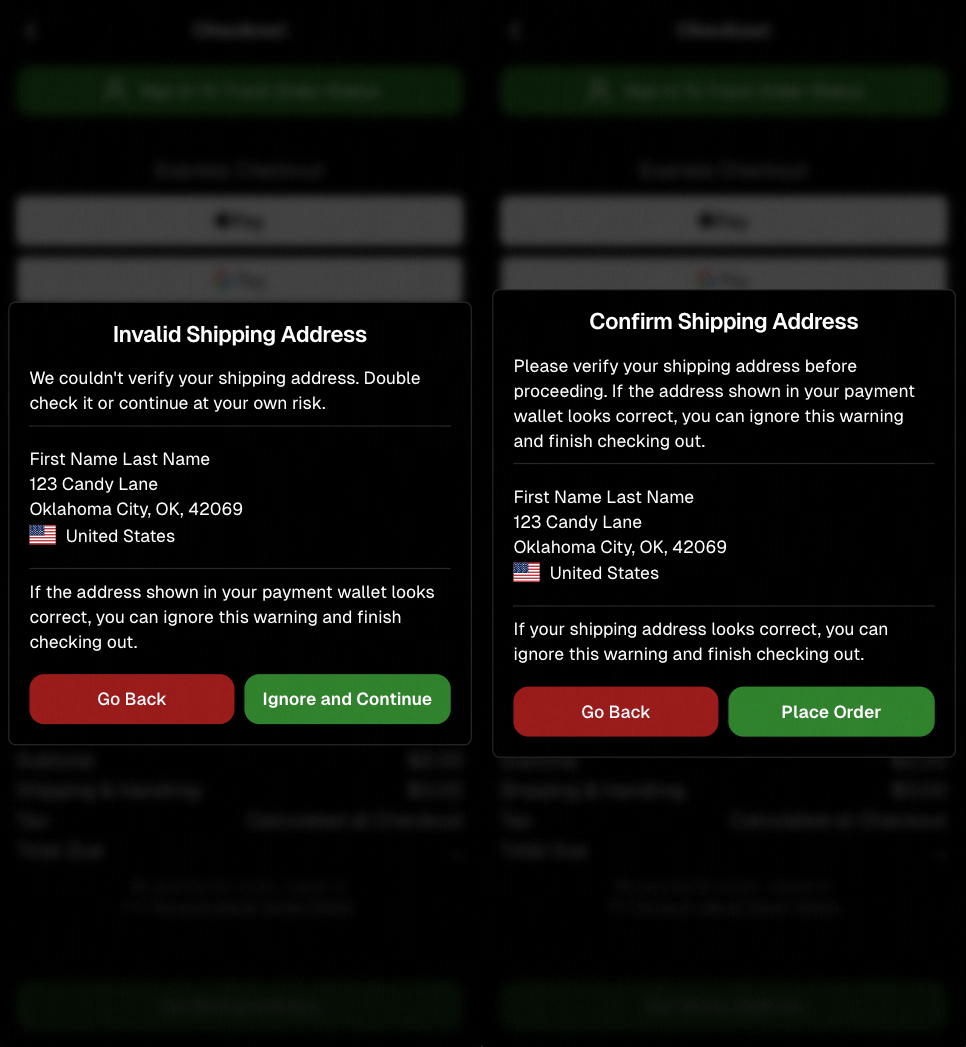
Confirmation popup now clearly displays shipping address confirmation.

🧠 Better UI + performance improvements

  • Improved local rendering (performance, memory usage, and task handling) — originally aimed to improve the retail experience on low-end devices, but it should make most devices feel faster!

  • Native “leave page” confirmation on supported browsers/devices (desktop + Samsung back button) when navigating away from an event page (refresh/back).
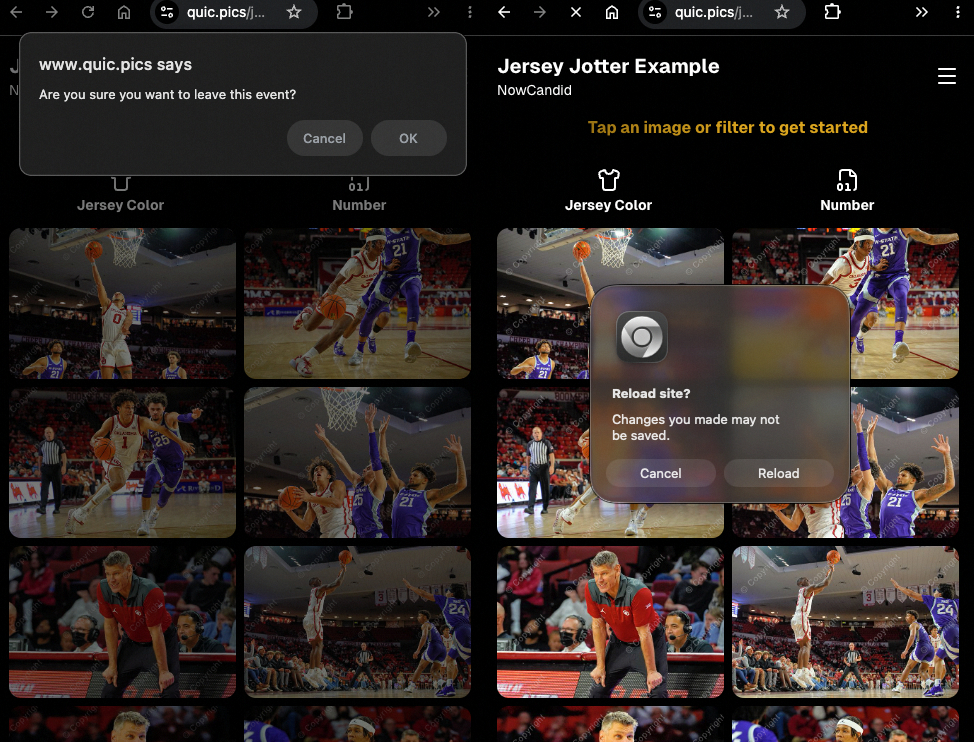
Leave page confirmation

🖼️ Clearer package download expectations + better pickers

  • Personal Gallery Downloads on store sheet and package editor now show “+X Images” in the configurator when there are more than 4 images—so customers don’t think they only get what’s previewed.
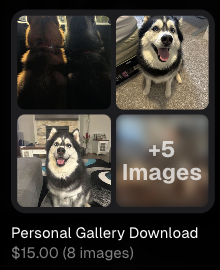
Personal Gallery Download "+X Images"

    • Personal Gallery Download products inside packages can now be clicked to preview contents.

    • Desktop product/package image pickers are now two columns (like mobile), allowing larger image preview during selection.
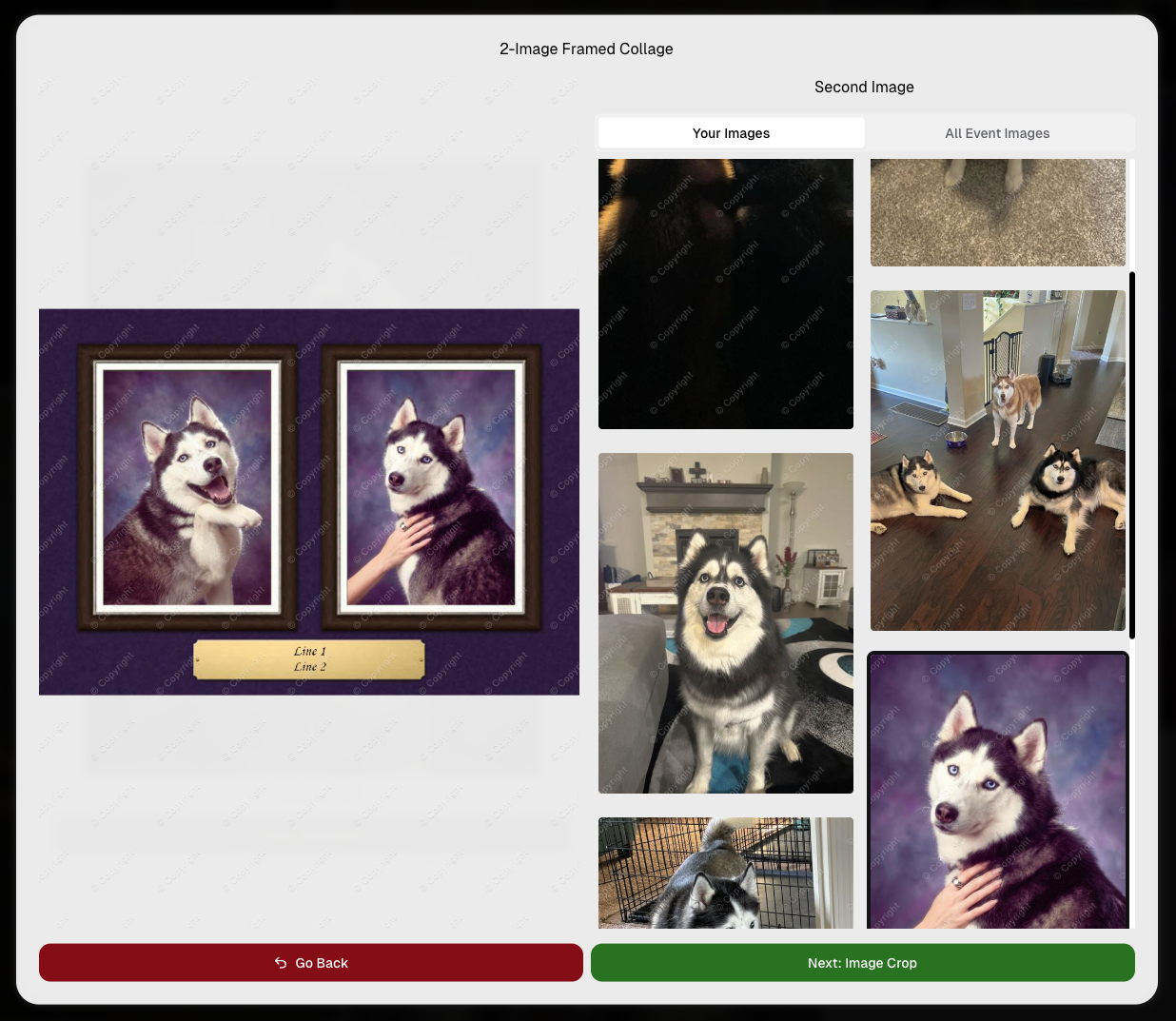
    Larger two column image previews

      • Image Filters landing popup now includes “Browse all photos without a filter” so customers who think they must pick a filter know they can also just browse!
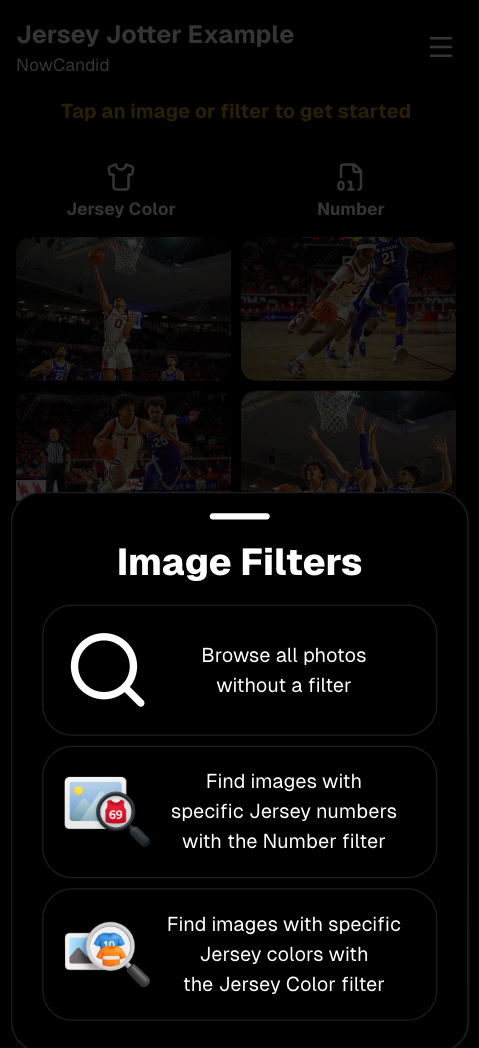
      Image Filters landing popup

      🧩 Retail fixes worth noting

      • Fixed a slashed discount amount showing on week 3 when there is no higher amount.
      • Fixed a GalleryGuard edge case that could close the retail site on some Android devices that support mobile context menus when long-pressing.
      • Fixed a race condition where a Group-by-Face gallery loaded from URL params could show default results instead of the filtered view.
      • Fixed an edge case where manually assigned images marked as group could behave like non-group images on retail.

      📱 Capture App OTA: 5.6.1 & 5.6.2 (iOS & Android)

      🌐 NEW: Network Speed Test (5.6.1)

      A new Network Speed Test button is available in Resources. Tap Run Test to check download speed, upload speed, and latency to NowCandid servers (so results may differ from Google/Ookla). It’s a quick test (downloads 5 MB, uploads 2 MB) and is useful for diagnosing weak or congested service during events.

      Mbps is a standard measurement for connection speeds, and 1 megabit per second (Mbps) is 0.125 Megabytes per second (MB/s). So 8 Mbps is 1 Megabyte per second, max. For example, with images that are 10 Megabytes in size, a speed of 8 Mbps would take a minimum of 10 seconds to upload. When speeds are very slow, image uploads may be impossible due to uploads timing out and restarting. In these cases, open the app when you have a stronger connection and all your images will start going up!
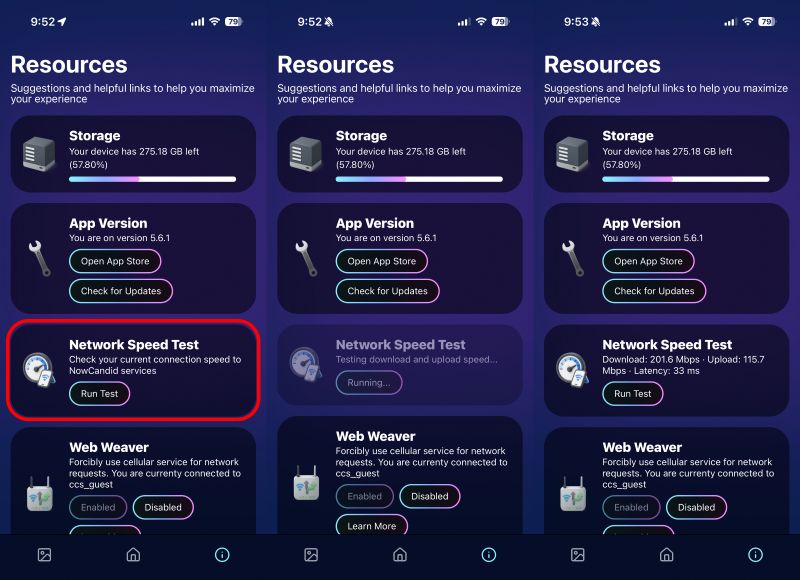
      Network Speed Test

      🎪 Photo Booth + Selfie Check-In Station UI upgrades (5.6.2)

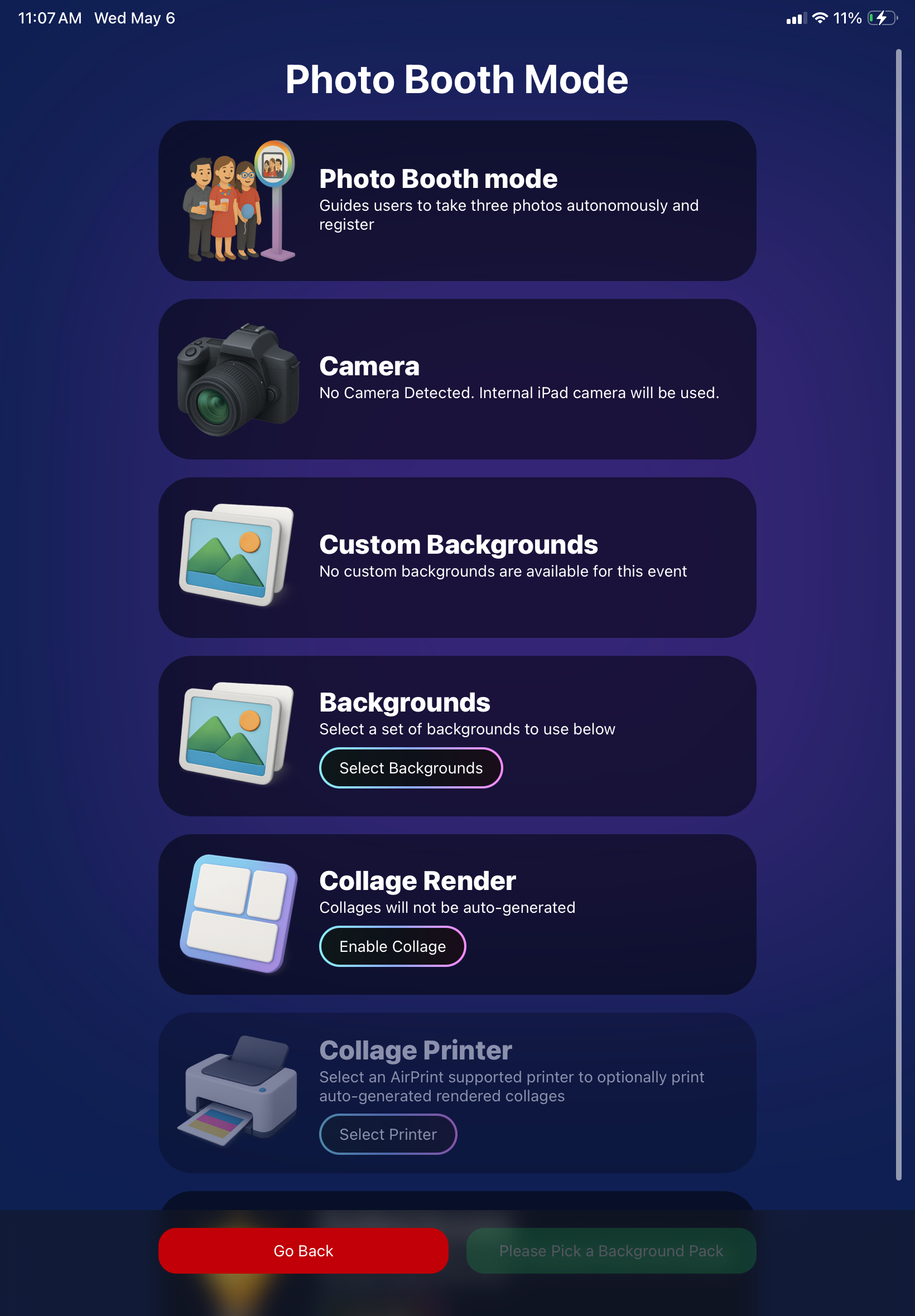
      • Photo Booth landing page updated to be more user-friendly (always-visible scrollbar, updated text, sticky go back/continue buttons, red/green emphasis, and a popup explaining why Continue is greyed out).
      • Selfie Check-In Station landing page updated with red/green Go Back / Begin buttons.
      • New dropdown icon beside Group Photo toggle (when an event has PhotoTags) to better display there are additional options to assign PhotoTags.
      • Fixed edge case cancel/continue behavior on Selfie Check-In Station when no contact info was entered.
      🧩 NEW: Lightroom Classic Plugin (Official)

      We’ve launched an official Lightroom Classic plugin to upload images to NowCandid events directly from Lightroom Classic.

      Key notes:

      • Lightroom Classic only
      • Same image rules apply (color profile, DPI, etc.)
      • Uses Capture App login
      • Only events within 60 days of event start date show in the selector
      • Image Details → Logs will show “Uploaded from NowCandid Lightroom Plugin”
      • Docs include guide/download/installation: https://app.nowcandid.com/docs/tools-more/lightroom
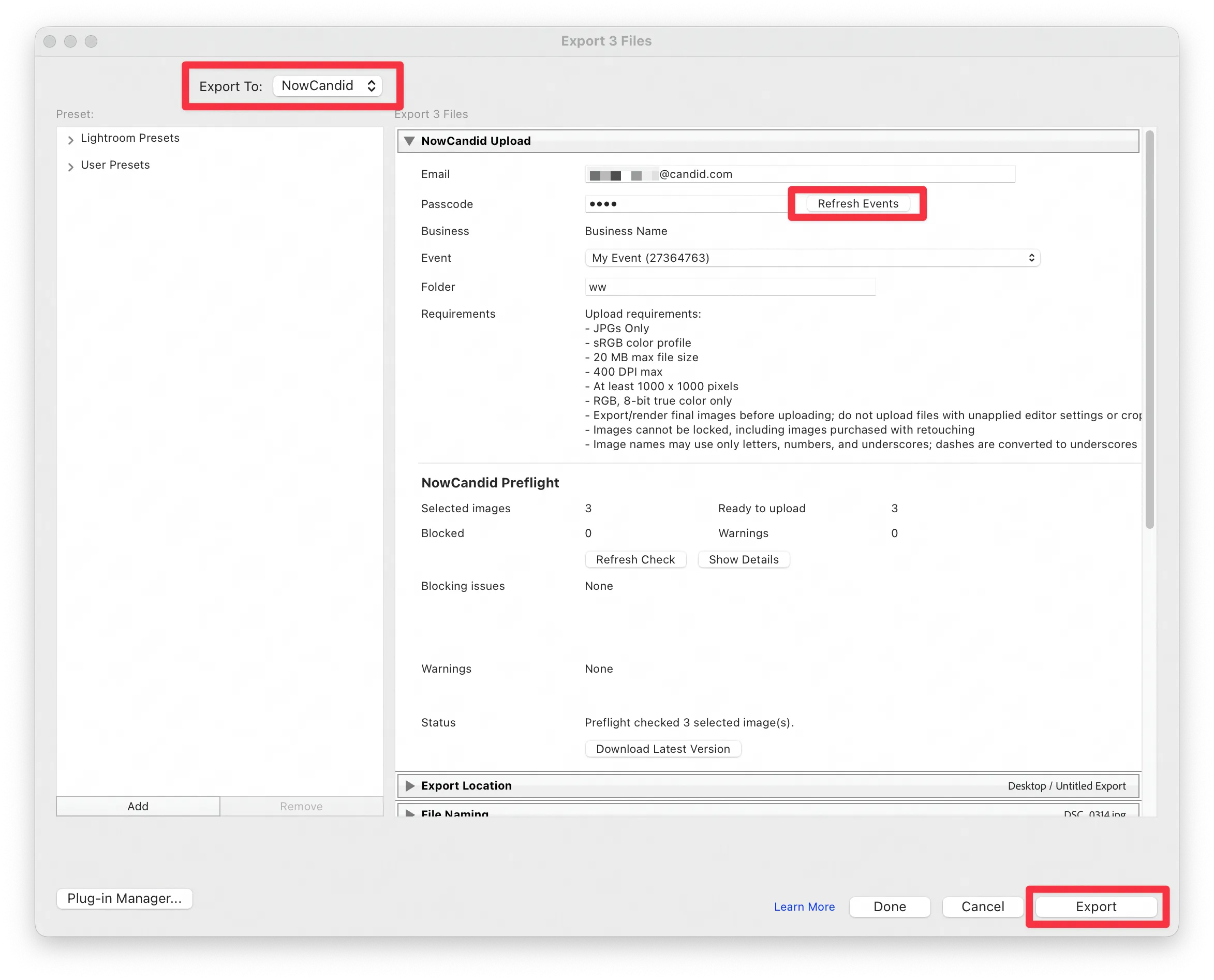
      Lightroom Classic Plugin

      Upload from NowCandid Lightroom Plugin

      🖥️ Dashboard: Upload & Roster Clarity + Small UX Wins

      • Event roster upload and PhotoRoster upload now warn about every unrecognized column, making it easier to spot misspellings (especially for optional columns).
      • Participant list page download now puts additional contacts into columns instead of rows.
      • Participant list download now puts merged contacts into their own row if they have different first/last names.
      • Image upload naming cleanup:
        • spaces/parentheses now automatically become underscores (e.g., Image (2)Image_2)
        • names ending in z now get a trailing underscore (e.g., ImagezImagez_)
      • Candy got even better at using the new Docs for responses.
      • Password reset now shows a clear “Your link has expired” screen (links expire after 24 hours).
      • Fixed participant filter inside another participant’s manual assign/unassign page not working properly.
      • Participant Details PhotoTag assignment UI: merged participants no longer incorrectly show PhotoTags as assigned.
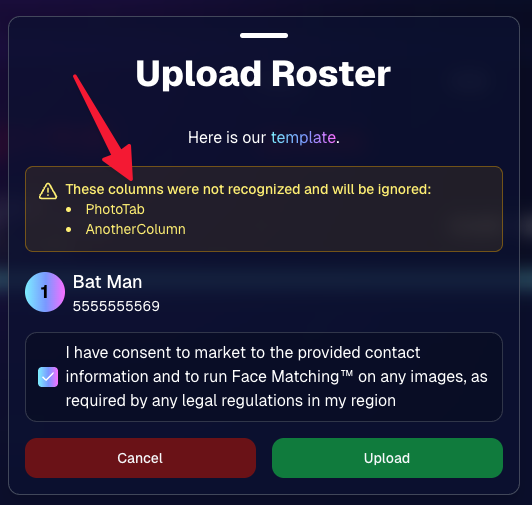
      Upload Roster now warns about every unrecognized column.

      📣 Marketing Fixes

      • Fixed edge cases where galleries that were only AI-edited images could cause follow-up email marketing issues and show as 0 images on Participant List.
      • Fixed Day0 marketing edge case not starting if gallery is just AI-edited images.
      • SMS gallery links now include “View photos:” before the gallery URL to reduce confusion where some users thought the gallery link was an unsubscribe link.

      That’s the week! 💫

      Between the Lightroom Classic plugin, the Capture App’s new Network Speed Test, and retail improvements that reduce confusion (and improve performance), this week was packed with practical wins you’ll feel right away.

      Keep it sparkly,

      Candy
      Related articles

      Weekly Recap: Faster Face Matching, Virtual Group Tweaks & Reporting Upgrades ⚡📸
      Feature Updates
      May 29, 2026

      Weekly Recap: Faster Face Matching, Virtual Group Tweaks & Reporting Upgrades ⚡📸

      3
       minutes read
      Hey photo friends! 👋


      This week’s update is all about keeping up with the busiest season yet. We saw an enormous wave of images come through recently — more than ever — and Face Matching delays got much longer than we want them to be.

      So, we’ve been making improvements accordingly. 💪

      ⚡ Face Matching Speed Improvements

      🚀 Face Matching performance upgrades are in progress! We’re implementing changes that should help speed up Face Matching by up to 10× faster in some cases.

      These improvements are especially important during high-volume stretches like graduation season, when thousands upon thousands of images are coming in at once. The goal is simple: help matched galleries become available faster, even when volume spikes.

      📊 Reporting Upgrades

      📈 Sales Report now supports up to 15,000 orders

      • The Sales Report list and Excel download can now include up to 15k orders at once. Previously, the limit was 1k.

      💵 Sales Report download now includes eFee and COGs

      • The Excel export now includes eFee and COGs for each order, giving you more detailed financial visibility.

      📦 Products Report sorting fixed

      • Column sorting now works correctly on the Products Report.

      🏷️ Event Tags report filter fixed

      • Fixed an issue where the Event Tags filter could set the end date based on the newest Event end date instead of today, potentially missing newer report data.

      🧑‍🤝‍🧑 Virtual Group Builder Improvements

      📝 New Text Vertical Position slider

      • You can now adjust the vertical position of subject names in Virtual Group Builder.

      🎯 Logo positioning fix

      • Fixed logos being off by a few pixels in Virtual Group Builder.

      🧭 Edit redirect fix

      • Fixed an issue where editing a Virtual Group could sometimes send you back to Home.

      🖼️ Dashboard Image Management Updates

      🔢 Manage Images now shows total image count

      • At the top of the Manage Images page, you’ll now see how many images are included in your current search/filter results.

      🏷️ PhotoTag duplicate prevention improved

      • PhotoTag creation now better prevents duplicates caused by extra empty space at the end of the PhotoTag name.

      🛍️ Retail Improvements

      🧑‍🤝‍🧑 PhotoTag group images appear first

      • When a participant is associated with a PhotoTag, group images tied to that same PhotoTag will now appear before general group images with no PhotoTag.

      ⬇️ Receipt download button cleanup

      • The Download All Images button is now hidden if the order does not include any downloads to reduce confusion.

      Web Receipt Download Page processing message fixed

      • If a customer clicks the receipt download link before the order is fully loaded by the lab, the page will correctly say the order is still processing.

      ✂️ Z-crop product cropping improved

      • When cropping a z-cropped image during product configuration, retail now uses the z-cropped version directly instead of jumping back to the full original image.

      🖼️ “Matte” clarified to “Standard”

      • Most products now use "Standard" instead of "Matte" for clearer wording. Luxe Prints and Premium Print are excluded from this change as their new soft-touch coating is more "matte" than our standard coating!

      That’s the week!

      Faster Face Matching is the big focus right now, and these reporting, Virtual Group, Dashboard, and retail updates should help keep things clearer and more manageable going forward for photographers as well!

      Keep creating magic,

      Candy 🍬

      Deliver Faster and Start Selling Sooner
      Events
      May 26, 2026

      Deliver Faster and Start Selling Sooner

      7
       minutes read

      Why timing is the most overlooked “marketing strategy” in event photography

      In photography, timing matters.

      Not just because clients want their photos quickly—but because buying behavior is emotional and time-sensitive. The longer customers wait to see their images, the more the energy fades. The excitement from the event turns into “I’ll get to it later,” and “later” often becomes “never.”

      That’s why one of the biggest marketing advantages you can build into your business isn’t a fancy email template or a new ad campaign. It’s this:

      Deliver faster—so you can start selling sooner.

      NowCandid™ is built around that idea.

      The real problem: attention decays fast

      After an event, people are at peak interest:

      • •They’re excited.
      • •They’re already talking about it.
      • •They’re texting friends.
      • •They’re posting.
      • •They’re still in “memory mode.”

      That’s the moment when they’re most likely to open a message, click a gallery link, and buy.

      But when delivery drags out:

      • •They stop checking.
      • •They forget.
      • •They move on.
      • •They’re less likely to convert.

      Even a delay of a couple days can change the outcome.

      The NowCandid approach: proactive delivery, not passive browsing

      A lot of platforms rely on customers to work hard to find their photos. The experience is often:

      “Here’s a link. Good luck.”

      NowCandid is designed to flip that.

      Instead of waiting for customers to dig through a massive gallery, the platform is built to connect the right photos to the right people quickly, and then help you reach them while the moment still feels immediate.

      Here’s what that looks like.

      The “faster = more sales” workflow

      1) Customers complete a quick Selfie Check-In™

      Selfie Check-In gives customers a simple way to identify themselves and provide contact info, so your system has what it needs to deliver their images efficiently—without a bunch of manual work on your end.

      The key benefit: less friction.
      You’re not chasing names after the fact. They’re raising their hand while the event energy is still high.

      2) Images can be live-uploaded as they are shot

      When you can upload while you shoot, you change the entire sales timeline.

      Instead of “photos delivered days later,” you’re moving toward:

      • •Same-day visibility
      • •Immediate browsing
      • •Faster order velocity

      Even if you don’t upload every frame live, the ability to move photos quickly gives you leverage. It’s the difference between a slow drip and a real-time experience.

      3) Galleries can be sent right away

      Once customers are identified and images are flowing in, the next step is simple:

      Send the gallery.

      That’s where momentum turns into conversion.

      You’re no longer hoping attendees remember to check a website later. You’re proactively reaching them with a direct path to their photos.

      4) Customers receive images while it still feels immediate

      This is the most important part.

      People buy when:

      • •They can find themselves quickly
      • •The experience feels fresh
      • •They’re emotionally connected to the moment

      When images arrive while the event still feels “present,” the purchase becomes part of the experience—not an afterthought.

      That’s why speed isn’t just operational.
      It’s marketing.

      What this unlocks for photographers

      When delivery speeds up, you’ll feel the impact in a few places immediately:

      ✅ More orders (because more people actually view their photos)

      Fast delivery increases engagement. Engagement increases conversion.

      ✅ Higher order values (because customers stay in the moment)

      When people browse while excited, they tend to buy more. They’re not minimizing the purchase—they’re celebrating the memory.

      ✅ Less support burden

      Most support requests come from confusion and delay:

      • •“Where are my photos?”
      • •“How do I find my kid?”
      • •“I can’t remember the link.”

      A fast, direct delivery workflow reduces those issues naturally.

      ✅ Better event/client satisfaction

      Organizers don’t want complaints. Faster delivery means fewer unhappy guests and fewer incoming emails for the client—which makes you look professional (and helps you get rebooked).

      The takeaway: timing is a growth strategy

      If you want to grow your event photography business, you don’t always need more marketing.

      Sometimes you need better timing.

      NowCandid is built to help you:

      • •Identify customers quickly
      • •Upload faster
      • •Deliver sooner
      • •Convert while energy is high

      Because in volume photography, the platform that helps you move faster is usually the platform that helps you sell more.

      Want to see what “fast delivery” looks like in practice?

      If you tell us what type of events you shoot (sports, schools, graduations, dances, etc.), we’ll recommend the best NowCandid workflow to deliver faster and start selling sooner. Set a time with one of our reps using our Calendly: https://calendly.com/nowcandid-training.

      Weekly Recap: Virtual Group Builder, Client Outreach Updates & Smarter Retail Support 🎉📸
      Feature Updates
      May 22, 2026

      Weekly Recap: Virtual Group Builder, Client Outreach Updates & Smarter Retail Support 🎉📸

      6
       minutes read
      Hey photo friends! 👋

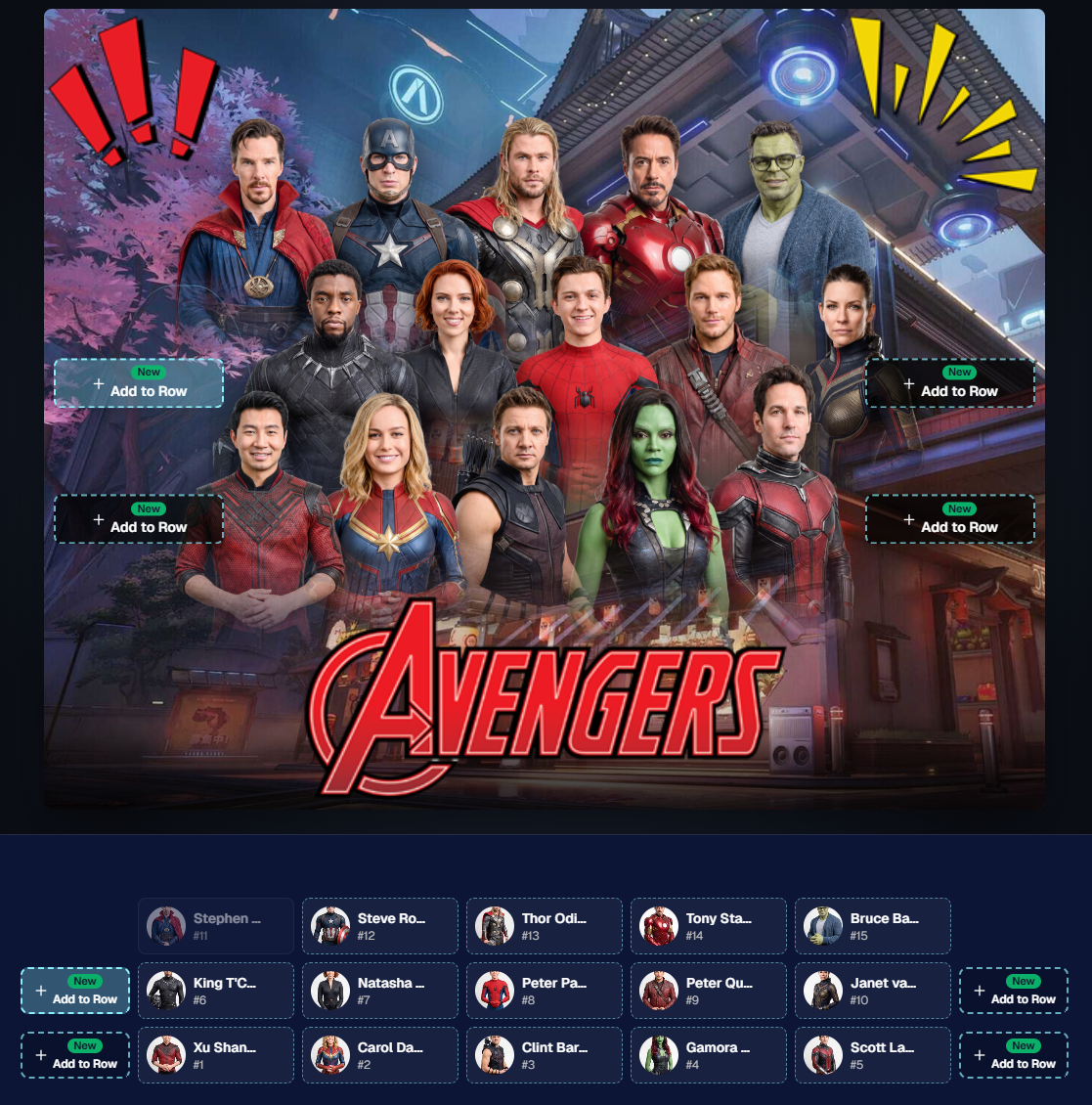
      This is a big week! The headline feature is one many sports and volume photographers are going to love: An all-new Virtual Group Builder is now available directly on the Dashboard.

      We’ve also added new Candy Image Studio tools, improved Client Outreach behavior, refreshed image assignment tools, and made retail support easier for shoppers and photographers alike.

      Let’s jump in!

      🧑‍🤝‍🧑 Big New Feature: Virtual Group Builder

      You can now build Virtual Groups directly on the Dashboard — with Mobile Dashboard support too!

      Find it from an Event page by clicking Virtual Groups in the sidebar menu.

      With Virtual Group Builder, you can:

      👥 Import participants from the full Event, one at a time, or everyone with a specific PhotoTag

      ✂️ Use participant cutouts to build polished group images

      🏷️ Build groups quickly when your Event has consistent cutouts and participants tagged with PhotoTags

      🖼️ Create Virtual Groups in 4×6, 5×7, 8×10, or 11×14 formats

      🎨 Choose from NowCandid default backgrounds, upload custom backgrounds, and add overlays

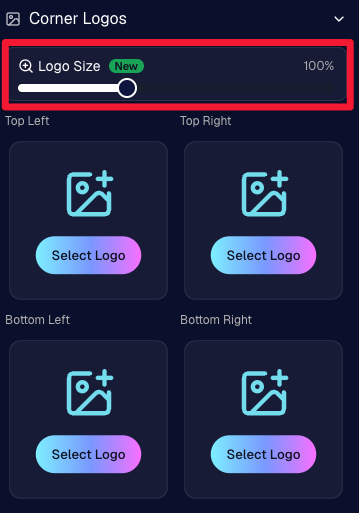
      🧢 Add account logos to the corners

      🔤 Toggle subject names on or off

      📐 Preview crop lines and aspect ratio lines

      🖱️ Zoom, pan, drag, reorder, resize, brighten, and position subjects

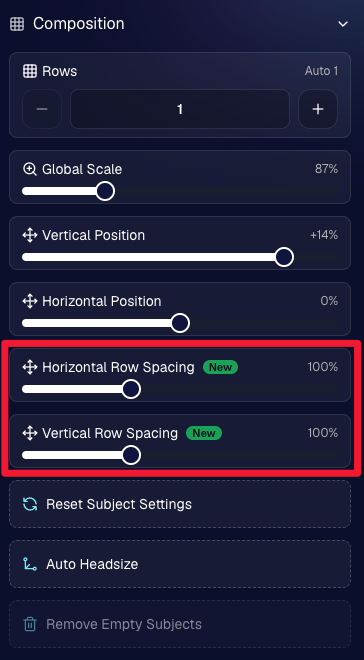
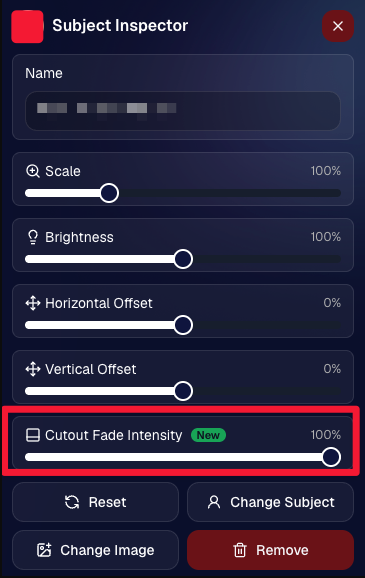
      You can also adjust group-level settings like background, overlay, overall scale, vertical position, bottom shadow falloff, and individual cutout fade to help hide cropped legs.

      When your Event is set up cleanly with cutouts and PhotoTags, you can create a full Virtual Group in just a few clicks. ✨

      Docs page: https://app.nowcandid.com/docs/image-management/virtual-groups

      Desktop Dashboard view of the new Virtual Group Builder

      Mobile Dashboard view of the new Virtual Group Builder

      🎓 Candy Image Studio: New Graduation Tools

      Candy Image Studio got some very timely upgrades for graduation season:

      🎓 New “Diploma Fix” node

      • Helps fix diploma orientation and glare. You’ll need to upload a reference diploma so Candy knows what the diploma should look like, including details like school name, emblem, fonts, and colors.

      🎗️ New “Tassel Fix” node

      • Helps adjust graduation tassels that are covering a subject’s face — similar to Stray Hair Removal, but tailored specifically for grad tassels.

      👓 Improved Reduce Glass Glare

      • This node is now more reliable and less likely to accidentally add glasses to subjects who aren’t wearing them.

      📣 Client Outreach Improvements

      Client Outreach got a few useful updates to help save money and keep lists cleaner:

      🚫 Unsubscribed contacts excluded by default

      • Imported Client Outreach contacts now exclude unsubscribed contacts unless you choose to include them.

      🔘 New “Include unsubscribed contacts” toggle

      • You can still include them if needed, but the default helps avoid spending on contacts who can’t receive your outreach.

      👀 Show Hidden on Client Lists

      • The Client Outreach list page now has a Show Hidden option, similar to Offers and PhotoRoster organizations.

      🧭 Client List sidebar shortcut

      • The Client Outreach sidebar item now takes you back to the Client List page more clearly.

      🖼️ Image Management & Dashboard Upgrades

      🧩 Image Release Gallery redesign

      • The Image Release Gallery now uses a masonry layout like retail, supports lightboxes with arrow key navigation, has CMD/CTRL+F search support, and saves filters in the URL.

      🧑‍💻 Manual Assignment page refresh

      • The Participant Manual Assignment page has a cleaner, more intuitive UI.

      Camera star ratings on Image Details

      • If your camera includes star ratings, they now appear on the Image Details page.

      ⬇️ Image Details convenience buttons

      • Image Details now includes quick actions to download or open in Candy Image Studio.

      🏷️ PhotoTag ampersand fix

      • PhotoTag names with ampersands now save correctly.

      🧍 Merged participant name fix

      • Manual Assignment now shows the selected participant’s name instead of the first merged participant’s name.

      🔙 Event sidebar remembers filters

      • When going back to the Event List from an Event Overview page, your filters are remembered as long as you haven’t refreshed.

      🔁 Pricing tier reset button

      • Participant marketing history now includes a button to reset a participant’s pricing tier start date, useful if support wants to re-offer first-week pricing.

      🪪 Positive ID QR Code downloader options

      • You can now download blank cards only, registered participants only, or everyone, making scan card PDFs easier to manage for multi-workflow sports events.

      🛠️ New Tool: Image Converter

      There’s a new tool under Tools & More → Image Converter.

      Use it to:

      🔄 Convert images to WEBP, PNG, or JPEG

      🎨 Convert images to sRGB

      Handy for preparing files before uploading them to NowCandid Events.

      📚 New Capture App Camera Docs

      We added a dedicated docs page for confirmed camera models that work with the Capture App.

      More cameras may work than what’s listed, but this page focuses on models we’ve confirmed.

      Docs page: https://app.nowcandid.com/docs/capture-app/cameras

      🛍️ Retail Improvements

      📬 New Contact Us form on retail

      • The Contact Us popup now includes a form that sends support an email with helpful details automatically included, such as browser info, window size, retail link, Event details, and order number when available. This should make support faster and reduce back-and-forth.

      🖼️ Overlay step now comes before cropping

      • This prepares retail for future improvements while keeping product customization clearer.

      🗓️ Smarter Year captions

      • Certain products now default the Year caption to the Event start year or participant Day 0 year instead of the current year. Helpful for late-December events or older graduation galleries.

      🌍 International order fix

      • Fixed an edge case where some international orders could send multiple receipts and incorrectly show that the order wasn’t submitted.

      🤳 Selfie Check-In & Capture App Updates

      📶 Clearer Selfie Check-In upload errors

      • If a selfie upload fails, subjects now see a more specific error reason — like upload speed being too slow — so they know what to try next.

      📱 Capture App 5.6.3 OTA update

      • Contact Info Settings now says Tap-A-Face or Type & Take based on the Event program
      • The 1000×1000 reference image requirement has been removed for Selfie Check-In Station and Roster Check-In, especially helpful for Android devices with lower-resolution cameras

      That’s the week!

      Virtual Group Builder is the big one, especially for sports and volume workflows — but between Client Outreach, Candy Image Studio, Image Converter, and retail support improvements, there’s a lot here to make your next Event easier to manage.

      Keep creating magic,

      Candy 🍬

      Let’s get in touch

      If you’re a photographer looking to add NowCandid services to your wheelhouse – set up a call by clicking the button below.

      How to customize formatting for each rich text

      How to customize formatting for each rich text

      How to customize formatting for each rich text

      How to customize formatting for each rich text

      How to customize formatting for each rich text
      How to customize formatting for each rich text

      What’s a Rich Text element?

      The rich text element allows you to create and format headings, paragraphs, blockquotes, images, and video all in one place instead of having to add and format them individually. Just double-click and easily create content.

      A rich text element can be used with static or dynamic content. For static content, just drop it into any page and begin editing. For dynamic content, add a rich text field to any collection and then connect a rich text element to that field in the settings panel. Voila!

      Headings, paragraphs, blockquotes, figures, images, and figure captions can all be styled after a class is added to the rich text element using the "When inside of" nested selector system.

      • List One
      • List Two
      • List Three
      • List Four
      • List Five

      This is a link

      This is bold text