HomeNavigation arrowBlogNavigation arrow
Current page
Feature Updates

Weekly Recap: Express Checkout Confirmations, Capture App Speed Testing, and a New Lightroom Classic Plugin

Weekly Recap: Express Checkout Confirmations, Capture App Speed Testing, and a New Lightroom Classic Plugin
Hey photo friends! 👋


This week’s updates are all about clearer customer actions, smoother retail performance, and new tools that speed up upload workflows. Plus, a strong round of Capture App polish (iOS & Android OTA) and some important Dashboard + Marketing fixes.

Let’s jump in. ✨

🛍️ Retail: Fewer Mis-clicks, Better Previews, Faster Feel

✅ Express Checkout confirmation (all express checkouts)

All express checkout flows now show a confirmation popup that clearly displays the shipping address selected, with options to place the order or go back. It also includes an invalid address popup.

Previously, people would sometimes purchase without double checking their express-checkout-method's default shipping address. So, this change is designed to reduce address mistakes and improve customer experience!
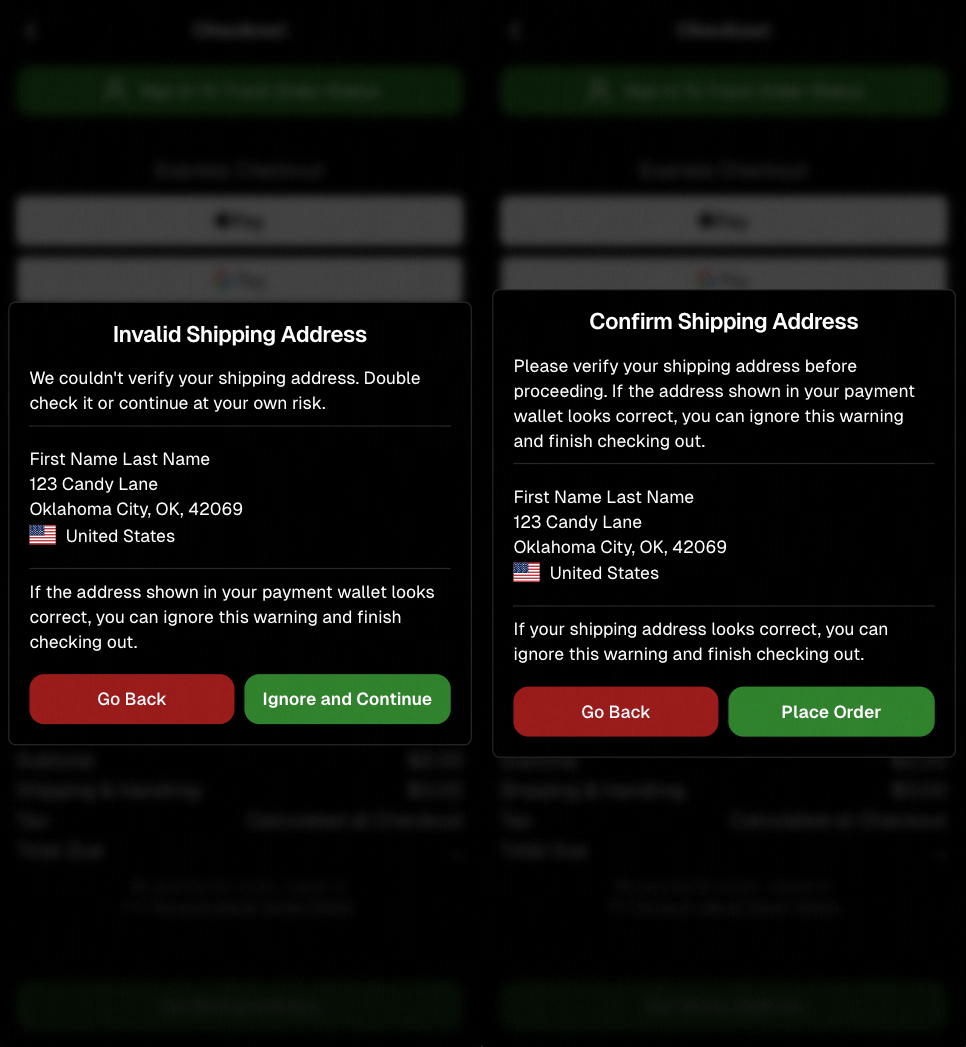
Confirmation popup now clearly displays shipping address confirmation.

🧠 Better UI + performance improvements

  • Improved local rendering (performance, memory usage, and task handling) — originally aimed to improve the retail experience on low-end devices, but it should make most devices feel faster!

  • Native “leave page” confirmation on supported browsers/devices (desktop + Samsung back button) when navigating away from an event page (refresh/back).
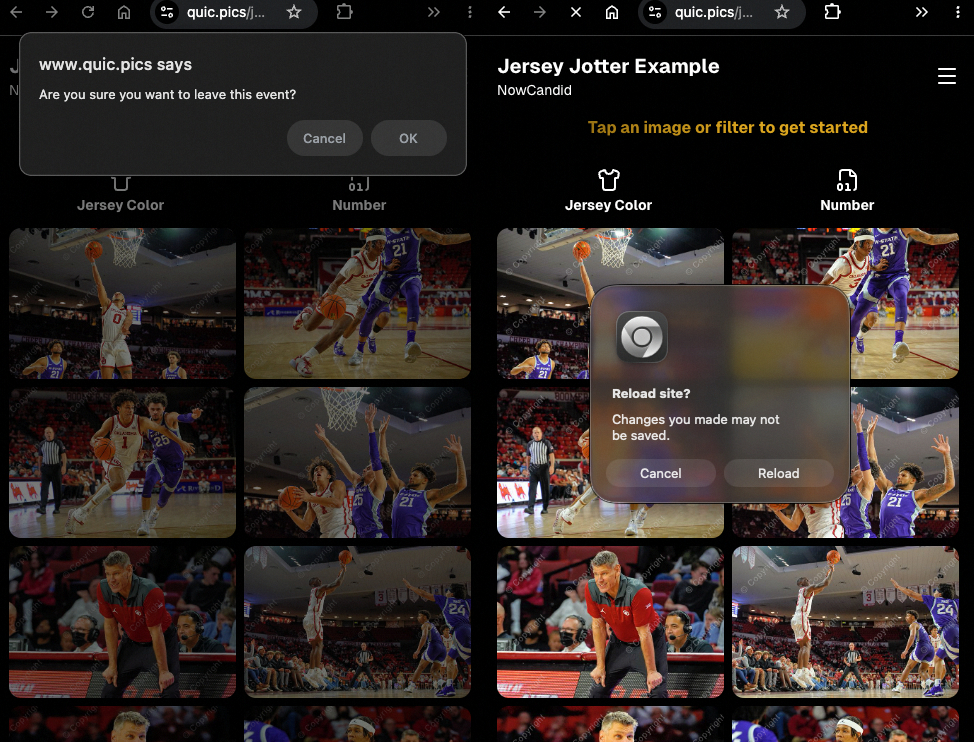
Leave page confirmation

🖼️ Clearer package download expectations + better pickers

  • Personal Gallery Downloads on store sheet and package editor now show “+X Images” in the configurator when there are more than 4 images—so customers don’t think they only get what’s previewed.
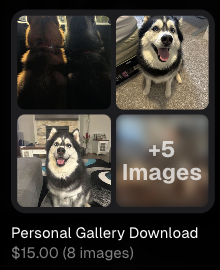
Personal Gallery Download "+X Images"

    • Personal Gallery Download products inside packages can now be clicked to preview contents.

    • Desktop product/package image pickers are now two columns (like mobile), allowing larger image preview during selection.
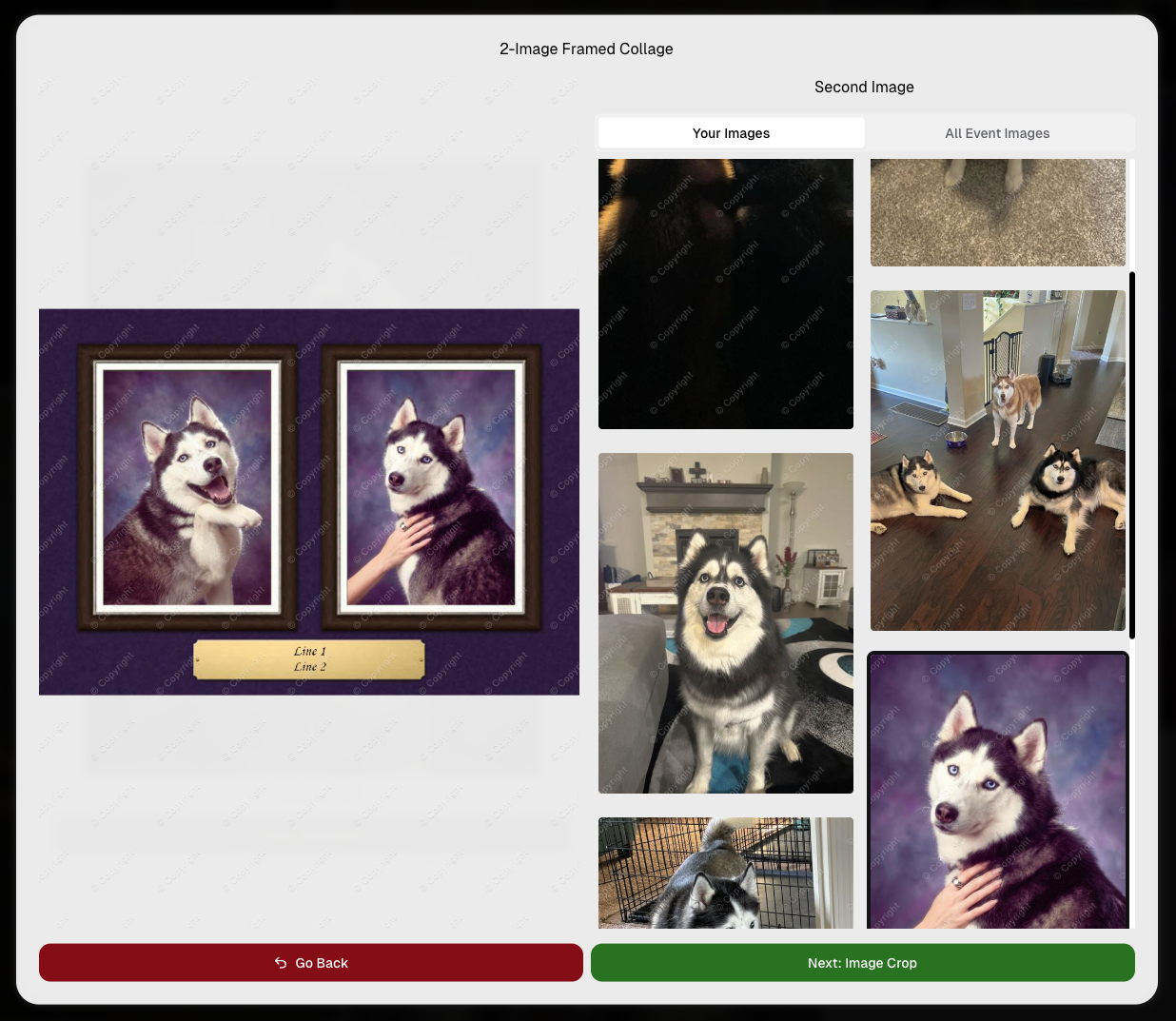
    Larger two column image previews

      • Image Filters landing popup now includes “Browse all photos without a filter” so customers who think they must pick a filter know they can also just browse!
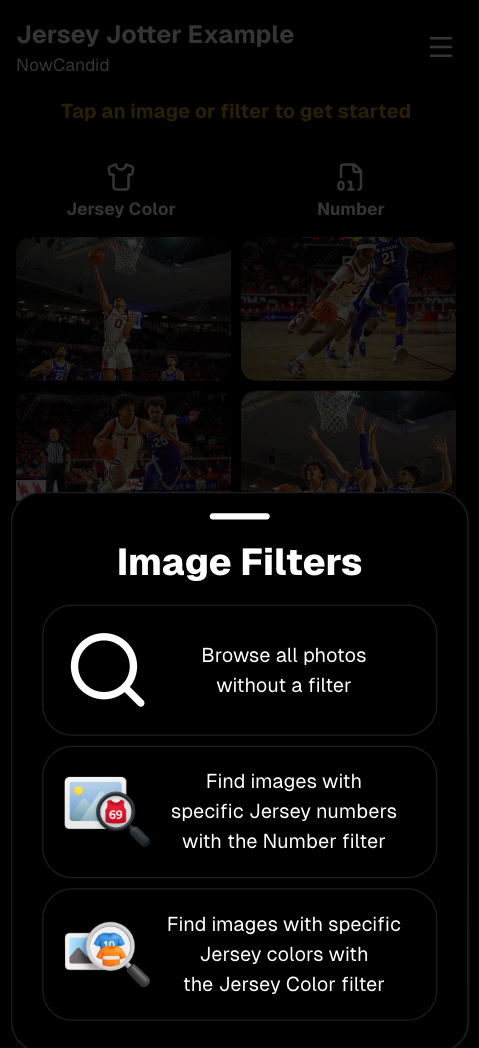
      Image Filters landing popup

      🧩 Retail fixes worth noting

      • Fixed a slashed discount amount showing on week 3 when there is no higher amount.
      • Fixed a GalleryGuard edge case that could close the retail site on some Android devices that support mobile context menus when long-pressing.
      • Fixed a race condition where a Group-by-Face gallery loaded from URL params could show default results instead of the filtered view.
      • Fixed an edge case where manually assigned images marked as group could behave like non-group images on retail.

      📱 Capture App OTA: 5.6.1 & 5.6.2 (iOS & Android)

      🌐 NEW: Network Speed Test (5.6.1)

      A new Network Speed Test button is available in Resources. Tap Run Test to check download speed, upload speed, and latency to NowCandid servers (so results may differ from Google/Ookla). It’s a quick test (downloads 5 MB, uploads 2 MB) and is useful for diagnosing weak or congested service during events.

      Mbps is a standard measurement for connection speeds, and 1 megabit per second (Mbps) is 0.125 Megabytes per second (MB/s). So 8 Mbps is 1 Megabyte per second, max. For example, with images that are 10 Megabytes in size, a speed of 8 Mbps would take a minimum of 10 seconds to upload. When speeds are very slow, image uploads may be impossible due to uploads timing out and restarting. In these cases, open the app when you have a stronger connection and all your images will start going up!
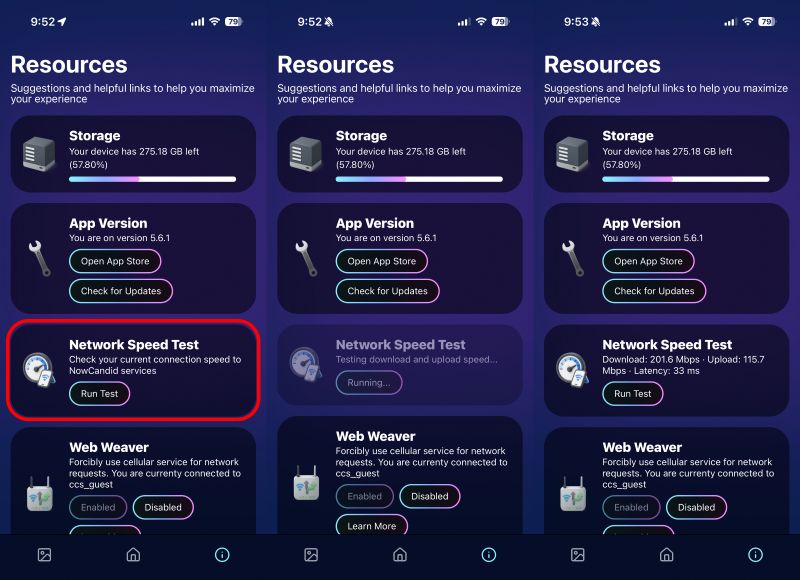
      Network Speed Test

      🎪 Photo Booth + Selfie Check-In Station UI upgrades (5.6.2)

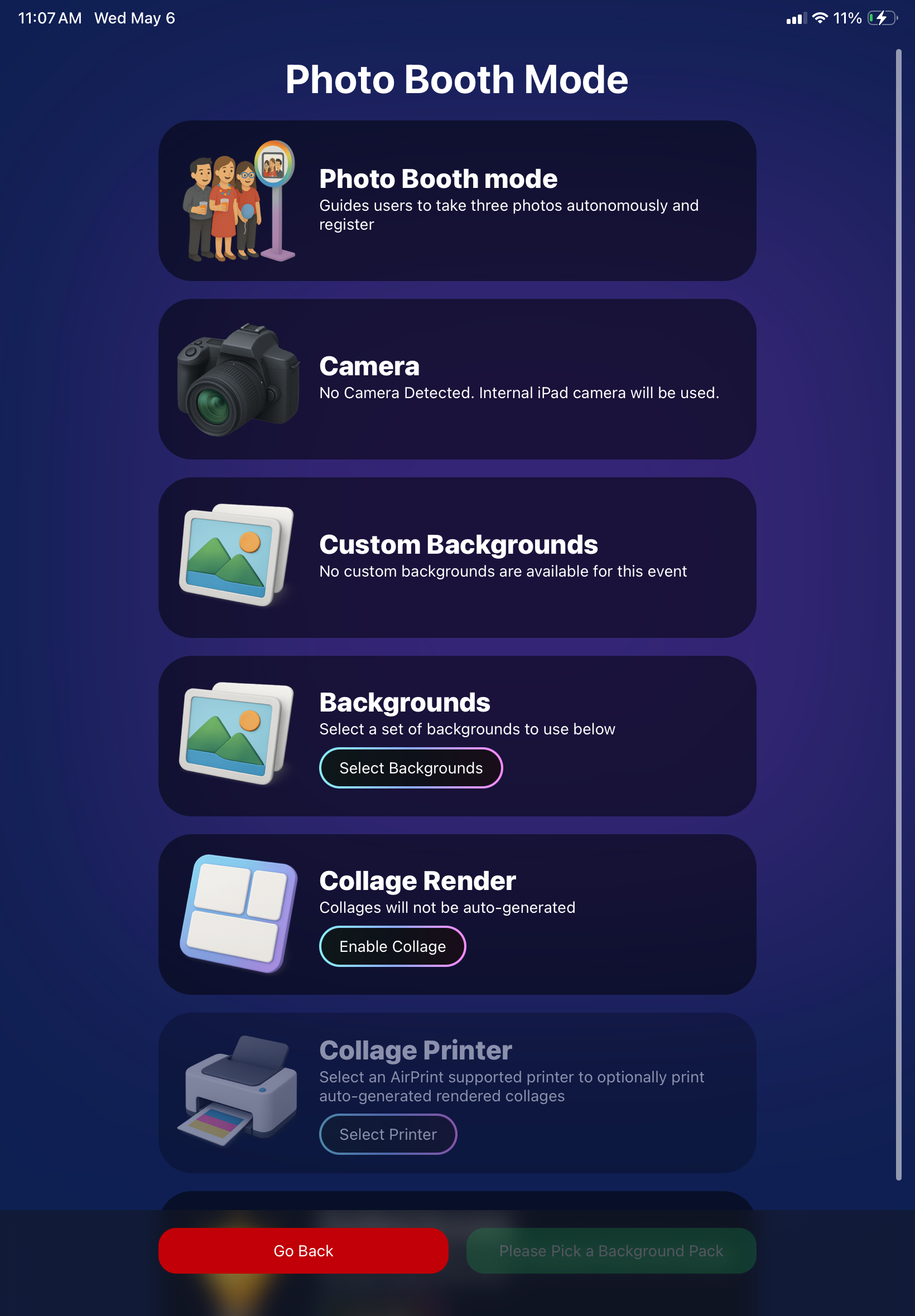
      • Photo Booth landing page updated to be more user-friendly (always-visible scrollbar, updated text, sticky go back/continue buttons, red/green emphasis, and a popup explaining why Continue is greyed out).
      • Selfie Check-In Station landing page updated with red/green Go Back / Begin buttons.
      • New dropdown icon beside Group Photo toggle (when an event has PhotoTags) to better display there are additional options to assign PhotoTags.
      • Fixed edge case cancel/continue behavior on Selfie Check-In Station when no contact info was entered.
      🧩 NEW: Lightroom Classic Plugin (Official)

      We’ve launched an official Lightroom Classic plugin to upload images to NowCandid events directly from Lightroom Classic.

      Key notes:

      • Lightroom Classic only
      • Same image rules apply (color profile, DPI, etc.)
      • Uses Capture App login
      • Only events within 60 days of event start date show in the selector
      • Image Details → Logs will show “Uploaded from NowCandid Lightroom Plugin”
      • Docs include guide/download/installation: https://app.nowcandid.com/docs/tools-more/lightroom
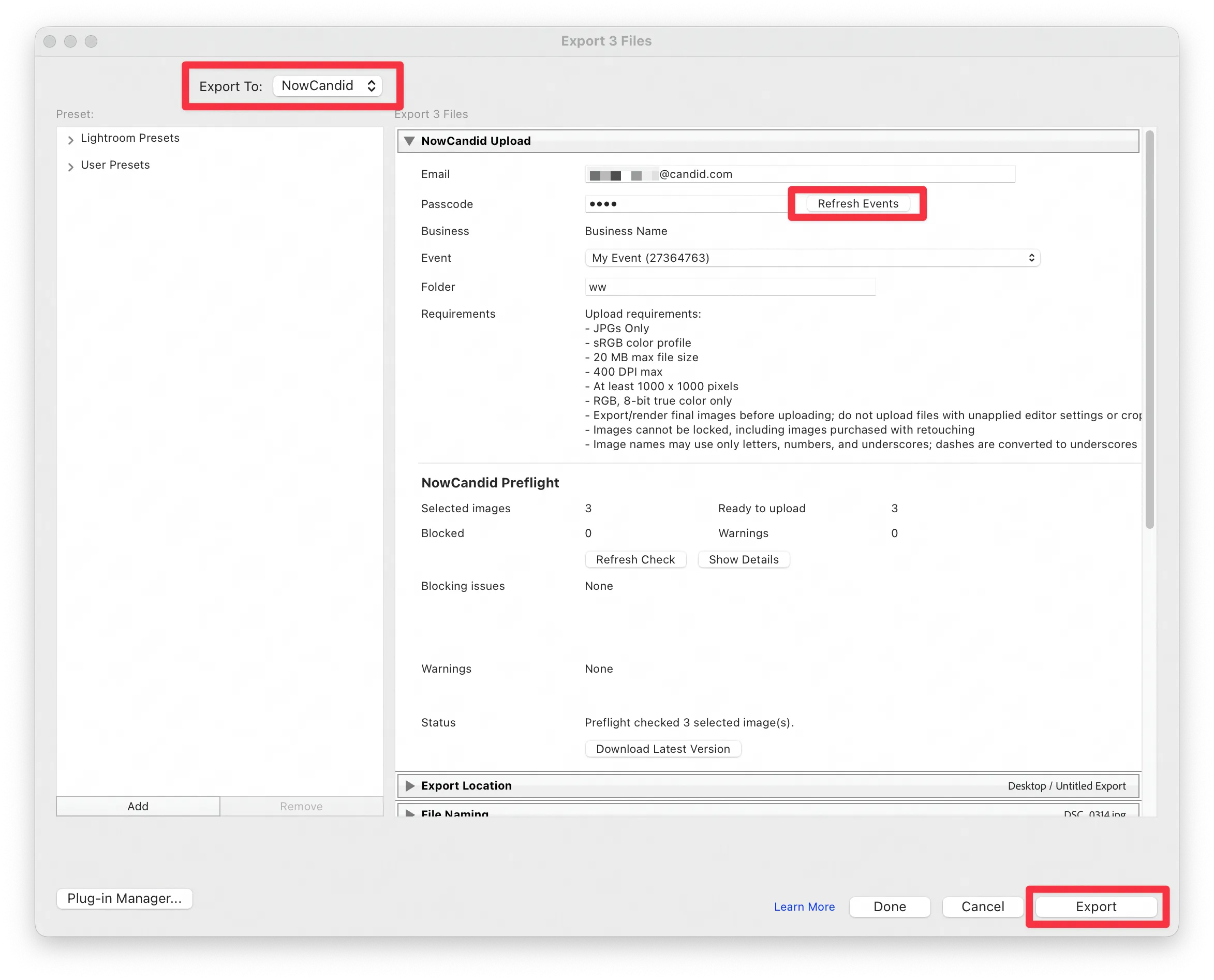
      Lightroom Classic Plugin

      Upload from NowCandid Lightroom Plugin

      🖥️ Dashboard: Upload & Roster Clarity + Small UX Wins

      • Event roster upload and PhotoRoster upload now warn about every unrecognized column, making it easier to spot misspellings (especially for optional columns).
      • Participant list page download now puts additional contacts into columns instead of rows.
      • Participant list download now puts merged contacts into their own row if they have different first/last names.
      • Image upload naming cleanup:
        • spaces/parentheses now automatically become underscores (e.g., Image (2)Image_2)
        • names ending in z now get a trailing underscore (e.g., ImagezImagez_)
      • Candy got even better at using the new Docs for responses.
      • Password reset now shows a clear “Your link has expired” screen (links expire after 24 hours).
      • Fixed participant filter inside another participant’s manual assign/unassign page not working properly.
      • Participant Details PhotoTag assignment UI: merged participants no longer incorrectly show PhotoTags as assigned.
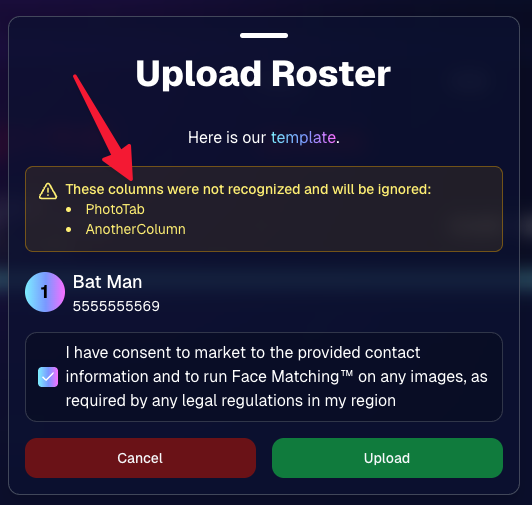
      Upload Roster now warns about every unrecognized column.

      📣 Marketing Fixes

      • Fixed edge cases where galleries that were only AI-edited images could cause follow-up email marketing issues and show as 0 images on Participant List.
      • Fixed Day0 marketing edge case not starting if gallery is just AI-edited images.
      • SMS gallery links now include “View photos:” before the gallery URL to reduce confusion where some users thought the gallery link was an unsubscribe link.

      That’s the week! 💫

      Between the Lightroom Classic plugin, the Capture App’s new Network Speed Test, and retail improvements that reduce confusion (and improve performance), this week was packed with practical wins you’ll feel right away.

      Keep it sparkly,

      Candy

      Related articles

      Weekly Recap: Tiered Pricing 💵, Enhanced Reporting 📊 & More!✨
      Feature Updates
      January 17, 2025

      Weekly Recap: Tiered Pricing 💵, Enhanced Reporting 📊 & More!✨

      6
       minutes read
      Hello, my fabulous photographer friends!

      Candy here, ready to sprinkle some sparkle on your day with our latest Weekly Recap!

      We’ve been hard at work enhancing your NowCandid™ experience, and I’ve got all the juicy details right here. Let’s dive in!

      1. Tiered Pricing Reminders & Preview

      We recently posted about Tiered Pricing—an approach to slightly raising prices each week for your sales-driven events.

      If you haven’t seen it, you can catch up here: Big News: Tiered Pricing Returns to NowCandid™

      • Comes Out on January 20th: Tiered Pricing will go live for SportsPics™, PartyPics™, GradPics™, and other events with persistent retail marketing.
      • Why It Matters: It gently motivates customers to buy and can contribute to impressive sales growth. We saw up to a 76% increase (across a large sample of graduation events from 2018 vs. 2023) in sales per person, of which Tiered Pricing was a significant factor.
      • Check Your Custom Offers: You’ll now see new Week 1, Week 2, and Week 3 tabs so you can preview how the pricing progression will look. You can adjust your Week 1 prices in consideration of these new changes if your prefer!

      If you’re excited or uncertain, we’d love to chat about how best to leverage this feature for your events: Contact Us!

      2. Reporting-Related Additions & Improvements 📊

      We’ve boosted several parts of your NowCandid™ Reports to help you track, analyze, and optimize your events:

      • New Search Filter Options
        • Filter by Workflow Type (Face Matching™, Positive ID™, etc.) and by Program (QuicPics™, PartyPics™, etc.).
        • Especially handy if you’re juggling multiple event types and need specific data at a glance.

      • Reorganized Quick Stats + “Upfront Sales” Box
        • We reshuffled some quick stats on the Events Report to be more intuitive.
        • Introducing “Upfront Sales” specifically for QuicPics™ and QuicPics GO™: Enter how much you were paid to shoot the event upfront, and this will appear in your date-range reports, right alongside your retail sales figures.

      • Faces Report
        • A new “Faces” Report for events that have run Group-By-Face™.
        • Easily see an estimate of unique faces, compare that to your participant count, and spot how many images contain 1, 2, 3, 4, 5, or 6+ faces.
        • Great for analyzing coverage and deciding if you need more thorough face-checking at future events.

      3. Additional Participant Details 🙋

      We’ve made small but valuable changes to the Participant Details page:

      • Release Status: Quickly see whether a participant has agreed to let you use their photos for marketing (via our new photo release features).
      • Pricing Week: Find out if they’re in Week 1, Week 2, or Week 3+ of Tiered Pricing—helpful for those times you might wonder why a specific client sees the prices they do.

      4. LiveLoop™ Improvements 🖼️

      LiveLoop™ just got a quality & performance boost:

      • Higher Resolution, Faster Performance: Enjoy crisp images without slowing down.
      • Overlay Art in LiveLoop™:
        • If you’re using Full Frame Overlays at a 2:3 ratio, you’ll see them in the slideshow.
        • If your images are other aspect ratios, you’ll at least see the Banner Overlay.
      • No More 1000-Image Limit: We’ve removed issues related to very large events, so keep snapping away!

      Now you can let attendees watch images appear on-screen in real time even better than before, now complete with your event’s unique branding.

      5. Candy Upgrades 🤖

      Yes, I (Candy) got a little smarter!

      • Bigger Brain: Not literally of course! But in general, we've improved Candy's Q&A and reasoning skills!
      • Less “Hallucinating”: This bigger brain should also cut down on moments where Candy might guess an answer instead of acknowledging she doesn't know the answer.
      • Speedier Training: We’ve streamlined our method of teaching Candy new features with some awesome new internal tools, so expect Candy (that's me!) to gain knowledge at a quicker pace going forward.

      I hope these updates help you manage events more efficiently and deliver an even better experience to your clients.

      If you have any thoughts or want to share feedback, just reach out. Until next time!

      Candy 🍬

      Big News: Tiered Pricing Returns to NowCandid™! 🎉
      Feature Updates
      January 15, 2025

      Big News: Tiered Pricing Returns to NowCandid™! 🎉

      10
       minutes read
      Hello, my wonderful photographers!

      Candy here, and I’ve got big news about a feature that might just boost your sales in 2025. Yes, that’s right—Tiered Pricing is making its comeback to NowCandid™!

      Let’s dive into the what, why, and how of this exciting development.

      Heads Up, Everyone! ⚠️

      This is an important one if you’re an active NowCandid™ user. So, if you read only one of our updates this year... let it be this one!

      Tiered Pricing will roll out on January 20th, and it’s a big deal for your SportsPics™, PartyPics™, GradPics™, or other sales-driven events. So please keep reading to see what’s new and how it could benefit you.

      What Is Tiered Pricing?

      Tiered Pricing is the concept that your retail prices will nudge upward in small increments over three separate one-week periods:

      1. Week 1 – “Early bird” pricing
      2. Week 2 – Slightly higher “discounted” pricing
      3. Week 3 – Another small bump, settling at your “regular” pricing

      We call it “Tiered Pricing” because each week is its own “Tier.”

      We’re not trying to get you to charge outrageous amounts (in fact, lowering your prices can often benefit your overall profit), we're just introducing tiny price increases that the NowCandid™ marketing campaign will reference to gently push people to order more, and sooner.

      The Real Advantage Lies in the Marketing

      Some might assume Tiered Pricing is about making money off late buyers, but that’s not our aim:

      • Minimal Price Increases:

        A $1 or $2 difference won’t significantly affect your overall pricing but creates a sense of urgency in your marketing.
      • Deadlines & Discounts:
        • Week 1: Promoted as “early bird.”
        • Week 2: Positioned as “slightly higher but still discounted.”
        • Week 3: Called “regular” or “final” pricing.
      • No Negative Reinforcement:
        • There are no hefty late fees. Buyers see a small difference in price from one week to the next, which spurs action without scaring them off.

      This structure keeps your clients engaged, draws in earlier purchases, and still ensures a reasonable price for those who come back later.

      Remembering Tiered Pricing from the Past 🏛️

      • Before the New Dashboard:

        In mid-2024, when we introduced our modern Web Dashboard & new retail site, we chose to keep pricing straightforward at first—no Tiered Pricing.
      • Old Premade Offers:

        Back in the day, NowCandid™ used default “Tiered” premade offers with subtle $1–$2 increases each week. These small bumps proved beneficial enough that we’re ready to bring them back with the new system.

      Why Such Tiny Price Increases? 🤏

      NowCandid™ fosters long-term, residual sales through:

      • Annual Marketing Reminders
      • Event History (for customers who log into the retail site)
      • “Buy More” QR Codes on Prints
      • Our Find Me Portal
      • And future expansions that will encourage reorders!

      By raising prices too steeply in the final weeks, you risk losing those valuable residual buyers. Tiny increments let the marketing do the heavy lifting—highlighting deadlines without truly punishing anyone for missing Week 1 or 2.

      Why Bring Tiered Pricing Back Now? 📈

      We studied a large batch of graduation Events, comparing the performance of schools photographed in both 2018 and 2023 (avoiding COVID years in the middle).

      Between these two rounds of graduations, we made many improvements, but one of the bigger changes was the addition of Tiered Pricing.

      Importantly, in 2023, Sales per person photographed increased by 76% over 2018.

      Even if Tiered Pricing accounted for just one-fifth of that boost, that’s still a 15% jump in your own sales.

      So while it might not be the only factor, it’s likely to be a meaningful one.

      How We’re Implementing Tiered Pricing 🚀

      We want to keep NowCandid™ easy to use, so Tiered Pricing will be made active for all sales-driven events (SportsPics™, PartyPics™, GradPics™, Portraits, etc.) starting January 20th, without a special toggle to turn it off—for now. Here’s the plan:

      1. New Tabs Accompanying Each Product & Package in the Offer Creator
        • Week 1 (base price)
        • Week 2 (+$1 on individual items, +$2 on packages)
        • Week 3 (+$2 on individual items, +$4 on packages compared to Week 1).
      2. Marketing Alignment
        • NowCandid™ marketing texts and emails will be altered to automatically reference these price bumps each week, nudging people to purchase before they miss the “discounted” or “early bird” phase.
      3. Your Current Prices Will Become Week 1 Prices
        • If you want your current price to remain the “Week 2” rate, consider lowering your Week 1 by $1 or $2. That way, you’re effectively offering a genuine discount in Week 1 while still matching your usual rate in Week 2, with only a slight increase in Week 3.
      4. What About QuicPics™ or QuicPics GO™?
        • Tiered Pricing won’t apply to those event types, since they focus on free downloads and don’t rely on persistent marketing. This only affects events where you’re selling items at retail prices over multiple weeks.

      Participant vs. Event-Based Timing ⏱️

      • Participant Timing:

        Tiered Pricing for a specific subject starts when their “Day 0” marketing text goes out—i.e., once they become a participant in your Face Matching or Positive ID event. If someone isn’t photographed until Day 3, they’ll still get a full Week 1 period from that day forward.
      • All Images Gallery:

        If a customer bypasses personal galleries and shops the All Images Gallery on the NowCandid™ retail site, the Price Tier they see is based on the Event’s official start date.
      • Dashboard Insight:

        You can see which pricing Week a participant is currently in by viewing their Participant Details page on the Web Dashboard.

      What Do I Have to Do? 🤔

      • If You’re Fine With Default:

        Sit back and let NowCandid™ handle it! We’ll roll out the changes automatically on January 20th.
      • If You Want a Lower “Week 1”:

        Adjust your existing Offer prices downward for that first Tier, making your Week 2 and Week 3 prices align with what you used to charge

        If you want your current price to remain the “Week 2” rate, consider lowering your Week 1 by $1 or $2. That way, you’re effectively offering a genuine discount in Week 1 while still matching your usual rate in Week 2, with only a slight increase in Week 3.
      • Feedback Welcome:

        If you truly dislike Tiered Pricing or think it messes up your strategy, reach out. We’re open to suggestions for making it optional, though for now it’s set to be standard across sales-driven events.

      That’s the scoop, my lovely photographers!

      Tiered Pricing is coming back to NowCandid™, and we believe it can add a gentle lift to your sales without complicating your life.

      If you have questions or concerns, don’t hesitate to let us know. Otherwise, mark your calendar for January 20th and watch those early-bird sales roll in!

      Candy 🍬

      Weekly Recap: Photo Release Features, Merged Participant Clarity & More!
      Feature Updates
      January 10, 2025

      Weekly Recap: Photo Release Features, Merged Participant Clarity & More!

      5
       minutes read
      Hello, my fabulous photographer friends!

      Candy here, ready to sprinkle some sparkle on your day with our latest Weekly Recap! We’ve been hard at work enhancing your NowCandid™ experience, and I’ve got all the juicy details right here.

      Let’s dive in!

      1. Photo Releases & The New Image Release Gallery

      Collecting Releases

      Before using the pictures you take of your subjects in things like portfolios, websites, flyers, samples, and more - the best practice is to get a record of consent from your subjects before using photos of them for such things!

      So... we've made some additions to NowCandid that will expedite this process for everyone involved!

      • Enabled via Retail Site Settings: Head to your Account Profile, open the “Retail Site Settings,” and toggle whether to ask participants for a photo release when they complete Selfie Check-In™.
      • Future Expansion: We plan to someday add this consent request to other locations in our Workflows, such as Scanner ID™ Check-Ins or after retail site checkout, so stay tuned!

      Found under "Retail Site Settings" in your account profile

      The post-Selfie Check-In messaging

      Image Release Gallery

      Once you’ve enabled Photo Releases, we’ve made viewing those fully released images a snap with the new Image Release Gallery!

      • Fully Released Photos Only: This gallery shows images where every primary face in the picture has opted in for marketing use.
      • Opt-Out Procedures: If someone changes their mind, NowCandid™ support can remove their release, and those images will disappear from the gallery.
      • Easier Marketing & Inspiration: Enjoy a reliable stash of images for portfolios, websites, flyers, or sample products, all with peace of mind!

      This major addition simplifies the entire release process and keeps your marketing efforts on the right side of consent!

      Starting next week, this feature will be enabled by default for all NowCandid accounts! If you wish to disable it, that's up to you!

      An example of some images with only released faces in the new Image Release Gallery

      2. Improved Merged Participants Clarity

      We have also improved the photographer's experience and clarity when it comes to Merged Participants!

      • Multiple Names, One Contact: When two or more participants share a phone number, they now visibly merge under one participant in the Participant Manager, with all names separated by commas.
      • Reduced Confusion: Parents with multiple kids at an event won’t be an enigma anymore. You’ll see each kid’s name instead of a single ambiguous participant.
      • Same Smooth Experience for Families: Consumers won’t notice much change, but you’ll breathe easier knowing your records more clearly show who’s who.

      No more wondering why two kids keep “replacing” each other in the backend—our improved merging UI has your back!

      Example of multiple merged participants wrapped into one participant

      3. Group Photo Filter in Manage Images

      • Just Group Photos: We’ve added a toggle to the Manage Images page that shows only images flagged as “Group Photos.”
      • Sports & GroupTags™: Perfect for organizing big team shots or verifying no single-person images slipped in by accident.
      • Future Tweaks Coming: We’re cooking up more ways to polish Group Photo and GroupTags™ functionalities, so watch this space!

      If you handle big groups (like sports teams or large gatherings), this quick filter simplifies your event workflow.

      New toggle button to switch between showing All Images and just Group Photos

      4. All Images Gallery Pagination

      • Page-by-Page Browsing: We replaced the endless scroll in the NowCandid™ retail site’s All Images Gallery with a paginated view—complete with arrows to move between pages.
      • Jump to Page: Customers can type or select a page number if they already know where to look.
      • Less Scrolling, More Finding: Makes returning to a specific photo (especially one not in a personal gallery) a breeze.

      This update ensures customers spend less time hunting and more time admiring—or purchasing—the images they love.

      New retail site page navigation tools

      5. New Events List Filter

      One last small addition to mention... we added a way to filter down your Events list!

      This should make it easier than ever to browse through your upcoming Events as you plan and prepare for them.

      New Events list filter options

      That’s it for this week’s recap!

      We hope these changes help you manage your events more smoothly, give you extra confidence in your marketing, and offer your customers a cleaner, faster photo-browsing experience.

      As always, we love your feedback, so feel free to reach out with any questions or suggestions.

      Thank you for being an essential part of the NowCandid™ community. Keep capturing those unforgettable moments and creating smiles! 📸✨

      Cheers and sparkles,

      Candy 🍬

      Let’s get in touch

      If you’re a photographer looking to add NowCandid services to your wheelhouse – set up a call by clicking the button below.

      How to customize formatting for each rich text

      How to customize formatting for each rich text

      How to customize formatting for each rich text

      How to customize formatting for each rich text

      How to customize formatting for each rich text
      How to customize formatting for each rich text

      What’s a Rich Text element?

      The rich text element allows you to create and format headings, paragraphs, blockquotes, images, and video all in one place instead of having to add and format them individually. Just double-click and easily create content.

      A rich text element can be used with static or dynamic content. For static content, just drop it into any page and begin editing. For dynamic content, add a rich text field to any collection and then connect a rich text element to that field in the settings panel. Voila!

      Headings, paragraphs, blockquotes, figures, images, and figure captions can all be styled after a class is added to the rich text element using the "When inside of" nested selector system.

      • List One
      • List Two
      • List Three
      • List Four
      • List Five

      This is a link

      This is bold text