

Weekly Recap: Discount Outreach, Better Mobile Dashboard Tools & Easier Reporting 📱✨
.png)
Hey photo friends! 👋
Candy here with another weekly recap! This week brings a new way to promote discounts directly to your customers, more branding options for your retail pages, helpful Mobile Dashboard and image management improvements, and some new reporting tools for your business.
We've also improved Background Removal, expanded roster and Event management options, and added a few more ways to customize your NowCandid experience.
Let's jump in!
💸 NEW: Promote Discounts with Client Outreach!
Remember the Discounts feature we introduced recently? Well, we've made it even easier to put those discounts to use!
There's now a Send Outreach button directly on the Discount Details page.
This lets you send a predefined text and email to unique contacts who have at least one photo in their gallery, making it easier to promote a discount to customers who already have photos available to purchase.
📱 Text and email outreach – Reach customers without having to create a separate campaign manually.
👥 Unique contacts – The outreach targets each eligible contact once rather than duplicating recipients.
📊 Track your outreach – Review sends in Client Outreach history under the automatically generated Reserved List.
Just like the Group Photo Alert feature we introduced last week, this is powered by Client Outreach, giving you another convenient way to connect with customers directly from the Dashboard!
🚀 Your Business Logo Can Now Appear in Browser Tabs!
A little more branding for your business!
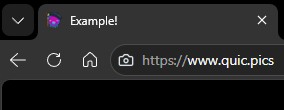
If you've uploaded a business logo to NowCandid, it can now replace the standard camera favicon (the little icon in your browser tab) across several customer-facing pages.
This includes:
🛍️ Retail Galleries
🖼️ Private Image Download Galleries
🏷️ Public Event Tag Lists
📥 Web Receipt Download Pages
If you haven't uploaded a business logo, the usual camera icon will still appear.
Don't have your logo set up yet? Head to your Profile Settings while logged into NowCandid to upload one!
It's a small detail, but another way to make your customers' experience feel a little more like your own business.
📱 Mobile Dashboard 4.2 & Navigation Improvements
Mobile Dashboard 4.2 arrived on October 19 for iOS and Android!
This App Store update includes several performance and reliability improvements, along with refinements to make the app feel more natural on your device.
We've also added some new Mobile Dashboard features that don't require an app update:
👆 Swipe between images – On Manage Images, you can now swipe left and right to move between images instead of closing and reopening each one.
🖼️ Expanded Image Details – The Details panel now opens at full height by default.
✨ Better page transitions – Mobile Dashboard navigation now includes transitions similar to the desktop Dashboard.
🏠 Refreshed Overview page – The landing page and several other interface elements have received visual improvements.
⌨️ Better Image Management & Keyboard Shortcuts
We've refreshed parts of the image details experience on both Manage Images and Participant Details.
And for those of you who like keyboard shortcuts, we've added a couple of useful ones!
🖼️ Updated Image Details interface – Several controls and layout elements have been reworked for a better viewing experience.
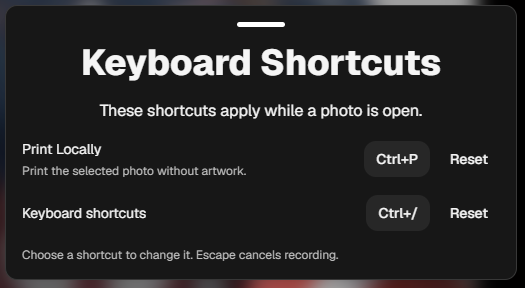
🖨️ Quick Print Locally – With an image selected, press CMD + P on Mac or CTRL + P on Windows to launch the existing Print Locally feature.
⌨️ Customizable keyboard shortcuts – Press CMD/CTRL + / to open a new keyboard shortcut menu, where you can view, change, or reset the shortcuts for the image lightbox.
🧑🤝🧑 Virtual Group Builder Gets Arrow-Key Controls
When you select a subject in Virtual Group Builder, you can now use your keyboard's arrow keys to move them up, down, left, or right.
Perfect for making those small positioning adjustments without dragging subjects around with your mouse.
📊 New Tax Reporting & Business Tools
We've added a couple of convenient ways to access your business information.
💰 NEW: Download Your Sales Tax Summary
As a reminder, NowCandid is a Marketplace Facilitator, meaning we handle collecting and remitting applicable sales tax on orders placed through our platform. You don't have to handle that step yourself for those orders!
You've always been able to see sales tax collected on individual orders through the downloadable Sales Report Excel file, but now we're making that information easier to review.
There's a new Tax Summary button on your Profile page, right beside Edit Profile.
Click it to download an Excel spreadsheet showing sales tax paid by jurisdiction.
This can be particularly helpful if your photography business is ever audited or you need documentation showing how sales tax was handled across different jurisdictions.
📑 NEW: The BFR (Big F@#$ing Report) 😂
Sometimes you just want ALL the reports at once.
The Reports section now includes a new BFR button that downloads a combined PDF containing your:
- Sales Report
- Events Report
- Faces Report
- Background Removal Report
- Products Report
The combined report respects your currently selected filters, making it easier to pull together the information you need without downloading each report separately.
👤 Other Profile Improvements
🔢 Account Number is easier to find – Your Profile page now has a dedicated Account Number box. Click it to copy your number.
📣 New Long Term Marketing toggle – You can now enable or disable marketing messages scheduled for Day 365 and beyond.
- This setting is enabled by default, so your existing marketing behavior won't change unless you turn it off. Re-enabling it allows that long-term marketing to resume.
📋 More Flexible Roster & Event Management
We've made several improvements to help with roster uploads, PhotoTags, and Event setup.
📧 More flexible contact spreadsheets – Event, PhotoRoster, and Client Outreach uploaders no longer require you to include both Email and Cell columns. You can upload a roster containing just one of those contact methods.
🏷️ PhotoTags export into separate columns – Event Participant Downloads now place each PhotoTag in its own column, labeled PhotoTag 1, PhotoTag 2, and so on.
- This more closely matches the Event Roster Upload format, making it easier to reuse participant data when setting up another Event.
➕ More than three PhotoTag columns supported – The Event Roster Uploader now accepts more than three PhotoTag columns, giving you more flexibility when importing Participants with multiple PhotoTags.
🔄 Change Your Event Program After Creation
You can now switch an existing Event between different non-Free Event Programs!
For example, you can change:
- PartyPics → SportsPics
- SportsPics → GradPics
- GradPics → PartyPics
And so on!
You'll find this option in the Edit Event popup on Event Overview.
Free Event Programs are excluded from this new switching functionality.
✂️ Background Removal Version 33
Background Removal continues getting better!
✨ Improved cutout quality – Version 33 brings another round of improvements to cutout results.
🖼️ Better handling of very large image files – We've addressed some edge cases involving unusually large source files.
🔁 More Flexible Image Overwriting
We've also brought back and improved the ability to reprocess Background Removal images when overwriting files.
When overwriting an image in a folder marked for Background Removal, the replacement can now be reprocessed when it has either:
- The same dimensions as the original, or
- The same aspect ratio, even if the dimensions differ.
Previously, this functionality was limited to matching dimensions. The updated version should make replacing and reprocessing cutouts more flexible and reliable.
🛍️ Retail & Customer Experience Improvements
A few smaller changes should make the shopping experience more convenient for customers.
🎨 Better color selection on desktop – Color pickers, such as those used for Memory Mates, now display options in a grid on desktop. Mobile continues using the slider with arrow buttons.
📥 Downloads now live on the Web Receipt page – Images that previously had direct download links in receipt emails, such as uncropped Personal Gallery Downloads, are now accessed through the Web Receipt Download page instead.
- This change is also part of our ongoing improvements to Free Auto Image Enhancement, an optional feature photographers can choose to use when creating their NowCandid Events. Plus, we've made several improvements to mobile sharing on the Web Receipt Download page recently, making it easier for customers to save photos to their phones or share them with others!
🖼️ Product preview fix – Fixed certain statuettes, ornaments, and cutout magnets showing a selected background in their product previews when that background shouldn't appear.
That's the week!
The new Discount Outreach option gives you another way to turn available photos into sales, while the reporting, roster, and Event management changes should help save time on common administrative tasks.
And if you're a fan of keyboard shortcuts, there's plenty to play with this week too!
Keep creating magic,
Candy 🍬

.jpg)

.svg)


