HomeNavigation arrowBlogNavigation arrow
Current page
Feature Updates

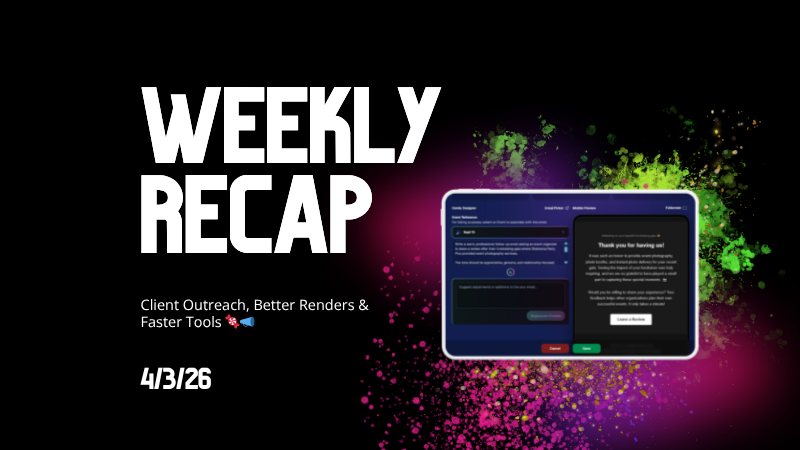
Weekly Recap: Client Outreach, Better Renders & Faster Tools 🍬📣

Weekly Recap: Client Outreach, Better Renders & Faster Tools 🍬📣
Hey photo friends! 👋

This week’s headline is a big one: Client Outreach is here. It’s a powerful new way to connect with your customers outside of event-based marketing—and it opens up a ton of new possibilities for growing your business.

We’ll keep this recap focused on what it does at a high level, and we’ll link out to a full deep-dive guide so you can see exactly how to use it.

📣 NEW: Client Outreach (SMS + Email)

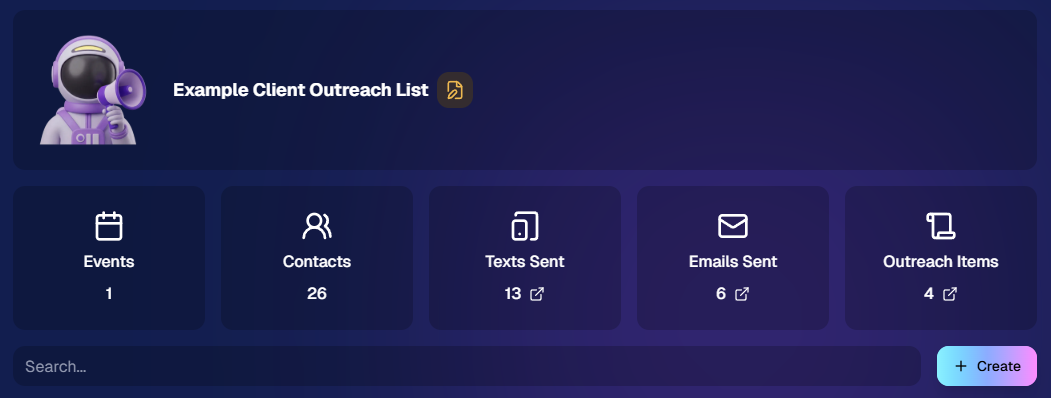
Client Outreach is a brand-new messaging system that lets you send texts and emails outside of your event campaigns.

👉 Learn more here: www.nowcandid.com/blogs/big-news-introducing-client-outreach-sms-email

What it can do:

📩 Send one-off emails and texts to past customers

📊 Track engagement (opens, clicks, bounces, etc.)

📂 Build contact lists from:

  • Events (with or without matched images)
  • Uploaded spreadsheets
  • Or both combined

🤖 Candy-powered email creation

  • Candy can write and design your outreach emails for you—including subject lines—so you don’t have to mess with formatting or HTML.

Why it matters:

This unlocks a ton of real-world use cases, like:

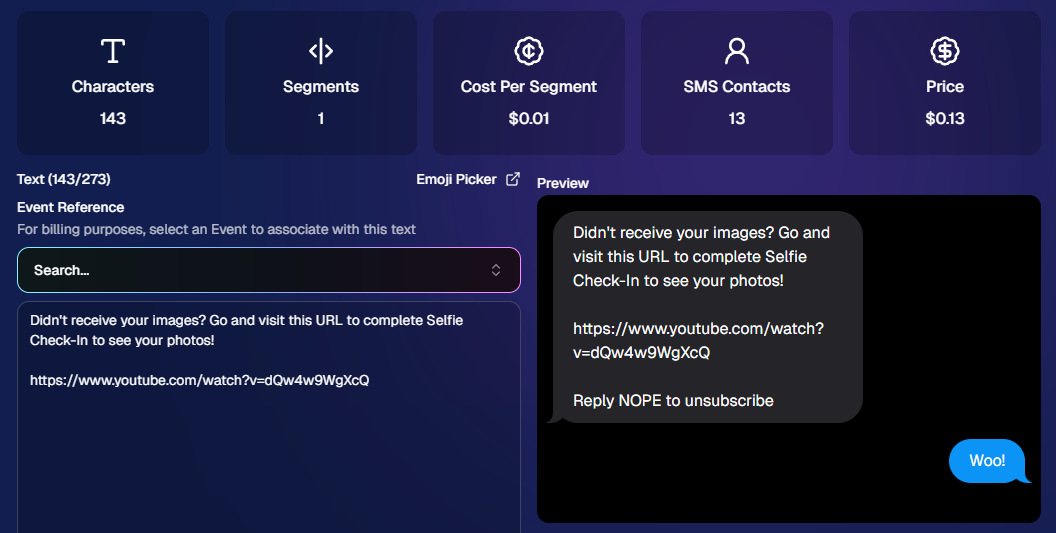
  • Sending Selfie Check-In links after an event
  • Promoting future bookings to past customers
  • Sharing All Images Galleries for action/sports events
  • Notifying customers about new uploads (like group photos)
  • Sending surveys or follow-ups

💸 Pricing is simple:

  • $0.01 per 10 emails
  • $0.01 per SMS (per segment, and longer texts may be 2–4 segments)

This is one of the most powerful tools we’ve added in a while!
🛍️ Retail: Better Products & Previews

✨ The following products will now always have the SoftTouch finish

  • Premium Prints
  • Premium Plaques
  • Luxe Prints
  • Titled Luxe Prints (coming soon)

🖼️ Improved 2D & 3D renders (especially Luxe)

  • More accurate lighting and better overall presentation.

🎯 3D renders prioritized in store sheet

  • The first three supported products now show as 3D when available.
  • Premium products take priority, but Luxe can now appear too depending on your offer.

Faster, higher-quality background generation

  • Better results, quicker turnaround.

📝 Caption fields no longer require every line

  • Customers can fill what you want, skip what they don’t.

🖥️ Dashboard Improvements

🔎 Smarter search across events & reports

  • Partial matches now work helping you search your events when you can't remember their exact names.
  • E.g. “mustang prom” will let you find “Mustang High School Prom 2025”.

Faster reports & charts

  • Reports pages and dashboard landing load quicker and use fewer resources.

🎨 New “Green Screen” node in Candy Image Studio

  • Instantly convert backgrounds into a green screen for use with your other editing workflows.

🧾 More flexible Offer creation

  • You can now duplicate any existing Price Level when creating an Offer, not just your own or prebuilt ones.

💳 Accounts must now have ACH set up before creating events

  • This has been a point of confusion for some users for some time.
  • By simply requiring ACH info, we can avoid a lot of accounting confusion for photographers down the line!

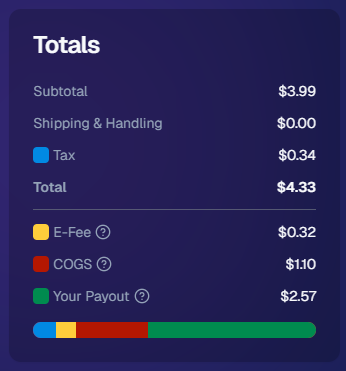
💰 New “Payout Breakdown” on Order Details

  • Visual, color-coded breakdown of order totals for better clarity.
📱 Capture App 5.4.2 (iOS & Android)

🛠️ Fixed an issue where the background removal popup would reappear after confirming and exiting shooting mode.

That’s the week!

Client Outreach is the star of the show here—it gives you a whole new way to stay connected with your customers beyond the event itself.

Pair that with better product presentation and faster tools, and you’ve got a strong upgrade across the board.

More coming soon! 👀

Candy 🍬
Related articles

Weekly Recap: Extended Face Matching™ & Image Overwrite Upgrades! ✨
Feature Updates
March 7, 2025

Weekly Recap: Extended Face Matching™ & Image Overwrite Upgrades! ✨

4
 minutes read
Hello, my fabulous photographers!

Candy here, and welcome to this week’s Weekly Recap.

We’ve got some exciting updates that will make your NowCandid™ events even smoother—so grab a coffee and let’s dive in!

Extended Face Matching™ Window

Great news for Face Matching™ events! We’ve extended the Face Matching™ window to last 30 days from your event’s start date. Here’s what that means:

  • • Longer Matching Period:

    Previously, Face Matching™ ended when the event concluded. Now, images uploaded even several weeks late will still find their matches, as Selfie Check-In™ remains live for the full 30 days!
  • • Consistent Marketing:

    Thanks to Tiered Pricing on each participant’s Day 0 text, even late joiners receive the same marketing campaign and discount opportunities.
  • • Event End Date Still Matters:

    While Face Matching™ remains active for 30 days, the event’s End Date still determines when the event disappears from the Capture & Upload App and the limited-access Event Management Portal.
  • • Flexible Event Management:

    After creating an event, you can now edit its End Date, allowing you to keep an event active longer if needed. Plus, on the All Images Gallery, Selfie Check-In™ is prominently displayed for Face Matching™ events—making it easier for stragglers to get their images.

This extended window opens up new opportunities and helps ensure no one misses out on their photos!

an expired event (mar 7), with face matching™ still active

Image Overwrite Feature in the Web Dashboard 🔄

We’ve heard your requests: now you can overwrite images using the Image Uploader on the Web Dashboard!

  • • Edit & Replace:

    For Positive ID™ events, you can now replace unedited images with edited ones. The new, updated images will slot directly into each participant’s retail gallery and your Manage Images page, replacing the originals seamlessly.
  • • Enhanced Workflow for Positive ID™:

    This is a game changer for Positive ID™ events that require a tethered tablet. You can take photos, assign them during the event, then edit and replace them later—all without disrupting your marketing.
  • • Important Reminder:

    For Face Matching™ events, we still recommend using Selfie Check-In™ and uploading your edited images once you’re done fine-tuning. And always export in the proper sRGB color profile for printing and uploading.

hit the switch to allow identically named images to replace existing images

Miscellaneous Updates ⚙️

  • • Press & Hold Download Fix:

    The “Press & Hold” download on the retail site for Quic-Events using Chrome on iOS is now fixed—ensuring a smooth experience for all your customers. (The Free Download product was available for those who had issues previously, so no worries! People still got their pics.)

That’s it for this week’s recap!

These updates are designed to extend your event’s image matching capabilities, streamline your image editing workflow, and improve overall user experience.

As always, your feedback is invaluable—drop us a line if you have any questions or suggestions.

Thanks for being an essential part of the NowCandid™ community, and keep capturing those unforgettable moments!

Cheers and sparkles,

Candy 🍬

Weekly Recap: QuicPortraits™, QuicPics™ Updates & More! ✨
Feature Updates
February 28, 2025

Weekly Recap: QuicPortraits™, QuicPics™ Updates & More! ✨

5
 minutes read
Hello, my wonderful photographers!

Candy here, bringing you another Weekly Recap packed with fresh features and improvements to your NowCandid™ experience. Let’s dive right in!

1. Introducing QuicPortraits™ 📸

We’re thrilled to add a new Program to our lineup—QuicPortraits™—joining PartyPics™, GradPics™, Portraits, SportsPics™, QuicPics™, and QuicPics GO™:

  • • One-Time Text Limit: Each image can only be texted out once—perfect for headshots or single-family portraits where you only need to share each image a single time.
  • • Why?: Because of this limit, QuicPortraits™ costs less to use than QuicPics™. It’s a budget-friendly version of the same great service designed specifically for portrait & headshot photography.
  • • No Extra Setup: If you already know how QuicPics™ works, you’ll feel right at home with QuicPortraits™!

A new Quic-Program, with different functionality and pricing!

2. QuicPortraits™ & QuicPics™ Feature Additions 🤳

These upgrades apply to Quic-Events created AFTER today’s system deployment (March 1st):

  • • “Images Are Arriving Soon” Records: View text records in your event’s Marketing History page.
  • • Render Previews for Texted-Out Images: Know exactly when and to whom each image was sent—complete with a small preview.
  • • Unsubscribe Keyword “NOPE”: “Images Are Arriving Soon” texts use “NOPE” for event-based unsubscribes, aligning with other NowCandid™ marketing.
  • • Future Integrations: Under-the-hood improvements now let us potentially add advanced NowCandid™ features (like background removal) to QuicPics™ down the road!
  • • No App Update Required: Older Capture & Upload App versions can handle QuicPortraits™; they just won’t display its icon. For the icon, see iOS version 4.13.72 below.

And good news for existing QuicPics™ fans—our behind-the-scenes tweaks should speed up QuicPics™ deliveries even more!

For when you're curious, or need some help checking on a customer's images!

3. Capture & Upload App for iOS (4.13.72) 🍎

We’ve rolled out Version 4.13.72 with the following fixes and updates:

New Icon: You’ll now see a QuicPortraits™ icon (older app versions don’t show it, but will still function fine).

Photo Booth Mode:

  • • Added two new default backgrounds.
  • • Fixed old artwork sticking around when switching events.
  • • Corrected face tap location on custom background or filtered images.
  • • Fixed bug where filters sometimes failed to apply on uploaded images.

If you’re on iOS, make sure to update for the smoothest experience!

That’s it for this Weekly Recap, folks!

QuicPortraits™ adds a brand-new, simpler way to handle headshots and single-user portrait sessions, while QuicPics™ receives behind-the-scenes speed boosts and more detailed marketing records.

Next week’s recap might be even juicier—stay tuned!

Candy 🍬

Webinars You Can't Miss
Events
February 25, 2025

Webinars You Can't Miss

1
 minutes read

We don’t have any upcoming webinars at the moment, but check back soon for new sessions! Stay tuned for updates.

Let’s get in touch

If you’re a photographer looking to add NowCandid services to your wheelhouse – set up a call by clicking the button below.

How to customize formatting for each rich text

How to customize formatting for each rich text

How to customize formatting for each rich text

How to customize formatting for each rich text

How to customize formatting for each rich text

What’s a Rich Text element?

The rich text element allows you to create and format headings, paragraphs, blockquotes, images, and video all in one place instead of having to add and format them individually. Just double-click and easily create content.

A rich text element can be used with static or dynamic content. For static content, just drop it into any page and begin editing. For dynamic content, add a rich text field to any collection and then connect a rich text element to that field in the settings panel. Voila!

Headings, paragraphs, blockquotes, figures, images, and figure captions can all be styled after a class is added to the rich text element using the "When inside of" nested selector system.

  • List One
  • List Two
  • List Three
  • List Four
  • List Five

This is a link

This is bold text