HomeNavigation arrowBlogNavigation arrow
Current page
Feature Updates

Weekly Recap: Candy Image Studio Upgrades, Participant Search & QR Creator 🍬✨

Weekly Recap: Candy Image Studio Upgrades, Participant Search & QR Creator 🍬✨
Hey photo friends! 👋

This week is packed with tools you’ll probably use right away: big upgrades to Candy Image Studio, a brand-new Participant Search across all events, and a fun but practical QR Creator.

Let’s dive in.

🎨 Candy Image Studio: More Control, More Power

We’ve made some meaningful upgrades to Candy Image Studio:

👁️ Choose whether to mark the original image invisible

  • Previously, edits always hid the original. Now it’s your call.

🗂️ Multiple edits can coexist

  • Uploading multiple AI edits of the same image no longer overwrites previous ones.

🧠 New safety agent

  • Automatically checks for edits involving race/ethnicity/skin tone changes or nudity to keep things appropriate.

🖼️ Generate 2K or 4K outputs

  • 4K is recommended for images with text.

Image Lightbox Integration

  • Click “Candy Image Studio” directly from an image lightbox to preload it into the Studio.
  • You can optionally mark the original invisible, and it keeps all participant associations intact for the new image (just like cutouts).
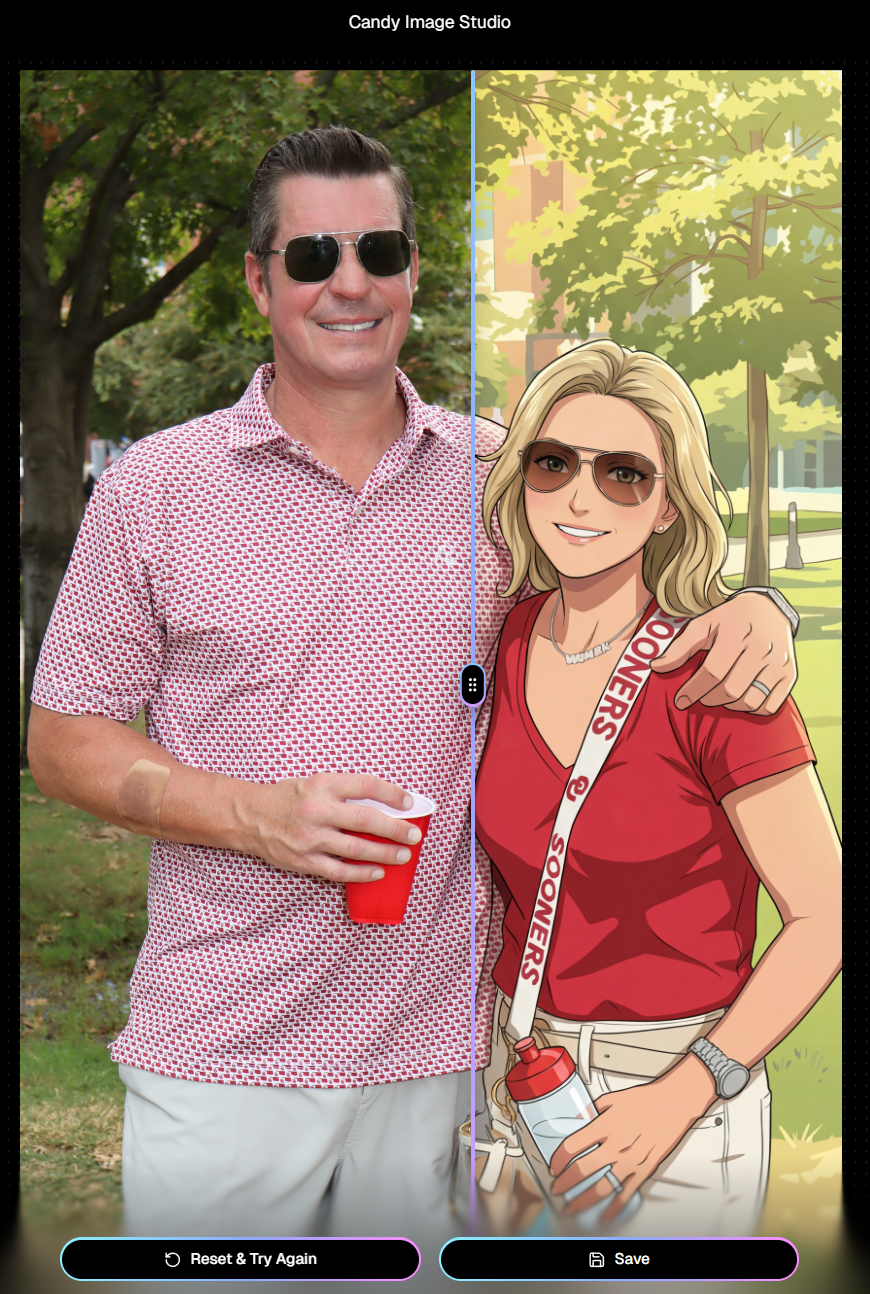
If you haven't checked out the AI editor, give it a try!

🔎 New: Participant Search Across All Events

You can now search participants across your entire account:

  • Search by name or contact info
  • Access via Tools & More, Sidebar Search bar, or "/participants" directly in the URL
  • Supports Candy navigation

Huge time-saver when you can’t remember or don't know which event someone was in.
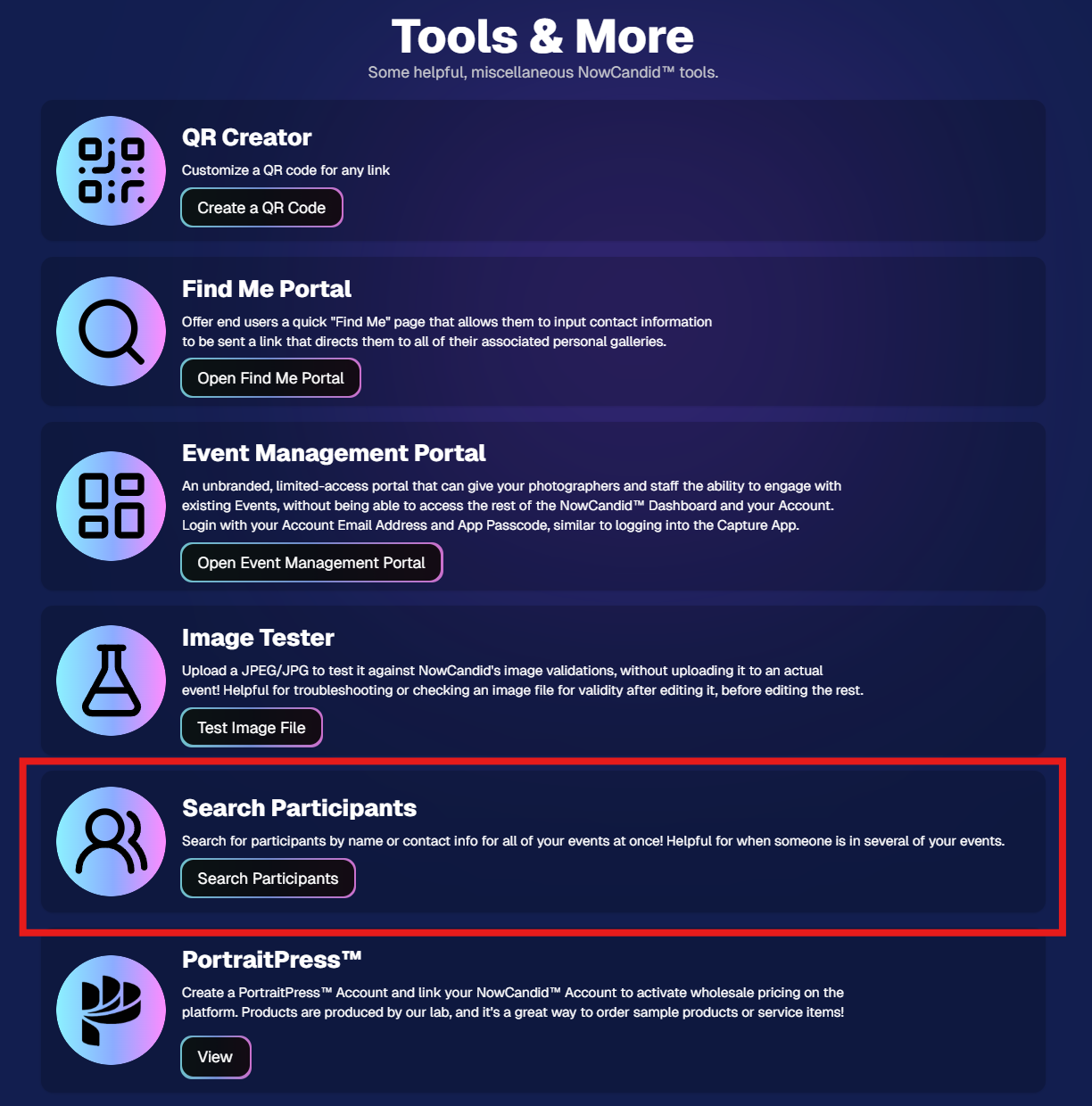
Click here to jump to the Tools & More page

🔳 New Tool: QR Creator

Found under Tools & More, the new QR Creator lets you:

  • Paste in any link (event, check-in, retail, etc.)
  • Customize shape and colors
  • Generate something nicer than a plain black-and-white square
  • Download the new, cuter QR code!

Simple, but useful for signage, flyers, and booths.
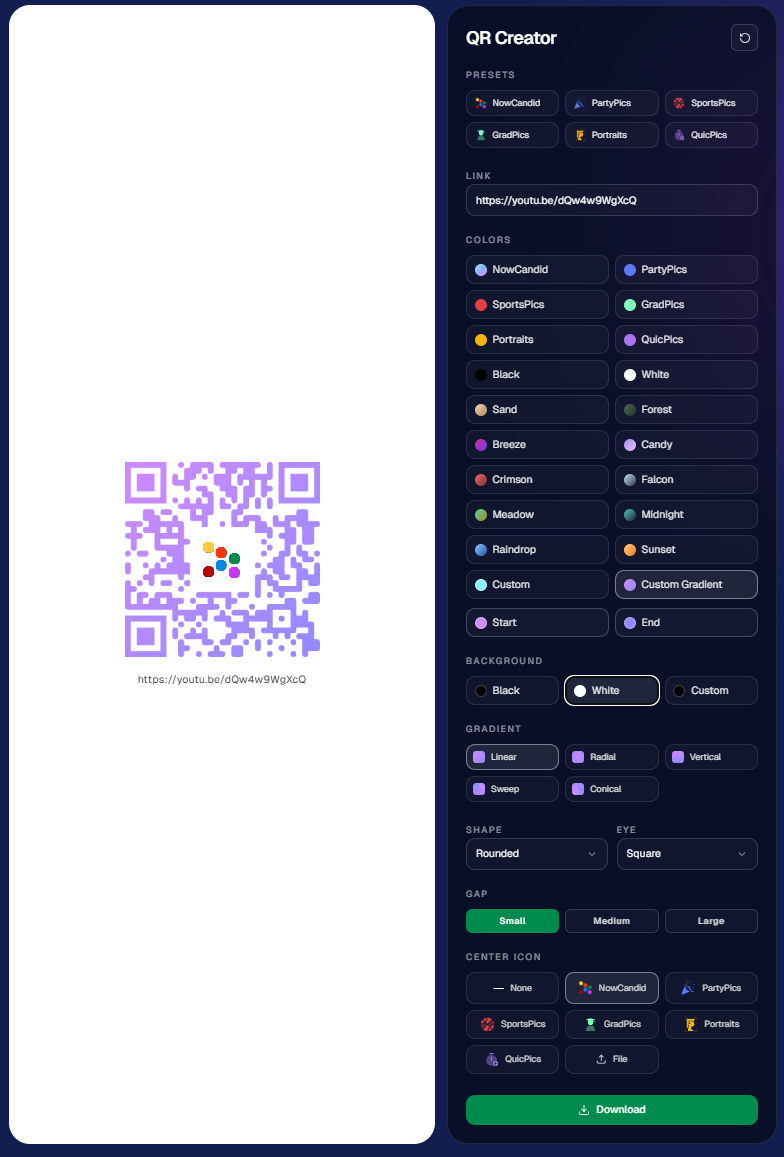
https://app.nowcandid.com/tools/qr

📱 Mobile Dashboard Improvements

🔄 Swipe down to refresh any page (no app update needed, just refresh)

↔️ Swipe left/right in image lightboxes to move between images (desktop users already have arrow keys)

🍬 Overall improved Candy experience on mobile

🖥️ Dashboard Improvements

📂 PhotoRoster upload limit increased to 10,000 members

🏷️ PhotoTag assignment via Edit Folder fixed (won’t remove all tags unless you choose “None”)

👤 Create Participant button re-enabled (shows warning if event is older than 60 days; roster import still disabled for older events)

⚡ Faster event list search for accounts with many events

🖼️ Event cover photo now visually anchors the Event Details & Tags pages

🧾 Fixed overlay import not working properly

🔔 Fixed toast notifications appearing behind popups

🌾 Candy Culler Duplicate detection improvement

  • When using “Duplicates Only” in Candy Culler, duplicates now appear side-by-side for easier reviewing.

🛍️ Retail Improvements

📄 Fixed pagination buttons requiring page jump to function

🏈 Improved Jersey Jotter search speed/performance

🌀 LiveLoop Fixes

🛠️ Fixed certain events stopping after running for awhile

📢 Fixed not being able to upload advertisements

💸 Shipping Update

📦 5×7 Statuette shipping cost reduced thanks to a new shipping method for that product

  • From $7.25 → $3.25 (about 55% lower)

That’s the week!

Bigger AI editing control, faster participant lookup, custom QR codes, and a lighter shipping cost on 5×7 Statuettes.

Keep creating magic,

Candy 🍬

Related articles

New Reporting Feature
Feature Updates
March 7, 2023

New Reporting Feature

2
 minutes read
Recently, we rolled out a much-needed reporting tool for our NowCandid™ users!

Two new reporting tools that will be able to give you a macro view into your business’s performance, as well as a lot of helpful data and analytics on your events!


Tool #1, the Sales Report:

This report focuses on reporting all your sales within a date range! It’s filterable by which NowCandid™ program you’re using as well and can report your sales by day or your sales by month. Once you have your date range, filters, and date format set, you’ll get a reactive bar graph as well as a series of totals and averages for your sales performance within that date range! This report is great for quickly getting an idea of your overall income and margin.


Tool #2, the Events Report:

This second report is where you can really dig into your various metrics. Instead of reporting on all sales during a date range, when you choose a date range, you’re selecting all the events that have a Start Date within that date range. Those events and their totals will be what’s included in this report! So residual sales on older events would not be included like they would be in the Sales Report. After you choose a date range, this report can also be filtered by NowCandid™ program!

You can also choose whether to include $0 sale test events you may have made, so that you don’t drag down your averages on this report. If there are any non-$0 sale events you don’t want included, you can click the checkbox by the event to remove it from your total and averages as well! And lastly, once the information you are interested in is being displayed to you, you can export the data to preserve as a spreadsheet on your own device.


With several ways to look at your business’s performance, we believe these tools will be a great benefit to our users and help them make the most of their account with NowCandid™.

Our users will no longer have to guess or run a separate spreadsheet to understand their business’ performance or their overall margins.

Let us know if you have any questions or feedback!

Backprinting: The newest feature to promote your brand
Branding
March 3, 2023

Backprinting: The newest feature to promote your brand

4
 minutes read

With NowCandid, we stress how we try to make everything as white-label as possible.

This week, we've officially implemented a new feature that promotes your brand and drives sales in yet another way: Backprinting! Going forward, your business name, your contact info and the retail support email address will be on the back of all standard print products ordered (with the ability to include your business logo coming soon). Plus, the back of the print includes a unique QR code that when scanned, directs back to that person's individual gallery from that event (even if scanned 10 years from now) so they can buy more prints and increase your residual sales long term! With this change, all NowCandid users will now be delivering an even higher quality product, promoting their brands more effectively than ever, booking more business, and bringing in more residual sales as the years go on.

We hope you are as excited as we are!

Note: your business name will replace NowCandid in the example image.

How One Night Led to $15,000 in Social Photography Sales
Success Stories
December 12, 2022

How One Night Led to $15,000 in Social Photography Sales

9
 minutes read

Amy Lombardo, and her photography group recently sent several photographers to a military ball and at the time of writing this article, had over $15,000 in sales! To accomplish this, Amy used Now Candid’s Party Pics Now program & Tap A Face workflow with 4 photographers at the event. Several of these photographers worked photo stations with backdrops Amy provided (gray backgrounds with flags bordering the background) while other photographers roamed the party taking posed photos of the guests.

$15,000 is a lot of sales for one social event already, but it is especially impressive when you consider the fact that this was Amy’s first Now Candid event.

Amy Lombardo had this advice for those considering using Now Candid for their next event: “Keep it simple and trust the process. … When planning my first Now Candid event, I was advised to not overcomplicate things and to not get hung up on some of the more minor details. Following through with how the system is intended to work turned out very well for us!”

Thanks for trusting the process Amy! We wish you many successful events to come. To see Amy’s entire video testimonial, click the play button below.

Let’s get in touch

If you’re a photographer looking to add NowCandid services to your wheelhouse – set up a call by clicking the button below.

How to customize formatting for each rich text

How to customize formatting for each rich text

How to customize formatting for each rich text

How to customize formatting for each rich text

How to customize formatting for each rich text

What’s a Rich Text element?

The rich text element allows you to create and format headings, paragraphs, blockquotes, images, and video all in one place instead of having to add and format them individually. Just double-click and easily create content.

A rich text element can be used with static or dynamic content. For static content, just drop it into any page and begin editing. For dynamic content, add a rich text field to any collection and then connect a rich text element to that field in the settings panel. Voila!

Headings, paragraphs, blockquotes, figures, images, and figure captions can all be styled after a class is added to the rich text element using the "When inside of" nested selector system.

  • List One
  • List Two
  • List Three
  • List Four
  • List Five

This is a link

This is bold text