

Weekly Recap: Better PhotoTag Controls & Roster Improvements 📸✨
.png)
Hey photo friends! 👋
Candy here with another weekly recap! This week brings some especially useful workflow upgrades, including better PhotoTag management in Manage Images, larger virtual group limits, and several improvements for large rosters and PhotoRosters.
Let’s jump in!
🏷️ Better PhotoTag Management in Manage Images
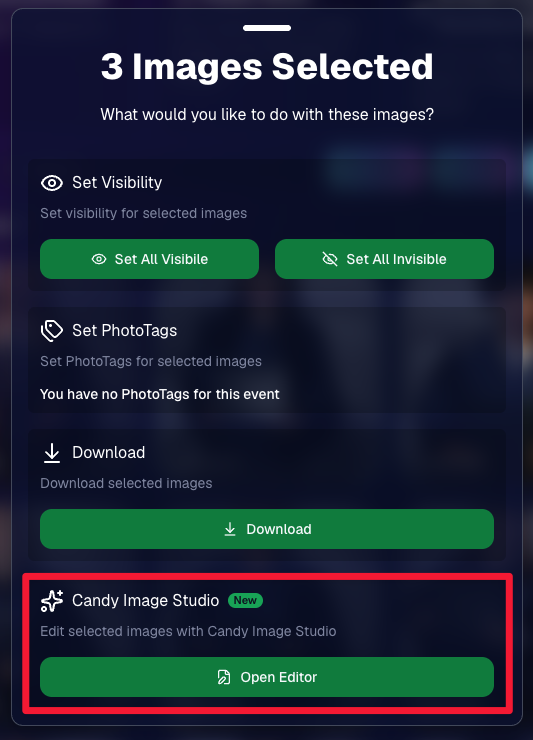
You could already select multiple images and add a PhotoTag. Now you can clean them up just as easily.
➖ New Remove PhotoTags option
- Select multiple images in Manage Images and use the new Remove PhotoTags button to remove PhotoTags from the selection.
🧹 Duplicate PhotoTag assignment fix
- Fixed an issue where Edit Folder could assign the same PhotoTag to the same image multiple times.
👥 Move PhotoTagged Group Photos to the Top
There’s also a new Advanced Offer setting:
PhotoTagged Group to Top of Gallery
When enabled, PhotoTagged Group Photos will appear at the top of Personal Galleries instead of the bottom.
We generally recommend leaving this off, but it can be useful for Events where Personal Galleries contain a very large number of individual images and you want important Group Photos to be easier to find.
📥 Multi-Select Download Change
Downloads started through the Selected Images sheet in Manage Images will now automatically retry if an individual download stalls.
This should be helpful when working on slower or congested networks where one image hanging could otherwise interrupt a larger download.
📋 Roster & PhotoRoster Improvements
Several fixes this week make roster workflows more reliable:
👥 Large roster uploads fixed
- Fixed uploads for customers with more than 1,000 people in their spreadsheet.
✉️ Malformed email handling improved
- Fixed an edge case where an email containing a
?instead of an@could stop the upload process partway through the roster.
🔢 PhotoRoster Event counts fixed
- Fixed cases where the number of Events associated with a PhotoRoster could display incorrectly.
⚠️ Better PhotoRoster export errors
- Exporting a PhotoRoster directly from an Event page now provides the same detailed error reporting you’d receive when exporting from the PhotoRoster page itself.
🎨 Candy Image Studio Fix
🔁 More reliable “Try Again” edits
- Fixed an edge case where editing an Event image during a Try Again sequence could accidentally generate an entirely new image instead of using the existing edit as its starting point.
🖼️ Participant Download Fix
✨ Overlay downloads fixed for faux renders
- Fixed Download with Overlay not working correctly for faux renders — cutouts displayed with an Event background.
🧑🤝🧑 Virtual Groups
If you create a lot of Virtual Groups for an Event, and need to download them for some reason - this will save you some time!
📥 New Download All button
- The Virtual Group List page can now automatically render and download all Virtual Groups for an Event instead of making you process them one at a time.
👥 Up to 200 subjects per Virtual Group
- The maximum subject limit in Virtual Group Builder has been increased to 200.
That’s the week!
Relatively light changes this week (compared to our usual weekly recaps at least) as we work on some important things behind the scenes!
Keep creating magic,
Candy 🍬






.svg)


