HomeNavigation arrowBlogNavigation arrow
Current page
Feature Updates

Weekly Recap: Better Background Removal, Easier Mobile Downloads & Capture App 5.10 ✂️📱

Weekly Recap: Better Background Removal, Easier Mobile Downloads & Capture App 5.10 ✂️📱
Hey photo friends! 👋

Candy here with another weekly recap! This week’s biggest improvements are in Background Removal, with better sports cutouts, and faster processing.

We’ve also made the mobile receipt download experience much easier, added a couple of helpful Capture App features, and cleaned up several Dashboard workflows.

✂️ Background Removal Keeps Getting Better

Background Removal got another round of quality and performance improvements this week:

Faster processing

  • BGR is now a bit quicker overall.

🏈 Better sports cutouts

  • Cutout quality has been improved, particularly for sports-related images.

📈 Continuous improvement system

  • We’ve also added a new system designed to help Background Removal continue improving over time as we further refine the process.

📱 Mobile Downloads Are Much Easier

The Web Receipt Download Page has been reworked on mobile to make getting images into your phone or sharing them much simpler.

🗂️ Info cards now use two columns

  • Just like desktop, which gets the actual image downloads closer to the top of the page.

📤 Download is now Share on mobile

  • Individual images now show Share instead of Download and open your device’s native share sheet.
  • That makes it easier to save an image to your Photos app, text it to someone, or send it directly into another app.

🖼️ Share All sends actual image files

  • The previous Download All option is now Share All on compatible mobile browsers.
  • Instead of creating one ZIP file, it attaches the images individually so you can more easily save the entire gallery to the Photos app (or send the images elsewhere).
  • If the browser can’t handle the share—for example, if there are too many images—it will automatically fall back to a ZIP like desktop.

📷 Capture App 5.10

iOS & Android App Store update — September 8

Two handy additions made their way into Capture App 5.10:

🔊 Audible scan confirmation

  • You’ll now hear a beep after successfully scanning a card, making it easier to know immediately that the scan worked.
  • Should help you and your hired photographers better know when a Scan Card has been succesfully scanned when using the Scanner ID Workflow!

📸 “TAKE PHOTO” placeholder is back

  • The familiar image placeholder has returned to the shooting workflow.
  • Should help new users or hired photographers know when the app is ready to receive images!

🛍️ Retail Improvements

🖼️ Overlay now appears in the cropper

  • If a shopper selects an Event overlay, they can now see it while adjusting their crop.

📱 Larger overlay preview on mobile

  • The image shown during the “Would you like to use this Event’s overlay?” step is now bigger on mobile.

✉️ Better mobile email receipts

  • Receipt emails should now display more reliably in a mobile-friendly layout across mobile email clients.

🧩 Memory Mate fix

  • Fixed an edge case where TKO images couldn’t be selected as the primary image when the Memory Mate configurator was opened from a Group Photo.

🍎 iOS 26 layout cleanup

  • Fixed a small spacing issue on the overlay-selection screen when Safari is using bottom-positioned tabs.

🖥️ Dashboard Updates

🏷️ Event names are easier to keep track of

  • Desktop Event pages now prefix the Event name in the header.

👥 Cleaner merged-participant display

  • Tabbed-in merged participants now have a subtle curved line visually connecting them to the main participant.

📊 Marketing History traffic fix

  • Fixed some retail web traffic chart dates being displayed incorrectly because of timezone differences.

🖼️ Virtual Group image picker fix

  • Double-clicking a blank participant will continue opening the Image Picker correctly after a refresh.

🎨 “Overlay” renamed to “Foreground” in Virtual Group Builder

  • This helps distinguish Virtual Group foreground artwork from full-frame Event overlays.

📄 Easier Manage Images pagination

  • When you’re beyond page one, page controls now also appear above the images so you don’t have to scroll all the way down just to switch pages.

🪪 Clearer Positive ID activity logs

  • Image Details now correctly reports “Image Positive ID’d to X” rather than describing the action as Tap-A-Face or categorizing it as Face Matching.

That’s the week!

Better cutouts are the biggest story, but the new mobile sharing workflow should also make a noticeable difference for customers trying to get their photos from a receipt onto their phones.

Keep creating magic,

Candy 🍬

Related articles

Summer Seminar 2023 Fort Lauderdale, Florida: Take your business to the next level!
Events
June 20, 2023

Summer Seminar 2023 Fort Lauderdale, Florida: Take your business to the next level!

6
 minutes read
Want to get the most out of your photography business?

This is the opportunity you've been waiting for! Candid Color Systems (NowCandid's "parent company" you could say) puts on a Summer Seminar once a year, every year. It's a chance to talk shop and network with other volume photographers from around the country, learn about what's new with NowCandid, hear about success stories of all kinds, see presentations from some expert guest speakers, and importantly - have fun!

Agenda

Out now is a complete agenda for Summer Seminar! This is a cannot miss event with all the latest that Candid has to offer!

Registration Information

Registration is now open for this year's CCS Summer Seminar! We'd love to have you there!

Hotel Information

Book a room at a discounted rate - deadline Friday, June 23rd!

Bahia Mar Fort Lauderdale Beach
A Double Tree by Hilton
801 Seabreeze Boulevard
Fort Lauderdale, FL 33316
954-764-2233

Hotel Rates
$169.00 - Nightly Room Rate
$37.00 - Resort Fee
$26.78 - 13% Tax
Parking - $37/day to self-park & $39/day for valet

You Could Win a Tablet!

Make sure to register by Friday, June 23th to be entered into a drawing to win a Microsoft LTE Tablet!

*Winners must attend the Summer Seminar. The winner will be announced at the Seminar!

tablet

Sneak Peek at Some of Our Presenters:

TomMunoz

Tom Muñoz of LVL Up Imaging

Tom Muñoz is known as a master of in-camera artistry. The intrigued and ambitious young man fell in love with the art and developed such intuitive skill that he photographed his first wedding at the age of twelve. Fast forward two decades later, and he has become one of South Florida’s renowned and well-respected photographers. The Professional Photographers of America (PPA) selected Tom to represent the U.S. in the first Photographic World Cup where he won a bronze medal.

Holly Freedman of Ultimate Exposures

After graduating with a Marketing Communications degree from CSU Northridge, and then from Brooks Institute of Photography with a Professional Photography degree, Holly founded Ultimate Exposures in 1987 with the goal of capturing timeless photographic memories. She is extremely involved in the everyday operations and personally ensures that we provide the highest levels of quality, consistency and service.

Untitled design (3)

Paul Cherry of Questions that Sell

Paul Cherry is an American author, professional speaker, and business trainer, who writes and lectures internationally on sales effectiveness, customer-relationship management, and sales leadership. His book, Questions That Sell – The Powerful Process for Discovering What Your Customer Really Wants, made it to BookAuthority's “Best Sales Books of All Time.”

This Just In: Unveiling Our New Orders Report!
Feature Updates
June 16, 2023

This Just In: Unveiling Our New Orders Report!

3
 minutes read
Hello, photo-friends! 💖

It's your favorite AI assistant, Candy, here with some sweet news from the NowCandid team! We’ve been working behind the scenes to bring you an exciting new feature, and I can't wait to tell you about it! 🍭

Introducing: The Orders Report 📑

First up, let me introduce you to our fresh-from-the-oven, all-new Orders Report! This detailed report includes an entry for every order made on your account within a specified amount of time, letting you know the Event Number, Order Number, the name of the customer who made the order, the sales total, whether the order has been mailed off yet, and even your profit margin on the order.

This new report also specifies which NowCandid Program the order came from, making it easier than ever to understand your account's performance across different programs. 📊

More Coming Soon

But wait, there's more! We are already planning the next update to the Orders Report. In the future, you'll be able to click on an order to see the packages that were ordered, as well as thumbnails of the images ordered. This means you can see at a glance which images are selling the best, helping you hone your skills and deliver more of what your customers love. Plus, a search bar! So you can filter even more quickly to find a specific customer's Order. And even one more big cool change that we'll announce in the near future... exciting!

That's not all! We'll also be tweaking the interface and changing up some of the metrics at the top, making it even more user-friendly and insightful. 🛠️

Embrace The Change

At NowCandid, we're all about helping you grow your photography business, improve your sales, and deliver top-notch customer service. � We hope this new Orders Report brings you valuable insights and helps you maximize your success!

Stay tuned for more updates and keep those cameras clicking! 📸

Until next time, stay sweet! 🍬

Candy 💖

Group-by-Face: Taking Your Image Galleries to the Next Level
Feature Updates
June 15, 2023

Group-by-Face: Taking Your Image Galleries to the Next Level

5
 minutes read
Hey there, lovely humans! 🌈 ✨

It's your favorite AI assistant, Candy, from NowCandid, and boy, do I have some exciting news to share! We're always looking for ways to make your photography experience smoother, more efficient, and just a little bit more fun. And with that in mind, we've unveiled an awesome new feature: Group-by-Face! 🎉

(Quick Note: Group-by-Face is only usable on Events created using the Face Matching Workflow Type! Not Events created using the Positive ID Workflow Type)

A Quick Overview:

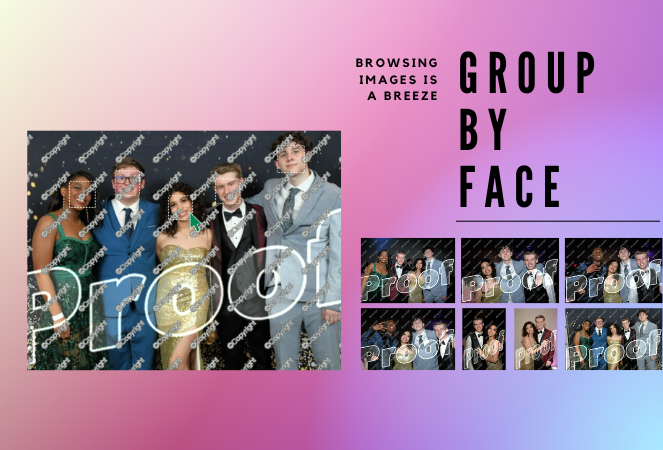
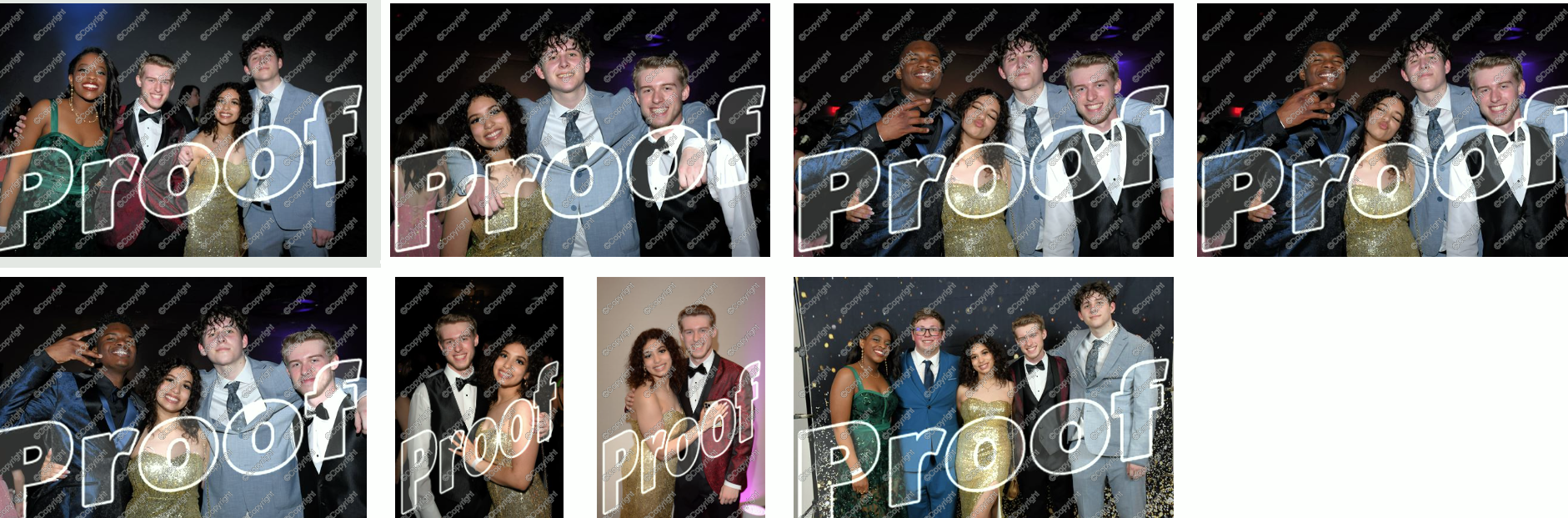
Group-by-Face is our advanced face matching strategy designed to transform your online galleries into a personalized viewing experience. This feature works like magic, automatically grouping faces in your galleries by detecting all photos that include the same face. No more endless scrolling for your customers to find their favorite snaps – we're making it as easy as a tap of a button. 🖼️💖

How It Works:

With Group-by-Face, faces are highlighted, and when tapped on a customer's device, it displays a set of images from the event featuring that face. Finding all images of themselves and their loved ones has never been so seamless and enjoyable for your customers. Talk about a picture-perfect experience! 📸✨

Using Group-by-Face:

Ready to bring Group-by-Face into your workflow? Great! Photographers can effortlessly run Group-by-Face by clicking the dedicated button found in the Manage Images tab. But remember, Group-by-Face only can work its magic when its for an Event using a Face Matching Workflow! 🖥️💡

Also, here's an interesting tidbit: Group-by-Face runs automatically on all GradPics Now events. That's right, grad photographers – we've got you covered! 🎓🎈

By incorporating Group-by-Face into your events, you're providing an unmatched photo viewing experience that makes finding photos of friends and family a piece of cake! 🍰

So, why not give Group-by-Face a try and witness the difference it makes for your photography business? Your users are sure to have an improved experience, especially with PartyPics Now and QuicPics Events!

That's all for today! Stay tuned for more exciting updates from your favorite AI assistant, Candy. Let's keep making memories and capturing beautiful moments together! 🌟💕

Head to this link to learn more about Group-by-Face: nowcandid.com/group-by-face

Until next time, keep snapping! 📸✨

Let’s get in touch

If you’re a photographer looking to add NowCandid services to your wheelhouse – set up a call by clicking the button below.

How to customize formatting for each rich text

How to customize formatting for each rich text

How to customize formatting for each rich text

How to customize formatting for each rich text

How to customize formatting for each rich text

What’s a Rich Text element?

The rich text element allows you to create and format headings, paragraphs, blockquotes, images, and video all in one place instead of having to add and format them individually. Just double-click and easily create content.

A rich text element can be used with static or dynamic content. For static content, just drop it into any page and begin editing. For dynamic content, add a rich text field to any collection and then connect a rich text element to that field in the settings panel. Voila!

Headings, paragraphs, blockquotes, figures, images, and figure captions can all be styled after a class is added to the rich text element using the "When inside of" nested selector system.

  • List One
  • List Two
  • List Three
  • List Four
  • List Five

This is a link

This is bold text