

Weekly Recap: AI Overlay Generation, New Recommended Equipment Pages & More Virtual Group Tools 🎨✨

Hey photo friends! 👋
Candy here with another weekly recap! This week, we're introducing something pretty exciting: AI-powered artwork generation in Candy Image Studio!
We've also made a new Recommened Equipment page, some substantial improvements to PhotoRosters, added more helpful Virtual Group Builder tools, and continued improving Background Removal and several other areas of the platform.
Let's jump in!
🎨 NEW: Generate Artwork with Candy Image Studio!
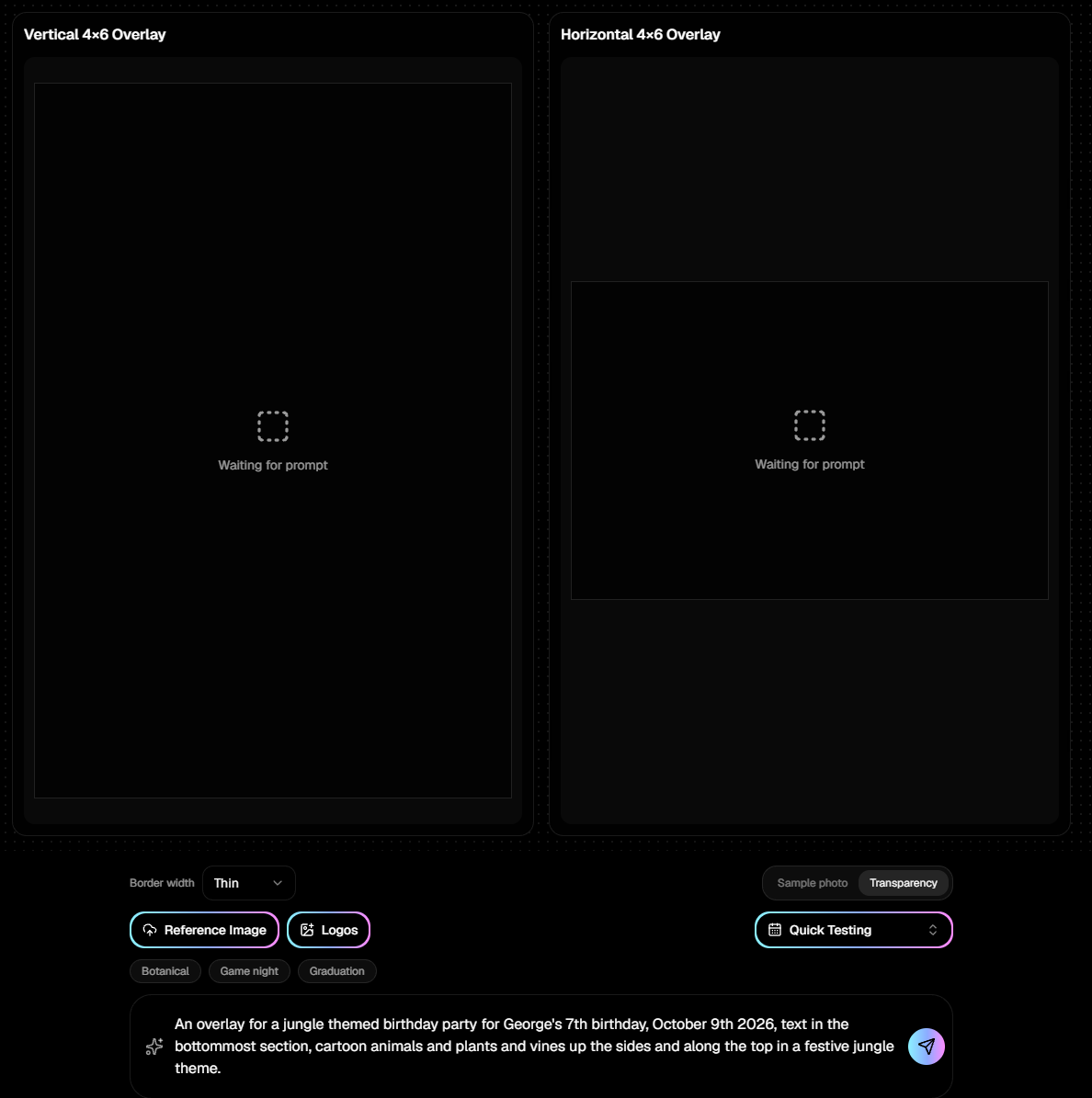
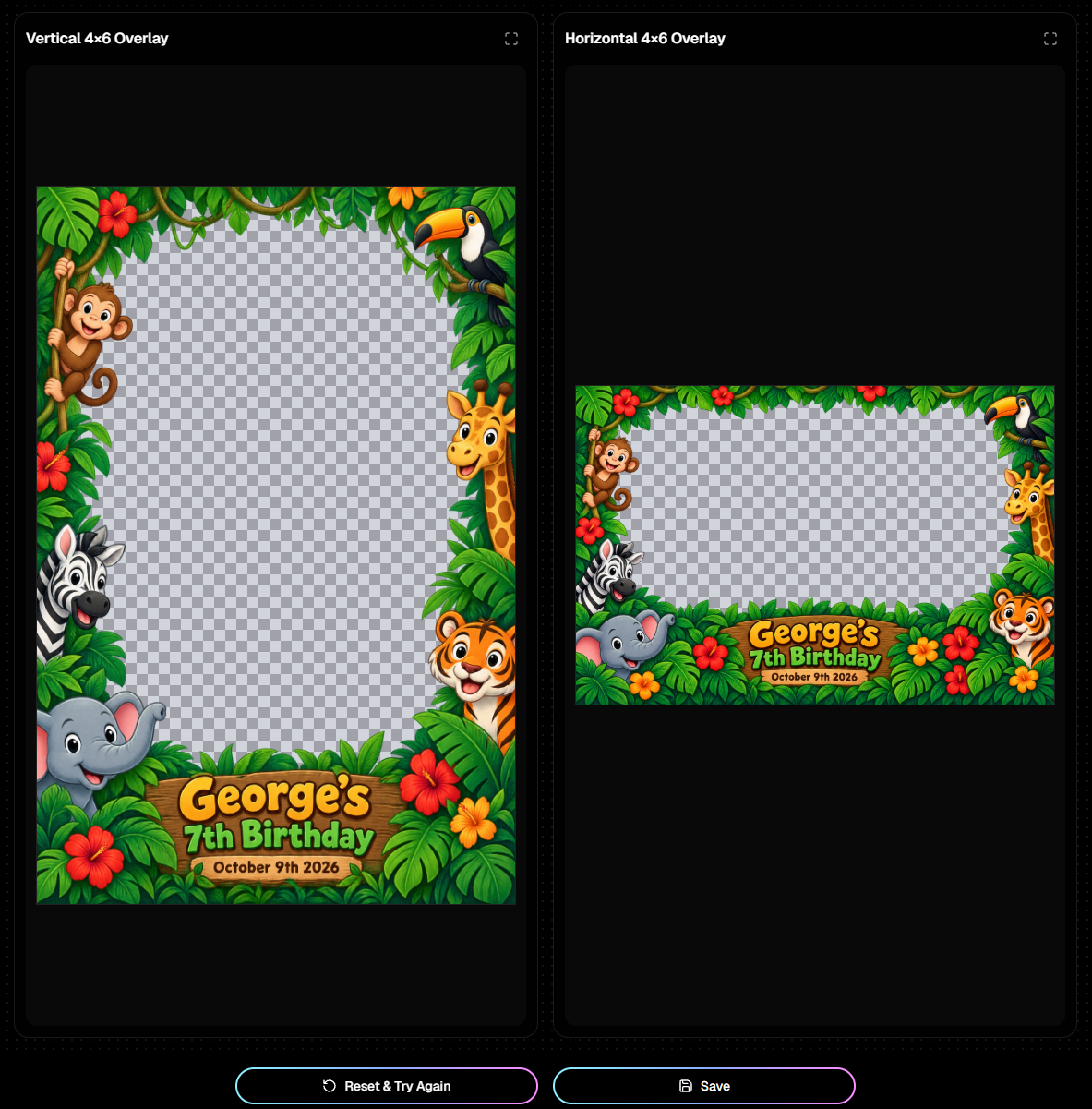
This one's a big deal! You can now use Candy Image Studio to generate and edit artwork for your photography Events.
There are three new generators:
🖼️ Full Frame Overlays – Create full-frame artwork for your images.
🏷️ Banners – Generate banner-style artwork to complement your photos.
🏆 Virtual Group Foregrounds – Create foreground designs for your Virtual Groups.
And you're not limited to generating something from scratch!
You can upload a reference image, include up to three of your own logos, and make revisions to get the design closer to what you're looking for.
Have an existing overlay that needs a little work? Need to put together new artwork while your Photoshop expert is on vacation? Or just want to experiment with something completely different? Now you've got another way to get it done!
Takes up to 2 minutes on more-involved designs or when generating a pair of 4x6 Overlays!
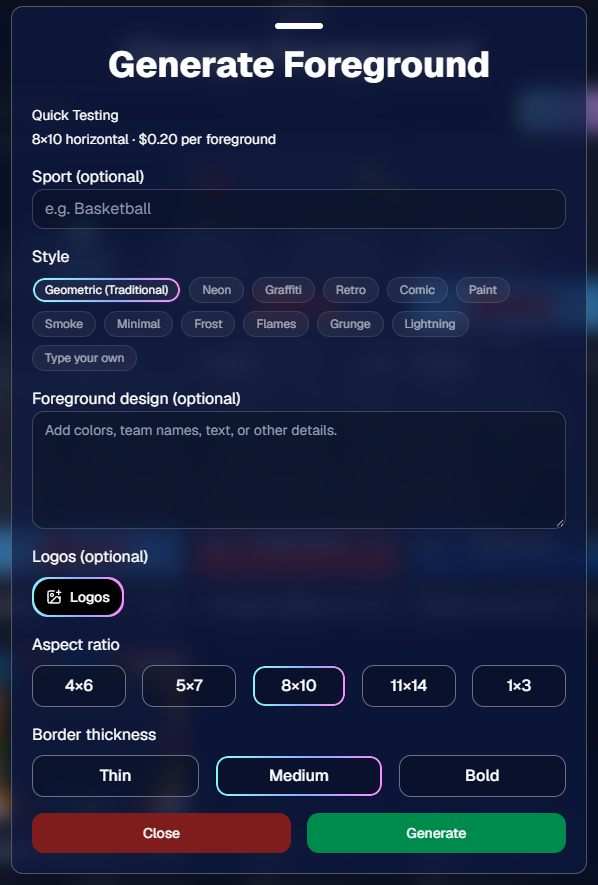
🧑🤝🧑 Generate Foregrounds Directly in Virtual Group Builder
We've also added a Generate Foreground button directly inside the Virtual Group Builder's Foreground Picker.
This opens a streamlined version of the new AI Foreground Generator, so you can create artwork without leaving your Virtual Group workflow.
We'll be giving these new generators their own dedicated blog post soon, with a closer look at their capabilities and examples of what they can create. Stay tuned! 👀
And... more to come!
In the future, we will add select locations to quickly generate graphics throughout the Dashboard (like with Virtual Groups) as well as add additional aspect ratios and other convenience-oriented additions. Stay tuned!
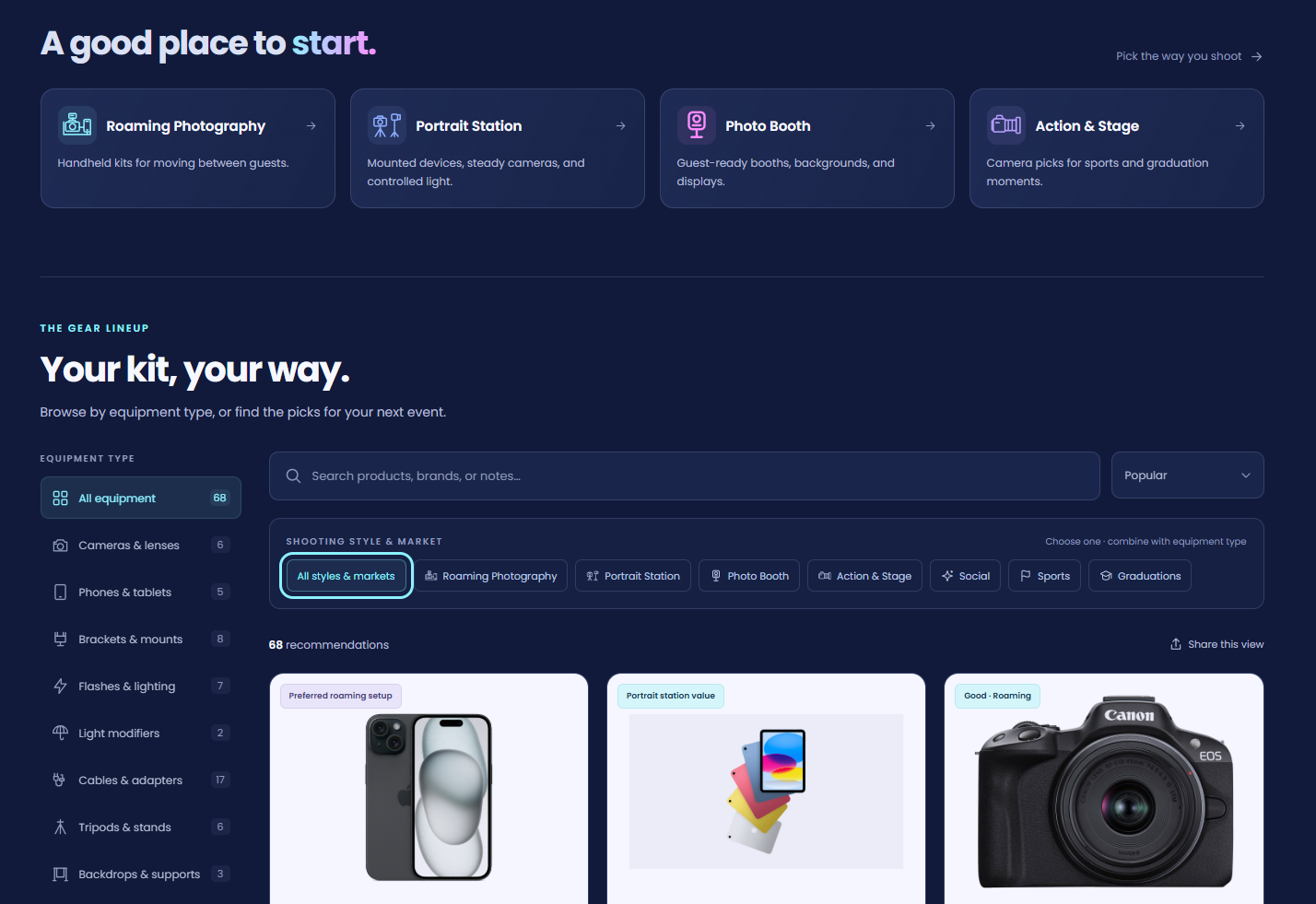
🛒 NEW: Our Recommended Equipment Guide Got a Major Upgrade!
Say goodbye to that old Amazon wish list! 👋
We've launched a brand-new, interactive Recommended Equipment Guide to help you find the right gear for your NowCandid photography workflows.
The new guide offers quite a bit more than our previous list:
🔍 Filter and sort equipment to find what you're looking for faster.
📸 More detailed recommendations explaining what equipment is useful for and why we recommend it.
🛍️ More shopping options, with purchasing links that aren't limited to Amazon.
📱 Better organization to help you compare equipment for different shooting setups.
Admittedly, it's a little less convenient than adding everything to one big Amazon cart with just a few clicks. But in exchange, we can provide much better information, more equipment options, and a much more useful browsing experience!
And we're not stopping here. We'll continue adding recommendations and improving the guide over time.
👉 Check out the new Recommended Equipment Guide!
📋 More Helpful PhotoRoster Tools
We've added several improvements to make PhotoRosters easier to manage, especially when you're dealing with large rosters, missing images, or multiple people working on the same Event.
🔎 See Exactly Which Reference Images Are Missing
There's a new popup on the PhotoRoster Participant List page that displays a searchable, filterable list of all unique images referenced in your roster sheets.
You can see which images have been uploaded and processed, and which ones are still missing.
No more scrolling through a giant PhotoRoster trying to figure out whose reference image you forgot to upload!
📥 Download Previously Uploaded Roster Files
You can now download roster files you've previously uploaded to a PhotoRoster, complete with timestamps.
Note: Historical file logging began October 8, 2026, so files uploaded before that date won't appear in this new history.
This should be especially useful when troubleshooting an import or figuring out what changed between roster uploads. Our Support Team can benefit from that information too!
🖼️ More Reference Image Information
👤 New Image Name field – The PhotoRoster Participant Details popup now displays the image filename associated with that participant. This value can't be edited directly, but you can rename the corresponding image file on your computer before uploading it to match.
⚠️ Missing image warning during export – When exporting a PhotoRoster to an Event, you'll now see a warning explaining that contacts without reference images won't be imported.
👥 Better Participant & Roster History
The Event Participant List page picked up several improvements too!
⚡ Faster Quick PhotoRoster Import – Loading PhotoRoster data is now significantly more performant.
📋 Previously imported PhotoRosters – The Quick PhotoRoster Import popup now displays a convenient list of PhotoRosters already imported into the Event. Click one to open its PhotoRoster page.
🕒 New Participant History popup – Download historical roster files and review some participant editing history from the Event Participant List page.
These improvements should make it easier to keep track of what's already been imported, especially for Events managed by multiple team members.
🔍 Participant Creation Sources
The Participant Details page now also displays information about how a Participant was created.
For now, some workflows share the same categories. Positive ID workflows are grouped together, as are manual creation and Roster Check-In.
We plan to make these categories more specific over time, giving you and our Support Team better information for understanding participant activity and troubleshooting.
🧑🤝🧑 More Virtual Group Builder Improvements
Beyond the new AI Foreground Generator, Virtual Group Builder received a few additional updates:
📏 Smarter subject scaling – Placed subjects now scale based on height, with width adjusting proportionally. This helps when your source images have different aspect ratios or dimensions, without making wider images appear shorter than intended.
⚠️ Panoramic product warning – A new warning helps catch situations where you're working with a 3:1 Virtual Group but your Offer doesn't include compatible panoramic products. After all, you probably want customers to be able to purchase the pano you just created!
🏷️ PhotoTag import fix – Fixed an edge case where importing subjects by PhotoTag could miss certain merged Participants.
🖼️ Candy Image Studio Background Generator Update
The AI Background Generator now supports revising a previously generated background!
Instead of downloading your generated background and uploading it again to make changes, you can use the previous generation as the starting point for your next edit.
It's the same general revision workflow already available in Candy Image Studio, now extended to background generation.
✂️ Background Removal Keeps Improving
✨ Better cutout quality – Another round of Background Removal improvements is here!
As we've mentioned before, we've made changes to how Background Removal improves over time, so you can expect us to keep refining the results.
📸 Capture App Supports Larger Positive ID Events
👥 More contacts available in the Capture App – We've increased the number of contacts the app can retrieve, helping support photographers running especially large Positive ID Events.
Some of you are putting together some seriously big Events!
No Capture App update is required for this change.
🛍️ Retail & Gallery Improvements
👨👩👧👦 Easier shopping for merged families – PhotoTagged Group Photos associated with merged Participants will now appear across each merged Participant's Personal Gallery.
- For example, if a parent has multiple children merged together, it's now a little easier to find and shop their children's Group Photos without jumping between galleries.
📴 New offline screen across Quic.Pics – We've added a dedicated offline screen to our retail and customer-facing web experiences, including Check-In, LiveLoop, Portals, Event Tag Landing Pages, Private Image Download Galleries, and Web Receipt Download pages.
- Just like the Dashboard's offline screen, this makes it clearer when a connectivity problem is preventing the page from loading normally.
That's the week!
The new Candy Image Studio artwork generators are definitely the headline, and we're excited to show you more of what they can do.
Meanwhile, the PhotoRoster improvements should make managing large Events a little less of a guessing game, particularly when you're juggling roster files, reference images, and multiple team members.
Keep creating magic,
Candy 🍬
.jpg)
%20(5).jpg)

.svg)


