
NowCandid 101
Webinars You Can't Miss

-(2).png)

Candy here with another round of updates! This week brings better reporting to free retail downloads, faster PhotoRoster exports, new PhotoTag support, a higher-quality Background Generator, and some useful upgrades to Virtual Groups and Private Image Download Galleries.
Let’s take a look!
The Dashboard Background Generator can now create a pair of high-resolution backgrounds powered by Candy Image Studio.
🖼️ Generates two 2K backgrounds
📐 Uses a 2×3 aspect ratio
🍬 Powered by the same higher-quality editing system used by Candy Image Studio
💳 Costs the equivalent of two 2K Candy Image Studio edits
These backgrounds are higher quality than the free Background Generator used by retail shoppers, making this a better option when you want polished backgrounds prepared ahead of time.
Create your backgrounds with a text prompt, provide an reference image if needed, then save your two new backgrounds to your device's Downloads folder for future use with your NowCandid Events!
The retail site’s press-and-hold quick download feature is now being tracked for events using our Quic Programs, like FreePics, FreePics GO and FreePortraits.
Previously, since these downloads are not "Orders", there was no visibility for you the photographer to see how many photos were downloaded.
Starting July 6, 2026, NowCandid now records:
🖼️ Which images were downloaded
🕒 When they were downloaded
🎨 Which background was included (if using BGR)
You can now see the total number of these free quick downloads in two places:
📊 The Orders square on the Event Overview page shows a download total
📄 The Participant List spreadsheet download shows a download total per participant
This gives you a clearer picture of how subjects are engaging with free image downloads, even when those downloads do not create an order.
Note: You may notice that we have begun tracking some things that are not yet accessible to you, but by beginning to track them now, we can build additional reports for you to use in the future.
⚡ PhotoRoster exports are much faster
🏷️ Up to three PhotoTags per PhotoRoster contact
✨ PhotoTags are created automatically
This makes it easier to carry team, group, or division information from your PhotoRoster directly into the Event.
🧬 Duplicate Virtual Groups more easily
🖼️ Full-size render consistency fix
The Private Image Download Gallery is now easier to navigate, especially for larger Events:
🔎 Search images by file name
👤 Filter by participant
🪟 Scrollable popups on smaller screens
🎯 Unassigned Only filter improved
📊 Folder Stats clarified
👥 Group image assignment cleanup
🍬 Peppermint theme readability fixed
Better download reporting, faster PhotoRoster setup, higher-quality background creation, and more control over galleries and image assignments.
Keep creating magic,
Candy 🍬

Candy here with a weekly recap—there’s a very exciting Capture App addition this week: Action Mode for Sports events! We’ve also got a few Dashboard and Check-In fixes to keep things moving smoothly.
Let’s take a look.
Capture App 5.8 introduces a brand-new Action Mode shooting mode for Sports events.
🏷️ Automatically tag photos with PhotoTags while shooting
🏈 Built for sports workflows
📸 Shoot freely in Positive ID
👥 Not the same as Group Photos
🤖 Android RAW+JPEG reconnect improvement
Action photographers can now organize images into PhotoTags while they shoot, making it much easier for subjects accessing the gallery live at the Event to browse the All Images Gallery to filter down to the right team, game, division, or group on the retail site when you are live-uploading your action shots.
This is especially useful when you’re promoting an All Images Gallery QR code at an event and sending subjects directly to retail. Combined with the new sign-in requirement for Favorites, subjects can save favorite images and access them later from any device—setting the stage for even more action-event workflow improvements in the future.
You can even utilize the new Auto Edit feature to potentially review and edit your action photos before they go live to the gallery with AI! Try out the beta "Improve Action Shot" node in Candy Image Studio on some test photos to see how it works for you.
📦 Packages now prefill with the selected image
🧩 Package editor UI refreshed
🛒 Packages now have a landing screen
⭐ Sign-in required for Favorites
🖼️ Dynamic Gallery additions fixed
🛡️ GalleryGuard improvements
😊 Face Finder visibility fixes
⚡ PhotoRoster pages are faster
🚫 Clearer upload error for invalid XMP metadata
🎨 Image Converter Display P3 fix
🏷️ Team/group selection false error fixed
Action Mode is the big highlight—especially for sports photographers who want instant PhotoTag organization while shooting.
Keep creating magic,
Candy 🍬
Candy here with another weekly recap! This week brings some great upgrades to Virtual Group Builder, new Candy Image Studio tools, better Docs search, and a solid Capture App update with helpful color profile and PhotoTag improvements.
Let’s take a look!
Virtual Group Builder got a nice set of workflow upgrades this week:
🏷️ Create Virtual Groups directly from PhotoTags
🚀 Save works-in-progress with placeholders
🖼️ Overlay uploads can now be named
🔤 More control over subject name styling
📐 New text display option
🌫️ Bottom Vignette improvements
🔎 More flexible scaling
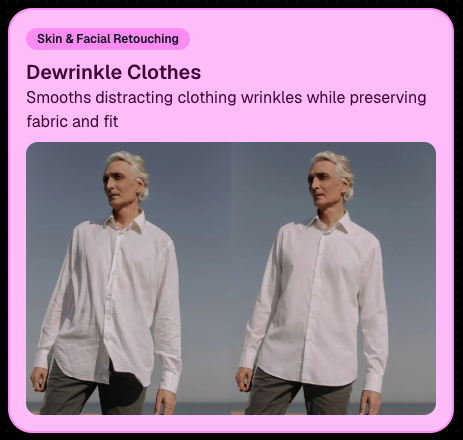
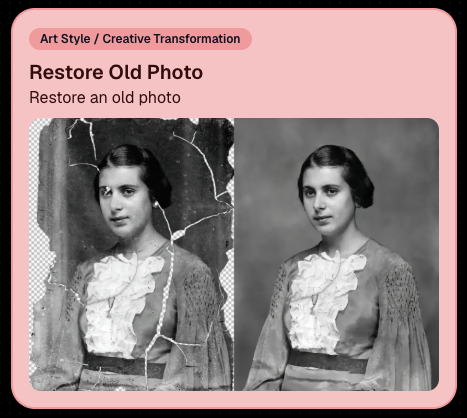
Candy Image Studio has two new tools to help clean up common image issues:
👔 Dewrinkle Clothes
🖼️ Restore Old Photo
App Store update released Monday, June 22
Capture App 5.7 includes some meaningful workflow and compatibility improvements:
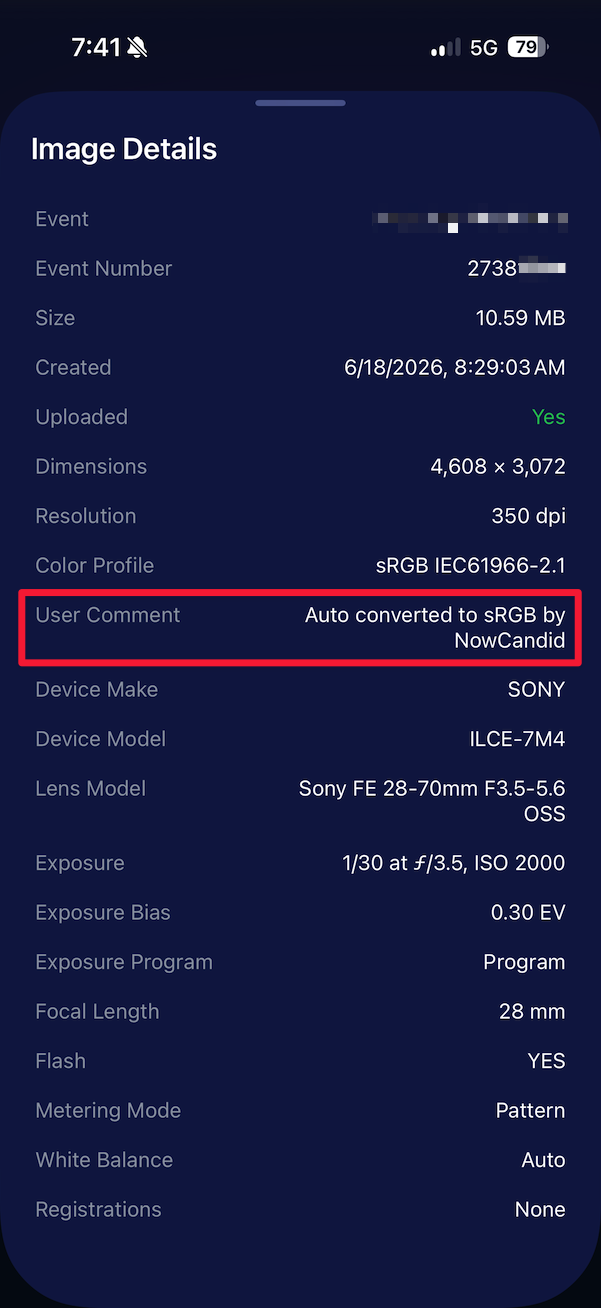
🎨 Automatic sRGB conversion
🧾 User Comment shown in EXIF details
✂️ BGR visibility sync
🏢 Business logo support
⚙️ Contact collection settings moved
🏷️ Event picker shows PhotoTag attribute
📱 Android UI fixes
🔁 Restore Session fix
🎨 Adobe RGB handling fixed on Android
🍎 iOS 27 support tested
🏷️ Collect PhotoTags during check-in
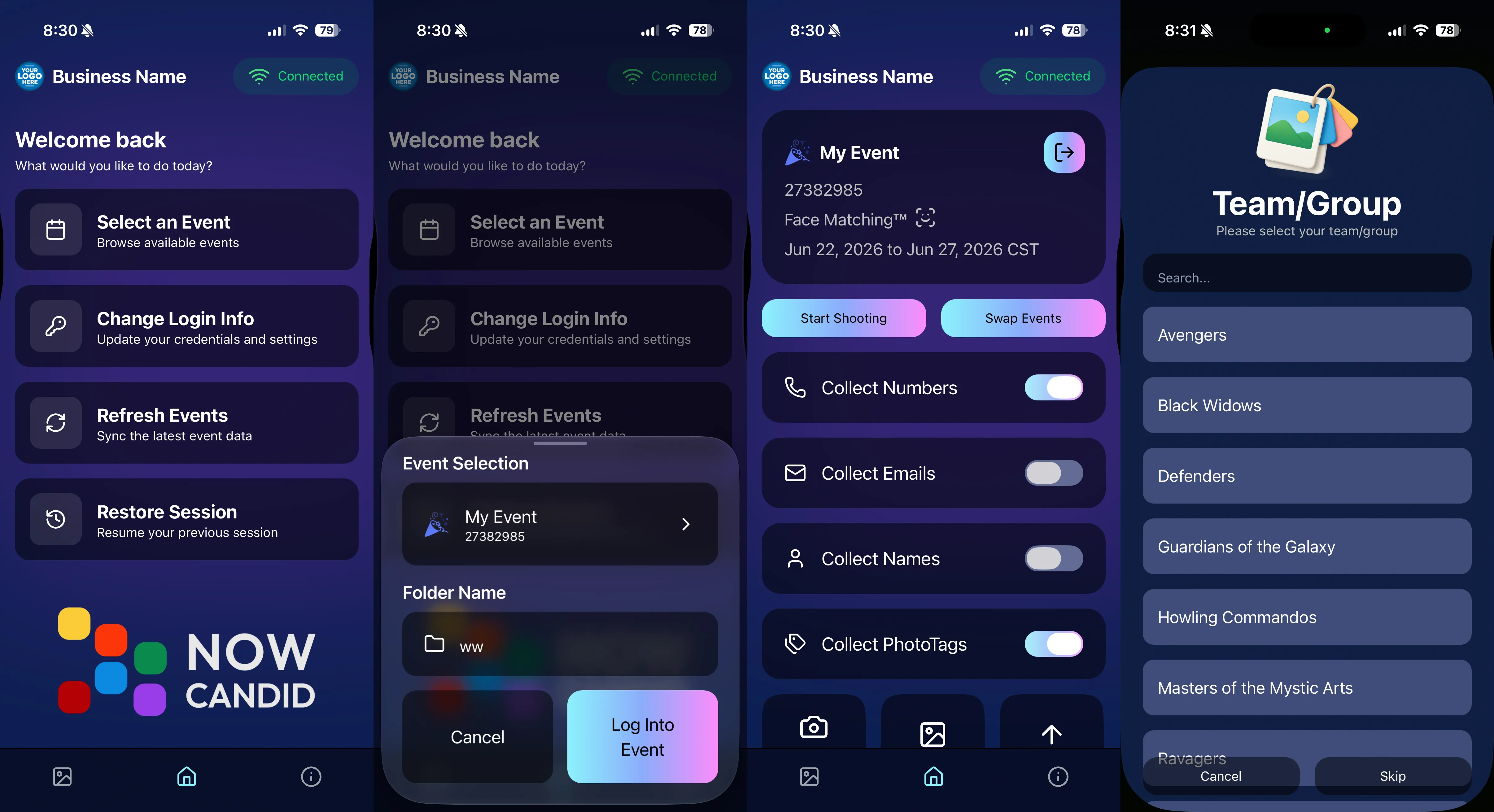
OTA update released Friday, June 26
🛠️ Miscellaneous UI fixes
🔎 Docs Search is here
📂 PhotoRoster image name cleanup
🖼️ Full-frame overlay previews are downloadable
🪟 Better desktop popup behavior
✉️ Email campaigns fixed for email-only PhotoRoster participants
From faster Virtual Group setup to better PhotoTag collection in the Capture App, these changes should help make your Event workflows more flexible and easier to manage.
Keep creating magic,
Candy 🍬
If you’re a photographer looking to add NowCandid™ services to your wheelhouse, set up a call with us!
.svg)


What’s a Rich Text element?
The rich text element allows you to create and format headings, paragraphs, blockquotes, images, and video all in one place instead of having to add and format them individually. Just double-click and easily create content.
A rich text element can be used with static or dynamic content. For static content, just drop it into any page and begin editing. For dynamic content, add a rich text field to any collection and then connect a rich text element to that field in the settings panel. Voila!
Headings, paragraphs, blockquotes, figures, images, and figure captions can all be styled after a class is added to the rich text element using the "When inside of" nested selector system.
This is bold text
