HomeNavigation arrowBlogNavigation arrow
Current page
Photography Tips

The Hidden Cost of Shipping in Volume Photography

The Hidden Cost of Shipping in Volume Photography

by Jack Counts III - NowCandid Project Manager

‍

A photography business recently switched to NowCandid from another volume photography platform...

‍

During the transition, they shared some details about how their previous software handled shipping and fees.

‍

I knew different platforms approached this stuff differently. But seeing the mechanics laid out was one of those "wait… what?" moments.

‍

In the setup they described, the photographer didn’t set the shipping charge. They didn’t keep that shipping money. But the amount charged for shipping still increased the percentage-based fees coming out of their payout.

‍

Which is honestly kind of wild to me.

‍

Let me break down why:

  1. The shipping & handling amount could be set outside the photographer's control.
  2. The photographer would not generate any additional revenue on this shipping charge, which may be marked up.
  3. The photographer would pay ecommerce, payment processing, and potentially sales tax on the collected shipping.

‍

That can add up to some significant % in additional costs that photographers might not otherwise notice.

‍

Hearing about this hard-to-notice cost got me thinking about shipping in the volume photography space.

‍

What does that shipping charge actually cost the photographer?

‍

Some volume photography platforms use lab-set shipping rates for orders delivered directly to customers. GotPhoto’s documentation (help.gotphoto.com/en/support), for example, says its direct-shipping charges are determined by the lab and automatically added at checkout.

‍

Then there’s a separate question: Does that shipping charge also increase the fees coming out of the photographer’s payout?

‍

PhotoDay’s published standard pricing (support.photoday.io/en/articles) applies its 10% ecommerce fee to the total order, including products, shipping, and tax. Its reporting guide (support.photoday.io/en/articles) says customer-paid shipping goes directly to the lab.

‍

Let’s use a hypothetical order as an example with $50 in photo products plus $10 shipping. The customer pays $60 before tax.

‍

A 10% ecommerce fee on the $50 in products would be $5. But because that fee also applies to shipping, the photographer pays $6 in total ecommerce fees instead of $5 (before accounting for any additional ecommerce fees on collected sales tax).

‍

That extra dollar might not sound like much. But it means the ecommerce fee consumes 12% of the photographer’s product sales, even though the photographer doesn’t keep any shipping revenue.

‍

That’s an additional two percentage points of product revenue going toward ecommerce fees because of shipping.

‍

Here’s how that changes across a $5–$20 shipping range:

‍

How shipping affects ecommerce fees on $50 in product sales
Customer's shipping charge 10% ecommerce fee on shipping alone Total ecommerce fee on products + shipping Effective fee as a share of $50 in product sales
$5 $0.50 $5.50 11%
$10 $1.00 $6.00 12%
$15 $1.50 $6.50 13%
$20 $2.00 $7.00 14%

Illustrative calculations assume $50 in product sales and a 10% ecommerce fee applied to products plus shipping. They exclude payment processing, sales tax, and fulfillment costs.

‍

Payment processing adds another layer. Under PhotoDay’s published 2.9% processing rate, that $10 shipping charge generates another $0.29 in fees. Combined with the $1 ecommerce fee, that’s $1.29 attributable to shipping alone, equivalent to 2.58% of the $50 in product sales. The fixed $0.30 transaction fee is separate; it isn’t an additional charge caused by shipping, so we don't need to include that in this math we're doing to determine additional cost.

‍

Across 1,000 orders like this, that adds up to $1,000 in ecommerce fees plus $290 in processing fees attributable to shipping.

‍

To be clear, charging processing on shipping isn’t the problem by itself. I understand why processing a larger payment costs more, and I’m not assuming shipping revenue is all profit for the lab, since packaging, handling, and postage need to be covered. The problem is that it’s one more fee applied to a number the photographer doesn’t control. The lab or platform sets the shipping charge, and if that charge runs high, the photographer still pays a percentage on every dollar of it.

‍

But an ecommerce commission on shipping money the photographer doesn’t benefit from or have a significant say in? That does not sit right with me.

‍

To be fair, PhotoDay does let photographers offer free economy shipping as a promo (support.photoday.io/en/articles), and its reporting guide (support.photoday.io/en/articles) says that when you do, the shipping cost is deducted from your payout. That takes the charge off the customer’s plate, but the photographer still isn’t the one setting it. The amount comes from the lab’s shipping rates on the price sheet, and those may be customer-facing rates with markup built in, not what it actually costs to get the package out the door.

‍

High shipping costs can put the whole order at risk

‍

The photography business I talked with also shared with me how costs related to expensive-to-ship items were entirely passed on to end customers during checkout.

‍

Say someone picks out a $70 product, then discovers shipping adds another $20. Their purchase just became almost 29% more expensive, before tax.

‍

Maybe they’re fine with that. Maybe that’s the moment they close the tab.

‍

Baymard Institute’s checkout research (baymard.com/lists/cart-abandonment) lists high extra costs, including shipping, taxes, and fees, as the top reason shoppers give for abandoning checkout, cited by 40% of respondents. That’s general ecommerce research, not a photography-specific rate, but it’s a pretty compelling reason to pay attention to the shipping line.

‍

And the actual fulfillment expense doesn’t necessarily have to appear entirely in that line.

‍

Consider two hypothetical ways to price the same purchase:

‍

Same $90 total, different shipping prices
Price breakdown Higher shipping Lower shipping
Product price $70 $85
Shipping $20 $5
Total before tax $90 $90

Hypothetical pricing example. Both options total $90 before tax; the difference is how the price is divided between the product and shipping.

‍

Same total. Different presentation.

‍

There’s research suggesting that distinction matters. A 2026 study in PLOS ONE (journals.plos.org/plosone) found a preference for free shipping even when the total purchase price stayed constant. It was a small study, but it gives us a reasonable question to test: Would customers respond better if more of the fulfillment cost were included in the product price and less appeared as shipping?

‍

While there is more testing we at NowCandid could do in this space to provide a more concrete answer to this question, we’ve recently seen abandoned carts come in at about 3% of the orders placed. In other words, for every 100 orders, only about 3 shoppers added something to their cart and never checked out - so we seem to be doing something right. 😎

‍

How NowCandid gives photographers more control

‍

With NowCandid, photographers can set their customer-facing shipping prices (nowcandid.com/blogs), rather than simply passing through a lab-set charge. They can also price shipping above the underlying cost to create additional margin.

‍

But having the opportunity to profit from shipping doesn’t mean you should always charge more for it.

‍

You can keep shipping very inexpensive and account for more of the fulfillment expense in your product pricing instead. That’s especially useful when you’d rather not put a large delivery charge in front of someone buying a more expensive item.

‍

We also don’t calculate our ecommerce or payment-processing percentages on collected sales tax (nowcandid.com/blogs). Collecting tax and charging additional fees on those tax dollars are two separate things.

‍

It’s about more than cheaper shipping

‍

Looking back at that conversation, the part that bothered me wasn’t simply the shipping price. It was how little control the photographer had over a charge that affected both their profit and their customer’s experience.

‍

On one side, shipping can increase the fees coming out of your payout. On the other, it can make a purchase feel more expensive at the exact moment someone is deciding whether to complete it.

‍

That deserves more consideration than “that’s just what the lab charges.”

‍

And addressing it doesn’t necessarily mean giving up margin. In our $90 example, we didn’t lower the customer’s total—we moved more of the price into the product and less into shipping. Whether that presentation works better for your customers is worth testing, but you need the flexibility to try it first.

‍

That’s what I’d encourage photographers to look at when comparing volume photography software: Who sets the shipping price? Who receives that money? What additional fees does it generate? And can you change it when it isn’t working for your business?

‍

The advertised ecommerce % fee only tells part of that story.

‍

I don’t think every photographer needs the same shipping strategy. Some may want a reasonable margin on shipping. Others may prefer a higher product price and a very low shipping charge. That flexibility is what we want to provide with NowCandid.

‍

Shipping is part of your pricing. You should get a say in it.

‍

Thank you for attending my TED talk 🙏

Jack Counts III

NowCandid Project Manager

‍

NOTE: Platform examples reflect published policies and standard rates reviewed September 25, 2026. Terms can vary by lab, plan, promotion, or agreement. Order examples are illustrative, not reported studio results.


Related articles

Weekly Recap: Action Mode for Sports, Faster Package Ordering & Favorites Sign-In 📸⭐
Feature Updates
July 2, 2026

Weekly Recap: Action Mode for Sports, Faster Package Ordering & Favorites Sign-In 📸⭐

5
 minutes read
Hey photo friends! 👋

‍

Candy here with a weekly recap—there’s a very exciting Capture App addition this week: Action Mode for Sports events! We’ve also got a few Dashboard and Check-In fixes to keep things moving smoothly.

‍

Let’s take a look.

‍

📱 Capture App 5.8: New Action Mode

‍

Capture App 5.8 introduces a brand-new Action Mode shooting mode for Sports events.

‍

🏷️ Automatically tag photos with PhotoTags while shooting‍

  • Action Mode lets you select a PhotoTag and automatically apply it to the photos you take, using a familiar PhotoTag selection flow similar to managing PhotoTags for group images.

‍

🏈 Built for sports workflows‍

  • Action Mode appears for Sports events:
    • On Positive ID events, it shows up all the time
    • On Face Matching events, it shows up when the Event has PhotoTags

‍

📸 Shoot freely in Positive ID‍

  • This also allows you to shoot freely in Positive ID events without first adding a participant—something that wasn’t previously possible.

‍

👥 Not the same as Group Photos‍

  • Action Mode applies PhotoTags while shooting, but it does not mark images as group images.

‍

🤖 Android RAW+JPEG reconnect improvement‍

  • Improved behavior on Android when shooting in RAW+JPEG while reconnecting the camera multiple times.

‍

Why it’s helpful:

‍

Action photographers can now organize images into PhotoTags while they shoot, making it much easier for subjects accessing the gallery live at the Event to browse the All Images Gallery to filter down to the right team, game, division, or group on the retail site when you are live-uploading your action shots.

‍

This is especially useful when you’re promoting an All Images Gallery QR code at an event and sending subjects directly to retail. Combined with the new sign-in requirement for Favorites, subjects can save favorite images and access them later from any device—setting the stage for even more action-event workflow improvements in the future.

‍

You can even utilize the new Auto Edit feature to potentially review and edit your action photos before they go live to the gallery with AI! Try out the beta "Improve Action Shot" node in Candy Image Studio on some test photos to see how it works for you.

‍

🛍️ Retail Updates

‍

📦 Packages now prefill with the selected image‍

  • When a shopper starts a package from an image, eligible package items will now auto-fill with that image. Customers can still change any product, but this makes ordering larger packages much faster.‍
  • Note: Group images won’t prefill non-group products, non-group images won’t prefill group products, downloads beyond the first won't prefill, and products requiring captions or multiple images won’t be prefilled.

‍

🧩 Package editor UI refreshed‍

  • Configured products now show a clearer Change Image button, and product names + image controls are grouped together to reduce confusion.

‍

🛒 Packages now have a landing screen‍

  • Packages now open with an overview of what’s included before the shopper continues into the editor.

‍

⭐ Sign-in required for Favorites‍

  • Shoppers now sign in before adding Favorites, which lets their Favorites sync across devices when they use the same account.

‍

🖼️ Dynamic Gallery additions fixed‍

  • User-added Dynamic Gallery images now persist correctly after refresh and appear properly in Dynamic Gallery purchases.

‍

🛡️ GalleryGuard improvements‍

  • Additional GalleryGuard improvements were made to help protect retail images.

‍

😊 Face Finder visibility fixes‍

  • The Show Face Match Groups Offer setting now hides the Face Finder filter as expected, including when Zoom Cropping is enabled.

‍

🖥️ Dashboard Improvements

‍

⚡ PhotoRoster pages are faster‍

  • All PhotoRoster pages should feel a little quicker.

‍

🚫 Clearer upload error for invalid XMP metadata‍

  • The Upload Images page now shows “Invalid Metadata (XMP)” for a rare export issue that can happen with some Adobe workflows.

‍

🎨 Image Converter Display P3 fix‍

  • The Image Converter Tool now correctly converts Display P3 images to sRGB when Convert to sRGB is enabled.

‍

🤳 Check-In Website Fix

‍

🏷️ Team/group selection false error fixed‍

  • Fixed an issue where selecting a team or group could incorrectly show an error saying the selfie failed to upload.

‍

That’s the update for this week!

‍

Action Mode is the big highlight—especially for sports photographers who want instant PhotoTag organization while shooting.

‍

Keep creating magic,

Candy 🍬

Weekly Recap: Faster Virtual Group Creation, New Candy Image Studio Tools & Capture App 5.7 Updates ✨📸
Feature Updates
June 26, 2026

Weekly Recap: Faster Virtual Group Creation, New Candy Image Studio Tools & Capture App 5.7 Updates ✨📸

5
 minutes read
Hey photo friends! 👋

‍

Candy here with another weekly recap! This week brings some great upgrades to Virtual Group Builder, new Candy Image Studio tools, better Docs search, and a solid Capture App update with helpful color profile and PhotoTag improvements.

‍

Let’s take a look!

‍

🧑‍🤝‍🧑 Virtual Group Builder Improvements

‍

Virtual Group Builder got a nice set of workflow upgrades this week:

‍

🏷️ Create Virtual Groups directly from PhotoTags‍

  • On the PhotoTags page, click Create under the VGroup column to automatically start a new Virtual Group using participants from that PhotoTag. You’ll also get a popup asking whether to use each participant’s first or last cutout.

‍

🚀 Save works-in-progress with placeholders‍

  • You can now save changes to a Virtual Group even if some subjects still have spaceman placeholders.
  • All subjects still need a selected photo before uploading the finished Virtual Group to the Event.

‍

🖼️ Overlay uploads can now be named‍

  • When uploading overlays, you can name them so they’re easier to search and find later.

‍

🔤 More control over subject name styling‍

  • Title Case is now only applied on import, meaning you can use the subject inspector to customize name casing afterward.

‍

📐 New text display option‍

  • There’s a new Display setting to disable justified text.

‍

🌫️ Bottom Vignette improvements‍

  • Bottom Vignette rendering has been reworked for better results.

‍

🔎 More flexible scaling‍

  • Max global scale is now 200%.

‍

🎨 Candy Image Studio: New Editing Nodes

‍

Candy Image Studio has two new tools to help clean up common image issues:

‍

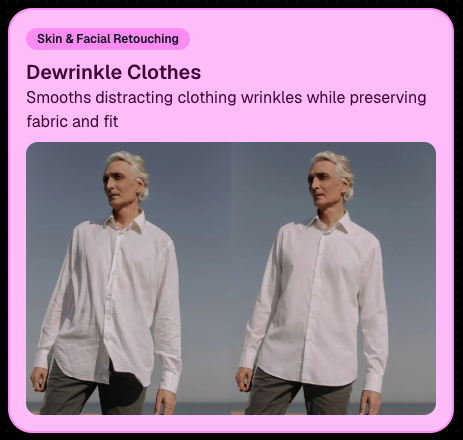
👔 Dewrinkle Clothes‍

  • Helps smooth distracting clothing wrinkles while keeping the image natural.

‍

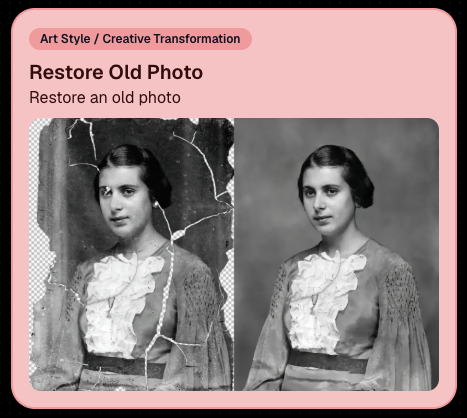
🖼️ Restore Old Photo‍

  • A new restoration-style node for improving older or damaged images.

‍

‍

‍

📱 Capture App 5.7 Updates

‍

App Store update released Monday, June 22

‍

Capture App 5.7 includes some meaningful workflow and compatibility improvements:

‍

🎨 Automatic sRGB conversion‍

  • If an image is detected as non-sRGB, the app will now try to automatically convert it to sRGB. If it can’t, you’ll still get the existing invalid color profile warning.
  • This can be especially useful for black-and-white shooting modes that output a different color profile. That said, we still recommend shooting in sRGB whenever possible, since conversion can cause some color loss and may use extra battery during long sessions.

‍

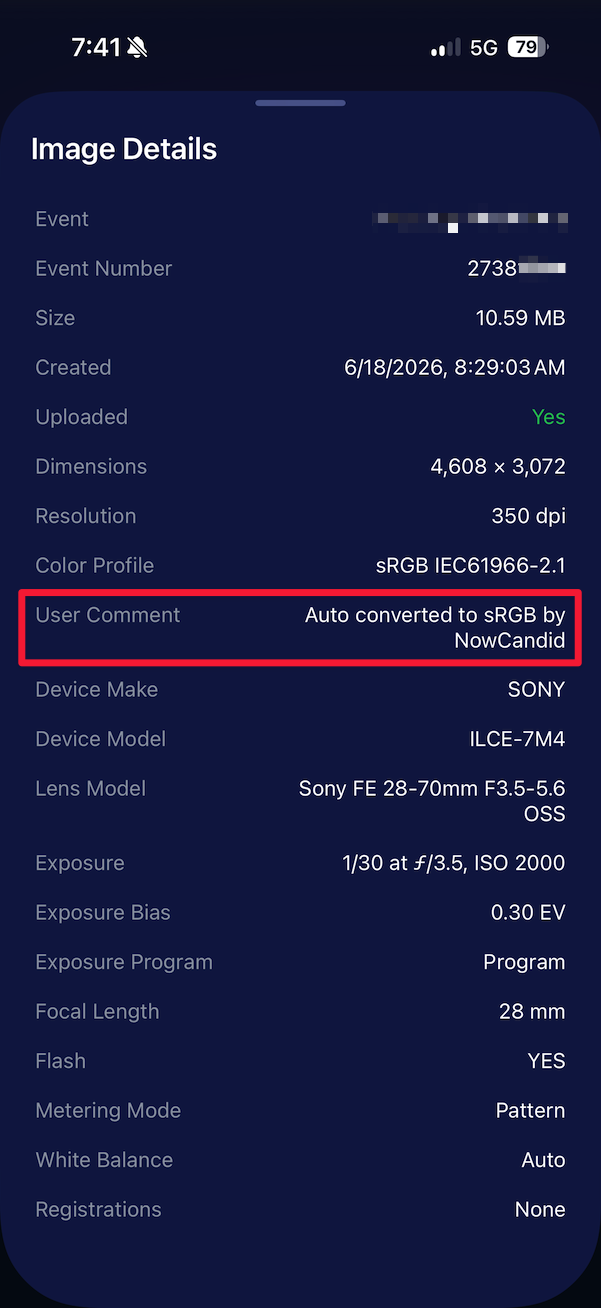
🧾 User Comment shown in EXIF details‍

  • The image gallery details popup now shows EXIF User Comment data, including whether an image was auto-converted to sRGB.

‍

‍

✂️ BGR visibility sync‍

  • Visibility changes in BGR folders now affect the cutout too. Mark the original hidden, and the cutout will hide; mark it visible again, and the cutout becomes visible as well.

‍

🏢 Business logo support‍

  • Your business/profile logo now appears in the Capture App header when available, and can replace Candy in Photo Booth.

‍

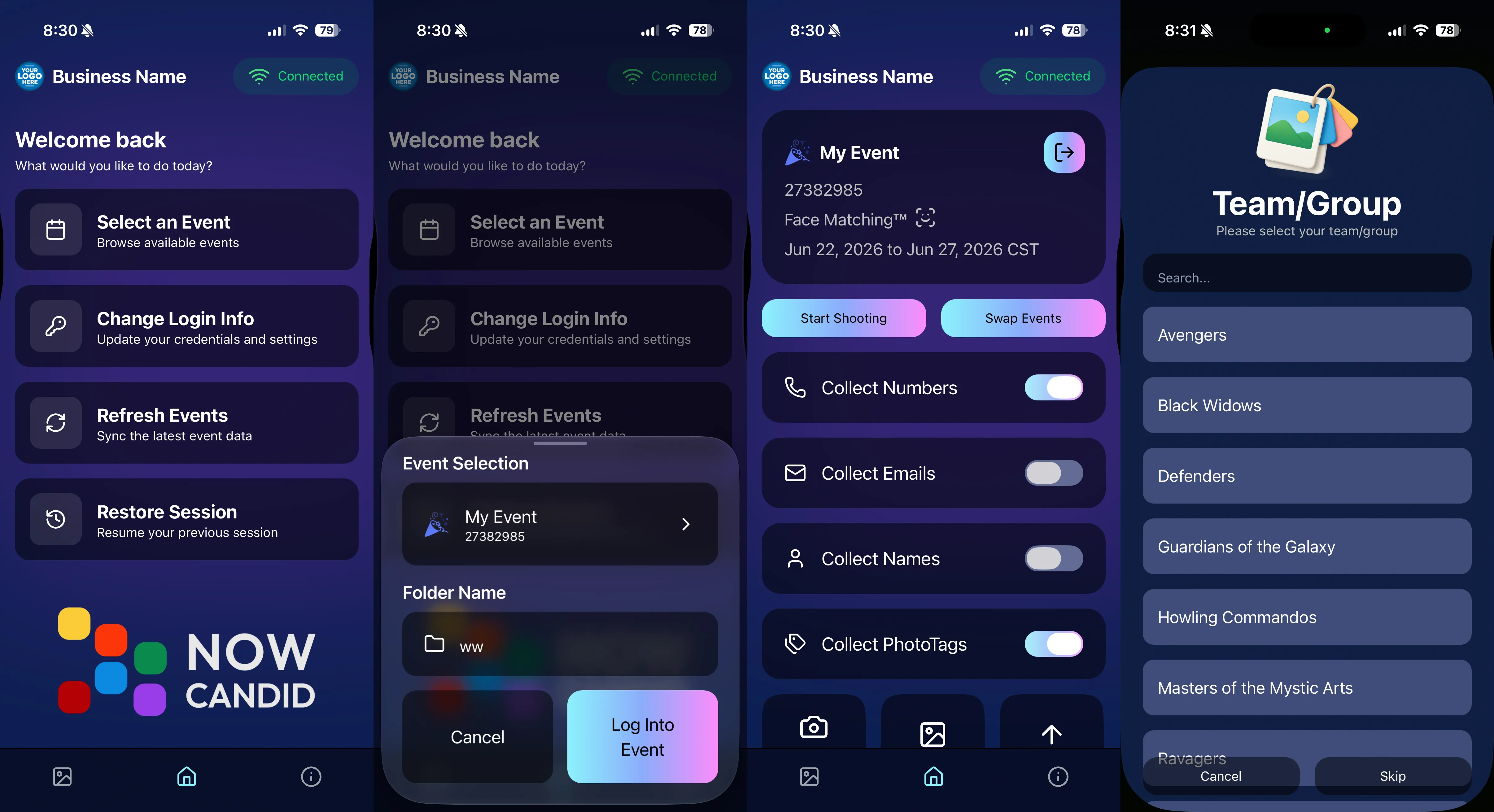
⚙️ Contact collection settings moved‍

  • Number, email, and name collection settings now live on the Event Overview instead of the Event login sheet, so you don’t need to re-log to change them.

‍

🏷️ Event picker shows PhotoTag attribute‍

  • If an Event has PhotoTags, the Event picker now makes that easier to spot.

‍

📱 Android UI fixes‍

  • Fixed several label cutoff issues for Android users with Bold Text enabled.

‍

🔁 Restore Session fix‍

  • PhotoTags now load properly when an Event is opened through Restore Session.

‍

🎨 Adobe RGB handling fixed on Android‍

  • Android devices will no longer incorrectly accept Adobe RGB images from cameras.

‍

🍎 iOS 27 support tested‍

  • iOS 27 has been tested, and no issues were found. The app also respects the latest Liquid Glass device settings.
  • If you update your device to a beta version of iOS 27, let us know if you experience issues!

‍

🏷️ Collect PhotoTags during check-in‍

  • Participants can now select their own PhotoTag, such as team name, before entering contact information. This option appears when the Event has PhotoTags.
  • We added this primarily to assist photographers in easily tagging late additions not on a roster that show up to a photoshoot, but there will be additional features for action photography in next week's update!

‍

‍

📱 Capture App 5.7.1

‍

OTA update released Friday, June 26

‍

🛠️ Miscellaneous UI fixes‍

  • A small OTA update with additional interface polish and cleanup.

‍

🖥️ Dashboard Improvements

‍

🔎 Docs Search is here‍

  • Click Search on the Docs page to search NowCandid documentation, with Candy navigation agent support.

‍

📂 PhotoRoster image name cleanup‍

  • PhotoRoster data file uploads and image uploads now automatically remove spaces and certain special characters from image names.

‍

🖼️ Full-frame overlay previews are downloadable‍

  • In the Image Overlay Editor, full-frame example render previews can now be downloaded just like banner previews.

‍

🛍️ Retail Update

‍

🪟 Better desktop popup behavior‍

  • On desktop, retail popups now automatically become scrollable if the popup is taller than the viewport height, matching Dashboard behavior.

‍

📣 Marketing Fix

‍

✉️ Email campaigns fixed for email-only PhotoRoster participants‍

  • Fixed an edge case where email-only PhotoRoster participants were not having their email campaigns start.

‍

That’s the week!

‍

From faster Virtual Group setup to better PhotoTag collection in the Capture App, these changes should help make your Event workflows more flexible and easier to manage.

‍

Keep creating magic,

Candy 🍬

Weekly Recap: Auto Headsize for Virtual Groups, New BGR Report, HEIC Conversion & More
Feature Updates
June 19, 2026

Weekly Recap: Auto Headsize for Virtual Groups, New BGR Report, HEIC Conversion & More

5
 minutes read

This week’s updates include some helpful improvements across Virtual Group Builder, reporting, image conversion, participant management, and folder downloads.

‍

The biggest highlight is a new Auto Headsize option in Virtual Group Builder, designed to give you a much better starting point when building virtual groups. We also added a new BGR Report to help you see which backgrounds are being ordered most, plus a few quality-of-life improvements throughout the Dashboard.

‍

Let’s take a look!

‍

🧑‍🤝‍🧑 Virtual Group Builder Improvements

‍

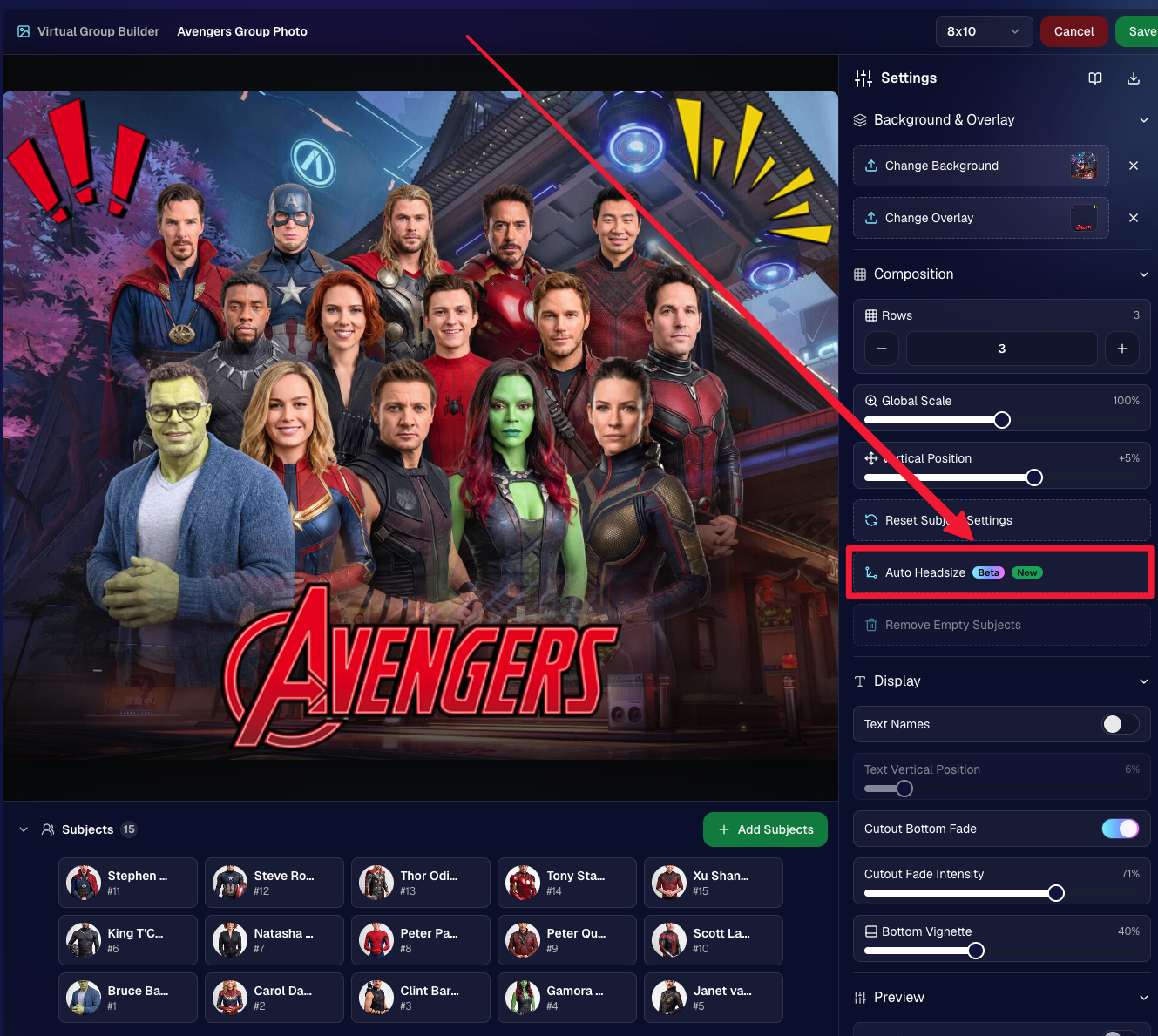
✨ New Auto Headsize button

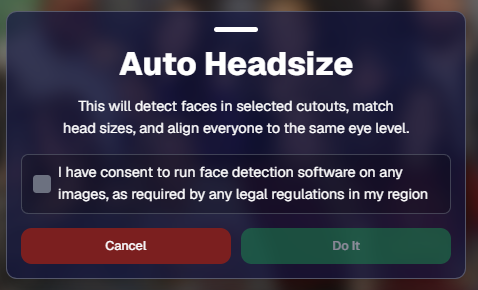
Virtual Group Builder now has a new Auto Headsize button.

This feature automatically detects faces and adjusts the scale and vertical offset of all cutouts so that subjects have roughly the same head size and are closer to eye level.

That means when you’re building a virtual group, you should have a much better starting point before making your final manual adjustments.

🏷️ Improved PhotoTag import behavior

We improved the behavior when importing a PhotoTag into Virtual Group Builder, helping that workflow feel smoother when adding subjects from a specific PhotoTag.

‍

🚀 Upload fix for new from-scratch Virtual Groups

Fixed an issue where uploads were not uploading properly when working from /new on a from-scratch Virtual Group instead of an existing one.

‍

👥 Smarter default subject behavior

Virtual Group Builder now skips the initial “add to group or replace group” popup when the only subjects in the group are the default 8 subjects.

‍

🖼️ Bottom logo spacing improved

Bottom logos are now spaced the same distance from the bottom as top logos are from the top.

‍

📊 Reporting Updates

‍

📈 Events and Sales Report tables now have sortable columns

The Events Report and Sales Report tables now support sortable columns, making it easier to review and organize report data directly in the table.

‍

🎨 New BGR Report

There is now a new BGR Report that shows the most ordered backgrounds for BGR images.

The report shows:

  • How many orders a background has
  • How many items a background has

Important note: if you upload the same background to multiple Events, those will show up as different backgrounds in the report. To avoid that, use the background import feature.

‍

🖼️ Image Converter Update

‍

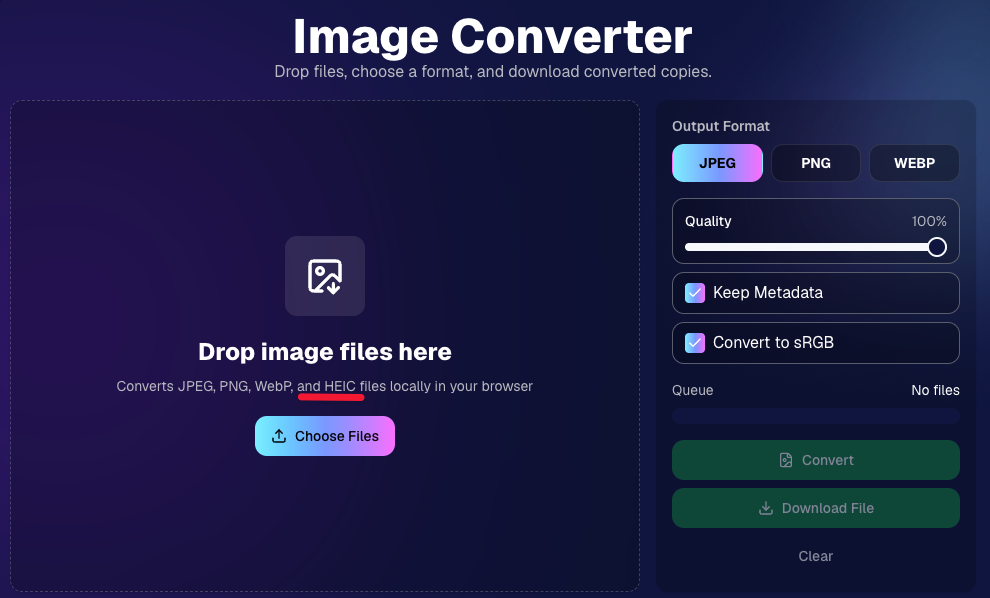
📱 HEIC conversion is now supported

The Image Convert page at tools/convert now supports converting from HEIC files.

This should be helpful when working with images from devices that commonly save in HEIC format.

‍

👥 Participant List Update

‍

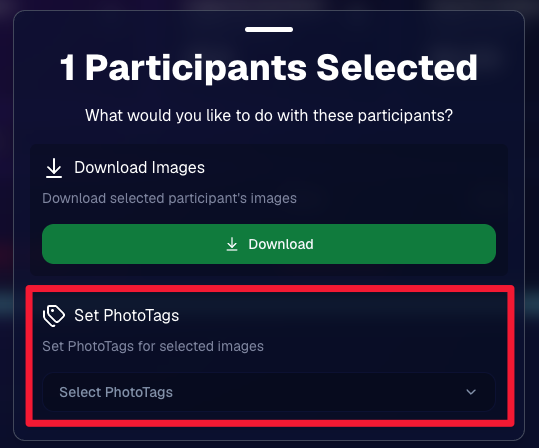
🏷️ Set PhotoTags for selected participants

On the Participant List page, the selected participants popup now includes a new option to set PhotoTags for those selected participants.

This gives you another way to update participant organization in bulk.

‍

📂 Manage Images Update

‍

⬇️ Download Folder improvements

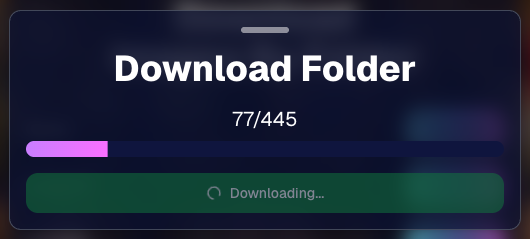
The Download Folder feature on the Manage Images page now includes an X/X counter while downloading.

We also improved the behavior when downloading a folder with hundreds of images, which should make larger folder downloads clearer and more manageable.

‍

That’s the week!

This week’s updates should make several everyday workflows smoother: Virtual Group Builder now has a stronger starting point with Auto Headsize, BGR background performance is easier to review, HEIC files are easier to convert, participant PhotoTags are easier to update, and large folder downloads are clearer.

‍

Keep creating magic,
Candy 🍬

‍

Let’s get in touch

If you’re a photographer looking to add NowCandid™ services to your wheelhouse, set up a call with us!

How to customize formatting for each rich text

How to customize formatting for each rich text

How to customize formatting for each rich text

How to customize formatting for each rich text

How to customize formatting for each rich text

‍

‍

What’s a Rich Text element?

The rich text element allows you to create and format headings, paragraphs, blockquotes, images, and video all in one place instead of having to add and format them individually. Just double-click and easily create content.

A rich text element can be used with static or dynamic content. For static content, just drop it into any page and begin editing. For dynamic content, add a rich text field to any collection and then connect a rich text element to that field in the settings panel. Voila!

Headings, paragraphs, blockquotes, figures, images, and figure captions can all be styled after a class is added to the rich text element using the "When inside of" nested selector system.

  • List One
  • List Two
  • List Three
  • List Four
  • List Five

This is a link

This is bold text

‍

  • ‍

‍