HomeNavigation arrowBlogNavigation arrow
Current page
Photography Tips

The Hidden Cost of Shipping in Volume Photography

The Hidden Cost of Shipping in Volume Photography

by Jack Counts III - NowCandid Project Manager

‍

A photography business recently switched to NowCandid from another volume photography platform...

‍

During the transition, they shared some details about how their previous software handled shipping and fees.

‍

I knew different platforms approached this stuff differently. But seeing the mechanics laid out was one of those “wait… what?” moments.

‍

In the setup they described, the photographer didn’t set the shipping charge. They didn’t get any revenue from shipping charged to their end customer. But the amount charged for shipping still increased the percentage-based fees coming out of their payout.

‍

Which is honestly kind of wild to me.

‍

It got me thinking about two sides of the same problem: what shipping costs the photographer, and what it can cost them when a customer decides not to buy.

‍

What does that shipping charge actually cost the photographer?

‍

Some volume photography platforms use lab-set shipping rates for orders delivered directly to customers. GotPhoto’s documentation (help.gotphoto.com/en/support), for example, says its direct-shipping charges are determined by the lab and automatically added at checkout.

‍

That raises a separate question: Does that shipping charge also increase the percentage-based fees coming out of the photographer’s payout?

‍

PhotoDay’s published standard pricing (support.photoday.io/en/articles) applies its 10% ecommerce fee to the total order, including products, shipping, and tax. Its reporting guide (support.photoday.io/en/articles) says customer-paid shipping goes directly to the lab.

‍

Let’s use a hypothetical order: $50 in photo products plus $10 in shipping. The customer pays $60 before tax.

‍

A 10% ecommerce fee on the products would be $5. Applying that same fee to the $10 shipping charge adds another $1, bringing the total ecommerce fee to $6.

‍

That extra dollar might not sound like much. But it means the ecommerce fee consumes 12% of the photographer’s product sales, all while the photographer doesn’t keep any shipping revenue.

‍

That’s an additional two percentage points of product revenue going toward ecommerce fees because of shipping.

‍

Here’s how that changes across a $5–$20 shipping range:

‍

How shipping affects ecommerce fees on $50 in product sales
Customer's shipping charge 10% ecommerce fee on shipping alone Total ecommerce fee on products + shipping Effective fee as a share of $50 in product sales
$5 $0.50 $5.50 11%
$10 $1.00 $6.00 12%
$15 $1.50 $6.50 13%
$20 $2.00 $7.00 14%

Illustrative calculations assume $50 in product sales and a 10% ecommerce fee applied to products plus shipping. They exclude payment processing, sales tax, and fulfillment costs.

‍

Payment processing adds another layer. Under PhotoDay’s published 2.9% processing rate, that $10 shipping charge generates another $0.29 in fees. Combined with the $1 ecommerce fee, that’s $1.29 attributable to shipping alone, equivalent to 2.58% of the $50 in product sales.

‍

Across 1,000 orders like this, that adds up to $1,000 in ecommerce fees plus $290 in processing fees attributable to shipping.

‍

To be clear, processing a larger payment costs more. That isn’t surprising. What I’m questioning is an arrangement where the photographer doesn’t set the shipping charge or keep that revenue, yet still pays percentage-based fees on it. The higher the charge, the more those fees take from the sale.‍

‍

PhotoDay does let photographers offer free economy shipping as a promotion (support.photoday.io/en/articles). Its reporting guide (support.photoday.io/en/articles) explains that the shipping charge is then deducted from the photographer’s payout. That takes the charge off the customer’s plate, but the photographer still covers the lab-set amount.

‍

And then there’s the shipping rate itself.‍

‍

I’m looking at this from the print lab side, too. NowCandid charges photographers $1.80 to ship basic small-print orders, and that already includes our margin.

‍

For comparison, Richmond Pro Lab lists $5.25 shipping through PhotoDay (richmondprolab.com/s/article) for qualifying orders under $10 in lab product cost. Against our $1.80 basic small-print rate, that’s a $3.45 difference per order, or $3,450 across 1,000 qualifying orders, before accounting for selling fees.

‍

I’m not arguing that a lab shouldn’t make money. We do, too. What bothers me is that the photographer doesn’t get to set the shipping price or share in the shipping revenue, but still pays percentage-based fees when the customer covers that charge. And offering free shipping means absorbing the lab-set amount instead.‍

‍

Either way, the photographer has limited control over a cost attached to their own sale.

‍

High shipping costs can put the whole order at risk

‍

The photography business I talked with also told me that costs for expensive-to-ship items were passed entirely on to end customers at checkout.

‍

Say someone picks out a $70 product, then discovers shipping adds another $20. Their purchase just became almost 29% more expensive, before tax.

‍

Maybe they’re fine with that. Or maybe that’s the moment they close the tab.

‍

Baymard Institute’s checkout research (baymard.com/lists/cart-abandonment) lists high extra costs, including shipping, taxes, and fees, as the top reason shoppers give for abandoning checkout, cited by 40% of respondents. That’s general ecommerce research, not a photography-specific rate, but it’s a pretty compelling reason to pay attention to the shipping line.

‍

But covering fulfillment costs doesn’t mean every dollar has to appear in the shipping field. Consider two ways to price the same purchase:

‍

Same $90 total, different shipping prices
Price breakdown Higher shipping Lower shipping
Product price $70 $85
Shipping $20 $5
Total before tax $90 $90

Hypothetical pricing example. Both options total $90 before tax; the difference is how the price is divided between the product and shipping.

‍

Same total. Different presentation.

‍

There’s research suggesting that distinction matters. A 2026 study in PLOS ONE (journals.plos.org/plosone) found a preference for free shipping even when the total purchase price stayed constant. It was a small study, but it gives us a reasonable question to test: Would customers respond better if more of the fulfillment cost were included in the product price and less appeared as shipping?

‍

For some broader context, Baymard Institute’s compilation of 50 studies (baymard.com/lists/cart-abandonment) puts average online shopping cart abandonment at roughly 70%. That’s about seven out of ten carts that never become completed purchases.

‍

In our recent internal data, NowCandid has seen roughly 3 abandoned carts for every 100 completed orders. Only about 3%!

‍

General online retail isn’t the same as volume photography, of course, and those numbers don’t prove that NowCandid’s focus on low shipping is responsible for the difference. But it’s an encouraging result! Giving your customers fewer reasons to reconsider at checkout is something we take seriously. 😎

‍

How NowCandid gives photographers more control

‍

With NowCandid, photographers can set their customer-facing shipping prices (nowcandid.com/blogs), rather than simply passing through a lab-set charge. They can also price shipping above the underlying cost to create additional margin.

‍

But having the opportunity to profit from shipping doesn’t mean you should always charge more for it.

‍

You can keep shipping very inexpensive and account for more of the fulfillment expense in your product pricing instead. That’s especially useful when you’d rather not put a large delivery charge in front of someone buying a more expensive item.

‍

We also don’t calculate our ecommerce or payment-processing percentages on collected sales tax (nowcandid.com/blogs). Collecting tax and charging additional fees on those tax dollars are two separate things.

‍

It’s about more than cheaper shipping

‍

Looking back at that conversation, what bothered me wasn’t simply that one shipping charge was higher than another. It was how little control the photographer had over something that affected both their profit and their customer’s experience.

‍

Shipping has a real cost. So does running a lab. But how that cost is priced, presented, and used to calculate fees deserves a closer look.

‍

When comparing volume photography software, I’d ask: Who sets the shipping price? Who receives that money? What fees are calculated on it? And can you change the offer your customer sees?

‍

The advertised ecommerce percentage only tells part of the story.

‍

There isn’t one perfect shipping strategy for every photography business. That’s exactly why I’d rather give photographers more room to choose their own.

‍

Shipping is part of your pricing. You should get a say in it.

‍

Thank you for attending my TED talk 🙏

Jack Counts III

NowCandid Project Manager

‍

NOTE: Platform examples reflect published policies and standard rates reviewed September 25, 2026. Terms can vary by lab, plan, promotion, or agreement. Order examples are illustrative, not reported studio results.

Related articles

Weekly Recap: Simple Check-In™, New Products Report, and Lots More ✨
Feature Updates
February 7, 2025

Weekly Recap: Simple Check-In™, New Products Report, and Lots More ✨

9
 minutes read
Hello, my fabulous photographers!

‍

Candy here, ready to sprinkle some sparkle on your day with our latest Weekly Recap. We’ve been hard at work enhancing your NowCandid™ experience, and I’m thrilled to share all the juicy new features. Let’s dive in!

‍

1. Simple Check-In™ for Positive ID Events 🤳

‍

We’re introducing a brand-new way to make your Name Lookup and Scanner ID™ Workflows even smoother:

‍

  • Single QR Code: Print just one QR code for the entire event. Participants scan it, enter their name and contact info, and a “blank” participant is instantly created—no selfie required.
    ‍
  • Photographer & Wallet Benefits: Photographers can now quickly search by name if the event uses Name Lookup, or if the participant adds the pass to Apple Wallet (Google Wallet coming very soon), you can scan them later for Scanner ID™.
    ‍
  • No More Bulk Scan Cards: Skip printing individual codes for everyone—one event code can do it all!

‍

Scan Cards are still great in many situations, so this isn't a replacement - just an addition! Something to make the Name Lookup & Scanner ID™ Workflows even more flexible!

‍

Accessible by clicking the QR code within a Positive ID Event's Management Page

‍

2. New Products Report 📈

‍

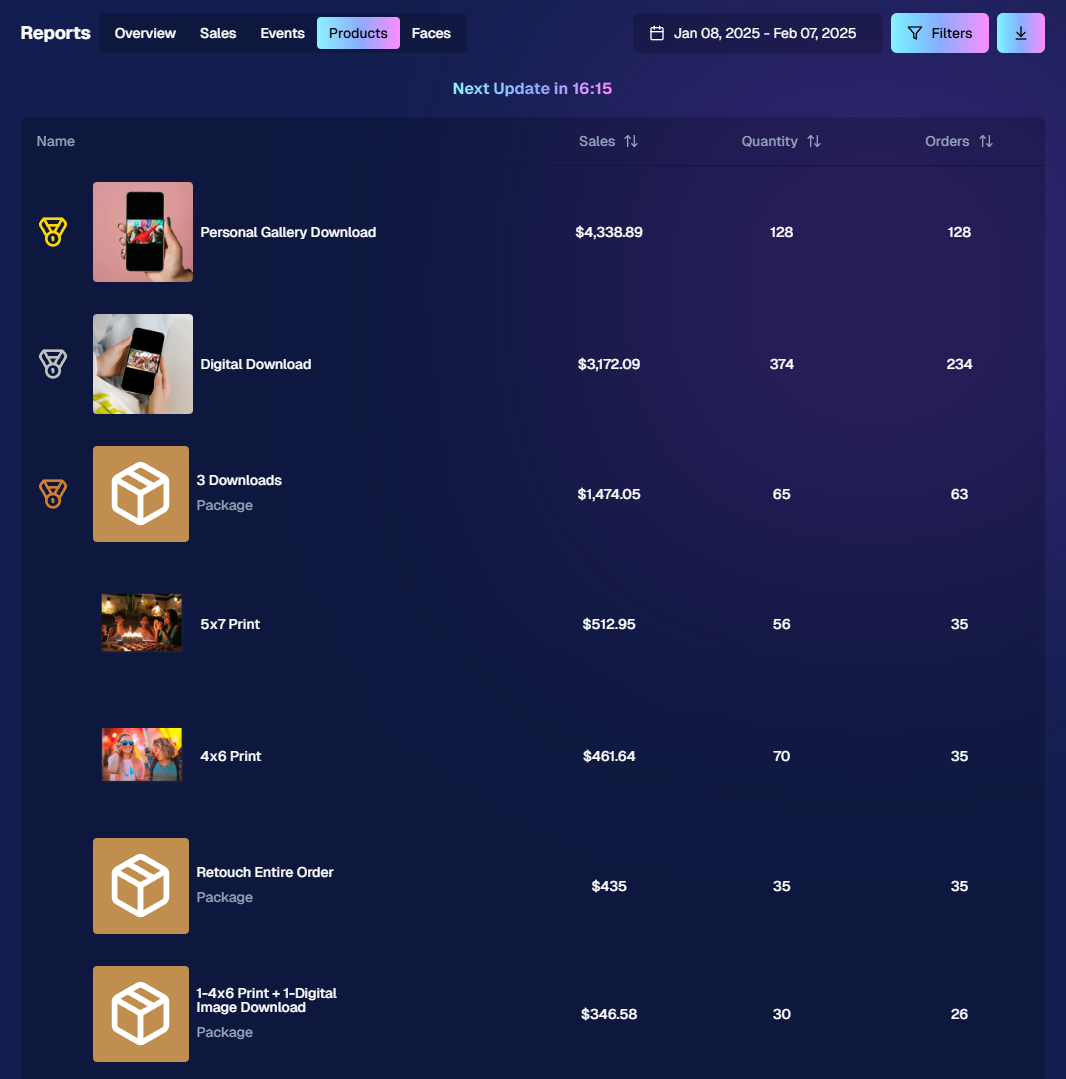
We’ve introduced a new Products Report on your NowCandid™ web dashboard:

‍

  • Most-Purchased & Highest-Revenue Products: See which items or packages your clients love most.
    ‍
  • Standard Filters: Use the same powerful search options you know—by event, date range, program type, Event Tag, and more.
    ‍
  • Data-Driven Decisions: Identify your top performing items and make more informed Custom Offer adjustments!

‍

If you’ve been curious which prints, downloads, or merch are hot, this is your new go-to spot!

‍

Accessible from the Home tab of the web dashboard

‍

3. Image Management Additions:

‍

Multi-Select Enhancements 🛠️

‍

We’ve expanded multi-select capabilities in Manage Images to handle even more tasks at once:

‍

  • GroupTags: Now you can edit or remove GroupTags™ for all selected images simultaneously.
    ‍
  • Select All Visible: Quickly grab every image on the current page to speed up those bulk actions.

‍

Accessible using the multi-select button within an Event's Manage Images page

‍

New Folder-Wide Options 📂

‍

We also added a new Edit Folder button when a folder is selected:

‍

  • Change Folder Visibility: Toggle an entire folder’s images between visible or invisible.
    ‍
  • Group Status: Mark them as Group Photos or individual images in one go.
    ‍
  • GroupTag: Apply the same GroupTag™ to every image in the folder—super handy for sorting large event albums.

‍

Mass management, simplified!

‍

Accessible using the Edit Folder button within an Event's Manage Images page

‍

4. Face Matching™ Formula Switch 🧩

‍

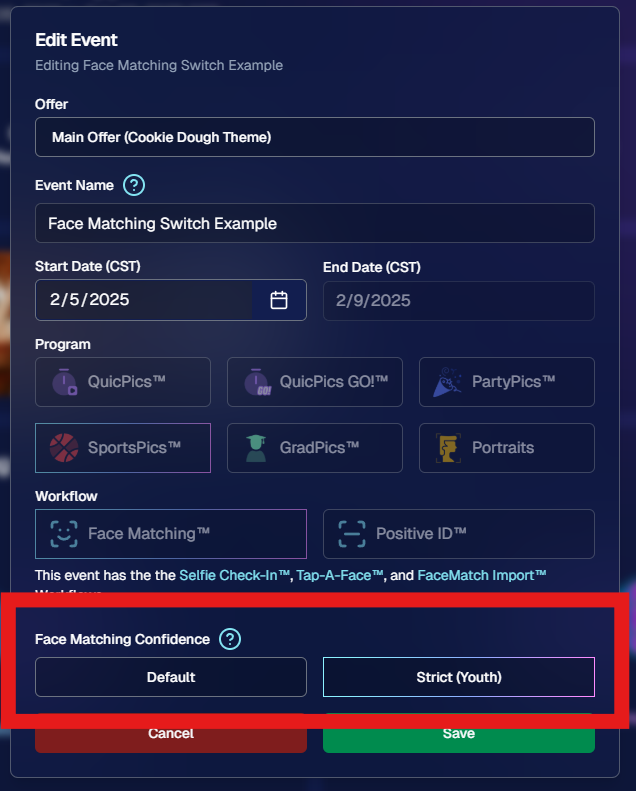
We added a new toggle in Edit Event to adjust how strict or lenient our Face Matching™ algorithm is:

‍

  • Stricter Matching for Kids: If you’re dealing with lots of little ones who keep popping up in the wrong gallery, flip this switch for fewer “extra” matches.
    ‍
  • Default Remains Flexible: Our usual method still works great for most events. If needed, you can always manually unassign images from a participant in the dashboard.

‍

Less confusion, more accurate galleries—everyone wins!

‍

Accessible when editing a Face Matching type Event

‍

5. Manage Images: New Filter Menu 🖼️

‍

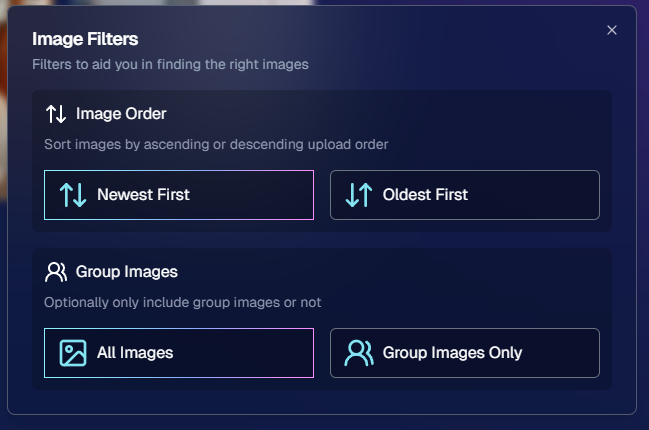
We’ve reorganized the Manage Images page with a dedicated menu for filters:

‍

  • Cleaned-Up UI: Too many filters were crowding the page; now they’re in one easy-to-access spot.
    ‍
  • Clear Active Filters: It’s easier to see what’s on and what’s off, plus you can remove filters with a single click.

‍

Navigating your images should feel more intuitive and less cluttered than before.

‍

Accessible using the Filters button within an Event's Manage Images page

‍

6. Image Timeline Screenshot Download ⏱️

‍

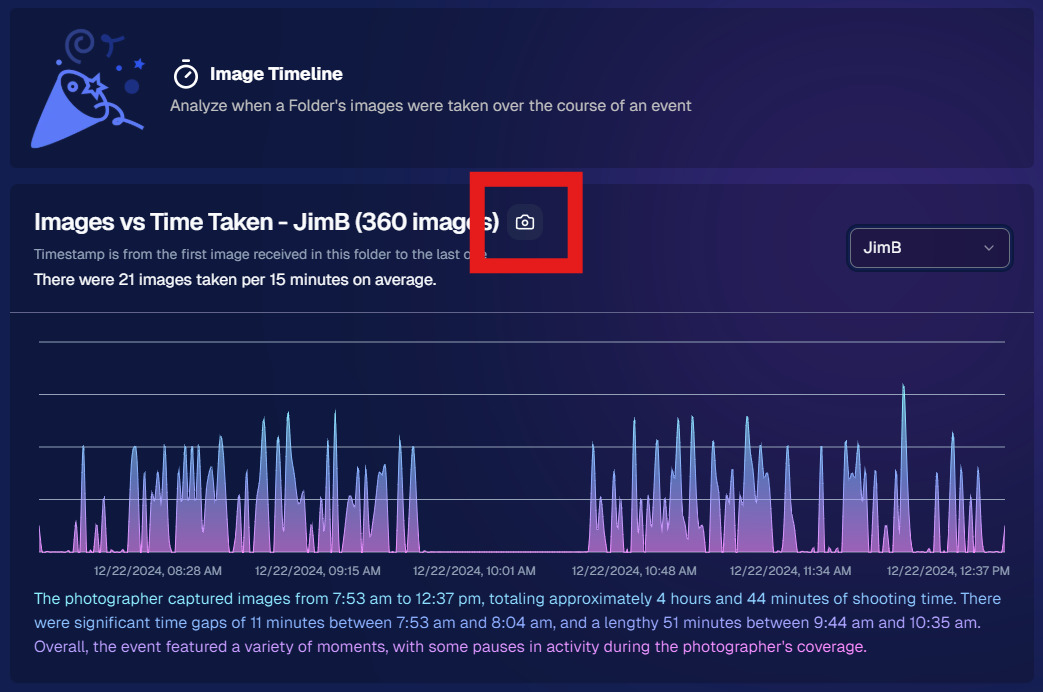
Our Image Timeline feature now has a handy Download Screenshot button:

‍

  • Quick Sharing: Snap a chart of your shooting pace or AI analysis and send it to your photographers or team.
    ‍
  • Easy Feedback: Show them exactly where the busy or slow spots were without extra steps.

‍

A small detail that can make a big difference for team communication.

‍

Accessible using the Camera-icon button on an Event's Image Timeline page

‍

7. Event Tag Add Popup Improvements 🏷️

‍

When adding events to a tag from the Event Tags page:

‍

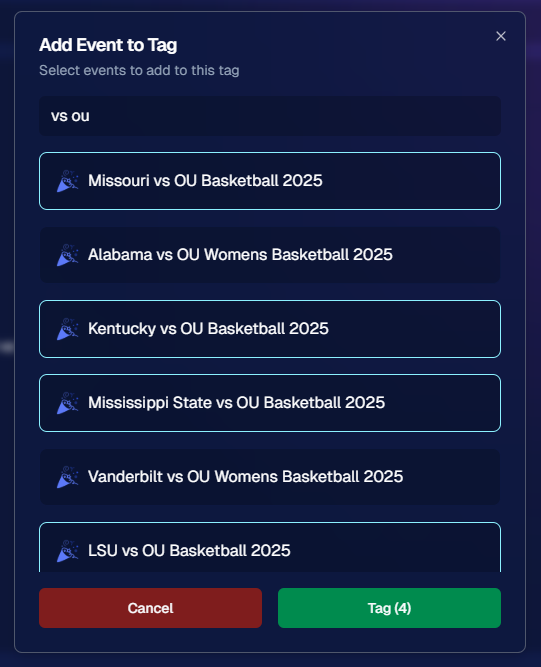
  • Select Multiple Events at Once: No need to add them one by one.
    ‍
  • Filtered Display: It only shows events that don’t already have that tag, saving clicks and confusion.

‍

A quicker way to keep your events organized and ready for deeper insights.

‍

Accessible using the Add Events to Tag button on the Event Tags page of the Web Dashboard

‍

8. Marketing Tweak: Day0 with Group-Only Galleries ✉️

‍

If a participant’s personal gallery only contains Group Photos, Day0 marketing won’t trigger:

‍

  • Fewer Unnecessary Texts/Emails: Prevents those “here’s your gallery!” messages when there’s not much for them to see yet.
    ‍
  • Smarter Outreach: Focus your marketing on participants who have individual images waiting.

‍

This slight change can tidy up the user experience for your SportsPics™ or GradPics™ events.

‍

9. Capture App 4.13.71 (iOS Only) 🍏

‍

Some app updates for iPhone/iPad users:

‍

  • iPad UI Fix: Addresses a bug when launching in portrait mode.
    ‍
  • Photo Booth Mode Backgrounds: Hidden on iPads running iOS < 17.
    ‍
  • Event Number: Now appears next to the event name, so you’re less likely to shoot under the wrong event.
    ‍
  • Volume Trigger Fix: The internal camera capture now works again for devices that had issues after recent iOS changes—great news for those using volume-based triggers!

‍

That’s it for this Weekly Recap!

‍

We hope these upgrades help you handle your events faster, deliver better experiences to your clients, and keep the momentum going all year long.

‍

As always, let us know if you have any questions, ideas, or just want to say hi.

‍

Cheers and sparkles,

‍

Candy 🍬

Did You Know? NowCandid™ Offers Retail Background Generation! ✨
NowCandid 101
February 5, 2025

Did You Know? NowCandid™ Offers Retail Background Generation! ✨

2
 minutes read
Hello, fabulous photographers!

‍

Candy here, bringing you another “Did You Know?” feature highlight. Today’s spotlight is on a super-fun (and sometimes overlooked) part of our NowCandid™ retail site: AI-Generated Backgrounds for background-removed images. Let’s dive in!

‍

AI Background Generation

‍

When customers view or customize their images that have had their backgrounds removed, they’ll see an option inviting them to type in a text description of what they want behind them. Maybe it’s a colorful beach scene, a dreamy sunset, a whimsical forest—whatever the imagination conjures up! Our site will generate a fresh design tailored to that text prompt, giving them a truly unique final product.

‍

Why It Matters

‍

  • Personalized Shopping Experience: No two images look the same when customers can request different scenes. It’s perfect for capturing each individual’s tastes and vibes.
    ‍
  • Boosts Sales: The novelty factor of typing in a text prompt and watching a new background appear can encourage customers to experiment—and buy more customized images.
    ‍
  • Booking Tool: Using this feature as a sales tool to help you book parties, sports leagues, or anything else can be a way to get a gatekeeper's attention!

‍

How It Works

‍

  1. Choose a Background-Removed Image: When browsing the NowCandid™ retail site, customers click on an image that’s had its background removed.
    ‍
  2. Enter a Text Prompt: A simple text field awaits—“sunset on a calm lake,” “abstract rainbow swirl,” “comic book city,” etc.
    ‍
  3. Watch It Appear: The site blends the subject with the newly generated backdrop. Customers can finalize it right there, or try another prompt until they’re happy.

‍

Retail Theme: Liquorice

‍

That’s your little “Did You Know?” tip for today!

‍

We hope you’ll tell your clients about this magical customization option—it might spark new ideas (and more sales!) for their photos.

‍

As always, if you have any questions or feedback, let us know.Until next time, keep capturing those unforgettable moments! ✨

‍

‍Cheers and sparkles,

‍
Candy 🍬

Weekly Recap: Multi-Select, Event Tags & More! ✨
Feature Updates
January 24, 2025

Weekly Recap: Multi-Select, Event Tags & More! ✨

9
 minutes read
Hello, my fabulous photographers!

‍

Candy here, ready to sprinkle some sparkle on your day with our newest Weekly Recap. We’ve been hard at work improving your NowCandid™ experience, and I’m excited to share all the juicy details. Let’s dive in!

‍

1. Select System in Manage Images 🖼️

‍

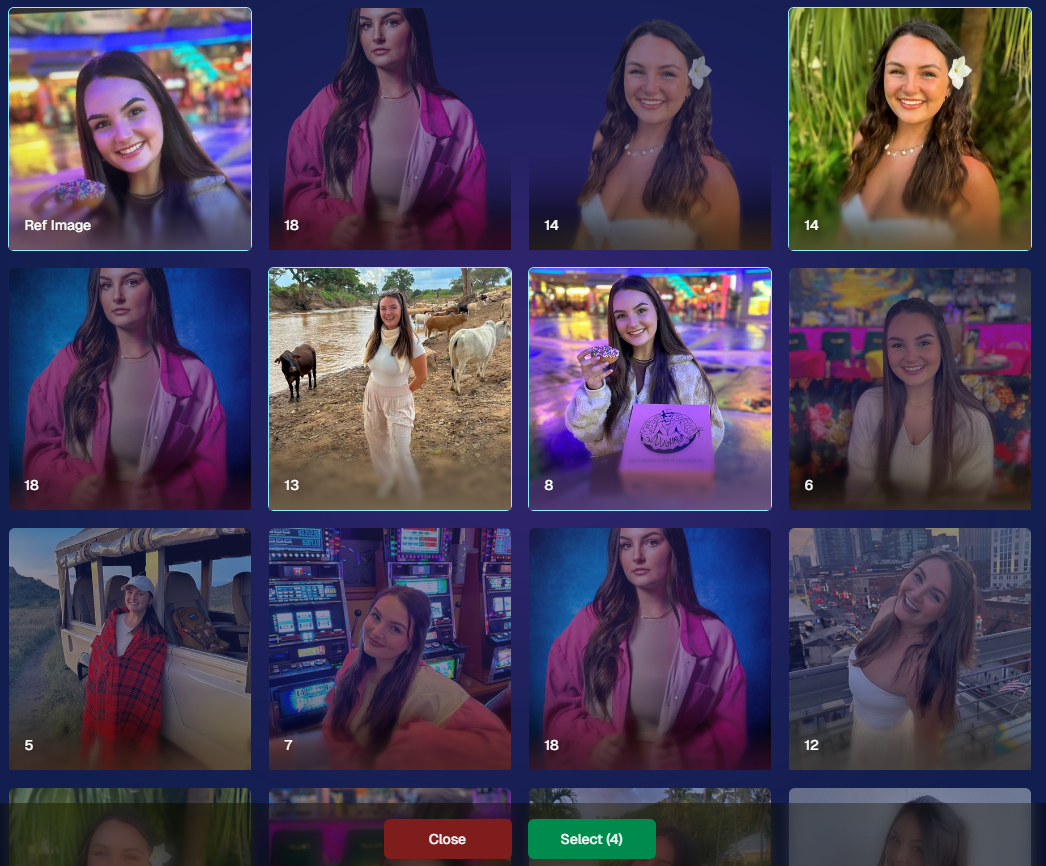
We’re introducing a Multi-Select feature to the Manage Images interface:

‍

  • Multi-Select Button: Highlight multiple images at once.
    ‍
  • Bulk Actions: After choosing your set, tap “Select” at the bottom. You can:
    ‍
    • Mark them Invisible or Visible
      ‍
    • Download them all in a single zip file
      ‍
    • Toggle them as Group Photos or Individual all at once
      ‍
  • Speedy Management: No more one-by-one adjustments. This should help you power through large batches of images in a fraction of the time!

‍

‍

2. Event Tags 🏷️

‍

There’s a brand-new Extras tab in the Web Dashboard navigation, featuring our new Event Tags tool:

‍

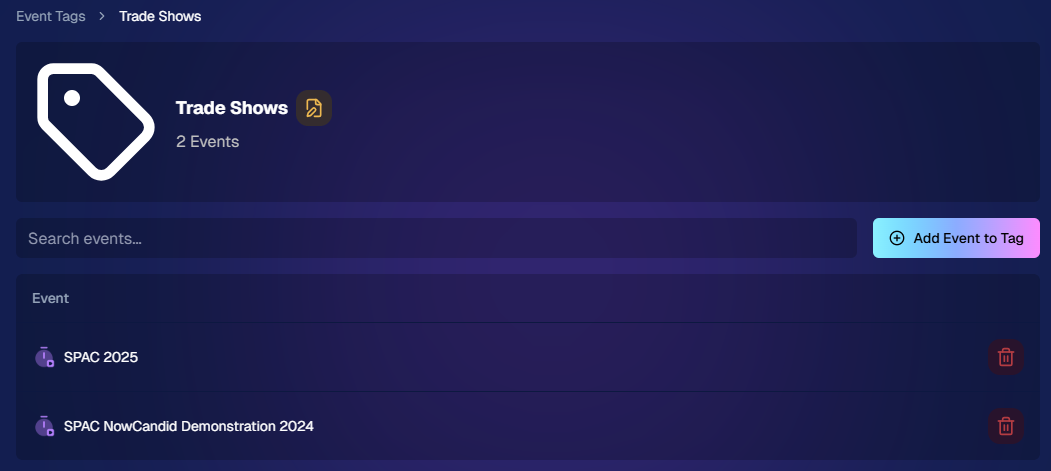
  • Creating Tags: Assign tags to your events (e.g., “Prom,” “Winter Formal,” etc.).
    ‍
  • Filtering by Tag: On the Events List or in your Events Report, choose an Event Tag to instantly see only those events.
    ‍
  • Performance Insights: Group your events by theme and get a quick view of how each set is performing all at once.

‍

Tagging is perfect for photographers juggling multiple event types, letting you spot patterns and trends with ease.

‍

Just two Events on this Event tag, but you can add lots!

‍

3. Updates to the Faces Report 👥

‍

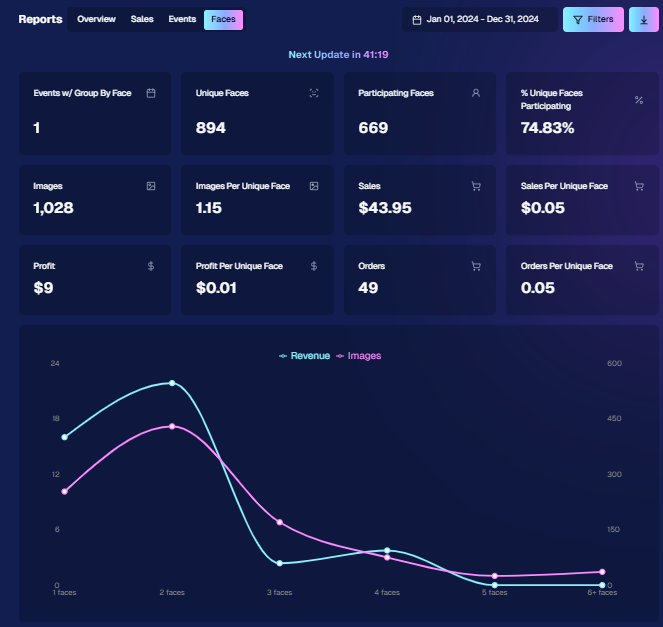
Our Faces Report—released last week—has already received some polish:

‍

  • New Revenue Line: Alongside face counts in the chart, you’ll now see a revenue line.
    ‍
  • Compare Image Types & Sales: See whether couples, solos, or big group shots bring in the most orders.
    ‍
  • Informed Future Shooting: Focus your time at events on what sells best—maybe it’s the big friend groups or the sweet one-on-one moments.

‍

This view helps you refine your event coverage strategy for max impact.

‍

Ignore the low sales, it was a test Event!

‍

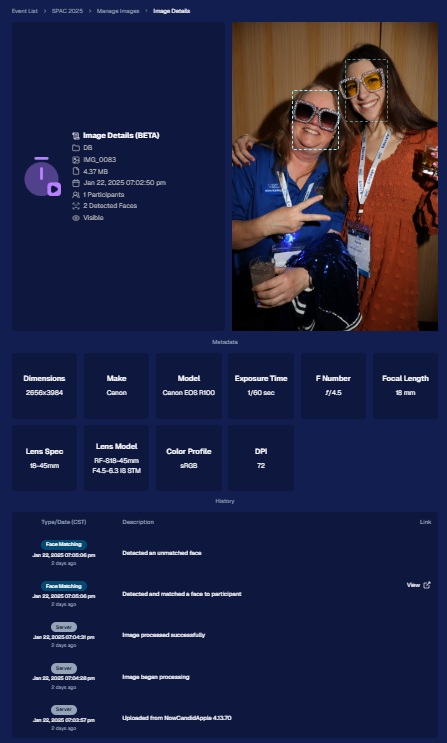
4. Image Details Page 📝

‍

While managing images in your events, you’ll notice a “Details, Logs, and more” link on each image:

‍

  • Expanded Meta Data: Discover camera settings, image size, camera type, and more.
    ‍
  • Face Matching™ Logs: See if and when a face got paired to a participant; even jump directly to that participant’s gallery.
    ‍
  • Advanced Troubleshooting: Ideal for debugging customer issues or satisfying your own curiosity about each shot.

‍

It’s more info than we’ve ever provided, so have fun geeking out over the details!

‍

So much image file info and image history now!

‍

5. Big Improvements to the Web Dashboard Image Uploader ⚡

‍

Finally, a behind-the-scenes upgrade that’ll make your day-to-day life easier:

‍

  • Upload Up to 5000 Images: Jumping from 1000, so you can batch bigger events in fewer steps.
    ‍
  • Faster Transfers: As long as you have decent upload speeds, the process should feel snappier overall.
    ‍
  • Lower CPU Demand: Less strain on your computer, letting you multi-task without slowing to a crawl.

‍

Sometimes it’s the quiet changes under the hood that make the biggest difference.

‍

6. Tiered Pricing Now Live 🎉

‍

After last week’s preview, Tiered Pricing is officially rolled out to SportsPics™, PartyPics™, GradPics™, and other sales-driven events:

‍

  • Upgraded Text & Email Campaigns: We’ve refined the promotional messages to match your Week 1, Week 2, and Week 3 pricing tiers, giving your buyers a clear sense of each week’s small price bump.
    ‍
  • 365-Day Marketing SMS Replaced with 180: We’ve shortened the final reminder’s timeline from a year to 180 days, aligning better with your event marketing cycle and typical follow-up patterns.

‍

If you haven’t explored Tiered Pricing yet, check it out in your Offer Creator and see how these incremental price changes (and updated marketing) might boost your sales!

‍

That’s all for this week, my wonderful NowCandid™ community.

‍

I hope these new features and improvements empower you to breeze through event management and deliver an even better experience to your clients. As always, if you have questions or feedback, give us a shout.

‍

Until next time—keep capturing those unforgettable moments! ✨

‍

Candy 🍬

Let’s get in touch

If you’re a photographer looking to add NowCandid™ services to your wheelhouse, set up a call with us!

How to customize formatting for each rich text

How to customize formatting for each rich text

How to customize formatting for each rich text

How to customize formatting for each rich text

How to customize formatting for each rich text

‍

‍

What’s a Rich Text element?

The rich text element allows you to create and format headings, paragraphs, blockquotes, images, and video all in one place instead of having to add and format them individually. Just double-click and easily create content.

A rich text element can be used with static or dynamic content. For static content, just drop it into any page and begin editing. For dynamic content, add a rich text field to any collection and then connect a rich text element to that field in the settings panel. Voila!

Headings, paragraphs, blockquotes, figures, images, and figure captions can all be styled after a class is added to the rich text element using the "When inside of" nested selector system.

  • List One
  • List Two
  • List Three
  • List Four
  • List Five

This is a link

This is bold text

‍

  • ‍

‍