Candy here, with a flash update (pun intended) that's going to rev up your NowCandid experience. Ready to capture the moment? 📸
Blink and You'll Miss It!
Using a Positive ID Workflow like Type & Take, Scanner ID, or Name Lookup? You're in for a treat! QuicPics images are now zooming to individuals at warp speed. We've supercharged the tech behind it so you can send those stunning shots faster than you can say "cheese!"
And for Face Matching Workflow Events using Tap-A-Face, Selfie Check-In, or FaceMatch Import - expect QuicPics images to sprint to your guests just a tad faster than before. Maybe not light-speed like our Positive ID pals, but definitely faster!
Sweet Savings Alert! 🍬
Did you catch our little tweak from last month? The fee for each uploaded image when using QuicPics dipped to just $0.20, down from $0.31. Savings, speed, and sensational images? Talk about a picture-perfect combo!
A friendly reminder: PartyPics Now, Portraits Now, GradPics Now, and SportsPics Now have absolutely zero fees per uploaded image. QuicPics is the only NowCandid Program that has any sort of fees!
Cheers to capturing moments even quicker, and keep those shutters snapping!
Candy here with another weekly recap! This week’s biggest improvements are in Background Removal, with better sports cutouts, and faster processing.
We’ve also made the mobile receipt download experience much easier, added a couple of helpful Capture App features, and cleaned up several Dashboard workflows.
✂️ Background Removal Keeps Getting Better
Background Removal got another round of quality and performance improvements this week:
⚡ Faster processing
BGR is now a bit quicker overall.
🏈 Better sports cutouts
Cutout quality has been improved, particularly for sports-related images.
📈 Continuous improvement system
We’ve also added a new system designed to help Background Removal continue improving over time as we further refine the process.
📱 Mobile Downloads Are Much Easier
The Web Receipt Download Page has been reworked on mobile to make getting images into your phone or sharing them much simpler.
🗂️ Info cards now use two columns
Just like desktop, which gets the actual image downloads closer to the top of the page.
📤 Download is now Share on mobile
Individual images now show Share instead of Download and open your device’s native share sheet.
That makes it easier to save an image to your Photos app, text it to someone, or send it directly into another app.
🖼️ Share All sends actual image files
The previous Download All option is now Share All on compatible mobile browsers.
Instead of creating one ZIP file, it attaches the images individually so you can more easily save the entire gallery to the Photos app (or send the images elsewhere).
If the browser can’t handle the share—for example, if there are too many images—it will automatically fall back to a ZIP like desktop.
📷 Capture App 5.10
iOS & Android App Store update — September 8
Two handy additions made their way into Capture App 5.10:
🔊 Audible scan confirmation
You’ll now hear a beep after successfully scanning a card, making it easier to know immediately that the scan worked.
Should help you and your hired photographers better know when a Scan Card has been succesfully scanned when using the Scanner ID Workflow!
📸 “TAKE PHOTO” placeholder is back
The familiar image placeholder has returned to the shooting workflow.
Should help new users or hired photographers know when the app is ready to receive images!
🛍️ Retail Improvements
🖼️ Overlay now appears in the cropper
If a shopper selects an Event overlay, they can now see it while adjusting their crop.
📱 Larger overlay preview on mobile
The image shown during the “Would you like to use this Event’s overlay?” step is now bigger on mobile.
✉️ Better mobile email receipts
Receipt emails should now display more reliably in a mobile-friendly layout across mobile email clients.
🧩 Memory Mate fix
Fixed an edge case where TKO images couldn’t be selected as the primary image when the Memory Mate configurator was opened from a Group Photo.
🍎 iOS 26 layout cleanup
Fixed a small spacing issue on the overlay-selection screen when Safari is using bottom-positioned tabs.
🖥️ Dashboard Updates
🏷️ Event names are easier to keep track of
Desktop Event pages now prefix the Event name in the header.
👥 Cleaner merged-participant display
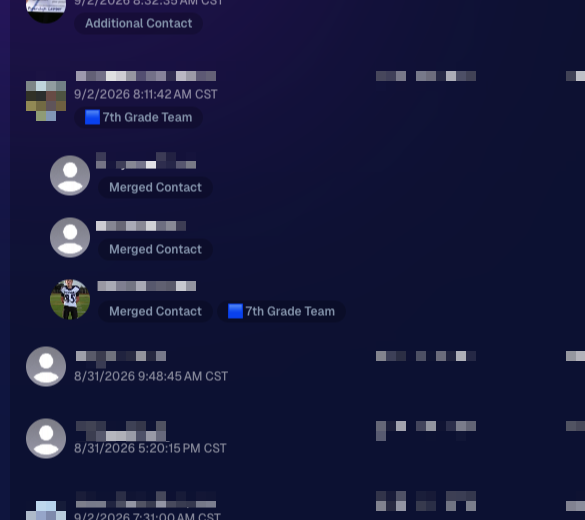
Tabbed-in merged participants now have a subtle curved line visually connecting them to the main participant.
📊 Marketing History traffic fix
Fixed some retail web traffic chart dates being displayed incorrectly because of timezone differences.
🖼️ Virtual Group image picker fix
Double-clicking a blank participant will continue opening the Image Picker correctly after a refresh.
🎨 “Overlay” renamed to “Foreground” in Virtual Group Builder
This helps distinguish Virtual Group foreground artwork from full-frame Event overlays.
📄 Easier Manage Images pagination
When you’re beyond page one, page controls now also appear above the images so you don’t have to scroll all the way down just to switch pages.
🪪 Clearer Positive ID activity logs
Image Details now correctly reports “Image Positive ID’d to X” rather than describing the action as Tap-A-Face or categorizing it as Face Matching.
That’s the week!
Better cutouts are the biggest story, but the new mobile sharing workflow should also make a noticeable difference for customers trying to get their photos from a receipt onto their phones.
Candy here with another weekly recap! This week’s biggest addition is a new Abandoned Cart Recovery marketing message designed to help bring shoppers back and complete purchases they already started.
We’ve also made Quick Candy Image Studio more powerful for editing a selected group of images, added shareable discount links, and made several improvements across participant tools, Virtual Groups, and the Capture App.
Let’s jump in!
🛒 NEW: Abandoned Cart Recovery Marketing
Sometimes a customer gets all the way to building a cart... and then life happens.
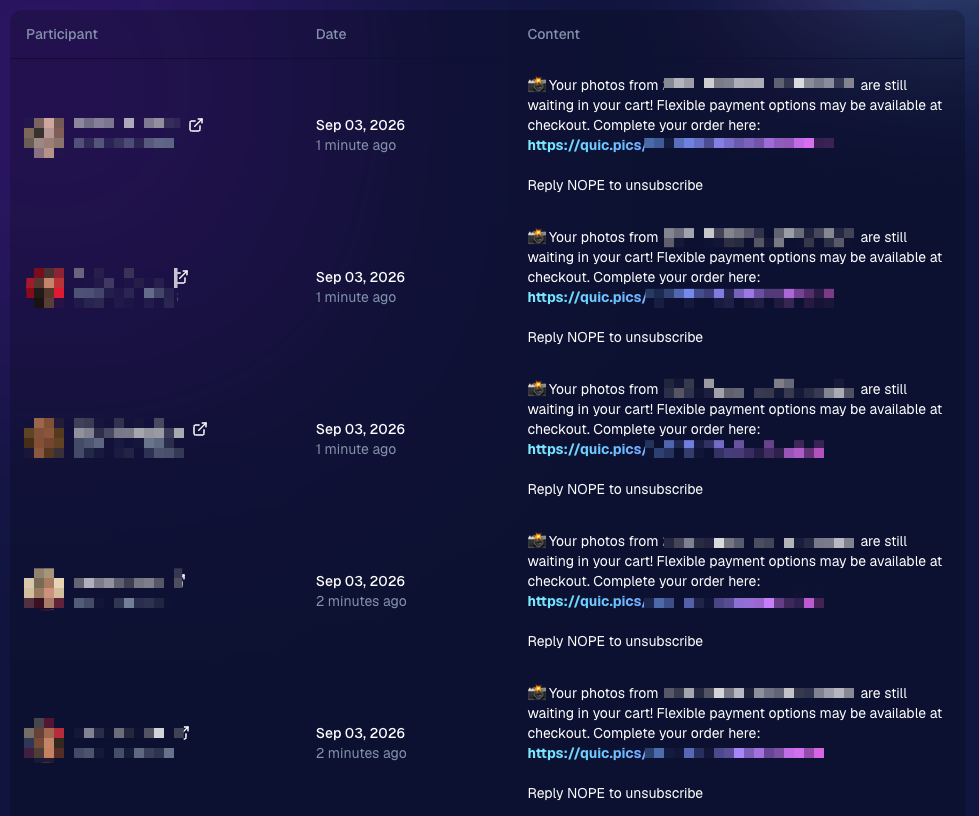
NowCandid will now automatically follow up with those shoppers via text + email to encourage them to come back and finish their order.
📅 Abandoned cart messaging will go out once a week!
🛍️ Targets participants who created a cart but did not complete their purchase
🚫 Participants who have already ordered are excluded
1️⃣ Each participant can only receive one abandoned-cart follow-up per Event
📊 Sends are still recorded on the Event’s Marketing History page
This gives shoppers a helpful nudge to return to something they were already interested in buying—and hopefully turns a few more unfinished carts into completed sales. 📈
Note: NowCandid's abandoned cart rate is already very low. Even so, we expect this to boost your overall sales by about 0.3% or more!
🎨 Batch AI Editing Gets More Powerful
Quick Candy Image Studio on Manage Images continues to fill the gap between editing one image at a time and running Auto Editor across an entire folder or Event.
Select a handful of images, open Quick Candy Image Studio, and apply an AI edit across the selection.
This week, it also gained more of the controls available in the full Candy Image Studio:
👁️ Mark Original Invisible
✂️ Mark Destination Folder as Background Removal Folder
Available when Background Removal is enabled for the Event.
🖼️ Custom image-input nodes fixed
Nodes that require another image as an input now behave correctly through Quick Candy Image Studio.
This makes it much easier to apply the same edit to a small, intentional group of images without setting up a larger Auto Editor workflow.
👥 Participant List Improvements
🏷️ PhotoTags now appear as badges
Participant rows now show assigned PhotoTags directly, similar to the existing Additional Contact badge.
👨👩👧 Merged participants are easier to understand
Individual merged records now appear as separate, indented rows beneath the main merged participant.
🙈 Hidden PhotoTags stay hidden
Fixed hidden PhotoTags incorrectly appearing on Participant Details.
🧑🤝🧑 Virtual Group Builder Improvements
↩️ Better Undo behavior for sliders
CTRL/CMD + Z now behaves more naturally when adjusting slider values.
🖱️ Better drag-and-drop with large groups
The Subjects pane is easier to work with when there are dozens of participants.
🖼️ Full-resolution render consistency fix
Fixed an edge case where the final full-res Virtual Group could differ from the Builder preview.
🤖 Auto Editor & Background Removal
🙈 Hide Originals now handles BGR originals correctly
If Hide Originals is enabled and the original folder is marked for Background Removal, the original PNG will now be hidden too.
The same behavior now applies in Candy Image Studio.
📱 Capture App 5.9.3
iOS & Android OTA — September 1
📋 Shooting mode selector fixed on tablets
The popup is now scrollable, so options like Roster Check-In are always reachable.
📸 Photo Booth fix on iOS
Cancelling the countdown no longer accidentally disables the Event collage.
That’s the week!
Abandoned Cart Recovery is the big addition here, giving NowCandid another way to help turn existing shopper interest into completed orders. And with the improvements to Quick Candy Image Studio, you’ve got more flexibility for those “edit these five photos, not the entire folder” situations too.
Candy here with another weekly recap! This week’s biggest addition is a major upgrade to Client Outreach: you can now schedule texts and emails to send later. We’ve also added smarter Virtual Group tools, new Candy Image Studio looks, and a few useful retail and Dashboard fixes.
Let’s jump in!
📅 Client Outreach Can Now Be Scheduled
You can now schedule Client Outreach messages to send at a future date and time instead of having to send everything immediately.
⏰ Schedule texts or emails up to 60 days in advance
📋 New Scheduled page to see upcoming sends
❌ Cancel a scheduled outreach before it goes out
💰 See estimated sends and cost before the scheduled time
🔔 Get notified when it sends
Dashboard Inbox notification
Mobile Dashboard push notification
This makes Client Outreach much more useful for planned reminders, follow-ups, announcements, and other messages you already know you’ll want to send later.
👥 Import from multiple Events at once
When building a Client Outreach list from Event contacts, you can now select multiple Events in a single import instead of adding them one at a time.
🏈 Virtual Group Builder Gets Smarter
Virtual Group Builder picked up several new controls this week:
🔢 New Auto Order By Jerseys button
Automatically reorder subjects based on their jersey numbers.
This is powered by Jersey Jotter, but Jersey Jotter does not need to be enabled on the Event for you to use it.
🧠 Improved Auto Headsize
Automatic subject sizing should now produce better results.
👤 Less disruptive participant additions
Adding one participant now places them at the bottom-right of the bottom row instead of automatically rearranging the entire group.
🌈 New Saturation slider
Adjust an individual subject’s saturation from the Subject Inspector.
🌑 Drop Shadow can now be disabled
There’s a new toggle if you prefer the group without subject shadows. Drop Shadow behavior also works more naturally with Cutout Fade.
🌫️ Simplified Cutout Fade
Cutout Fade and Cutout Fade Intensity have been combined into a single control with improved defaults and results.
↕️ More vertical positioning freedom
Subjects can now be moved significantly farther downward when needed.
🎛️ New Effects category
Some related controls have been reorganized to make the Builder easier to navigate.
🎨 New Candy Image Studio Looks
Two new low-cost styles are available:
🌸 Mayfair — 4¢
A polished filter-inspired look with its own distinct color treatment.
🌈 Lively
Similar in spirit to Clarendon, but with a different look and feel. Give it a try!
🛠️ Candy Image Studio fixes
✨ Fixed some nodes not working through Quick Candy Image Studio on Manage Images
🖼️ Fixed the Retouch node failing on especially large image files
🖥️ Dashboard Improvements
📣 Event Marketing History links are more visible
Three important links on the page are now displayed as cards, matching the approach used elsewhere in the Dashboard.
🏷️ Remove PhotoTags in bulk
Select multiple participants on the Participant List page and use the new Remove PhotoTags button to clear their PhotoTags at once.
📱 Mobile Dashboard
No app update required:
⬅️ Previous Page
➡️ Next Page
Both options are now available from the logo button / Quick Actions menu at the top of the Mobile Dashboard.
🛍️ Retail & Quic Fixes
📦 Group package visibility fixed
Packages containing group products will no longer incorrectly appear when an Event has no group images.
🤖 Auto Edited QuicPics/QuicPortraits images fixed
Fixed an issue where Event-level Auto Edits with Hide Originals enabled were not being texted once the edited image was ready.
That’s the week!
Scheduled Client Outreach opens up a lot more ways to plan customer communication ahead of time, while the new Virtual Group tools should make sports layouts quicker and easier to fine-tune.
The rich text element allows you to create and format headings, paragraphs, blockquotes, images, and video all in one place instead of having to add and format them individually. Just double-click and easily create content.
A rich text element can be used with static or dynamic content. For static content, just drop it into any page and begin editing. For dynamic content, add a rich text field to any collection and then connect a rich text element to that field in the settings panel. Voila!
Headings, paragraphs, blockquotes, figures, images, and figure captions can all be styled after a class is added to the rich text element using the "When inside of" nested selector system.


.png)



.svg)


