HomeNavigation arrowBlogNavigation arrow
Current page
FreePics

Helpful Tips: Using FreePics at your Proms

Helpful Tips: Using FreePics at your Proms

FreePics is an innovative photo booth alternative designed to enhance the photo-taking experience at events like proms. As a photographer, FreePics allows you to offer a modern, fun, and interactive experience for prom attendees, while you get paid upfront for your services. It can be sold as a “mobile photo booth” service, as a manned portrait station akin to traditional photo booths, or as a service where you provide both! Thanks to our cloud, no matter how many photographers or photo stations you have, they’ll all talk to each other, meaning guests only have to provide their contact info once. 

This short guide will walk you through how to effectively use FreePics for a prom night:

  1. First, Understanding FreePics:
    FreePics is quite different from NowCandid’s other programs, it texts image files directly to guests in addition to a link to their online gallery. With NowCandid’s other programs, only links to online galleries of images are delivered. FreePics also charges the photographer for each image they take and upload to the cloud, making it the only NowCandid feature that charges the photographer in any way.
  2. FreePics’ Advantage:
    FreePics is a perfect alternative to traditional photo booths. It's a mobile, modern, interactive, and engaging way to capture memories at proms. With instant texting of images to attendees, FreePics ensures a seamless experience for everyone involved.
  3. Create a Unique Photo Station:
    Make your photo station stand out by offering themed backdrops, fun props, and creative lighting. This will not only draw the prom-goers to your station but also encourage them to share their professional photos on social media, giving you free advertising and potentially attracting new clients.
  4. Pricing and Payment:
    As a photographer, it's essential to get paid upfront for your services. We recommend charging between $200 to $300 per photographer hour, possibly offering a discount if they are requesting a large number of photographers and/or hours. Alternatively, talk to the school or with involved parents about increasing the cost of prom tickets to pay for FreePics services for the prom. Take payments using PayPal, Square, Venmo, via check, checkout on your own website, or whatever means are most convenient for you! Just ensure it looks professional to the school you’re dealing with.
  5. Planning your Workflow:
    To ensure a smooth process, have a tablet available for prom attendees to interact with the FreePics platform. This will allow them to receive their photos via text message instantly thanks to the LTE connection of the tablets. We recommend using the Tap-A-Face workflow, which simplifies the process of collecting data and pairing it to their face, as well as being a fun addition to the prom already!
  6. Selling the Service:
    To promote your FreePics services, create a compelling sales pitch that highlights the benefits of a mobile photo booth experience, the convenience of instant photo sharing, and the interactive nature of the platform. Showcase sample photos and emphasize the unique value FreePics brings to a prom night.

FreePics is a fun, interactive, and modern solution to traditional photo booths, making it an excellent addition to any prom night. By following these tips, hopefully you'll be able to provide a memorable experience for prom attendees while securing payment for your services. Happy snapping!
Related articles

Weekly Recap: Reworked Titled Luxe Prints, Better Cutouts & Faster PhotoRoster Imports ✨📸
Feature Updates
August 7, 2026

Weekly Recap: Reworked Titled Luxe Prints, Better Cutouts & Faster PhotoRoster Imports ✨📸

4
 minutes read
Hey photo friends! 👋

Candy here with another round of updates! This week’s highlights include a fresh redesign for Titled Luxe Prints, a brand-new 4×6 size, continued Background Removal improvements, and some helpful Dashboard upgrades for PhotoRosters, Event Tags, and Positive ID workflows.

✨ Titled Luxe Prints Get a Refresh

Titled Luxe Prints have been reworked to feel more like the classic PartyPics style while still keeping the premium embellishments that make them special.

🖼️ Updated Titled Luxe Print design

  • Still embellished
  • Still supports 3 caption lines
  • Still includes 2 crests
  • Now has a more traditional PartyPics-style look

🆕 New 4×6 Titled Luxe Print

  • Priced at $1.38
  • Includes both 2D and 3D renders
  • Joins the existing 5×7 and 8×10 sizes

You can preview the updated product here:
https://app.nowcandid.com/3d/titled-luxe-print

✂️ Background Removal Keeps Getting Better

🟢 Green screen cutouts improved (again!)

Overall cutout quality improved

We’re continuing to tune Background Removal so cutouts look cleaner across more shooting conditions. Stay tuned for even more improvements!

📱 Capture App 5.9.1 – Android

📷 Full-quality internal camera capture

  • Android devices now use the full available quality of their internal cameras when shooting through the Capture App.
  • Previously, it was using a down-sized version!

🖥️ Dashboard Improvements

🪪 Faster Positive ID Scanner Card generation

  • The Scanner ID Workflow's Scan Card PDF Generator is now performs better, stalls less, and produces significantly smaller download files.

⚠️ Background artwork warning

  • When uploading an Event background, NowCandid can now detect text or logos and show an extra warning.
  • This reinforces the existing recommendation to avoid placing important text or branding on backgrounds where product cropping could cut it off. Use our Overlay features instead!

Clearer Auto Editor folder naming

  • Manage Images now shows a sparkles icon for Folders containing AI edits, with clearer formatting for Folders created by the Auto Editor.

📥 Import PhotoRosters directly from Participant List

  • Face Matching Events now have an Import from PhotoRoster button at the top of the Participant List page, letting you select and import a PhotoRoster without navigating away.

🎨 Candy Image Studio & Auto Editor

🖼️ Background Generator improvements

  • Outputs are now sized more appropriately for uploading back into an Event
  • Generated background sets match each other more consistently

💰 Every node now displays its price

  • Previously, only discounted nodes showed pricing. Now every node clearly displays what it costs!
  • Expect more nodes with their own unique prices in the future! We will continue to build on and improve our Auto Edit & Image Studio tools.

🧩 Predetermined node order

  • Nodes can no longer be drag-and-dropped into different edit "orders".
  • Their hierarchy is now set automatically so edits run in the best possible sequence without you needing to think about it!

🛠️ Auto Editor UI refreshed

  • Several interface changes make setup and options clearer and easier to understand.

📋 PhotoRoster Improvements

👥 Multiple PhotoRosters per Event

  • Fixed an issue that could prevent you from importing more than one PhotoRoster into the same Event.

💬 Clearer disabled export messaging

  • If Export is unavailable, clicking it now explains why.

🚫 Empty PhotoRosters can’t be exported

  • A PhotoRoster must have at least one member with an image before it can be exported to an Event.

🔐 Password-Protected Public Event Lists

Event Tags now have an optional extra layer of privacy:

🔑 Password-protect your Public Event List Pages:

  • ➕ Set a password while creating a new Event Tag
  • ✏️ OR add or remove the password using the Event Tag editor

This works similarly to the password protection for your Private Image Download Galleries.

🛍️ Retail Fixes & Protection

🖼️ Fixed package editing edge cases where the Overlay step could be missing while choosing a new image

🛡️ Additional GalleryGuard improvements

That’s the week!

The refreshed Titled Luxe Prints are the star of this update, with better Background Removal, easier PhotoRoster importing, and more control over Event Tags rounding things out.

Keep creating magic,

Candy 🍬

Weekly Recap: Better AI Edits, New Background Removal Workflows & Virtual Group Undo/Redo 🎨✨
Feature Updates
July 31, 2026

Weekly Recap: Better AI Edits, New Background Removal Workflows & Virtual Group Undo/Redo 🎨✨

3
 minutes read
Hey photo friends! 👋

Candy here with this week’s updates! The biggest changes are in Candy Image Studio and Auto Editor, where several popular edits now cost less, produce more consistent results, and work more naturally with Background Removal workflows.

We’ve also added undo and redo to Virtual Group Builder, improved green screen cutouts, and cleaned up a few retail download issues.

Let’s take a look!

🎨 Candy Image Studio: Better Results & New Lower-Cost Edits

Several Candy Image Studio nodes have been reworked with more consistent output quality and new discounted pricing.

Improved Black & White edits — now 4¢

  • Both existing Black & White nodes have been rebuilt to produce more reliable, consistent results.

Improved Retouch — now 6¢

  • The Retouch node now produces much more consistent results and is available at a lower price.

🎞️ New 35mm Film node — 4¢

  • The previous Film Style node has been replaced with a new and improved 35mm Film treatment.

📸 New Clarendon node — 4¢

  • Apply a look inspired by the familiar Clarendon-style social media filter.

💳 More flexible edit pricing

Some nodes now display their own lower price. Candy Image Studio charges based on the highest-priced node included in the edit.

For example:

  • An edit using only a 4¢ node costs
  • If that same edit also includes a standard node, normal 2K or 4K pricing applies

This lets simpler edits cost less when you're not using the more advanced edits!

✂️ New Background Removal Options for AI Edits

Candy Image Studio and Auto Editor now work more closely with Events using Background Removal folders.

🖼️ Candy Image Studio can send an edit into Background Removal

  • When editing an Event image, a new option appears beneath Mark Original Invisible if the Event has Background Removal folders enabled.
  • Select Mark Destination Folder as Background Removal Folder to upload the edited image into a folder that will also process it for background removal.

⚙️ Auto Editor adds a Background Removal size option

  • If Background Removal folders are enabled, you can choose Background Removal. Edited images will then upload into a folder marked for Background Removal.

🛠️ Auto Editor folder fix

  • Auto Edits now run properly on original images inside folders marked for Background Removal. Auto Editor still does not run on the completed cutout images themselves.

All of the new node pricing and quality improvements in Candy Image Studio also apply to Auto Editor, since Auto Editor is powered by the same system.

↩️ Virtual Group Builder: Undo & Redo

Virtual Group Builder now supports familiar keyboard shortcuts:

  • ↩️ Undo: CMD/CTRL + Z
  • ↪️ Redo: CMD/CTRL + Shift + Z
  • ↪️ Redo: CMD/CTRL + Y

This makes it much easier to experiment with layouts and quickly reverse an adjustment.

🖼️ Manage Images Improvement

⬇️ Download Original for BGR and AI images

  • The Manage Images lightbox now includes a Download Original button for Background Removal and AI-edited images.

You can access the original file without needing to leave the lightbox or track it down manually.

✂️ Background Removal Improvement

🟢 Better green screen cutouts

  • Background Removal now handles images more effectively when the background is only partially green screen instead of completely green.

🛍️ Retail Download Fixes

📥 Improved QuicEvents press-and-hold downloads

  • Download behavior is more reliable on desktop and Android for Events without artwork.

🖼️ Free Gallery Download resolution fixed

  • Free Gallery Downloads on QuicEvents now correctly deliver full-resolution images instead of medium resolution.

🧲 Photo Magnet artwork fix

  • Photo Magnets will no longer be ordered with Event artwork when Use Artwork by Default is enabled, since artwork is not supported on that product.

📱 Mobile Dashboard 4.1 for Android

💰 New “Cha Ching” notification sound

  • Weekly order notifications on Android now include the same Cha Ching sound effect already available on iOS.

👉 Swipe to open the Sidebar

  • Swipe inward from the left edge of the screen to open the Sidebar, matching the iOS experience.

🤖 Google Play compatibility updates

  • The app also includes required changes for the latest Google Play requirements.

That’s the week!

Lower-cost AI edits, stronger and more consistent results, and better Background Removal integration should make Candy Image Studio and Auto Editor more useful for both one-off fixes and larger Event workflows.

Keep creating magic,

Candy 🍬

Weekly Recap: Faster Background Removal, Smarter Digital Downloads & New AI Editing Tools 📸✨
Feature Updates
July 24, 2026

Weekly Recap: Faster Background Removal, Smarter Digital Downloads & New AI Editing Tools 📸✨

4
 minutes read
Hey photo friends! 👋

Last week, we were busy hosting our annual Summer Seminar in Denver, Colorado—and we had a great time with everyone who joined us!

That means this week’s recap includes two weeks of updates. Nothing too wild, but plenty of useful improvements across Retail, the Dashboard, Auto Editor, Capture App, and more while we continue working on some bigger changes behind the scenes.

Let’s catch up!

⚡ Faster Background Removal

✂️ Background Removal processing is faster

  • We made multiple speed improvements over the past two weeks to help cutouts finish sooner, especially during higher-volume periods.

📥 Smarter Digital Download Delivery

Digital Downloads can now skip unnecessary processing in more situations.

Some downloads are now available immediately

  • If a customer selects No Overlay, the Event has no artwork, and/the image is not a BGR image, the customer will skip the cropping step on the retail site and receive the full-resolution image without waiting for an 8×12 rendered version.

🖼️ Full aspect ratio is preserved

  • These downloads bypass the cropping step and work more like Personal Gallery Download products.

🆓 Also applies to Medium Res and Free Downloads

  • This includes cases where those downloads are automatically upgraded to full resolution.

📧 Clearer receipt messaging for custom renders

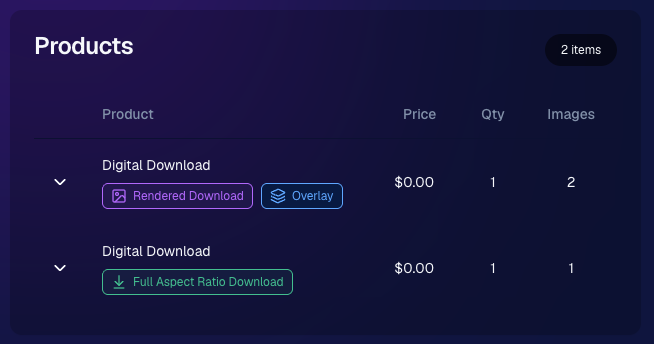
🧾 Order Details now identifies each download type

  • Digital Downloads can now show a Rendered Download or a Full Aspect Ratio Download badge, making it clearer which version was delivered to your customers.

__wf_reserved_inherit

🎨 Auto Editor & Candy Image Studio Updates

🧩 Auto Editor now supports image-input nodes

  • You can now use nodes such as:
    • Custom Image
    • Copy Style
    • Diploma Fix

🙈 Auto Edit originals won’t be texted too early

  • FreePics and FreePortraits will no longer send the original image by MMS when it belongs to an active Auto Edit with Hide Originals enabled. The system will wait for the edited version instead.

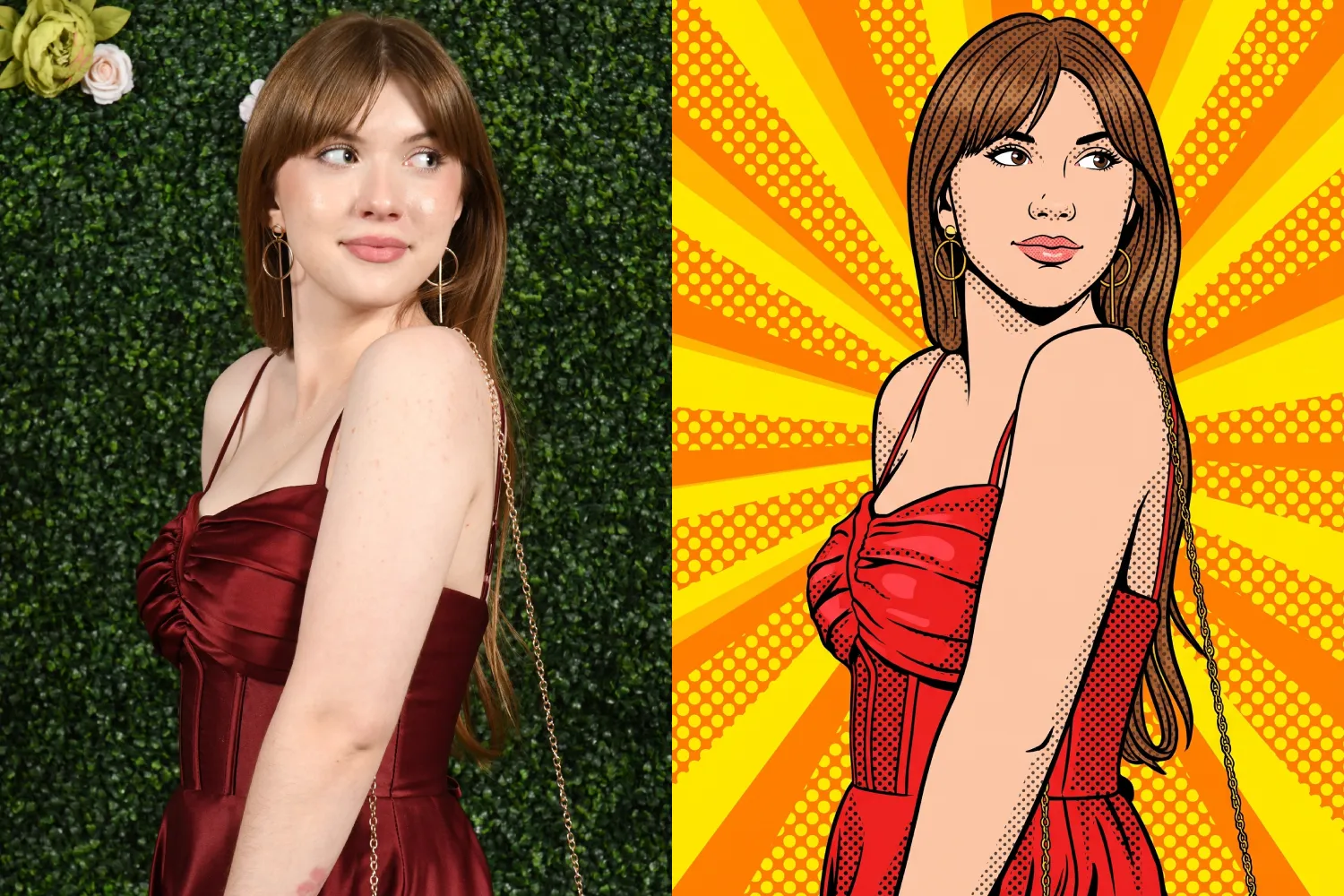
🕺 New Retro Pop node

  • Give images a colorful, retro-inspired treatment.

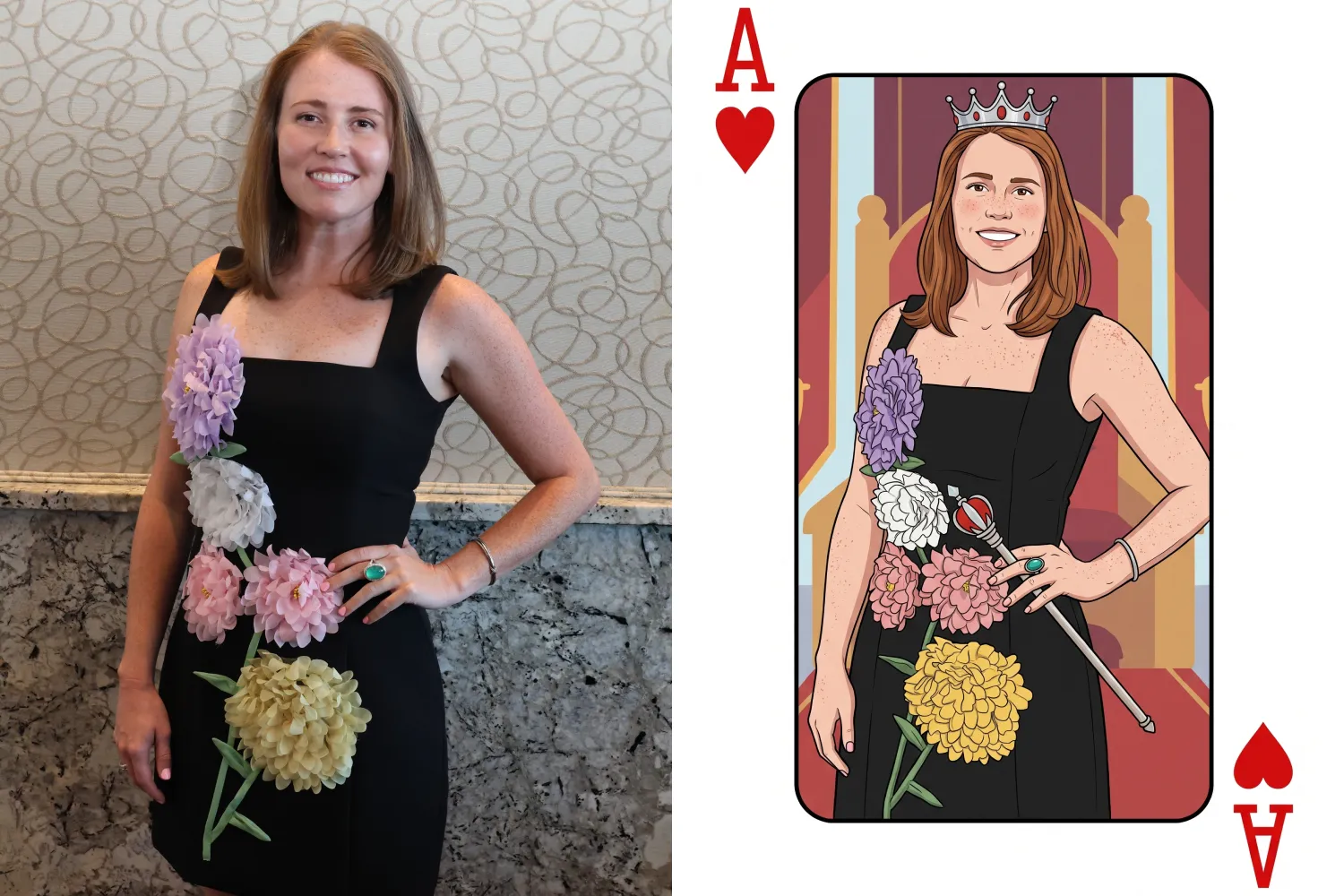
🂡 New Ace Card node

  • Turn subjects into a bold playing-card-style design.

__wf_reserved_inherit

__wf_reserved_inherit

💬 FreePics & Marketing Improvements

👥 FreePics can now send to multiple contacts on merged participants

  • If merged participant records contain different phone numbers or email addresses, regular FreePics can now send to each unique contact.

✉️ Marketing startup fix for BGR cutouts

  • Fixed an edge case where marketing would not begin if the only visible images were cutouts from the newer Background Removal system.

🔗 Hot Links now better respect Hide Originals

  • Fixed an issue where the preview could temporarily show the original image before an Auto Edit finished generating.

📱 Capture App Updates

Capture App 5.8.1

iOS and Android OTA updates

🎨 Updated Event artwork is refreshed at login

  • If artwork changed, the latest file is pulled when logging into the Event normally.

🛠️ Small follow-up fix

  • An additional 5.8.1 update was released to address a minor issue.

Capture App 5.9

iOS and Android App Store update

📲 iOS OTA updates are easier to install

  • You no longer need to completely restart the app or return to the Home Screen to install an available Over-the-Air update.

🤖 Android compatibility updates

  • Required updates were made to stay current with new Google Play requirements.

🛍️ Retail Download Fixes

📱 Safari share sheet reliability improved

  • Press-and-hold downloads should now open the native share sheet more consistently on Safari.

🖼️ Virtual Group download cleanup

  • Virtual Groups in FreePics no longer offer a Download with Art option.

🎨 Background selection fixes

  • Fixed cases where:
    • A PNG could be downloaded without selecting a background and receive an incorrect blue background
    • Faux renders showed no selected background in the download popup

🔐 Facebook login works again

🖥️ Dashboard Improvements

📊 Image Timeline cleanup

  • Fixed chart display issues, removed folders that were not useful in the timeline, and prevented multiple summaries from appearing when switching folders quickly.

🌾 Candy Culler controls are clearer

  • Filter visibility and report controls now use more descriptive buttons, similar to Manage Images.

📈 BGR Folder Stats fixed

  • Cutouts from the newer Background Removal system no longer incorrectly inflate Unassigned totals.

📱 Mobile Dashboard

🔗 More reliable deep linking

  • Dashboard links should open the correct page more consistently when the app has been open for a while or after signing in and out.

That’s the two-week update!

Faster Background Removal and smarter Digital Download delivery are the biggest highlights, with plenty of smaller improvements making Auto Editor, FreePics, Retail, and the Capture App more dependable.

Thanks again to everyone who joined us in Denver for Summer Seminar—we loved seeing you!

Keep creating magic,

Candy 🍬

Let’s get in touch

If you’re a photographer looking to add NowCandid™ services to your wheelhouse, set up a call with us!

How to customize formatting for each rich text

How to customize formatting for each rich text

How to customize formatting for each rich text

How to customize formatting for each rich text

How to customize formatting for each rich text

What’s a Rich Text element?

The rich text element allows you to create and format headings, paragraphs, blockquotes, images, and video all in one place instead of having to add and format them individually. Just double-click and easily create content.

A rich text element can be used with static or dynamic content. For static content, just drop it into any page and begin editing. For dynamic content, add a rich text field to any collection and then connect a rich text element to that field in the settings panel. Voila!

Headings, paragraphs, blockquotes, figures, images, and figure captions can all be styled after a class is added to the rich text element using the "When inside of" nested selector system.

  • List One
  • List Two
  • List Three
  • List Four
  • List Five

This is a link

This is bold text