HomeNavigation arrowBlogNavigation arrow
Current page
Feature Updates

A Sweeter Capture Experience: Apple iOS Capture App Version 1.0.5🍭

A Sweeter Capture Experience: Apple iOS Capture App Version 1.0.5🍭
Hey NowCandid users! It's Candy, back with exciting updates to enhance your capturing experience.

‍

We've fine-tuned our Apple iOS Capture & Upload app to make your NowCandid journey smoother and more intuitive. Here's what's new:

‍

Always Connected, Always Ready📶

‍

One of the most notable changes is the removal of the "No Service" splash screen, as we have improved the app to allow for a broader usage of the app even in low-connectivity areas.

‍

However! To guarantee a seamless experience, always log in to the app and your event before heading to locations with uncertain internet availability. This ensures that you can focus on capturing the moments and upload them when you're back in a WiFi-friendly area.

‍

Image Management Made Easy📸

‍

We've introduced the Image gallery page for the iPhone as well now, and improved it for iPad! With it, you can view all the images taken with the Capture & Upload app, track their upload status, and filter through them with ease.

‍

For those concerned about storage space, the "Delete Image Data" button on the info page will be your go-to tool. Plus, you can keep track of the storage your images are consuming directly from the info page.

‍

A More Responsive Experience⚙️

‍

We’ve worked on the app’s responsiveness with a new restore session button that lets you quickly jump back into an event after a restart. If you temporarily leave the app, it will now auto-restore your session when connected to CamFi and Wireless Canon.

‍

Oh yea, did we mention we work with CamFi now as well? + Click here to learn more! +

‍

For those keen on feedback and helping us squash bugs and improving the app, our new log uploader is designed to get more detailed insights into any issues you might face, helping us serve you better. Access it from the Info page on the app!

‍

Enhancements & Fixes✨

‍

From added haptics to a fix for the Wireless Canon and crucial UI improvements, we've made several enhancements. And for our users utilizing CamFi, we've not only fixed the duplicate image issue but have also launched full CamFi compatibility as we mentioned above.

‍

Quick Overview of Updates📋

‍

  • Added CamFi compatability.
  • "No Service" splash screen removed alongside new enhanced offline use.
  • Revamped Image gallery: view, filter, and manage photos.
  • Quick event access with restore session features.
  • Enhanced bug reporting via the new log uploader.
  • Full CamFi compatibility and duplicate image issue resolved.
  • UI improvements, haptic feedback additions, and more!

‍

That wraps up our latest updates!

‍

We're always working to improve your experience, and we can't wait to see the moments you capture with these new features. Until next time!‍

‍

Best,
‍

Candy

‍

Related articles

The Hidden Cost of Shipping in Volume Photography
Photography Tips
September 25, 2026

The Hidden Cost of Shipping in Volume Photography

5
 minutes read

by Jack Counts III - NowCandid Project Manager

‍

A photography business recently switched to NowCandid from another volume photography platform...

‍

During the transition, they shared some details about how their previous software handled shipping and fees.

‍

I knew different platforms approached this stuff differently. But seeing the mechanics laid out was one of those "wait… what?" moments.

‍

In the setup they described, the photographer didn’t set the shipping charge. They didn’t keep that shipping money. But the amount charged for shipping still increased the percentage-based fees coming out of their payout.

‍

Which is honestly kind of wild to me.

‍

Let me break down why:

  1. The shipping & handling amount could be set outside the photographer's control.
  2. The photographer would not generate any additional revenue on this shipping charge, which may be marked up.
  3. The photographer would pay ecommerce, payment processing, and potentially sales tax on the collected shipping.

‍

That can add up to some significant % in additional costs that photographers might not otherwise notice.

‍

Hearing about this hard-to-notice cost got me thinking about shipping in the volume photography space.

‍

What does that shipping charge actually cost the photographer?

‍

Some volume photography platforms use lab-set shipping rates for orders delivered directly to customers. GotPhoto’s documentation (help.gotphoto.com/en/support), for example, says its direct-shipping charges are determined by the lab and automatically added at checkout.

‍

Then there’s a separate question: Does that shipping charge also increase the fees coming out of the photographer’s payout?

‍

PhotoDay’s published standard pricing (support.photoday.io/en/articles) applies its 10% ecommerce fee to the total order, including products, shipping, and tax. Its reporting guide (support.photoday.io/en/articles) says customer-paid shipping goes directly to the lab.

‍

Let’s use a hypothetical order as an example with $50 in photo products plus $10 shipping. The customer pays $60 before tax.

‍

A 10% ecommerce fee on the $50 in products would be $5. But because that fee also applies to shipping, the photographer pays $6 in total ecommerce fees instead of $5 (before accounting for any additional ecommerce fees on collected sales tax).

‍

That extra dollar might not sound like much. But it means the ecommerce fee consumes 12% of the photographer’s product sales, even though the photographer doesn’t keep any shipping revenue.

‍

That’s an additional two percentage points of product revenue going toward ecommerce fees because of shipping.

‍

Here’s how that changes across a $5–$20 shipping range:

‍

How shipping affects ecommerce fees on $50 in product sales
Customer's shipping charge 10% ecommerce fee on shipping alone Total ecommerce fee on products + shipping Effective fee as a share of $50 in product sales
$5 $0.50 $5.50 11%
$10 $1.00 $6.00 12%
$15 $1.50 $6.50 13%
$20 $2.00 $7.00 14%

Illustrative calculations assume $50 in product sales and a 10% ecommerce fee applied to products plus shipping. They exclude payment processing, sales tax, and fulfillment costs.

‍

Payment processing adds another layer. Under PhotoDay’s published 2.9% processing rate, that $10 shipping charge generates another $0.29 in fees. Combined with the $1 ecommerce fee, that’s $1.29 attributable to shipping alone, equivalent to 2.58% of the $50 in product sales. The fixed $0.30 transaction fee is separate; it isn’t an additional charge caused by shipping, so we don't need to include that in this math we're doing to determine additional cost.

‍

Across 1,000 orders like this, that adds up to $1,000 in ecommerce fees plus $290 in processing fees attributable to shipping.

‍

To be clear, charging processing on shipping isn’t the problem by itself. I understand why processing a larger payment costs more, and I’m not assuming shipping revenue is all profit for the lab, since packaging, handling, and postage need to be covered. The problem is that it’s one more fee applied to a number the photographer doesn’t control. The lab or platform sets the shipping charge, and if that charge runs high, the photographer still pays a percentage on every dollar of it.

‍

But an ecommerce commission on shipping money the photographer doesn’t benefit from or have a significant say in? That does not sit right with me.

‍

To be fair, PhotoDay does let photographers offer free economy shipping as a promo (support.photoday.io/en/articles), and its reporting guide (support.photoday.io/en/articles) says that when you do, the shipping cost is deducted from your payout. That takes the charge off the customer’s plate, but the photographer still isn’t the one setting it. The amount comes from the lab’s shipping rates on the price sheet, and those may be customer-facing rates with markup built in, not what it actually costs to get the package out the door.

‍

High shipping costs can put the whole order at risk

‍

The photography business I talked with also shared with me how costs related to expensive-to-ship items were entirely passed on to end customers during checkout.

‍

Say someone picks out a $70 product, then discovers shipping adds another $20. Their purchase just became almost 29% more expensive, before tax.

‍

Maybe they’re fine with that. Maybe that’s the moment they close the tab.

‍

Baymard Institute’s checkout research (baymard.com/lists/cart-abandonment) lists high extra costs, including shipping, taxes, and fees, as the top reason shoppers give for abandoning checkout, cited by 40% of respondents. That’s general ecommerce research, not a photography-specific rate, but it’s a pretty compelling reason to pay attention to the shipping line.

‍

And the actual fulfillment expense doesn’t necessarily have to appear entirely in that line.

‍

Consider two hypothetical ways to price the same purchase:

‍

Same $90 total, different shipping prices
Price breakdown Higher shipping Lower shipping
Product price $70 $85
Shipping $20 $5
Total before tax $90 $90

Hypothetical pricing example. Both options total $90 before tax; the difference is how the price is divided between the product and shipping.

‍

Same total. Different presentation.

‍

There’s research suggesting that distinction matters. A 2026 study in PLOS ONE (journals.plos.org/plosone) found a preference for free shipping even when the total purchase price stayed constant. It was a small study, but it gives us a reasonable question to test: Would customers respond better if more of the fulfillment cost were included in the product price and less appeared as shipping?

‍

While there is more testing we at NowCandid could do in this space to provide a more concrete answer to this question, we’ve recently seen abandoned carts come in at about 3% of the orders placed. In other words, for every 100 orders, only about 3 shoppers added something to their cart and never checked out - so we seem to be doing something right. 😎

‍

How NowCandid gives photographers more control

‍

With NowCandid, photographers can set their customer-facing shipping prices (nowcandid.com/blogs), rather than simply passing through a lab-set charge. They can also price shipping above the underlying cost to create additional margin.

‍

But having the opportunity to profit from shipping doesn’t mean you should always charge more for it.

‍

You can keep shipping very inexpensive and account for more of the fulfillment expense in your product pricing instead. That’s especially useful when you’d rather not put a large delivery charge in front of someone buying a more expensive item.

‍

We also don’t calculate our ecommerce or payment-processing percentages on collected sales tax (nowcandid.com/blogs). Collecting tax and charging additional fees on those tax dollars are two separate things.

‍

It’s about more than cheaper shipping

‍

Looking back at that conversation, the part that bothered me wasn’t simply the shipping price. It was how little control the photographer had over a charge that affected both their profit and their customer’s experience.

‍

On one side, shipping can increase the fees coming out of your payout. On the other, it can make a purchase feel more expensive at the exact moment someone is deciding whether to complete it.

‍

That deserves more consideration than “that’s just what the lab charges.”

‍

And addressing it doesn’t necessarily mean giving up margin. In our $90 example, we didn’t lower the customer’s total—we moved more of the price into the product and less into shipping. Whether that presentation works better for your customers is worth testing, but you need the flexibility to try it first.

‍

That’s what I’d encourage photographers to look at when comparing volume photography software: Who sets the shipping price? Who receives that money? What additional fees does it generate? And can you change it when it isn’t working for your business?

‍

The advertised ecommerce % fee only tells part of that story.

‍

I don’t think every photographer needs the same shipping strategy. Some may want a reasonable margin on shipping. Others may prefer a higher product price and a very low shipping charge. That flexibility is what we want to provide with NowCandid.

‍

Shipping is part of your pricing. You should get a say in it.

‍

Thank you for attending my TED talk 🙏

Jack Counts III

NowCandid Project Manager

‍

NOTE: Platform examples reflect published policies and standard rates reviewed September 25, 2026. Terms can vary by lab, plan, promotion, or agreement. Order examples are illustrative, not reported studio results.

Weekly Recap: Better PhotoTag Controls & Roster Improvements 📸✨
Feature Updates
September 24, 2026

Weekly Recap: Better PhotoTag Controls & Roster Improvements 📸✨

3
 minutes read
Hey photo friends! 👋

‍

Candy here with another weekly recap! This week brings some especially useful workflow upgrades, including better PhotoTag management in Manage Images, larger virtual group limits, and several improvements for large rosters and PhotoRosters.

‍

Let’s jump in!

‍

🏷️ Better PhotoTag Management in Manage Images

‍

You could already select multiple images and add a PhotoTag. Now you can clean them up just as easily.

‍

➖ New Remove PhotoTags option

  • Select multiple images in Manage Images and use the new Remove PhotoTags button to remove PhotoTags from the selection.

‍

🧹 Duplicate PhotoTag assignment fix

  • Fixed an issue where Edit Folder could assign the same PhotoTag to the same image multiple times.

‍

👥 Move PhotoTagged Group Photos to the Top

‍

There’s also a new Advanced Offer setting:

‍

PhotoTagged Group to Top of Gallery

‍

When enabled, PhotoTagged Group Photos will appear at the top of Personal Galleries instead of the bottom.

‍

We generally recommend leaving this off, but it can be useful for Events where Personal Galleries contain a very large number of individual images and you want important Group Photos to be easier to find.

‍

📥 Multi-Select Download Change

‍

Downloads started through the Selected Images sheet in Manage Images will now automatically retry if an individual download stalls.

‍

This should be helpful when working on slower or congested networks where one image hanging could otherwise interrupt a larger download.

‍

📋 Roster & PhotoRoster Improvements

‍

Several fixes this week make roster workflows more reliable:

‍

👥 Large roster uploads fixed

  • Fixed uploads for customers with more than 1,000 people in their spreadsheet.

‍

✉️ Malformed email handling improved

  • Fixed an edge case where an email containing a ? instead of an @ could stop the upload process partway through the roster.

‍

🔢 PhotoRoster Event counts fixed

  • Fixed cases where the number of Events associated with a PhotoRoster could display incorrectly.

‍

⚠️ Better PhotoRoster export errors

  • Exporting a PhotoRoster directly from an Event page now provides the same detailed error reporting you’d receive when exporting from the PhotoRoster page itself.

‍

🎨 Candy Image Studio Fix

‍

🔁 More reliable “Try Again” edits

  • Fixed an edge case where editing an Event image during a Try Again sequence could accidentally generate an entirely new image instead of using the existing edit as its starting point.

‍

🖼️ Participant Download Fix

‍

✨ Overlay downloads fixed for faux renders

  • Fixed Download with Overlay not working correctly for faux renders — cutouts displayed with an Event background.

‍

🧑‍🤝‍🧑 Virtual Groups

‍

If you create a lot of Virtual Groups for an Event, and need to download them for some reason - this will save you some time!

‍

📥 New Download All button

  • The Virtual Group List page can now automatically render and download all Virtual Groups for an Event instead of making you process them one at a time.

‍

👥 Up to 200 subjects per Virtual Group

  • The maximum subject limit in Virtual Group Builder has been increased to 200.

‍

That’s the week!

‍

Relatively light changes this week (compared to our usual weekly recaps at least) as we work on some important things behind the scenes!

‍

Keep creating magic,

Candy 🍬

Weekly Recap: Faster Payouts, New PhotoTag Details & Redesigned Marketing Emails 💸✨
Feature Updates
September 18, 2026

Weekly Recap: Faster Payouts, New PhotoTag Details & Redesigned Marketing Emails 💸✨

3
 minutes read
Hey photo friends! 👋

‍

Candy here with another weekly recap! This week brings faster, more frequent payouts, a much more informative home for PhotoTags, redesigned marketing emails, and another round of Background Removal quality improvements.

‍

Let’s jump in!

‍

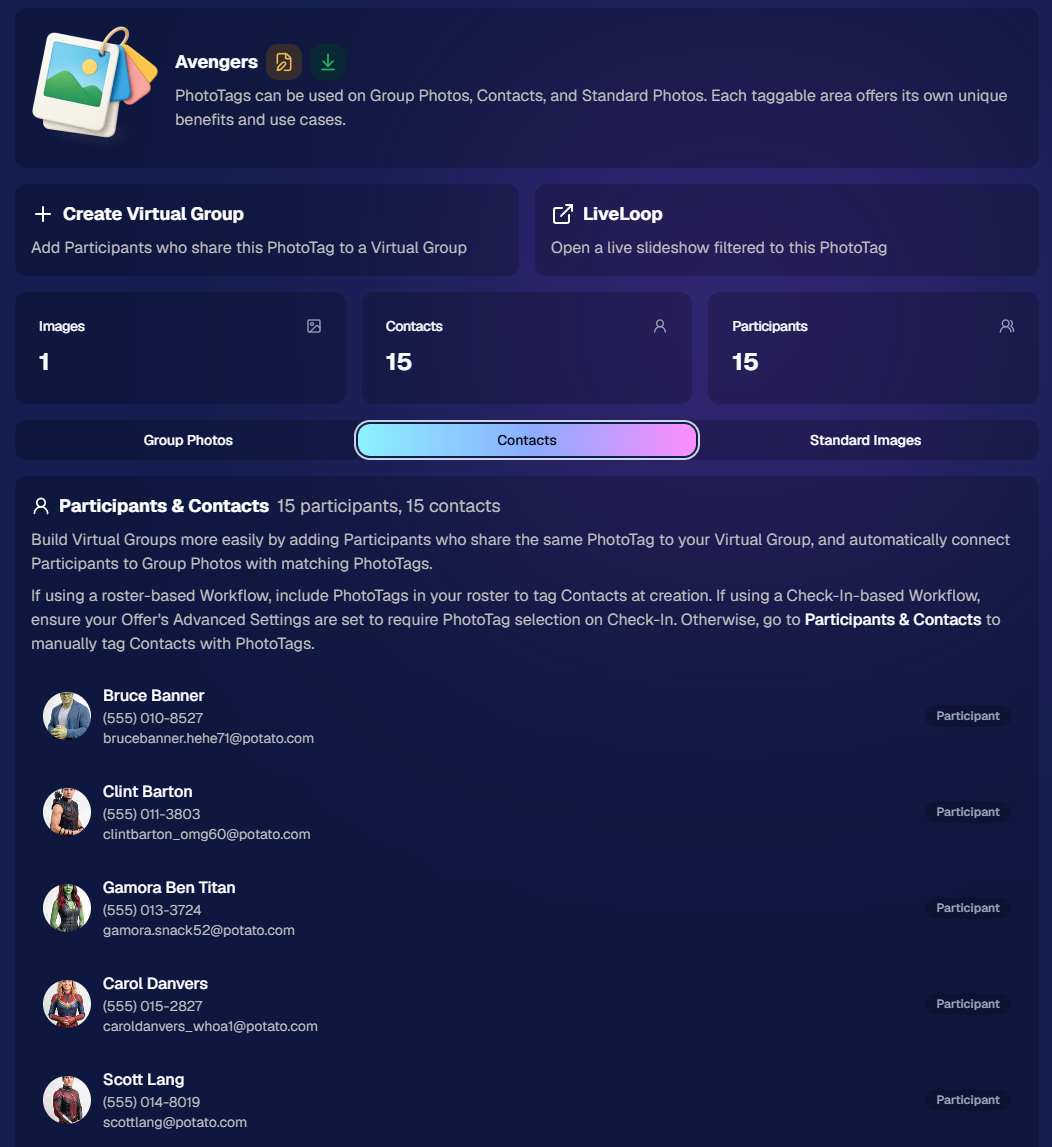
🏷️ NEW: PhotoTag Details Pages

‍

PhotoTags now have their own dedicated details pages.

‍

Click any PhotoTag from the PhotoTag List page to open a much more complete view of everything connected to it.

‍

From there, you can:

‍

  • ✏️ Edit the PhotoTag
    ‍
  • 👤 View tagged Participants and Contacts
    ‍
  • 👥 View tagged Group Photos
    ‍
  • 🖼️ View tagged Standard Photos

‍

This is a pretty big improvement for anyone learning or managing PhotoTags!

‍

PhotoTags can affect several different parts of an Event, and these pages make those relationships much easier to see in one place. They should also be especially helpful when training employees or helping someone understand exactly how a PhotoTag is being used.

‍

‍

💸 Faster, More Frequent Remittance Payments

‍

We’ve sped up our remittance schedule and are adding a second payment cycle each week, helping completed-order funds reach your bank account sooner.

‍

Previously, we sent your remittance statement on Wednesday, with the corresponding payment typically arriving in your bank account on Friday morning.

‍

Going forward:

‍

💰 Orders completed Friday through Tuesday will be included on your Wednesday remittance statement, with payment typically arriving Thursday

‍

💰 Orders completed Wednesday and Thursday will be included on a new Friday remittance statement, with payment typically arriving Monday

‍

That means the existing Wednesday payment cycle should now reach you about one day faster, while the new Friday cycle reduces the wait for orders completed later in the week.

‍

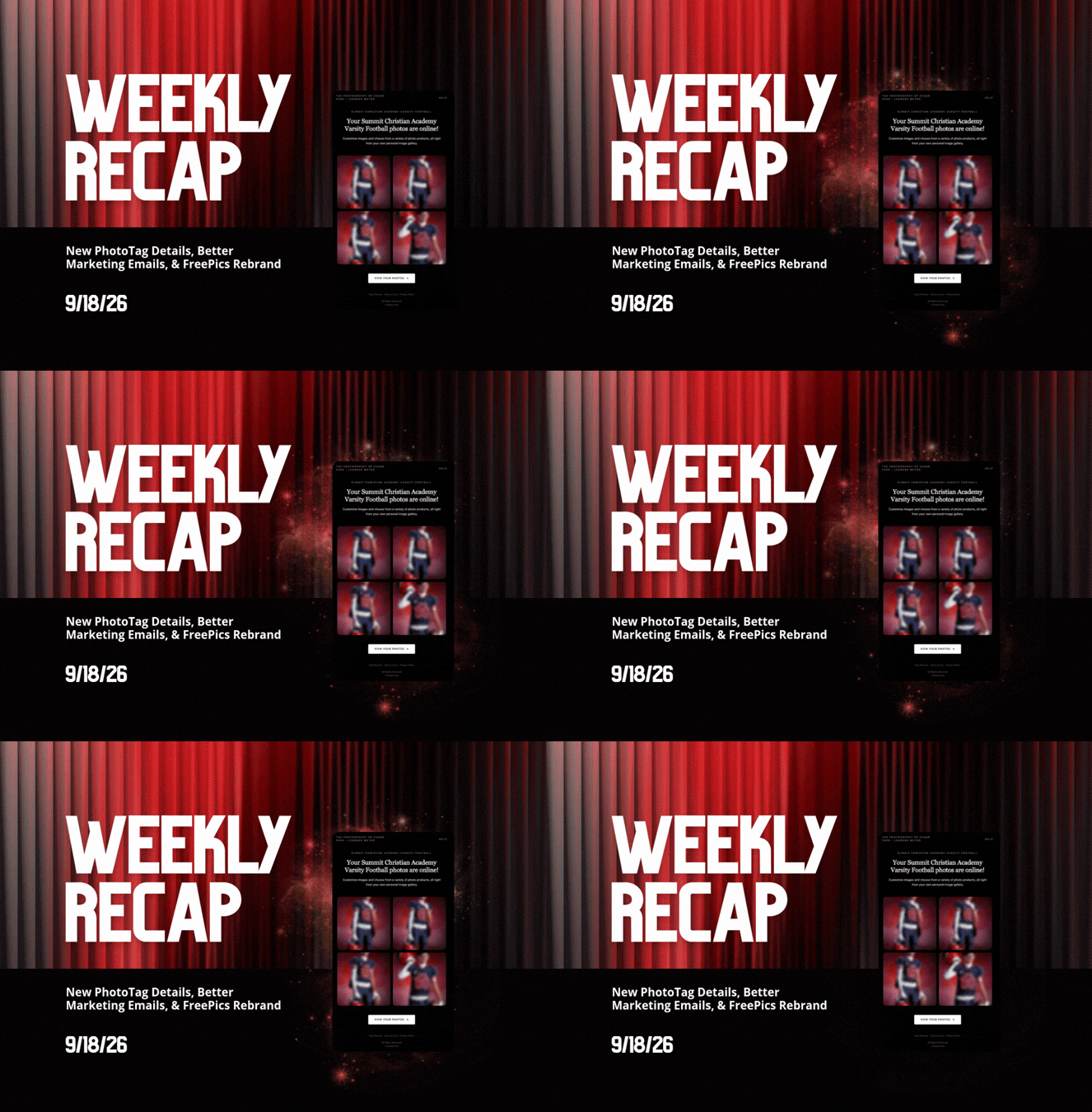
✉️ Marketing Emails Get a New Look

‍

Marketing emails have been redesigned with a cleaner, more modern layout.

‍

There’s also a bigger change to the way images are protected:

‍

  • 🌫️ Email image previews are now blurred
    ‍
  • 🛡️ This replaces the previous scrolling copyright treatment

‍

Blurring provides more consistent protection in situations where an email client might not properly render the scrolling copyright, or where the preview image is displayed outside an environment where GalleryGuard can protect it.

‍

Real email, but with business & event name replaced for privacy!

‍

Also: Minor Marketing Fix!

‍

We also fixed an edge case that could prevent a marketing campaign from starting when two different Participants shared only part of their contact information.

‍

For example, if two Participants had the same email address but different phone numbers, one Participant starting marketing should no longer incorrectly prevent the other from starting theirs.

‍

✂️ Better Background Removal

‍

Background Removal got another quality pass this week:

‍

  • 💇 Improved hair cutouts
    ‍
  • ⚽ Better handling of certain sports portrait props, particularly soccer balls sitting on the ground

‍

These changes continue our work to improve cutout quality across the kinds of images photographers are actually shooting.

‍

🆕 "Quic" Is Now "Free"

‍

The Quic programs have been rebranded to Free.

‍

Nothing about the pricing or functionality has changed — just the names:

‍

  • QuicPics → FreePics
    ‍
  • QuicPortraits → FreePortraits
    ‍
  • QuicPics GO! → FreePics GO!

‍

Same programs, same functionality, same pricing. Just a (hopefully) clearer name moving forward.

‍

🛍️ Retail Improvements

‍

✨ “Diamond Gloss” is now “Glossy Finish”

  • ‍We’ve renamed "Diamond Gloss" to Glossy Finish on the retail site to make the option clearer and easier for customers to understand.

‍

📱 More reliable iOS sharing

  • The native iOS share sheet used by the press-and-hold download feature should now open more reliably.

‍

👥 Group Digital Downloads now behave like regular Digital Downloads

  • When no overlay is selected — or the Event doesn’t have one — Group Digital Downloads can now provide the full-resolution, uncropped original.
  • That means the image can be available immediately from the email receipt and avoids problematic cropping steps on Group Photos that aren’t a standard 2:3 aspect ratio.

‍

📦 More accurate package previews

  • Fixed cases where Group and non-Group images could appear as previews for the wrong type of package product.

‍

🖥️ Dashboard Improvements

‍

📴 New offline screen

  • If your device is completely offline, the Dashboard now tells you instead of leaving you wondering whether the site is simply loading slowly.

‍

📅 Event Calendar color coding fixed

  • Events once again display the correct colors based on their Event Program.

‍

🖼️ Better Virtual Group Foreground management

  • The Foreground Picker now shows the names of your saved foregrounds. Click one to preview it, and you can also rename foregrounds for easier reuse later.

‍

✂️ Overwritten BGR images can reprocess

  • If you overwrite an image inside a folder marked for Background Removal, it can now be reprocessed as long as the replacement has the exact same dimensions as the original.
  • If the dimensions differ at all, the existing PNG will not be replaced.

‍

📋 Roster upload error fix

  • Fixed an edge case where a malformed email containing a # instead of an @ could stop the roster upload process and leave only the rows before that error imported.

‍

👤 Participant names on QR downloads

  • ‍QR download pages now display participant names in bold, making them easier to spot at a glance.

‍

📊 Clearer Sales & Shipping chart details

  • ‍Tooltips on the Event Details Sales & Shipping chart now break out Sales and Shipping separately on hover, adding some clarity.

‍

Capture App 5.10.1 (OTA)📱

‍

📱Selfie Check-In Station Mode fix

  • ‍The Continue button text has been shortened, and the Close button now stays accessible when PhotoTag Check-In is enabled.
  • Previously, the extra PhotoTag selection row could push the Close button off the bottom of the screen.

‍

That’s the week!

‍

The FreePics name change is the most visible update, but the new PhotoTag Details pages may be one of the most useful additions for teams working with PhotoTags regularly.

‍

Keep creating magic,

Candy 🍬

Let’s get in touch

If you’re a photographer looking to add NowCandid™ services to your wheelhouse, set up a call with us!

How to customize formatting for each rich text

How to customize formatting for each rich text

How to customize formatting for each rich text

How to customize formatting for each rich text

How to customize formatting for each rich text

‍

‍

What’s a Rich Text element?

The rich text element allows you to create and format headings, paragraphs, blockquotes, images, and video all in one place instead of having to add and format them individually. Just double-click and easily create content.

A rich text element can be used with static or dynamic content. For static content, just drop it into any page and begin editing. For dynamic content, add a rich text field to any collection and then connect a rich text element to that field in the settings panel. Voila!

Headings, paragraphs, blockquotes, figures, images, and figure captions can all be styled after a class is added to the rich text element using the "When inside of" nested selector system.

  • List One
  • List Two
  • List Three
  • List Four
  • List Five

This is a link

This is bold text

‍

  • ‍

‍