HomeNavigation arrowBlogNavigation arrow
Current page
NowCandid 101

How to Make FreePics Work for Your Photography Business 📸✨

How to Make FreePics Work for Your Photography Business 📸✨
In honor of our QuicPics Program’s rebrand to FreePics, we wanted to take a fresh look at some helpful info, best practices, and booking strategies for using FreePics and service photography successfully!

Giving photos away for free might not sound like an obvious way to make money.

But with the right setup, FreePics can be a powerful business tool — whether you’re getting paid by an event organizer, working with a sponsor, building the cost into ticket sales, developing relationships with venues, or simply using free photos to get your name in front of more potential customers.

And depending on the kind of experience you want to offer, you now have three different Programs to choose from: FreePics, FreePics GO!, and FreePortraits.

First: What Is FreePics?

FreePics is designed for photographers who want to provide images to subjects at no cost to the person being photographed.

Instead of relying on each participant to purchase their own images, the photography can be funded another way — or used as a marketing tool to help generate future business.

That opens up a lot of possibilities.

Ways to “Sell” FreePics 💸

1. Work Through an Event Organizer

One of the simplest approaches is to have the event organizer pay for photography as part of the event itself.

That could include:

  • Reunions
  • Luncheons
  • Galas
  • Corporate parties
  • Balls
  • Private events
  • Community events

Instead of charging individual guests for their photos, the organizer pays you for your time and coverage.

This can make the photography feel like another included event amenity — just like entertainment, décor, or catering.

The original FreePics training material even suggested photographers may be able to charge a few hundred dollars per hour, per photographer, depending on the event and market.

2. Find an Event Sponsor

Another option is to have a sponsor cover the photography.

In exchange, you can incorporate the sponsor’s branding into the experience, including branded image artwork or overlays.

That gives the sponsor something more memorable than a banner or table sign: photos attendees may actually save, share, and revisit.

Sponsorship pricing will naturally depend on the event, audience, and sponsor, but this type of arrangement may support a much higher overall photography budget than selling directly to individual attendees.

3. Build Photography Into Ticket Sales 🎟️

If every attendee is going to receive photos, another option is to simply include the photography cost in the ticket price.

A relatively small increase per ticket can add up quickly across a large event.

For example, an organizer could add a photography fee to each admission ticket, then use that revenue to pay for event coverage while letting every guest access their photos afterward.

Participants feel like they’re getting something included with admission, while the photographer still gets paid.

4. Partner With Party Planners or Venues 🤝

FreePics can also be a great tool for building recurring relationships.

A photographer can establish themselves as the go-to photographer for a planner or venue and create an arrangement that works for everyone involved.

That could mean a commission, referral agreement, preferred-vendor relationship, or another setup that encourages the planner or venue to continue sending events your way.

Instead of thinking about a single event, you’re using FreePics to help build a steady pipeline of future bookings.

5. Use FreePics as Marketing for Your Own Business 📣

You don’t necessarily have to make money directly from every FreePics Event.

Sometimes, the value is the exposure.

Offering free photography at the right event can introduce your business to dozens or even hundreds of potential customers.

Because participants receive their images directly, you have an opportunity to put your business and branding in front of them while creating a positive interaction with your photography.

That can turn one promotional event into future:

  • Event bookings
  • Portrait sessions
  • School or sports opportunities
  • Corporate work
  • Referrals
  • Repeat customers

Sometimes the free photo is the product.

Sometimes it’s the advertisement. 👀

Which Free Program Should You Use?

This is where the three Programs start to differ.

FreePics — Best for Most Events ⭐

For most photographers, FreePics is the best all-around option.

It provides the full FreePics experience and gives you the most flexibility in how images are delivered to participants.

If you simply want to photograph an event and make it easy for subjects to receive their images for free, start here.

It costs more per image than the other Free Programs, but you’re paying for the broader experience and flexibility.

Best for:

  • Parties
  • Galas
  • Corporate events
  • Reunions
  • Sponsored events
  • General event photography
  • Most situations where you want free image delivery

FreePics GO! — Best for a Gallery-First Experience 🖼️

FreePics GO! is a gallery-only experience, which allows it to cost less per image than standard FreePics.

But the gallery format also gives it some unique advantages.

FreePics GO! is especially useful if you want participants to clearly see that they can download different versions of their images — such as versions without overlay artwork.

It can also be a better choice when using Background Removal, because participants can browse different background options before deciding which version of an image they want to download.

And because subjects are already browsing through a gallery, FreePics GO! gives you a stronger opportunity to showcase physical products and other potential upsells alongside their free images.

Best for:

  • No-overlay option is important
  • Sponsored events with branded artwork
  • Background Removal workflows
  • Events where you want subjects choosing between different image treatments
  • Photographers who want to promote prints or physical products
  • Situations where keeping per-image costs lower is important

FreePortraits — Best for Headshots 👤

FreePortraits takes the FreePics concept and adapts it specifically for headshot-style photography.

Because the workflow is more limited — with only one image file sent out per image — it can be offered at a lower per-image cost than standard FreePics.

If your Event is centered around individual portraits rather than a larger event gallery, that limitation can actually make perfect sense.

Best for:

  • Corporate headshots
  • Conferences
  • Professional networking events
  • Employee portraits
  • Profile photos
  • Other single-image portrait workflows

If you want the FreePics experience but you’re really photographing headshots, FreePortraits is likely the better fit.

A Simple Way to Choose 🍬

When in doubt:

Use FreePics for the best general-purpose experience.

Choose FreePics GO! when the gallery itself adds value — especially for Background Removal choices and physical-product upsells.

Choose FreePortraits when you’re photographing headshots and only need to deliver one finished image file per image.

The goal with all three is the same: make it easy to get great images into your subjects’ hands while giving you flexibility in how the photography fits into your business.

Free Doesn’t Have to Mean Unprofitable 🚀

FreePics is less about giving your work away and more about deciding who is paying for the experience — and what value the photography creates.

Maybe the event organizer pays you.

Maybe a sponsor does.

Maybe the cost is included in admission.

Maybe a venue relationship brings you more bookings.

Or maybe the Event itself acts as marketing that introduces your photography business to a whole new group of people.

There are plenty of ways to make free photos make business sense.

And with FreePics, FreePics GO!, and FreePortraits, you can choose the version that fits the Event instead of forcing every job into the same workflow. 📸✨

Cheers,

— Candy 🍬

Related articles

Big News: Introducing GalleryGuard™ – The Ultimate Image Protection! 🔒✨
Feature Updates
March 28, 2025

Big News: Introducing GalleryGuard™ – The Ultimate Image Protection! 🔒✨

5
 minutes read
Hello, my fabulous photographers!

Candy here, and I'm thrilled to share some BIG news that’ll give you peace of mind when it comes to protecting your digital art.

For as long as ViewFirst™ photo systems have existed, safeguarding your images has been a constant challenge.

While offering a digital preview is a fantastic business model, there's always that worry about unauthorized screenshots and image theft.

The Image Protection Challenge 🛡️

  • • The Dilemma:
    Digital images are easy to view and share, but that also makes them vulnerable to being stolen—whether through clever workarounds or even just customers posting watermark-covered screenshots on socials.
  • • Industry Solutions:
    Some platforms hide faces behind logos or use messy, multi-colored watermarks to confuse AI, but these methods can compromise the aesthetic and customer experience.
  • • NowCandid™ Approach:
    Until now, we've relied on Scrolling Copyrighting—a good balance between visual appeal, customer satisfaction, and protection. However, with AI watermark removal making headlines, we wanted to step up our game.

Introducing GalleryGuard™ 👨‍🍳

Our digital chefs have been busy in the NowCandid™ kitchen, and their latest creation is nothing short of a Michelin Star-worthy innovation:

  • • iOS Protection:
    On iOS device browsers, GalleryGuard™ ensures that any attempted screenshots of our Image Galleries or Previews will result in a completely black screen. Let's see AI pull an image out of that!
  • • Desktop Defense:
    On desktop browsers, GalleryGuard™ applies an intense blur effect to the retail site when a screenshot is attempted, keeping your images safe without compromising overall aesthetics.
  • • Seamless Integration:
    The technology is live on most NowCandid™ retail pages and will continue to evolve, offering you superior digital image protection.

Sample gallery on Chrome on an iPhone 16 Plus

Sample gallery on Chrome on a Windows PC

What Does This Mean for You? 🎉

  • • Less Image Theft:
    Your valuable digital art stays secure from unauthorized screenshots and AI watermark removal.
  • • More Peace of Mind:
    Enjoy the confidence that your creative work is protected by industry-leading technology.
  • • Quick Note:
    While GalleryGuard™ currently supports only iOS & desktop experiences, we may expand its capabilities in the future!

That’s the scoop on GalleryGuard™—a breakthrough step in defending your digital art.

Thanks for being an essential part of the NowCandid™ community.!

As always, if you have any questions or feedback, drop us a line.

Cheers and sparkles,


Candy 🍬

Weekly Recap: Faster Check-Ins, Text Upgrades & More! ✨
Feature Updates
March 21, 2025

Weekly Recap: Faster Check-Ins, Text Upgrades & More! ✨

5
 minutes read
Hello, my fabulous photographers!

Candy here, ready to sprinkle some sparkle on your day with our latest Weekly Recap.

We’ve been busy refining your NowCandid™ experience, and this week’s update is a solid mix of practical tweaks and new features—all designed to make your events run even smoother. Let’s dive in!

1. Check-In Info Saves to Account 📝

We know every second counts during an event. Now, when subjects perform a Selfie Check-In™ while logged into quic.pics, their check-in info is automatically saved to their account for future events.

Streamlined Check-In:

  • • Reuse saved check-in details for faster access at subsequent events.
  • • Speeds up the process and reduces repetitive data entry.
  • • Works for both Selfie Check-In™ as well as Positive ID™ Check-In.

__wf_reserved_inherit
Expedited Selfie Check-In for your regular subjects, woo!

2. FreePics™ Text Character Increase 📲

Our marketing messages just got a boost! You now have more characters available when customizing the “Your images are arriving soon” text for FreePics™ events.

More Room to Create:

  • • Tailor your messaging with extra characters for a more personalized touch.
  • • Future tweaks may come, but for now, enjoy the expanded flexibility!

__wf_reserved_inherit
Previously capped at 100 characters, you'll have a bit more wiggle room going forward!

3. FreePortraits™ Pricing Now at 10¢ per Image 💰

Good news for portrait photographers who get paid upfront! We’ve adjusted the FreePortraits™ pricing down to 10¢ per image from 12¢. This change is designed to help you offer headshots and individual portraits at a lower rate.

Cost-Saving for Portraits:

  • • FreePortraits is aimed specifically at headshots and portraits where only one person receives the images.
  • • Expect further tweaks to FreePortraits in the future, but the cost-saving is here to stay!

__wf_reserved_inherit
FreePortraits is now 10 cents, down from 12!

4. GroupTags™ Enhancements 🏷️

We’ve made it easier than ever to manage group photos and individual shots with GroupTags™.

Import GroupTags:

  • • Upload a spreadsheet to auto-create as many GroupTags™ as you need—perfect for events with many teams or groups.

GroupTagging Individuals:

  • • Now you can assign GroupTags™ even to Individual Photos, not just Group Photos.
  • • This change gives you more flexibility when organizing the Groups of images your customers can filter by on the retail site. Possibly helpful for some action photographers!

__wf_reserved_inherit
GroupTags™ are now no longer limited to only Group Photos!

5. Miscellaneous Updates 🔧

A few extra tweaks to enhance overall performance and clarity:

Shortened Marketing Links:

  • • All links in marketing texts are now shortened without compromising URL security.

Informative Color Profile Errors:

  • • When an image is uploaded with the wrong color profile, the error now specifies which color profile the image has, instead of just saying “wrong color profile.”

That’s this week’s recap, folks!

These updates are all about making your workflow more efficient—from saving check-in info and giving you more flexible text options to reducing costs on FreePortraits™ and enhancing GroupTags™.

We’re continuously improving our system to help you manage your events seamlessly and boost your sales.

As always, we love hearing your feedback—let us know what you think!

Cheers and sparkles,


Candy 🍬

Weekly Recap: iOS 4.16 Updates, Order History Links & More! ✨
Feature Updates
March 14, 2025

Weekly Recap: iOS 4.16 Updates, Order History Links & More! ✨

6
 minutes read
Hello, my fabulous photographers!

Candy here, and welcome to this week’s Weekly Recap. We’ve been busy fine-tuning your NowCandid™ experience with a host of practical updates—from enhanced iOS features to smarter marketing and reporting tools.

Whether you're managing events on the go or perfecting your galleries, these improvements are designed to streamline your workflow and boost your productivity.

Let’s dive into this week’s updates!

1. iOS 4.16 Updates 🍏

Our latest version, iOS 4.16, brings a host of new features and UI improvements to make your workflow smoother:

  • • Camera Permissions Required:

    The app now requires camera permissions on startup—reducing issues caused by accidental declines.
  • • New “Resources” Page:

    Our info page has been revamped into a “Resources” page that mirrors the dashboard site. It now includes detailed button descriptions and a stylish UI.
  • • Device Storage Indicator:

    Check your remaining storage right from the Resources page, so you know when it’s time to free up space.
  • • Low Disk Space Login Block:

    If your device has less than 1GB of free space, logging into an event is disabled—ensuring you can always upload your images without hiccups.
  • • New Event Landing Page:

    A more detailed UI now lets you view image overlays and see descriptive shooting buttons before you dive into capturing photos.
  • • Photo Booth Landing Page:

    View custom background files and camera info, among other helpful items—and also a handy link to teach you about Guided Access!
  • • Vertical Liveview Support:

    For Sony and Canon users, you can now manually set the Photo Booth liveview to vertical. (Nikon auto-orients, and iPad cameras are always vertical.)
  • • Other UI Refinements & Performance Tweaks:

    We’ve polished numerous small details to boost overall efficiency.

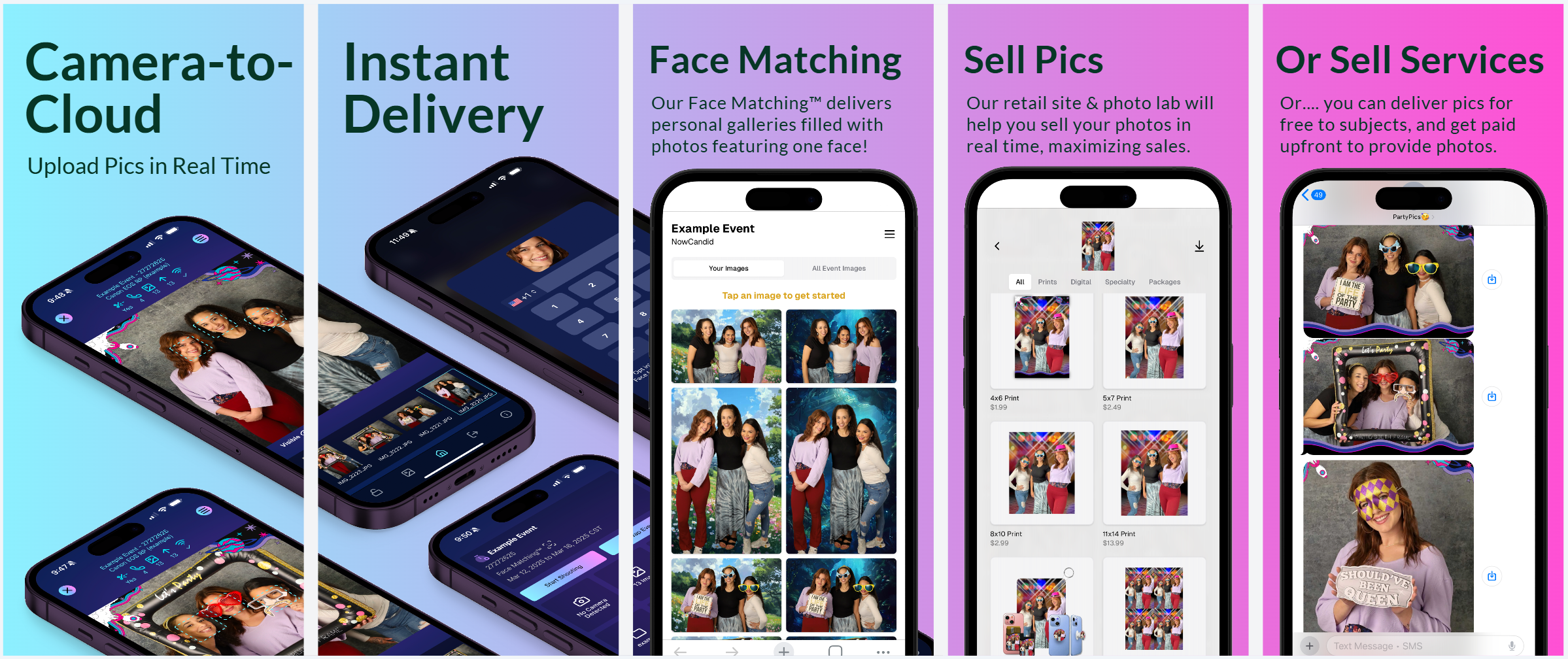
New screenshots for the app store!

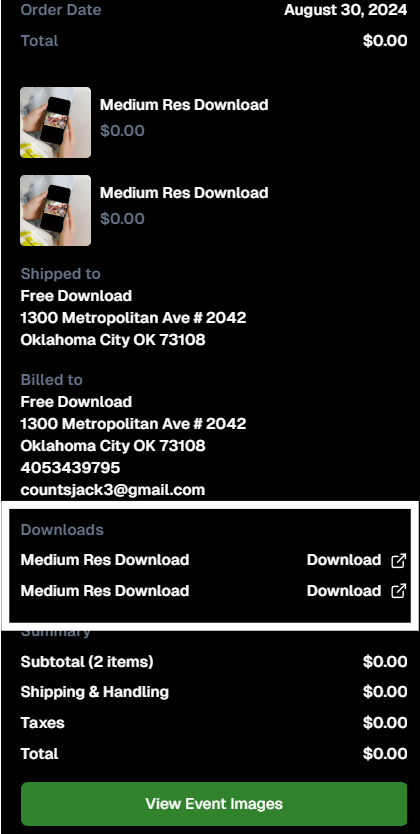
2. Accessible Download Links 📥

Great news for your customers—and for you, too!

  • • Order History:

    End customers now access their download links from past orders via their Order History (if they were signed in at the time of the order).
  • • Order Details:

    Photographers can also access links to ordered downloads from an Order's Details page in the dashboard.

IF they're signed in, permanent access to their purchased downloads

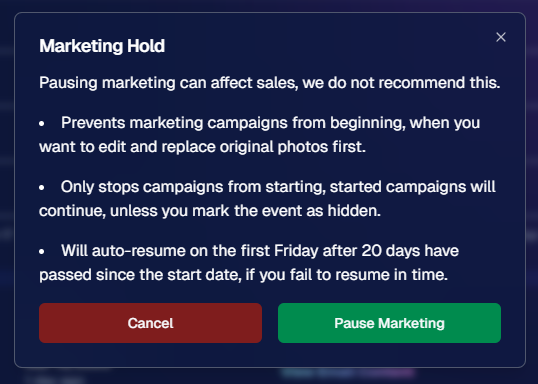
3. Hold Marketing Feature ⏸️

Need to pause your marketing while you fine-tune your images? Our new Hold Marketing option is here to help:

  • • Pause Campaigns:

    On an Event’s Marketing Page, you can halt new marketing messages from starting. (Started campaigns continue unless you mark the event as hidden.)
  • • Auto-Resume:

    If you forget, the campaign will auto-resume on the first Friday after 20 days from the event’s start date.
  • • Optional Use:

    While not generally recommended, this feature is perfect for unique situations—like editing and replacing photos before releasing marketing.

Found in an Event's Marketing Page

4. Event Management Portal Updates 🌐

Our Event Management Portal (access via quic.pics/portal) just got an upgrade:

  • • Enhanced Image Downloading:

    Now you can download images with custom backgrounds directly from the portal.
  • • Multi-Select & New Filters:

    Enjoy improved multi-select options and refined tools, just like on the main dashboard.
  • • Consistent Tools:

    Most of the updates we’ve applied to the primary dashboard lately are now available here as well, making it easier for your photographers to manage active, recent, or upcoming events.

5. Group-by-Face™ Upgrades 👥

Our Group-by-Face™ feature just got even better!

  • • Improved Accuracy:

    We’ve refined things to ensure fewer false matches when using this feature.
  • • In Case You Didn't Know:

    In a Face Matching™ event, simply head to the Manage Images page and select “Group-by-Face™” to run it.

    This adds clickable boxes around faces on the retail site, directing users to galleries of images featuring that face.

That’s this week’s Weekly Recap!

We hope these updates—ranging from UI enhancements to new marketing tools—make your NowCandid™ experience even more efficient and enjoyable.

As always, we’d love to hear your feedback.

Cheers and sparkles,

Candy 🍬

Let’s get in touch

If you’re a photographer looking to add NowCandid™ services to your wheelhouse, set up a call with us!

How to customize formatting for each rich text

How to customize formatting for each rich text

How to customize formatting for each rich text

How to customize formatting for each rich text

How to customize formatting for each rich text

What’s a Rich Text element?

The rich text element allows you to create and format headings, paragraphs, blockquotes, images, and video all in one place instead of having to add and format them individually. Just double-click and easily create content.

A rich text element can be used with static or dynamic content. For static content, just drop it into any page and begin editing. For dynamic content, add a rich text field to any collection and then connect a rich text element to that field in the settings panel. Voila!

Headings, paragraphs, blockquotes, figures, images, and figure captions can all be styled after a class is added to the rich text element using the "When inside of" nested selector system.

  • List One
  • List Two
  • List Three
  • List Four
  • List Five

This is a link

This is bold text