

Customer Spotlight: How Joe Photo Tampa Is Turning Heads with NowCandid's Auto Editor
.png)
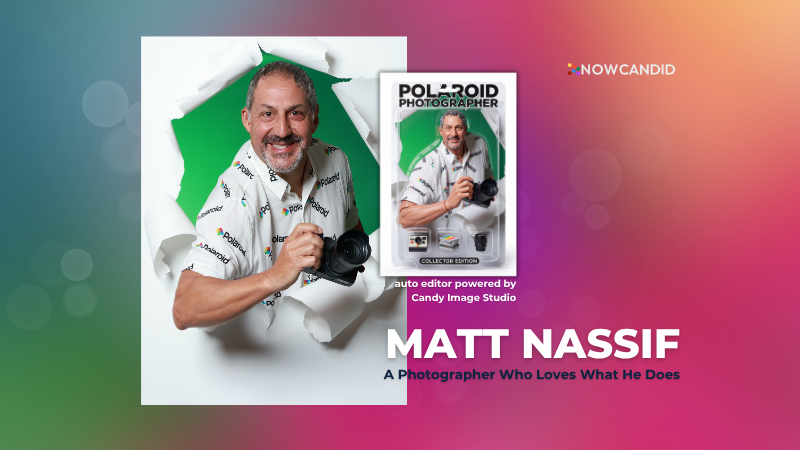
When you've been in the event photography business for nearly two decades, you've seen just about everything.
But every once in a while, a new tool comes along that changes the game.
For Matt Nassif of Joe Photo Tampa, that tool has been NowCandid's Auto Editor.
Nearly 20 Years of Capturing Memories
Joe Photo Tampa has been photographing events across Florida for almost 20 years. Matt credits much of that journey to his longtime friend and mentor, Ed Kempf of Impact Photography/Joe Photo Iowa.
Back in 2007, Ed introduced Matt to Candid Color Systems, inviting him to visit Oklahoma and see everything CCS had to offer firsthand. That visit marked the beginning of a partnership that continues nearly two decades later.
"I'll be going into my 20th year this fall and feel incredibly blessed to have CCS as my lab. I'm also grateful for my mentor Ed, who has guided me throughout the years."
When NowCandid was just getting started, Matt was there from the beginning. After reconnecting with Jack at a photography conference in Las Vegas in early 2020, he became one of the platform's original beta testers, working closely with the development team to help shape the software.
Today, Matt has been using NowCandid for six years and believes Joe Photo Tampa is one of the platform's largest users.
Taking a Chance on Something New
When Matt first learned about the Auto Editor through a NowCandid newsletter, he immediately saw an opportunity.
One of his long-time clients was celebrating their 20th anniversary, with more than 600 guests expected to attend. Rather than offering another standard event experience, Matt wanted to surprise attendees with something they'd never seen before.
The result?
A huge success.
More than 180 guests participated in the Auto Editor experience.
"It was a TOTAL hit."
Like many photographers, Matt admits he was initially hesitant because of the AI component.
"My biggest hesitation was simply not knowing anything about AI."
Fortunately, a little guidance helped turn uncertainty into excitement.
Creating an Experience Guests Remember
By his third Auto Editor event, Matt had found his rhythm.
"What surprised me the most is how fun, different, and interactive the Auto Editor is."
Guests weren't just participating. They were bringing their friends back to experience it themselves.
"Guests would receive their character on their phone, then come back with more friends so they could try it too. That's a win-win for Joe Photo Tampa!"
The response from event hosts has been equally enthusiastic.
"My customers loved the product, and their guests were showing off their images and posting them online."
More Than a Fun Feature: A Business Opportunity
While the guest experience has been exciting, the business results have been just as impressive.
At Matt's second Auto Editor event, one guest loved the experience so much that she booked Joe Photo Tampa on the spot for another event just 72 hours later.
"The product sells itself."
Matt also sees Auto Editor opening doors in an increasingly competitive market.
"This is an upsell product that can definitely compete with the photo booth world."
Instead of simply taking another picture, photographers can offer clients an interactive experience that guests talk about long after the event ends.
Advice for Fellow Photographers
Matt's advice for photographers considering Auto Editor is simple:
"If not now, when?"
He encourages photographers to spend some time experimenting before introducing it to clients.
"Try it at the office. Test it. Learn what prompts work best for your style and events."
He also offers one important reminder:
"AI isn't perfect. It takes some patience to learn what works best. Once you get your prompts dialed in, it becomes an incredible product."
A Photographer Who Loves What He Does
Whether it's corporate events, parties, or celebrations, Matt simply loves photographing people.
His photography style?
Fun. Outgoing. Professional.
And when it comes to camera gear...
"I bleed Nikon."
Thank You, Joe Photo Tampa!
Matt has been an incredible partner to NowCandid from the very beginning! From helping beta test the platform to embracing new features like Auto Editor and sharing honest feedback along the way.
We're incredibly grateful for photographers like Matt who continue to push the platform forward while creating unforgettable experiences for their clients.
Thank you, Matt, for being part of the NowCandid family. We can't wait to see what you create next.
.jpg)


.svg)


