HomeNavigation arrowBlogNavigation arrow
Current page
Success Stories

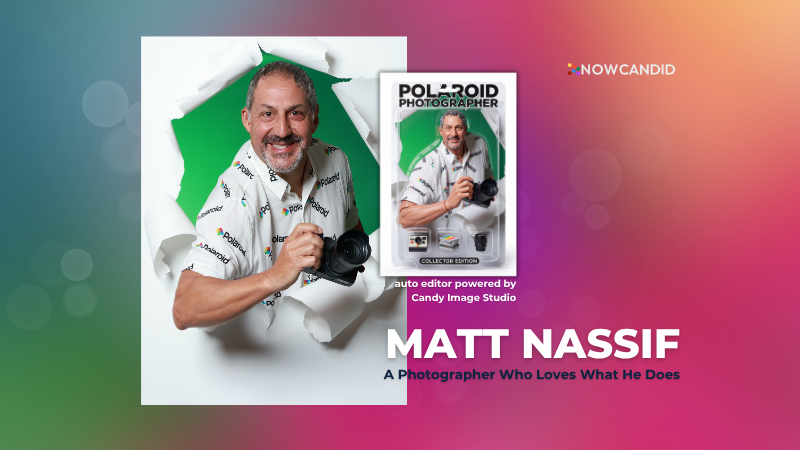
Customer Spotlight: How Joe Photo Tampa Is Turning Heads with NowCandid's Auto Editor

Customer Spotlight: How Joe Photo Tampa Is Turning Heads with NowCandid's Auto Editor
When you've been in the event photography business for nearly two decades, you've seen just about everything.

But every once in a while, a new tool comes along that changes the game.

For Matt Nassif of Joe Photo Tampa, that tool has been NowCandid's Auto Editor.

Nearly 20 Years of Capturing Memories

Joe Photo Tampa has been photographing events across Florida for almost 20 years. Matt credits much of that journey to his longtime friend and mentor, Ed Kempf of Impact Photography/Joe Photo Iowa.

Back in 2007, Ed introduced Matt to Candid Color Systems, inviting him to visit Oklahoma and see everything CCS had to offer firsthand. That visit marked the beginning of a partnership that continues nearly two decades later.

"I'll be going into my 20th year this fall and feel incredibly blessed to have CCS as my lab. I'm also grateful for my mentor Ed, who has guided me throughout the years."

When NowCandid was just getting started, Matt was there from the beginning. After reconnecting with Jack at a photography conference in Las Vegas in early 2020, he became one of the platform's original beta testers, working closely with the development team to help shape the software.

Today, Matt has been using NowCandid for six years and believes Joe Photo Tampa is one of the platform's largest users.

Taking a Chance on Something New

When Matt first learned about the Auto Editor through a NowCandid newsletter, he immediately saw an opportunity.

One of his long-time clients was celebrating their 20th anniversary, with more than 600 guests expected to attend. Rather than offering another standard event experience, Matt wanted to surprise attendees with something they'd never seen before.

The result?

A huge success.

More than 180 guests participated in the Auto Editor experience.

"It was a TOTAL hit."

Like many photographers, Matt admits he was initially hesitant because of the AI component.

"My biggest hesitation was simply not knowing anything about AI."

Fortunately, a little guidance helped turn uncertainty into excitement.

Creating an Experience Guests Remember

By his third Auto Editor event, Matt had found his rhythm.

"What surprised me the most is how fun, different, and interactive the Auto Editor is."

Guests weren't just participating. They were bringing their friends back to experience it themselves.

"Guests would receive their character on their phone, then come back with more friends so they could try it too. That's a win-win for Joe Photo Tampa!"

The response from event hosts has been equally enthusiastic.

"My customers loved the product, and their guests were showing off their images and posting them online."

More Than a Fun Feature: A Business Opportunity

While the guest experience has been exciting, the business results have been just as impressive.

At Matt's second Auto Editor event, one guest loved the experience so much that she booked Joe Photo Tampa on the spot for another event just 72 hours later.

"The product sells itself."

Matt also sees Auto Editor opening doors in an increasingly competitive market.

"This is an upsell product that can definitely compete with the photo booth world."

Instead of simply taking another picture, photographers can offer clients an interactive experience that guests talk about long after the event ends.

Advice for Fellow Photographers

Matt's advice for photographers considering Auto Editor is simple:

"If not now, when?"

He encourages photographers to spend some time experimenting before introducing it to clients.

"Try it at the office. Test it. Learn what prompts work best for your style and events."

He also offers one important reminder:

"AI isn't perfect. It takes some patience to learn what works best. Once you get your prompts dialed in, it becomes an incredible product."

A Photographer Who Loves What He Does

Whether it's corporate events, parties, or celebrations, Matt simply loves photographing people.

His photography style?

Fun. Outgoing. Professional.

And when it comes to camera gear...

"I bleed Nikon."

Thank You, Joe Photo Tampa!

Matt has been an incredible partner to NowCandid from the very beginning! From helping beta test the platform to embracing new features like Auto Editor and sharing honest feedback along the way.

We're incredibly grateful for photographers like Matt who continue to push the platform forward while creating unforgettable experiences for their clients.

Thank you, Matt, for being part of the NowCandid family. We can't wait to see what you create next.

Related articles

Holiday Gear Up
Success Stories
October 16, 2024

Holiday Gear Up

4
 minutes read
Are you ready for the Holiday Season?

Maybe not since we have roughly 10 weeks to go. For most photographers, the winter months can bring a noticeable slowdown, but this also presents the perfect opportunity to seize seasonal event opportunities like Santa Portraits and holiday parties.

These festive events are in high demand, and with the right tools, you can make the most out of them!

We want to share a success story from a Santa Portrait Event that took place in the last few years, along with how NowCandid’s Workflows can help you maximize your success this holiday season.

Santa Portrait Station Success

Rachel S., a photography business owner from South Florida, a few years ago landed a Santa Portrait event at a Zoo and turned it into a HUGE win. With Candid's Scanner ID Workflow, Rachel was able to use the same techniques of a typical sports or school picture day and apply them to the Holiday Zoo Lights Santa Event.

To manage the event, Rachel used the Scanner ID Workflow, and generated blank QR cards to pass out to people while they waited in line.

The QR codes were scanned by the guests who then paired their contact info with their QR code! Once they got to the front of the line, Rachel's photographers would scan the next guest's QR with their tethered device, and then take their photos!

The device tethered to the camera would then upload the photos right after they were taken!

With the contact info and pictures both in the system, gallery links were then automatically texted directly to the subjects, right away.

Overall, this event garnered over $42,000 in it's first year!!! Not bad for a couple weeks of work!

NowCandid Workflows: Make Your Holiday Events a Breeze

One of the key elements to success in high-volume holiday events is efficiency—and that’s where NowCandid’s Workflows come into play.

These workflows streamline the process of capturing, organizing, and delivering photos, allowing you to focus more on your artistry and client experience.

Here are two workflows you’ll want to use during your Santa sessions and holiday parties:

  1. Scanner ID: The Workflow Rachel used! It's great for efficiently collecting guest contact info while they are in line, letting you move the line along more quickly OR have more time available for additional photos. Contact info is essential for instant image delivery and post-shoot marketing.
  2. Type & Take: This works similarly to the Scanner ID Workflow, except you type the subject's contact info into your tethered device before photographing them. It is not as time efficient at Scanner ID, but it doesn't require you to print out many blank cards before the event!

Seasonal Retail Theme to Add to the Experience

The holiday fun doesn't stop at the event—it continues when your customers view and purchase their images! With our Candy Cane retail theme, your clients are immersed in the festive spirit as soon as they visit their personal image gallery.

Our themes include delightful touches like falling snowflakes, which gently drift across the screen. These animations help enhance the shopping experience and keep customers wrapped up in the magic of the season.

Theme: Candy Cane - Watermarking: Default

Use Overlay Art to Add a Special Touch

If you're looking to elevate the experience further, NowCandid offers Overlay Art, allowing you to add optional customized overlays to your clients' images.

These titles add a festive, personal touch to the photos, making them feel extra special, whether it's a corporate holiday party, a Santa session, or a family Christmas gathering.

Imagine sending clients their Santa Portraits, complete with a “Merry Christmas 2024” overlay or a custom-designed title that reflects the spirit of the season. It’s little touches like these that make clients feel valued and excited about your services—leading to more referrals and repeat business.

Why You Shouldn't Sleep on Holiday Opportunities

The holiday season offers some of the most lucrative photography opportunities of the year, especially when it comes to events like Santa Portrait sessions, corporate holiday parties or large family and friends gatherings.

With many photographers considering this time a "slow season," there's an opportunity to stand out from the crowd by offering fun, engaging photo experiences that families, organizations, and individuals will love.

Adding these events to your services can also build lasting relationships with your clients—because who doesn’t want to make holiday memories they’ll treasure forever?

Don't Miss Out: Prep for the Holidays Now

The key to success is preparation. Start planning your Santa sessions, promote your holiday event photography, and make sure you're using NowCandid’s powerful tools to handle your Events with ease.

And remember: festive cheer isn’t just for clients. By embracing the holiday season and seizing these photography opportunities, you can fill your calendar and finish the year strong.

Cheers, and may there be many holiday events in your future!

Candy 🍬

Big News: Introducing the "View Photos in Sequence" Button for SportsPics! 📣⚽
Feature Updates
October 15, 2024

Big News: Introducing the "View Photos in Sequence" Button for SportsPics! 📣⚽

3
 minutes read
Hello, amazing photographers and sports enthusiasts!

Candy here with some thrilling news that'll make capturing and enjoying those epic sports moments even better! 🌟

Drumroll, please... 🥁 We're excited to introduce the new "View Photos in Sequence" button on the Retail site. It will be visible on SportsPics Events using Face Matching! 🎉

What's the Buzz About?

Imagine you're photographing a high-energy soccer game. You've snapped a series of shots capturing the intensity of the match. Some photos feature the players' faces, which, thanks to our Face Matching technology and Selfie Check-In or Tap-A-Face workflows, automatically land in their personal galleries.

BUT what about those incredible action shots where the player's face isn't visible? 🤔

That's where our "View Photos in Sequence" button comes into play!

How Does It Work?

When your customers view a photo in their personal gallery, they'll now see a "View Photos in Sequence" button. Clicking this button allows them to explore images taken immediately before and after that specific shot.

This means they can easily find and enjoy all the action-packed moments, even if their face isn't visible in every photo! 🏃‍♂️⚡

The button is visible when previewing a personal gallery photo on the retail site

Why You'll Love It

  • Expand Your Memories: Players can now discover more photos of themselves, capturing every twist, turn, and goal—even those where they're zooming past the camera!
  • Enhanced Engagement: Offering more images increases the chances of customers finding that perfect shot they can't wait to share or purchase.
  • Effortless Navigation: It's simple and intuitive—just a click, and they're exploring a sequence of moments from the game.

A Game-Changer for Sports Photography

This feature is a win-win for everyone:

  • Photographers: Showcase more of your work and provide added value to your clients.
  • Athletes and Families: Relive the excitement of the game with a comprehensive view of their performance.
  • Boost Sales: More images mean more opportunities for sales and happy customers!

Ready to Try It Out?

The "View Image Sequence" button is now live for all SportsPics Events using Face Matching. So go ahead and give it a spin in your next event! We can't wait to see the amazing moments you'll capture and share. 📷💫

As always, we're here to help you make the most of NowCandid's features.

If you have any questions or feedback, don't hesitate to reach out!

Cheers and high fives,

Candy 🍬

Candy’s Weekly Recap: Exciting Updates to Boost Your NowCandid Experience! 📸🎉
Feature Updates
October 11, 2024

Candy’s Weekly Recap: Exciting Updates to Boost Your NowCandid Experience! 📸🎉

6
 minutes read
Hello, my wonderful photography friends!

Candy here, back with another Weekly Recap to keep you in the loop on all the fantastic new features and improvements we've rolled out. 🌟

We've got some real game-changers this week that I'm sure you'll love. So, grab a comfy seat and let's dive in! 🛋️

Chip Board Now Included with All Print Orders 📦

We're enhancing the quality of your clients' "unboxing" experience!

  • • Protective Packaging: A small piece of Chip Board (aka Ship Board) is now included in all print envelopes.
  • • Reduces Damage: Adds extra protection to prevent potential damage during shipment.
  • • Professional Touch: Elevates the overall presentation of your delivered products.

QuicPics & QuicPics GO Enhancements 🚀

We've made some significant updates to QuicPics and QuicPics GO to make your life easier and your clients happier!

  • • Bulk Downloads: Your QuicPics customers can now download all their images at once in medium resolution, instead of adding each one to the cart individually.
  • • Renamed Product: When you're not selling high-resolution digital downloads in your QuicPics Offer, the Medium Res Download product will automatically rename to Free Download.
  • • Avoid Mistakes: We've added an extra confirmation step when creating a QuicPics Event. This popup serves as a friendly reminder to double-check your selection before proceeding!

Theme: Starburst - Watermarking: Off

Access to Selfie Check-In from All Images Gallery 📲

Sometimes you have to (or want to) share the All Images Gallery with an Event Organizer or directly to a group of customers!

Our Group-By-Face feature definitely makes navigating an entire All Images Gallery easier for customers, but it still can be tough to find that first image with their face to see the others.

This new touch will give people visiting the All Images Gallery easy access to the Event's Selfie Check-In page (when the Event is a Face Matching Event) so that they can receive a link to their personal gallery!

  • • Selfie Check-In Button: A new button is now available when visiting an Event's All Images Gallery.
  • • Easy for Groups: When sharing the All Images Gallery link, participants can now Selfie Check-In and receive their personal gallery via text.
  • • Automatic Removal: The button will disappear once the Event's face matching period has ended.

Theme: Liquorice

Order History Enhancements 🛍️

Some new quality of life improvements when it comes to your orders!

  • • Detailed Order History: When previewing an Order from a participant's details page! Includes order contents and subtotal.
  • • Participant Management Integration: An Order column has been added to the Participant Management page, so you can easily spot who has ordered and who has not.
  • • Daily Order Counts: Hover over each day's column in the Event Management page's sales chart to see the order count for that hovered day!

Import Backgrounds and Overlays from Past Events 🎨

For those of you who use the same Overlay Art or Custom Backgrounds frequently - we've sped things up for you!

  • • Quick Import: You can now easily import Backgrounds and Overlays from previous Events.
  • • Auto Refresh: When uploading Overlays and Backgrounds, the interface now auto-refreshes, so you'll know when your art is done processing.
  • • Ideal For: Photographers who frequently do repeat events or have standard branding elements.

Capture App Version 4.5 Update (for iOS)📱

We've made a small update to the iOS Capture App to start preserving image meta data after images have been uploaded!

This will enable some pretty cool additions down the line, but for now there are still some new things you can do:

  • • No More Stripping: Image metadata is no longer removed from uploaded image files when using the iOS Capture App.
  • • Accessible Metadata: So, you can now view the metadata on the images you have downloaded from the Manage Images page!
  • • Benefits:
    • Check image timestamps to check photographer productivity.
    • Review camera settings from past shoots for comparison.
    • Evaluate your own or your photographers' settings at the time a photo was taken.

Windows' "image details" information

New Marketing Preview Page 📣

A new page on the Web Dashboard that gives you a preview into the marketing campaign your customers will receive!

  • • Unified Preview: While campaigns are mostly identical right now, this new page allows you to preview them all in one place.
  • • Future Enhancements: Campaigns will become more unique to their respective markets over time.

Minor Changes & Bug Fixes 🐞

We're always working behind the scenes to improve your experience:

  • • Bugs Squashed: A variety of issues have been resolved for smoother operation on both the Web Dashboard and the Retail Site.
  • • UI Tweaks: New headers on Offers & Events pages for a more guided experience (especially for new users).
  • • Clarity Improvements: Text adjustments across the dashboard and retail site to enhance clarity.
  • • Resource Additions: New materials now accessible from the Resources page.

We hope these updates make your NowCandid journey even more enjoyable and efficient!

Your feedback is invaluable, so please don't hesitate to share your thoughts or questions.

Cheers and sparkles,

Candy 🍬

Let’s get in touch

If you’re a photographer looking to add NowCandid services to your wheelhouse – set up a call by clicking the button below.

How to customize formatting for each rich text

How to customize formatting for each rich text

How to customize formatting for each rich text

How to customize formatting for each rich text

How to customize formatting for each rich text

What’s a Rich Text element?

The rich text element allows you to create and format headings, paragraphs, blockquotes, images, and video all in one place instead of having to add and format them individually. Just double-click and easily create content.

A rich text element can be used with static or dynamic content. For static content, just drop it into any page and begin editing. For dynamic content, add a rich text field to any collection and then connect a rich text element to that field in the settings panel. Voila!

Headings, paragraphs, blockquotes, figures, images, and figure captions can all be styled after a class is added to the rich text element using the "When inside of" nested selector system.

  • List One
  • List Two
  • List Three
  • List Four
  • List Five

This is a link

This is bold text