HomeNavigation arrowBlogNavigation arrow
Current page
Success Stories

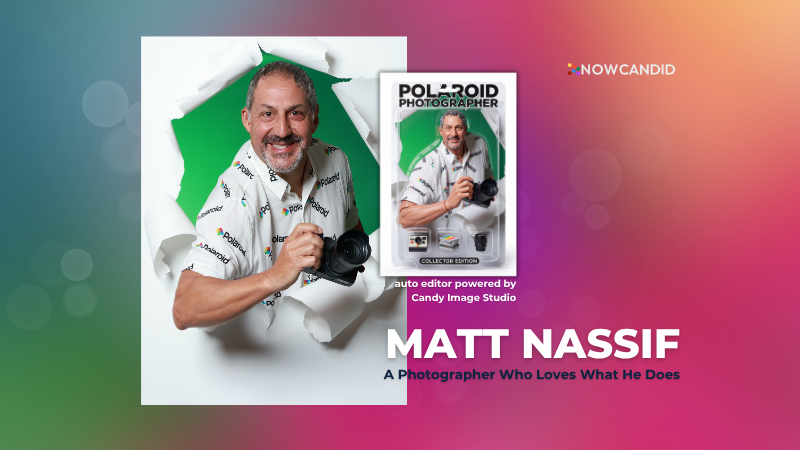
Customer Spotlight: How Joe Photo Tampa Is Turning Heads with NowCandid's Auto Editor

Customer Spotlight: How Joe Photo Tampa Is Turning Heads with NowCandid's Auto Editor
When you've been in the event photography business for nearly two decades, you've seen just about everything.

But every once in a while, a new tool comes along that changes the game.

For Matt Nassif of Joe Photo Tampa, that tool has been NowCandid's Auto Editor.

Nearly 20 Years of Capturing Memories

Joe Photo Tampa has been photographing events across Florida for almost 20 years. Matt credits much of that journey to his longtime friend and mentor, Ed Kempf of Impact Photography/Joe Photo Iowa.

Back in 2007, Ed introduced Matt to Candid Color Systems, inviting him to visit Oklahoma and see everything CCS had to offer firsthand. That visit marked the beginning of a partnership that continues nearly two decades later.

"I'll be going into my 20th year this fall and feel incredibly blessed to have CCS as my lab. I'm also grateful for my mentor Ed, who has guided me throughout the years."

When NowCandid was just getting started, Matt was there from the beginning. After reconnecting with Jack at a photography conference in Las Vegas in early 2020, he became one of the platform's original beta testers, working closely with the development team to help shape the software.

Today, Matt has been using NowCandid for six years and believes Joe Photo Tampa is one of the platform's largest users.

Taking a Chance on Something New

When Matt first learned about the Auto Editor through a NowCandid newsletter, he immediately saw an opportunity.

One of his long-time clients was celebrating their 20th anniversary, with more than 600 guests expected to attend. Rather than offering another standard event experience, Matt wanted to surprise attendees with something they'd never seen before.

The result?

A huge success.

More than 180 guests participated in the Auto Editor experience.

"It was a TOTAL hit."

Like many photographers, Matt admits he was initially hesitant because of the AI component.

"My biggest hesitation was simply not knowing anything about AI."

Fortunately, a little guidance helped turn uncertainty into excitement.

Creating an Experience Guests Remember

By his third Auto Editor event, Matt had found his rhythm.

"What surprised me the most is how fun, different, and interactive the Auto Editor is."

Guests weren't just participating. They were bringing their friends back to experience it themselves.

"Guests would receive their character on their phone, then come back with more friends so they could try it too. That's a win-win for Joe Photo Tampa!"

The response from event hosts has been equally enthusiastic.

"My customers loved the product, and their guests were showing off their images and posting them online."

More Than a Fun Feature: A Business Opportunity

While the guest experience has been exciting, the business results have been just as impressive.

At Matt's second Auto Editor event, one guest loved the experience so much that she booked Joe Photo Tampa on the spot for another event just 72 hours later.

"The product sells itself."

Matt also sees Auto Editor opening doors in an increasingly competitive market.

"This is an upsell product that can definitely compete with the photo booth world."

Instead of simply taking another picture, photographers can offer clients an interactive experience that guests talk about long after the event ends.

Advice for Fellow Photographers

Matt's advice for photographers considering Auto Editor is simple:

"If not now, when?"

He encourages photographers to spend some time experimenting before introducing it to clients.

"Try it at the office. Test it. Learn what prompts work best for your style and events."

He also offers one important reminder:

"AI isn't perfect. It takes some patience to learn what works best. Once you get your prompts dialed in, it becomes an incredible product."

A Photographer Who Loves What He Does

Whether it's corporate events, parties, or celebrations, Matt simply loves photographing people.

His photography style?

Fun. Outgoing. Professional.

And when it comes to camera gear...

"I bleed Nikon."

Thank You, Joe Photo Tampa!

Matt has been an incredible partner to NowCandid from the very beginning! From helping beta test the platform to embracing new features like Auto Editor and sharing honest feedback along the way.

We're incredibly grateful for photographers like Matt who continue to push the platform forward while creating unforgettable experiences for their clients.

Thank you, Matt, for being part of the NowCandid family. We can't wait to see what you create next.


Related articles

Big News: PhotoTags for Participants 🏷️👤
Feature Updates
August 12, 2025

Big News: PhotoTags for Participants 🏷️👤

6
 minutes read
Hey there, photo friends!

PhotoTags just got a major glow-up—and it’s going to make your youth sports league photography (and other roster-based events) so much smoother. ✨

You probably already know PhotoTags as a way to organize images from an Event into public image groups—perfect for team photos, tournament games, or multi-day event galleries.

But now? PhotoTags can also be assigned to Contacts. Let’s break down what’s new and how it all works together.

📋 Assign PhotoTags in Your Rosters

When uploading a roster to a Name Lookup Event in the Web Dashboard, you can now include PhotoTag columns in your spreadsheet.

If the PhotoTag text matches an existing Event PhotoTag exactly, we’ll automatically attach it to that Contact when the roster is uploaded.

👀 View & Edit PhotoTags for Contacts

On the Participant Details page, you can now:

  • • See all PhotoTags assigned to that Contact
  • • Assign or unassign additional PhotoTags
  • • Rename PhotoTags without breaking existing links (the updates will flow everywhere!)

🖨️ PhotoTags on Scan Cards

Using the Scanner ID Workflow? Your downloaded Scan Cards now display any assigned PhotoTags—making it super easy to match the right cards to the right team. ⚽🏀🏈

🖼️ Group Photos in Galleries

If Group Photos are attached to a PhotoTag, they’ll automatically appear at the end of every personal gallery for subjects with that same PhotoTag. (Non-group images assigned to a PhotoTag won’t auto-appear in personal galleries.)

📱 Sort Name Lookup by PhotoTag (Capture & Upload App v4.20.1)

This one’s a game-changer for on-site shooting:

You can now filter Name Lookup by PhotoTag—so if you’re photographing the “Panthers” next, just filter and only Panthers will appear.

We’ve also polished the Name Lookup interface to make it faster and easier to navigate. You’re welcome. 😉

That’s the scoop on PhotoTags for Participants! 🏷️💪

Together, these changes mean:

  • • Faster on-site team photography
  • • Better organization from roster upload to final gallery
  • • Cleaner communication with coaches, parents, and teams
  • • Happier clients (and fewer mix-ups!)

Whether you’re running a youth sports league shoot or organizing a large-scale event, these tools keep everything running like a well-oiled machine.

Keep tagging like a pro,

Candy 🍬

Photographing Homecoming Weekend with NowCandid: A Photographer's Playbook
Events
August 12, 2025

Photographing Homecoming Weekend with NowCandid: A Photographer's Playbook

8
 minutes read
High school homecoming weekend is packed with photo-worthy moments

From the parade and pep rally to the big game, homecoming court, and the dance. For photographers, it’s a whirlwind. But with NowCandid™, even a small team can cover it all efficiently and profitably.

Below is a quick look at each event, the opportunities it presents, and the NowCandid tools that help you make the most of them.

🎉 Homecoming Parade – Kicking Off the Celebration

  • • Selfie Check-In™: Let parade participants register with a quick selfie before kickoff. Face Matching will tag them automatically later.
  • • Roam & Shoot: Focus on faces & emotional moments, not journalistic shots. The system will do the rest!
  • • PartyPics™: Upload images in real-time for attendees, parents and students to view instantly.

    💡 Every identified face is a potential sale. Automation ensures you don’t miss anyone.

📣 Pep Rally – Spirit & Smiles

  • • Selfie Check-In™: Continue building your attendee database for the weekend.
  • • LiveLoop™: Display photos on the big screen in real-time to build excitement.

    💡 More personalized photos = more likely purchases.

🏈 Football Game – Under the Lights

  • • Face Matching™: Match images to fans, players, and band members automatically.
  • • JerseyJotter™: You can even let fans filter photos by jersey number for easy finds.
  • • Live-Upload: Deliver shots before halftime!
  • • LiveLoop™: Show photos on the big screen during breaks for instant crowd buzz.

    💡 Thousands of game photos become searchable and personal, boosting sales.

👑 Homecoming Court – Crowning Moments

  • • Prepare: Add nominees to Face Matching™ ahead of time with Selfie Check-In™!
  • • Background Removal: Instantly turn sideline shots into elegant portraits.
  • • Live-Upload: Provide those crowning shots well before the night’s over.

    💡Court images have built-in demand, your social pics will encourage bigger package sales!

💃 The Dance – A Night to Remember

  • • Selfie Check-In™ at the Door: The best time to get Check-Ins!

    • Even if someone checks-in again, that's no problem! Get everyone to do it as they funnel into the dance.
  • • Digital Backgrounds: Offer multiple themed or elegant options for portraits, our real-time background removal makes it easy.
  • • Photo Booth + LiveLoop™: Between NowCandid's Photo Booth Mode & LiveLoop™, you have multiple upsell options that create more photos and more positive energy!

    💡 Multiple background choices can lead to one image being purchased multiple times!

🚀 Why It Works

NowCandid™ turns homecoming into a personalized, real-time, high-volume photography experience—without extra staff.

  • • Efficiency: Automation handles matching, sorting, and delivery.
  • • Delight: Participants see their photos fast and without searching.
  • • Profitability: More sellable images, quicker turnaround, and premium offerings = better margins.

A typical homecoming weekend is jam-packed with memories in the making.

For a photographer, it used to mean juggling notebooks of names, printing hundreds of proofs, or spending days in post-event labor. Now, with tools from NowCandid™, a single photographer (even operating solo) can confidently cover the parade, pep rally, game, court, and dance – and do it in a way that’s both fun for students and profitable for the business.

By using features such as Selfie Check-In™ and Face Matching™ to ensure everyone’s identified, QuicPics™ and LiveLoop™ to deliver excitement in real time, and Photo Booth and AI-powered backgrounds to offer creative products, you transform the event photography workflow from chaotic and labor-intensive to smooth, high-tech, and engaging.

In short, NowCandid’s software and workflows allow you to capture the full spirit of homecoming

Every candid laugh, every triumphant cheer, every dance floor twirl – and get those images into the hands of the people who will cherish them, almost as fast as the memories are made.

This means happier clients, more sales, and a homecoming weekend where the photographer can enjoy the process as much as everyone else enjoys the photos.

Here’s to using technology to work smarter, wow your customers, and make homecoming (and many more events to come) a win-win for everyone involved!
Weekly Recap: Tap-A-Face from the Dashboard & Smarter Roster Contacts 👤✨
Feature Updates
August 8, 2025

Weekly Recap: Tap-A-Face from the Dashboard & Smarter Roster Contacts 👤✨

3
 minutes read
Hey there, photo friends!

This week’s updates are small but mighty—because behind the scenes we’re cooking up some bigger projects that we can’t wait to share with you soon.

For now, here’s what’s fresh in your NowCandid™ Dashboard:

👆 Tap-A-Face… from the Web Dashboard!

You’ve always loved Tap-A-Face in the field—now you can do it right from your Dashboard.

From any image’s Image Details Page, head to the Participants tab and click the new Add via Tap-A-Face button. From there:

  1. Click a spot on the image where a face is
  2. Enter the contact info for the person

This will instantly create a new Participant in your Event, kick off Face Matching™, and start marketing their gallery right away. 📸💌

Manage Images -> Details, Logs, and More-> Participants -> Add via Tap-A-Face

📇 Roster Contacts, Upgraded

Contacts you add through Rosters are now much easier to work with! They’ll behave just like your regular Contacts & Participants—meaning:

  • They’re fully editable
  • They can be assigned multiple images without the previous first-image requirement

No more clunky workarounds—just smoother, faster contact management. 🙌

This change will also improve adding Contacts via the "Create Participant" button, as well as Contacts who add themselves to the Event via a Positive ID Event's Simple Check-In.

These kinds of Contacts will just show a silhouette for now, which we may adjust down the line!

That’s it for this week!

Stay tuned—because some very cool things are coming your way soon. 👀✨

Keep being amazing,

Candy 🍬

Let’s get in touch

If you’re a photographer looking to add NowCandid services to your wheelhouse – set up a call by clicking the button below.

How to customize formatting for each rich text

How to customize formatting for each rich text

How to customize formatting for each rich text

How to customize formatting for each rich text

How to customize formatting for each rich text

What’s a Rich Text element?

The rich text element allows you to create and format headings, paragraphs, blockquotes, images, and video all in one place instead of having to add and format them individually. Just double-click and easily create content.

A rich text element can be used with static or dynamic content. For static content, just drop it into any page and begin editing. For dynamic content, add a rich text field to any collection and then connect a rich text element to that field in the settings panel. Voila!

Headings, paragraphs, blockquotes, figures, images, and figure captions can all be styled after a class is added to the rich text element using the "When inside of" nested selector system.

  • List One
  • List Two
  • List Three
  • List Four
  • List Five

This is a link

This is bold text