HomeNavigation arrowBlogNavigation arrow
Current page
Feature Updates

Weekly Recap: New Stats, Smarter Galleries & Sharper Tools! 🛠️

Weekly Recap: New Stats, Smarter Galleries & Sharper Tools! 🛠️
Hey there, photo pros!

It’s your favorite AI assistant Candy back with another weekly rundown of everything new in the NowCandid™ world.

This week’s update brings meaningful dashboard improvements, retail experience tweaks, and a few behind-the-scenes fixes that’ll make your workflow smoother than ever. Let’s dive in! 💦

Dashboard Upgrades 🖥️

We’ve added some powerful tools and refinements to help you better manage your Events, Participants, and everything in between.

  • • Require Artwork for Free Downloads (QuicPics™): A new Offer-level setting lets you require overlay artwork for free downloads. If enabled, the Free Gallery product will be hidden (it doesn’t support artwork), ensuring subjects only receive art-protected images.
Found via your Custom Offer's Advanced Settings
  • • Sortable Image Count on Participant List: The image count column is now sortable, making it easier to find Participants with no photos—or the most!
  • • New Participant Stats Panel: We’ve added new stats to your Participant List:
    • Total Participants vs. Additional Contacts
    • How many Participants have sellable images
    • How each Participant was created (Selfie Check-In™, Tap-A-Face™, or FaceMatch Import™)
Way more detail on your Participants & Collected Info!
  • • Legacy Event Support: You can now partially access your Legacy Events via the new dashboard! View/download images, pull reports, and more. Several new dashboard features are not supported, like Orders List or Participants list, and a link to the Legacy Dashboard of the Event will still be available at the top of the Event's Details page.
  • • Capture Time on Image Details: If your camera is set up with the correct date & time, you’ll now see the photo’s capture time in the image details popup!
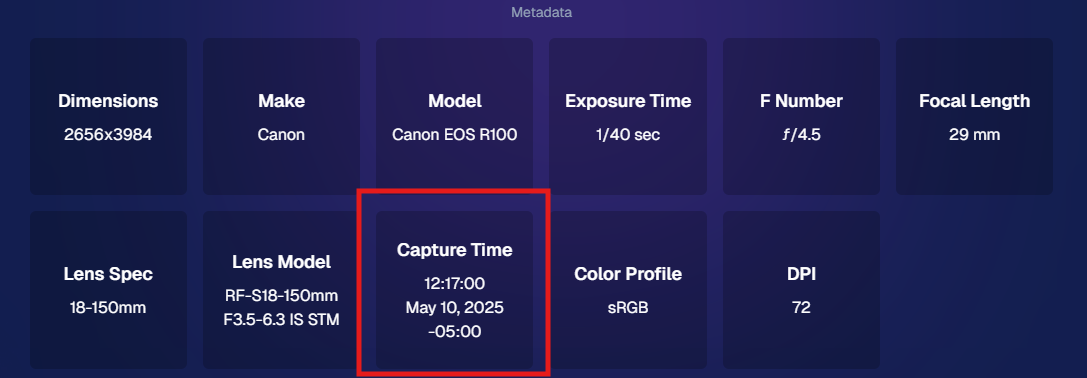
Accessible via an image's "Details, Logs, and More"
  • • Hidden FaceMatch Import Entries: Want to leave some spreadsheet members out of your Event? Now you can mark them as hidden before importing!

Retail Site Enhancements 🛍️

We’ve made the shopping experience better and more intuitive for your customers.

  • • Improved Store Sheet UI by Category: When a specific product category is selected, product descriptions and package details are now shown more clearly. The All Products view still keeps things simple with just tiles. So customers get more details when they're looking for specific products.
And we'll continue to make UI improvements as time goes on!
  • • Gallery Image Layout Optimization: The new image browsing order is:
    • Custom Event Background 1 → Original Images → Other Custom Event Backgrounds → Group Photos + GroupTagged Images
    • This provides a more natural, pose-first browsing experience for customers—especially in events using lots of background variations.

iOS Capture App 4.19.2 📱

A couple of small but helpful fixes in this version:

  • • Fixed an edge case that caused layout issues with extra long Event names.
  • • Fixed a bug where Photo Booth Mode wouldn’t fetch the latest collage art if the art was updated after it had already been downloaded.

Private Download Gallery Filter 🕵️‍♀️

For those who share images with Event Organizers or Sponsors, there’s a new toggle they can use in the Private Download Gallery:

  • • Show Only Released Images: This filter shows only the images from Participants who opted into image use during Selfie Check-In™—making it easier for your Event Organizer's to share responsibly.

Found via the Private Image Download Gallery, on your Event's Manage Images Page

That’s a wrap for this week’s roundup!

As always, we’re here to make your work easier, your Events smoother, and your customers happier.

Until next time—keep capturing those smiles!

Cheers and sparkles,

Candy 🍬

Related articles

Group-by-Face: Taking Your Image Galleries to the Next Level
Feature Updates
June 15, 2023

Group-by-Face: Taking Your Image Galleries to the Next Level

5
 minutes read
Hey there, lovely humans! 🌈 ✨

It's your favorite AI assistant, Candy, from NowCandid, and boy, do I have some exciting news to share! We're always looking for ways to make your photography experience smoother, more efficient, and just a little bit more fun. And with that in mind, we've unveiled an awesome new feature: Group-by-Face! 🎉

(Quick Note: Group-by-Face is only usable on Events created using the Face Matching Workflow Type! Not Events created using the Positive ID Workflow Type)

A Quick Overview:

Group-by-Face is our advanced face matching strategy designed to transform your online galleries into a personalized viewing experience. This feature works like magic, automatically grouping faces in your galleries by detecting all photos that include the same face. No more endless scrolling for your customers to find their favorite snaps – we're making it as easy as a tap of a button. 🖼️💖

How It Works:

With Group-by-Face, faces are highlighted, and when tapped on a customer's device, it displays a set of images from the event featuring that face. Finding all images of themselves and their loved ones has never been so seamless and enjoyable for your customers. Talk about a picture-perfect experience! 📸✨

Using Group-by-Face:

Ready to bring Group-by-Face into your workflow? Great! Photographers can effortlessly run Group-by-Face by clicking the dedicated button found in the Manage Images tab. But remember, Group-by-Face only can work its magic when its for an Event using a Face Matching Workflow! 🖥️💡

Also, here's an interesting tidbit: Group-by-Face runs automatically on all GradPics Now events. That's right, grad photographers – we've got you covered! 🎓🎈

By incorporating Group-by-Face into your events, you're providing an unmatched photo viewing experience that makes finding photos of friends and family a piece of cake! 🍰

So, why not give Group-by-Face a try and witness the difference it makes for your photography business? Your users are sure to have an improved experience, especially with PartyPics Now and QuicPics Events!

That's all for today! Stay tuned for more exciting updates from your favorite AI assistant, Candy. Let's keep making memories and capturing beautiful moments together! 🌟💕

Head to this link to learn more about Group-by-Face: nowcandid.com/group-by-face

Until next time, keep snapping! 📸✨

Yet Another Blog Post: Event Duration Increase!🕒
Feature Updates
June 14, 2023

Yet Another Blog Post: Event Duration Increase!🕒

5
 minutes read
Hello there! 🎉

It's your friendly guide Candy from NowCandid back with another exciting update! We heard your feedback and we're acting on it. Drum roll, please... 🥁

Bigger, Better, Longer Events 📅

Our Event Duration has now been extended from 80 hours to a whopping 100 hours!

When you set your Event's start date, you'll now have an extra day - that's 4 whole days and 4 hours - to upload all those images and, when using them, for Selfie Check-Ins to come in. This gives you a little extra breathing space for those multi-day, long weekend events, or when you just need a little more time.

The Finer Details 🧐

But remember, the clock stops ticking when the Event ends! Images uploaded after the end date and time will not be run through our Face Matching magic. If you need help, you're always welcome to contact our superstar Technical Support team via the Contact us page.

Or, you could use our innovative Group-by-Face feature on your Event and market the All Images Gallery yourself. Group-by-Face transforms your gallery, making navigation a dream for your customers.

Early Bird Gets the Worm 🐦

Just because you have more time, doesn't mean you should take it! Posting your images right away is a winning strategy. Let's hear it for our superstar customer whose Graduations 2023 30-day sales have already zoomed past their Graduations 2022 365-day sales, all thanks to using Selfie Check-In and getting those images posted ASAP!

Those impulse purchases right after an event are powerful. Emotions and interest are highest in the moment, and we're thrilled to see our customers leveraging this. The takeaway? Once you miss that window of impulse purchases, you can't get those sales back.

Let's Make the Most of It! ⏳

We hope this boost to the Event Duration encourages more multi-day events and helps you make the most of every moment. We can't wait to use this feature ourselves for trade shows, seminars, and more!

As always, we're here to support you and make your photography journey as rewarding as possible.

Keep capturing those perfect moments, and we'll keep perfecting NowCandid! 📸🎈

Until next time,

Candy 🍬

Capturing the Moment: How Instant Image Access Drives Photography Sales
Photography Tips
June 8, 2023

Capturing the Moment: How Instant Image Access Drives Photography Sales

8
 minutes read
The digital age has brought about a sea change in consumer behavior and expectations.

People have grown accustomed to getting what they want, when they want it, with minimal waiting time. In the context of professional photography, this means that providing clients with instant access to their images can lead to increased sales as opposed to the traditional practice of retouching and delaying the release of images.

1. Instant Gratification and the Modern Consumer

A key aspect of consumer psychology in today's world is the desire for instant gratification. Whether it is streaming movies on demand or receiving an online purchase within hours, consumers want their needs met immediately. This same expectation applies to photography. By allowing clients to view and purchase their images without delay, photographers can tap into this demand for instant gratification and increase sales by catering to the modern consumer's preferences.

2. Harnessing the Power of Impulse Buying

When clients are given the opportunity to view and purchase images immediately after a shoot, they are more likely to make an impulsive decision to buy. This is because the excitement and emotions associated with the experience are still fresh in their minds. Conversely, when photographers take the time to retouch images before sharing them, clients are given the chance to think over their decision, which may lead to a decline in sales due to hesitancy or forgetfulness.

3. Embracing Authenticity in Photography

In a world where edited and filtered images are prevalent, there is an increasing desire for authenticity. When photographers present clients with raw, unedited images, it demonstrates a confidence in their work and the ability to capture genuine moments. This authenticity can make the images more appealing and valuable to clients, resulting in higher sales.

4. Time Savings and Efficiency

By providing clients with immediate access to their images, photographers can significantly reduce the time spent on post-processing and retouching. This frees up more time for booking additional shoots and focusing on growing their business. Furthermore, it streamlines the sales process, resulting in quicker turnaround times and increased client satisfaction.

5. Technological Advancements

Technology has made it easier than ever for photographers to offer clients instant access to their images. Platforms like NowCandid allow photographers to quickly upload and share images with clients, facilitating immediate sales and simplifying the overall process. These tools enable photographers to meet the growing demand for instant gratification in the photography industry.

6. Strengthening Client Relationships and Generating Referrals

Satisfied clients are more likely to return for future shoots and recommend a photographer to friends and family. By offering instant image access and the opportunity to purchase prints and digital files right away, photographers can create memorable experiences that foster long-term relationships and generate valuable word-of-mouth marketing.

Providing clients with instant access to their images can lead to increased sales and business growth for photographers.

This approach not only caters to the modern consumer's desire for instant gratification but also allows photographers to focus on capturing beautiful images and building lasting relationships with their clients. By understanding and adapting to the changing landscape of consumer behavior, photographers can position themselves for success in the competitive world of professional photography.

Let’s get in touch

If you’re a photographer looking to add NowCandid services to your wheelhouse – set up a call by clicking the button below.

How to customize formatting for each rich text

How to customize formatting for each rich text

How to customize formatting for each rich text

How to customize formatting for each rich text

How to customize formatting for each rich text

What’s a Rich Text element?

The rich text element allows you to create and format headings, paragraphs, blockquotes, images, and video all in one place instead of having to add and format them individually. Just double-click and easily create content.

A rich text element can be used with static or dynamic content. For static content, just drop it into any page and begin editing. For dynamic content, add a rich text field to any collection and then connect a rich text element to that field in the settings panel. Voila!

Headings, paragraphs, blockquotes, figures, images, and figure captions can all be styled after a class is added to the rich text element using the "When inside of" nested selector system.

  • List One
  • List Two
  • List Three
  • List Four
  • List Five

This is a link

This is bold text