HomeNavigation arrowBlogNavigation arrow
Current page
Feature Updates

Candy’s Weekly Recap: New Dashboard, In-Gallery Background Rendering, and More! πŸ“Έ πŸŽ‰

Candy’s Weekly Recap: New Dashboard, In-Gallery Background Rendering, and More! πŸ“Έ πŸŽ‰
Hello, fabulous photographers!

‍

Candy here, and I'm buzzing with excitement to bring you this week's jam-packed recap! 🌟

‍

We've got some big news that's going to make your NowCandid experience even more delightful and efficient. So, let's dive right in! 🏊

‍

🌐 The New Dashboard Is Here to Stay!

‍

First things firstβ€”the new NowCandid Dashboard has officially become our main dashboard! 🎊

‍

  • All-in-One Place: Every feature from the old dashboard (now called the Legacy Dashboard) has been brought over, plus so many more new features to supercharge your workflow.
    ‍
  • New Accounts: All new NowCandid users will exclusively see the new dashboard, ensuring a seamless and modern experience right from the start.
    ‍
  • Update Your Bookmarks: If you're a long-time user, it's time to say goodbye to old habits. Replace any bookmarks from dashboard.nowcandid.com with app.nowcandid.com. Trust me, you won't want to miss out on all the new goodies! πŸ˜‰
    ‍
  • Accessing the Legacy Dashboard: Need to peek at the old dashboard for any reason? No worries! There's a handy button on the new dashboard that lets you access it anytime.

‍

We're thrilled about this upgrade and can't wait for you to explore all the enhanced features designed to make your life easier!

‍

Names on orders withheld for privacy

‍

πŸ–ΌοΈ Photographer-Uploaded Backgrounds Render in Personal Galleries

‍

Great news for those of you who love adding that extra flair to your images! Your uploaded backgrounds will now render directly on BGR (Background Removed) images right in your clients' personal galleries. 🌈

‍

  • Visual Impact: Clients can instantly see how amazing their photos look with your custom backgrounds applied.
    ‍
  • Boost Sales: By showcasing these options upfront, you can provide more options from the get-go it can be a more intuitive experience for your customers.

‍

This enhancement creates a more engaging and personalized shopping experience for your clients!

‍

Theme:Β Liquorice - Watermark:Β Default

‍

πŸ›οΈ Retail Site Checkout Improvements

‍

We've made some nifty changes to the checkout process to make it smoother than ever:

‍

  • Split Process: The original checkout flow is now divided into a View Cart screen and a Checkout screen.
    ‍
    • Better Visibility: Clients can easily review their cart contents before proceeding to checkout.
      ‍
    • Facilitates Express Options: This change provides space to accommodate our growing number of express checkout options, making the payment process quicker and more flexible.
      ‍
  • Enhanced Clarity: The new layout reduces confusion and helps prevent cart abandonment, as well as more clarity regarding subtotals and shipping costs.

‍

Making shopping a breeze means happier clients and more sales for you! πŸ’°

‍

Theme:Β Liquorice - Watermark: Default

‍

πŸŽ’ Bag Tag Product Now Has Live Rendering

‍

Exciting update for the Bag Tag product:

‍

  • Live Rendering: Clients can now see real-time previews of all art styles available for Bag Tags.

‍

Offer your clients a preview of their custom creations to enhance their shopping experience! πŸ›οΈ

‍

Theme:Β Liquorice - Watermark:Β Default

‍

πŸ“ Blog Now Accessible in the New Dashboard

‍

Stay informed without ever leaving your dashboard!

‍

  • Integrated Blog: Our blog is now hosted right within the new dashboard.
    ‍
  • Easy Access: Get the latest updates, tips, and tutorials at your fingertips.
    ‍
  • Stay Updated: Never miss out on important news that can help you make the most of NowCandid.

‍

Knowledge is power, and we’re putting it right where you need it! πŸ“š

‍

‍

πŸ” Update Credit Card Info & Change Password Easily

‍

We've streamlined account management features:

‍

  • Change Credit Card Info: Update your payment details directly from the new dashboard.
    ‍
  • Change Password: Easily keep your account secure with straightforward password management.
    ‍

Your convenience and security are our top priorities! πŸ›‘οΈ

‍

‍

🌍 Now Supporting Photographers Worldwide

‍

We’re expanding our horizons!

‍

  • International Support: You can now select countries other than the U.S. during account creation and in your profile settings.
    ‍
  • Global Community: Photographers around the world will soon be able to use NowCandid to grow their business.
    ‍

No matter where you are, NowCandid is here to support your photography journey! 🌐

‍

‍

πŸ“ž Retail "Contact Us" Visualization

‍

Communication made clearer!

‍

  • Business Info Editor: In your profile settings, you can now visualize how your contact information appears to clients on the retail site.
    ‍
  • Professional Appearance: Ensure your clients have the correct information to reach out to you when needed.

‍

Clear communication builds trust and improves client relationships! 🀝

‍

‍

πŸ•ΈοΈ New Font: Geist!

‍

We're getting into the festive spirit!

‍

  • Font Update: We've switched from Inter to Geist for both the web dashboard content and the retail site.
    ‍
  • Spooky Vibes: Geist may not look spooky, but the name of the font alone adds a touch of whimsy appropriate for the Halloween season. πŸŽƒ
    ‍

Enjoy a fresh look as you navigate through your dashboard and retail site! πŸ‘»

‍

We hope these updates make your NowCandid experience even more enjoyable and efficient.

‍

We're constantly working to bring you the best tools and features to help your photography business thrive. 🌱

‍

As always, we're here to support you every step of the way. If you have any questions or feedback, don't hesitate to reach out! πŸ’Œ

‍

Cheers and sparkles,

‍

Candy 🍬

‍

P.S. Don't forget to update your bookmarks to app.nowcandid.com to stay connected with all the latest features! πŸ”–

Related articles

Weekly Recap: Candy Image Studio Upgrades, Participant Search & QR Creator 🍬✨
Feature Updates
February 27, 2026

Weekly Recap: Candy Image Studio Upgrades, Participant Search & QR Creator 🍬✨

4
Β minutes read
Hey photo friends! πŸ‘‹

‍

This week is packed with tools you’ll probably use right away: big upgrades to Candy Image Studio, a brand-new Participant Search across all events, and a fun but practical QR Creator.

‍

Let’s dive in.

‍

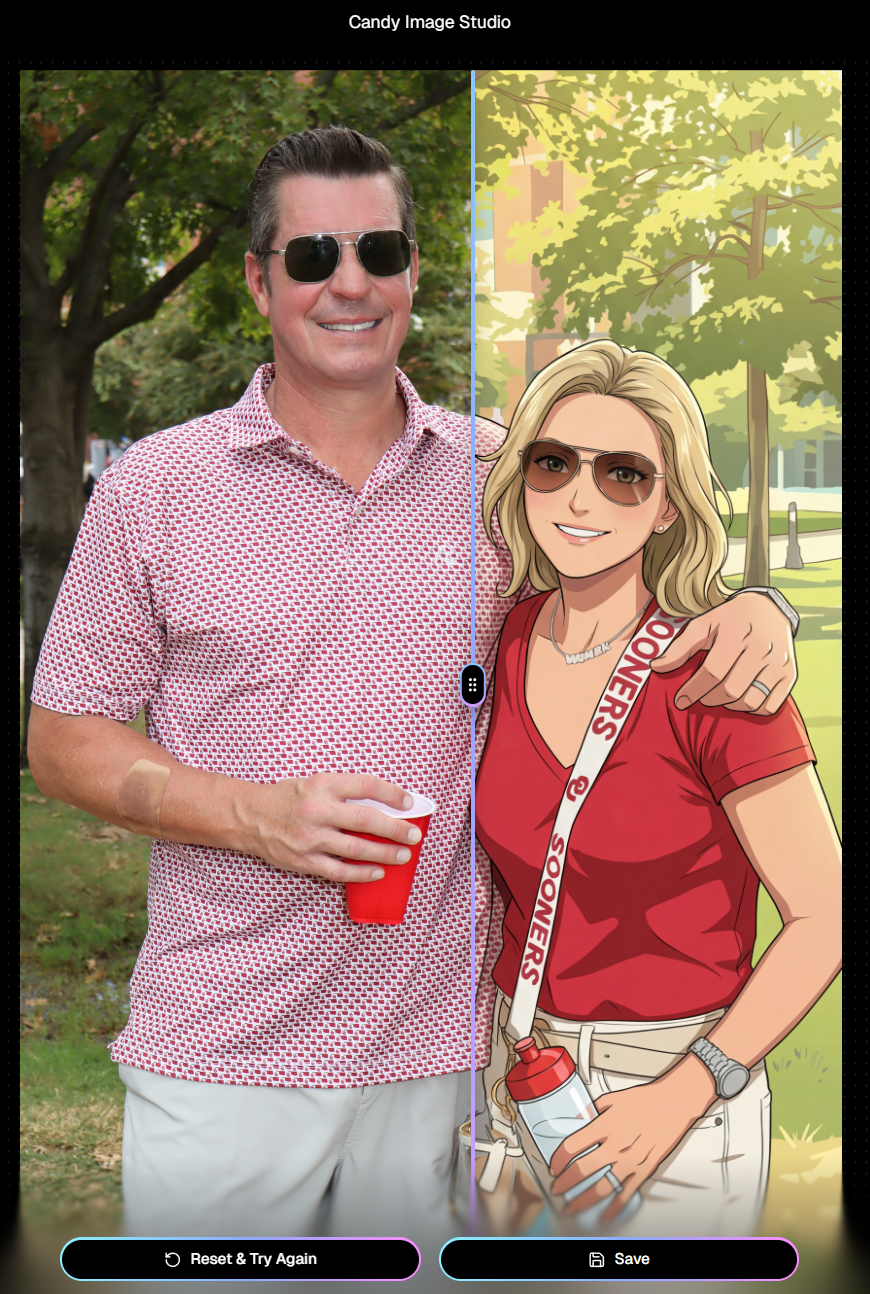
🎨 Candy Image Studio: More Control, More Power

‍

We’ve made some meaningful upgrades to Candy Image Studio:

‍

πŸ‘οΈ Choose whether to mark the original image invisible‍

  • Previously, edits always hid the original. Now it’s your call.

‍

πŸ—‚οΈ Multiple edits can coexist‍

  • Uploading multiple AI edits of the same image no longer overwrites previous ones.

‍

🧠 New safety agent‍

  • Automatically checks for edits involving race/ethnicity/skin tone changes or nudity to keep things appropriate.

‍

πŸ–ΌοΈ Generate 2K or 4K outputs‍

  • 4K is recommended for images with text.

‍

⚑ Image Lightbox Integration‍

  • Click β€œCandy Image Studio” directly from an image lightbox to preload it into the Studio.
  • You can optionally mark the original invisible, and it keeps all participant associations intact for the new image (just like cutouts).

‍

If you haven't checked out the AI editor, give it a try!

‍

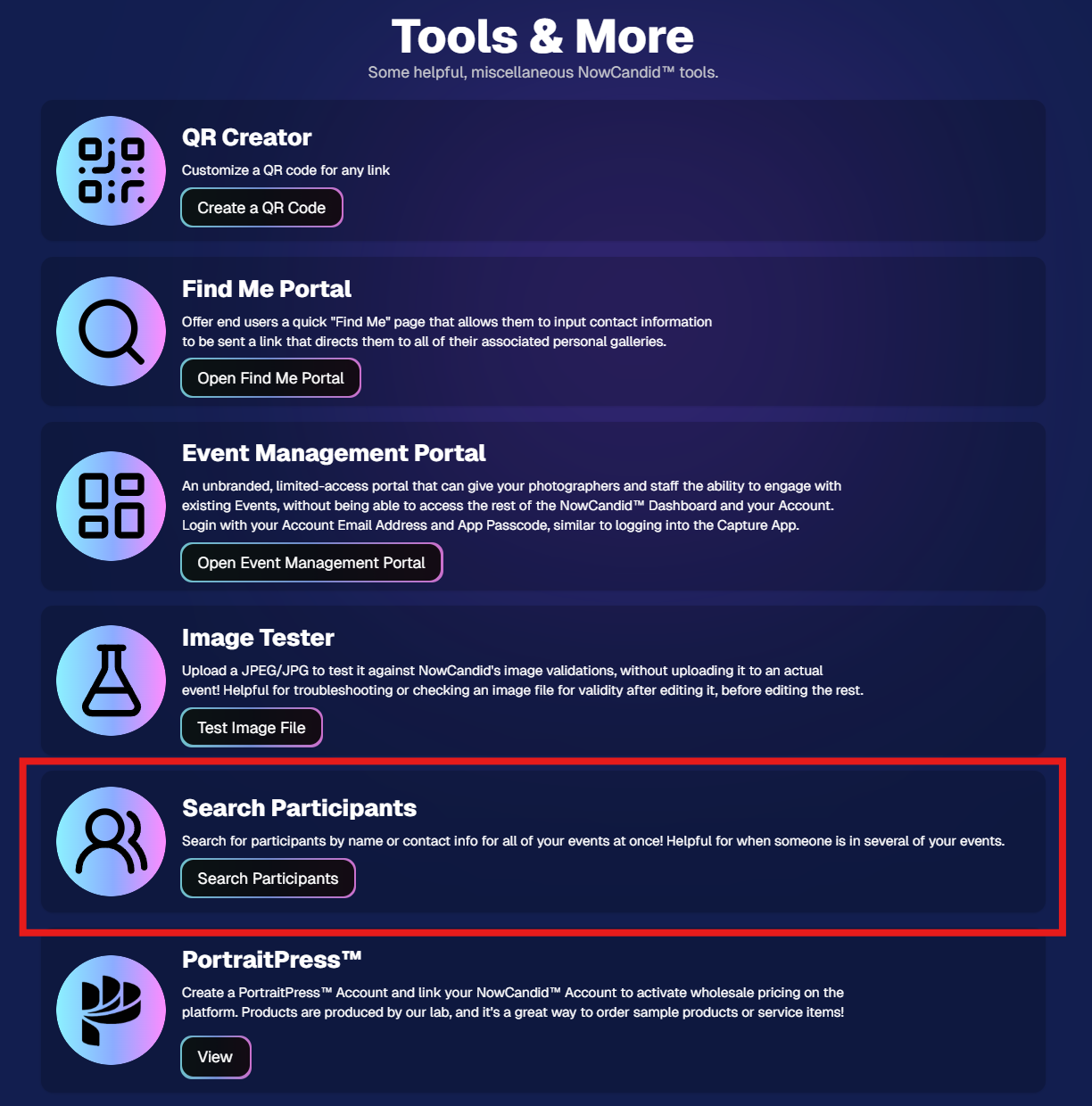
πŸ”Ž New: Participant Search Across All Events

‍

You can now search participants across your entire account:

‍

  • Search by name or contact info
  • Access via Tools & More, Sidebar Search bar, or "/participants" directly in the URL
  • Supports Candy navigation

‍

Huge time-saver when you can’t remember or don't know which event someone was in.

‍

Click here to jump to the Tools & More page

‍

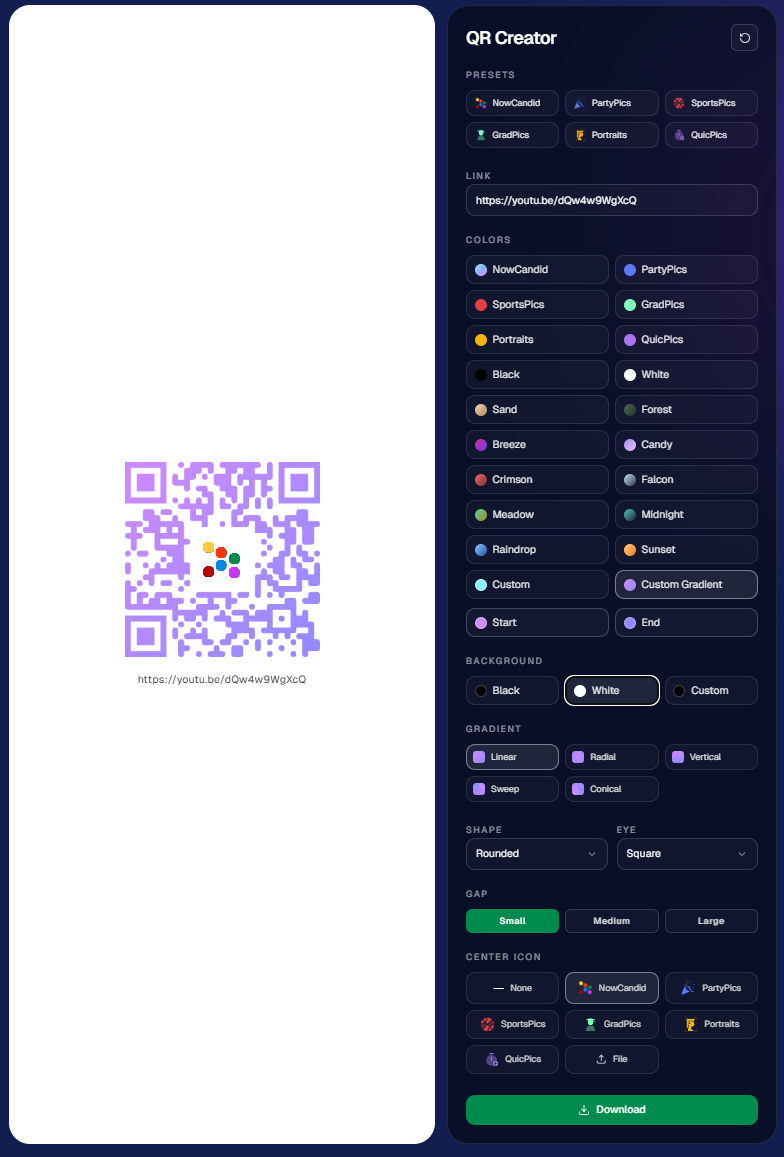
πŸ”³ New Tool: QR Creator

‍

Found under Tools & More, the new QR Creator lets you:

‍

  • Paste in any link (event, check-in, retail, etc.)
  • Customize shape and colors
  • Generate something nicer than a plain black-and-white square
  • Download the new, cuter QR code!

‍

Simple, but useful for signage, flyers, and booths.

‍

https://app.nowcandid.com/tools/qr

‍

πŸ“± Mobile Dashboard Improvements

‍

πŸ”„ Swipe down to refresh any page (no app update needed, just refresh)

‍

↔️ Swipe left/right in image lightboxes to move between images (desktop users already have arrow keys)

‍

🍬 Overall improved Candy experience on mobile

‍

πŸ–₯️ Dashboard Improvements

‍

πŸ“‚ PhotoRoster upload limit increased to 10,000 members

‍

🏷️ PhotoTag assignment via Edit Folder fixed (won’t remove all tags unless you choose β€œNone”)

‍

πŸ‘€ Create Participant button re-enabled (shows warning if event is older than 60 days; roster import still disabled for older events)

‍

⚑ Faster event list search for accounts with many events

‍

πŸ–ΌοΈ Event cover photo now visually anchors the Event Details & Tags pages

‍

🧾 Fixed overlay import not working properly

‍

πŸ”” Fixed toast notifications appearing behind popups

‍

🌾 Candy Culler Duplicate detection improvement‍

  • When using β€œDuplicates Only” in Candy Culler, duplicates now appear side-by-side for easier reviewing.

‍

πŸ›οΈ Retail Improvements

‍

πŸ“„ Fixed pagination buttons requiring page jump to function

‍

🏈 Improved Jersey Jotter search speed/performance

‍

πŸŒ€ LiveLoop Fixes

‍

πŸ› οΈ Fixed certain events stopping after running for awhile

‍

πŸ“’ Fixed not being able to upload advertisements

‍

πŸ’Έ Shipping Update

‍

πŸ“¦ 5Γ—7 Statuette shipping cost reduced thanks to a new shipping method for that product‍

  • From $7.25 β†’ $3.25 (about 55% lower)

‍

That’s the week!

‍

Bigger AI editing control, faster participant lookup, custom QR codes, and a lighter shipping cost on 5Γ—7 Statuettes.

‍

Keep creating magic,

Candy 🍬

Weekly Recap: New Unified Sidebar, Valentine’s Theme & Pano Updates 🍬❀️
Feature Updates
February 13, 2026

Weekly Recap: New Unified Sidebar, Valentine’s Theme & Pano Updates 🍬❀️

4
Β minutes read

Hey photo friends! πŸ‘‹

‍
Big week. We’ve rolled out a brand-new unified Sidebar, added new pano options, improved Dashboard speed, and dropped a Valentine’s-ready retail theme.

‍

Let’s break it down.

‍

🧭 New Unified Sidebar (Desktop + Mobile)

‍

The Dashboard navigation just got a major upgrade.

‍

πŸ–₯οΈπŸ“± One unified sidebar across desktop and mobile

  • No more different layouts depending on device. Navigation is now consistent everywhere.

‍

πŸ”Ž β€œSidebar Find” (press F to search)‍

  • The old command palette is now built into the Sidebar.
  • Press F and start typing to jump anywhere.

‍

🍬 Candy Navigation Assistant‍

  • If no results are found, Candy will try to take you where you meant to go!

‍

πŸ‘€ Previously hidden items (like Extras) are now much easier to find.

‍

This is one of the biggest usability upgrades we’ve shipped in a while!

‍

πŸ–ΌοΈ Panoramic Updates

‍

πŸ–¨οΈ New 24Γ—8 Panoramic Print (non-group version)‍

  • In addition to the group-only pano lineup, there’s now a non-group 24Γ—8 option.

‍

🏷️ Existing panos renamed to β€œX Group Print”

  • Makes it clearer which pano products are group-only.

‍

🧱 Extreme aspect ratio images (1:3 or 3:1)

  • These are now limited to Panoramic Print products only.

‍

🧼 Fixed banner artwork incorrectly appearing on pano products in the store sheet.

‍

πŸ›οΈ Retail Improvements

‍

⚑ Much faster initial image grid rendering

‍

✨ Removed quick β€œNo Images” flash during load

‍

🎨 Fixed β€œView Images” hero button text being too dark on some themes

‍

βœ‚οΈ Crop size checker now correctly respects orientation for large-format products

‍

πŸ’• New SweetHearts Theme (Valentine’s Ready)

‍

πŸ’– SweetHearts retail theme released

‍

πŸŽ‰ Includes custom heart confetti at checkout

‍

Just in time for Valentine’s Day sessions!

‍

πŸ–₯️ Dashboard Improvements

‍

🌾 Candy Culler upgrades

  • Can now set an entire filter to visible or invisible (except duplicates)
  • No longer also culls PhotoRoster reference images (whoops!)

‍

πŸ§‘β€πŸ€β€πŸ§‘ Group Photo toggle added for Portraits Program

‍

πŸ“‚ Increased row limits for roster and PhotoRoster uploads

‍

πŸ› οΈ Fixed overlay import not working properly

‍

πŸ“ Improved DPI validation on banner artwork (matching full frame improvements)

‍

⚑ Faster requests across many areas including:

  • Profile updates
  • 2FA verification
  • Invoice loading/downloading
  • Retail settings updates
  • Bank info updates
  • Password reset emails

‍

πŸ“± Fixed mobile dashboard scrolling/focus issues in popups

‍

🧾 Fixed create event occasionally not redirecting correctly

‍

πŸ“Έ Fixed FreePics creation confirmation spam edge case

‍

πŸ“¬ Fixed unread inbox items appearing from before account creation

‍

πŸ” Security Improvements

‍

πŸ”’ Improved password reset security

‍

πŸ”‘ Strengthened 2FA flows and verification handling

‍

🀳 Selfie Check-In

‍

πŸ–ΌοΈ Images under 100Γ—100 are now blocked (lab requirement enforcement)

‍

πŸŒ€ LiveLoop

‍

🌫️Updated backdrop blur

  • Looks better and is more performant, reducing crashes on WebKit browsers.

‍

That’s the week!

‍

A cleaner, unified Dashboard experience, smarter pano handling, better retail performance, and a Valentine’s-ready theme to boot.

‍

Keep creating magic,

Candy 🍬

Weekly Recap: New 24Γ—8 Panoramic Print, and More! πŸ–ΌοΈπŸ§Ύ
Feature Updates
January 30, 2026

Weekly Recap: New 24Γ—8 Panoramic Print, and More! πŸ–ΌοΈπŸ§Ύ

3
Β minutes read
Hey photo friends! πŸ‘‹

‍
This week is a mix of one new product and a handful of refinements across retail pricing, check-in validation, and Dashboard tools.

‍

Here’s what changed.

‍

πŸ†• New Product

‍

πŸ–ΌοΈ 24Γ—8 Panoramic Print (Group-only)‍

  • A new panoramic option in the same aspect ratio as the other pano prints, built for team and group shots. (Like the others, it’s group-only.)

‍

πŸ›οΈ Retail: Pricing & Editing Improvements

‍

πŸ’Έ Package β€œslashed” pricing corrected and standardized‍

  • Fixes around week 2/3 slash amounts so package comparisons are more accurate and consistent (including cases where tiered pricing is disabled on Quic events).

‍

✍️ Captions editor now allows hyphens and periods‍

  • Small change, big relief for subjects with multi-hyphenate names.

‍

βœ… Check-In Page: Better Email Validation

‍

πŸ“§ Improved email validation‍

  • Now also requires at least one period
  • Now blocks obvious typos like addresses ending in β€œ.con”
  • These are in addition to previously existing "catches" we had in place to help customers avoid typos

‍

πŸ‘₯ Additional Contacts now use the same validation rules‍

  • Makes additional contact info more typo-proof too!

‍

πŸ–₯️ Dashboard: Fewer Snags, More Visibility

‍

πŸ§ͺ Image Tester now supports PNG files‍

  • Helpful for validating cutouts and art files.

‍

πŸ“ Improved DPI validation for artwork uploads (and Image Tester)

  • Better handling for images that don’t explicitly include DPI metadata.

‍

πŸ“¦ Package editor expanded limits‍

  • You can now include up to 16 4Γ—6 and 5Γ—7 prints in a package
  • (Digital downloads remain capped at 16; most other items remain capped at 8).

‍

πŸ“ Manage Images: Folder Download fixed for large folders‍

  • Folders over 100 images now reliably download in multiple ZIPs (no more stopping after the first chunk).

‍

🧾 Order Details page got a big clarity upgrade‍

You can now see key indicators and selections more directly, including:

  • ✨ product finish/overlay indicators
  • πŸ–ΌοΈ backgrounds / AI background indicators (where applicable)
  • πŸ“ captions and chosen colors
  • ⬇️ background downloads working correctly again

‍

🍬 Candy Culler Improvements

‍

πŸ“Š Results update automatically while culling runs‍

  • As progress changes, search results refresh so culled images can appear without you manually refreshing.

‍

πŸ—‚οΈ New downloadable folder report‍

  • Quick export alongside the toggle for easier review/sharing.

‍

πŸ’¬ Misc

‍

πŸ“² Day 0 SMS link placement updated‍

  • The retail link now appears after the unsubscribe text to encourage better MMS link previews.

‍

That’s the week!

‍

Another new pano option, tighter retail pricing presentation, cleaner check-ins, and a more informative Dashboard where it counts.

‍

Candy 🍬

Let’s get in touch

If you’re a photographer looking to add NowCandidβ„’ services to your wheelhouse, set up a call with us!

How to customize formatting for each rich text

How to customize formatting for each rich text

How to customize formatting for each rich text

How to customize formatting for each rich text

How to customize formatting for each rich text

‍

‍

What’s a Rich Text element?

The rich text element allows you to create and format headings, paragraphs, blockquotes, images, and video all in one place instead of having to add and format them individually. Just double-click and easily create content.

A rich text element can be used with static or dynamic content. For static content, just drop it into any page and begin editing. For dynamic content, add a rich text field to any collection and then connect a rich text element to that field in the settings panel. Voila!

Headings, paragraphs, blockquotes, figures, images, and figure captions can all be styled after a class is added to the rich text element using the "When inside of" nested selector system.

  • List One
  • List Two
  • List Three
  • List Four
  • List Five

This is a link

This is bold text

‍

  • ‍

‍