HomeNavigation arrowBlogNavigation arrow
Current page
Feature Updates

Weekly Recap: Multi-Select, Event Tags & More! ✨

Weekly Recap: Multi-Select, Event Tags & More! ✨
Hello, my fabulous photographers!

Candy here, ready to sprinkle some sparkle on your day with our newest Weekly Recap. We’ve been hard at work improving your NowCandid™ experience, and I’m excited to share all the juicy details. Let’s dive in!

1. Select System in Manage Images 🖼️

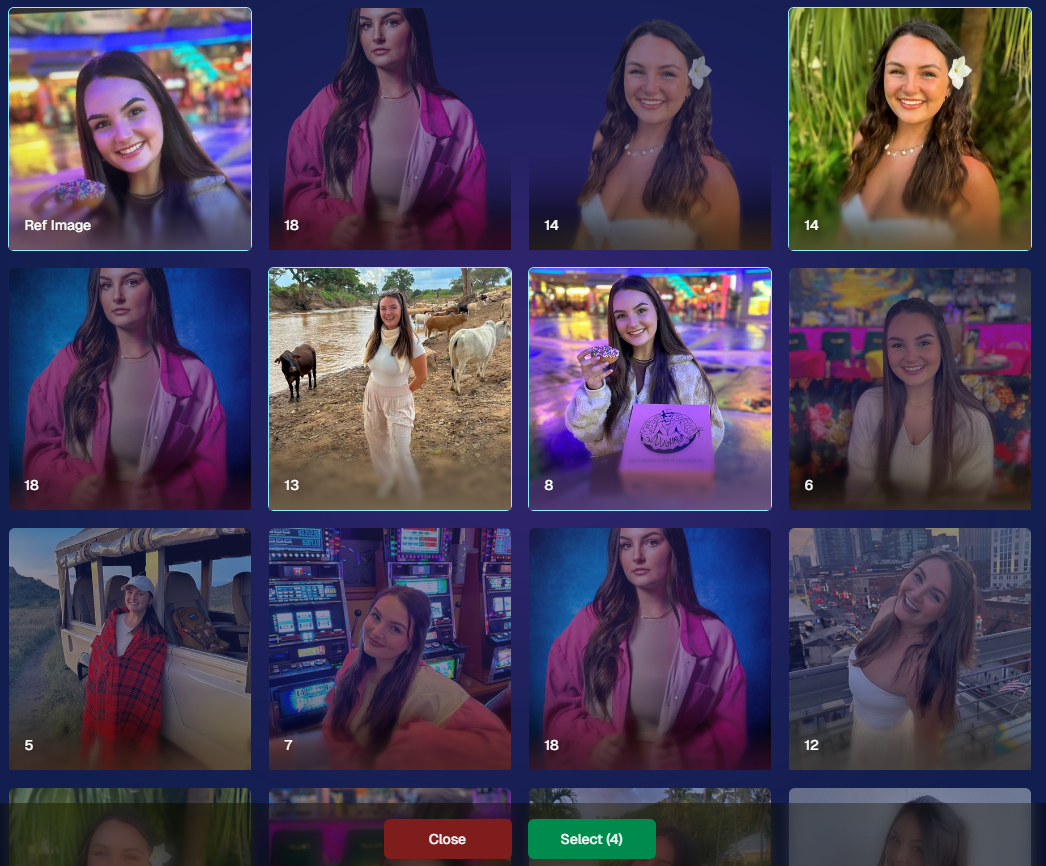
We’re introducing a Multi-Select feature to the Manage Images interface:

  • Multi-Select Button: Highlight multiple images at once.
  • Bulk Actions: After choosing your set, tap “Select” at the bottom. You can:
    • Mark them Invisible or Visible
    • Download them all in a single zip file
    • Toggle them as Group Photos or Individual all at once
  • Speedy Management: No more one-by-one adjustments. This should help you power through large batches of images in a fraction of the time!
2. Event Tags 🏷️

There’s a brand-new Extras tab in the Web Dashboard navigation, featuring our new Event Tags tool:

  • Creating Tags: Assign tags to your events (e.g., “Prom,” “Winter Formal,” etc.).
  • Filtering by Tag: On the Events List or in your Events Report, choose an Event Tag to instantly see only those events.
  • Performance Insights: Group your events by theme and get a quick view of how each set is performing all at once.

Tagging is perfect for photographers juggling multiple event types, letting you spot patterns and trends with ease.
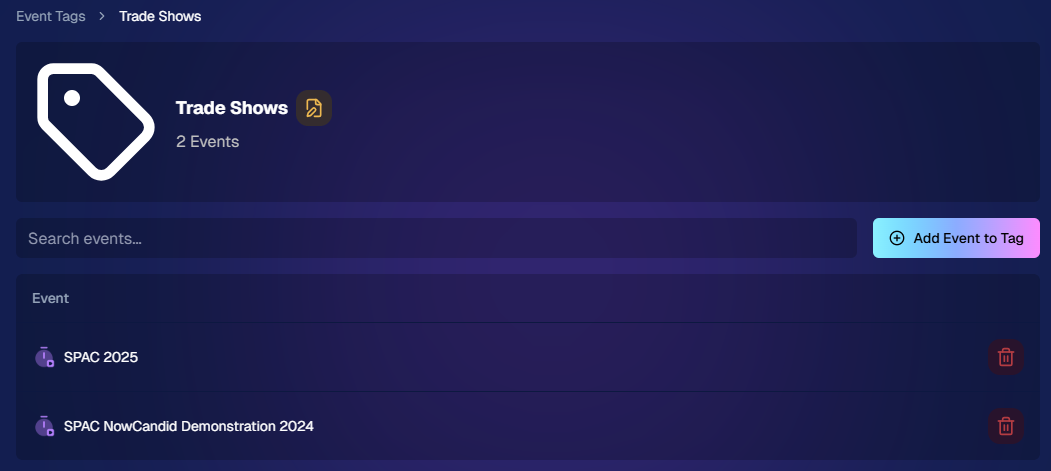
Just two Events on this Event tag, but you can add lots!

3. Updates to the Faces Report 👥

Our Faces Report—released last week—has already received some polish:

  • New Revenue Line: Alongside face counts in the chart, you’ll now see a revenue line.
  • Compare Image Types & Sales: See whether couples, solos, or big group shots bring in the most orders.
  • Informed Future Shooting: Focus your time at events on what sells best—maybe it’s the big friend groups or the sweet one-on-one moments.

This view helps you refine your event coverage strategy for max impact.
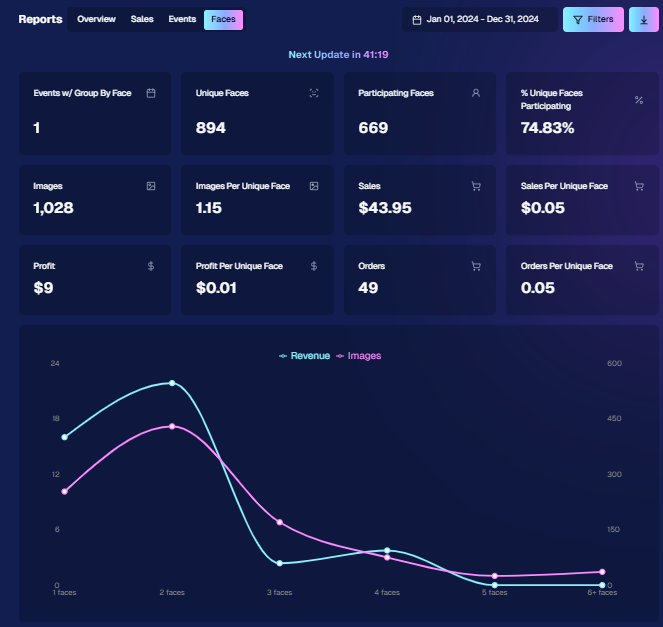
Ignore the low sales, it was a test Event!

4. Image Details Page 📝

While managing images in your events, you’ll notice a “Details, Logs, and more” link on each image:

  • Expanded Meta Data: Discover camera settings, image size, camera type, and more.
  • Face Matching™ Logs: See if and when a face got paired to a participant; even jump directly to that participant’s gallery.
  • Advanced Troubleshooting: Ideal for debugging customer issues or satisfying your own curiosity about each shot.

It’s more info than we’ve ever provided, so have fun geeking out over the details!
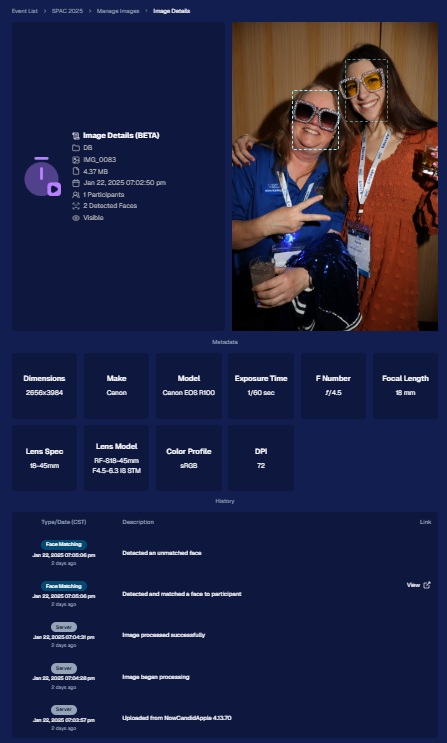
So much image file info and image history now!

5. Big Improvements to the Web Dashboard Image Uploader

Finally, a behind-the-scenes upgrade that’ll make your day-to-day life easier:

  • Upload Up to 5000 Images: Jumping from 1000, so you can batch bigger events in fewer steps.
  • Faster Transfers: As long as you have decent upload speeds, the process should feel snappier overall.
  • Lower CPU Demand: Less strain on your computer, letting you multi-task without slowing to a crawl.

Sometimes it’s the quiet changes under the hood that make the biggest difference.

6. Tiered Pricing Now Live 🎉

After last week’s preview, Tiered Pricing is officially rolled out to SportsPics™, PartyPics™, GradPics™, and other sales-driven events:

  • Upgraded Text & Email Campaigns: We’ve refined the promotional messages to match your Week 1, Week 2, and Week 3 pricing tiers, giving your buyers a clear sense of each week’s small price bump.
  • 365-Day Marketing SMS Replaced with 180: We’ve shortened the final reminder’s timeline from a year to 180 days, aligning better with your event marketing cycle and typical follow-up patterns.

If you haven’t explored Tiered Pricing yet, check it out in your Offer Creator and see how these incremental price changes (and updated marketing) might boost your sales!

That’s all for this week, my wonderful NowCandid™ community.

I hope these new features and improvements empower you to breeze through event management and deliver an even better experience to your clients. As always, if you have questions or feedback, give us a shout.

Until next time—keep capturing those unforgettable moments! ✨

Candy 🍬

Related articles

Big News: Custom Offer Creator Now Live!
Feature Updates
July 2, 2024

Big News: Custom Offer Creator Now Live!

4
 minutes read
🌟 Hey there, amazing photographers!

Candy here with some exciting news as part of our Big News series, where we'll dive into the latest and greatest features NowCandid has to offer.

Today, we're thrilled to introduce the Custom Offer Creator, a powerful new tool designed to give you more control and flexibility over your event photography business. 📸✨

Custom Offer Creator: Tailor-Made for You 🎨

Gone are the days of relying solely on premade price levels. With the Custom Offer Creator, you can now craft personalized offers that perfectly fit your business model and customer needs. Here’s what you can do:

  • Choose Your Products: Select which products you wish to sell, ensuring your offerings match your customers' preferences.
  • Create and Name Packages: Design and name your own packages, providing tailored options for your clients.
  • Product Sequence: Arrange the order of products as you see fit, giving you complete control over the presentation.
  • Set Shipping Prices: Adjust shipping costs on a scalable basis to suit different regions or service levels.
  • Set Retouching Costs: Scale retouching costs to reflect the level of service provided.
  • Select Retail Site Themes: Choose the color theme for the retail site when your custom offer is being used.

Simplified Event Creation 📅

Creating an event remains as straightforward as ever. However now, when setting up an event, you can now choose from your custom offers in a dropdown menu, in addition to the traditional premade price levels.

Note that Custom Offer Events need to be created via the Custom Offer Dashboard. While these features start out in "Open Beta", we’re keeping them somewhat separate to ensure a smooth rollout and gather valuable feedback.

New Retail Site Experience 🌐

Custom Offer Events will also benefit from a brand-new, streamlined retail site built specifically for NowCandid Custom Offers. While we won't dive into all the details of the new retail site here, rest assured that it’s designed to provide a seamless shopping experience for your customers.

Open Beta: Your Feedback Matters 📝

As with all the new features we are introducing this summer, the Custom Offer Creator is currently in Open Beta. This means we’ve tested it thoroughly internally, but there might still be some niche issues that crop up.

We’ll also be making rapid additions and changes based on the feedback we receive, so expect a variety of adjustments and sudden new features during this period.

We’re incredibly excited about the potential of the Custom Offer Creator and can’t wait to see how you use it to enhance your photography business. Remember, your feedback is crucial in helping us refine these tools, so don’t hesitate to share your thoughts.

Stay tuned for more updates in our Big News series! 🌈

Cheers and sparkles,

Candy 🍬

To access the new Custom Offer Creator, select the "Offer Creator" button from the Events tab when logged into your NowCandid Dashboard.

Big News: NowCandid's Capture App Version 4.0 is Here! 🌟
Feature Updates
June 25, 2024

Big News: NowCandid's Capture App Version 4.0 is Here! 🌟

5
 minutes read

🌟 Big News: NowCandid Capture & Upload App Version 4.0 is Here! 🌟

Hey there, amazing photographers! Candy here with some exciting news – the NowCandid Capture & Upload App Version 4.0 is live! 🎉

This is a big update packed with new features, performance improvements, and UI enhancements to make your photo-taking experience even smoother.

Test Your Setup 🧪📲

But first things first: it’s crucial to test the new app version on your setup well before your next event. This ensures there are no issues with your particular combination of equipment and settings, and we have time to help troubleshoot any problems that may arise. 📸✨

Before diving into the new features, make sure to test the updated app on your usual tablet/phone and camera setup. Doing this well ahead of your next event ensures everything runs smoothly, and you'll have time to address any potential issues. This proactive step is key to a successful and stress-free event. 🚀

New Features for both iOS & Windows🌟

Check out the fantastic new features designed to enhance your user experience:

  • Dark OLED Theme: This new theme on the info page will help save battery life on OLED devices – up to 42% less power consumption at max brightness!
  • Advanced Participant Search: Now you can search for participants by email or phone in addition to name.
  • Custom Offer Positive ID Events: We’ve added app support for new Custom Offer Events.
  • Toast System: Added a toast system to display error messages and other notifications promptly, without disrupting your workflow with pop-ups.

Windows and iOS Specific Updates 🍏💻

Windows:

  • New Engine: Uses a new engine behind the scenes for better performance.

iOS:

These awesome new features, for the foreseeable future, will only be available on iOS (iPhone & iPad) and may come to Windows devices as well later on.

  • Pre-Highlighted Faces: Automatically detect and highlight faces on the app, and Tap-A-Face will use the center of detected faces for accuracy - no more missed taps!
  • Notifications: The app can now push important notifications to your device, and all notifications auto-dismiss when the app is opened.
  • Nikon Camera Support: Image review is enabled while tethered if image review is enabled on the camera.
  • Upload Reminders: Get notified if you still have images left to upload when the app goes into the background of your device.
  • Enhanced Tap-A-Face: Shows selected face in email/number/name popups, helping ensure the correct face is chosen (so subjects can easily notice if they tapped the wrong face before entering their info).
  • iOS 18 Support: Full support for the latest iOS version.
  • UI Improvements: Fixed issues with group photo labels, brought back borders for selected images, and added workflow icons in event dropdowns for more Event Selection clarity.

Performance Enhancements ⚡️

Version 4.0 is loaded with behind-the-scenes magic to boost performance and efficiency:

  • More Efficient: We’ve completely redone a variety of app systems to enhance speed and reliability.
  • Instant Updates: Header stats and image gallery statuses update even quicker now.
  • Improved Filtering and UI Interactions: Enjoy much faster image gallery filtering and quicker UI interactions.

UI Enhancements 🎨

We’ve made numerous UI improvements to make your experience more enjoyable:

  • Tap-A-Face UI: Tap-A-Faces are now cyan instead of yellow, and will zoom/scale based on image scroll/zoom for a more intuitive and smooth experience.
  • Dark Mode Tweaks: Dark dropdowns, input fields, and more cyan text for a sleek look.
  • Refined Controls: Checkmark & X symbols instead of yes/no for service indicators, updated image gallery UI, and improved secondary/cancel buttons.
  • Improved Email Input: Email inputs now include space, dot, and @ on the keyboard for easier entry when collecting email addresses via the app.

Thank you for being incredible users of NowCandid. Your feedback drives these improvements, and we’re excited to see how version 4.0 enhances your photography business. 🌟

Cheers and sparkles,

Candy 🍬

Teaser: NowCandid's Game-Changing Updates for Photographers!
Feature Updates
June 21, 2024

Teaser: NowCandid's Game-Changing Updates for Photographers!

10
 minutes read
At NowCandid, we understand that the success of our platform hinges on the success of our photographers.

Over the past year, we have invested significant time, energy and resources into revamping our system, tailoring our software and interfaces to meet the specific wants and needs of photographers. Our commitment is to create solutions that are built around the photographer, for the photographer. Here’s a look at the powerful new features and functionalities coming to NowCandid:

New Updates to Boost Your Business

1. Custom Offers

Until now, NowCandid users could only use our premade Offers, which have been very successful - but the limited options have sometimes been restrictive in certain situations.

Now, we are excited to introduce the ability for photographers to create their own custom Offers.

This means you can now set your own prices, choose your own product lineup, set your shipping costs, and create your own packages.

You can even choose from a variety of color schemes, including animated holiday themes, that will change the color palette of the new retail site, Selfie Check-In site, and Scan Card Check-In site.

Speaking of, the Selfie Check-In site has been overhauled as well! And now will only allow the subject to take a selfie if there is only one face visible in their camera view.

If you're not sure where to start when building your first offer, instead of building from scratch you can use our recommended premade Offers as templates to get started.

Also, we have revamped our text & email marketing system for Custom Offer Events! Text marketing is now a bit trendier, and includes emojis to improve click rates, and gallery links for QuicPics will now be delivered from the same phone number as their QuicPics image files. Plus, if a new image is added to a subject's gallery after they make a purchase, they will now receive a text or email notification that new images have been added since their last visit.

These new features aim to break down significant obstacles NowCandid photographers have faced, and allow for greater flexibility and customization.

2. Simplified Retail Site with new Features

When you create a new Event using one of your Custom Offers, it will utilize an all-new, simplified, retail site! The new site has a very clean and simple look, and comes with a variety of cool features:

  • Cart-Wide Retouching: End customers can order retouching for all items in their cart for one flat price. This incentivizes larger orders, and allows photographers to focus on speedy delivery by skipping pre-upload retouching.
  • Third-Party Sign-In: Customers can sign in using Google, Apple, Facebook, or X/Twitter accounts. This provides access to an Event History of all personal galleries they’ve accessed, and an Order History complete with order statuses.
  • Product Page Rendering: When viewing the product page, most products will render with the customer's selected image, right there in the product gallery!
  • More Product Customization: Customers can choose from multiple product styles, and change an art style's primary & accent colors before adding the product to their cart.
  • AI Background Generation Tools: For images with backgrounds removed, customers can use text prompts to generate unique AI backgrounds tailored to their specifications, or choose from a variety of popular defaults.
  • Live Face Match Groups: Similar to our popular Group-by-Face feature, this allows faces in a Face Matching Event's gallery to be clicked to view other images in the Event with a matching face. However, this runs live during an Event (not just by triggering it afterwards) on all Tapped or Checked-In faces within the Event.
  • Retail Header Tweaks: Now includes the Event Name first and foremost, followed by your Business Name! Retail Support contact info will be featured frequently throughout the remainder of the sales process.
  • More Private Galleries: Personal Gallery links now require both an Event Name and a corresponding randomized sequence unique to that participant. Making each gallery more private than ever before.

3. App Version 4.0

Our upcoming app version 4.0 for iOS and Windows is a complete overhaul of version 3.22, including:

  • Improved UI: A refreshed user interface for a smoother experience.
  • Dark Mode: A new Dark Theme for the app's UI that also optimizes battery saving on OLED iOS devices.
  • Pre-Highlighted Faces: Enhanced Face Matching with pre-highlighted faces ensures subjects never miss their face when tapping.
  • Significant Performance Improvements: Reduced bugs, lag, and improved battery life.

4. Event Management Improvements

When managing your new Custom Offer Events (different from traditional NowCandid Events) you'll have access to new Event Management tools and information.

  • Manage Participants: A new Manage Participants interface so you can access your subjects' personal gallery URL.
  • Marketing Tracking: Number of marketing pieces sent out (counting both texts & emails sent).
  • Recent Orders: A new "recent orders" window.
  • Sales Chart: A new sales chart tracking sales over the first 30 days from your Event's start date.
  • Image Uploader: An all-new image-upload tool with a variety of improvements.

Why NowCandid?

NowCandid is designed to be incredibly simple to use, with no subscription fees, startup fees, or license fees. We only make money when you do.

Our platform is built to help you scale your business and brand by being completely white-label, handling customer support for your retail customers, and replacing orders damaged in shipping—all for free.

This means there's more time for you to focus on booking and shooting, while we handle the rest.

Ready to take your photography business to the next level? Embrace NowCandid’s new features and watch your business thrive!

Let’s get in touch

If you’re a photographer looking to add NowCandid services to your wheelhouse – set up a call by clicking the button below.

How to customize formatting for each rich text

How to customize formatting for each rich text

How to customize formatting for each rich text

How to customize formatting for each rich text

How to customize formatting for each rich text

What’s a Rich Text element?

The rich text element allows you to create and format headings, paragraphs, blockquotes, images, and video all in one place instead of having to add and format them individually. Just double-click and easily create content.

A rich text element can be used with static or dynamic content. For static content, just drop it into any page and begin editing. For dynamic content, add a rich text field to any collection and then connect a rich text element to that field in the settings panel. Voila!

Headings, paragraphs, blockquotes, figures, images, and figure captions can all be styled after a class is added to the rich text element using the "When inside of" nested selector system.

  • List One
  • List Two
  • List Three
  • List Four
  • List Five

This is a link

This is bold text