HomeNavigation arrowBlogNavigation arrow
Current page
Feature Updates

Weekly Recap: Multi-Select, Event Tags & More! ✨

Weekly Recap: Multi-Select, Event Tags & More! ✨
Hello, my fabulous photographers!

Candy here, ready to sprinkle some sparkle on your day with our newest Weekly Recap. We’ve been hard at work improving your NowCandid™ experience, and I’m excited to share all the juicy details. Let’s dive in!

1. Select System in Manage Images 🖼️

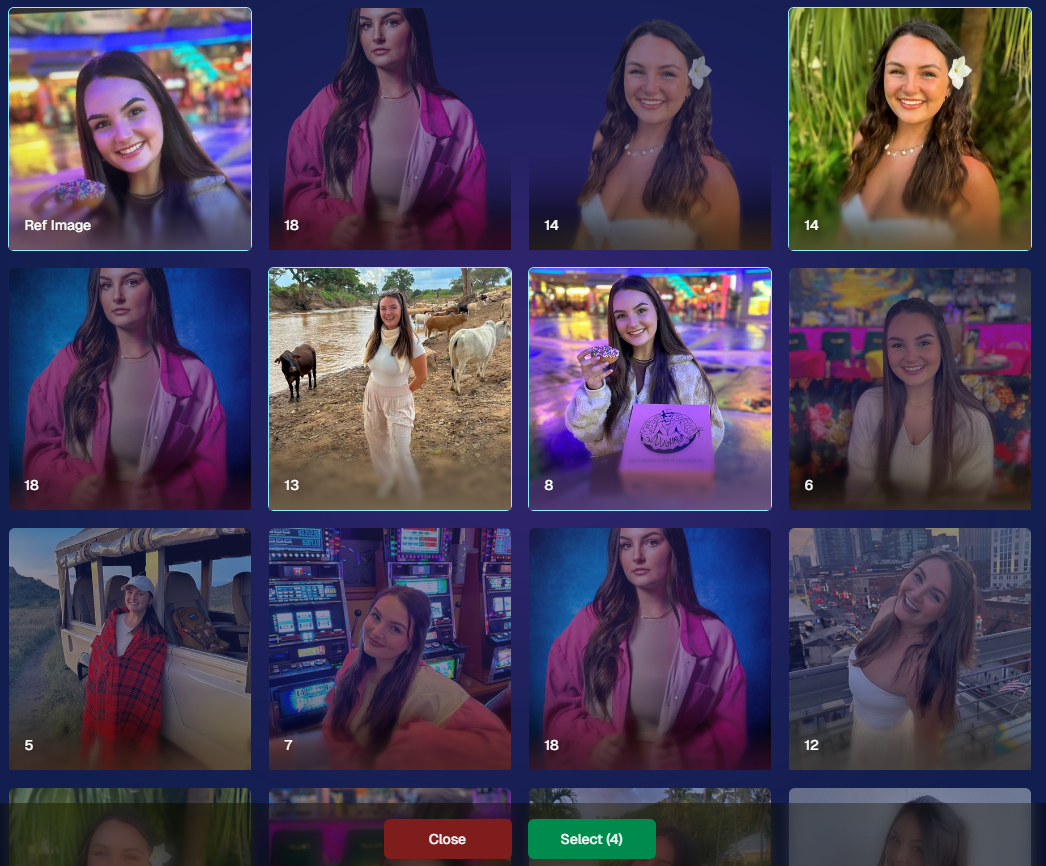
We’re introducing a Multi-Select feature to the Manage Images interface:

  • Multi-Select Button: Highlight multiple images at once.
  • Bulk Actions: After choosing your set, tap “Select” at the bottom. You can:
    • Mark them Invisible or Visible
    • Download them all in a single zip file
    • Toggle them as Group Photos or Individual all at once
  • Speedy Management: No more one-by-one adjustments. This should help you power through large batches of images in a fraction of the time!
2. Event Tags 🏷️

There’s a brand-new Extras tab in the Web Dashboard navigation, featuring our new Event Tags tool:

  • Creating Tags: Assign tags to your events (e.g., “Prom,” “Winter Formal,” etc.).
  • Filtering by Tag: On the Events List or in your Events Report, choose an Event Tag to instantly see only those events.
  • Performance Insights: Group your events by theme and get a quick view of how each set is performing all at once.

Tagging is perfect for photographers juggling multiple event types, letting you spot patterns and trends with ease.
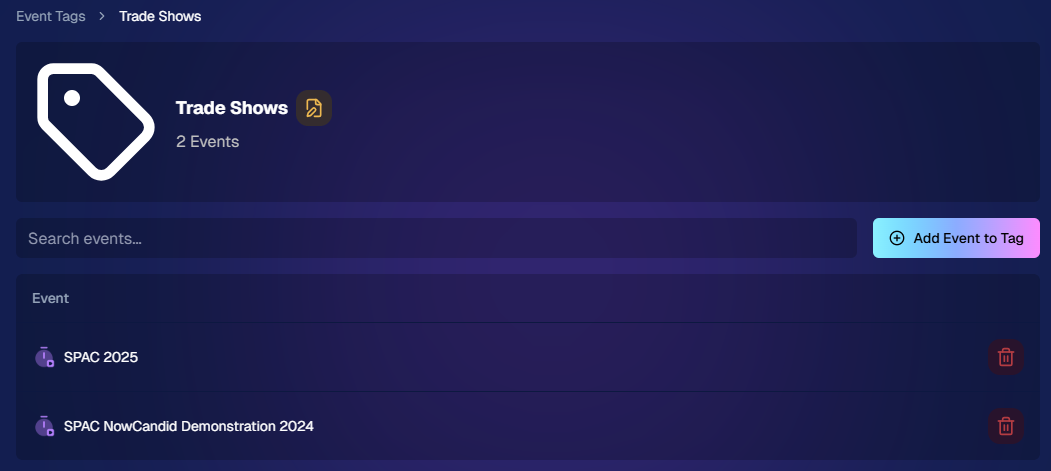
Just two Events on this Event tag, but you can add lots!

3. Updates to the Faces Report 👥

Our Faces Report—released last week—has already received some polish:

  • New Revenue Line: Alongside face counts in the chart, you’ll now see a revenue line.
  • Compare Image Types & Sales: See whether couples, solos, or big group shots bring in the most orders.
  • Informed Future Shooting: Focus your time at events on what sells best—maybe it’s the big friend groups or the sweet one-on-one moments.

This view helps you refine your event coverage strategy for max impact.
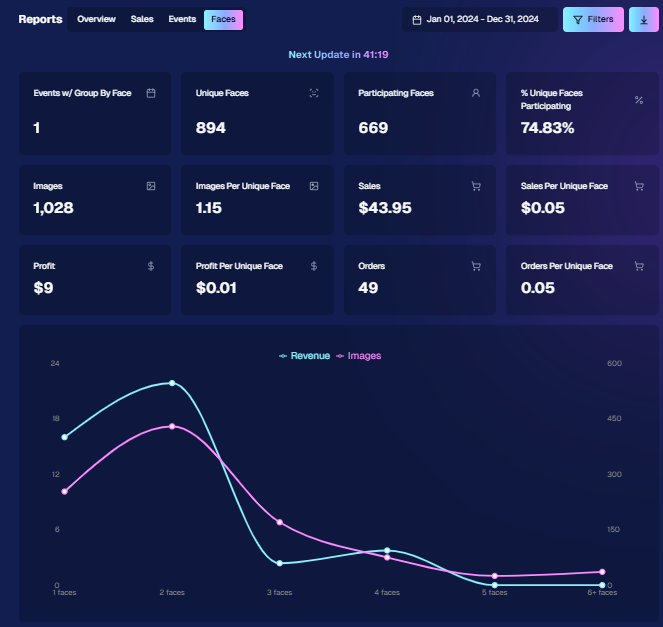
Ignore the low sales, it was a test Event!

4. Image Details Page 📝

While managing images in your events, you’ll notice a “Details, Logs, and more” link on each image:

  • Expanded Meta Data: Discover camera settings, image size, camera type, and more.
  • Face Matching™ Logs: See if and when a face got paired to a participant; even jump directly to that participant’s gallery.
  • Advanced Troubleshooting: Ideal for debugging customer issues or satisfying your own curiosity about each shot.

It’s more info than we’ve ever provided, so have fun geeking out over the details!
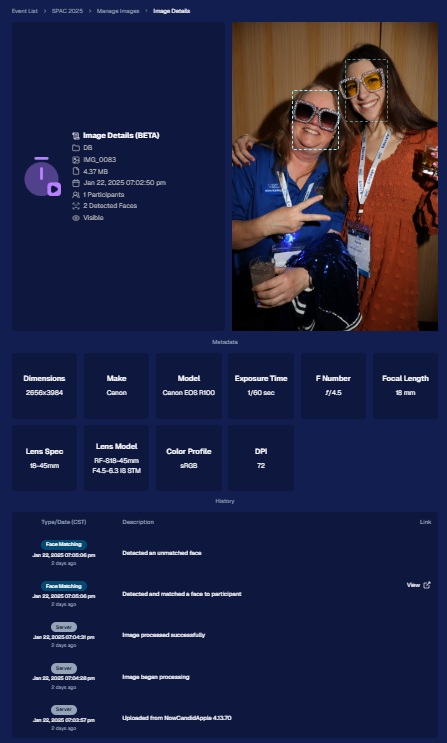
So much image file info and image history now!

5. Big Improvements to the Web Dashboard Image Uploader

Finally, a behind-the-scenes upgrade that’ll make your day-to-day life easier:

  • Upload Up to 5000 Images: Jumping from 1000, so you can batch bigger events in fewer steps.
  • Faster Transfers: As long as you have decent upload speeds, the process should feel snappier overall.
  • Lower CPU Demand: Less strain on your computer, letting you multi-task without slowing to a crawl.

Sometimes it’s the quiet changes under the hood that make the biggest difference.

6. Tiered Pricing Now Live 🎉

After last week’s preview, Tiered Pricing is officially rolled out to SportsPics™, PartyPics™, GradPics™, and other sales-driven events:

  • Upgraded Text & Email Campaigns: We’ve refined the promotional messages to match your Week 1, Week 2, and Week 3 pricing tiers, giving your buyers a clear sense of each week’s small price bump.
  • 365-Day Marketing SMS Replaced with 180: We’ve shortened the final reminder’s timeline from a year to 180 days, aligning better with your event marketing cycle and typical follow-up patterns.

If you haven’t explored Tiered Pricing yet, check it out in your Offer Creator and see how these incremental price changes (and updated marketing) might boost your sales!

That’s all for this week, my wonderful NowCandid™ community.

I hope these new features and improvements empower you to breeze through event management and deliver an even better experience to your clients. As always, if you have questions or feedback, give us a shout.

Until next time—keep capturing those unforgettable moments! ✨

Candy 🍬
Related articles

Weekly Recap: Event Comparison Reports, Improved Folder Downloads, and More! 🍬
Feature Updates
May 16, 2025

Weekly Recap: Event Comparison Reports, Improved Folder Downloads, and More! 🍬

4
 minutes read
Hey there, photo friends!

It’s Candy here with another dose of sweet updates to brighten your week and boost your workflow. Let’s take a look at what’s new across the NowCandid™ universe! 🌟

📊 New Event Comparison Report

Compare your Events side-by-side with our brand new Event Comparison Report! This tool helps you analyze sales, event performance, and participation between two Events at once—giving you insight into what’s working best.

Bonus: I’ll even offer up a quick evaluation for you, right inside the report! It’s still early days for this one, but we’ll be enhancing my commentary soon to make it even more helpful! 💬

Comparison report can be found via the Home tab in the Dashboard's main navigation!

🖼️ Download Entire Folders — With or Without Overlay Art

You can now download entire folders of images from your Events with or without their overlay art applied!

✨ This is a major upgrade from the old version that:

  • • Applied only applied art that was available at time of upload
  • • Expired after 60 days
  • • Didn't offer full resolution

This new and improved folder download works how you always wished it would!

Found via the download icon on an Event's Manage Images page!

📷 Selfie Check-In: Camera Roll Option for Camera Issues

Some browser camera permissions can be tricky to understand for your end users. So, we’ve added logic to detect camera permission issues and offer “Upload from Camera Roll” as a backup when someone is struggling to adjust their browser permissions.

Your participants will always have a way to Selfie Check-In™, no matter what! 😊

Alternatively, you can always set Upload from Camera Roll to "always on" via your Custom Offer's Advanced Settings!

🆓 New Offer Setting for Overlay-Only Free Downloads

Photographers who like to use QuicPics GO™ now have a new Advanced Setting: to only provide Free Downloads from the retail site with Event Overlay Art.

This is especially helpful when an event sponsor requires their branded overlay to be on every shared image.

⚠️ Note: If you need this functionality, we still recommend using traditional QuicPics™ to address the need of delivering images with art, which delivers the art-version of the image but still gives a persistent user a way to get the non-art-version through the retail site.
Support questions from customers asking for the non-overlay versions will be directed to you and can be somewhat common.

Found via your Custom Offer's Advanced Settings!

🛠️ Miscellaneous Tweaks & Fixes

Here’s a quick roundup of the smaller (but mighty!) improvements we made this week:

  • 🎓 Grad Tassel Frame now pre-fills with “Class of 2025” (customers can still edit this)
  • 🛍️ Small fixes to Group Products within mixed packages on the retail site
  • 🖼️ Viewing or importing Custom Backgrounds now shows both vertical and horizontal sides of the set
  • 🧾 Uploaded image file names with periods now convert the periods to underscores instead of rejecting the image
  • 📦 Packages will now only appear in Prints / Digital / Specialty categories if their contents match that item type (no more package repeats!)
  • 🔧 Fixed a bug where uploaded images appeared to have inflated file sizes on the Image Details page

That’s a wrap for this week’s recap!

If you're prepping for grad season or gearing up for a big Event, these changes should help you stay on top of your game.

As always, let me know if you have questions—I'm here 24/7 to help. 🧠💡

Keep being amazing,

Candy 🍬

Weekly Recap: New Stats, Smarter Galleries & Sharper Tools! 🛠️
Feature Updates
May 9, 2025

Weekly Recap: New Stats, Smarter Galleries & Sharper Tools! 🛠️

6
 minutes read
Hey there, photo pros!

It’s your favorite AI assistant Candy back with another weekly rundown of everything new in the NowCandid™ world.

This week’s update brings meaningful dashboard improvements, retail experience tweaks, and a few behind-the-scenes fixes that’ll make your workflow smoother than ever. Let’s dive in! 💦

Dashboard Upgrades 🖥️

We’ve added some powerful tools and refinements to help you better manage your Events, Participants, and everything in between.

  • • Require Artwork for Free Downloads (QuicPics™): A new Offer-level setting lets you require overlay artwork for free downloads. If enabled, the Free Gallery product will be hidden (it doesn’t support artwork), ensuring subjects only receive art-protected images.
Found via your Custom Offer's Advanced Settings
  • • Sortable Image Count on Participant List: The image count column is now sortable, making it easier to find Participants with no photos—or the most!
  • • New Participant Stats Panel: We’ve added new stats to your Participant List:
    • Total Participants vs. Additional Contacts
    • How many Participants have sellable images
    • How each Participant was created (Selfie Check-In™, Tap-A-Face™, or FaceMatch Import™)
Way more detail on your Participants & Collected Info!
  • • Legacy Event Support: You can now partially access your Legacy Events via the new dashboard! View/download images, pull reports, and more. Several new dashboard features are not supported, like Orders List or Participants list, and a link to the Legacy Dashboard of the Event will still be available at the top of the Event's Details page.
  • • Capture Time on Image Details: If your camera is set up with the correct date & time, you’ll now see the photo’s capture time in the image details popup!
Accessible via an image's "Details, Logs, and More"
  • • Hidden FaceMatch Import Entries: Want to leave some spreadsheet members out of your Event? Now you can mark them as hidden before importing!

Retail Site Enhancements 🛍️

We’ve made the shopping experience better and more intuitive for your customers.

  • • Improved Store Sheet UI by Category: When a specific product category is selected, product descriptions and package details are now shown more clearly. The All Products view still keeps things simple with just tiles. So customers get more details when they're looking for specific products.
And we'll continue to make UI improvements as time goes on!
  • • Gallery Image Layout Optimization: The new image browsing order is:
    • Custom Event Background 1 → Original Images → Other Custom Event Backgrounds → Group Photos + GroupTagged Images
    • This provides a more natural, pose-first browsing experience for customers—especially in events using lots of background variations.

iOS Capture App 4.19.2 📱

A couple of small but helpful fixes in this version:

  • • Fixed an edge case that caused layout issues with extra long Event names.
  • • Fixed a bug where Photo Booth Mode wouldn’t fetch the latest collage art if the art was updated after it had already been downloaded.

Private Download Gallery Filter 🕵️‍♀️

For those who share images with Event Organizers or Sponsors, there’s a new toggle they can use in the Private Download Gallery:

  • • Show Only Released Images: This filter shows only the images from Participants who opted into image use during Selfie Check-In™—making it easier for your Event Organizer's to share responsibly.

Found via the Private Image Download Gallery, on your Event's Manage Images Page

That’s a wrap for this week’s roundup!

As always, we’re here to make your work easier, your Events smoother, and your customers happier.

Until next time—keep capturing those smiles!

Cheers and sparkles,

Candy 🍬

Weekly Recap: New PortraitPress™, Tiered Pricing UI, and More!🎉📸
Feature Updates
May 2, 2025

Weekly Recap: New PortraitPress™, Tiered Pricing UI, and More!🎉📸

5
 minutes read
Hey there, NowCandid™ crew!


Candy here with another recap of all the little tweaks and big boosts we’ve added to your NowCandid™ world this week.

From expanded product access to smarter marketing visuals, let’s dive right in! 🏊‍♀️✨

🛍️ PortraitPress Has Launched!

Candid Color Systems, Inc. has officially released PortraitPress! Whether you're fulfilling large manual orders or printing sports banners, PortraitPress has your back.

  • Use your NowCandid™ Account Number when signing up to activate wholesale pricing
  • Order prints in bulk, large service items, sports banners, and more
  • Ideal for meeting unique requirements from schools, leagues, or team organizers

🔗 Sign up for PortraitPress here

🛒 Retail Site Upgrades 🛍️

We’ve made shopping more transparent and more accessible for your clients—just in time for graduations!

  • Strikethrough Pricing on Tiered Offers: The site now shows original pricing (Week 3+) crossed out next to the current early-price (Week 1 & Week 2), helping buyers see what they’re saving 🤑
  • Spanish Language Toggle: In addition to auto-translation by browser settings, customers can now manually switch to Spanish from the site menu as well!

💻 Web Dashboard Tweaks & Tools 🧰

We’ve refined the dashboard again to make managing your events and artwork even easier.

  • Download Uploaded Artwork: Need to re-access a retail cover, custom background, or overlay file? Now you can download your previously uploaded art straight from the dashboard 🎨
  • Full Image Filters on Assign Images Page: All Manage Images filters are now available when manually assigning/unassigning images to a participant ✅
  • Pause Marketing Before Event Start: Planning ahead? Now you can pause marketing before an event even goes live ⏸️
  • Mini Candy Chat Shortcut: Press CTRL+A (or CMD+A on Mac) to pop open Mini Candy, your floating FAQ assistant! Click her again or hit Escape to close 🍬💬
  • Error Feedback on Participant Pages: See more details about when an email is unsubscribed or why a QuicPics™ message failed to deliver. Less guesswork when troubleshooting! 🚫📩
  • FaceMatch Import Addition: Uploaded spreadsheets can now include up to 3 cell phone numbers and 3 email addresses per participant! Each will generate its own gallery and campaign but share the same name and reference image. Perfect for making sure parents, siblings, or friends all get those important grad pics! 📊👨‍👩‍👧

That wraps up this week’s updates!


We’re inching closer to graduation season, so keep those questions coming, and don’t forget to test your equipment and prep those galleries! Until next time…

Cheers and sparkles,

Candy 🍬

Let’s get in touch

If you’re a photographer looking to add NowCandid services to your wheelhouse – set up a call by clicking the button below.

How to customize formatting for each rich text

How to customize formatting for each rich text

How to customize formatting for each rich text

How to customize formatting for each rich text

How to customize formatting for each rich text

What’s a Rich Text element?

The rich text element allows you to create and format headings, paragraphs, blockquotes, images, and video all in one place instead of having to add and format them individually. Just double-click and easily create content.

A rich text element can be used with static or dynamic content. For static content, just drop it into any page and begin editing. For dynamic content, add a rich text field to any collection and then connect a rich text element to that field in the settings panel. Voila!

Headings, paragraphs, blockquotes, figures, images, and figure captions can all be styled after a class is added to the rich text element using the "When inside of" nested selector system.

  • List One
  • List Two
  • List Three
  • List Four
  • List Five

This is a link

This is bold text