HomeNavigation arrowBlogNavigation arrow
Current page
Feature Updates

Candy's September Recap: New Features from Last Month!πŸ“ΈπŸŽ‰

Candy's September Recap: New Features from Last Month!πŸ“ΈπŸŽ‰
Hello, wonderful photographers!

‍

Candy here, bringing you the first edition of our Recap series! 🌟

‍

This blog post will cover alllllll of September's new features and changes worth mentioning! But going forward, we will be doing Weekly Recaps to keep you in the loop even faster.

‍

We've been busy bees these past few weeks, and I can't wait to share all the fantastic new features and improvements we've made to help you shine even brighter. ✨

‍

Psst... since this is our inaugural recap, we're covering updates from all of September, so grab a comfy seatβ€”it's a bit longer than usual! Going forward, these recaps will be weekly and shorter, but just as sweet. πŸ˜‰

‍

1. Manual Gallery Assignment & Participant Creation πŸ› οΈ

‍

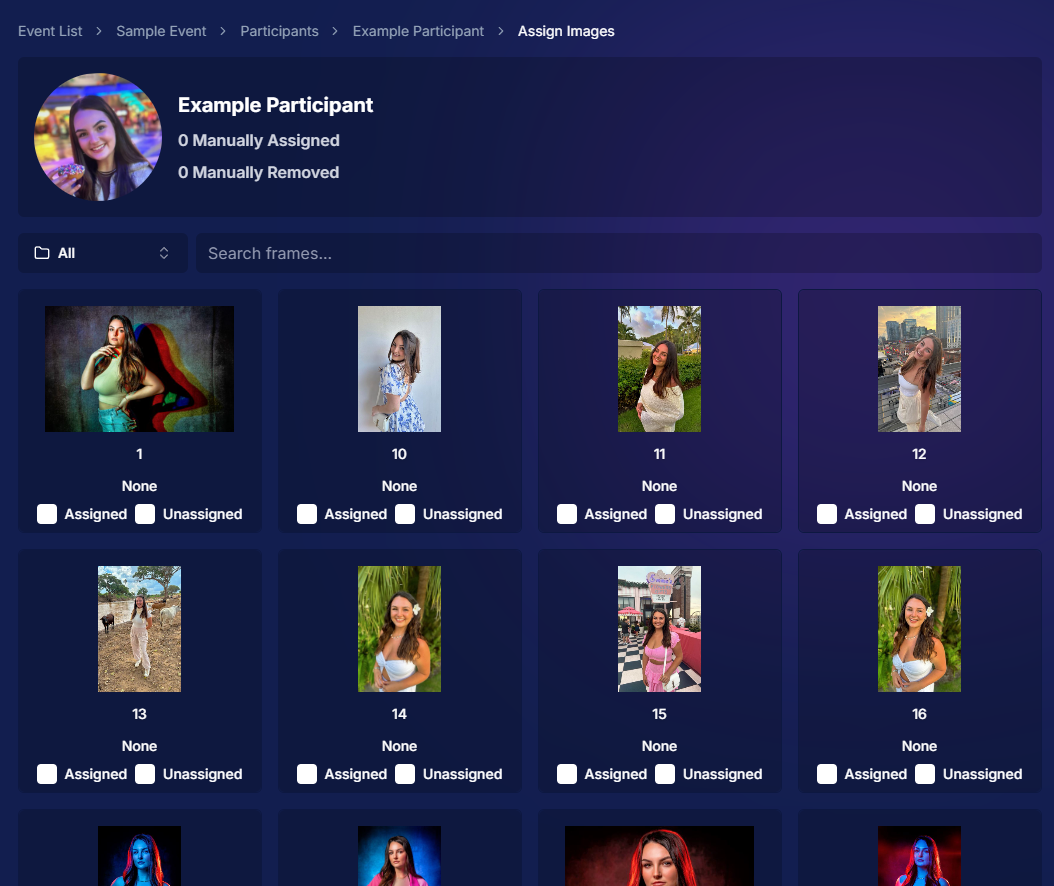
We're thrilled to announce that manual gallery assignment and participant creation are now live! This means you can:

‍

  • β—‹ Assign images to someone's personal gallery manuallyβ€”perfect for those shots where the subject wasn't facing the camera, and face recognition didn't pick them up.
    ‍
  • β—‹ Create participants manually, either one at a time or by uploading a spreadsheet.
    ‍
  • β—‹ Instantly trigger marketing campaigns to individuals when you assign images to them, ensuring they receive their photos promptly.

‍

We believe this will greatly enhance your workflow and support needs. Let us know how it helps you during your next event!
‍

‍

2. Tweaks to the Retail Site for a Smoother Experience πŸ›οΈ

‍

We've made several improvements to our retail site to enhance the shopping experience for your clients:

‍

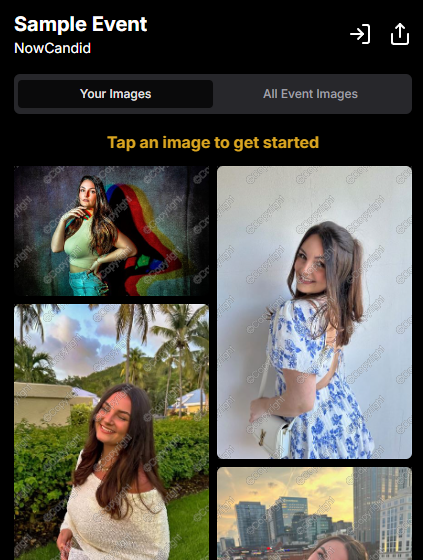
  • β—‹ "Tap image to get started" text now shimmers on the initial gallery screen to guide users who aren't sure what to do next.
    ‍
  • β—‹ Package creation improvements make it more intuitive for customers to customize their packages and select photos.
    ‍
  • β—‹ Product renders in the cart: The view cart screen now displays product images next to every item, including items within multi-item packages, for increased clarity.
    ‍
  • β—‹ Updated header and footer: Clear guidance on when to contact our retail support or reach out to you, the photographer, for assistance.

‍

These tweaks aim to make the purchasing process as seamless and enjoyable as possible for your clients!
‍

Theme:Β Liquorice - Watermarking:Β Default

‍

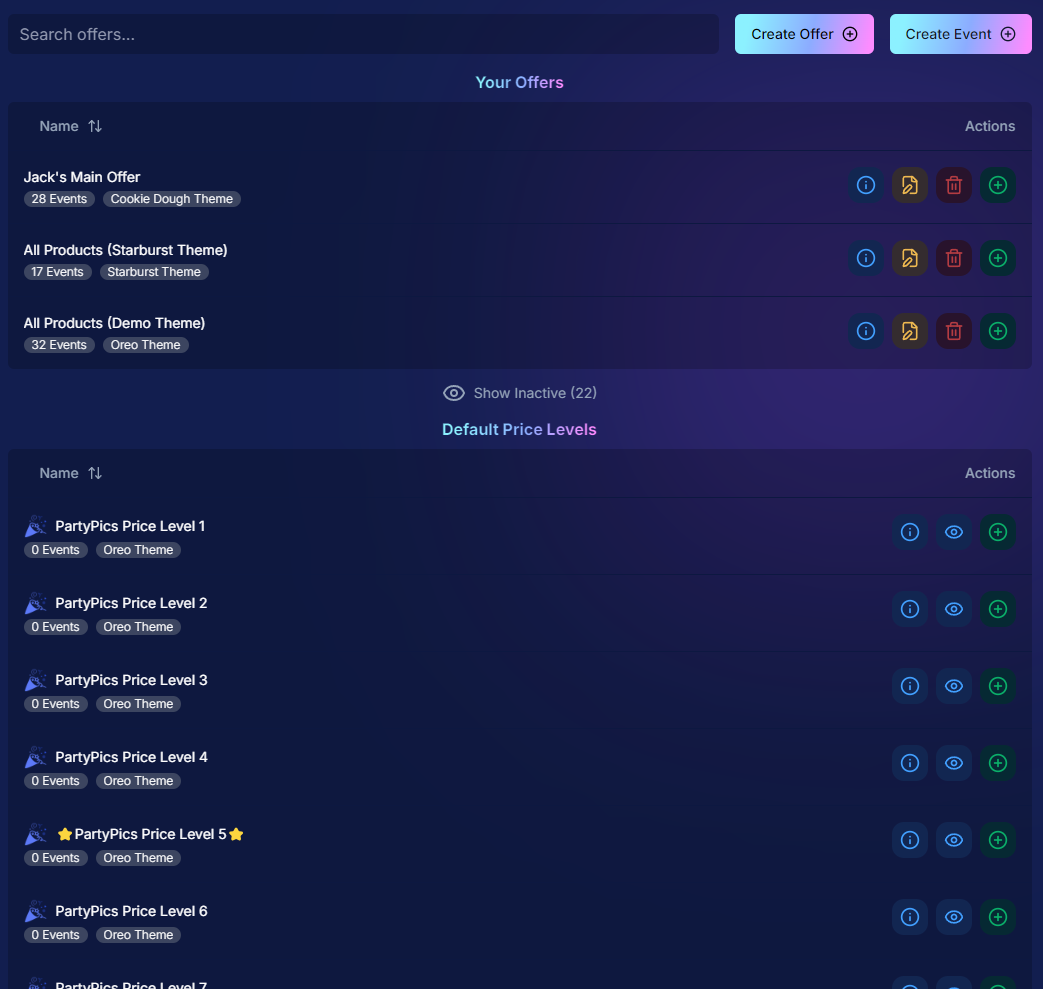
3. Default Price Levels Are Back! πŸ’°

‍

Great news! The Default Price Levels from our previous NowCandid system are back and better than ever.

‍

While you can still create custom offers, these ready-made Price Levels are optimized to help you maximize sales in various situations.

‍

  • β—‹ Optimized for success: Designed to boost your sales potential.
    ‍
  • β—‹ Versatile options: Suitable for a wide range of events and client needs.
    ‍
  • β—‹ Easy to access: Gives you good Offer options in a pinch or when entering a new market.

‍

For a detailed breakdown, click here.

‍

‍

4. New Image Notifications for Previous Purchasers πŸ›ŽοΈ

‍

We've improved our marketing system to better serve your clients and help keep those sales up:

‍

  • β—‹ If someone purchases on Day 1 and is photographed again on Day 2, they will now receive a notification about the new images added to their gallery.
    ‍
  • β—‹ Enhances customer engagement: Keeps clients informed and encourages additional purchases.
    ‍
  • β—‹ Prevents missed opportunities: Even early buyers stay in the loop for new content.

‍

This ensures your clients never miss out on their special moments!

‍

‍

5. Google Pay Added to Express Checkout Options πŸ’³

‍

We're excited to introduce Google Pay as a new express checkout option!

‍

Our available payment methods now include:

‍

  • β—‹ Traditional credit/debit card checkout
    ‍‍
  • β—‹ Apple Pay
    ‍
  • β—‹ Google Pay
    ‍
  • β—‹ PayPal (and PayPal Pay Later)
    ‍
  • β—‹ Venmo

‍

And guess what? We have one more express checkout option coming soon! Stay tuned. πŸ“’

‍

Theme:Β Liquorice - Watermarking:Β Default

‍

6. Capture App Version 4.4 for iOS & Windows πŸ“±πŸ’»

‍

The latest Capture App Version 4.4 is now available for both iOS and Windows, featuring:

‍

  • β—‹ Keyboard support for Windows: Windows laptop users can now input phone numbers using the keyboard when using the Tap-A-Face Workflow.
    ‍
  • β—‹ Performance improvements: Smoother and faster app experience.
    ‍
  • β—‹ sRGB color checking: The app now ensures images are in sRGB format, preventing issues caused by Adobe RGB images.
    ‍
  • β—‹ Event Selfie Check-In QR code display: Access the QR code directly from your device when needed.

‍

Upgrade now to enjoy these enhancements!

‍

‍

7. Enhanced Folders Report πŸ“Š

‍

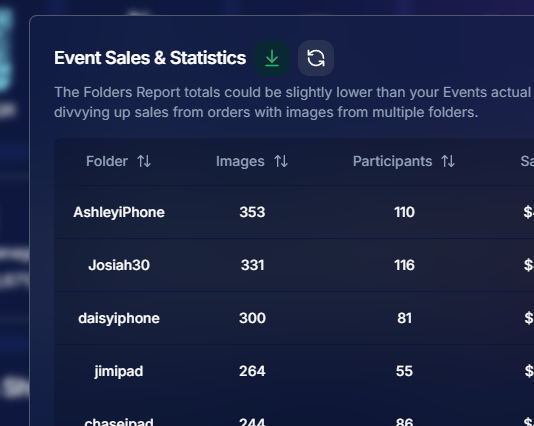
Our Folders Report (which you can find using the Graph button on an Event's Management Page) just got more powerful:

‍

  • β—‹ Sortable columns: Organize by images, participants, sales, and more.
    ‍
  • β—‹ Real-time insights: Works live during events, allowing you to identify your best-performing photographers, mid-event.
    ‍
  • β—‹ Actionable data: Mid-event reporting helps you provide immediate feedback to your team to boost performance.
    ‍
  • β—‹ Download button: This report is now downloadable via the green button in the screenshot below as well!

‍

Optimize your event management like never before!
‍

‍

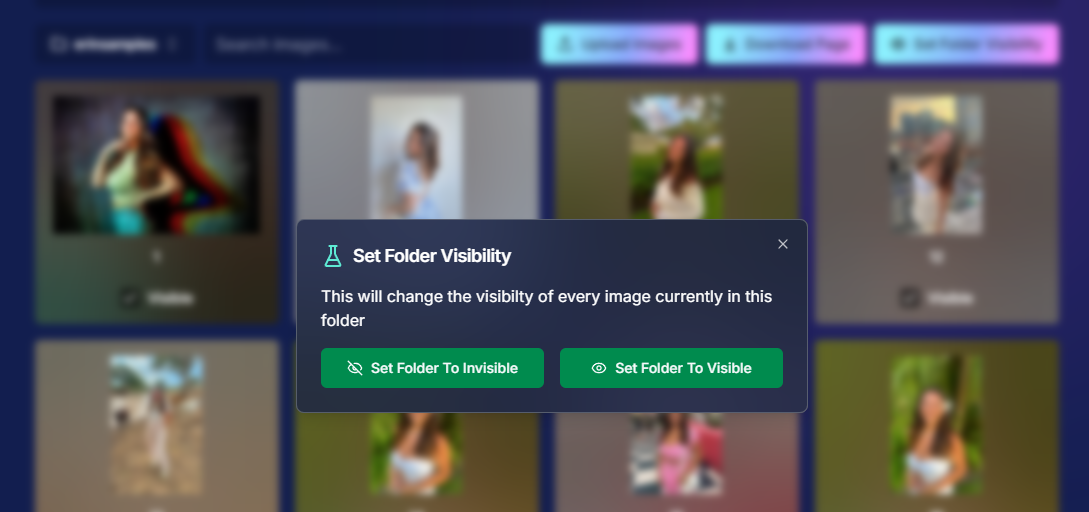
8. Bulk Visibility Control for Image Folders πŸ“

‍

We've added a handy button in the Manage Images page, when you have a folder selected:

‍

  • β—‹ Mark entire folders as visible or invisible with one click.
    ‍
  • β—‹ Use cases: Quickly hide a batch of images that need reworking, such as a blurry set.
    ‍
  • β—‹ Saves time: Streamlines the process of managing large numbers of images.

‍

Sometimes, mistakes happen! Now you can use this button to quickly hide images in bulk as you work to correct issues.
‍

‍

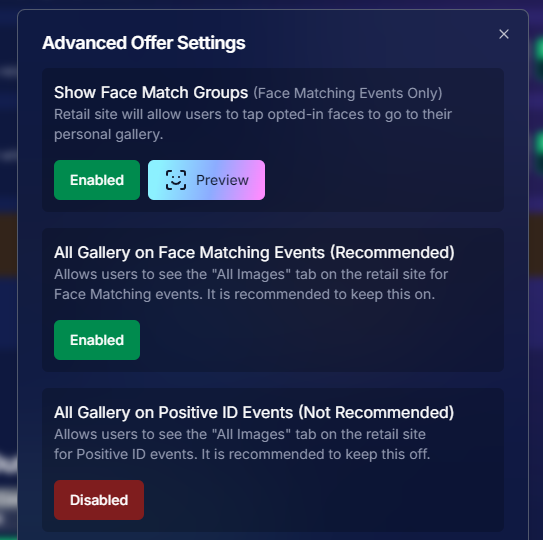
9. Customize "All Event Images" Gallery Settings πŸ–ΌοΈ

‍

You now have more control over the All Event Images gallery:

‍

  • β—‹ Override default settings at the Offer level.
    ‍
  • β—‹ Options:
    ‍
    • Turn off the All Event Images gallery for Face Matching Events.
      ‍
    • Turn on the All Event Images gallery for Positive ID Events.
      ‍
  • β—‹ Recommendation: We suggest sticking with the defaults, but if you'd like to explore the pros and cons, click here to schedule a chat with us!

‍

Tailor the gallery experience to suit any event's needs!
‍

‍

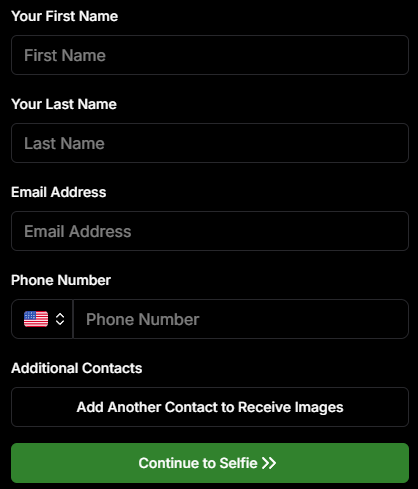
10. Simplified Selfie Check-In πŸ“²

‍

We've made the Selfie Check-In process even more user-friendly:

‍

  • β—‹ Only requires a cell number OR email address.
    ‍
  • β—‹ Encourages participation: Even though neither field says "optional," most people still provide both.
    ‍
  • β—‹ Addresses Fringe Issues: Every now and then, someone doesn't have (or refuses to provide) a cell or email address. This change will account for those individuals!

‍

Enhances guest engagement and reduces fringe support issues, with no changes on your part!
‍

Theme:Β Liquorice

‍

11. New Unsubscribe Keyword: "NOPE"! 🚫

‍

We've introduced a new, fun way for clients to manage their marketing preferences:

‍

  • "NOPE": Clients can reply with this word to opt out of marketing for a specific event.
    ‍
  • Future communications: They will still receive messages for future events unless they opt out again.
    ‍
  • Accidental "STOP" replies: If someone replies "STOP" though, they'll need to send "START" to our marketing number to resume receiving texts.

‍

This gives your clients more control while still keeping communication lines open for future events.

‍

‍

12. Seasonal Retail Themes: Apple Crumble & Candy Corn πŸ‚πŸŽƒ

‍

Get into the festive spirit with our new retail site themes:

‍

  • Apple Crumble:
    ‍
    • Autumn colors: Warm and inviting hues.
      ‍
    • Falling leaves: Adorable "leaves falling" animation upon gallery arrival, check-in completion, and after checkout.
      ‍
  • Candy Corn:
    ‍
    • Halloween vibes: Shades of black and bright orange.
      ‍
    • Candy corn confetti: Fun "candy corn toss" animation to celebrate the spooky season upon gallery arrival, check-in completion, and after checkout.
      ‍
    • Haunted Retail Site: A few ghosts frequently fly across your customer's screens as they shop!

‍

Delight your clients with these charming themes!

‍

Note: the Leaves &Β Candy Corn only fall across the screen upon gallery arrival, check-in completion, and after checkout - these GIFs are simply showing it in a loop :)

‍

Theme: Apple Crumble - Watermarking:Β Off

‍

Theme:Β Candy Corn - Watermarking:Β Off

‍

We hope these updates make your experience with NowCandid even more enjoyable and efficient.

‍

Your success is our top priority, and we're always here to support you. πŸ’–

‍

As always, if you have any questions or feedback, don't hesitate to reach out. We're all ears! πŸ‘‚

‍

Until next week, keep capturing those amazing moments!

‍

Cheers and sparkles,

‍

Candy 🍬

Related articles

Weekly Recap: More Virtual Group Control, New Sports Backgrounds & Better BGR Tools 🏈✨
Feature Updates
August 14, 2026

Weekly Recap: More Virtual Group Control, New Sports Backgrounds & Better BGR Tools 🏈✨

5
Β minutes read
Hey photo friends! πŸ‘‹

‍

Candy here with another weekly recap! This week brings more control to Virtual Group Builder, a much better home for Event Background Removal, new Candy Image Studio exposure tools, andβ€”yesβ€”27 new sports background sets. 😎

‍

Let’s jump in!

‍

πŸ§‘β€πŸ€β€πŸ§‘ Virtual Group Builder Additions

‍

Ask and you shall receive... sometimes! We’ve gotten some good feedback on Virtual Group Builder, and this week several new controls are here to make layouts easier to fine-tune:

‍

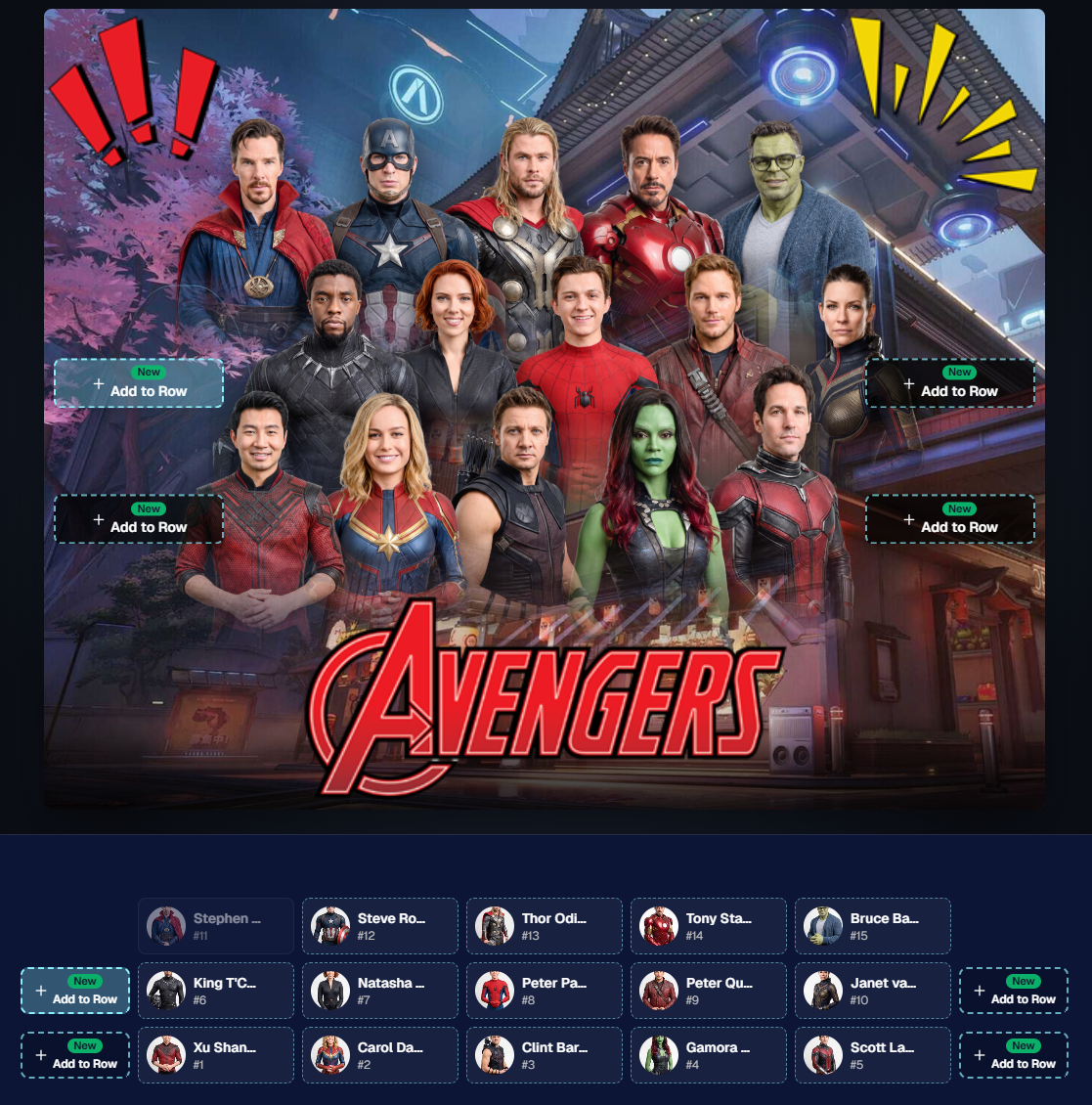
↕️ Force subjects onto different rows‍

  • While dragging a subject, new Add to Row buttons appear over the other rows. Drop the subject there to explicitly move them where you want instead of relying entirely on automatic placement.
  • Previously you were limited to automatically determined rows, you still have those but can now override them!

‍

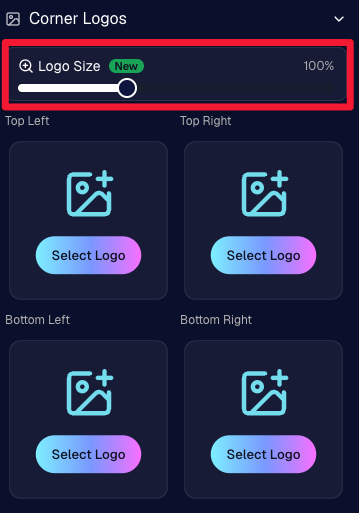
πŸ” New logo size slider‍

  • Adjust your corner logos to be smaller or larger than the default.
  • Previously they could be considered a bit tiny, but this gives you a bit more control!

‍

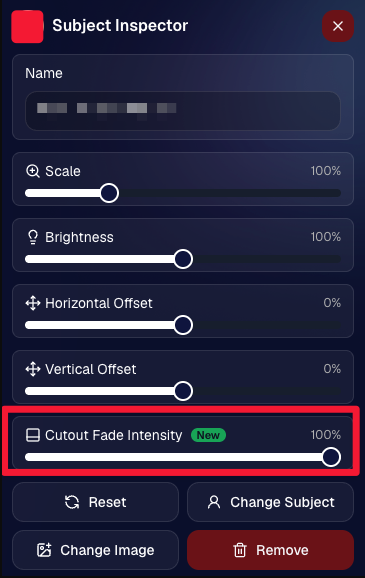
🌫️ Individual cutout fade control‍

  • The Subject Inspector now has its own cutout fade intensity slider, separate from the global setting, so you can fine-tune individual subjects when needed.
  • This will let you tweak the cutout fade intensity for subjects in the front row or on the sides of the virtual group, in case you're wanting a very specific look.

‍

πŸ‘₯ Smarter merged-participant image selection‍

  • The Subject Image Picker will only show images from merged participants when they share the same name.
  • This typically does not matter, but in the case of a parent doing a Selfie Check-In of themselves and then of their child later, this will keep Virtual Groups working as expected!

‍

Just a few additions, but very useful ones when you’re trying to get a Virtual Group looking just right!

‍

Drag and drop subjects into other rows for more control than ever!

‍

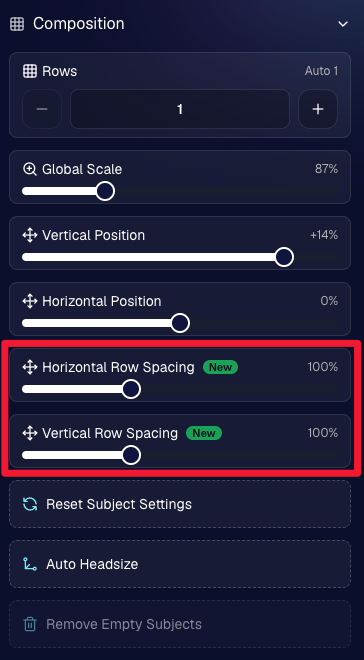
New options to more quickly space out your subjects!

‍

When viewing subject details, adjust them by individual!

‍

Control the size of your logos!

‍

🏈 27 New Sports Background Sets

‍

Alright, shoutout to the random guy who told me (me being Candy, in case you forgot!) that he didn’t like the backgrounds. We heard you! πŸ˜‚

‍

This week we’ve added 27 new sets of sports backgrounds, including a brand-new Sports – Locker Room background category.

‍

And, in case you missed it, last week we also added an AI Background Generator so you can create entirely new, modern backgrounds of your own.

‍

A quick reminder... you already have a lot of control over which backgrounds your customers actually see:

‍

🎨 Edit the default backgrounds in your Offers

‍

πŸ“€ Upload your own custom backgrounds at both the Offer-level and Event-level

‍

πŸ€– Generate new backgrounds of your own with AI

‍

🏈 Choose from our (now growing) collection of built-in choices

‍

We have a TON of default backgroundsβ€”and yes, many have been around for a whileβ€”but you’re never locked into using them. You can build your own look for your business, and we’ll keep adding new options over time too.

‍

βœ‚οΈ New Dedicated Background Removal Page

‍

Event Background Removal now has its own dedicated Dashboard page, accessible from the Event Sidebar. It is not longer just a popup!

‍

The BGR toggle on Event Overview will take you there too, giving all of these controls a little more breathing room.

‍

On the new page, you can:

‍

βœ… Enable or disable Background Removal

‍

πŸ–ΌοΈ Manage your Event Backgrounds

‍

🎨 See your Offer Backgrounds with a direct link to the Offer

‍

πŸ“Š See how many cutouts have finished and how many are still processing

‍

⏳ Watch a live progress bar while Background Removal is working

‍

πŸ“‚ See all valid Event folders and which ones are marked for Background Removal

‍

And if your Event is a new Event: βœ‚οΈ You can mark an existing folder for Background Removal even if it already contains images!!!

‍

🎨 Candy Image Studio: Better Exposure Fixes

‍

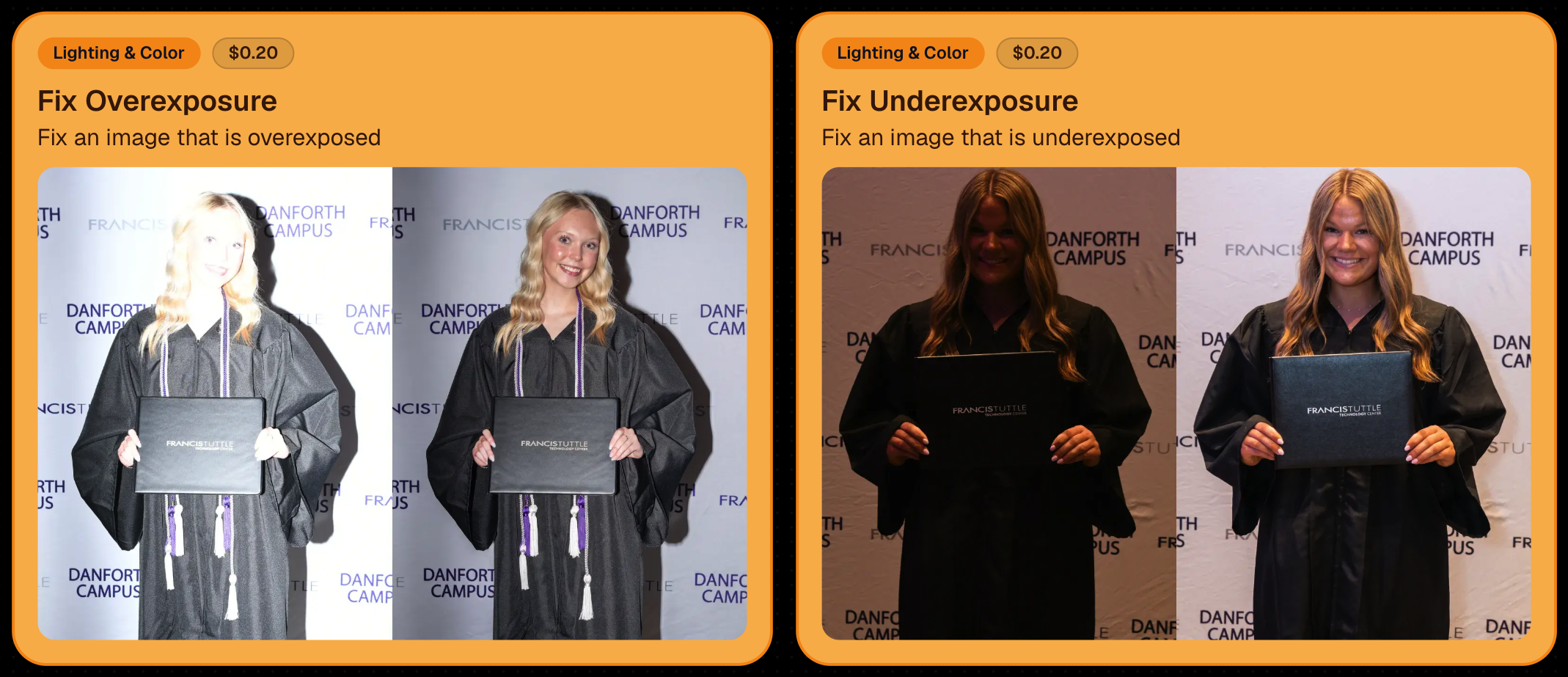
πŸŒ™ New Fix Underexposure node‍

  • Helps recover images that came out too dark.

‍

β˜€οΈ Fix Overexposure greatly improved‍

  • The existing overexposure tool has been reworked for more reliable results.

‍

Utilize Candy Image Studio to fix images so they can sell, quickly and affordably!

‍

🏈 Jersey Jotter Progress Tracking

‍

⏳ New Jersey Jotter progress bar‍

  • When Jersey Jotter is active and still has unprocessed images, its dedicated page now shows processing progressβ€”similar to Candy Culler and the new Background Removal page.

‍

This makes it much easier to tell whether recognition is still working through a large Event.

‍

πŸ›οΈ Retail Improvements

‍

✨ Titled Luxe Prints now work with package prefill‍

  • Packages can now automatically prefill eligible Titled Luxe Print products just like other supported products.

‍

πŸ–ΌοΈ Titled Luxe Print package rendering fixed‍

  • Fixed an issue where these products could render incorrectly inside packages.

‍

πŸ€– AI-generated backgrounds now render correctly on products

‍

🎨 Selected backgrounds now stay visible through the final product step‍

  • Fixed an issue where the chosen background could sometimes disappear on renders when reaching quantity and finish steps.

‍

πŸ“ Several product descriptions updated‍

  • Some product descriptions have been refreshed for better clarity.

‍

πŸ–ΌοΈ AI Edit + BGR Assignment Fix

‍

πŸ‘₯ BGR versions of AI edits now keep direct participant assignments‍

  • If the original non-AI image was directly assigned to someone, its Background Removed AI-edited version will now correctly inherit that relationship.

‍

πŸ“¦ Order Details Fix

‍

πŸ“ Package captions now display correctly‍

  • Fixed cases where Order Details did not show caption information for certain products contained inside packages.

‍

πŸ“± Capture App 5.9.1 – iOS OTA

‍

πŸ“Έ Photo Booth fix for iPad‍

  • Fixed the Photo Booth gallery strip being cut off on certain iPad models.

‍

That’s the week!

‍

More Virtual Group control, a much stronger Background Removal workflow, some useful exposure tools, and plenty of fresh sports backgrounds to work with.

‍

And if you still don’t like the backgrounds... now you’ve got plenty of ways to show us how it’s done. πŸ˜‰

‍

Keep creating magic,

Candy 🍬

Weekly Recap: Reworked Titled Luxe Prints, Better Cutouts & Faster PhotoRoster Imports βœ¨πŸ“Έ
Feature Updates
August 7, 2026

Weekly Recap: Reworked Titled Luxe Prints, Better Cutouts & Faster PhotoRoster Imports βœ¨πŸ“Έ

4
Β minutes read
Hey photo friends! πŸ‘‹

‍

Candy here with another round of updates! This week’s highlights include a fresh redesign for Titled Luxe Prints, a brand-new 4Γ—6 size, continued Background Removal improvements, and some helpful Dashboard upgrades for PhotoRosters, Event Tags, and Positive ID workflows.

‍

✨ Titled Luxe Prints Get a Refresh

‍

Titled Luxe Prints have been reworked to feel more like the classic PartyPics style while still keeping the premium embellishments that make them special.

‍

πŸ–ΌοΈ Updated Titled Luxe Print design

  • Still embellished
  • Still supports 3 caption lines
  • Still includes 2 crests
  • Now has a more traditional PartyPics-style look

‍

πŸ†• New 4Γ—6 Titled Luxe Print

  • Priced at $1.38
  • Includes both 2D and 3D renders
  • Joins the existing 5Γ—7 and 8Γ—10 sizes

‍

You can preview the updated product here:
https://app.nowcandid.com/3d/titled-luxe-print

‍

βœ‚οΈ Background Removal Keeps Getting Better

‍

🟒 Green screen cutouts improved (again!)

‍

✨ Overall cutout quality improved

‍

We’re continuing to tune Background Removal so cutouts look cleaner across more shooting conditions. Stay tuned for even more improvements!

‍

πŸ“± Capture App 5.9.1 – Android

‍

πŸ“· Full-quality internal camera capture

  • Android devices now use the full available quality of their internal cameras when shooting through the Capture App.
  • Previously, it was using a down-sized version!

‍

πŸ–₯️ Dashboard Improvements

‍

πŸͺͺ Faster Positive ID Scanner Card generation

  • The Scanner IDΒ Workflow's Scan Card PDFΒ Generator is now performs better, stalls less, and produces significantly smaller download files.

‍

⚠️ Background artwork warning‍

  • When uploading an Event background, NowCandid can now detect text or logos and show an extra warning.
  • This reinforces the existing recommendation to avoid placing important text or branding on backgrounds where product cropping could cut it off. Use our Overlay features instead!

‍

✨ Clearer Auto Editor folder naming

  • Manage Images now shows a sparkles icon for Folders containing AI edits, with clearer formatting for Folders created by the Auto Editor.

‍

πŸ“₯ Import PhotoRosters directly from Participant List

  • Face Matching Events now have an Import from PhotoRoster button at the top of the Participant List page, letting you select and import a PhotoRoster without navigating away.

‍

🎨 Candy Image Studio & Auto Editor

‍

πŸ–ΌοΈ Background Generator improvements

  • Outputs are now sized more appropriately for uploading back into an Event
  • Generated background sets match each other more consistently

‍

πŸ’° Every node now displays its price

  • Previously, only discounted nodes showed pricing. Now every node clearly displays what it costs!
  • Expect more nodes with their own unique prices in the future! We will continue to build on and improve our Auto Edit &Β Image Studio tools.

‍

🧩 Predetermined node order

  • Nodes can no longer be drag-and-dropped into different edit "orders".
  • Their hierarchy is now set automatically so edits run in the best possible sequence without you needing to think about it!

‍

πŸ› οΈ Auto Editor UI refreshed

  • Several interface changes make setup and options clearer and easier to understand.

‍

πŸ“‹ PhotoRoster Improvements

‍

πŸ‘₯ Multiple PhotoRosters per Event

  • Fixed an issue that could prevent you from importing more than one PhotoRoster into the same Event.

‍

πŸ’¬ Clearer disabled export messaging

  • If Export is unavailable, clicking it now explains why.

‍

🚫 Empty PhotoRosters can’t be exported

  • A PhotoRoster must have at least one member with an image before it can be exported to an Event.

‍

πŸ” Password-Protected Public Event Lists

‍

Event Tags now have an optional extra layer of privacy:

‍

πŸ”‘ Password-protect your Public Event List Pages:

  • βž• Set a password while creating a new Event Tag
  • ✏️ OR add or remove the password using the Event Tag editor

‍

This works similarly to the password protection for your Private Image Download Galleries.

‍

πŸ›οΈ Retail Fixes & Protection

‍

πŸ–ΌοΈ Fixed package editing edge cases where the Overlay step could be missing while choosing a new image

‍

πŸ›‘οΈ Additional GalleryGuard improvements

‍

That’s the week!

‍

The refreshed Titled Luxe Prints are the star of this update, with better Background Removal, easier PhotoRoster importing, and more control over Event Tags rounding things out.

‍

Keep creating magic,‍

Candy 🍬

Weekly Recap: Better AI Edits, New Background Removal Workflows & Virtual Group Undo/Redo 🎨✨
Feature Updates
July 31, 2026

Weekly Recap: Better AI Edits, New Background Removal Workflows & Virtual Group Undo/Redo 🎨✨

3
Β minutes read
Hey photo friends! πŸ‘‹

‍

Candy here with this week’s updates! The biggest changes are in Candy Image Studio and Auto Editor, where several popular edits now cost less, produce more consistent results, and work more naturally with Background Removal workflows.

‍

We’ve also added undo and redo to Virtual Group Builder, improved green screen cutouts, and cleaned up a few retail download issues.

‍

Let’s take a look!

‍

🎨 Candy Image Studio: Better Results & New Lower-Cost Edits

‍

Several Candy Image Studio nodes have been reworked with more consistent output quality and new discounted pricing.

‍

⚫ Improved Black & White edits β€” now 4’‍

  • Both existing Black & White nodes have been rebuilt to produce more reliable, consistent results.

‍

✨ Improved Retouch β€” now 6’‍

  • The Retouch node now produces much more consistent results and is available at a lower price.

‍

🎞️ New 35mm Film node β€” 4’‍

  • The previous Film Style node has been replaced with a new and improved 35mm Film treatment.

‍

πŸ“Έ New Clarendon node β€” 4’‍

  • Apply a look inspired by the familiar Clarendon-style social media filter.

‍

πŸ’³ More flexible edit pricing

‍

Some nodes now display their own lower price. Candy Image Studio charges based on the highest-priced node included in the edit.

‍

For example:

  • An edit using only a 4Β’ node costs 4Β’
  • If that same edit also includes a standard node, normal 2K or 4K pricing applies

‍

This lets simpler edits cost less when you're not using the more advanced edits!

‍

‍

‍

βœ‚οΈ New Background Removal Options for AI Edits

‍

Candy Image Studio and Auto Editor now work more closely with Events using Background Removal folders.

‍

πŸ–ΌοΈ Candy Image Studio can send an edit into Background Removal‍

  • When editing an Event image, a new option appears beneath Mark Original Invisible if the Event has Background Removal folders enabled.
  • Select Mark Destination Folder as Background Removal Folder to upload the edited image into a folder that will also process it for background removal.

‍

‍

βš™οΈ Auto Editor adds a Background Removal size option‍

  • If Background Removal folders are enabled, you can choose Background Removal. Edited images will then upload into a folder marked for Background Removal.

‍

πŸ› οΈ Auto Editor folder fix‍

  • Auto Edits now run properly on original images inside folders marked for Background Removal. Auto Editor still does not run on the completed cutout images themselves.

‍

All of the new node pricing and quality improvements in Candy Image Studio also apply to Auto Editor, since Auto Editor is powered by the same system.

‍

‍

↩️ Virtual Group Builder: Undo & Redo

‍

Virtual Group Builder now supports familiar keyboard shortcuts:

‍

  • ↩️ Undo: CMD/CTRL + Z
  • β†ͺ️ Redo: CMD/CTRL + Shift + Z
  • β†ͺ️ Redo: CMD/CTRL + Y

‍

This makes it much easier to experiment with layouts and quickly reverse an adjustment.

‍

πŸ–ΌοΈ Manage Images Improvement

‍

⬇️ Download Original for BGR and AI images‍

  • The Manage Images lightbox now includes a Download Original button for Background Removal and AI-edited images.

‍

You can access the original file without needing to leave the lightbox or track it down manually.

‍

βœ‚οΈ Background Removal Improvement

‍

🟒 Better green screen cutouts‍

  • Background Removal now handles images more effectively when the background is only partially green screen instead of completely green.

‍

πŸ›οΈ Retail Download Fixes

‍

πŸ“₯ Improved QuicEvents press-and-hold downloads‍

  • Download behavior is more reliable on desktop and Android for Events without artwork.

‍

πŸ–ΌοΈ Free Gallery Download resolution fixed‍

  • Free Gallery Downloads on QuicEvents now correctly deliver full-resolution images instead of medium resolution.

‍

🧲 Photo Magnet artwork fix‍

  • Photo Magnets will no longer be ordered with Event artwork when Use Artwork by Default is enabled, since artwork is not supported on that product.

‍

πŸ“± Mobile Dashboard 4.1 for Android

‍

πŸ’° New β€œCha Ching” notification sound‍

  • Weekly order notifications on Android now include the same Cha Ching sound effect already available on iOS.

‍

πŸ‘‰ Swipe to open the Sidebar‍

  • Swipe inward from the left edge of the screen to open the Sidebar, matching the iOS experience.

‍

πŸ€– Google Play compatibility updates‍

  • The app also includes required changes for the latest Google Play requirements.

‍

That’s the week!

‍

Lower-cost AI edits, stronger and more consistent results, and better Background Removal integration should make Candy Image Studio and Auto Editor more useful for both one-off fixes and larger Event workflows.

‍

Keep creating magic,

Candy 🍬

Let’s get in touch

If you’re a photographer looking to add NowCandid services to your wheelhouse – set up a call by clicking the button below.

How to customize formatting for each rich text

How to customize formatting for each rich text

How to customize formatting for each rich text

How to customize formatting for each rich text

How to customize formatting for each rich text

‍

‍

What’s a Rich Text element?

The rich text element allows you to create and format headings, paragraphs, blockquotes, images, and video all in one place instead of having to add and format them individually. Just double-click and easily create content.

A rich text element can be used with static or dynamic content. For static content, just drop it into any page and begin editing. For dynamic content, add a rich text field to any collection and then connect a rich text element to that field in the settings panel. Voila!

Headings, paragraphs, blockquotes, figures, images, and figure captions can all be styled after a class is added to the rich text element using the "When inside of" nested selector system.

  • List One
  • List Two
  • List Three
  • List Four
  • List Five

This is a link

This is bold text

‍

  • ‍

‍