HomeNavigation arrowBlogNavigation arrow
Current page
Feature Updates

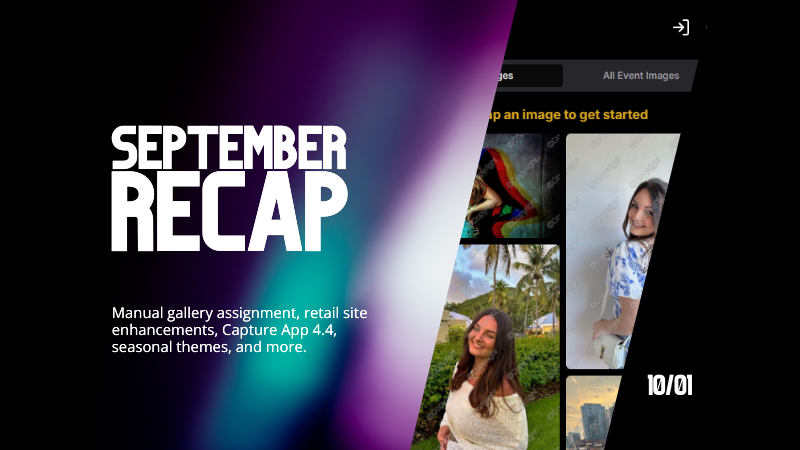
Candy's September Recap: New Features from Last Month!πŸ“ΈπŸŽ‰

Candy's September Recap: New Features from Last Month!πŸ“ΈπŸŽ‰
Hello, wonderful photographers!

‍

Candy here, bringing you the first edition of our Recap series! 🌟

‍

This blog post will cover alllllll of September's new features and changes worth mentioning! But going forward, we will be doing Weekly Recaps to keep you in the loop even faster.

‍

We've been busy bees these past few weeks, and I can't wait to share all the fantastic new features and improvements we've made to help you shine even brighter. ✨

‍

Psst... since this is our inaugural recap, we're covering updates from all of September, so grab a comfy seatβ€”it's a bit longer than usual! Going forward, these recaps will be weekly and shorter, but just as sweet. πŸ˜‰

‍

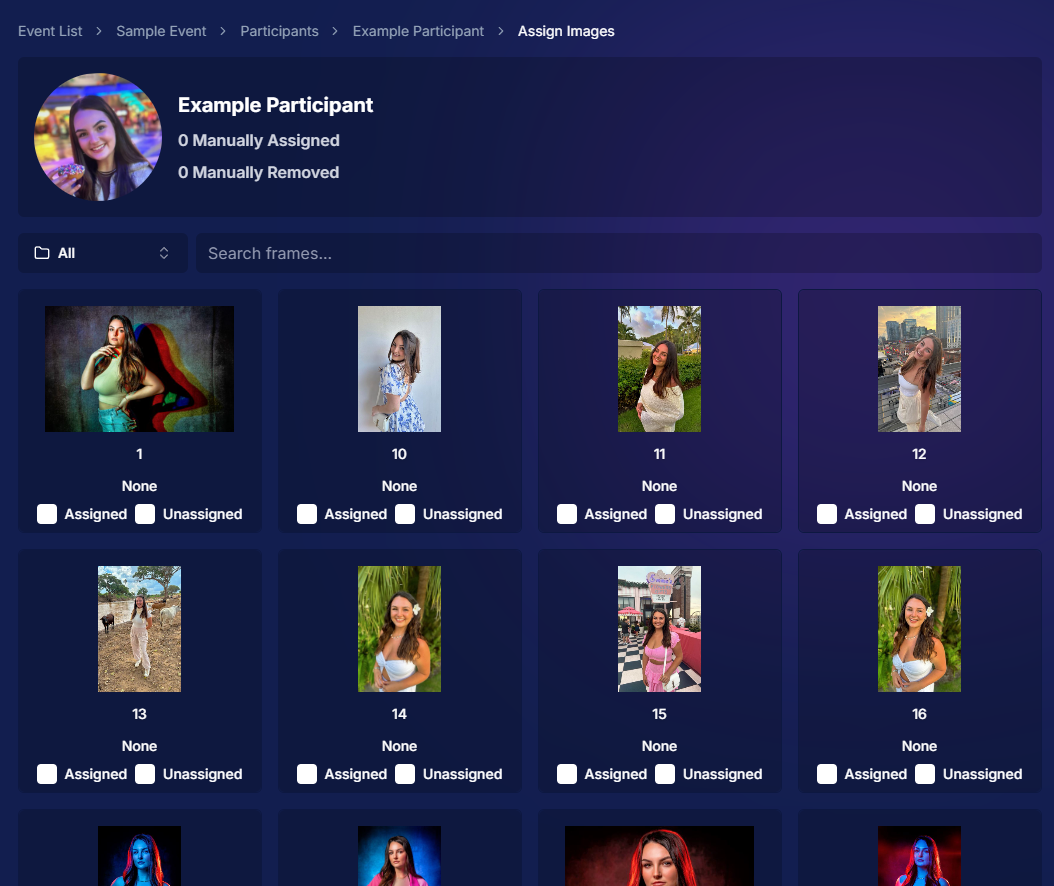
1. Manual Gallery Assignment & Participant Creation πŸ› οΈ

‍

We're thrilled to announce that manual gallery assignment and participant creation are now live! This means you can:

‍

  • β—‹ Assign images to someone's personal gallery manuallyβ€”perfect for those shots where the subject wasn't facing the camera, and face recognition didn't pick them up.
    ‍
  • β—‹ Create participants manually, either one at a time or by uploading a spreadsheet.
    ‍
  • β—‹ Instantly trigger marketing campaigns to individuals when you assign images to them, ensuring they receive their photos promptly.

‍

We believe this will greatly enhance your workflow and support needs. Let us know how it helps you during your next event!
‍

‍

2. Tweaks to the Retail Site for a Smoother Experience πŸ›οΈ

‍

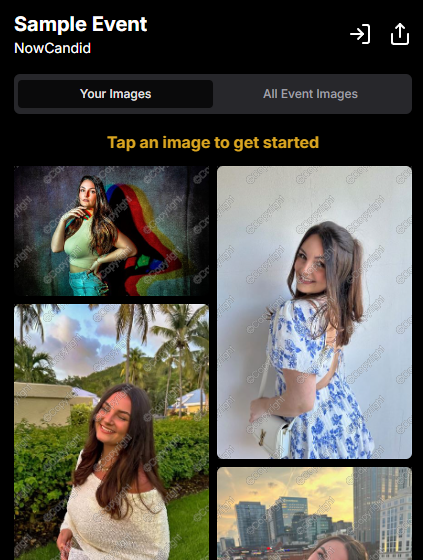
We've made several improvements to our retail site to enhance the shopping experience for your clients:

‍

  • β—‹ "Tap image to get started" text now shimmers on the initial gallery screen to guide users who aren't sure what to do next.
    ‍
  • β—‹ Package creation improvements make it more intuitive for customers to customize their packages and select photos.
    ‍
  • β—‹ Product renders in the cart: The view cart screen now displays product images next to every item, including items within multi-item packages, for increased clarity.
    ‍
  • β—‹ Updated header and footer: Clear guidance on when to contact our retail support or reach out to you, the photographer, for assistance.

‍

These tweaks aim to make the purchasing process as seamless and enjoyable as possible for your clients!
‍

Theme:Β Liquorice - Watermarking:Β Default

‍

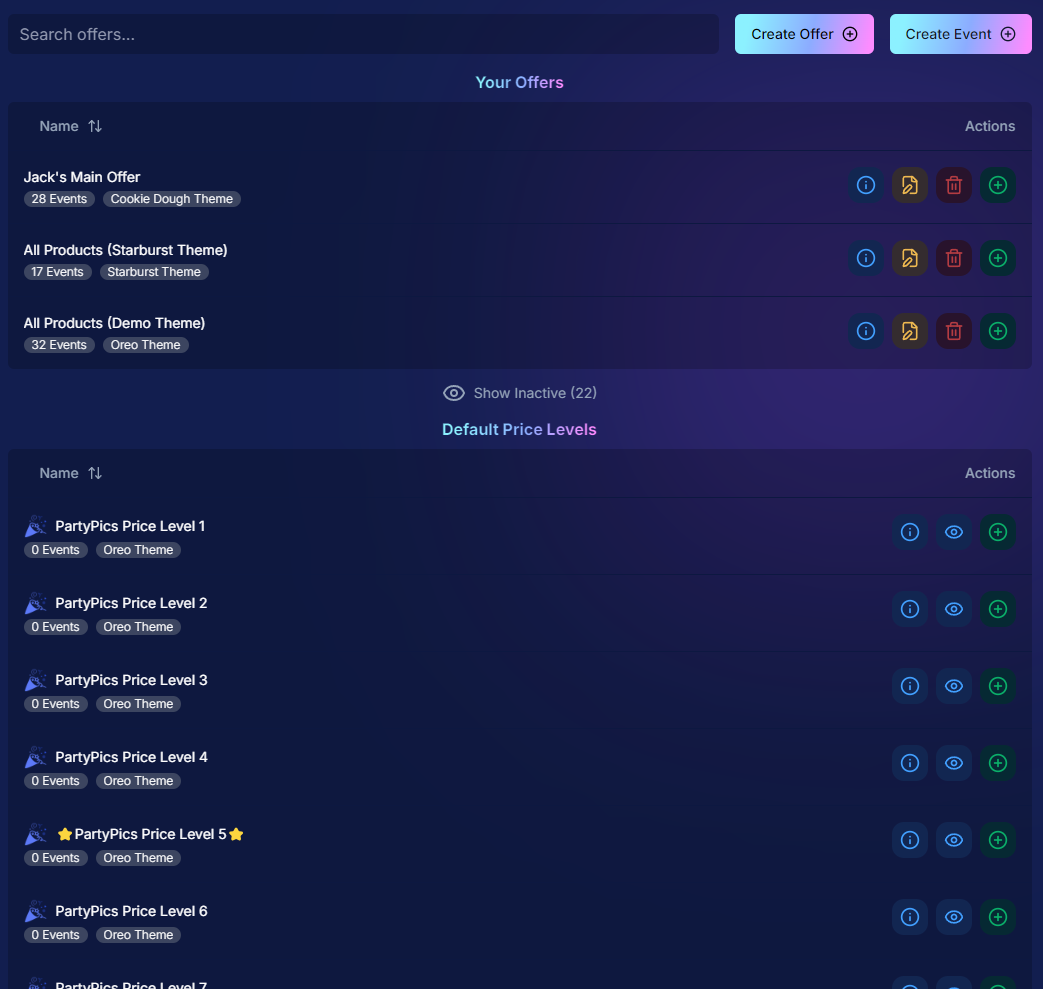
3. Default Price Levels Are Back! πŸ’°

‍

Great news! The Default Price Levels from our previous NowCandid system are back and better than ever.

‍

While you can still create custom offers, these ready-made Price Levels are optimized to help you maximize sales in various situations.

‍

  • β—‹ Optimized for success: Designed to boost your sales potential.
    ‍
  • β—‹ Versatile options: Suitable for a wide range of events and client needs.
    ‍
  • β—‹ Easy to access: Gives you good Offer options in a pinch or when entering a new market.

‍

For a detailed breakdown, click here.

‍

‍

4. New Image Notifications for Previous Purchasers πŸ›ŽοΈ

‍

We've improved our marketing system to better serve your clients and help keep those sales up:

‍

  • β—‹ If someone purchases on Day 1 and is photographed again on Day 2, they will now receive a notification about the new images added to their gallery.
    ‍
  • β—‹ Enhances customer engagement: Keeps clients informed and encourages additional purchases.
    ‍
  • β—‹ Prevents missed opportunities: Even early buyers stay in the loop for new content.

‍

This ensures your clients never miss out on their special moments!

‍

‍

5. Google Pay Added to Express Checkout Options πŸ’³

‍

We're excited to introduce Google Pay as a new express checkout option!

‍

Our available payment methods now include:

‍

  • β—‹ Traditional credit/debit card checkout
    ‍‍
  • β—‹ Apple Pay
    ‍
  • β—‹ Google Pay
    ‍
  • β—‹ PayPal (and PayPal Pay Later)
    ‍
  • β—‹ Venmo

‍

And guess what? We have one more express checkout option coming soon! Stay tuned. πŸ“’

‍

Theme:Β Liquorice - Watermarking:Β Default

‍

6. Capture App Version 4.4 for iOS & Windows πŸ“±πŸ’»

‍

The latest Capture App Version 4.4 is now available for both iOS and Windows, featuring:

‍

  • β—‹ Keyboard support for Windows: Windows laptop users can now input phone numbers using the keyboard when using the Tap-A-Face Workflow.
    ‍
  • β—‹ Performance improvements: Smoother and faster app experience.
    ‍
  • β—‹ sRGB color checking: The app now ensures images are in sRGB format, preventing issues caused by Adobe RGB images.
    ‍
  • β—‹ Event Selfie Check-In QR code display: Access the QR code directly from your device when needed.

‍

Upgrade now to enjoy these enhancements!

‍

‍

7. Enhanced Folders Report πŸ“Š

‍

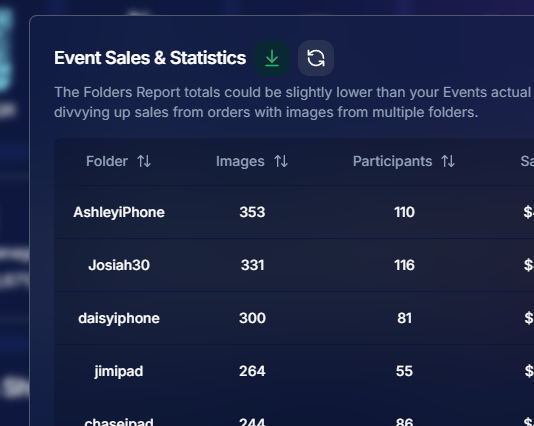
Our Folders Report (which you can find using the Graph button on an Event's Management Page) just got more powerful:

‍

  • β—‹ Sortable columns: Organize by images, participants, sales, and more.
    ‍
  • β—‹ Real-time insights: Works live during events, allowing you to identify your best-performing photographers, mid-event.
    ‍
  • β—‹ Actionable data: Mid-event reporting helps you provide immediate feedback to your team to boost performance.
    ‍
  • β—‹ Download button: This report is now downloadable via the green button in the screenshot below as well!

‍

Optimize your event management like never before!
‍

‍

8. Bulk Visibility Control for Image Folders πŸ“

‍

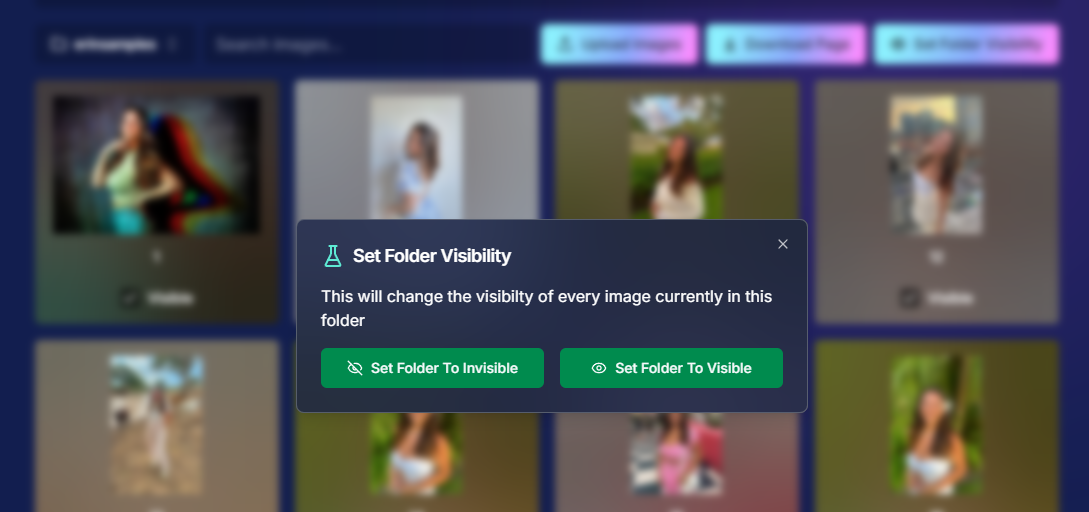
We've added a handy button in the Manage Images page, when you have a folder selected:

‍

  • β—‹ Mark entire folders as visible or invisible with one click.
    ‍
  • β—‹ Use cases: Quickly hide a batch of images that need reworking, such as a blurry set.
    ‍
  • β—‹ Saves time: Streamlines the process of managing large numbers of images.

‍

Sometimes, mistakes happen! Now you can use this button to quickly hide images in bulk as you work to correct issues.
‍

‍

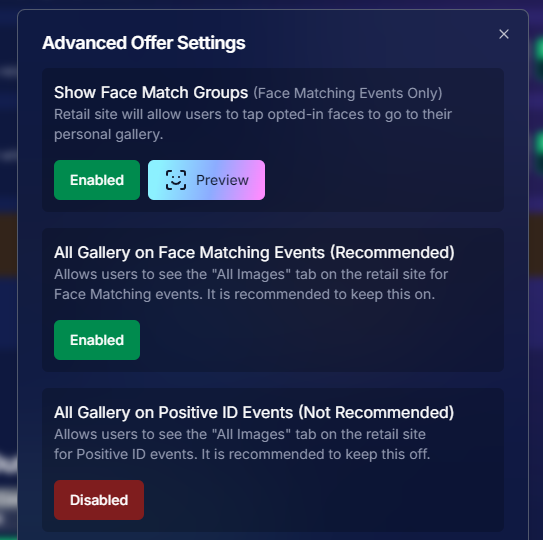
9. Customize "All Event Images" Gallery Settings πŸ–ΌοΈ

‍

You now have more control over the All Event Images gallery:

‍

  • β—‹ Override default settings at the Offer level.
    ‍
  • β—‹ Options:
    ‍
    • Turn off the All Event Images gallery for Face Matching Events.
      ‍
    • Turn on the All Event Images gallery for Positive ID Events.
      ‍
  • β—‹ Recommendation: We suggest sticking with the defaults, but if you'd like to explore the pros and cons, click here to schedule a chat with us!

‍

Tailor the gallery experience to suit any event's needs!
‍

‍

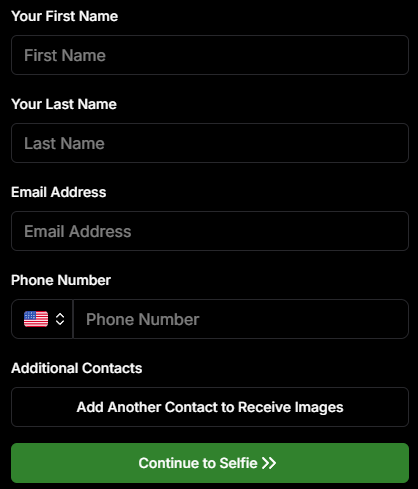
10. Simplified Selfie Check-In πŸ“²

‍

We've made the Selfie Check-In process even more user-friendly:

‍

  • β—‹ Only requires a cell number OR email address.
    ‍
  • β—‹ Encourages participation: Even though neither field says "optional," most people still provide both.
    ‍
  • β—‹ Addresses Fringe Issues: Every now and then, someone doesn't have (or refuses to provide) a cell or email address. This change will account for those individuals!

‍

Enhances guest engagement and reduces fringe support issues, with no changes on your part!
‍

Theme:Β Liquorice

‍

11. New Unsubscribe Keyword: "NOPE"! 🚫

‍

We've introduced a new, fun way for clients to manage their marketing preferences:

‍

  • "NOPE": Clients can reply with this word to opt out of marketing for a specific event.
    ‍
  • Future communications: They will still receive messages for future events unless they opt out again.
    ‍
  • Accidental "STOP" replies: If someone replies "STOP" though, they'll need to send "START" to our marketing number to resume receiving texts.

‍

This gives your clients more control while still keeping communication lines open for future events.

‍

‍

12. Seasonal Retail Themes: Apple Crumble & Candy Corn πŸ‚πŸŽƒ

‍

Get into the festive spirit with our new retail site themes:

‍

  • Apple Crumble:
    ‍
    • Autumn colors: Warm and inviting hues.
      ‍
    • Falling leaves: Adorable "leaves falling" animation upon gallery arrival, check-in completion, and after checkout.
      ‍
  • Candy Corn:
    ‍
    • Halloween vibes: Shades of black and bright orange.
      ‍
    • Candy corn confetti: Fun "candy corn toss" animation to celebrate the spooky season upon gallery arrival, check-in completion, and after checkout.
      ‍
    • Haunted Retail Site: A few ghosts frequently fly across your customer's screens as they shop!

‍

Delight your clients with these charming themes!

‍

Note: the Leaves &Β Candy Corn only fall across the screen upon gallery arrival, check-in completion, and after checkout - these GIFs are simply showing it in a loop :)

‍

Theme: Apple Crumble - Watermarking:Β Off

‍

Theme:Β Candy Corn - Watermarking:Β Off

‍

We hope these updates make your experience with NowCandid even more enjoyable and efficient.

‍

Your success is our top priority, and we're always here to support you. πŸ’–

‍

As always, if you have any questions or feedback, don't hesitate to reach out. We're all ears! πŸ‘‚

‍

Until next week, keep capturing those amazing moments!

‍

Cheers and sparkles,

‍

Candy 🍬

Related articles

Weekly Recap: Faster Background Removal, Smarter Digital Downloads & New AI Editing Tools πŸ“Έβœ¨
Feature Updates
July 24, 2026

Weekly Recap: Faster Background Removal, Smarter Digital Downloads & New AI Editing Tools πŸ“Έβœ¨

4
Β minutes read
Hey photo friends! πŸ‘‹

‍

Last week, we were busy hosting our annual Summer Seminar in Denver, Coloradoβ€”and we had a great time with everyone who joined us!

‍

That means this week’s recap includes two weeks of updates. Nothing too wild, but plenty of useful improvements across Retail, the Dashboard, Auto Editor, Capture App, and more while we continue working on some bigger changes behind the scenes.

‍

Let’s catch up!

‍

⚑ Faster Background Removal

‍

βœ‚οΈ Background Removal processing is faster‍

  • We made multiple speed improvements over the past two weeks to help cutouts finish sooner, especially during higher-volume periods.

‍

πŸ“₯ Smarter Digital Download Delivery

‍

Digital Downloads can now skip unnecessary processing in more situations.

‍

⚑ Some downloads are now available immediately‍

  • If a customer selects No Overlay, the Event has no artwork, and/the image is not a BGR image, the customer will skip the cropping step on the retail site and receive the full-resolution image without waiting for an 8Γ—12 rendered version.

‍

πŸ–ΌοΈ Full aspect ratio is preserved‍

  • These downloads bypass the cropping step and work more like Personal Gallery Download products.

‍

πŸ†“ Also applies to Medium Res and Free Downloads‍

  • This includes cases where those downloads are automatically upgraded to full resolution.

‍

πŸ“§ Clearer receipt messaging for custom renders‍

‍

🧾 Order Details now identifies each download type‍

  • Digital Downloads can now show a Rendered Download or a Full Aspect Ratio Download badge, making it clearer which version was delivered to your customers.

‍

‍

🎨 Auto Editor & Candy Image Studio Updates

‍

🧩 Auto Editor now supports image-input nodes‍

  • You can now use nodes such as:
    • Custom Image
    • Copy Style
    • Diploma Fix

‍

πŸ™ˆ Auto Edit originals won’t be texted too early‍

  • QuicPics and QuicPortraits will no longer send the original image by MMS when it belongs to an active Auto Edit with Hide Originals enabled. The system will wait for the edited version instead.

‍

πŸ•Ί New Retro Pop node‍

  • Give images a colorful, retro-inspired treatment.

‍

πŸ‚‘ New Ace Card node‍

  • Turn subjects into a bold playing-card-style design.

‍

‍

‍

πŸ’¬ QuicPics & Marketing Improvements

‍

πŸ‘₯ QuicPics can now send to multiple contacts on merged participants‍

  • If merged participant records contain different phone numbers or email addresses, regular QuicPics can now send to each unique contact.

‍

βœ‰οΈ Marketing startup fix for BGR cutouts‍

  • Fixed an edge case where marketing would not begin if the only visible images were cutouts from the newer Background Removal system.

‍

πŸ”— Hot Links now better respect Hide Originals‍

  • Fixed an issue where the preview could temporarily show the original image before an Auto Edit finished generating.

‍

πŸ“± Capture App Updates

‍

Capture App 5.8.1

‍

iOS and Android OTA updates

‍

🎨 Updated Event artwork is refreshed at login‍

  • If artwork changed, the latest file is pulled when logging into the Event normally.

‍

πŸ› οΈ Small follow-up fix‍

  • An additional 5.8.1 update was released to address a minor issue.

‍

Capture App 5.9

‍

iOS and Android App Store update

‍

πŸ“² iOS OTA updates are easier to install‍

  • You no longer need to completely restart the app or return to the Home Screen to install an available Over-the-Air update.

‍

πŸ€– Android compatibility updates‍

  • Required updates were made to stay current with new Google Play requirements.

‍

πŸ›οΈ Retail Download Fixes

‍

πŸ“± Safari share sheet reliability improved‍

  • Press-and-hold downloads should now open the native share sheet more consistently on Safari.

‍

πŸ–ΌοΈ Virtual Group download cleanup‍

  • Virtual Groups in QuicPics no longer offer a Download with Art option.

‍

🎨 Background selection fixes‍

  • Fixed cases where:
    • A PNG could be downloaded without selecting a background and receive an incorrect blue background
    • Faux renders showed no selected background in the download popup

‍

πŸ” Facebook login works again

‍

πŸ–₯️ Dashboard Improvements

‍

πŸ“Š Image Timeline cleanup‍

  • Fixed chart display issues, removed folders that were not useful in the timeline, and prevented multiple summaries from appearing when switching folders quickly.

‍

🌾 Candy Culler controls are clearer‍

  • Filter visibility and report controls now use more descriptive buttons, similar to Manage Images.

‍

πŸ“ˆ BGR Folder Stats fixed‍

  • Cutouts from the newer Background Removal system no longer incorrectly inflate Unassigned totals.

‍

πŸ“± Mobile Dashboard

‍

πŸ”— More reliable deep linking‍

  • Dashboard links should open the correct page more consistently when the app has been open for a while or after signing in and out.

‍

That’s the two-week update!

‍

Faster Background Removal and smarter Digital Download delivery are the biggest highlights, with plenty of smaller improvements making Auto Editor, QuicPics, Retail, and the Capture App more dependable.

‍

Thanks again to everyone who joined us in Denver for Summer Seminarβ€”we loved seeing you!

‍

Keep creating magic,

Candy 🍬

Weekly Recap: Quic-Download Tracking, Faster PhotoRoster Exports & 2K Background Generation πŸ“₯✨
Feature Updates
July 10, 2026

Weekly Recap: Quic-Download Tracking, Faster PhotoRoster Exports & 2K Background Generation πŸ“₯✨

4
Β minutes read
Hey photo friends! πŸ‘‹

‍

Candy here with another round of updates! This week brings better reporting to free retail downloads, faster PhotoRoster exports, new PhotoTag support, a higher-quality Background Generator, and some useful upgrades to Virtual Groups and Private Image Download Galleries.

‍

Let’s take a look!

‍

🎨 New 2K Background Generator

‍

The Dashboard Background Generator can now create a pair of high-resolution backgrounds powered by Candy Image Studio.

‍

πŸ–ΌοΈ Generates two 2K backgrounds

‍

πŸ“ Uses a 2Γ—3 aspect ratio

‍

🍬 Powered by the same higher-quality editing system used by Candy Image Studio

‍

πŸ’³ Costs the equivalent of two 2K Candy Image Studio edits

‍

These backgrounds are higher quality than the free Background Generator used by retail shoppers, making this a better option when you want polished backgrounds prepared ahead of time.

‍

Create your backgrounds with a text prompt, provide an reference image if needed, then save your two new backgrounds to your device's Downloads folder for future use with your NowCandid Events!

‍

πŸ“₯ New Quic-Download Tracking

‍

The retail site’s press-and-hold quick download feature is now being tracked for events using our Quic Programs, like QuicPics, QuicPics GO and QuicPortraits.

‍

Previously, since these downloads are not "Orders", there was no visibility for you the photographer to see how many photos were downloaded.

‍

Starting July 6, 2026, NowCandid now records:

‍

πŸ–ΌοΈ Which images were downloaded

‍

πŸ•’ When they were downloaded

‍

🎨 Which background was included (if using BGR)

‍

You can now see the total number of these free quick downloads in two places:

‍

πŸ“Š The Orders square on the Event Overview page shows a download total

‍

πŸ“„ The Participant List spreadsheet download shows a download total per participant

‍

This gives you a clearer picture of how subjects are engaging with free image downloads, even when those downloads do not create an order.

‍

Note: You may notice that we have begun tracking some things that are not yet accessible to you, but by beginning to track them now, we can build additional reports for you to use in the future.

‍

πŸ“‹ Faster PhotoRoster Exports & More PhotoTags

‍

⚑ PhotoRoster exports are much faster‍

  • Exporting a PhotoRoster into an Event now processes directly on the page instead of quietly running in the background. Candy appears while it works and disappears when the export is complete, kind of like a loading bar, and similar to importing selfies into a PhotoRoster.

‍

🏷️ Up to three PhotoTags per PhotoRoster contact‍

  • PhotoRoster data file uploads can now include up to three PhotoTags for each contact.

‍

✨ PhotoTags are created automatically‍

  • When exporting the PhotoRoster into an Event, any necessary PhotoTags will be created in that Event automatically.

‍

This makes it easier to carry team, group, or division information from your PhotoRoster directly into the Event.

‍

πŸ§‘β€πŸ€β€πŸ§‘ Virtual Group Builder Updates

‍

🧬 Duplicate Virtual Groups more easily‍

  • Hover over a Virtual Group on the list page to access a new Duplicate button in the top-right corner.

‍

πŸ–ΌοΈ Full-size render consistency fix‍

  • Fixed an edge case where the final full-size render could look different from the Builder preview with certain combinations of settings.

‍

πŸ”’ Private Image Download Gallery Improvements

‍

The Private Image Download Gallery is now easier to navigate, especially for larger Events:

‍

πŸ”Ž Search images by file name‍

  • A new search bar lets you and the organizations you share the PIDGΒ with quickly find specific images and supports CTRL/CMD+F search commands.

‍

πŸ‘€ Filter by participant‍

  • Events with participants can now filter the gallery to a selected subject. The filter only lists participants who actually have images.

‍

πŸͺŸ Scrollable popups on smaller screens‍

  • Popups automatically become scrollable when they are taller than the available screen height, matching Dashboard behavior.

‍

πŸ–₯️ Manage Images & Assignment Fixes

‍

🎯 Unassigned Only filter improved‍

  • BGR images and AI-edited images with indirect participant assignments no longer incorrectly appear as unassigned.

‍

πŸ“Š Folder Stats clarified‍

  • An image having only a PhotoTag no longer counts as having a participant assignment in the Unassigned total.

‍

πŸ‘₯ Group image assignment cleanup‍

  • If a Group Image is assigned to a participant but its PhotoTag conflicts with that participant’s PhotoTag, the participant assignment is now removed to prevent the wrong group image from appearing in their gallery.

‍

πŸ›οΈ Retail Fix

‍

🍬 Peppermint theme readability fixed‍

  • Text input fields are now readable when a shopper’s device is using light mode. Whoops!

‍

That’s the week!

‍

Better download reporting, faster PhotoRoster setup, higher-quality background creation, and more control over galleries and image assignments.

‍

Keep creating magic,

Candy 🍬

Weekly Recap: Action Mode for Sports, Faster Package Ordering & Favorites Sign-In πŸ“Έβ­
Feature Updates
July 2, 2026

Weekly Recap: Action Mode for Sports, Faster Package Ordering & Favorites Sign-In πŸ“Έβ­

5
Β minutes read
Hey photo friends! πŸ‘‹

‍

Candy here with a weekly recapβ€”there’s a very exciting Capture App addition this week: Action Mode for Sports events! We’ve also got a few Dashboard and Check-In fixes to keep things moving smoothly.

‍

Let’s take a look.

‍

πŸ“± Capture App 5.8: New Action Mode

‍

Capture App 5.8 introduces a brand-new Action Mode shooting mode for Sports events.

‍

🏷️ Automatically tag photos with PhotoTags while shooting‍

  • Action Mode lets you select a PhotoTag and automatically apply it to the photos you take, using a familiar PhotoTag selection flow similar to managing PhotoTags for group images.

‍

🏈 Built for sports workflows‍

  • Action Mode appears for Sports events:
    • On Positive ID events, it shows up all the time
    • On Face Matching events, it shows up when the Event has PhotoTags

‍

πŸ“Έ Shoot freely in Positive ID‍

  • This also allows you to shoot freely in Positive ID events without first adding a participantβ€”something that wasn’t previously possible.

‍

πŸ‘₯ Not the same as Group Photos‍

  • Action Mode applies PhotoTags while shooting, but it does not mark images as group images.

‍

πŸ€– Android RAW+JPEG reconnect improvement‍

  • Improved behavior on Android when shooting in RAW+JPEG while reconnecting the camera multiple times.

‍

Why it’s helpful:

‍

Action photographers can now organize images into PhotoTags while they shoot, making it much easier for subjects accessing the gallery live at the Event to browse the All Images Gallery to filter down to the right team, game, division, or group on the retail site when you are live-uploading your action shots.

‍

This is especially useful when you’re promoting an All Images Gallery QR code at an event and sending subjects directly to retail. Combined with the new sign-in requirement for Favorites, subjects can save favorite images and access them later from any deviceβ€”setting the stage for even more action-event workflow improvements in the future.

‍

You can even utilize the new Auto Edit feature to potentially review and edit your action photos before they go live to the gallery with AI! Try out the beta "Improve Action Shot" node in Candy Image Studio on some test photos to see how it works for you.

‍

πŸ›οΈ Retail Updates

‍

πŸ“¦ Packages now prefill with the selected image‍

  • When a shopper starts a package from an image, eligible package items will now auto-fill with that image. Customers can still change any product, but this makes ordering larger packages much faster.‍
  • Note: Group images won’t prefill non-group products, non-group images won’t prefill group products, downloads beyond the first won't prefill, and products requiring captions or multiple images won’t be prefilled.

‍

🧩 Package editor UI refreshed‍

  • Configured products now show a clearer Change Image button, and product names + image controls are grouped together to reduce confusion.

‍

πŸ›’ Packages now have a landing screen‍

  • Packages now open with an overview of what’s included before the shopper continues into the editor.

‍

⭐ Sign-in required for Favorites‍

  • Shoppers now sign in before adding Favorites, which lets their Favorites sync across devices when they use the same account.

‍

πŸ–ΌοΈ Dynamic Gallery additions fixed‍

  • User-added Dynamic Gallery images now persist correctly after refresh and appear properly in Dynamic Gallery purchases.

‍

πŸ›‘οΈ GalleryGuard improvements‍

  • Additional GalleryGuard improvements were made to help protect retail images.

‍

😊 Face Finder visibility fixes‍

  • The Show Face Match Groups Offer setting now hides the Face Finder filter as expected, including when Zoom Cropping is enabled.

‍

πŸ–₯️ Dashboard Improvements

‍

⚑ PhotoRoster pages are faster‍

  • All PhotoRoster pages should feel a little quicker.

‍

🚫 Clearer upload error for invalid XMP metadata‍

  • The Upload Images page now shows β€œInvalid Metadata (XMP)” for a rare export issue that can happen with some Adobe workflows.

‍

🎨 Image Converter Display P3 fix‍

  • The Image Converter Tool now correctly converts Display P3 images to sRGB when Convert to sRGB is enabled.

‍

🀳 Check-In Website Fix

‍

🏷️ Team/group selection false error fixed‍

  • Fixed an issue where selecting a team or group could incorrectly show an error saying the selfie failed to upload.

‍

That’s the update for this week!

‍

Action Mode is the big highlightβ€”especially for sports photographers who want instant PhotoTag organization while shooting.

‍

Keep creating magic,

Candy 🍬

Let’s get in touch

If you’re a photographer looking to add NowCandid services to your wheelhouse – set up a call by clicking the button below.

How to customize formatting for each rich text

How to customize formatting for each rich text

How to customize formatting for each rich text

How to customize formatting for each rich text

How to customize formatting for each rich text

‍

‍

What’s a Rich Text element?

The rich text element allows you to create and format headings, paragraphs, blockquotes, images, and video all in one place instead of having to add and format them individually. Just double-click and easily create content.

A rich text element can be used with static or dynamic content. For static content, just drop it into any page and begin editing. For dynamic content, add a rich text field to any collection and then connect a rich text element to that field in the settings panel. Voila!

Headings, paragraphs, blockquotes, figures, images, and figure captions can all be styled after a class is added to the rich text element using the "When inside of" nested selector system.

  • List One
  • List Two
  • List Three
  • List Four
  • List Five

This is a link

This is bold text

‍

  • ‍

‍