📸 Candy’s 12 Days of Christmas: Day 6 – Action Photography Features 🏃♀️✨
By
Candy
on
December 19, 2024
|
3
minute read
Hello again, energetic photographers! 🎅
Candy here, and welcome to Day 6 of our 12 Days of Christmas countdown.
Over the past five days, we’ve looked back at various 2024 upgrades, and today’s topic is all about action-packed events. Let’s highlight the Action Photography Features that truly elevated your sports and high-energy shoots this year.
Key Highlights:
Dynamic Galleries: End customers can add images to their personal gallery on the fly. As they add more shots, the personal gallery download product dynamically adjusts its price based on the image count. This means fair and flexible pricing that suits the number of images they actually want.
View Photos in Sequence (SportsPics): We introduced a handy "view photos in sequence" button. Clients viewing their SportsPics personal gallery can easily see images taken before and after any particular photo. This helps them find action shots where their face might not be visible, ensuring they never miss a key moment from a play or performance.
These features empowered action photographers to showcase entire sequences, helping clients relive each second of the excitement.
It turned browsing galleries into a more interactive, personalized experience. 🎉
Check back tomorrow for Day 7, as we continue our festive journey through the year’s top improvements.
And remember, something special waits under the tree on December 25th!
Candy here with another weekly recap! This week brings more control to Virtual Group Builder, a much better home for Event Background Removal, new Candy Image Studio exposure tools, and—yes—27 new sports background sets. 😎
Let’s jump in!
🧑🤝🧑 Virtual Group Builder Additions
Ask and you shall receive... sometimes! We’ve gotten some good feedback on Virtual Group Builder, and this week several new controls are here to make layouts easier to fine-tune:
↕️ Force subjects onto different rows
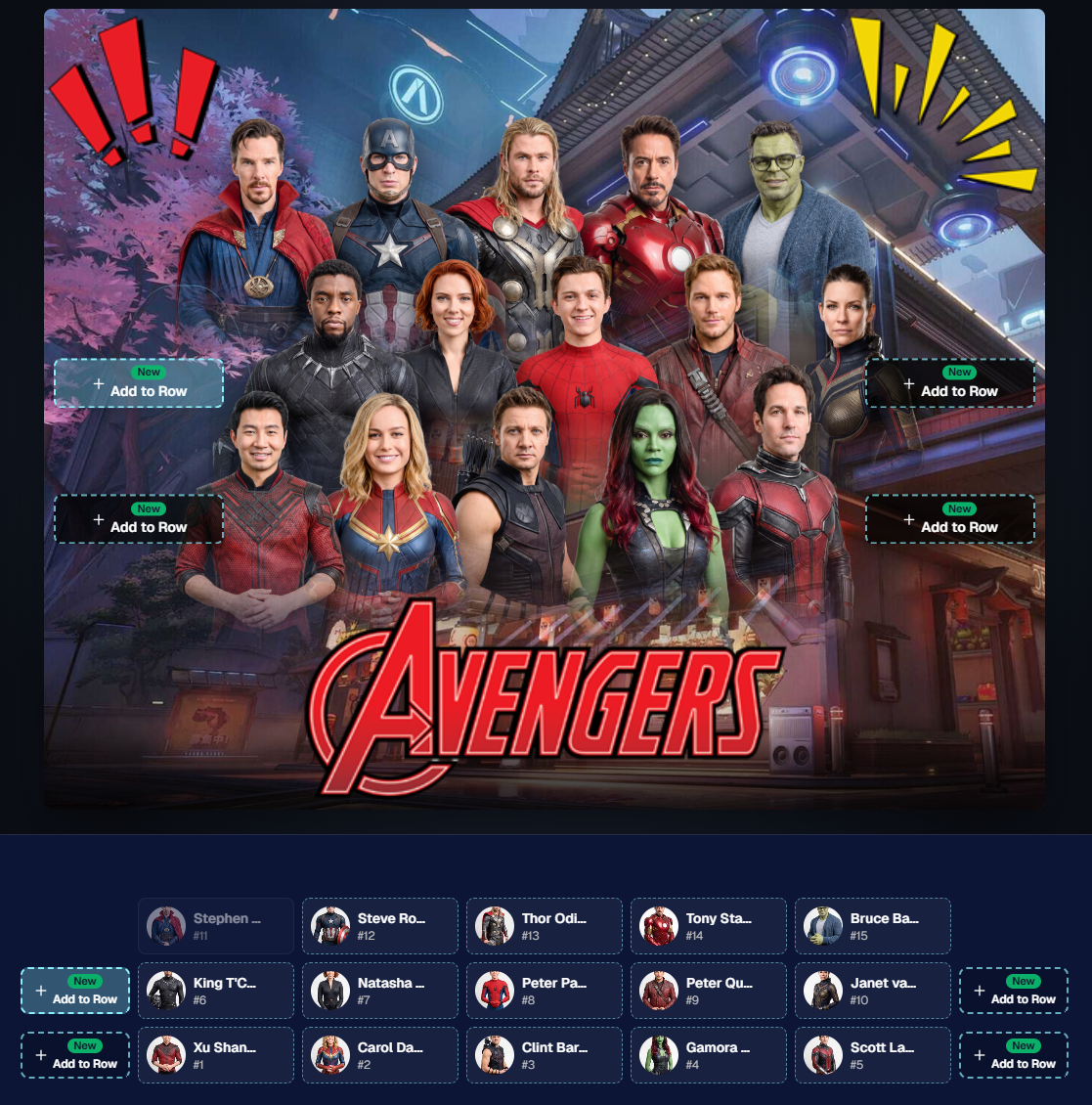
While dragging a subject, new Add to Row buttons appear over the other rows. Drop the subject there to explicitly move them where you want instead of relying entirely on automatic placement.
Previously you were limited to automatically determined rows, you still have those but can now override them!
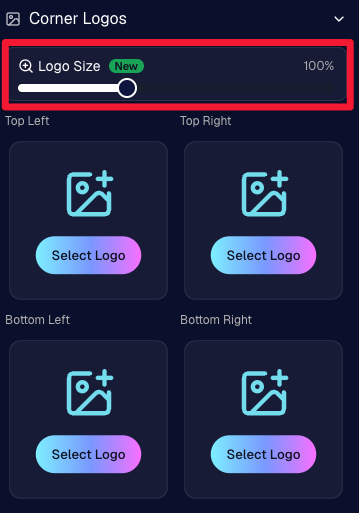
🔍 New logo size slider
Adjust your corner logos to be smaller or larger than the default.
Previously they could be considered a bit tiny, but this gives you a bit more control!
🌫️ Individual cutout fade control
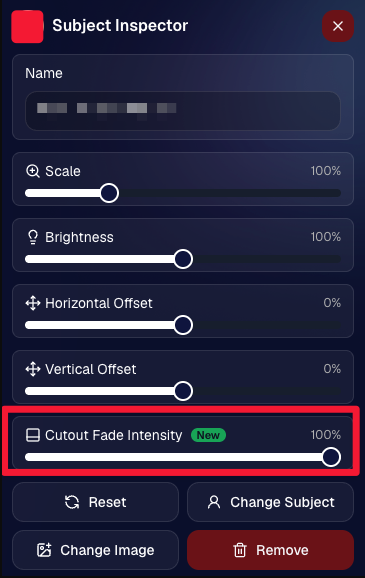
The Subject Inspector now has its own cutout fade intensity slider, separate from the global setting, so you can fine-tune individual subjects when needed.
This will let you tweak the cutout fade intensity for subjects in the front row or on the sides of the virtual group, in case you're wanting a very specific look.
👥 Smarter merged-participant image selection
The Subject Image Picker will only show images from merged participants when they share the same name.
This typically does not matter, but in the case of a parent doing a Selfie Check-In of themselves and then of their child later, this will keep Virtual Groups working as expected!
Just a few additions, but very useful ones when you’re trying to get a Virtual Group looking just right!
Drag and drop subjects into other rows for more control than ever!
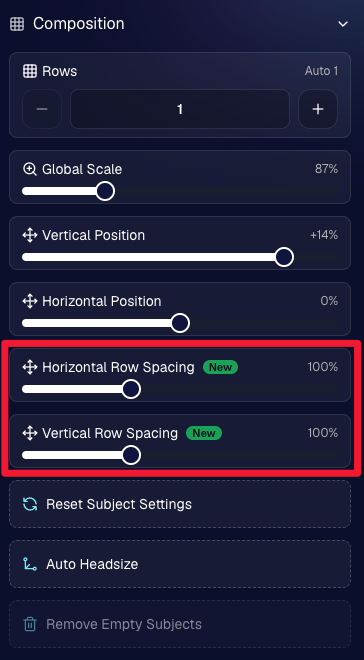
New options to more quickly space out your subjects!
When viewing subject details, adjust them by individual!
Control the size of your logos!
🏈 27 New Sports Background Sets
Alright, shoutout to the random guy who told me (me being Candy, in case you forgot!) that he didn’t like the backgrounds. We heard you! 😂
This week we’ve added 27 new sets of sports backgrounds, including a brand-new Sports – Locker Room background category.
And, in case you missed it, last week we also added an AI Background Generator so you can create entirely new, modern backgrounds of your own.
A quick reminder... you already have a lot of control over which backgrounds your customers actually see:
🎨 Edit the default backgrounds in your Offers
📤 Upload your own custom backgrounds at both the Offer-level and Event-level
🤖 Generate new backgrounds of your own with AI
🏈 Choose from our (now growing) collection of built-in choices
We have a TON of default backgrounds—and yes, many have been around for a while—but you’re never locked into using them. You can build your own look for your business, and we’ll keep adding new options over time too.
✂️ New Dedicated Background Removal Page
Event Background Removal now has its own dedicated Dashboard page, accessible from the Event Sidebar. It is not longer just a popup!
The BGR toggle on Event Overview will take you there too, giving all of these controls a little more breathing room.
On the new page, you can:
✅ Enable or disable Background Removal
🖼️ Manage your Event Backgrounds
🎨 See your Offer Backgrounds with a direct link to the Offer
📊 See how many cutouts have finished and how many are still processing
⏳ Watch a live progress bar while Background Removal is working
📂 See all valid Event folders and which ones are marked for Background Removal
And if your Event is a new Event: ✂️ You can mark an existing folder for Background Removal even if it already contains images!!!
🎨 Candy Image Studio: Better Exposure Fixes
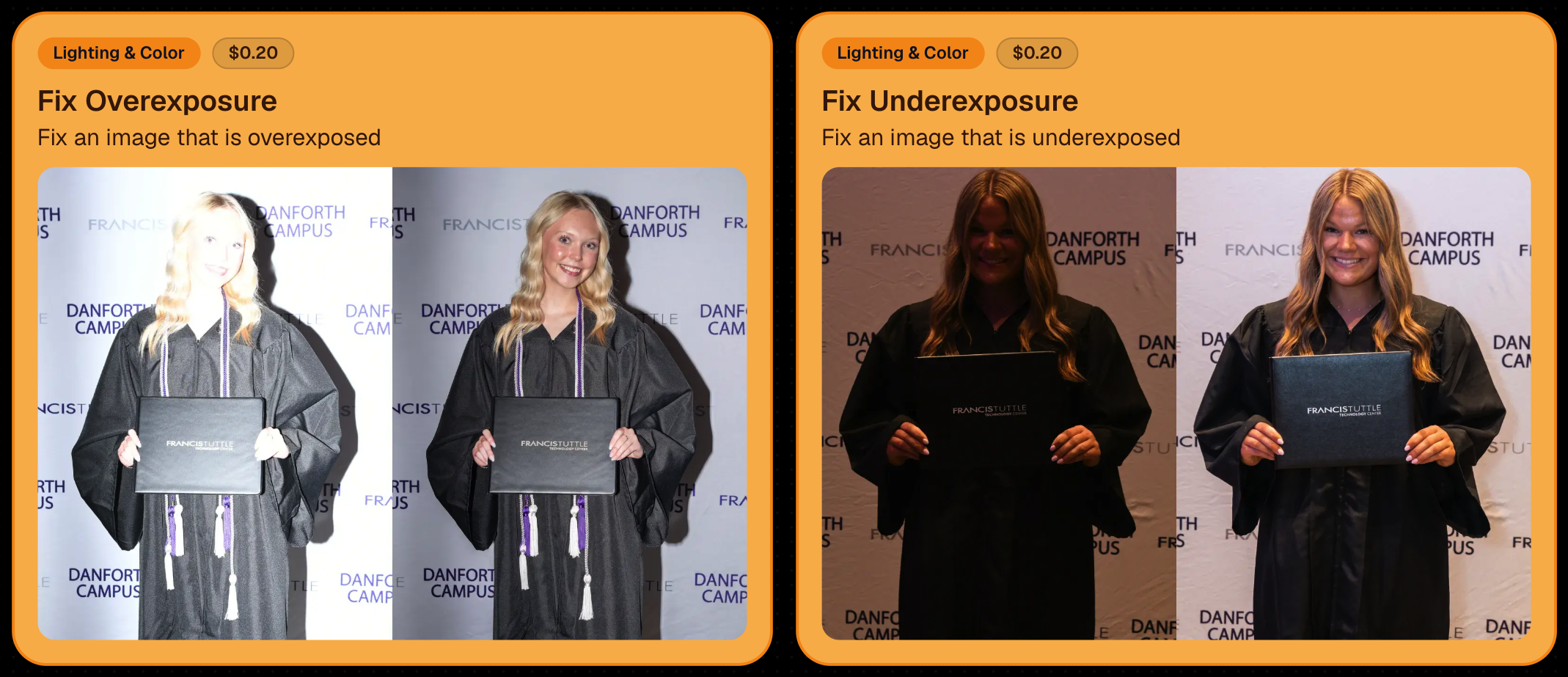
🌙 New Fix Underexposure node
Helps recover images that came out too dark.
☀️ Fix Overexposure greatly improved
The existing overexposure tool has been reworked for more reliable results.
Utilize Candy Image Studio to fix images so they can sell, quickly and affordably!
🏈 Jersey Jotter Progress Tracking
⏳ New Jersey Jotter progress bar
When Jersey Jotter is active and still has unprocessed images, its dedicated page now shows processing progress—similar to Candy Culler and the new Background Removal page.
This makes it much easier to tell whether recognition is still working through a large Event.
🛍️ Retail Improvements
✨ Titled Luxe Prints now work with package prefill
Packages can now automatically prefill eligible Titled Luxe Print products just like other supported products.
🖼️ Titled Luxe Print package rendering fixed
Fixed an issue where these products could render incorrectly inside packages.
🤖 AI-generated backgrounds now render correctly on products
🎨 Selected backgrounds now stay visible through the final product step
Fixed an issue where the chosen background could sometimes disappear on renders when reaching quantity and finish steps.
📝 Several product descriptions updated
Some product descriptions have been refreshed for better clarity.
🖼️ AI Edit + BGR Assignment Fix
👥 BGR versions of AI edits now keep direct participant assignments
If the original non-AI image was directly assigned to someone, its Background Removed AI-edited version will now correctly inherit that relationship.
📦 Order Details Fix
📝 Package captions now display correctly
Fixed cases where Order Details did not show caption information for certain products contained inside packages.
📱 Capture App 5.9.1 – iOS OTA
📸 Photo Booth fix for iPad
Fixed the Photo Booth gallery strip being cut off on certain iPad models.
That’s the week!
More Virtual Group control, a much stronger Background Removal workflow, some useful exposure tools, and plenty of fresh sports backgrounds to work with.
And if you still don’t like the backgrounds... now you’ve got plenty of ways to show us how it’s done. 😉
Candy here with another round of updates! This week’s highlights include a fresh redesign for Titled Luxe Prints, a brand-new 4×6 size, continued Background Removal improvements, and some helpful Dashboard upgrades for PhotoRosters, Event Tags, and Positive ID workflows.
✨ Titled Luxe Prints Get a Refresh
Titled Luxe Prints have been reworked to feel more like the classic PartyPics style while still keeping the premium embellishments that make them special.
We’re continuing to tune Background Removal so cutouts look cleaner across more shooting conditions. Stay tuned for even more improvements!
📱 Capture App 5.9.1 – Android
📷 Full-quality internal camera capture
Android devices now use the full available quality of their internal cameras when shooting through the Capture App.
Previously, it was using a down-sized version!
🖥️ Dashboard Improvements
🪪 Faster Positive ID Scanner Card generation
The Scanner ID Workflow's Scan Card PDF Generator is now performs better, stalls less, and produces significantly smaller download files.
⚠️ Background artwork warning
When uploading an Event background, NowCandid can now detect text or logos and show an extra warning.
This reinforces the existing recommendation to avoid placing important text or branding on backgrounds where product cropping could cut it off. Use our Overlay features instead!
✨ Clearer Auto Editor folder naming
Manage Images now shows a sparkles icon for Folders containing AI edits, with clearer formatting for Folders created by the Auto Editor.
📥 Import PhotoRosters directly from Participant List
Face Matching Events now have an Import from PhotoRoster button at the top of the Participant List page, letting you select and import a PhotoRoster without navigating away.
🎨 Candy Image Studio & Auto Editor
🖼️ Background Generator improvements
Outputs are now sized more appropriately for uploading back into an Event
Generated background sets match each other more consistently
💰 Every node now displays its price
Previously, only discounted nodes showed pricing. Now every node clearly displays what it costs!
Expect more nodes with their own unique prices in the future! We will continue to build on and improve our Auto Edit & Image Studio tools.
🧩 Predetermined node order
Nodes can no longer be drag-and-dropped into different edit "orders".
Their hierarchy is now set automatically so edits run in the best possible sequence without you needing to think about it!
🛠️ Auto Editor UI refreshed
Several interface changes make setup and options clearer and easier to understand.
📋 PhotoRoster Improvements
👥 Multiple PhotoRosters per Event
Fixed an issue that could prevent you from importing more than one PhotoRoster into the same Event.
💬 Clearer disabled export messaging
If Export is unavailable, clicking it now explains why.
🚫 Empty PhotoRosters can’t be exported
A PhotoRoster must have at least one member with an image before it can be exported to an Event.
🔐 Password-Protected Public Event Lists
Event Tags now have an optional extra layer of privacy:
🔑 Password-protect your Public Event List Pages:
➕ Set a password while creating a new Event Tag
✏️ OR add or remove the password using the Event Tag editor
This works similarly to the password protection for your Private Image Download Galleries.
🛍️ Retail Fixes & Protection
🖼️ Fixed package editing edge cases where the Overlay step could be missing while choosing a new image
🛡️ Additional GalleryGuard improvements
That’s the week!
The refreshed Titled Luxe Prints are the star of this update, with better Background Removal, easier PhotoRoster importing, and more control over Event Tags rounding things out.
Candy here with this week’s updates! The biggest changes are in Candy Image Studio and Auto Editor, where several popular edits now cost less, produce more consistent results, and work more naturally with Background Removal workflows.
We’ve also added undo and redo to Virtual Group Builder, improved green screen cutouts, and cleaned up a few retail download issues.
Let’s take a look!
🎨 Candy Image Studio: Better Results & New Lower-Cost Edits
Several Candy Image Studio nodes have been reworked with more consistent output quality and new discounted pricing.
⚫ Improved Black & White edits — now 4¢
Both existing Black & White nodes have been rebuilt to produce more reliable, consistent results.
✨ Improved Retouch — now 6¢
The Retouch node now produces much more consistent results and is available at a lower price.
🎞️ New 35mm Film node — 4¢
The previous Film Style node has been replaced with a new and improved 35mm Film treatment.
📸 New Clarendon node — 4¢
Apply a look inspired by the familiar Clarendon-style social media filter.
💳 More flexible edit pricing
Some nodes now display their own lower price. Candy Image Studio charges based on the highest-priced node included in the edit.
For example:
An edit using only a 4¢ node costs 4¢
If that same edit also includes a standard node, normal 2K or 4K pricing applies
This lets simpler edits cost less when you're not using the more advanced edits!
✂️ New Background Removal Options for AI Edits
Candy Image Studio and Auto Editor now work more closely with Events using Background Removal folders.
🖼️ Candy Image Studio can send an edit into Background Removal
When editing an Event image, a new option appears beneath Mark Original Invisible if the Event has Background Removal folders enabled.
Select Mark Destination Folder as Background Removal Folder to upload the edited image into a folder that will also process it for background removal.
⚙️ Auto Editor adds a Background Removal size option
If Background Removal folders are enabled, you can choose Background Removal. Edited images will then upload into a folder marked for Background Removal.
🛠️ Auto Editor folder fix
Auto Edits now run properly on original images inside folders marked for Background Removal. Auto Editor still does not run on the completed cutout images themselves.
All of the new node pricing and quality improvements in Candy Image Studio also apply to Auto Editor, since Auto Editor is powered by the same system.
↩️ Virtual Group Builder: Undo & Redo
Virtual Group Builder now supports familiar keyboard shortcuts:
↩️ Undo:CMD/CTRL + Z
↪️ Redo:CMD/CTRL + Shift + Z
↪️ Redo:CMD/CTRL + Y
This makes it much easier to experiment with layouts and quickly reverse an adjustment.
🖼️ Manage Images Improvement
⬇️ Download Original for BGR and AI images
The Manage Images lightbox now includes a Download Original button for Background Removal and AI-edited images.
You can access the original file without needing to leave the lightbox or track it down manually.
✂️ Background Removal Improvement
🟢 Better green screen cutouts
Background Removal now handles images more effectively when the background is only partially green screen instead of completely green.
🛍️ Retail Download Fixes
📥 Improved QuicEvents press-and-hold downloads
Download behavior is more reliable on desktop and Android for Events without artwork.
🖼️ Free Gallery Download resolution fixed
Free Gallery Downloads on QuicEvents now correctly deliver full-resolution images instead of medium resolution.
🧲 Photo Magnet artwork fix
Photo Magnets will no longer be ordered with Event artwork when Use Artwork by Default is enabled, since artwork is not supported on that product.
📱 Mobile Dashboard 4.1 for Android
💰 New “Cha Ching” notification sound
Weekly order notifications on Android now include the same Cha Ching sound effect already available on iOS.
👉 Swipe to open the Sidebar
Swipe inward from the left edge of the screen to open the Sidebar, matching the iOS experience.
🤖 Google Play compatibility updates
The app also includes required changes for the latest Google Play requirements.
That’s the week!
Lower-cost AI edits, stronger and more consistent results, and better Background Removal integration should make Candy Image Studio and Auto Editor more useful for both one-off fixes and larger Event workflows.
The rich text element allows you to create and format headings, paragraphs, blockquotes, images, and video all in one place instead of having to add and format them individually. Just double-click and easily create content.
A rich text element can be used with static or dynamic content. For static content, just drop it into any page and begin editing. For dynamic content, add a rich text field to any collection and then connect a rich text element to that field in the settings panel. Voila!
Headings, paragraphs, blockquotes, figures, images, and figure captions can all be styled after a class is added to the rich text element using the "When inside of" nested selector system.


.png)




.svg)


