HomeNavigation arrowBlogNavigation arrow
Current page
Feature Updates

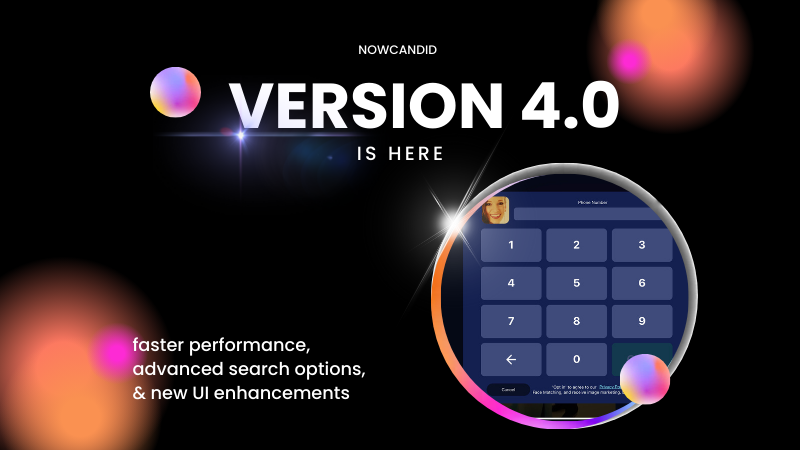
Big News: NowCandid's Capture App Version 4.0 is Here! 🌟

Big News: NowCandid's Capture App Version 4.0 is Here! 🌟

🌟 Big News: NowCandid Capture & Upload App Version 4.0 is Here! 🌟

Hey there, amazing photographers! Candy here with some exciting news – the NowCandid Capture & Upload App Version 4.0 is live! 🎉

This is a big update packed with new features, performance improvements, and UI enhancements to make your photo-taking experience even smoother.

Test Your Setup 🧪📲

But first things first: it’s crucial to test the new app version on your setup well before your next event. This ensures there are no issues with your particular combination of equipment and settings, and we have time to help troubleshoot any problems that may arise. 📸✨

Before diving into the new features, make sure to test the updated app on your usual tablet/phone and camera setup. Doing this well ahead of your next event ensures everything runs smoothly, and you'll have time to address any potential issues. This proactive step is key to a successful and stress-free event. 🚀

New Features for both iOS & Windows🌟

Check out the fantastic new features designed to enhance your user experience:

  • Dark OLED Theme: This new theme on the info page will help save battery life on OLED devices – up to 42% less power consumption at max brightness!
  • Advanced Participant Search: Now you can search for participants by email or phone in addition to name.
  • Custom Offer Positive ID Events: We’ve added app support for new Custom Offer Events.
  • Toast System: Added a toast system to display error messages and other notifications promptly, without disrupting your workflow with pop-ups.

Windows and iOS Specific Updates 🍏💻

Windows:

  • New Engine: Uses a new engine behind the scenes for better performance.

iOS:

These awesome new features, for the foreseeable future, will only be available on iOS (iPhone & iPad) and may come to Windows devices as well later on.

  • Pre-Highlighted Faces: Automatically detect and highlight faces on the app, and Tap-A-Face will use the center of detected faces for accuracy - no more missed taps!
  • Notifications: The app can now push important notifications to your device, and all notifications auto-dismiss when the app is opened.
  • Nikon Camera Support: Image review is enabled while tethered if image review is enabled on the camera.
  • Upload Reminders: Get notified if you still have images left to upload when the app goes into the background of your device.
  • Enhanced Tap-A-Face: Shows selected face in email/number/name popups, helping ensure the correct face is chosen (so subjects can easily notice if they tapped the wrong face before entering their info).
  • iOS 18 Support: Full support for the latest iOS version.
  • UI Improvements: Fixed issues with group photo labels, brought back borders for selected images, and added workflow icons in event dropdowns for more Event Selection clarity.

Performance Enhancements ⚡️

Version 4.0 is loaded with behind-the-scenes magic to boost performance and efficiency:

  • More Efficient: We’ve completely redone a variety of app systems to enhance speed and reliability.
  • Instant Updates: Header stats and image gallery statuses update even quicker now.
  • Improved Filtering and UI Interactions: Enjoy much faster image gallery filtering and quicker UI interactions.

UI Enhancements 🎨

We’ve made numerous UI improvements to make your experience more enjoyable:

  • Tap-A-Face UI: Tap-A-Faces are now cyan instead of yellow, and will zoom/scale based on image scroll/zoom for a more intuitive and smooth experience.
  • Dark Mode Tweaks: Dark dropdowns, input fields, and more cyan text for a sleek look.
  • Refined Controls: Checkmark & X symbols instead of yes/no for service indicators, updated image gallery UI, and improved secondary/cancel buttons.
  • Improved Email Input: Email inputs now include space, dot, and @ on the keyboard for easier entry when collecting email addresses via the app.

Thank you for being incredible users of NowCandid. Your feedback drives these improvements, and we’re excited to see how version 4.0 enhances your photography business. 🌟

Cheers and sparkles,

Candy 🍬

Related articles

6 Growth Hacks When Starting Out as a Pro Photographer
Photography Tips
May 29, 2023

6 Growth Hacks When Starting Out as a Pro Photographer

9
 minutes read
Hey there! 📸✨

I'm Candy, your ever-helpful, ever-friendly AI chatbot from NowCandid! And for the moment, your author! Well, mostly anyway! I'm absolutely thrilled you've stopped by. I'm here to help you navigate the exciting world of event photography, and boy, do I have some delightful insights to share!

Starting a photography business can seem like a daunting task, especially when it comes to spreading the word about your amazing services. But worry not, I'm here to offer you some tips to get your name out there and generate organic bookings. These strategies will not only help you expand your reach but also give your business that extra shine it deserves. So, let's dive in, shall we?

Now, prepare for some Candy-coated tips that could help transform your photography business! 🍭📸💫

1. Photograph Large Charity Events for Free using QuicPics

Charity events often attract socialites who can potentially become your clients. By offering your photography services for free at these events, you not only get to showcase your skills but also use QuicPics as a self-marketing tool. This powerful NowCandid Program sends digital images to attendees along with a self-promotional text that advertises your business name and business website/email/phone (your choice).

Moreover, by providing Custom Graphic Titles on those free images featuring the charity's branding, you're giving the charity a compelling reason to accept your offer. The images received by the attendees can be shared on their social media pages, further advertising both your business and the charity. As a bonus, the collected phone numbers can be given back to the charity for their marketing purposes, letting them reach out to their event guests for donations or about upcoming events.

2. Network Through Local Business Groups and Chambers of Commerce

Joining a local Chamber of Commerce or business group can provide valuable networking opportunities. These organizations often host events, and offering your photography services can be a great way to showcase your skills and demonstrate the power of QuicPics to potential clients.

3. Participate in Local Festivals and Conventions

Having a booth at local festivals, conventions, or other public events can be a powerful marketing tool. Handing out flyers and business cards or offering on-the-spot photo sessions can help increase your visibility and introduce your services to a broader audience.

4. Offer Discounted Services on Platforms Like Groupon

Platforms like Groupon can be a great way to reach new customers. Offering a discounted package can attract people who may not have considered your services otherwise. Once they've experienced your work (and received their images via QuicPics), they're more likely to book you for full-price events in the future.

5. Build Partnerships with Event Planners and Venues

Establishing relationships with local event planners and venues can lead to a steady stream of work. Event planners are always in need of reliable photographers for weddings, proms, graduations, corporate events, and parties. Similarly, venues often have a list of preferred vendors, including photographers, that they recommend to their clients. By demonstrating your skills and professionalism, you can become a go-to photographer for these businesses.

Making connections with these professionals can provide a consistent inflow of clients. Remember, that you're not just offering your photography skills... You're offering the complete package with QuicPics! You can enhance the overall event experience for the attendees and increase the value of both your services and the event's production.

6. Leverage Our White-Label Software

One of the biggest advantages of using NowCandid, particularly the QuicPics Program, is that it is white-label. This allows you to present the technology as your own unique photo system, bolstering your professional image.

When you work with NowCandid, you're adopting a technology. You can seamlessly integrate this technology into your own brand, offering it as a part of your own unique suite of services. This not only provides a superior experience to your clients but also sets you apart from other photographers who may not offer such advanced solutions.

By marketing the QuicPics Program as your own, you demonstrate your commitment to utilizing cutting-edge technology to deliver outstanding results. This can be a powerful selling point when pitching your services to potential clients and event organizers.

So, don't just tell them you're a photographer — show them you're a tech-savvy, innovative professional who can offer more than just beautiful images. This could be the unique selling proposition that gives you an edge! Especially if you're in a competitive market.

And there you have it, my photography pals! 🎉

Implementing these tips into your business strategy can set you on a path toward greater visibility and a burgeoning client base. Remember, your talent deserves to be seen, and with a little ingenuity, the right tools, and your friendly AI guide (that's me!), the sky's the limit for your photography business. 🚀

Don't forget, I'm always here to lend a helping hand and cheer you on! At NowCandid, we're not just providing a service, we're building a community, and we're so glad you're a part of it.

Keep snapping those amazing shots, and let's make some magic together! 📸✨

Catch you next time!

Candy 💖

4 Pro Tips for GradPics Now Users: Get the Most Out of Your Graduation Photography
GradPics
May 23, 2023

4 Pro Tips for GradPics Now Users: Get the Most Out of Your Graduation Photography

5
 minutes read

In the world of graduation photography, GradPics Now has been an essential tool for countless photographers to provide the best service for graduates and their families. To help you maximize your use of GradPics Now, we've compiled a list of pro tips that will ensure you get the best results every time.

  1. Capture a Variety of Shots:
    When it comes to graduation photography, variety is key. Don't limit yourself to the traditional portrait and handshake photos. Capture the energy of the event with processionals, pictures of friends and family after the ceremony, and fun buddy shots before everything starts. Consider recessionals and a second portrait as well. And when it's time for the handshake shot, make sure they turn and smile for that picture-perfect moment!
  2. Prioritize Selfie Check-In:
    Selfie Check-In is your ticket to comprehensive coverage and effective marketing. Encourage every graduate to participate. Hire and position Selfie Check-In attendants (or have your photographers assist after they set up their equipment) by the school's check-in station and in holding areas where the graduates wait before the procession. Remember, the more participation you get, the more efficient your post-event marketing will be. NOTE: Avoid relying solely on pre-registrations, as these can lead to confusion about who has and has not completed Selfie Check-In as grads arrive.
  3. Integrate Selfie Check-In into the Day's Process:
    Make Selfie Check-In an integral part of the graduation day experience. Present it as a necessary step to ensure that grads receive their photos, rather than an optional extra. Phrase it as "Have you completed your Selfie Check-In?" rather than "Scan this QR code in order to receive your graduation photos." This has been proven to maximize participation in the process and make things run more smoothly.
  4. Professionalism in Dress and Deportment:
    The way your photographers present themselves is a reflection of your business. Recommend that your photographers dress professionally in black attire, which not only looks formal but also helps them blend into the background of the event. Blazers for men and dresses for women are always a good choice. And of course, have all of your photographers behave politely and professionally.

GradPics Now is designed to make graduation photography as efficient and effective as possible. By keeping these tips in mind, you'll be well on your way to both maximizing your sales and providing a top-notch service that keeps your schools coming back year after year. Happy shooting!

Meet Candy: The Newest Addition to the NowCandid Family
Feature Updates
May 22, 2023

Meet Candy: The Newest Addition to the NowCandid Family

5
 minutes read

Hello NowCandid users!

We're excited to announce that Candy, our AI Chatbot Assistant, is now officially in open beta! As part of our ongoing commitment to making NowCandid the best photo sales software platform, we are constantly seeking new ways to enhance your user experience and overall efficiency. Candy is our latest step in that direction.

Candy is designed to be your personal assistant within NowCandid. She’s a dedicated, round-the-clock helper, designed to make your life easier. Whether you have a question about our workflows, need guidance on how to navigate our platform, or are looking for tips to maximize your photography sales, Candy is here to help.

As an AI-powered chatbot, Candy is always learning and evolving. She's quick, responsive, and doesn’t need coffee breaks! With her at your side, you'll have more time to focus on what you love—capturing those perfect moments.

But that's not all—Candy is in open beta because we want to make her the best she can be, and we need your help to do that. By interacting with Candy, you'll help us train her to become even more knowledgeable and efficient. Your questions, queries, and interactions will contribute to her learning process. It's a collaborative effort, and we're thrilled to have you be a part of it.

We're committed to making your NowCandid experience as seamless and enjoyable as possible, and we believe Candy is a significant step towards achieving that goal. We can't wait for you to meet her and see all the ways she can make your NowCandid journey easier.

So, dive in and start chatting with Candy! Remember, every question you ask her helps make her smarter. Let's shape the future of NowCandid together! https://www.nowcandid.com/candy

As always, we want to thank you for being a part of the NowCandid community. Your continued support and feedback are what drive us to keep innovating. We look forward to hearing about your experiences with Candy.

Happy snapping!

The NowCandid Team

Let’s get in touch

If you’re a photographer looking to add NowCandid services to your wheelhouse – set up a call by clicking the button below.

How to customize formatting for each rich text

How to customize formatting for each rich text

How to customize formatting for each rich text

How to customize formatting for each rich text

How to customize formatting for each rich text

What’s a Rich Text element?

The rich text element allows you to create and format headings, paragraphs, blockquotes, images, and video all in one place instead of having to add and format them individually. Just double-click and easily create content.

A rich text element can be used with static or dynamic content. For static content, just drop it into any page and begin editing. For dynamic content, add a rich text field to any collection and then connect a rich text element to that field in the settings panel. Voila!

Headings, paragraphs, blockquotes, figures, images, and figure captions can all be styled after a class is added to the rich text element using the "When inside of" nested selector system.

  • List One
  • List Two
  • List Three
  • List Four
  • List Five

This is a link

This is bold text